
Where Flight Simulation Enthusiasts Gather from Around the World!
AVSIM Library - Search Results

| Category: Flight Simulator X - Utilities | |
| FS2004/FSX Flight Analyzer, Logbook Utility V4.09 |

|
Images related to this file:
File Description:
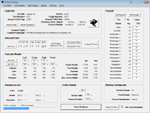
FS2004/FSX Flight Analyzer Utility V4.09
Flight Data Recorder - Logbook.
NOW WITH STATISTICS TOP 5 AIRPORTS, CITIES AND COUNTRIES.
Very easy to use, just make a flight plan in the simulator or in this utility.
What this program do:
- quickly change the settings of FSX/Fs2004, such as time, date, fuel, weight, traffic etc.
- start a failure sytem, such as gear, flaps, engine, etc.
- freeze the time, so you can fly in a for everlasting sunset.
- runway detecting system to see wich runways are in use.
- flight analyzing/data recording from departure to parking at the gate.
- When flight analysis is finished you can print a report, the report is automaticly saved as pdf File.
- graphical landingchart.
- record all your flights
- quickly look to your FSX display settings (only FSX) and change them even before the flight simulator is running.
- After a flight is finished FsQC saves your flight automaticly as 'FsQC last Flight', so you can continue the next day or hour.
Flight analysis start recording at the moment when you begin taxiing.
It gives you huge information such as:
- takeoff- and landing-weight.
- takeoff- and landing-roll in m. and ft.
- separate fuel consumption in taxi, climb, cruise and descent.
- maximum banking in flight.
- which speed you using the flaps and gear.
- when autopilot on or off.
- vertical speed on touchdown.
- reverser set after landing.
- wich speed you cancel reverser.
- bouncing at landing.
- graphical landingchart.
- and lots of more.
You can better look the example of the pdf document located in the 'Flight Reports' folder.
Logbook records:
- fuel consumption.
- payload.
- distance.
- number of different airports.
- flight hours.
- landings.
- flaps.
- speed.
- and lots of more.
- quickly show touchdown wind information in a picture.
- quickly show the graphical landing chart.
- Now with statistics: top 5 Countries, Cities and Airports
Requirements:
Computer with vista or higher and internet access.
Microsoft .net framework 4.6 or higher.(free download on microsft.com)
Flightsimulator FSX or 2004 and FSUIPC installed.
Note: requires paid activation for full use.
Register and you have 1 month free.
Program fully works without registration at airport Athens and Iraklion (Greece)
| Filename: | FS2004FSX_Flight_Analyzer_Logbook_Utility_V409.zip |
| License: | Shareware, time limited |
| Added: | 3rd March 2019, 00:20:37 |
| Downloads: | 250 |
| Author: | Evander Tholen |
| Size: | 3.35 MB |
| Category: Flight Simulator X - Scenery | |
| Albany International Airport (KALB) Albany, New York |
|
Images related to this file:
File Description:
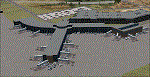
This airport was made using Airport Design Editor, Google Sketchup, and Instant Scenery 2. Albany International Airport, Is an airport located near Albany, New York. The airport has scheduled airline flights. Almost all of the buildings are custom made with photo textures to make it closer to real life. At the main terminal, I added more gates and put moving jetways. The gates have assigned parking codes. There is a parking lot next to the terminal full of cars. I put the airport access road in between the parking lot and the terminal. At the southwest ramp, I put hangars and some you can taxi inside of. If you choose to start off from the southwest DOCK gate, You will start off inside the Million Air Aviation FBO. I also put static aircraft on the ramp too. To the northwest, I put the New York Police hangar. You can start off inside this hangar by choosing the Northwest DOCK gate. Taxiing into or starting off inside a hangar will not cause a crash unless you touch the sides. To the Northeast, I put the cargo terminal with trucks. At the cargo section, I put three FedEx Cessna Caravans. I also put the control tower and the buildings. Tower views are from the roof of the control tower. To the southeast, I put small hangars and the Air National Guard Section with UH-60 helicopters. I extended runway 1/19 to the correct length of 8,500 feet. I also put red, blue, green, and purple Cessna 172s in different places around the airport. There will be more objects if your scenery complexity is set to normal (such as jetways, aircraft, and vehicles). This was all made based on Google Earth Imagery and Bing Maps. There are no night textures for the buildings. This will be added in a future version. An installer program is included to install the airport for you. There will be more versions of this that include night textures and static business jets. This is for Flight Simulator X only. By Tyler Lawrence.
| Filename: | Albany_International_Airport_KALB_Albany_New_York.zip |
| License: | Freeware |
| Added: | 2nd June 2012, 08:14:12 |
| Downloads: | 4,346 |
| Author: | Tyler Lawrence |
| Size: | 47.69 MB |
| Category: Flight Simulator 2004 - Scenery | |
| Wilmington International Airport - Update |
|
File Description:
WILMINGTON INTERNATIONAL AIRPORT KILM, WILMINGTON, NORTH CAROLINA.
For FS9.
BY JOHN B. LONEY, JR, RAY LUNNING, and MICHAEL VERLIN
UPDATE
In this package you will find an updated copy of KILM_ADE9_MV.BGL.
The original release did not have taxiway signs, and the ATIS frequency was incorrect. These errors have been corrected.
INSTRUCTIONS -
Simply unzip this file to a temporary folder. Move the updated file to where you have your KILM files installed, overwriting the original file. This will update your installation
Legal stuff. Copyright and Distribution
The Copyrights of the items used in this scenery are property of the respective authors and are in full force on behalf of those authors. If I have infringed on any of the copyrights by including the items viewed in this scenery in the upload file, it was purely unintentional and I do sincerely apologize. I have acknowledged and given credit to all the persons associated with each aircraft in the scenery to the best of my knowledge. Also, I do appreciate the permissions I did receive from some of the authors. I felt is helps the end user when certain items in a scenery can be uploaded with the scenery. An honest attempt has been made to acknowledge and give credit to those whose works contributes to this scenery.
This scenery is freeware. Copyright John B. Loney, Jr. You do not have my permission to make any monetary gain from this scenery. It started out as freeware and it shall remain freeware.
This scenery should only be distributed from/to one of the following three websites: Flightsim.com, AVSIM.com or lfssd.net.
Written request to distribute this scenery and/or its components to any other website will be considered on an individual basis.
This scenery can be bundled with any modification to the scenery as long as the proper credit is given to the authors of the scenery and components of the scenery and the original readme file is included with the modification.
-The author's rights and wishes concerning this archive must be respected.
Copyright (c) 2013 by John B. Loney, Jr. All Rights Reserved.
-Disclaimer: I do not accept any responsibility for any damage to any system as a result of running this software.
-Contact: As usual, I welcome any comments. I will try to answer as many as I can. Website: www.lfssd.net Have fun and enjoy.
| Filename: | Wilmington_International_Airport__Update.zip |
| License: | Freeware, limited distribution |
| Added: | 24th August 2013, 10:28:35 |
| Downloads: | 602 |
| Author: | John B. Loney, Ray Lunning and Michael Verlin |
| Size: | 12.33 KB |
| Category: Prepar3D V1-4 - Flight Plans | |
| CargoJet Flight Plans |
|
File Description:
Attached is an Excel Flight Planner including recent (Jan/Feb 2019) scheduled flight plans for CargoJet for use with the CaptainSim 757-III Freighter expansion.
A couple of weeks ago, I made two CargoJet liveries for the CS 757-III Freighter, available at Avsim:
https://library.avsim.net/esearch.php?DLID=&Name=&FileName=&Author=meier&CatID=p3dacrp
To use these files, copy the attached .rt files to your Captain Sim route directory:
*\Lockheed Martin\Prepar3D v4\Captain_Sim\757-III\Routes\
These accompanying route files (60+) DO NOT include any SID or STAR data, nor do they include any performance information (cargo/fuel weights)...I've intentionally tried to keep these files customizable with any ATC program you may be using.
The Excel spreadsheet use should be pretty straight forward (it was designed using MS Excel 2019...you'll need MS Excel 2013 or newer for the macros to work correctly).
The spreadsheet will open to a worksheet containing CargoJet's current, scheduled route network. From this worksheet, simply select a departure location from the buttons on the world map.
Once a departure location is selected, a second "Flight Planning" worksheet will open with a UserForm Box directing you to select an airport destination based upon your selected departure location.
The UserForm box is pre-populated only with current destinations from that departure airport (based upon current CargoJet Jan/Feb 2019 schedules obtained from online flight tracking data).
I've included a weather snapshot download from each of the departure and destination airports into the flight planning worksheet.
I have not yet included enroute weather information...that may come in a "V2" of this flight planner.
As I have not yet included enroute weather information, flight fuel calculations/fuel burn are only approximate for now. Down the road, I may also include calculations for derate temperatures...that will take considerable more work.
I think this Flight Planner is a pretty good version 1 for sharing. In the absence of a website dedicated to a "CargoJet Virtual Airline", I thought this Excel spreadsheet and accompanying flight plans may be of benefit to anyone who might enjoy flying the CS757-III Freighter expansion with CargoJet livery.
Personally, I was fortunate to already have the full compliment of SimAddon airports (Canada wide) which makes for enhanced enjoyment of the CaptainSim 757-III add-on and this flight planning spreadsheet. (That statement wasn't intended as a promotion for people to go out and buy the SimAddons software!!!)
I haven't had a chance to test all the flight plans yet...I'm hoping I haven't made any errors!
Anyhow, I hope this spreadsheet and flight plans can be of benefit to others.
Feedback always appreciated!
Rob
February 15, 2019
| Filename: | CargoJet_Flight_Plans.zip |
| License: | Freeware |
| Added: | 16th February 2019, 22:00:12 |
| Downloads: | 169 |
| Author: | Rob Meier |
| Size: | 1.93 MB |
| Category: Flight Simulator X - Scenery | |
| hythevillage_pier.zip |
|
File Description:
Hythe Village and Pier
Hythe Village [Town] nestles between the edge of Southampton Water and the New Forest, some 500 yards west of the ‘American Base – RAF Hythe’; the surrounding area is known as ‘The Waterside’. Hythe, with its waterfront, boasts incredible views across Southampton Water, while the village [town] centre, with its Georgian High Street, offers a range of shops, services, traffic-free precincts and parking facilities. Nearby is ‘Hythe Marina’, to be found on Southampton Water's southern shore; it’s a unique development of a 206 berth marina, together with waterside homes, shops, restaurants, bars and a boutique hotel.There is also a passenger ferry which sails back-and-forth from Hythe Pier to the City of Southampton every 30 minutes. Before Hythe Pier was built, ferry and other boats arriving at Hythe had to use a gravel hard ramp which ran from the land out to the low tide point in Southampton Water. Walking along the hard gravel was not easy and travellers often got very wet. Various ideas to improve the situation were suggested at the time and construction of Hythe Pier was eventually started in October 1879 and officially opened on the 1st January 1881. Many World War II heroes departed from this pier on D-Day in June 1944.The pier itself stretches some 640 meters into Southampton Water and is one of the ten longest piers in the British Isles. In 1922, a narrow gauge electric railway opened in order to take passengers the full length of the Pier. This railway, with its original engine and rolling stock, is the oldest operating electric pier train in the world and is still operational to this day – playing an important part in the local transportation system between Hythe and Southampton.
Scenery Features
* Bus Shelter
* Ferry Ticket Collectors (On pier landing platform)
* Ferry Ticket Office
* High Street Shops
* Hotspur House
* Hythe Library & Car Park
* Hythe Pier
* Hythe Pier Landing Platform
* Hythe Promenade
* Library Road & Shops
* Lidl Superstore & Car Park
* People (Static & animated)
* Pier Railway & Safety Railings
* Pier Train (Parked at village end of pier)
* Lord Nelson Public House
* Prospect Place Park
* Public Toilets
* Seashells Lounge Bar & Restaurant
* St. John's Church & Cemetery
* Street Lighting
* Streets & Roadways
* ‘The Marsh’ & New Road
* Vegetation (Trees, bushes)
* Vehicles (Buses & cars)
* Waitrose Supermarket & Car Park
* WWII Remembrance Plaque (Prospect Place)
Special Effects
* Animated Birds (seagulls-close to village & pier)
* Chimney Smoke
* Night, Dusk & Dawn Lighting Effects
* Seagull Cry Sounds
| Filename: | hythevillage_pierzip.zip |
| License: | Freeware |
| Added: | 21st November 2025, 12:42:28 |
| Downloads: | 68 |
| Author: | Barrie Semmens |
| Size: | 16.37 MB |
| Category: Flight Simulator 2004 - Scenery | |
| Sydney CYQY in Nova Scotia Canada |
|
Images related to this file:
File Description:
Sydney is a maritime port on the east coast of Canada, on the eastern corner of Cape Breton Island. It was founded in 1785 and grew in size emormously from 1900 as a steel mill was founded that prospered along with local coal mines until 1950 or so. After that date and following the final closure of the mill in 2001 the population declined to the current 29,000 or so. The airport is 3 or 4 miles southwest and inland of a coastal urban area which stretches from New Waterford in the north through Lingan, Dominion, Reserve Mines, and Glace Bay, to Port Caledonia, and 5 miles east of the town of Sydney which is beside a sheltered deep water harbour area. This version is not from a fixed date as although I had video of some of the buildings from 2010 I inadvertently constructed part of the apron layout from 2018 information, and then decided to keep it like that either because I liked it or perhaps was too lazy to redo it. The terminal building and the garages to the east of the terminal are original and old, though renovated and maintained to a fairly good standard. The other buildings on the airport are "hangars" in the expected form, with steel frames, insulated cladding, and pitched roofs. The airport publicises it's ability to cater for all the needs of visiting aircraft, with a large FBO hanger just beside the terminal. There are (or were, before the virus came along) scheduled flights by Westjet, Air Canada Jazz, and Air North, which are included in the AI along with GA flights. The runways are 07-25 at 7,000 feet and with PAPI on 25 and ILS on 07, and 01-19 at 6,000 feet with PAPI on 01 and ILS on 19. You will see once the scenery is installed that there are two folders in Sydney CYQY called "Scenery summer" and "scenery winter". Editing the folder name down from "scenery summer" to just "scenery" results in FS9 loading the summer ground textures and parked planes etc. In February you would edit down the "scenery winter" folder to just "scenery" and the unused and unswept taxiways, runway, and aprons will be invisible under the snow, the open-topped cars will not be parked in the open, and privately-owned planes will be in the hangars. If FS9 decides that there is snow on the ground then you need the winter textures, if not then the summer textures. The winter textures are not the full-snowdrift-middle-of-Winter-gale type and are more like early or late winter. One thing you must NOT DO is to edit both folders down at the same time.
| Filename: | Sydney_CYQY_in_Nova_Scotia_Canada.zip |
| License: | Freeware, limited distribution |
| Added: | 22nd August 2020, 00:07:58 |
| Downloads: | 276 |
| Author: | Roger Wensley |
| Size: | 29.42 MB |
| Category: Flight Simulator X - Scenery | |
| RAF Elvington |
|
File Description:
The station was originally a grass airfield within No. 4 Group. In the early 1940s the airfield was entirely reconstructed with three hardened runways replacing the grass. It re-opened in October 1942 as a station for 77 Squadron RAF and along with RAF Melbourne and RAF Pocklington was known as No "42 Base". The squadron had a strength of approximately 20 aircraft and initially used the twin engined Armstrong Whitworth Whitley medium bomber although this was quickly replaced by the Handley Page Halifax four engined heavy bomber which was being introduced. No 77 Squadron suffered heavy losses during its time at Elvington with over 500 aircrew killed, missing or taken prisoner and almost 80 Halifaxes lost as it played a major part in the Battle of the Ruhr and the bombing of Berlin.
In May 1944 No 77 Squadron posted to the newly opened nearby RAF Full Sutton and was replaced at Elvington by two French squadrons, numbers 346 "Guyenne" and 347 "Tunisie" who both played a leading part in the bombing of Germany. Elvington was the only airfield in the United Kingdom used by the remainder of the Free French Forces, they also flew Handley Page Halifax heavy bombers until they moved to Bordeaux in October 1945 where they became the basis for the new air force of liberated France. In September 1957 a memorial was unveiled in Elvington village dedicated to the two French squadrons. While they were at RAF Elvington nearly half of the squadrons' members were killed.
After the war the 400-acre (1.6 km2) airfield was transferred to No 40 Group under the control of Maintenance Command until 1952 when it was greatly enlarged and extended for use by the United States Air Force.
United States Air Force use
The United States Air Force (USAF) built a new 3,094 m (10,151 ft) runway, which was the longest in the north of England, and a huge 19.8 hectares (49 acres) rectangular hardstanding apron as well as a new control tower to turn Elvington into a "Basic Operation Platform" which would have operated as a Strategic Air Command (SAC) dispersal airfield. After spending £4 million the airfield never became operational as a SAC base and was abandoned by the US Air Force in 1958.
Other uses
In the early 1960s the Blackburn Aircraft Company, now part of British Aerospace used the runway for test flights of the Blackburn Buccaneer. Elvington retained its status as an RAF relief landing ground and was used by the RAF flying training schools at RAF Church Fenton and RAF Linton-on-Ouse until the airfield was finally closed in March 1992.
Present day
The airfield is now owned by Elvington Park Ltd. The adjacent buildings and control tower have been restored, and serve as the Yorkshire Air Museum which has many varied and rare aircraft and exhibits, including a complete Halifax bomber. Elvington is also a popular motorsports venue for motorcycle racing.
Source:Wikipedia
| Filename: | RAF_Elvington.zip |
| License: | Freeware |
| Added: | 10th April 2017, 22:08:13 |
| Downloads: | 167 |
| Author: | Terry Boissel |
| Size: | 220.79 KB |
| Category: Flight Simulator 2004 - Miscellaneous Files | |
| Shoot 1.6.3' Voice Contro File |
|
File Description:
"Shoot 1.6.3" voice control file for use with FS2004. You will need to download the main "freeware" program from http://clans.gameclubcentral.com/shoot/downloads.php which will allow you to make use of this control file for FS2004. The program is brilliant and allows you to control FS2004 by voice and it's totally free! All I have done is made a config file that works very well with FS2004.
It will allow you to; speak to ATC and instead of fighting with the keyboard or yoke/stick so you can fly more like a real pilot and keep your hands on the yoke more of the time. For example a commercial jet pilot calls out to the co-pilot to get the gear up and simply says "gear up". That's just what you will have to do, just like the real thing; the gear will go up when you make the call. When FS2004 ATC controller tells you to reply you can just say "roger" or "hello" or "ATC" or "air traffic" etc, etc, and the ATC window will pop up. Then all you have to do is call out the command instead of pushing buttons that real pilots don't use. Does a real pilot push a button to look out of the window or use a "mouse" to engage the autopilot?
Similarly you can call out "autopilot engage" or "autopilot master" or "autopilot disengage" and that's just what happens; the autopilot comes on/off. The best part though is when you try looking around the cockpit. If you want to move your head up you just say "move up" and presto you are higher up in your seat. You can move to the left or
Right, back or forward. You can say "zoom in" and that's what happens. You can say "reset zoom" and so on. You can say "next view" and then the view may be outside or another panel. Alternatively, you can say "panel 2" and the radio panel will come up in the 737 so you can tune the radios. If you have FS navigator installed all you have to
do is say "navigator" and the map comes up, and then say navigator again and off it goes. Just for once it is easy and possible to make full use of FS2004. Using this program has afforded me the opportunity of making better use of the views available, (and I have CH products yoke so if was never hard) but now it's even easier.
All the panels can be activated in this way, and control of the autopilot and control of FS2004. It's probably the best kept secret. I've made a file so we can all share in this freebie of a program. I've included a readme and instructions of how to make the best use of the program.
Config file for FS2004 only is provided.
| Filename: | Shoot_163_Voice_Contro_File.zip |
| License: | Freeware |
| Added: | 7th January 2004, 19:52:26 |
| Downloads: | 8,795 |
| Author: | Peter Wilding |
| Size: | 21.83 KB |
| Category: Flight Simulator X - Aircraft Repaints, Textures and Modifications | |
| Boeing B-17G Flying Fortress #43-97976 "A Bit o' Lace" |
|
Images related to this file:
File Description:

This folder contains a repaint for the accu-sim version of the A2A B-17G Flying Fortress. It represents #42-97976 "A Bit o' Lace", which was assigned to the 709th BS /447th BG. The nose art consisted of a cartoon by Milton Caniff. The co-pilot was Lt. John Bauman, a fraternity brother of Milton Caniff. He sent Caniff a detailed idea of the proposed artwork and the sketch was returned with Caniff's annotation: "A Bit-O-Lace for Lt. John H. Bauman, and the rest of the gang, with my best wishes - Milton Caniff NY, Oct. 1944". Nicholas Fingelly, an artist attached to the 709th BS, carried out the work and completed the painting in about six hours and gave Milton Caniff full credit for his his character. Her first crew flew 35 missions over Europe with no injuries, although returning with a good many holes, at times. The closest call was when a piece of shrapnel came up through Navigator's table and "Ike" Eisenhart's arms, but missed him. A surprise souvenir for Ike, which he still has. She flew more missions with different crews, until the april 4, 1945 flight. From the navigator, John Kirkwood: "Right over Kiel, and seconds before the bomb release, I heard the co-pilot say that "This airplane feels funny." Seconds later the tail gunner, who had regained his power of speech, blurted out something to the effect that part of "The tail was gone." A flak shell had gone right through the left horizontal tail, leaving only a partial surface, and completely removing the left elevator.
We dropped out of the formation, and tried to drop the bombs, but the electrical system failed. We flew north a minute or so, the plane now in the hands of the pilot. The pilot did not want to drop over Denmark, so we turned out over sea, and dropped via screwdriver. Actually, we were over Schleswig-Holstein, according to my position, but it was close, and Tom did not want to chance killing danes.
We flew on, at a reduced speed, far out to sea on a west-south-west course with occasional ETA's to the pilot. Several fighters joined us, and finally we got back to the base, and the runway was cleared for us. A decision had to be made by the pilot: To jump or ride her in.. Tom decided that he could land the plane, so we all congregated to the radio room, and that was that.
I might add that none of us had any desire to jump. Most of the photos of 976 were taken after repairs, hence the dark colored rudder and left elevator. As you know, the color prior to the damage was silver. 976 flew one or two missions after that, but I never saw her again, other than in a color photo of the moth-balled fleet in Arizona."
Repaint by Jan Kees Blom, based on the repaint kit by A2A.
| Filename: | Boeing_B17G_Flying_Fortress_4397976_A_Bit_o_Lace.zip |
| License: | Freeware |
| Added: | 20th August 2010, 22:14:46 |
| Downloads: | 721 |
| Author: | Jan Kees Blom |
| Size: | 19.95 MB |
| Category: Flight Simulator X - Original Aircraft | |
| FedEx McDonnell Douglas MD-11F (N604FE) |
|
Images related to this file:
File Description:
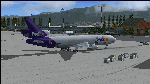
The Boeing MD-11F aircraft, N604FE, named "Hollis" is based out of Memphis, TN and can fly both Domestic and International Routes. The MD-11F (53 built) are the Freight transport aircraft version and were the second variant on offer at launch in 1986, and was the last and longest (1988-2000) manufactured version. 22 MD-11F's were delivered between 1991 and 2001 to FedEx. According to Flight Aware, she flies mainly domestic routes daily. The aircraft is almost identical to the DC-10F, although BOEING modernized their model with a longer fuselage and more powerful engines, giving her a longer range and higher service ceiling. Most flights are at full payload, and those disclude the center long-range fuel tanks, and involve flights ranging between 2,000 and 4,500 nm. I've been dealing with several versions of this aircraft for many years, actually since the first offered on CompuServe for FS98 in the '90s, and through time have found many aerodynamic details that were required in order to make her fly realistically. The Internet slowly added the details I needed, and then came the testing. Needless to say, I've flown many versions, including this one, for way too many hours, and added and corrected things along the way. This version is the best I've ever done, and I've worked on her for about a year before this upload. Everything is aerodynamically correct, and the engines (and their placement) are beyond anything ever presented by anyone with anything like this previously. I even fixed the gear to be 100% authentic in placement and use. I tried to fix the lights, but the textures are from FS2004, so I did the best I could. I chose this aircraft because it is actually in service today, and because the painter did a great job in making her look authentic. She now flies in FSX just as she does in reality, but you are better advised to study this on your own, rather than take my word. Aircraft ratings by manufacturers are based on simple standards, and very conservative. FSX is a virtual “WIND TUNNEL†when realistic aerodynamics are employed, so we can see what aircraft are capable of if we do it all right. Sorry to say, no one ever builds a free aircraft for upload with the correct engine/aerodynamics employed. In fact, I don't think anyone, other than myself, has ever put that much effort into it. So, keep this in mind. What you have now is real. It is Free. Now learn from it. READ THE MD11Readme.txt document before any operation after unzipping this. Tri-Engine Sound by B.G. Hany; Textures by Bradley McCoy; Panel by Marco Spada; Real World Engine/Aerodynamics by Douglas E. Trapp, [email protected], June 2018. This aircraft is designed for educational use protected under the Fair Use Doctrine: (http://www.expertlaw.com/library/intellectual_property/fair_use.html) ... It cannot be sold or bundled for sale, and such will never be approved by me or the original authors. FREEWARE DISTRIBUTION ONLY!!!
| Filename: | FedEx_McDonnell_Douglas_MD11F_N604FE.zip |
| License: | Freeware |
| Added: | 1st July 2018, 02:41:02 |
| Downloads: | 1,474 |
| Author: | Douglas E. Trapp |
| Size: | 121.26 MB |


© 2001-2026 AVSIM Online
All Rights Reserved
Privacy Policy |