
Where Flight Simulation Enthusiasts Gather from Around the World!
AVSIM Library - Search Results

| Category: Flight Simulator 2004 - Scenery | |
| FMEE Roland Garros Airport for FS2004 |

|
Images related to this file:
File Description:
Roland Garros Airport (ICAO: FMEE) is the principal airport on the French Overseas Region of Reunion Island. This scenery is a representation of the airport for FS2004 and was designed to fit onto the France VFR photoscenery for Reunion Island. This scenery will work with the default FS2004 Reunion Island but only those who own France VFR La Reunion will enjoy the full immersion benefits of FMEE in its proper setting. With permission, the starting point of this scenery is the FS2002 FMEE scenery by Yannick Mille. Static aircraft in this scenery are courtesy of David Rawlins.
| Filename: | FMEE_Roland_Garros_Airport_for_FS2004.zip |
| License: | Freeware, limited distribution |
| Added: | 12th July 2022, 18:23:25 |
| Downloads: | 660 |
| Author: | Gregory Putz |
| Size: | 46.29 MB |
| Category: Flight Simulator X - Original Aircraft | |
| FS9 / FSX CONCORDE COLLECTION |
|
File Description:
FS9 / FSX CONCORDE COLLECTION.
Includes new model, four new textures, VC, Passenger's views, full animated parts, and INSTRUCTIONS FOR GAUGES ON FSX - COCKPIT / VC MODE !! - gauges from FS9 needed - (or use default B747-400 PANEL, so gauges will not appear on VC mode). GAUGES NOT INCLUDED: you have to download MR. FRANCISCO SILVA's wonderful panel: "fsconcpn.zip" wich will also provide afterburn effects. Other files suggested: "nlf_v2.zip" and "njs_final.zip" (BEAUTIFUL lights and smoke effects) by Nick Needham. Also MR. KALON JEFFRIES's sound package: "cncsstsn.zip", and the experience will be THE BEST!!!!!. NO FIXES NEEDED. By Libardo Guzman.
| Filename: | FS9__FSX_CONCORDE_COLLECTION.zip |
| License: | Freeware |
| Added: | 4th November 2008, 04:37:31 |
| Downloads: | 18,584 |
| Author: | Libardo Guzmán García |
| Size: | 29.59 MB |
| Category: Flight Simulator 2004 - Aircraft Repaints, Textures and Modifications | |
| Air Greenland Boeing 737-900 (OY-GRW) - Fictional |
|
Images related to this file:
File Description:

FS2004/FSX Air Greenland Fictional 737-900. A B737-900 in Air Greenland colours, developed by Tenkuu Developers Studio (TDS). Model features high resolution textures, dynamic flexing wings, nose gear steering, rudder lock, ground spoilers, low speed aileron locks at high speed, fully animated control surfaces, fully independent suspension, trim animation, opening passenger doors, rolling wheels, animated thrust reversers with reverser block doors, detailed textures, full night lighting, ground service vehicles and more. Model design by Hiroshi Igami. Flight dynamics design by Nick Wilkinson, with assistance from David Biggar. Master textures by Kyle Schurb. Livery by Will Larmour.
| Filename: | Air_Greenland_Boeing_737900_OYGRW__Fictional.zip |
| License: | Freeware |
| Added: | 28th March 2014, 18:52:39 |
| Downloads: | 739 |
| Author: | Will Larmour |
| Size: | 9.24 MB |
| Category: Flight Simulator 2004 - Aircraft Repaints, Textures and Modifications | |
| American Airlines Boeing 737 MAX 8 (N990NN) |
|
Images related to this file:
File Description:
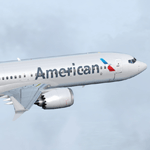
FS2004/FSX Boeing 737 MAX 8 Series. Developed by Tenkuu Developers Studio (TDS). Model features high resolution textures, dynamic flexing wings, nose gear steering, rudder lock, ground spoilers, low speed aileron locks at high speed, fully animated control surfaces, fully independent suspension, trim animation, opening passenger doors, rolling wheels, animated thrust reversers with reverser block doors, detailed textures, full night lighting, ground service vehicles and more. Package contains model and all files necessary for immediate flight. Model design by Hiroshi Igami. Flight dynamics design by Nick Wilkinson and David Biggar. Master textures by Kyle Schurb, Carlos Eduardo Salas and Stian Svensen.
| Filename: | American_Airlines_Boeing_737_MAX_8_N990NN.zip |
| License: | Freeware |
| Added: | 5th September 2014, 22:27:25 |
| Downloads: | 3,952 |
| Author: | Stian Svensen | Tenkuu Developers Studio (TDS) |
| Size: | 8.52 MB |
| Category: Flight Simulator X - Aircraft Repaints, Textures and Modifications | |
| FS2004/FSX WESTJET Boeing 737MAX8 "Bluejays" |
|
Images related to this file:
File Description:

FS2004/FSX Westjet Boeing 737 MAX8 "Bluejays" registration # C-GORP. Westjet Boeing 737 MAX8 "Bluejays" livery for the TDS MAX8 aircraft . Livery repainted on the TDS Boeing 737 MAX8 V3 paint kit. Textures only; you will need to add to your existing TDS 737 MAX8 V3 file or download the latest version from TDS. The model does not include a VC. The detailed textures include full night lighting and ground vehicles. For support with aircraft please visit Tenkuu Developers Studio's Facebook page at https://www.facebook.com/groups/TDS.SkySpirit.B737NG Repaint by Phillip Hughes.
| Filename: | FS2004FSX_WESTJET_Boeing_737MAX8_Bluejays.zip |
| License: | Freeware |
| Added: | 26th June 2026, 21:12:24 |
| Downloads: | 117 |
| Author: | TDS Boeing 737 MAX8 | Phillip Hughes |
| Size: | 10.31 MB |
| Category: Flight Simulator 2004 - Aircraft Repaints, Textures and Modifications | |
| United Airlines Scimitar Boeing 737-800 (N37277) |
|
Images related to this file:
File Description:
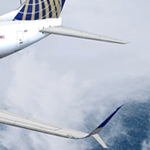
FS2004 737-800 United Airlines Split Scimitar Winglet (N37277). Developed by Tenkuu Developers Studio (TDS). Model features high resolution textures, dynamic flexing wings, nose gear steering, rudder lock, ground spoilers, low speed aileron locks at high speed, fully animated control surfaces, fully independent suspension, trim animation, opening passenger doors, rolling wheels, animated thrust reversers with reverser block doors, detailed textures, full night lighting, ground service vehicles and more. Package contains model and all files necessary for immediate flight. Model design by Hiroshi Igami. Flight dynamics design by Nick Wilkinson and David Biggar. Master textures by Kyle Schurb. Livery by David Biggar.
| Filename: | United_Airlines_Scimitar_Boeing_737800_N37277.zip |
| License: | Freeware, limited distribution |
| Added: | 10th January 2014, 07:29:48 |
| Downloads: | 1,984 |
| Author: | David Biggar | Tenkuu Developers Studio (TDS) |
| Size: | 13.08 MB |
| Category: Flight Simulator 2004 - Aircraft Repaints, Textures and Modifications | |
| Air China Boeing 737-800 (B-5178) |
|
File Description:
FS2004 Air China Boeing 737-800. A B737-800 in Air China Airlines "Silver Peony" livery, developed by Tenkuu Developers Studio (TDS). Model features high resolution textures, dynamic flexing wings, nose gear steering, rudder lock, ground spoilers, low speed aileron locks at high speed, fully animated control surfaces, fully independent suspension, trim animation, opening passenger doors, rolling wheels, animated thrust reversers with reverser block doors, detailed textures, full night lighting, ground service vehicles and more. Model design by Hiroshi Igami. Flight dynamics design by Nick Wilkinson and David Biggar. Master textures Kyle Schurb and livery by Istvan Biro.
| Filename: | Air_China_Boeing_737800_B5178.zip |
| License: | Freeware |
| Added: | 31st December 2014, 20:46:43 |
| Downloads: | 343 |
| Author: | Istvan Biro |
| Size: | 10.48 MB |
| Category: Flight Simulator 2004 - Original Aircraft | |
| Delta Air Lines Boeing 737-900/ER |
|
Images related to this file:
File Description:
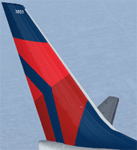
FS2004 TDS Boeing 737-900ER in Delta Air Lines colors. Developed by Tenkuu Developers Studio (TDS). Model features high resolution textures, dynamic flexing wings, nose gear steering, rudder lock, ground spoilers, low speed aileron locks at high speed, fully animated control surfaces, fully independent suspension, trim animation, opening passenger doors, rolling wheels, animated thrust reversers with reverser block doors, detailed textures, full night lighting, ground service vehicles and more. Package contains model and all files necessary for immediate flight. Model design by Hiroshi Igami. Flight dynamics design by Nick Wilkinson and David Biggar. Master textures and livery by Kyle Schurb.
| Filename: | Delta_Air_Lines_Boeing_737900ER.zip |
| License: | Freeware, limited distribution |
| Added: | 9th February 2014, 20:24:21 |
| Downloads: | 1,833 |
| Author: | Kyle Schurb | Tenkuu Developers Studio (TDS) |
| Size: | 11.63 MB |
| Category: Flight Simulator X - Aircraft Repaints, Textures and Modifications | |
| FS2004/FSX United Airlines Boeing 787-9 N24988 |
|
Images related to this file:
File Description:
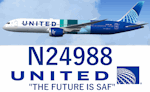
FS2004/FSX United Airlines Boeing 787-9, registration N24988. "The Future is SAF" livery painted based on photos of the current aircraft and is repainted on the Tenkuu Developers Studio (TDS) B787-9 GE paint kit. The detailed textures include custom D1 & D2 passenger entries, custom catering trucks, air stairs and cargo containers. *Textures only* You will need to add to your existing TDS 787-9 file using model TDS789GENX or TDSX789GENX for FSX or download the latest version from TDS. The model does not have a VC. The detailed textures include full night lighting and ground vehicles. Repaint by Phillip Hughes
| Filename: | FS2004FSX_United_Airlines_Boeing_7879_N24988.zip |
| License: | Freeware |
| Added: | 26th October 2024, 14:32:25 |
| Downloads: | 193 |
| Author: | TDS 787 | Phillip Hughes |
| Size: | 14.11 MB |
| Category: Flight Simulator 2004 - Aircraft Repaints, Textures and Modifications | |
| Braathens Boeing 737-700 duo pack (LN-TUA and LN-TUI) |
|
Images related to this file:
File Description:
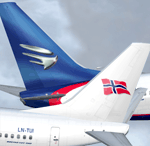
FS2004 Braathens Boeing 737-700 duo pack. A B737-700 in Braathens colors, registration LN-TUA and LN-TUI, developed by Tenkuu Developers Studio (TDS). Model features high resolution textures, dynamic flexing wings, nose gear steering, rudder lock, ground spoilers, low speed aileron locks at high speed, fully animated control surfaces, fully independent suspension, trim animation, opening passenger doors, rolling wheels, animated thrust reversers with reverser block doors, detailed textures, full night lighting, ground service vehicles and more. Model design by Hiroshi Igami. Flight dynamics design by Nick Wilkinson, with assistance from David Biggar. Master textures by Kyle Schurb.
| Filename: | Braathens_Boeing_737700_duo_pack_LNTUA_and_LNTUI.zip |
| License: | Freeware |
| Added: | 21st September 2013, 22:32:25 |
| Downloads: | 699 |
| Author: | Stian Svensen / Tenkuu Developers Studio |
| Size: | 16.23 MB |


© 2001-2026 AVSIM Online
All Rights Reserved
Privacy Policy |