
Where Flight Simulation Enthusiasts Gather from Around the World!
AVSIM Library - Search Results

| Category: Flight Simulator 2004 - Aircraft Repaints, Textures and Modifications | |
| Northwest Airlines Boeing 747-400 1990's Colors |

|
File Description:
Project Opensky 747-400 V4. Model Features include fully animated control surfaces, fully independent suspension, main gear steering, trim animation, opening passenger doors, opening cargo doors, dynamic flexing wings, animated tilting bogies, rolling wheels, animated thrust reversers, fully reflective textures ( each part has different degree of reflection based on material ), accurate flight dynamics ( accurate FDE with full profiles for wheels, tires, struts, leading/trialing struts, engine types ... Tested by real pilots.), newly re-defined individual part damage profiles, accurate spoiler animation, detailed textures, full night lighting, visible landing lights from the cockpit, reflective cockpit windows, crash effects, transparent nav light lenses, newly re-defined individual part damage profiles. Model Designer Hiroshi Igami. Flight Dynamics Designer Warren C. Daniel. Tested by Project Open Sky Members. Master textures by Corey Ford/Yosuke Ube.
| Filename: | Northwest_Airlines_Boeing_747400_1990s_Colors.zip |
| License: | Freeware, limited distribution |
| Added: | 14th December 2007, 23:04:17 |
| Downloads: | 872 |
| Author: | Project Opensky | Corey Ford |
| Size: | 10.52 MB |
| Category: Flight Simulator X - Scenery | |
| Ireland VFR Small Airports Part 2 |
|
Images related to this file:
File Description:
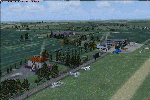
Ireland VFR Small Airports Part 2.
This scenery consists of EIME Casement Aerodrome, EIWT Weston Executive Airport and EIKH Kilrush Airfield. Casement and Weston are within 8nm of Dublin International whilst Kilrush lies approximately 30miles to the south west.
EIME's main runway 11/29 is 1,829m (6,001feet) in length and has handled the largest of heavies. Weston caters for small executive jets, GA and helicopters. Kilrush is a small private airstrip with grass and paved runways.
The scenery has been created almost entirely from real photographs and features many open hangers with internal textures. Each airport features a full panoramic view from inside the tower, sound, lighting, and smoke effects, together with animations, high definition people and military personnel. Full night lighting with wash lighting of the aprons is included. The scenery can be used as a standalone, however it also uses many objects from my Ireland VFR Small Airports Part 1. It has been tested with FSXA only and is designed to complement vfr photographic scenery. It will also work with the default terrain and I have included a set of photoreal textures with night masks. Full installation instructions are included in the Readme file. I hope you enjoy using the airports as much as I enjoyed making them.
| Filename: | Ireland_VFR_Small_Airports_Part_2.zip |
| License: | Freeware, limited distribution |
| Added: | 15th February 2012, 04:35:57 |
| Downloads: | 4,346 |
| Author: | George Keogh |
| Size: | 86.1 MB |
| Category: Prepar3D V1-4 - Utilities | |
| MultiTool Prepar3D v3.2 |
|
Images related to this file:
File Description:
Multi-Tool Prepar3D v3.2 is a collection of tools, a number of them unique, extending the capabilities of P3D.
New features in v3.2 :
- Adjustable Horizon/Aircraft banking
- Bug fixes/Improvements on previous functions
Previous features include :
- Custom Flybys, user defined camera flyby paths.
- Roaming Flybys, computer generated camera flyby paths.
- Active Observers views placeable by clicking on a top-down view
- Find My Way Home random aircraft positioning.
- 3D Native Stereoscopic Output.
- Head tracking additions: Ordinals, Take off lock, View switching by head movement , Spot up/down tracking.
- Camera Shake + Vibration : Turbulence, G, ground roll, side slip, spoilers.
- Easy 2D & 3D custom cameras definitions.
- XYZ Position (Eyepoint) Mouse Move similar to the Mouse Look pan function, i.e. hold down a key and reposition your eyepoint with your mouse.
- POV conversion to multiple controller buttons.
- Keystroke macros to perform menu functions. - Landing lineup with runway camera.
- Multi screen VC setup. - Save/Recall view setup by aircraft.
- Recallable position autosaving. and more....
Youtube Channel https://www.youtube.com/channel/UCnFQCGMTB7eL-MFTHf8NFbA
| Filename: | MultiTool_Prepar3D_v32.zip |
| License: | Freeware |
| Added: | 22nd December 2016, 07:47:21 |
| Downloads: | 916 |
| Author: | Richard Barry |
| Size: | 3.74 MB |
| Category: Prepar3D V1-4 - Utilities | |
| FS Flight Builder - Update |
|
Images related to this file:
File Description:
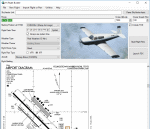
FS Flight Builder is a utility for general aviation flying that will build flight files for FSX, FSX Steam Edition, and Prepar3D based on waypoints and other data either entered manually or imported from SkyVector using the Plain Text Link functionality. Among other things, you can select your starting position, aircraft, and VFR or IFR flight plan.
One of the most interesting features of the application is that it will include a Briefing file, added to the aircraft's built-in kneedboard, that will include departure and destination airport information (runways, frequencies, weather, and charts) as well as navigation frequencies along the route.
Have you ever started up flight simulator and wondered “where do I want to go today� The new Destination Chooser functionality can help to solve that problem. The screen allows you to enter your departure airport and choose various parameters for your destination (like min and max distance, tower availability, ILS availability, runway length requirements, etc.).
| Filename: | FS_Flight_Builder__Update.zip |
| License: | Freeware |
| Added: | 30th July 2018, 18:12:05 |
| Downloads: | 303 |
| Author: | Tom Arduini |
| Size: | 27.99 MB |
| Category: Prepar3D V1-4 - Utilities | |
| P3D/FSX/FSXSE FS Flight Builder |
|
Images related to this file:
File Description:

Update to fix the auto-updater functionality
FS Flight Builder is a utility for general aviation flying that will build flight files for FSX, FSX Steam Edition, and Prepar3D based on waypoints and other data either entered manually or imported from SkyVector using the Plain Text Link information. Among other things, you can select your starting position, aircraft, and VFR or IFR flight plan.
One of the most interesting features of the application is that it will include a Briefing file, added to the aircraft's built-in kneedboard, that will include departure and destination airport information (runways, frequencies, weather, and charts) as well as navigation frequencies along the route.
Have you ever started up flight simulator and wondered “where do I want to go today� The new Destination Chooser functionality can help to solve that problem. The screen allows you to enter your departure airport and choose various parameters for your destination (like min and max distance, tower availability, ILS availability, runway length requirements, etc.).
| Filename: | P3DFSXFSXSE_FS_Flight_Builder.zip |
| License: | Freeware |
| Added: | 31st July 2018, 07:19:16 |
| Downloads: | 367 |
| Author: | Tom Arduini |
| Size: | 27.99 MB |
| Category: Prepar3D V1-4 - Gauges | |
| GPS2020 – V12.0 |
|
Images related to this file:
File Description:

Major upgrade for V10.3, with focus on zooming, Direct-To, inserting waypoints in the flight plan, and User waypoints (waypoints not present in FSX/P3D database).
Key improvements:
- Zooming maps with the mouse wheel now finally like in Google Maps, Google Earth, Bing Maps, Garmin BaseCamp, Little Navmap (FSX utility), etc..
- Direct-To Track Updating: dark red track line continuously follows aircraft movements. For proper operation, the user should install XMLVARS/XMLTools in FSX/P3D (most users will already have done this).
- Visual indication of "Direct-To Active".
- Flight plan: multiple POI's (points clicked on a map) can be inserted in the FPL, they will be named sequentially as TARGET1 to TARGETnnnn.
- Inserting in the flight plan, all sorts of waypoints from all possible sources, can be done with a quicker method with the green buttons alone, without needing to open the Direct-To page.
- Other refinements in code and screen layout since V10.3.
It is recommended to replace V10.3 with this V12.0!
| Filename: | GPS2020__V120.zip |
| License: | Freeware |
| Added: | 29th June 2020, 17:51:55 |
| Downloads: | 302 |
| Author: | Hugo Jansen |
| Size: | 15.7 MB |
| Category: Flight Simulator 2004 - Aircraft Repaints, Textures and Modifications | |
| Boeing 737-700 Corvette Textures |
|
Images related to this file:
File Description:
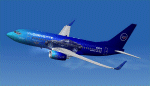
This file contains "TEXTURES ONLY" for the Posky 737-700 aircraft. The textures are of the Fictitious Corvette Airline and will hopefully appeal to all Corvette enthusiasts. These textures have only been tested in FS9 (2004) and you will require the FREEWARE Posky 737-700 to install them. A recommended panel for the aircraft is Targan UNUTMAZ great 737-700NG panel (tngv2.zip). While this is a freeware product UNDER NO CIRCUMSTANCES is this (or any of my textures) to be uploaded to or displayed on the FLYAWAY site or within their FORUMS. Should you wish to upload the textures to another site, or display a screen shot of the plane on another site, please accredit me as the Texture Artist. Thanks for your co-operation and I trust you will enjoy the plane. Should you have any questions or problems with this file feel free to contact me via my email address which is contained in the ReadMe file.
| Filename: | Boeing_737700_Corvette_Textures.zip |
| License: | Freeware |
| Added: | 29th September 2010, 19:28:30 |
| Downloads: | 148 |
| Author: | Tony Cannon |
| Size: | 3.88 MB |
| Category: Flight Simulator 2004 - Scenery | |
| Indira Gandhi International Airport,New Delhi, India [ VIDP ] updated |
|
Images related to this file:
File Description:
The scenery is being re-uploaded,removing all bugs in the previous version. no more nuisance created by 3d objects by popping up at KSEA Runway 34R.
60-65% of scenery contents have been replaced with new ones, thus giving the feel of new scenery.A jet Hanger is the major attraction of this scenery. hanger can accommodate two 737's or aircraft of similar size, hanger interior is new.before flying be sure to take a look at read-me file Or since this time its executable file so no worries about how and were to install.when the installer is done ,i.e. its last screen a tab that opens a pdf file "jet hanger" [one page only] illustrating few facts regarding using that park able hanger. i'm no professional so if you skip that pdf ,you'll keep crashing , usage is simple and very adventurous.General aviation Hanger is also included were you can park or even start a flight. have a sneak peak .....i mean check out pics
| Filename: | Indira_Gandhi_International_AirportNew_Delhi_India.zip |
| License: | Freeware |
| Added: | 8th August 2010, 21:42:37 |
| Downloads: | 2,548 |
| Author: | Ashish Singh |
| Size: | 31.24 MB |
| Category: Navigation and ATC - Navigation | |
| ChartMap 5.0 |
|
File Description:
ChartMap 5.0 is a small stand-alone Windows utility for Flight Simulators allowing a number of airport charts to be stored and available on screen whilst still flying.
The use of the program is very simple and intuitive. You insert only the Airport ICAO Code and the program will show all the data stored.
The ChartMap 5.0 is a program completely rebuilding with a new graphics power and a new database.
Now is possible to use the PDF format for every kind of charts. You can everywhere download it.
The important thing is to use the conventional letter below in this tutorial (vds IMPORTANT NOTE).
Differences with the previous version:
- Corrected some bugs.
IMPORTANT NOTE:
TO USE THIS PROGRAM YOU NEED DOWNLOAD the charts from Flight Simulator website FOR Italian airport download "Italian Airports Charts and Procedures Series 1, 2 and 3" and unzip in ICAO CODE FOLDER.
| Filename: | ChartMap_50.zip |
| License: | Freeware |
| Added: | 24th November 2013, 16:07:51 |
| Downloads: | 331 |
| Author: | Carlo Chiappisi |
| Size: | 1.51 MB |
| Category: Flight Simulator 2004 - Aircraft Repaints, Textures and Modifications | |
| Mid East Jet Boeing 777-24Q-ER |
|
File Description:
This is a repaint of Meljet the 777-200er GE in Mid East Jet. This is my first repaint and i would like to hear from you about the quality. I also would like to hear suggestion on how to make it better. I created this repaint for those of you who are registered pilots of HRW and have a signed number from David. I also created because I hated flight triple seven's in an airlines paint scheme to places they don't go. Please inform me if this repaint appears on any other flight sim site other than AVSIM. Please send me screen shots for a website i am creating where this and other future repaints of mine are flown and add the flight plan flown. YOU WILL NEED TO CHANGE THE PANEL AND SOUND FOLDERS. THEY ARE SETUP FOR MY SYSTEM.
Thanks,
Bryan Hobbs HRW 41
[email protected]
some interior texture credit goes to Dickson Chan
[email protected]
| Filename: | Mid_East_Jet_Boeing_77724QER.zip |
| License: | Freeware |
| Added: | 4th August 2004, 14:42:57 |
| Downloads: | 319 |
| Author: | Bryan Hobbs |
| Size: | 8.67 MB |


© 2001-2026 AVSIM Online
All Rights Reserved
Privacy Policy |