
Where Flight Simulation Enthusiasts Gather from Around the World!
AVSIM Library - Search Results

| Category: Flight Simulator 2004 - Scenery | |
| 1962 and 1965 Tokyo Haneda Airport Scenery |

|
File Description:
This scenery represents the international airport of Tokyo in the 1960's, Haneda. This package also removes the modern airport of Narita. There are two versions of the airport in this package, 1962 and 1965. Today, Tokyo International Airport (known to locals as Haneda) is consistently among the five busiest airports in the world. In the early 1960s, it was the only international airport serving the economic recovery of the Japanese capital. The entire airport was upgraded extensively between 1961 and 1964 in preparation for the Tokyo Olympics in October of '64. By 1965, a longer runway 15/33, expanded terminal, and improved ground transportation links were all in use at Haneda (these changes are reflected in the '62 and '65 versions). Terminal and ground details by Aaron Seymour, JAMCO/JAL hangars and AFCAD files by Tom Gibson. Thanks to Wolfgang Gersch for the parking area.
| Filename: | 1962_and_1965_Tokyo_Haneda_Airport_Scenery.zip |
| License: | Freeware, limited distribution |
| Added: | 5th October 2008, 20:43:08 |
| Downloads: | 3,845 |
| Author: | Aaron Seymour and Tom Gibson |
| Size: | 1.04 MB |
| Category: Prepar3D V1-4 - Aircraft Repaints, Textures and Modifications | |
| Lockheed L-049 Constellation (48-612) MATS |
|
Images related to this file:
File Description:

This folder contains a repaint for the A2A Lockheed L049 Constellation in the colors of 48-612 of the MATS. It was delivered to the USAF in 1949 and flew in support of the Berlin Airlift. This repaint shows it in the colors of the Atlantic Division of MATS around that time. It was converted to a C-121A and used for VIP missions for the remainder of its air force career, which lasted until 1967. It was then used as an agricultural spray aircraft, until it was bought by the Dutch Constellation Association. It went to the Aviodrome museum in Lelystad, the Netherlands in 2001, and was restored. It flew last in 2007, but insurance problems kept it grounded since. It is currently on static display in the Aviodrome, wearing KLM colors. Repaint by Jan Kees Blom, based on the paintkit by A2A.
| Filename: | Lockheed_L049_Constellation_48612_MATS.zip |
| License: | Freeware |
| Added: | 2nd October 2018, 20:43:00 |
| Downloads: | 195 |
| Author: | Jan Kees Blom |
| Size: | 23.01 MB |
| Category: Flight Simulator 2004 - Aircraft Repaints, Textures and Modifications | |
| American Flyers Airline Lockheed L-188 Electra |
|
Images related to this file:
File Description:
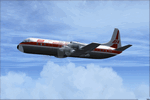
This is a repaint of the L-188 Electra by Libardo Guzman in American Flyers Airline livery. The L-188 (base file) by Libardo Guzman is needed for this repaint.
AFA was one of the oldest supplemental (charter) airlines based in Fort Worth, USA. The airline was founded by Reed Pigman in 1939, and started operations with a 5 seater Spartan 'Executive'. In 1951 AFA became the first charter airline to operate CAM (domestic trooping) operations. Sadly, Reed Pigman died in an L-188 crash in April 1966 while transporting over 80 military recruits. This was due to him having a heart attack at the controls. Consequently the plane lost control and crashed. All aboard perished. The airline continued to be run by his wife, before being taken over by Universal Airlines in 1971, which was itself absorbed by Saturn Airlines in 1972. Textures are DXT3.
| Filename: | American_Flyers_Airline_Lockheed_L188_Electra.zip |
| License: | Freeware |
| Added: | 9th April 2018, 19:24:11 |
| Downloads: | 64 |
| Author: | Ted Giana |
| Size: | 2.63 MB |
| Category: Microsoft Flight Simulator (2020) - Aircraft Repaints, Textures and Modifications | |
| Ryan ST-A VH-AHF |
|
Images related to this file:
File Description:

This folder contains a repaint for the Ryan ST-A by A1R Design Bureau. It shows Ryan ST-M VH-AHF as it looked around 1950. This aircraft was built in 1940 for the Dutch East Indies Navy and arrived in Surabaya in November 1940. It was registered S-14 with the Dutch Navy. Together with all other Dutch Ryans, it was shipped to Australia in early 1942, where they were taken on charge by the RAAF, S-14 becoming A50-7. It served with 2 Air Observer School at Mt Gambier airfield in SA. After the war, it became VH-AHF and flew with the Newcastle Aero Club, NSW. It made a forced landing in 1954 near Liverpool, west of Sydney and was struck off the register. It is believed remains of the aircraft are still held in storage in NSW. Repaint by Jan Kees Blom.
| Filename: | Ryan_STA_VHAHF.zip |
| License: | Freeware |
| Added: | 7th June 2021, 17:33:19 |
| Downloads: | 16 |
| Author: | Jan Kees Blom |
| Size: | 80.76 MB |
| Category: Prepar3D V1-4 - Aircraft Repaints, Textures and Modifications | |
| De Havilland DH-82 Tiger Moth (ZK-AQA & ZK-AYE) Nelson Aero Club |
|
Images related to this file:
File Description:

This folder contains two repaints for Ant's DH-82 Tiger Moth Pro for P3DV4+. It shows two Tiger Moths of the Nelson Aero Club in New Zealand, ZK-AQA and ZK-AYE.
ZK-AQA, which was built in Hatfield and assembled in New Zealand in 1940 as NZ863. It was sold to a Mr. J. Reid in 1947. In 1950 it went to the Nelson Aero Club, and is shown in their service in this repaint. After several owners it wound up with the Auckland Gliding Club in 1961. In 1965, it crashed on take-off while towing a glider and it was damaged. Its remains were stored, but I'm not sure if they are still around.
ZK-AYE came from RAF stocks and was previously R4978.
It was built at Hatfield and assembled in NZ. It was shipped to New Zealand on "SS Rangitata" and BOC Unit 18 Rongotai 03 June 1940 and flew with No.3 EFTS, Harewood 1943-1944. After the war, it was issued free to Nelson Aero Club from Taieri on 15 September 1949 and entered the New Zealand Civil Aircraft Register as ZK-AYE on 02 February 1951. It was sold to A. Blechynden on 28 October 1957. The transfer was not notified to the CAA who cancelled it from the register on 28 November 1957. It rejoined the register with the new allocated registration of ZK-BVK in January 1958 and went to W. Scottof Karangahua in 1958. Unfortunately, it broke up in flight 10 miles north of Otorohanga on 07 May 1958 killing pilot and passenger. Repaint by Jan Kees Blom, based on the paintkit by Anthony Lynch
| Filename: | De_Havilland_DH82_Tiger_Moth_ZKAQA__ZKAYE_Nelson_Aero_Club.zip |
| License: | Freeware |
| Added: | 27th December 2019, 18:51:54 |
| Downloads: | 97 |
| Author: | Jan Kees Blom |
| Size: | 30.36 MB |
| Category: Prepar3D V1-4 - Utilities | |
| Flightplan Visualizer 1.11 |
|
Images related to this file:
File Description:
Flightplan Visualizer (FV) version 1.11.0. Copyright 2018-2019 by Pelle F. S. Liljendal ([email protected]), all rights reserved.
FV comes with 540 pre-imported Commercial AI flightplans (+380 BizJet flightplans are available as a separate download). However you are able to import additional (AI) flightplans yourself. Once imported these (AI) flightplans can be visualized on a map-view, and the user will be able to search accross all these. Hence you can use the program as inspiration as to which routes to fly. E.g. you can search across all imported flightplans to find all flights in an A321 flying into/out from LDDU, or simply to look for all flights in a Boeing 747-8F.
Simply run the included installer to install the software. The program will be installed into "C:\Program Files (x86)\Flightplan Visualizer" and all datafiles will be installed into: "C:\Users\[UserName]\AppData\Roaming\FlightplanVisualizer". The program comes with a full manual explaining everything, and a 3 page quick manual to get you started. The first 3 times you run the program the quick manual will automatically open. The forum is hosted here: https://forum.aerosoft.com/index.php?/forum/919-flightplan-visualizer/
Version 1.11 Contains the following changes: The file-format of the Flightplan-files was changed to accommodate some planed changes. The program remains backward compatible, so "old" flightplans can still be loaded. I wanted to implement these changes BEFORE I began importing new flightplans, to ensure these new/updated flightplans are all utilizing the new format. On startup the old flightplans will automatically be converted to the new format. The new installer now comes bundled with 540 commercial flightplans (schedules:22291, legs:699158) whereas the old one "only" contained 300 commercial flighplans (schedules:16786, legs:536198). All BizJet flightplans were removed from the installer and are now available as a separate download. A new settings-form have been added to eliminate the need to manually edit the settings-file using a text-editor. A new menu-item have been added which opens an explore window browsing the content of the UserData folder. Individual (disabled) flightplan-files can now be permanently deleted via the "Enable/disable flightplans" form. Flightplan sub-folders (with exception of "Disabled") can now be marked as "enabled" (using a check-box). Meaning that the flightplans in these will be also loaded on startup (along with the files in the root-folder). Using the "Enable/disable flightplans" form you can now both move and copy flightplans (based on the value of the radio-buttons). A creator-field have been added to flightplans, which can be entered when you import/edit a flightplan. The name of the creator is displayed as a tool tip when hoovering the mouse over the combo-box in the bottom of the main-form. When importing new Flightplans the program will try to grab creator and provider from the files bundled with the flightplan. Likewise a button is added to the import-form which list the content of the text-files (e.g. "ReadMe.txt"), in case you need to manually grab the creators name from this file. Both when importing- and editing flightplans a new column have been added to the airport list-view containing comments regarding airports that have been redirected (from one ICAO to another), or airports classified as pseudo-airports (in case the airport does not exists in the flightsim). The elevation-column from previous versions was removed to make more room for the comment-column. Added a new form to edit airport-redirections (redirect from one ICAO to another on import). In the airport-info form you can now switch between showing flights for the selected flightplan/last search and all flights to/from the airport being displayed. Added a new "Nearby Airports" tab-sheet to the Airport-info form, which shows a distance-sorted list of nearby airports. In the previous versions all new aircraft were automatically added to the selection of favorite aircraft. From version 1.11 you must manually choose which are your favorites (upgrading from a previous version, your current selection of favorites will NOT be changed). First letter of decoded-metar is now changed to uppercase, and a checkbox lets you decide if you want to perserve line-breaks in the decoded text copied to the clipboard. Switched position of "Save" and "Cancel" buttons in airport-info form, to match layout of other forms. Like elsewhere in the program, the airport search-browser now lists the icao-codes with an asterisk (*) for each airport that is a pseudo airport. Greatly improved the responsiveness/performance of the browser-forms, when searching for : Airports, Airlines and Aircraft. Managed to shave off a few 10th of a second loading/processing data at startup. Added support for additional Aircraft. Many of the Airports in the supplied data-files were updated likewise some new Airlines were added as well. Made the importer stronger to import flightplans where aircraft names are not in quotes, and multiweek days are written as "1/3" in stead of "10". Fixed: When manually redirecting an airport during import, the flightplan was not visualized corretly until re-loading the flightplan (e.g. restarting the program). Fixed: Closing the Enable/Disable-flightplan using other means than the close-button would not make the program re-load active flightplans afterwards. Fixed: Several of the combo-boxes on the airport-info form allowed text being entered into them. Fixed: Corrected an issue with map-caching.
Pelle
| Filename: | Flightplan_Visualizer_111.zip |
| License: | Freeware, limited distribution |
| Added: | 7th July 2019, 18:15:30 |
| Downloads: | 227 |
| Author: | Pelle Liljendal |
| Size: | 29.95 MB |
| Category: Prepar3D V1-4 - Utilities | |
| Flightplan Visualizer 1.14 |
|
Images related to this file:
File Description:
Flightplan Visualizer (FV) version 1.14.0. Copyright 2018-2019 by Pelle F. S. Liljendal ([email protected]), all rights reserved.
FV comes with 629 pre-imported Commercial AI flightplans (+380 BizJet flightplans are available as a separate download). However you are able to import additional (AI) flightplans yourself. Once imported these (AI) flightplans can be visualized on a map-view, and the user will be able to search accross all these. Hence you can use the program as inspiration as to which routes to fly. E.g. you can search across all imported flightplans to find all flights in an A321 flying into/out from LDDU, or simply to look for all flights in a Boeing 747-8F.
Simply run the included installer to install the software. The program will be installed into "C:\Program Files (x86)\Flightplan Visualizer" and all datafiles will be installed into: "C:\Users\[UserName]\AppData\Roaming\FlightplanVisualizer". The program comes with a full manual explaining everything, and a 3 page quick manual to get you started. The first 3 times you run the program the quick manual will automatically open. The forum is hosted here: https://forum.aerosoft.com/index.php?/forum/919-flightplan-visualizer/
Version 1.14 Contains the following changes:
- Flightplan file-format was changed, to accommodate changes to the airline-data. In previous versions the airline ICAO-code had to be unique, hence not allowing old defunct airlines still remaining in the data-file when a new airline would be issued the same ICAO-code (now they can both exists, and many of the defunct have been marked as defunct).
- On start-up old flightplans in enabled folders will automatically be updated to the new format. If you have sub-folders containing additional flightplans, you should make sure these are enabled, in order to have these updated as well. Once they have been updated you can go ahead and disable these sub-folders again as you please.
- Its now possible to add user defined airlines, in case you want to add you own fictitious airlines (e.g. VA's) or you want to add airlines missing in the official data-files that I supply with the program (if this is the case, please notify me, so I can add these in the next release of the program).
- "Favorite aircraft" have been renamed into "Favorite aircraft-types", as it is the "types" of aircraft you mark. You don't mark a particular aircraft/cofiguration (like the PMDG B737-800 NGXu) as your favorite, but rather the "type" (B737-800). The file containing the (active) favorite aircraft-type selection was renamed as well (you don't have to do anything, the file is automatically renamed on start-up).
- Added a new Unit-Conversion form, letting the user convert units of: Speed, Lenght/Distance, Weight/Volume, Pressure and Temperature. The Weight/Volumne conversions is a bit special as it lets the user convert between weight (kg/lbs) and volume (liter/gal), thanks to a Fuel Density that defaults to 0.785, but can be changed by the user.
- All search-forms (seaching for airport, aircraft and airline) was changed to ignore whitespeaces (e.g. "airBaltic" vs. "air Baltic"), and ignore diacritics (e.g. "AerolÃnea" vs. "Aerolinea"), making it more easy to find what you are searching for in one go.
- The airline search-form will by default exclude airlines that have been marked as defunct. However a new "Include defunct" check-box have been added to the form, allowing you to include these (who am I to say you can not still use "Air Berlin", "Monarch" or "Thomas Cook" flightplans if you want to).
- Added 3 new columns to the airline search form showing commence/cease-date, and wheter or not the airline is "in use" (as carrier/operator by any of the active fligthplans).
- State is now by default excluded when using the airport search form, which make it a lot more convenient to find airports in the city of "New York". State can still be included in the search by choosing a different search-type using the combo-box in the upper/right corner.
- When Flightplan Visualizer needs for perform potentially lengthy operations it will spread the workload over the available cores of the CPU. However if you want to limit which cores it uses you can now set the affinity-mask in the settings form.
- The splash-screen shown when the program starts, and when reloading active flightplans was prevoiusly always shown on top (top-most), but if you find this anoying it can now be disabled in settings.
- Fixed: Warnings/errors regarding loading flightplans were only displayed at start-up. Now they are shown whenever all active flightplans are loaded (e.g. after having enabled a sub-folder).
- Data: The airline-data got a major update, and a bunch of new airlines were added, and the data for MANY others were updated. It is a manual process to update these, almost as funny to do as to watch paint dry ;-)
- Data: A few countries had a wrong- or no sub-region code, so these were fixed/updated. As usual, if any of you spot any erros, or missing data, please use the forum to notify me.
- Data: Additional info added to the aircraft-data (in preparation for some future plans).
- Flightplans: All flightplans bundled with the installer have been updated to the new file-format.
- Flightplans: Thanks to Ryan Carson (RCAI) for allowing me to bundle the installer with a few of his flightplans, so the installer comes with the very first winter 2019-2020 flightplan.
- Flightplans: The good people over at AIG (Alpha India Group) have been VERY busy since the last release, hence the installer comes with +130 new pre-imported flightplans, bringing the total to 629. This update concludes Summer 2019, and AIG already have the first Winter 2019/2020 flight-plans in beta-test.
Pelle
| Filename: | Flightplan_Visualizer_114.zip |
| License: | Freeware, limited distribution |
| Added: | 10th December 2019, 06:59:46 |
| Downloads: | 370 |
| Author: | Pelle Liljendal |
| Size: | 31.01 MB |
| Category: Flight Simulator 2004 - AI Aircraft | |
| Mexicana Boeing 727-200 |
|
File Description:
B727-200 in Mexicana 80's colors, the file includes textures only in 32 bits, you need the original model by Aardvark, very detailed... enjoy!
| Filename: | Mexicana_Boeing_727200.zip |
| License: | Freeware |
| Added: | 21st January 2006, 05:57:10 |
| Downloads: | 830 |
| Author: | Salvador P.H. / AI Aardvark |
| Size: | 749.53 KB |
| Category: Flight Simulator 2004 - AI Flight Plans | |
| Iceland Express Spring 2006 |
|
File Description:
This is a flightplan for Iceland Express based in April, They fly to Stansted and Copenhagen Daily and Alicante once a week in the spring.
| Filename: | Iceland_Express_Spring_2006.zip |
| License: | Freeware, limited distribution |
| Added: | 23rd January 2006, 04:19:33 |
| Downloads: | 420 |
| Author: | Markus Hillman |
| Size: | 1.63 KB |
| Category: Flight Simulator 2004 - Aircraft Repaints, Textures and Modifications | |
| DHC-3 For Payette Air Charter's Canadian colors |
|
File Description:
This is a repaint in the colour of our Virtual Airline “Payette Air Charter” in the markings of the Canadian base at Pitt Meadows, BC.
| Filename: | DHC3_For_Payette_Air_Charters_Canadian_colors.zip |
| License: | Freeware |
| Added: | 4th May 2006, 03:30:54 |
| Downloads: | 157 |
| Author: | Nathan Tyson |
| Size: | 422.24 KB |


© 2001-2026 AVSIM Online
All Rights Reserved
Privacy Policy |