
Where Flight Simulation Enthusiasts Gather from Around the World!
AVSIM Library - Search Results

| Category: Miscellaneous Files - Demos from Commercial Vendors | |
| QANTAS, Airbus A380 |

|
File Description:
The Airbus A380 is a doubledecker, four-engined airliner manufactured by Airbus S.A.S. It first flew on April 27, 2005 from Toulouse, France. Commercial flights should begin in 2006 after 15 months of testing. During much of ist development, the aircraft was known as the Airbus A3XX. The A380 is now the largest passenger airliner, topping the Boeing 747, which was the largest for 35 years. However, the Antonov An-225 retains the record of being the world's largest commercial aircraft. The media has termed the A380 a "superjumbo", with some comparing it to Howard Hughes's Spruce Goose. The first A380 prototype was unveiled during a ceremony in Toulouse, France, on January 18, 2005. Its manufacturer's serial number is 001, and is registered as F-WWOW. The new Airbus will initially be sold in two versions: the A380-800, carrying 555 passengers in a three-class configuration or up to 800 passengers in a single-class economy configuration. Expected range for the -800 model is 8,000 nautical miles (14,800 km). The second model, the A380-800F dedicated freighter, will carry 150 tons of cargo 5,600 miles (10,400 km). Airbus made the cockpit layout, procedures and handling characteristics similar to those of other Airbus aircraft to reduce crew training costs. Likewise, the A380 features a glass cockpit and side-stick flight controller. Demoversion with banners, Panel, GAUGES, model, sound and textures by www.afs-design.de - Author: A.Meyer.
| Filename: | QANTAS_Airbus_A380.zip |
| License: | Commercial demo |
| Added: | 25th October 2008, 12:30:46 |
| Downloads: | 344 |
| Author: | Andreas Meyer |
| Size: | 2.56 MB |
| Category: Flight Simulator 2004 - Scenery | |
| Toronto Downtown Airport CYTZ Ontario, Canada |
|
Images related to this file:
File Description:
CYTZ is on an island in Lake Ontario and immediately adjacent to downtown Toronto. This updates the version made by Flight Ontario as there have been major changes since Porter Airlines purchased the airport. The obvious and main new item is the terminal, made with photo textures and with ten gates sized to accomodate the Dash 8-400 they currently use. The terminal has a passenger entrance and a vehicle setdown point as part of the link to the ferry terminal that wraps around the west side of the original and preserved terminal building. The ferry terminal is included here, along with a ferry. Also new are the car parking, road routing, gate and taxi markings, taxiways, taxiway signage, taxiway lighting, runway lighting, aprons, apron lighting (from Sid Schwartz and you will need to install his "lights_ss_v2"), fences, fuel tanks, tanker trucks, access roads to navigation equipment, ai parking, static parked planes, parked cars, apron equipment, and the useable floatplane ramp. The AI includes Porter, Jazz, several GA aircraft, and a helicopter. Only 3 of these require downloads. The Lake Ontario AI includes three large ships, typical of the traffic to be seen on all the Great Lakes. CYTZ has three runways and there is an airport diagram included. 08-26 has ILS and is the only runway actually long enough to be used by Porter; FS9 atc will ignore this. There is fuel available and it is dispensed from a truck. The longer projection from the front of the terminal building is a covered ramp that leads up from the terminal basement level, used by towed luggage trolleys. The gates are not powered in any way except for the weather cover that protects passengers as they cross the small area of asphalt between plane and gate. I did not try to reproduce this in FS9.
| Filename: | Toronto_Downtown_Airport_CYTZ_Ontario_Canada.zip |
| License: | Freeware, limited distribution |
| Added: | 23rd October 2012, 12:52:14 |
| Downloads: | 1,806 |
| Author: | Roger Wensley + Flight Ontario |
| Size: | 12.43 MB |
| Category: Prepar3D V1-4 - Aircraft Repaints, Textures and Modifications | |
| North American P-51D 52nd FG (WD-M) 'Pendaja / Miss Ruth' |
|
Images related to this file:
File Description:
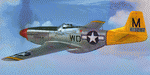
This folder contains a repaint for the A2A WoP3 P-51D Mustang (with AccuSim), in the colors of P-51D-5-NA 44-13287 WD-M, which was the aircraft assigned to Lt William Parent of the 4th FS/ 52nd FG, based in Italy. On the 1st of September 1944 however, it was being flown by Major Wyatt P. Exum during an escort mission to Hungary. It was Maj. Exum's first operational mission nin the ETO. On the way back from the mission, the squadron strafed an airfield, before spotting a moving train. Lts Strout and Wilson attacked the train, and as a result of Lt Wilson's attack, the engine blew up while he was overflying it, damaging his cooling system and setting the engine on fire. The fire quickly blew out, and Lt Wilson decided to make an belly landing in a recently plowed field. Over the radio, he heard Maj Wyatt Exum transmit "I'll be down to get you, Charlie!" and indeed he landed close to Lt Wilson's aircraft. Lt Wilson managed to turn Maj Exum's aircraft, as his tail wheel had become stuck in a rut in the field, and both men tried to squeeze into the cockpit. Meanwhile, men on horseback were approaching, shooting several holes in the aircraft. While Lt Wilson shot back with his .45, Major Exum gunned the engine, and they managed to take off with Lt Wilson half outside the cockpit with his .45. They flew the 400 miles back to Madna in Italy on their last fuel, and landed with other Mustangs landing from the other side. Major Exum received the Silver Star for this action, as well as from the undying gratitude and admiration from Lt Wilson Repaint by Jan Kees Blom, based on the A2A paintkit.
| Filename: | North_American_P51D_52nd_FG_WDM_Pendaja__Miss_Ruth.zip |
| License: | Freeware |
| Added: | 4th November 2018, 17:24:47 |
| Downloads: | 66 |
| Author: | Jan Kees Blom |
| Size: | 11.83 MB |
| Category: Miscellaneous Files - Demos from Commercial Vendors | |
| Singapore Airlines Airbus A380 version 2 |
|
File Description:
Demoversion with banners, new VOR gauge, with new PANEL and GAUGES, new external model, sound and virtuall cockpit. The Airbus A380 is a doubledecker, four-engined airliner manufactured by Airbus S.A.S. It first flew on April 27, 2005 from Toulouse, France. Commercial flights should begin in 2006 after 15 months of testing. During much of ist development, the aircraft was known as the Airbus A3XX. The A380 is now the largest passenger airliner, topping the Boeing 747, which was the largest for 35 years. However, the Antonov An-225 retains the record of being the world's largest commercial aircraft. The media has termed the A380 a "superjumbo", with some comparing it to Howard Hughes's Spruce Goose. The first A380 prototype was unveiled during a ceremony in Toulouse, France, on January 18, 2005. Its manufacturer's serial number is 001, and is registered as F-WWOW. The new Airbus will initially be sold in two versions: the A380-800, carrying 555 passengers in a three-class configuration or up to 800 passengers in a single-class economy configuration. Expected range for the -800 model is 8,000 nautical miles (14,800 km). The second model, the A380-800F dedicated freighter, will carry 150 tons of cargo 5,600 miles (10,400 km). Airbus made the cockpit layout, procedures and handling characteristics similar to those of other Airbus aircraft to reduce crew training costs. Likewise, the A380 features a glass cockpit and side-stick flight controller. Panel, GAUGES, model, sound and textures by www.afs-design.de - Author: A.Meyer.
| Filename: | Singapore_Airlines_Airbus_A380_version_2.zip |
| License: | Commercial demo |
| Added: | 22nd March 2008, 00:56:59 |
| Downloads: | 2,866 |
| Author: | Andreas Meyer |
| Size: | 2.04 MB |
| Category: Miscellaneous Files - Demos from Commercial Vendors | |
| Emirates Airbus A380 |
|
File Description:
Demoversion with banners, new VOR gauge, with new PANEL and GAUGES, new external model, sound and virtuall cockpit. The Airbus A380 is a doubledecker, four-engined airliner manufactured by Airbus S.A.S. It first flew on April 27, 2005 from Toulouse, France. Commercial flights should begin in 2006 after 15 months of testing. During much of ist development, the aircraft was known as the Airbus A3XX. The A380 is now the largest passenger airliner, topping the Boeing 747, which was the largest for 35 years. However, the Antonov An-225 retains the record of being the world's largest commercial aircraft. The media has termed the A380 a "superjumbo", with some comparing it to Howard Hughes's Spruce Goose. The first A380 prototype was unveiled during a ceremony in Toulouse, France, on January 18, 2005. Its manufacturer's serial number is 001, and is registered as F-WWOW. The new Airbus will initially be sold in two versions: the A380-800, carrying 555 passengers in a three-class configuration or up to 800 passengers in a single-class economy configuration. Expected range for the -800 model is 8,000 nautical miles (14,800 km). The second model, the A380-800F dedicated freighter, will carry 150 tons of cargo 5,600 miles (10,400 km). Airbus made the cockpit layout, procedures and handling characteristics similar to those of other Airbus aircraft to reduce crew training costs. Likewise, the A380 features a glass cockpit and side-stick flight controller. Panel, GAUGES, model, sound and textures by www.afs-design.de - Author: A.Meyer.
| Filename: | Emirates_Airbus_A380.zip |
| License: | Commercial demo |
| Added: | 24th May 2008, 08:30:10 |
| Downloads: | 2,150 |
| Author: | Andreas Meyer |
| Size: | 2.05 MB |
| Category: Miscellaneous Files - Demos from Commercial Vendors | |
| AIR FRANCE Airbus A380v2, , |
|
File Description:
Demoversion with banners, new VOR gauge, with new PANEL and GAUGES, new external model, sound and virtuall cockpit. The Airbus A380 is a doubledecker, four-engined airliner manufactured by Airbus S.A.S. It first flew on April 27, 2005 from Toulouse, France. Commercial flights should begin in 2006 after 15 months of testing. During much of ist development, the aircraft was known as the Airbus A3XX. The A380 is now the largest passenger airliner, topping the Boeing 747, which was the largest for 35 years. However, the Antonov An-225 retains the record of being the world's largest commercial aircraft. The media has termed the A380 a "superjumbo", with some comparing it to Howard Hughes's Spruce Goose. The first A380 prototype was unveiled during a ceremony in Toulouse, France, on January 18, 2005. Its manufacturer's serial number is 001, and is registered as F-WWOW. The new Airbus will initially be sold in two versions: the A380-800, carrying 555 passengers in a three-class configuration or up to 800 passengers in a single-class economy configuration. Expected range for the -800 model is 8,000 nautical miles (14,800 km). The second model, the A380-800F dedicated freighter, will carry 150 tons of cargo 5,600 miles (10,400 km). Airbus made the cockpit layout, procedures and handling characteristics similar to those of other Airbus aircraft to reduce crew training costs. Likewise, the A380 features a glass cockpit and side-stick flight controller. Panel, GAUGES, model, sound and textures by www.afs-design.de - Author: A.Meyer.
| Filename: | AIR_FRANCE_Airbus_A380v2_.zip |
| License: | Commercial demo |
| Added: | 12th April 2008, 02:10:45 |
| Downloads: | 3,203 |
| Author: | Andreas Meyer |
| Size: | 2.15 MB |
| Category: Prepar3D V1-4 - Utilities | |
| Flightplan Visualizer 1.13 |
|
Images related to this file:
File Description:
Flightplan Visualizer (FV) version 1.13.0. Copyright 2018-2019 by Pelle F. S. Liljendal ([email protected]), all rights reserved.
FV comes with 586 pre-imported Commercial AI flightplans (+380 BizJet flightplans are available as a separate download). However you are able to import additional (AI) flightplans yourself. Once imported these (AI) flightplans can be visualized on a map-view, and the user will be able to search accross all these. Hence you can use the program as inspiration as to which routes to fly. E.g. you can search across all imported flightplans to find all flights in an A321 flying into/out from LDDU, or simply to look for all flights in a Boeing 747-8F.
Simply run the included installer to install the software. The program will be installed into "C:\Program Files (x86)\Flightplan Visualizer" and all datafiles will be installed into: "C:\Users\[UserName]\AppData\Roaming\FlightplanVisualizer". The program comes with a full manual explaining everything, and a 3 page quick manual to get you started. The first 3 times you run the program the quick manual will automatically open. The forum is hosted here: https://forum.aerosoft.com/index.php?/forum/919-flightplan-visualizer/
Version 1.13 Contains the following changes: Flightplans can now be exported in AIFP/TrafficTool-format (the same format that FV is able to import). It means if you have made any changes to a flightplan (e.g. redirected some airports) the flightplan can be exported from FV, and imported into AIFP (AI Flight Planner, by Don Grovestine) where it can be compiled into an AI-traffic bgl-file (traffic "scenery"). A new setting called "Adjust flight-time on airport-redirect" have been added. This setting defaults to "false" (un-checked), however if changed to "true" (checked) the flight-time will be changed if/when departure/destination-airports are changed due to airport-redirections (both automatic and manually). The flight-time is the result of the difference between departure-/destination-time, hence if the flight-time is changed either- or both departure-/destination-time will change as well. The original flight-time is scaled based on the original- and the redirected distance between the departure/destination-airports. When importing/editing flightplans you can now select one or multiple aircraft and delete them. When deleting an aircraft all schedules attached to that aircraft will be deleted as well. One use of this feature could be to remove aircraft you don't have a AI aircraft, prior to exporting the flightplan in AIFP/TT-format, and loading it into AIFP. When importing/editing flightplans a "Similar" button will appear next to the flightplan name if a similar named flightplan exists (e.g. "same name", but different season), or other flighplans exists for the same airline (ICAO). Hoovering the mouse over this button will show the names of these flightplans as a tool-tip, and if you click the button the list will be shown in a window (with some additional information), from where it can be copied to the clipboard if you need to. On the Edit/Import-flightplan form, the Aircraft- and Airport tab-sheets have been swapped, and a new tab-sheet was added to list all routes of the flightplan. For each route the distance is listed along will all aircraft types of the flightplan servicing that route. The "Aircraft" tabsheet of the form to import/edit flightplans now contains a button called: "Fleet report". Pressing this button will generate a report showing the fleet of an airline (based on the flightplan), that is sorted by Aircraft type and registration. For each aircraft it will show a list of all the airports served by that particular aircraft. A "Word-wrap" check-box have been added to the Result-viewer to toggle word-wrap on/off (word-wrap defaults to "on"). In previous versions any changes made in the settings form resulted in all flightplans having to reload (while showing the splash-screen). Changing the path for MakeRunway-files still results in an automatic "reboot" of the program. The combo-box for choosing default direction (outbound/inbound/both) for the leg-search (on reset) have been removed from settings, and it now defaults to "Outbound or Inbound". However in the search legs form you can now save your own preferred "Reset" criteria. When you press the reset-button, it will load this Reset-file (with your preferred reset criteria). If you hold SHIFT while pressing the reset-button (or you have not saved a personal reset-file), it will reset to the default factory-criteria. In the traffic tabsheet of the airport info form there is a combo-box letting you switch between "Selected flightplan" or last-search on main-form" and "All flights to/from this airport". In previous versions it did not perform the search of flights to-/from- the viewed airport until you selected the 2nd item from the combo-box. Now this search is performed in the background as soon as the form is opened, hence choosing the 2nd item in the combo-box is now instantaneous. The "Nearby Airports" tab-sheet in the "Airport Info" form, now have a column listing direction (from the airport to the nearby airports). When listing number of runways and gates (e.g. in the form showing nearby airports, or in the redirection-report), the radius of the largest gate is now included, as there is no need to redirect any 747 traffic to an airport where the largest gate is 23m (a 747 requires a gate with a radius of at least 36m). The frequency-count was removed from the before mentioned listing of runways and gates, to make more room for listing the aircraft serving each airport. The search for airport browse now have a new optional column listing comments (e.g. length of longest rwy and largest gate). The "show" combo-box lets you choose to show comments in stead of "Size/Rank/Traffic" or "Hint-text". Opening the search airport browser from the import/edit flightplan form, will automatically choose to show the comments column, as information regarding rwy length/gate radius can be relevant when redirecting airports. Form "Nearby Airports" now show the GPS-position in the caption of the form. Added runway/gate summary to caption-bar of airport info form, so you no longer need to look at both the runway- and gate- tab-sheet in order to see: number of runways, longest runway, number of gates and largest rate (radius). New check-box added to settings allowing you to include the before mentioned runway/gate info in the airport marker tool-tip on the main map. Region/sub-region added to "Airport Info" form (top/left corner). A new setting (default to disabled) lets you add region/sub-region to the airport marker-hint on the map as well. Added a button to the "airport info" to show the airport at flightradar24 (opens the default browser), and the button on the leg info form to show route the route at flightaware (also using the browser) have been replicated on the route info form. The METAR-/TAF-buttons on the leg info form now shows the raw METAR/TAF-message - as a tool tip - when you hoover the mouse over the buttons. As before, when you press these buttons it will open a window showing the decoded messages. Various minor changes to the leg info form: added info regarding longest runway and largest gate for each airport, and re-positioned some of the fields. Likewise the info copied to the clipboard when you click the appropriate button have been re-ordered as well. Changed flightplan format to accommodate additional information, but the format remains backward compatible. Button added to about-box allowing the user to copy version-info to the clipboard. Managed to "shave off" approx ½ a second during start-up (on my pc). Not a lot but still an improvement :-) Fixed: In the form for importing/editing flightplans the leg-page showed the original distance even if the airports were redirected. Fixed: On leg info form "Dest.Country" and "Dest.Apt" column-order were swapped. Fixed: Tweaked aircraft type detecting to better detect 740-400 and 767-200/300 freighters. In previous versions a few aircrafts were wrongly detected as pax, when they should have been detected as freighter. Data: Airbus 330-800/900 Neo, Boeing 747-400LCF (Dreamlifter), and Embraer 175/190/195-E2 have been added as supported aircraft, and a few additional airlines and airports were added as well. Flightplans: Installer comes with +70 new pre-imported (Summer 2019) flightplans of which some are replacements of obsolete flightplans (from previous installers), and 2 of the "old" flightplans have been marked as defunct, as "Adria Airways" and "Aigle Azur" have filed for bankruptcy and ceased their operations. Flightplans: Among the added flightplans you will find the first flightplan I have made myself, a flightplan for Airbus Transport International covering their 5 Beluga's an 2 Beluga XL's (the latter 2 are stil performing test-flights and have yet to be implemented into their "normal schedule").
| Filename: | Flightplan_Visualizer_113.zip |
| License: | Freeware, limited distribution |
| Added: | 13th October 2019, 17:50:53 |
| Downloads: | 355 |
| Author: | Pelle Liljendal |
| Size: | 30.45 MB |
| Category: Flight Simulator 2004 - AFCAD Files | |
| Honolulu International Airport, Honolulu, Oahu, Hawaii (PHNL) with Active Crosswind Runways V2 |
|
File Description:
A high quality AFCAD2 for Honolulu Int'l Airport (PHNL). Only for use with the freeware scenery by Bill Melichar (honov5.zip). The file is built from scratch using the latest FAA charts, various photographs and information from the airport website, in order to be as near real as possible. All taxiways are named as per real life and runway lengths are 100% accurate. All Airline gates are named as per real life and have the correct airlines assigned to them. Using the crosswind runway technique, all runways are now active for use at the same time. The Air Freight Terminal, to the west of the airport is also featured, with parking assignments for the cargo carriers that use it. Hickham AFB parking is included, consisting of a Military Combat area, Military Cargo area and airline gates for troop charter flights. Maintenance parking for Air Pacific, Aloha Airlines and Hawaiian airlines jets can be found on the south ramp area. An extensive GA area can also be found on the south ramp, and can accomodate any privately owned aircraft ranging from Cessna to Boeing 747. It is recommended (but not necessary) that you also download the freeware "Hickam AFB" scenery by Derek and Brendan Webb (dbwsimhickam04.zip) as it greatly enhances the appearance of the Air Force Base. This file has been extensively tested and all AI flows as it should. New in this release are updated gate assignments for new airlines that recently started to serve Honlulu, plus updated parking for new cargo carriers. Previous version of this file had over 2000 downloads. Enjoy!!
| Filename: | Honolulu_International_Airport_Honolulu_Oahu_Hawai.zip |
| License: | Freeware, limited distribution |
| Added: | 9th December 2005, 02:05:45 |
| Downloads: | 8,238 |
| Author: | Lee Brompton |
| Size: | 113.3 KB |
| Category: Flight Simulator 2004 - Scenery | |
| PAKN - King Salmon - Alaska, US V1 |
|
Images related to this file:
File Description:
This is the final version, complete in itself and incorporating the two modifications posted separately. King Salmon is a town with a population of just under 400, on the north bank of the Naknek River and 15 miles from the sea. The airport is adjacent to the town and was originally an airforce base; the military hangars on the airport are still usable. The airport, with its long runway (11-29 and 8,500 feet with an ILS, and a second runway 18-36 and 4,000 feet) is a transportation hub for the area in general and in particular for the salmon industry. Along the Naknek River there are numerous canneries and there are also fishing lodges on the river and nearby lakes; to speed up transportation to the lodges there are float bases on the river to the south of the airport. King Salmon has three tiers of scheduled flights: Alaska Air direct from Anchorage in a 737 (passengers and cargo), PenAir (Saab turboprop) as part of their flights up and down the peninsula, and Grant Air serving nearby small towns. There are also PenAir flights, both scheduled and unscheduled, in smaller aircraft (Piper Navajo for instance) to smaller airports for the fishing season, plus cargo flights in larger aircraft by the lowest bidder (Everts and Northern). To complete the mix the AI includes a pair of F15s. The runways cross (see the airport diagram) so read the notes re long taxi routes. There is AI for PAKN, plus revised AI made for Dutch Harbor which includes flights by PenAir to King Salmon, plus revised parking for Dutch Harbor with new replacement bgls to cater for more flights. There is also AI for the float bases on the river; I have made two runways separated into two float bases for river AI, called King Salmon Floats and King Salmon River; more AI for these will be added when other scenery along the river is made. Just land according to the wind and taxi to whatever dock takes your fancy.
| Filename: | PAKN__King_Salmon__Alaska_US_V1.zip |
| License: | Freeware, limited distribution |
| Added: | 11th April 2015, 06:20:40 |
| Downloads: | 503 |
| Author: | Roger Wensley |
| Size: | 23.67 MB |
| Category: Flight Simulator 2004 - Scenery | |
| Toronto Downtown Airport CYTZ, Ontario Canada, for Toronto2 |
|
Images related to this file:
File Description:
CYTZ is on an island in Lake Ontario and immediately adjacent to downtown Toronto, and this is the version for use with Flight Ontario's Toronto2 scenery for the Greater Toronto Area. There have been major changes after Porter Airlines purchase of the airport. The obvious and main new item is the terminal, made with photo textures, and with ten gates sized to meet the requirements of the Dash 8-400 they currently use. The terminal has a passenger entrance and a vehicle setdown point as part of the link to the ferry terminal that wraps around the west side of the original and preserved terminal building. The ferry terminal is included here, along with a ferry. Also new are the car parking, road routing, gate and taxi markings, taxiways, taxiway signage, taxiway lighting, runway lighting, aprons, apron lighting (from Sid, and you will need to install his "lights_ss_v2"), fences, fuel tanks, tanker trucks, access roads to navigation equipment, ai parking, static parked planes, parked cars, apron equipment, and the useable floatplane ramp. The AI includes Porter, Jazz, several GA aircraft, and a helicopter; only 3 of these require downloads. The Lake Ontario AI includes three large ships, typical of the traffic to be seen on all the Great Lakes. CYTZ has three runways and there is an airport diagram included. 08-26 has ILS and is the only runway long enough for Porter to use; FS9 atc will ignore this. There is fuel available and it is dispensed from a truck. The longer projection from the front of the terminal building is a covered ramp that leads up from the terminal basement level, used by towed luggage trolleys. The gates are not powered in any way except for the weather cover that protects passengers as they cross the small area of asphalt between plane and gate. I did not try to reproduce this in FS9.
| Filename: | Toronto_Downtown_Airport_CYTZ_Ontario_Canada_for_T.zip |
| License: | Freeware, limited distribution |
| Added: | 23rd October 2012, 12:52:29 |
| Downloads: | 1,524 |
| Author: | Roger Wensley + Flight Ontario |
| Size: | 12.71 MB |


© 2001-2026 AVSIM Online
All Rights Reserved
Privacy Policy |