
Where Flight Simulation Enthusiasts Gather from Around the World!
AVSIM Library - Search Results

| Category: Flight Simulator 2004 - Original Aircraft | |
| Ansaldo S.V.A.-5 (V.01) |

|
Images related to this file:
File Description:
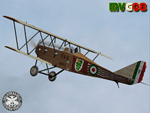
One of the faster airplane of WWI thanks to an innovative design, the S.V.A. was the first airplane conceived and built entirely in Italy. The initials "S.V.A." stand for the names of Savoia and Verduzio, the two engineers that designed it, and of Ansaldo, the firm that built over 2000 of them starting from 1917. The Ansaldo S.V.A. was an entire family of Italian reconnaissance biplane aircraft of World War I and the decade after. Originally conceived as a fighter, the S.V.A. was found inadequate for that role. Nevertheless, its impressive speed, range and operational ceiling made it an excellent reconnaissance aircraft and even light bomber.
The S.V.A. became legendary among pilots for some of its memorable flights; first, above all, the one over Vienna: this flight was an epic action performed by Italian poet and nationalist patriot Gabriele D'Annunzio on 9th August 1918. After the war, thanks to the strong determination of Arturo Ferrarin and Guido Masiero( the pilots), two S.V.A.9s (the two seater version of the S.V.A.-5) flew for 18000Km from Rome to Tokyo (14th February / 31st May 1920). Another S.V.A., piloted by Antonio Locatelli, first flew alone across the Andes (30th July 1919).
Production of the aircraft continued well after the war, with the final examples delivered in 1928. In 1919 some S.V.A.s were used in airmail routes by "Gruppo Sperimentale Comunicazioni Aeree", a group formed by the Italian Army in order to prove the feasibility of commercial air services. The Regia Aeronautica (Royal Italian Air Force, since 1923) employed the S.V.A. in operational units in Italy and North Africa (Lybia) as well as for pilot training. Many war-surplus planes were employed by commercial flying schools.
Complete aircraft, 5 Different Hi-Res GMax models (5 different versions, three S.V.A.-5 and two S.V.A.-9), features the usual moving parts, such as all flight controls. Five different liveries (three WWI and two post-war). VC and 2D Panel. Models, panels and paints by Manuele Villa, Flight dynamics, Handling notes and tutorials by FSAviator.
September 2008. Installation instructions included.
| Filename: | Ansaldo_SVA5_V01.zip |
| License: | Freeware |
| Added: | 6th May 2010, 08:49:53 |
| Downloads: | 3,207 |
| Author: | Manuele Villa |
| Size: | 40.55 MB |
| Category: Prepar3D V1-4 - Aircraft Repaints, Textures and Modifications | |
| Douglas C-54 (VH-PAF) Pacific Air Freighters |
|
Images related to this file:
File Description:
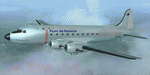
This folder contains a repaint for the Douglas C-54 / DC-4 by Flight Replicas. It shows Douglas DC-4 VH-PAF in the colors of Pacific Air Freighters.
VH-Paf was originally delivered new to the USAAF as 44-9126 on May 14, 1945. It transferred to the USAF in 1947 and was Withdrawn from service and stored at Davis Montahan, Arizona - December 1971. She was sold to Dross Metals in 1975 and entered onto the United States Aircraft Register as N9013V.She then flew for several companies in the US until she was seized by Bahamas authorities for alleged smuggling activities in April 1981. She was sold again, among others flying for Lynch Air Tankers Inc, Billings, Montana between 1984 and 1995 as 'City of Billings'.
She then went to Australia with Pacific Air Freighters Pty Ltd, arriving in Cairns on completion of the ferry flight to Australia in June 1995.
The ferry route was Chino - Hilo - Majuro - Honiara - Cairns, the first leg of this ferry flight took 14 hours. On arrival at Majuro some problems associated with Number 2 engine were worked on before departing for Honiara. During this leg Number 2 engine began to play up so it was shut down in flight. As the problem could not be rectified it was decided to carry on to Cairns as planned on three engines. She was ferried Cairns - Brisbane (Archerfield) on three engines in june 1995 and entered onto the Australian Aircraft Register as VH-PAF on January 31, 1996
She commenced long term contract with Goroka Air Service, Papua New Guinea - October 14, 1996. Returned to Brisbane after 3 months and placed in open storage and sold at auction to Airfreighters International P/L - May 22, 1997. Services were flown under the name of Pacific Air Freighters. Chartered by Ansett Australia Cargo for service Brisbane - Darwin - September 15, 2000. She was then sold to Historical Aviation Restoration Society Inc and ferried to Brisbane - Albion Park Regional Airport, where she was reregistered as VH-EAY - June 23, 2008. At present, she is undergoing complete overhaul for return to airworthy condition.
A repaint by Jan Kees Blom, based on the paintkit by Flight Replicas.
| Filename: | Douglas_C54_VHPAF_Pacific_Air_Freighters.zip |
| License: | Freeware |
| Added: | 28th November 2019, 23:21:36 |
| Downloads: | 102 |
| Author: | Jan Kees Blom |
| Size: | 58.97 MB |
| Category: Prepar3D V1-4 - Utilities | |
| Flightplan Visualizer 1.14 |
|
Images related to this file:
File Description:
Flightplan Visualizer (FV) version 1.14.0. Copyright 2018-2019 by Pelle F. S. Liljendal ([email protected]), all rights reserved.
FV comes with 629 pre-imported Commercial AI flightplans (+380 BizJet flightplans are available as a separate download). However you are able to import additional (AI) flightplans yourself. Once imported these (AI) flightplans can be visualized on a map-view, and the user will be able to search accross all these. Hence you can use the program as inspiration as to which routes to fly. E.g. you can search across all imported flightplans to find all flights in an A321 flying into/out from LDDU, or simply to look for all flights in a Boeing 747-8F.
Simply run the included installer to install the software. The program will be installed into "C:\Program Files (x86)\Flightplan Visualizer" and all datafiles will be installed into: "C:\Users\[UserName]\AppData\Roaming\FlightplanVisualizer". The program comes with a full manual explaining everything, and a 3 page quick manual to get you started. The first 3 times you run the program the quick manual will automatically open. The forum is hosted here: https://forum.aerosoft.com/index.php?/forum/919-flightplan-visualizer/
Version 1.14 Contains the following changes:
- Flightplan file-format was changed, to accommodate changes to the airline-data. In previous versions the airline ICAO-code had to be unique, hence not allowing old defunct airlines still remaining in the data-file when a new airline would be issued the same ICAO-code (now they can both exists, and many of the defunct have been marked as defunct).
- On start-up old flightplans in enabled folders will automatically be updated to the new format. If you have sub-folders containing additional flightplans, you should make sure these are enabled, in order to have these updated as well. Once they have been updated you can go ahead and disable these sub-folders again as you please.
- Its now possible to add user defined airlines, in case you want to add you own fictitious airlines (e.g. VA's) or you want to add airlines missing in the official data-files that I supply with the program (if this is the case, please notify me, so I can add these in the next release of the program).
- "Favorite aircraft" have been renamed into "Favorite aircraft-types", as it is the "types" of aircraft you mark. You don't mark a particular aircraft/cofiguration (like the PMDG B737-800 NGXu) as your favorite, but rather the "type" (B737-800). The file containing the (active) favorite aircraft-type selection was renamed as well (you don't have to do anything, the file is automatically renamed on start-up).
- Added a new Unit-Conversion form, letting the user convert units of: Speed, Lenght/Distance, Weight/Volume, Pressure and Temperature. The Weight/Volumne conversions is a bit special as it lets the user convert between weight (kg/lbs) and volume (liter/gal), thanks to a Fuel Density that defaults to 0.785, but can be changed by the user.
- All search-forms (seaching for airport, aircraft and airline) was changed to ignore whitespeaces (e.g. "airBaltic" vs. "air Baltic"), and ignore diacritics (e.g. "AerolÃnea" vs. "Aerolinea"), making it more easy to find what you are searching for in one go.
- The airline search-form will by default exclude airlines that have been marked as defunct. However a new "Include defunct" check-box have been added to the form, allowing you to include these (who am I to say you can not still use "Air Berlin", "Monarch" or "Thomas Cook" flightplans if you want to).
- Added 3 new columns to the airline search form showing commence/cease-date, and wheter or not the airline is "in use" (as carrier/operator by any of the active fligthplans).
- State is now by default excluded when using the airport search form, which make it a lot more convenient to find airports in the city of "New York". State can still be included in the search by choosing a different search-type using the combo-box in the upper/right corner.
- When Flightplan Visualizer needs for perform potentially lengthy operations it will spread the workload over the available cores of the CPU. However if you want to limit which cores it uses you can now set the affinity-mask in the settings form.
- The splash-screen shown when the program starts, and when reloading active flightplans was prevoiusly always shown on top (top-most), but if you find this anoying it can now be disabled in settings.
- Fixed: Warnings/errors regarding loading flightplans were only displayed at start-up. Now they are shown whenever all active flightplans are loaded (e.g. after having enabled a sub-folder).
- Data: The airline-data got a major update, and a bunch of new airlines were added, and the data for MANY others were updated. It is a manual process to update these, almost as funny to do as to watch paint dry ;-)
- Data: A few countries had a wrong- or no sub-region code, so these were fixed/updated. As usual, if any of you spot any erros, or missing data, please use the forum to notify me.
- Data: Additional info added to the aircraft-data (in preparation for some future plans).
- Flightplans: All flightplans bundled with the installer have been updated to the new file-format.
- Flightplans: Thanks to Ryan Carson (RCAI) for allowing me to bundle the installer with a few of his flightplans, so the installer comes with the very first winter 2019-2020 flightplan.
- Flightplans: The good people over at AIG (Alpha India Group) have been VERY busy since the last release, hence the installer comes with +130 new pre-imported flightplans, bringing the total to 629. This update concludes Summer 2019, and AIG already have the first Winter 2019/2020 flight-plans in beta-test.
Pelle
| Filename: | Flightplan_Visualizer_114.zip |
| License: | Freeware, limited distribution |
| Added: | 10th December 2019, 06:59:46 |
| Downloads: | 370 |
| Author: | Pelle Liljendal |
| Size: | 31.01 MB |
| Category: Flight Simulator X - Utilities | |
| FSDbBuild V1.0.2 for FStarToFS2K (Fully functional Release with Installer) |
|
File Description:
FSDbBuild is a Supplement for FStarToFS2K, it provides the possibility to build or update the Airport/Runway Database as used in FStarToFS2K. This Database is required because the from Jeppesen FliteStar/FliteMap exported Flight plans lack some important information as provided by FliteStar/FliteMap. The exported Flight plans don't provide the Information for the Departure Runway, which is a Requirement in Microsoft Flight Simulator 2000/2002/2004/FSX and Lockheed Martin Prepar3D.
In this current Version of the Utility, only the old plain Text-type Airport/Runway Data file - a Relict from Erni Alston's FSBuild 1.3.9 around the Year 2000 or even older - will be created, accompanied by a simple Indexing Mechanism Index file to speed-up the Search. A future Release will create a SQLite Database, which will be implemented also in FStarToFS2K V1.2.0 which will be released within the coming Weeks or Month. In Fact, this Airport/Runway Data file could also be used by Erni Alston's FSBuild, if there are any Users still around of this Flight Planning Software from 2000.
This program evolved from the necessity, that the with FStarToFS2K Program Package supplied Airport/Runway Data file was totally outdated, dating back to 2000 or even older! This shortcoming will now be eliminated, the User has now the possibility to build the Information according to the Data contained in his installed Microsoft Flight Simulator 2000/2002/2004/FSX or Lockheed Martin Prepar3D according the Scenery Configuration. For Installation and other Information consult the FSDbBuild Readme.txt file in the Zip-file.
Several Issues have been discovered and (hopefully) fixed. The detection of any Flight Simulator (MS FS 2002/2004/FSX or LM P3D V1.x) works now also correctly, also on 64bit machines. If you have the previous Versions of FSDbBuild (V1.0.0 & V1.0.1) installed, you should install now V1.0.2. Please note, this Utility is not only for Microsoft Flight Simulator X, it also supports Lockheed Martins Prepar3D V1.x!
| Filename: | FSDbBuild_V102_for_FStarToFS2K_Fully_functional_Re.zip |
| License: | Freeware |
| Added: | 25th July 2014, 00:00:24 |
| Downloads: | 396 |
| Author: | Conrad F. Staeheli |
| Size: | 4.43 MB |
| Category: Flight Simulator X - AFCAD Files | |
| Spitfire Aerodrome Airport (7N7), NJ |
|
File Description:
Located 02 miles S of Pedricktown, New Jersey on 48 acres of land, Spitfire Aerodrome Airport is a public asphalt single-strip field that allows transient craft to tie down on the apron. There are also helicopters based here on this field (note there is no Jet-A fuel available) so the helicopter start location will place you on the ramp.
Although this airport has a beacon, FSX for some reason does not include one with the stock airport file and I can't yet create rotating beacons so it is there and lit at night but does not rotate and is not as visible as the rotating ones. This will be addressed in a later update. Also take note of the layout of this airport, it requires that AI traffic cross the runway in order to taxi to either end for take off. AI aircraft DO NOT hold short when taxiing across runways (this is an FSX limitation), so use extreme caution on approach and departure to avoid any unfortunate runway incursions. Aircraft can fuel up by parking near the fuel truck beside the hangar south of the runway. If you have trouble locating the windsock, look on top of the hangar roof north of the runway. The crashed aircraft in the pond is fictional, there is a distinctive airplane-shaped object there in the satellite textures but I could not determine what this might be from aerial photos so I just crashed a plane there for kicks :)
Scenery constructed with use of satellite images/streetview/aerial photos - the author has not been there in person.
This scenery is meant to be used in conjunction with MegaScenery Earth New Jersey/Delaware 004. It is not required, but apron use is minimized to allow satellite scenery to show through as much as possible, and objects are placed based on the MSE textures - lack of it may make scenery look out of place.
| Filename: | Spitfire_Aerodrome_Airport_7N7_NJ.zip |
| License: | Freeware |
| Added: | 11th February 2011, 15:29:36 |
| Downloads: | 241 |
| Author: | Drew Sikora |
| Size: | 833.54 KB |
| Category: Flight Simulator X - AFCAD Files | |
| Murtala Muhammed International Airport, Lagos (DNMM) Version 2 |
|
File Description:
Hi again fellow simmers....
This is an major update to my previous AFCAD on this famous West African airport.
Here are all its features:
- ILS offset fixed as well as some smaller details, like the fact that rwys 1L/1R are
permanently closed to take-off and landings.
- Corrected runway lightings/markings.
- DME on Rwy 19R now working.
- Right Hand Pattern Approach/Take-off only.
- Added correct amount of gates at the International Terminal with parking codes for airlines
that actually fly to DNMM (British Airways, Air France, KLM, Alitalia, Virgin Atlantic,
Virgin Nigeria, Sabena, Swiss, Afriqiya, Emirates, Qatar Airways, South African Airways and
more).
- Domestic Terminal fully laid out and functional with domestic airline parkinting codes
(Albarka, Chanchangi, ADC, Belleview, Kabo Air, etc).
- Cargo parking fully functional.
- Military parking (C130, MiG-21, MiG-29, Alpha Jet, Jaguar, Tornado).
To Install:
1. DELETE THE PREVIOUS 'AF2_DNMM.BGL' file from the 'Flight Simulator X/Addon
Scenery/scenery' folder.
2. Extract all files from the downloaded '.zip' file.
3. Now COPY the NEW 'AF2_DNMM.BGL' file and place it into 'Flight Simulator X/Addon
Scenery/scenery' folder.
4. Start up the Flight sim and the changes will be present.
READ THIS !!!
I've tried to the best of my ability to produce and much detail as possible but i'm sure
something has been left out (there always is).
I've used the latest Jeppesen charts and other materials at my disposal and even my own
eyesight at great risk to myself (yep, even pilots are restricted from certain places at
airports)
Also, lots of airports have changed drasticly on the past couple years like Abuja airport
(DNAA) and I would love to do justice to it as its fast becoming a major hub in the region. I
would be willing to join forces to with anyone that is good with AFCAD on this project.
Enjoy!
[email protected]
13:44 30/07/2007
| Filename: | Murtala_Muhammed_International_Airport_Lagos_DNMM_.zip |
| License: | Freeware |
| Added: | 30th July 2007, 19:44:57 |
| Downloads: | 3,283 |
| Author: | usman saleh |
| Size: | 7.38 MB |
| Category: Flight Simulator 2004 - Scenery | |
| Bethel: Yukon Area |
|
Images related to this file:
File Description:
This presumes you have already installed Bethel PABE, Bethel Local Airfields, and Bethel St Mary's. In the Yukon River area of Alaska to the north of Bethel and to the south around the equally wide (but shorter) Kuskowim River there are small villages, served by flights from both Bethel PABE and St Mary's PASM. These villages are dependent upon fishing for survival, and in this flat and very wet terrain are equally dependent upon the gravel runways that link them to the outside world. There are no surfaced roads, and the rivers and their tributaries wind into the distance and are impractical delivery routes except from nearby places. In an area 300 miles by 200 miles most places cannot be described as "nearby". This post is of the small villages, including those previously posted; I had missed on picking up some terrain conflicts between nighttime grass and town textures. They are corrected here and included along with new airfields. Bethel and St Mary's are also reposted to include the further enlargement of parking for the increased number of small AI aircraft. These smaller airfields vary in quality; some have runway signage but most do not, and while some have two or even three hangars/garages/terminal buildings on the apron there are others who have none at all. The 39 small airfields included here are as listed:
Akiak AKI, Akiakchak Z13, Alakanuk AUK, Anvik PANV, Atmautluak 4A2, Cape Romanzof PACZ, Chefornak PACK, Chevak VAK, Eek EEK, Emmonak PAEM, Goodnews GNU, Grayling KGX, Holy Cross HCA, Hooper Bay PAHP, Kako 9AK2, Kalskag KLG, Kasigluk Z09, Kipnuk PAKI, Kongiganak PADY, Kotlik KOT, Kwethluk KWT, Kwigillingok A85, Marshall MLL, Mountain Village MOU, Napakiak WNA, Napaskiak PKA, Newtok PAEW, Nightmute IGT, Nunapichuk 16A, Pilot Station 0AK, Quinhagak PAQH, Russian Mission RSH, Scammon Bay SCM, Shageluk SHX, Sheldon Point SXP, Toksook Bay OOK, Tuluksak TLT, Tuntutuliak A61, Tununak 4KA.
I am currently going through the airfields again to check if further modifications are required, and I am also adding a few new ones. As I am going to be updating my computer I am posting now, complete or not, and I will post an update later of further additions.
| Filename: | Bethel_Yukon_Area.zip |
| License: | Freeware, limited distribution |
| Added: | 3rd May 2019, 17:20:53 |
| Downloads: | 170 |
| Author: | Roger Wensley |
| Size: | 6.3 MB |
| Category: Flight Simulator 2004 - Scenery | |
| Cameri and Turbigo sceneries (rev. 3) - north Italy |
|
Images related to this file:
File Description:
The following files are required by this file:
http://library.avsim.net/esearch.php?DLID=163723&UploadID=&Name=&FileName=&Author=&CatID=root
http://library.avsim.net/esearch.php?DLID=186350&UploadID=&Name=&FileName=&Author=&CatID=root
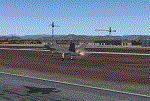
This scenery includes a global review of the previous Sceneries of Cameri Military airport (rev.2 Oct 2011), Cameri Museum (rev. 2 Oct 2011), Cameri Babini (rev. 2 oct 2011), Turbigo power station (rev. 2 Sep 2011 and update rev. 2.1 Oct 2014). All the above ARE NOW INCLUDED in this new unique scenery. Contents: Terrain in new version photo-realistic multi-seasons/night; adapted to Western Europe special elevation meshes; cover area of over 120 sqkm from Bellinzago-Oleggio (NW) to Magnago-Bienate (NE), from Novara (SW) to Cuggiono-Inveruno (SE); all the terrain has been restorated with 3D buildings, either through autogen that with specific dedicated objects (by GMax) and with significant addition of library objects ("dva51" and other existings). This scenery (located on the final approach to the Milan Malpensa international airport) includes the Cameri's Mil Airport with the Babini closed Army area and the planes of the Historical Museum of the airport; it is also included the thermoelectric power station of Turbigo. All the buildings are placed to recreate cities and villages covered in the photo-realistic terrain, including Bellinzago, Bienate, Buscate, Caltignaga, Cameri, Castano Primo, Castelletto Ticino, Cuggiono, Galliate, Inveruno, Magnago, Malvaglio, Nibbia, Novara, Oleggio, Pernate, Robecchetto, Romentino, Sant'Anna, San Pietro Mosezzo, Turbigo , Vanzaghello, and the covered Turin-Milan highway.
Details of the new buildings for the care and maintenance to F35 completely recreated, as obtainable from the current satellite view.
It REQUIRES the use of the following, to be downloaded separately :
- the libraries dva51 - the system of vegetations TreePlanter - the West Europe Meshes of Daniele Lanfranchi. See the Readme file. Enjoy!
Videos available here:
https://dl.dropboxusercontent.com/u/38829151/FS9/Cameri_Turbigo_v3%20shots.WMV
http://youtu.be/yVI2KeJKS5o
http://youtu.be/oKa0e_5kxIk
| Filename: | Cameri_and_Turbigo_sceneries_rev_3__north_Italy.zip |
| License: | Freeware |
| Added: | 21st January 2015, 21:32:36 |
| Downloads: | 994 |
| Author: | Aldo Della Vedova, Daniele Lanfranchi and Gian Mario Verga |
| Size: | 103.7 MB |
| Category: Prepar3D V1-4 - Utilities | |
| FS Flight Builder |
|
Images related to this file:
File Description:

New version: Updated installer and auto-update functionality along with chart downloaded changes to support browser updated security measures.
FS Flight Builder is a utility for general aviation flying that will build flight files for FSX (flt), FSX Steam Edition (flt), and Prepar3D (fxml) based on waypoints and other data either entered manually or imported from SkyVector using the Plain Text Link information. Among other things, you can select your starting position, aircraft, and VFR or IFR flight plan.
One of the most interesting features of the application is that it will include a Briefing file, added to the aircraft's built-in kneedboard, that will include departure and destination airport information (runways, frequencies, weather, and charts) as well as navigation frequencies along the route.
Have you ever started up flight simulator and wondered “where do I want to go today� The new Destination Chooser functionality can help to solve that problem. The screen allows you to enter your departure airport and choose various parameters for your destination (like min and max distance, tower availability, ILS availability, runway length requirements, etc.).
How to install:
***************
Run Setup.exe and simply follow the installation wizard.
When you run the application for the first time (make sure your flight simulator is not running), it will build the database from your flight sim data. Be patient. It could take a few minutes.
It will attempt to locate your flight sim folder and flight plan folders automatically. If it can't find them, however, you'll need to select them from the options menu.
IMPORTANT!
Because FS Flight Builder saves to your Flight Sim directories, it MUST be run in Administrator mode. To do this, right-click on the desktop icon, select the Compatibility tab, and check the Run as administrator checkbox.
IMPORTANT!
The airport and navaid databases for FS Flight Builder are built using Peter Dowson's excellent Make Runway utility and the equally excellent BGL2XML utility from ScruffyDuck Software. The links to these utilities are below. They must be added to the main FSX or Prepar3D folder.
Peter Dowson's website: http://www.schiratti.com/dowson.html
ScruffyDick Software website: http://www.scruffyduck.org/bgl2xml/4584282773
It's also important to note that Version 1.7 of BGL2XML is required for Prepar3D V3 and higher.
Author:
*******
Tom Arduini
The latest installer can always be found at
http://www.arduiniwebdevelopment.com/fsflightbuilder/fsflightbuilder.zip
| Filename: | FS_Flight_Builder.zip |
| License: | Freeware |
| Added: | 24th December 2018, 02:41:36 |
| Downloads: | 408 |
| Author: | Tom Arduini |
| Size: | 69.56 MB |
| Category: Flight Simulator X - Original Aircraft | |
| Airbus A318 FD Special Version V3 - Light Pack |
|
Images related to this file:
File Description:

This is the new version of my Airbus A318 with the Panel in V3 opened on the A321 - here in a light pack version, included is 1 livery only (Frontier Airlines NR807 Painted by Derek Mayer & Steve Mac Bee of PA Team).
This light pack contains only the user manual in english version (and low resolution). If you want the french version of this manual, use the "zipdrive" function with the complete pack of this aircraft (search by name file "pa318fd_v3.zip"). This light version has been made by request for all those with low download speeds and limits.
The original complete pack is available HERE (filename: pa318fd_v3.zip)
I remind you that this aircraft is based on the Project Airbus A318, with an ehanced panel based on the work of stefan Liebe.
This latest development can see the more realistic Airbus available as freeware. With a new version of the panel, the aircraft has a 100% cold & dark Status at the start of a flight, a real fuel system management with all valves, piumps and crossfeed work, the complete Bleed circuit with X-bleed, a real engines manual startup procedure like the real aircraft. I have also ehanced the navigation display with TCAS function in ARC and NAV mode; There is also the engines failure procedure to work (fire, oil leaks....) and many improved function that I cannot describe here. The aircraft comes with user manual in English and in French, and it is essantial to read it before you fly.
All the functions of the V2 have been kept and improved, like the vertical navigation gauge, the terrain radar map on the navigation display, the autolanding function, the SFCC.
This version is only in CFm engines, but with real engine data (CFM56-5B9) and custom HD sounds. Now, the Fly By wire works in 2 modes: "Normal Law" and "Direct Law". I put 300 hours into the development of this panel and I hope that you will like it.
Please, note that this panel is the v3.05 version, witch fixes the bugs of the first version that came with the A321 (there is an update panel for the A321).
So, It seems that this aircraft works with PREPAR3D
Francois Dore
| Filename: | Airbus_A318_FD_Special_Version_V3__Light_Pack.zip |
| License: | Freeware, limited distribution |
| Added: | 14th July 2012, 15:34:06 |
| Downloads: | 6,727 |
| Author: | Francois Dore, Project Airbus |
| Size: | 64.88 MB |


© 2001-2026 AVSIM Online
All Rights Reserved
Privacy Policy |