
Where Flight Simulation Enthusiasts Gather from Around the World!
AVSIM Library - Search Results

| Category: Online ATC - Software | |
| ServInfo version 2.02 |

|
File Description:
ServInfo is a utility that provides information for the on-line flying activity in the VATSIM, IVAO, FPI or any other network that uses the SquawkBox/ProController environment.
Data are downloaded from the VATSIM, IVAO, FPI or any other network and are presented in a convenient format, allowing users to easily find out details about the current on-line activity worldwide and for specific countries, FIRs, ARTCCs or airports, including details for each flight and controllers ATIS messages. This information can be displayed in both tabular and graphical format on a map display.
Additionally, ServInfo provides the possibility to display response times for all the network servers, display channel and user information for voice servers, retrieve and decode METAR & TAF reports for airports or whole regions and notify you when selected ATC positions open or close.
A ServInfo gauge is also provided, that can be installed your FS2000/2002/2004 aircraft panels and display information about ATC availability while you fly online.
Version 2.02 adds support for IVAO TeamSpeak voice servers, display of ATC bookings for all networks and display of VATSIM prefiled flight plans.
| Filename: | ServInfo_version_202.zip |
| License: | Freeware, limited distribution |
| Added: | 15th December 2003, 05:50:53 |
| Downloads: | 439,732 |
| Author: | Michael Frantzeskakis |
| Size: | 2.86 MB |
| Category: Flight Simulator 2004 - Panels | |
| F16 |
|
File Description:
FS2004 Panel, F16 Air Show Tour. The panel of this jet fighter has been designed for cross country flying to events worldwide. The 2D cockpit is packed with new gauges that complement this high performance, yet docile aircraft. All gauges, lights, etc. are functional, easy to read, and are panel installed except GPS 500. For long distance flights, the panel contains on-demand refueling capabilities for both ground and air operations. A few of the new gauges are; 180-degree scan navigational radar, triple mode interceptor-refueling-terrain radar, refueling gauge with command screen, fuel center with time/distance remaining computer, new Descentometer for Mach-plus aircraft, analog engine gauges including thrust and fuel efficiency, plus a hangar full of warning and indicator lights. The intercept mode of the ai-radar feeds info to the autopilot to assist in the rendezvous with tanker to allow all-weather, day or night air refueling. Digital data for AP, radio, altimeter, timer, and Descentometer is input via a central keypad. Acknowledge ATC instructions using joystick. Designed for use with Kirk Olsson's F16 Viper. Includes 15 page illustrated instructions plus Intercept and Refueling tutorial. By Glenn Copeland
| Filename: | F16.zip |
| License: | Freeware |
| Added: | 12th January 2007, 03:00:43 |
| Downloads: | 5,782 |
| Author: | Glenn Copeland |
| Size: | 1.83 MB |
| Category: Flight Simulator 2004 - Utilities | |
| AIRound v1.0 |
|
File Description:
FS2004 AIRound v1.0. This utility displays AI aircraft around user plane in AI map or AI list forms, enables AI aircraft forward, fly by or spot plane views and has its own built-in traffic alert system. In forward view eyepoint is tied to AI aircraft in front of virtual cockpit with ability to change look direction. Fly by view has adjustable parameters and random options. Departure and arrival airports and time, total about 40 ATC, state, control surfaces, radio, etc. AI aircraft parameters are available. AI map has set of scales and can be placed everywhere within 160nm AI aircraft zone around user plane. You can customize AI aircraft appearance on the map by changing mark colors, shapes, sizes and data tag types. Utility has mini panel with small scalable AI map for quick in-flight AI aircraft related analysis. Traffic alert panel helps to avoid collision with AI aircraft. Also it may be used as a navigation gauge in escort missions assisting to find, get closer and follow accompanied AI aircraft. Utility works both in FS windowed and full screen modes and doesn't require any other add-on modules or programs. You have 10 FS sessions for free.
| Filename: | AIRound_v10.zip |
| License: | Shareware, time limited |
| Added: | 12th February 2006, 22:02:49 |
| Downloads: | 5,267 |
| Author: | Valery Stenin |
| Size: | 612.81 KB |
| Category: Flight Simulator 2004 - Panels | |
| Piper PA-23 Apache Panel Upgrade (2D and VC) |
|
File Description:
If you’ve flown in Lynn and Bill Lyon’s Piper PA-23 Apache then you’ll likely know where I’m coming from when I say it’s one of the best payware old GA aircraft models out there. Like the Maule and a few others, it’s one of the few freeware packages out there that could have easily been released as payware (and I think may have initially been payware), and I for one, am very grateful it was not.
However, one of the big gripes with the Apache’s package is the lack of a DME display unit to couple with the Collins multi-comms/avionics gauge, a directional gyro with a heading bug and a suitable autopilot insert to bind the avionics to one AP unit. Initially the PA-23 was sold as an IFR capable plane, with the autopilot being either “good trimming” or the person in the right seat flying the plane. In the decades which followed, autopilots and updated gear became commonplace and most Piper PA-23’s were outfitted with modern avionics.
This upgrade will replace the bank indicator with a Directional Gyro w/ Heading Bug, add a DME indicator, and add a Bendix/King KAP 140 autopilot controller.
| Filename: | Piper_PA23_Apache_Panel_Upgrade_2D_and_VC.zip |
| License: | Freeware |
| Added: | 12th January 2008, 09:58:07 |
| Downloads: | 1,511 |
| Author: | Mark McCoy |
| Size: | 1.61 MB |
| Category: Flight Simulator X - Gauges | |
| Beechcraft Baron 58 FULL Engine Gauges for Saitek FIP's |
|
Images related to this file:
File Description:
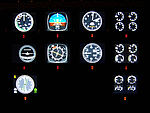
10 Left/Right analog Engine Gauges plus Fuel Level for the Beechcraft Baron 58 across 3 Saitek FIP's. I recommend these if you have 9 or more Saitek FIP's. However you can always scroll through the 3 gauges if you have less.
These compliment Philippe Verhaege's fantastic Beechcraft Baron 58 main gauges "essential_gauges.zip" nicely.
I grouped the Left/Right Manifold Pressure and RPM onto the first Saitek FIP. The Fuel Flow and Cylinder Head/Exhaust Gas Temperature onto the second. The Oil Temp/Pressure onto the third. Since there was room and they are directly below the engine gauges, I also incorporated the Fuel Level gauges.
The beautiful Freeware gauge artwork is by Laurent Ferrari (FlyFrog) of the www.thegaugesfactory.org (Website now dead). They even have the "Beechcraft" logo. Laurent's gauges were originally designed for high end custom cockpit gauges that I resized and configured to fit the Saitek FIP's. I customized XML's to position and calibrate to Flight Simulator X.
Thanks to Horacio for providing the original artwork via a zip file.
Installation requires simple copy and paste. These were only tested on a Windows 7 computer with a X99 i7-5960X processor. You may have to adjust the needle reaction speeds for your machine.
| Filename: | Beechcraft_Baron_58_FULL_Engine_Gauges_for_Saitek_.zip |
| License: | Freeware |
| Added: | 19th March 2015, 09:44:28 |
| Downloads: | 325 |
| Author: | Jack Pickett, Laurent Ferrari |
| Size: | 677.35 KB |
| Category: Flight Simulator X - Aircraft Repaints, Textures and Modifications | |
| Modification of the power table for the Continental IO-520-F Cessna CU206G Stationair 6 II de CARENADO. |
|
Images related to this file:
File Description:

New update of flight dynamics settings.
Corrected the indicated speed error (KIAS) vs the true speed (KTAS) according to the data suggested in the pilot's operating manual (POH).
In some cases the position of the center of gravity unladen weight is corrected for a better weight and balance of the airplane.
Actual direct references from Pilot Operations Manual (POH) for specific details, Power,
Nose or pitch position and weight and balance settings, airplane geometry, piston or turbine engine data,
propeller and everything that refers to references, also the real references of the manufacturers of sea engines whatever the specific case.
This model in particular, I am sure that the gauges have a difference error between what the indicator of
manifold pressure and actual airplane reading, similar case to the PA34 Seneca II, the RPM tachometer needle marked 2500 and the
Maus cursor on the tachometer said there were 2200 rpm.
In this modification of the Cessna CU206G Stationair 6 II there is still an error that could not be adjusted to what it says in manual
pilot operation (POH) because it is a gauge error and not an adjustment error in the .air file.
When the error is corrected it will be published together with a new and improved VC.
| Filename: | Modification_of_the_power_table_for_the_Continenta.zip |
| License: | Freeware |
| Added: | 15th April 2020, 18:48:28 |
| Downloads: | 147 |
| Author: | Rafael Ledezma |
| Size: | 642.83 KB |
| Category: Flight Simulator X - Panels | |
| F-111A |
|
File Description:
The purpose of this up date is because of the restore issue at the AVSIM lib. Secondly, this version V1.01 includes a bug fix for the compass gauge and the logic of the sonic sound. This panel has been designed according to the �F-111 Aardvark Pilot's Flight Operating Instructions� document published by the USAF. The design goal was to develop a panel and gauges
as close as possible to the original aircraft. It was not possible to program all the functionsand sub-panels, because of the complexity of the system and because of limitations in FSX.
The panel is a 2D panel. The panel has been developed from scratch as well as all the gauges.
All gauges are programmed in XML with the ACE tool from the MS SDK SP2 package.
The aircraft model, development by Mike Stone, has been used as the model for this panel. The model is part of the package. Other models may by used as well. However, the Light section and Flaps section in the aircraft.cfg may be modified accordingly in order to meet the requirements of this panel. There is an SP1 and SP2 Version. There are no tooltips in the SP1 Version. For installation and functional instructions, please read the PDF-Document
�F-111A-Panel-Documentation" which is included in the ZIP-File.
| Filename: | F111A.zip |
| License: | Freeware |
| Added: | 1st November 2009, 22:18:36 |
| Downloads: | 335 |
| Author: | Dietmar Loleit |
| Size: | 12.95 MB |
| Category: Flight Simulator 2004 - Panels | |
| New Vickers VC10 Panel, Part 4 - Missing bmp files |
|
File Description:
There were 2 missing bmps relating to Nav_Info from my 'New Vickers VC10 Panel, Part 4' (new_vc10_panel_project_4_maintenance_2.zip). In order for it to work correctly you need these files.
This project is based on David Maltby's panel. This update the first in the 50th Anniversary year of the VC10 (there are currently nine still flying) brings to fruition a number of extensive works in progress that have involved almost every gauge! The aircraft now has a fully integrated pressurisation and oxygen delivery system that conforms not only to the Flight Manual but also to ICAO regulations. Therefore cockpit mismanagement can potentially result in hypoxia! Besides this there are also a large number of new additions both in conformity with the Flight Manual and as extra visuals. It's now possible to "see" the Marshaller - There are new speed calls - and whilst you are preoccupied with your checklists the ground staff can be heard going about their business preparing for the flight as indicated also on the Ignition Panel. For a full list of changes view the VC10 Panel Update 4.doc
For this latest update thanks must go to Edi Hirsch for his excellent NavInfo gauges and again to the Gurus at FSDeveloper.com for their advice. To install make sure you have installed the previous (linked) files beforehand.
| Filename: | New_Vickers_VC10_Panel_Part_4__Missing_bmp_files.zip |
| License: | Freeware |
| Added: | 11th April 2012, 18:28:42 |
| Downloads: | 1,353 |
| Author: | Nicholas Weber |
| Size: | 10.5 KB |
| Category: Flight Simulator 2004 - Miscellaneous Files | |
| Nick's Prop Dust with Control Gauges |
|
File Description:
Prop aircraft users are in for a real treat. This gauge/effects package automatically senses the terrain the aircraft is in contact with or flying over and changes the dust and water effects for the aircrafts prop/rotor wash based on dirt, dry mud or clay, snow, rain, water, ice, sand, gravel and short grass. In addition the real time surface conditions are also sensed. In example, a dry asphalt or concrete runway will produce no dust, however, the same runway with snow conditions present will automatically produce a throttle controlled snow blowing effect. The 25 included effects files and 5 gauges have been tuned to reflect a realistic representation of the dust/mist produced by different types of aircraft taking off or touching down on different terrains and surface conditions. The effects are properly influenced by cross wind conditions and reverse pitch is also supported. Effects files and gauges are included for large and small, single engine, multi-engine, amphibians, helicopters and massive scale military and commercial transports. It requires editing/adding lines in the aircraft.cfg and panel.cfg files. The README files include very complete and comprehensive instructions including a quick and easy copy/paste file for all the Microsoft prop aircraft and tutorial on making custom gauges from the ones provided.
By Nick Needham
| Filename: | Nicks_Prop_Dust_with_Control_Gauges.zip |
| License: | Freeware |
| Added: | 8th December 2003, 17:07:07 |
| Downloads: | 7,298 |
| Author: | Nick Needham |
| Size: | 1.22 MB |
| Category: Flight Simulator 2002 - Panels | |
| Purple Panel Project Black (v5) |
|
File Description:
This is a new release for the purple panel project - it includes panels for Single Piston
Engine, Twin Piston Engine, Single Jet, Twin Jet, Twin TurboProp, along with 3 and 4 Jet
aircraft (also included are instructions on adding a water rudder to any of the panels). These
are 'all-in-one' panels that include everything needed to fly in one window/panel. Features
include pushback, switches for lights, door and power along with a variety of other things
(all switches have tooltip IDs), radio altimeter, EADI w/Glideslope indicator, OAT, Clock,
Taxi Control, APU (where applicable), GPS, Smoke, AutoBrake, TCAS, Spoiler Arming, full fuel
control, Dual Needle RMI, the 'blue' radio plus all the bells and whistles I could fit in the
panel like warning lights, pressure and windspeed indicators ect... This release corrects some
minor issues with v3 and is a major rework with new taxi and pushback gauges, a minimum of
gauge relocation from panel to panel and a improved background bitmap. As with v3 prop and
mixture control are in place on applicable aircraft plus the ADF radio and transponder are the
same from panel to panel and do not move as they did in v3. It is the perfect 'standard panel' for use with nearly all the aircraft one can fly in FS2002... No previous versions are
required to use these panels.
| Filename: | Purple_Panel_Project_Black_v5.zip |
| License: | Freeware, limited distribution |
| Added: | 5th May 2003, 12:18:13 |
| Downloads: | 1,654 |
| Author: | Don Janusz |
| Size: | 11.77 MB |


© 2001-2026 AVSIM Online
All Rights Reserved
Privacy Policy |