
Where Flight Simulation Enthusiasts Gather from Around the World!
AVSIM Library - Search Results

| Category: Flight Simulator X - Panels | |
| Mini Panel |

|
Images related to this file:
File Description:
FSX Mini Panel is intended to replace the global default Mini Panel. The panel is made up of good basic freeware flight instruments that can be used for any type of aircraft. This gives the pilot a common set of gauges to use on multiple aircraft. Additional navigation and control surfaces gauges are provided. Information is provided for wind direction, drift, ETA, ETE, direction, distance and name of the nearest airport; direction and distance to the next waypoint set in the GPS; and radar/absolute altitude. Lee Hetherington excellent TCAS gauge is also available. Karol Chlebowski's TFR gauge is included that allow flight at extremely low altitudes. Extensive tooltips have been provided on most gauges.
| Filename: | Mini_Panel.zip |
| License: | Freeware |
| Added: | 1st September 2010, 11:53:49 |
| Downloads: | 964 |
| Author: | Bill McClellan |
| Size: | 8.29 MB |
| Category: Flight Simulator 2004 - Panels | |
| Mini Panel |
|
Images related to this file:
File Description:
FS2004 Mini Panel is intended to replace the global default minipanel. The panel is made up of good basic freeware flight instruments that can be used for any type of aircraft. This gives the pilot a common set of gauges to use on multiple aircraft. Additional navigation and control surfaces gauges are provided. Information is provided for wind direction, drift, ETA, ETE, direction, distance and name of the nearest airport; direction and distance to the next waypoint set in the GPS; and radar/absolute altitude. Lee Hetherington excellent TCAS gauge is also available. Karol Chlebowski's TFR gauge is included that allow flight at extremely low altitudes. Extensive tooltips have been provided on most gauges.
| Filename: | Mini_Panel.zip |
| License: | Freeware |
| Added: | 1st September 2010, 11:54:46 |
| Downloads: | 577 |
| Author: | Bill McClellan |
| Size: | 5.49 MB |
| Category: Flight Simulator 2004 - Panels | |
| Douglas DC-3 Three Fuel Tank Modification |
|
File Description:
This gauge and modification is applicable only to the FS2004 DC-3. Its purpose is to disable FS2004's default characteristic of setting the fuel flow to the engines from "all" tanks. There is no "all" setting on a real DC-3. This gauge will disable the fuel flow from "all" tanks, by checking to see if the selection is in the "all" position and if so, changing it to supply fuel to the left engine from the left main tank, and fuel to the right engine from right main tank. It means, however, that you must remember to manually switch tanks to use fuel from all of them during the flight.
| Filename: | Douglas_DC3_Three_Fuel_Tank_Modification.zip |
| License: | Freeware |
| Added: | 12th January 2004, 23:57:28 |
| Downloads: | 1,338 |
| Author: | Dave Bitzer, Mark Beaumont |
| Size: | 25.09 KB |
| Category: Flight Simulator X - Gauges | |
| Garmin G1000 and CRJ-700 FSX SP-1 Gauge Fix |
|
File Description:
FSX SP-1 fixed some of the Instrument Panel issues in the original release, but they
missed a couple of items that should have been picked up. After a full reinstall of FSX and the SP-1 Patch, you can use these files to correct the gauge errors. As a pilot and former navigator, I couldn't let these go.
The TAS display on all installed G1000 MFDs is displayed as CS, and the TAS in the
CRJ-700 is shown as IAS. The two enclosed zip files will correct both issues. The
specific and simple instructions are included in each file in Readme.txt files.
Happy Flying - Per Ardua Ad Astra!
| Filename: | Garmin_G1000_and_CRJ700_FSX_SP1_Gauge_Fix.zip |
| License: | Freeware, limited distribution |
| Added: | 19th May 2007, 19:47:44 |
| Downloads: | 2,503 |
| Author: | Mark Chapman |
| Size: | 2.94 MB |
| Category: Flight Simulator 2004 - Gauges | |
| UPDATE 2 for Magnetic Compass gauge with selectable DIGITAL display. |
|
Images related to this file:
File Description:
UPDATE 2 for Magnetic Compass gauge with selectable DIGITAL display. In response to several requests, I have added code to the mag_compass.CAB file which will allow the Compass face to be lighted at night when cockpit lights are on. As this file contains only the replacement.cab file, no editing of any panel.cfg files where you have installed the Compass with Digital display is required. The installation of the original package - Digital_Compass.zip - is necessary. Please unzip to a temporary folder and follow the simple installation instructions. Compiled for your flying enjoyment by David "Opa" Marshall.
| Filename: | UPDATE_2_for_Magnetic_Compass_gauge_with_selectabl.zip |
| License: | Freeware |
| Added: | 10th December 2010, 02:43:20 |
| Downloads: | 458 |
| Author: | David "Opa" Marshall |
| Size: | 51.79 KB |
| Category: Flight Simulator X - Gauges | |
| V-One Gauge for B737-200/Adv with Call-outs |
|
File Description:
This gauge is written specifically for Captain Sim's B737-200 and B737-200Adv aircraft (http://www.captainsim.com/products/x737/). It will inform you of appropriate take-off speeds (V-speeds), take-off trim units, Vref landing speeds, elapsed flight time, fuel used, optimum cruise altitude, optimum ERP setting and Maximum Climb Thrust (MCT). It will also indicate when the aircraft's gross weight has been exceeded and if an incorrect flap has been set. Take-off speeds are adjusted for altitude and temperature values. Flight time and fuel used can be reset at any time by clicking on their respective displays. Provisions have been made to allow user adjustments to Optimum Altitude, Optimum EPR and Center of Gravity values.
Seven F/O take-off call-outs are included: 80 knots, V1, VR, V2, Gear-up, Flaps-up and Slats Retract.
| Filename: | VOne_Gauge_for_B737200Adv_with_Callouts.zip |
| License: | Freeware, limited distribution |
| Added: | 22nd May 2012, 03:36:23 |
| Downloads: | 2,083 |
| Author: | Paul Tally |
| Size: | 1.04 MB |
| Category: Flight Simulator X - Gauges | |
| V-One Gauge for B737-200/Adv/C/F Complete |
|
Images related to this file:
File Description:
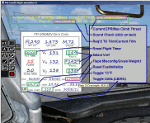
Twenty call-outs sounds integrated into gauge.
Take-off V-Speeds calculated for Flaps 1, 5, 10, 15 or 25 with temperature and altitude adjustments.
Take-off speed bugs and Command speed bug automatically set for: V1, Vr, V2 (cmd speed bug), V2 + 15 and
flaps-up maneuvering speed (clean speed).
Optimum altitude and optimum EPR (EPR calc for M.728) are continually calculated.
Flap misconfiguration is displayed in RED text. Tooltip will indicate overweight value (LB/KG).
Take-off trim calculated for current gross weight.
Maximum Climb Thrust (MCT) calculated based on current TAT temperature.
Current EPR displayed adjacent to MCT with 3 decimal precision.
Display units can be toggled between LB and KG (default LB).
Resettable fuel use.
Resettable flight timer.
Selectable Vref landing configurations, Vref15, Vref30 or Vref40 (defaults to Vref30).
Approach / landing speed bugs and Command speed bug automatically set for: Vref, Vref + 5 (cmd speed bug),
Vref + 15 and flaps-up maneuvering speed (clean speed).
ZFW, Fuel, CG, Gross Weight and Barometric Pressure MSL (QNH) displayed.
| Filename: | VOne_Gauge_for_B737200AdvCF_Complete.zip |
| License: | Freeware, limited distribution |
| Added: | 31st December 2012, 22:30:01 |
| Downloads: | 2,096 |
| Author: | Paul Tally |
| Size: | 3.55 MB |
| Category: Flight Simulator X - Gauges | |
| V-One Gauge for Boeing 727-100/200/F (Complete) |
|
Images related to this file:
File Description:
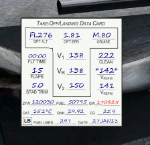
New features in this version are in indicated in '[ ]'.
Twenty call-outs sounds integrated into gauge [13 new call-outs].
Take-off V-Speeds calculated for Flaps 5, 15, or 25 with temperature and altitude adjustments.
[Take-off speed bugs and Command speed bug automatically set for: V1/Vr, V2, V2 + 15].
[Flaps-up maneuvering speed (clean speed) bug set after flaps-up].
Optimum altitude and optimum EPR (EPR calc for M.80) are continually calculated.
Gross Weight overage will display in 'red' text. Tooltip indicates overweight value (LB/KG).
Take-off trim calculated for current gross weight.
Maximum Climb Thrust (MCT) calculated based on current TAT temperature.
[Current EPR displayed adjacent to MCT for ease of use during climb phase].
Display units can be toggled between LB and KG (default LB).
Outside air Temperature can be toggle between Fahrenheit and Celsius.
Resettable fuel use.
Resettable flight timer.
[Selectable Vref landing configurations, Vref30 (default) or Vref40].
[Approach / landing speed bugs and Command speed bug automatically set for: Vref, Vref + 5, Vref + 15].
ZFW, Fuel, CG, Gross Weight and Barometric Pressure MSL (QNH) displayed.
['Barometer Set' call-out occurs when pressing keyboard letter 'B' (V-One gauge must be open)].
[Airspeed gauge enhanced: CMD speed bug colorized orange and notch added for visibly of tick marks below].
[Decision Height adjustment now on Data Card in hidden click-spot located on upper right corner].
[Now installation to a single location will work for all variants].
| Filename: | VOne_Gauge_for_Boeing_727100200F_Complete.zip |
| License: | Freeware, limited distribution |
| Added: | 28th January 2013, 11:30:53 |
| Downloads: | 1,512 |
| Author: | Paul Tally |
| Size: | 3.55 MB |
| Category: Dovetail Games Flight Sim World - Gauges | |
| FSX c208b aircraft.cfg, panel.cfg & fixed gauge for use in FSW |
|
File Description:
Aircraft.cfg files to allow the default FSX c20b to be used in FSW.
Panel.cfg files to avoid the startup error message.
Fixed itt & fuel flow gauges.
| Filename: | FSX_c208b_aircraftcfg_panelcfg__fixed_gauge_for_us.zip |
| License: | Freeware |
| Added: | 26th November 2017, 18:07:25 |
| Downloads: | 74 |
| Author: | Paul Kemp |
| Size: | 1.45 MB |
| Category: Flight Simulator 2004 - Gauges | |
| County Air Ambulance Eurocopter EC-135 (G-WMAS) **GAUGE FIX** |
|
File Description:
THIS IS VERSION 1.01 WHICH IS JUST A FIX FOR THE GAUGES ON MY PREVIOUS EC-135 PAINT , '' ec_g-wmas.zip '' REQUIRED.
| Filename: | County_Air_Ambulance_Eurocopter_EC135_GWMAS_GAUGE_.zip |
| License: | Freeware, limited distribution |
| Added: | 26th May 2005, 00:30:13 |
| Downloads: | 2,604 |
| Author: | Josh Moody |
| Size: | 3.95 MB |


© 2001-2026 AVSIM Online
All Rights Reserved
Privacy Policy |