
Where Flight Simulation Enthusiasts Gather from Around the World!
AVSIM Library - Search Results

| Category: Flight Simulator X - Gauges | |
| TCAS and Traffic Display Gauge V2.0 |

|
Images related to this file:
File Description:
This TCAS and Traffic Display Gauge Version 2.0 includes significant improvements from V1.0. It has been developed for the FSX Flight Simulator SP1/2 also. It should also work with Acceleration.The functionality for the TCAS part is based on general specs for commercial aircrafts. It does not provide in detail the function for a specific aircraft model. It is a generic gauge, and can be simple added to any aircraft as a standalone popup window.
In addition the gauge provides a AI traffic display in the ranges of 10,20, and 40 miles.Within this display mode, no TCAS rules are valid, which means all AI aircraft are displayed independent of any altitude or distance.
Improvements in V2.0 are: 1: Full TCAS and traffic display capability is provided even though your aircraft is on the ground. Only the trigger of the alarm/warn sound and the blinking lamp display willbe blocked. 2: An AI HDG pointer will be displayed. It shows in which direction the AI is moving. 3: A bearing pointer has been introduced. It allows the pilot to point to a specific AI.4: The AI additional text info display follows the structure of an ATC text.5:The AI additional text can be selected individually per AI with a mouse click.
6: Each AI display contains a ID index number (0 � 20).7: The design of the TCAS and Traffic Display Box has been updated.8: Increased the number of AIs displayed on the screen in display mode.
For installation and functional description look at the doc inside the ZIp.
CREDIT goes to :
Stefan Schneider for his support on special XML issues and TCAS functionality.
Bob Familton for his review of the documentation and testing for SP1 FSX.
Doug Dawson for his dsd-XML-sound interface in order to generate the sounds.
| Filename: | TCAS_and_Traffic_Display_Gauge_V20.zip |
| License: | Freeware |
| Added: | 25th October 2010, 13:37:36 |
| Downloads: | 3,761 |
| Author: | Dietmar Loleit |
| Size: | 981.32 KB |
| Category: Flight Simulator X - Gauges | |
| HSI gauge for PF instrument panel |
|
File Description:
This HSI Glass type gauge provides following utilities:
Digital values for: VOR 1 course, Heading, Autopilot heading, VOR 1 bearing, VOR 2 bearing, ADF bearing, DME 1, DME 2.
Needles of: VOR 1, VOR 2, ADF and horizontal situation bar.
Indexes of: Vertical situation bug and Autopilot heading.
Knobs functions: Right, allows to move autopilot index and left, allows to move VOR 1 course.
Instructions in English and French
| Filename: | HSI_gauge_for_PF_instrument_panel.zip |
| License: | Freeware |
| Added: | 27th March 2011, 02:38:16 |
| Downloads: | 1,310 |
| Author: | Philippe Verhaege |
| Size: | 110.14 KB |
| Category: Flight Simulator 2004 - Gauges | |
| Sound Gauge for C/C++ Gauges |
|
File Description:
A gauge to play sounds, based on commands received from other C++ gauges; not for use with XML gauges. Tested with both FS9 and FSX. This release replaces the previous, failed one. Package includes headers and library files, descriptions of all the available commands, and a simple example project.
| Filename: | Sound_Gauge_for_CC_Gauges.zip |
| License: | Freeware |
| Added: | 13th June 2011, 19:33:19 |
| Downloads: | 422 |
| Author: | Doug Dawson |
| Size: | 577.01 KB |
| Category: Flight Simulator 2004 - Panels | |
| Cessna C172SP - 2D Gauge Panel File |
|
File Description:
FS9 Default Cessna C172SP 2D Gauge Panel File. This is an FS9 default cessna c172sp panel file. I made this file ONLY for building my cessna home cockpit.
But i decided to share this file with flight simulator users. :)
I hope flight simulator users or home cockpit builders use this file efficiently.
| Filename: | Cessna_C172SP__2D_Gauge_Panel_File.zip |
| License: | Freeware, limited distribution |
| Added: | 8th March 2012, 18:51:33 |
| Downloads: | 205 |
| Author: | Steven Kim |
| Size: | 6.29 MB |
| Category: Flight Simulator X - Gauges | |
| Vspeed-callout gauge (with aural callouts) |
|
Images related to this file:
File Description:
This gauge is a virtual co-pilot calling out Vspeeds during take-off. It should work with most standard commercial jetliners. The auto-calculated Vspeeds depend on the aircraft's air-file, but are not really aircraft-specific as such. The Vspeed-values are average approximations for sim-use only, and are not necessarily true to the various individual real-life aircraft-specifications. The gauge is not for GA-aircraft, military or special-operation's aircraft. Only commercial jetliners (you are free to try it on any aircraft ofcourse, but don't expect it to work properly on others than those mentioned above, although it may.) Enjoy!
| Filename: | Vspeedcallout_gauge_with_aural_callouts.zip |
| License: | Freeware |
| Added: | 29th September 2013, 18:31:53 |
| Downloads: | 1,741 |
| Author: | Jacob Larsen |
| Size: | 143.44 KB |
| Category: Flight Simulator X - Panels | |
| TextInfo Gauge 4.0 and XML Tutorial |
|
Images related to this file:
File Description:
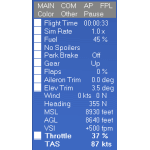
On-screen text display of flight data that operates equipment and dials settings. Includes a 70-page manual loaded with info about text gauges and panels, XML examples, and tips, plus detailed info about the FSX Shift-Z feature. Ver 4.0 is a complete re-write with too many adds and fixes to list here. Now has size settings that are transferable from aircraft to aircraft. Switch between two color schemes with a single click.
| Filename: | TextInfo_Gauge_40_and_XML_Tutorial.zip |
| License: | Freeware |
| Added: | 9th May 2014, 13:02:21 |
| Downloads: | 615 |
| Author: | Rick Federmann |
| Size: | 1.14 MB |
| Category: Flight Simulator X - Gauges | |
| FIP - 5 Gauge Display - 2 Engine |
|
Images related to this file:
File Description:
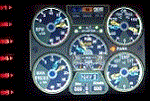
This set of gauges is for use in the Saitek FIP and has been developed specifically for the Baron 58 and variants but should work with other twin prop aircraft. There are 3 options-
option 1. a pair of gauges for displaying on 2 FIPs (layout is similar to the fsx BB58 layout)
option 2. One gauge for displaying only on 1 FIP (left and right eng needle on each of the 5 main instruments )
option 3. a pair of gauges for displaying on 2 FIPs with larger diameter gauges and more user interaction than in 1. above.
1,2, & 3 all have the 5 main engine instrumentation ( RPM, Manifild Pressure, Fuel Flow rate, Oil Temp and Pressure, CHT/EGT Temp.) Additional features are added .e.g Marker Beacon indicators plus indicator of left / right fuel tank selected for each engine, NAV 1 & NAV 2 with DME data.
Option 1 & 3 also has fuel pump switches, alternator switches, starter buttons, cowl flaps and Amps (total load) gauge, and Battery volts gauge.
Option 3 also has additional avionics data and avionics and battery switch buttons. All this enables the aircraft to be started from cold and shut down to cold. The avionics data is useful if you only have one Saitek radio panel. i.e. dont have to keep clicking / rotating switches all the time. This option also gives user ability to alter NAV 1 standby frequency and swap to active.
With the 2 gauges in option 3 above plus my earlier FIP gauge containing a working Auto pilot and fuel levels / flaps and landing gear indicators (refer "FIP-AP Multi Fuel Gauges") there is everything required (not the primary flight display instruments) for flying a single or twin prop aircraft displayed across either 2 or 3 FIPs.
| Filename: | FIP__5_Gauge_Display__2_Engine.zip |
| License: | Freeware |
| Added: | 30th October 2014, 06:24:58 |
| Downloads: | 250 |
| Author: | Robert Budd |
| Size: | 2.4 MB |
| Category: Flight Simulator X - Gauges | |
| SMS Airbus A32X series Gauge Upgrade |
|
Images related to this file:
File Description:
This is an Airbus A32X series OVERLAND SMS gauges upgrade pack. It is a very simple upgrade, yet it provides some extras and
makes the overall flying experience of the A32X series more enjoyable.
| Filename: | SMS_Airbus_A32X_series_Gauge_Upgrade.zip |
| License: | Freeware |
| Added: | 14th June 2015, 18:51:17 |
| Downloads: | 423 |
| Author: | Dimitrios Moschos |
| Size: | 5.67 MB |
| Category: Prepar3D V5 - Gauges | |
| SD2GAU39 C/C++ gauge programming guide |
|
File Description:
P3D Gauge Creation Tutorial Rev.39
Not for non-programmers but can be used by non-C programmers. New major topic on SimConnect and many, many changes to bring the document up to date.
See the Revision List for the most important updates.
FOR PROGRAMMING C++/C-LANGUAGE GAUGES ONLY.
First update for five years!
| Filename: | SD2GAU39_CC_gauge_programming_guide.zip |
| License: | Freeware |
| Added: | 6th February 2024, 18:08:58 |
| Downloads: | 57 |
| Author: | Dai Griffiths |
| Size: | 185.97 MB |
| Category: Microsoft Flight Simulator (2020) - Original Aircraft | |
| sd2gau40 C/C++ gauge programming tutorial |
|
Images related to this file:
File Description:

P3D Gauge Creation Tutorial Rev.40
Not for non-programmers but can be used by non-C programmers. New major topic on communicating with the VC.
See the Revision List for the most important updates (lots as usual).
FOR PROGRAMMING C++/C-LANGUAGE GAUGES ONLY.
Dai Griffiths, Dragonflight Design.
[email protected]
| Filename: | sd2gau40_CC_gauge_programming_tutorial.zip |
| License: | Freeware |
| Added: | 29th August 2024, 14:42:42 |
| Downloads: | 43 |
| Author: | Dai Griffiths |
| Size: | 190.97 MB |


© 2001-2026 AVSIM Online
All Rights Reserved
Privacy Policy |