
Where Flight Simulation Enthusiasts Gather from Around the World!
AVSIM Library - Search Results

| Category: Flight Simulator 2004 - Gauges | |
| Boeing 737-200ADV, Version 1.26 |

|
Images related to this file:
File Description:
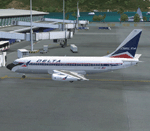
V1.26 Gauge Update (gauge file only) for the TinMouse II Boeing 737-200. Requires installation of V1.25 of the TinMouse II panel (tinmouse_ii_v1_25.zip - available here in the AVSIM library).
Corrects a panel bug that causes panel restarts when FS is switched to/from full screen and windowed mode, and several other minor systems issues. Visit the TinMouse II forum here on AVSIM for support.
| Filename: | Boeing_737200ADV_Version_126.zip |
| License: | Freeware, limited distribution |
| Added: | 17th December 2009, 03:29:28 |
| Downloads: | 13,619 |
| Author: | Bob Scott |
| Size: | 3.42 MB |
| Category: Flight Simulator X - Gauges | |
| Air to Air Refueling Gauge - Receiver Side Version 1.1 |
|
File Description:
This gauge will help you to simulate a realistic air to air refueling transfer by adding fuel gradually to your tanks based on the type of transfer that you choose. Fuel will be added at fixed rate each seconds and the weight of your airplane increased accordingly. Enjoy the feeling of your plane being heavier. Air to Air refueling gauge - Receiver Side version 1.1
| Filename: | Air_to_Air_Refueling_Gauge__Receiver_Side_Version_11.zip |
| License: | Freeware |
| Added: | 28th September 2010, 03:22:54 |
| Downloads: | 784 |
| Author: | Chris DUB |
| Size: | 24.68 KB |
| Category: Flight Simulator X - Gauges | |
| Boeing 737-200/Adv Various Fixes |
|
File Description:
This gauge includes 4 fixes for Captain Sim B737-200/ADV.
The following gauges are included in one CAB file:
[1. APU and Ground Power (CS737_ApuGenGrdPwrMod)]
[2. Autopilot Disconnect buttons on both yokes (CS737_ApYokeDisc)]
[3. Autopilot Disconnect Warning Lights (CS737_ApButtnLt)]
[4. Yaw Damper Light (CS737_YawDampLt)]
Each gauge can be selectively installed in the panel.cfg file.
A simulated charging circuit that will charge a flat battery is included.
| Filename: | Boeing_737200Adv_Various_Fixes.zip |
| License: | Freeware, limited distribution |
| Added: | 2nd February 2013, 19:06:19 |
| Downloads: | 1,368 |
| Author: | Paul Tally |
| Size: | 135.75 KB |
| Category: Flight Simulator 2004 - Panels | |
| Golding/Seale MD80 Fix |
|
File Description:
This update corrects the panel.cfg included with the Golding/Seale md80 panel updated for FS9. The file currently displays an epr gauge over the fuel flow gauge on the recently released gsmd80fs9 panel and gsmd80_9u update. Cfg files are included to fix the version with the white Concorde autopilot display as well as the version with the original red autopilot display released a few days ago.
| Filename: | GoldingSeale_MD80_Fix.zip |
| License: | Freeware, limited distribution |
| Added: | 28th November 2004, 06:48:26 |
| Downloads: | 1,660 |
| Author: | Leon Seale |
| Size: | 9 KB |
| Category: Flight Simulator 2004 - Aircraft Repaints, Textures and Modifications | |
| FSD International Piper Cheyenne 400 TStack Update |
|
File Description:
With the permission of FSD International, I have modified the TStack in the Piper Cheyenne to include the following: 1. HSI Control Panel 2. RMI Gauge and 3. Radar Altimeter Gauge. With these changes you get a better view of the main instruments required to perform IFR flying without having to minimize the TStack window to see or to make changes to other instruments in the background.
| Filename: | FSD_International_Piper_Cheyenne_400_TStack_Update.zip |
| License: | Freeware |
| Added: | 10th September 2003, 18:48:17 |
| Downloads: | 876 |
| Author: | Grant Beach / FSD International |
| Size: | 350.05 KB |
| Category: Flight Simulator X - Gauges | |
| Automatic Jet Smoke |
|
File Description:
Ever get tired of either having smoke come out of your engines all the time or none at all. Here is a solution for you. The gauge toggles the smoke system on and off based on the N1 percent for engine 1. It activates at 70 percent and shuts off below it giving the illusion of a heavily taxed engine in use.
This is a simple gauge to simulate a jet engine smoke trail when the engines rpm is above 70%. Can be used with any aircraft that has a smoke system. No effects are included in the upload, just the xml gauge.
| Filename: | Automatic_Jet_Smoke.zip |
| License: | Freeware, limited distribution |
| Added: | 26th April 2012, 15:45:39 |
| Downloads: | 1,256 |
| Author: | Erik Rivera |
| Size: | 1.86 KB |
| Category: Flight Simulator X - Aircraft Repaints, Textures and Modifications | |
| Fokker 70/100 2D Fixed Cockpit Views System |
|
Images related to this file:
File Description:
The fixed views are fully functional by:
- clickable icons gauge on main and fixed views panels
- keyboard numpad keys, when normally assigned to the correspondent views
- joystick hat, when mapped to the assigned keyboard keys
Note: Doug Dawson's Window Status Gauge reports the visibility status of panel windows and is needed for the fixed views to work. This original feature was lost since previous versions of MS Flight Simulator.
Doug Dawson's window_status gauge is available at http://www.douglassdawson.ca/
This add-on brings back the 2D Fixed Cockpit Views System, of the Digital Aviation Fokker 70/100, to FSX for the Default and First Officer views.
| Filename: | Fokker_70100_2D_Fixed_Cockpit_Views_System.zip |
| License: | Freeware |
| Added: | 23rd June 2012, 03:38:29 |
| Downloads: | 1,446 |
| Author: | Joao Muas, Digital Aviation |
| Size: | 9.42 MB |
| Category: Flight Simulator 2004 - Gauges | |
| Kingair Radio 20 |
|
File Description:
Freeware modified default Kingair Radio gauge.
This is the gauge file which contains the six separate Nav 1, 2; Comm 1, 2; Transponder; and ADF radios, as well as the metallic toggle switches. All except the ADF have transparent bitmaps, so that only the numerical frequency display is visible. The separate numerical displays can be placed in any customized radio image with any typical panel-maker program. The black, or grey, rectangular base of the toggle switches have also been made transparent, so that the metallic ring at the base of the switch blends better with a panel background. It should also work in FS2002. This gauge is Freeware.
| Filename: | Kingair_Radio_20.zip |
| License: | Freeware |
| Added: | 3rd December 2004, 02:38:10 |
| Downloads: | 892 |
| Author: | Will Fisher |
| Size: | 28.12 KB |
| Category: Flight Simulator 2004 - Panels | |
| Airbus A320 Detailed Overhead Panel |
|
Images related to this file:
File Description:
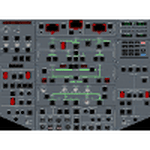
This is a set of gauges for twin-enigne jets, especially Airbus, containing:
- overhead panel with realistic procedures and almost all switches working
- lower EICAS with 10 working screens (F/CTL, FUEL, HYD, DOOR, APU, BLEED, COND, ELEC, WHEEL, EN-GINE, STATUS)
- EICAS switch
- Multiradio gauge (all radio functions in one place)
- optional Multiswitch gauge (flaps, spoilers, gear, autobrake indicators and switches)
It should work with any free or default twin-engine jet aircraft, however it was tested with Airbus models from iFDG and Project OpenSky. It should work on FS2004 and FSX.
Requirements: VasFMC 2.09 or newer in GAUGE version - it provides PFD, ND, upper EICAS, FMC, MCDU.
| Filename: | Airbus_A320_Detailed_Overhead_Panel.zip |
| License: | Freeware |
| Added: | 26th July 2013, 07:13:30 |
| Downloads: | 3,159 |
| Author: | Slawomir Wawak |
| Size: | 12.3 MB |
| Category: Flight Simulator 2004 - Gauges | |
| FS2004 GPS Map View Gauge v3.0 |
|
File Description:
The ultimate gauge. The Map will show: Airports details (Runways ID's, length & ILS), VOR's and NDB's frequencies,
Intersections and waypoints, Airspaces, Approaches and flight routes. You can toggle the view
you require for your flight. Also you can zoom in/out to see the nearest airports, vor's and
ndb's. The map will indicate A/C heading flightplan title and waypoints ID's.
Version 3 includes more enhancements such as the ability to input the ICAO code or name of any airport and the map will
show all the frequencies of that airport including ATIS, ILS, AND COM. In addition, the map will show the active
runway designations, length and width.
You can also input ICAO code of any VOR/NDB and the map will show their frequencies.
There was a bug in v2.0, in which if you enter ( click on ENT )the ICAO code of an airport, you will lose the flight
plan loaded. Now you can go back to the flight plan and with the NEXT/PREV buttons you have the choice of where to start
your FP.
The gauge will show Flight Plan Title, originating and destination airports, active waypoint, waypoint index and FP
crusing altitude.
I addition, the gauge will show various useful information, such as, Runway IDs, lenght, width and approach magnetic heading,
Airport name, city, and type. NAV1/2 names, codes, distances and ETA's, ADF1/2 names and codes.
Finally, the gaugee will show other information, such as, magvar, indicated airspeed, mach, ground velocity, ambient
wind velocity and direction, bank angle , and a/c altitude ( radio height ).
All the information above and much more on a single gauge window.
| Filename: | FS2004_GPS_Map_View_Gauge_v30.zip |
| License: | Freeware, limited distribution |
| Added: | 14th September 2005, 14:19:46 |
| Downloads: | 10,847 |
| Author: | Talal Alhaj |
| Size: | 710.05 KB |


© 2001-2026 AVSIM Online
All Rights Reserved
Privacy Policy |