
Where Flight Simulation Enthusiasts Gather from Around the World!
AVSIM Library - Search Results

| Category: Flight Simulator X - Scenery | |
| VOHS-VOBL package for FSX and FSX-SE |

|
Images related to this file:
File Description: Rajiv Gandhi International Airport (IATA: HYD, ICAO: VOHS) is an international airport that serves Hyderabad,
the largest city in the Indian state of Telangana. It is located in Shamshabad, about 24 kilometres (15 mi) south of Hyderabad.
The airport is operated by GMR Hyderabad International Airport Ltd, a public–private venture.
It was opened in March 2008 to replace Begumpet Airport as the primary commercial airport for Hyderabad.
It is named after Rajiv Gandhi, former Prime Minister of India. _______________________________________________________________________________________ Kempegowda International Airport (IATA: BLR, ICAO: VOBL) is an international airport serving Bangalore, the capital of the Indian state of Karnataka.
Spread over 4,000 acres (1,600 ha), it is located about 40 kilometres (25 mi) north of the city near the village of Devanahalli.
It is owned and operated by Bangalore International Airport Limited (BIAL), a public–private consortium.
The airport opened in May 2008 as an alternative to increased congestion at HAL Airport,
the original primary commercial airport serving the city. It is named after Kempe Gowda I, the founder of Bangalore.
Kempegowda International Airport became Karnataka's first fully solar powered airport developed by CleanMax Solar.[2][3] As of 2016, Kempegowda Airport is the third-busiest airport by passenger traffic in the country,
behind the airports in Delhi, Mumbai and is the 35th-busiest airport in Asia. It handled over 22.2 million passengers in 2016 with little less than 500 aircraft movements a day.
The airport also handled about 314,060 tonnes (346,190 short tons) of cargo. By 2020, it is expected to handle at least 40 million passengers per year,
with 45 international airlines and more than 1000 aircraft movements per day.
| Filename: | VOHSVOBL_package_for_FSX_and_FSXSE.zip |
| License: | Freeware |
| Added: | 28th January 2018, 17:03:17 |
| Downloads: | 4,488 |
| Author: | morten thomas van der linden |
| Size: | 171.62 MB |
| Category: Microsoft Flight Simulator (2020) - Utilities | |
| Random Flight Database 3.5.2 |
|
File Description:
Random Flight Database is a simple and easy to use application.
​
It will allow you to randomly choose one or more VFR, IFR flights according to your criteria (type of plane, flight time, company, distance, departure airport, .....).
​
These flights are chosen at random from a default database, a user base created by yourself or according to the world aviation POIs.
​
A default database is already included, but also the possibility for each user to create his own database.
​
But that's not all, you can also extract the flights of the day for an airport, or extract the flights for a whole week.
Why Use RFD ?
The advantage of RANDOM FLIGHT DATABASE:
Extracted from FlightRadar but also from other databases, it chooses randomly among those where these databases according to your choices.
You can also make many other possible combinations, such as leaving each time from the arrival airport for each flight generated, but also selecting your favorite planes and airports.
Simply choose the departure airport, he chooses the arrival airport for you, choose the arrival airport, he chooses the departure airport for you and all this according to the real data of the airlines.
A tab for generating non-real flights is available, it will allow you to generate random flights from over 58,000 global aviation POIs.
​
Full of possibilities, including the possibility to choose the flight time but also to generate several flights while leaving the arrival airport.
You also have the option of creating your own data for inclusion in this software.
And one of the most important is that once the flight (s) are generated, you can send them to SIMBRIEF or PFPX to schedule this.
| Filename: | Random_Flight_Database_352.zip |
| License: | Freeware |
| Added: | 21st December 2020, 20:47:04 |
| Downloads: | 163 |
| Author: | mikoulprostgrandprix |
| Size: | 181.97 MB |
| Category: Microsoft Flight Simulator (2020) - Utilities | |
| Random Flight Database 3.5.2 |
|
File Description:
Random Flight Database is a simple and easy to use application.
​
It will allow you to randomly choose one or more VFR, IFR flights according to your criteria (type of plane, flight time, company, distance, departure airport, .....).
​
These flights are chosen at random from a default database, a user base created by yourself or according to the world aviation POIs.
​
A default database is already included, but also the possibility for each user to create his own database.
​
But that's not all, you can also extract the flights of the day for an airport, or extract the flights for a whole week.
Why Use RFD ?
The advantage of RANDOM FLIGHT DATABASE:
Extracted from FlightRadar but also from other databases, it chooses randomly among those where these databases according to your choices.
You can also make many other possible combinations, such as leaving each time from the arrival airport for each flight generated, but also selecting your favorite planes and airports.
Simply choose the departure airport, he chooses the arrival airport for you, choose the arrival airport, he chooses the departure airport for you and all this according to the real data of the airlines.
A tab for generating non-real flights is available, it will allow you to generate random flights from over 58,000 global aviation POIs.
​
Full of possibilities, including the possibility to choose the flight time but also to generate several flights while leaving the arrival airport.
You also have the option of creating your own data for inclusion in this software.
And one of the most important is that once the flight (s) are generated, you can send them to SIMBRIEF or PFPX to schedule this.
https://www.youtube.com/channel/UC8y3mSeP-gj-h2MbMT59AOw
| Filename: | Random_Flight_Database_352.zip |
| License: | Freeware |
| Added: | 28th December 2020, 18:47:26 |
| Downloads: | 152 |
| Author: | mikoulprostgrandprix |
| Size: | 181.97 MB |
| Category: Flight Simulator 2004 - AFCAD Files | |
| Birmingham International Airport, Birmingham, Alabama (KBHM) |
|
File Description:
An extremely accurate rendition of the KBHM airport with appropriate gate, cargo and general aviation parkin. I've decided to make it a habit to do airports that one doesn't really see much on FS. Everyone does 300 AFCADs of KORD and there's nothing wrong with that it's a great airport but I figured I didn't need to add another KORD or KLAX to the pile unless I'd be providing something the others lack and I can't seem to find it. So, again, I'll be continuing to do AFCADs I feel are lacking or unavailable or not done well. The BHM airport is definetely not a bustling international port of call and it only receives mainline service from a few carriers but it has a decent amount of traffic and I thought it would be good to represent the airport. Thankfully this time MS did a reasonably good job with terminal space and I was able to include every gate in the two concourses. The great BHM website made my job a breeze by indicating which airlines park at which specific gate(s). Every airline is exactly where they should be as is cargo. A ramp for you VFR general aviation buffs is also available. The only time you might notice some craziness is if you start your flight super early in the morning and you have traffic at 95% +. It seems MS doesn't really "turn" planes in a realistic manner so you end up having more planes parked at the gate in the early morning hours then would be there in real life if they adheared to real world turn around times. Nothing I can do about that. Hope you enjoy your virtual trips in and out of the Birmingham International Airport.
| Filename: | Birmingham_International_Airport_Birmingham_Alabam.zip |
| License: | Freeware |
| Added: | 29th June 2004, 19:31:34 |
| Downloads: | 2,317 |
| Author: | Jason Diaz |
| Size: | 137.07 KB |
| Category: Flight Simulator 2004 - Scenery | |
| Brevoort CWOB and BAF-3 radar plus Cartwright LAB-6 radar Canada |
|
Images related to this file:
File Description:
Brevoort airstrip and the BAF-3 radar it serves is on Brevoort Island, off one of the southeastern tips of Baffin Island and 140 miles east of Iqaluit. This scenery includes the BAF-3 buildings on the hilltop and those on the airstrip below, plus the roads connecting them and down to the beach landing area on the rocky coast. This scenery is made for the FSGenesis 76m terrain mesh for northern Canada, and there will be a repost of all my northern Canada airfields to suit this; I cannot think now why I never installed this mesh before. The AI reflects the use of civil airlines for resupply and transportation of personnel. Given the terrain the wind should be from the north so that ai lands using the 02 runway. Landing from the north will involve a terrain clash while take off towards the north will not as the climb out clears the hilltop. The video shows the 600 foot cliff at the runway threshold and an Air Tindi plane on the apron. Cartwright CYCA is on the Labrador coast and has been posted by Flight Ontario as part of their Goose Bay and Labrador Regional Airports sceneries. The nearby LAB-6 radar site is included here, connected to CYCA by an extended road. The site uses the same buildings as Brevoort and Saglek (posted recently) and although I have included them here as separate sceneries the contents can be placed in the same folders as Saglek with a saving in duplicated textures. The textures here are more accurate than Saglek so say yes to over-write; a downloader with personal experience of Brevoort noted that in reality they are lighter.
| Filename: | Brevoort_CWOB_and_BAF3_radar_plus_Cartwright_LAB6_.zip |
| License: | Freeware, limited distribution |
| Added: | 20th August 2017, 15:46:36 |
| Downloads: | 178 |
| Author: | Roger Wensley |
| Size: | 4.37 MB |
| Category: Flight Simulator X - Original Aircraft | |
| Eurocopter EC-505 Tiger |
|
File Description:
TIGER HAP
The Tiger HAP/HCP (Helicoptere d'Appui Protection / Helicopter for Close Protection) is a medium-weight air-to-air combat and fire support helicopter built for the French Army. The Tiger HAP is an air-to-air combat and fire support medium-weight (6 tonnes) helicopter fitted with 2 MTR 390 engines. It is daytime and night combat capable and is operable in NBC environments. Three basic parameters were taken into account right from the start of the development phase: low (visual, radar and infrared) detectability, which provides excellent survivability on the battlefield, maximum efficiency of the weapons and the associated fire control systems without heavier workload for the crew, and an optimized logistic concept offering minimum possession costs. The Tiger HAP is fitted with a 30-mm gun turret; 68-mm submunition rokets, and air-to-air Mistral missiles. It also features a firing sight with 3 sensors: infrared, TV camera and direct optical channel. The complete avionics suite includes multi-purpose color displays and radar/laser warning receivers.
TIGER UHT
The UHT (from Unterstützungshubschrauber Tiger; Ger. supporting helicopter Tiger) is a medium-weight multi-role fire support helicopter built for the Bundeswehr (German Army).The Tiger UHT is a multi-role fire support helicopter. The Trigat Fire and Forget missiles and/or the Hot missiles it carries offer anti-tank capability, while 68-mm rockets ensure air-to-ground fire support. A 12.7 mm air-to-air gun pod and air-to-air Stinger missiles can also be installed. The helicopter also features a mast-mounted sight with a second-generation IRCCD infrared channel and a TV channel, as well as a nose-mounted IRCCD control FLIR for the pilot. Countermeasures include radar/laser/missiles launch/missile approach warning receivers and decoy launchers.
TIGER ARH
The Tiger ARH (Armed Reconnaissance Helicopter) is the version ordered by the Australian Army to replace its OH-58 Kiowas and UH-1 Iroquois-based 'Bushranger' gunships.[2] The Tiger ARH is a modified and upgraded version of the Tiger HAP with upgraded MTR390 engines as well as a laser designator incorporated in the Strix sight for the firing of Hellfire II air-to-ground missiles. Instead of SNEB unguided rockets, the ARH will operate 70 mm (2.75 in.) rockets from Belgian developer, Forges de Zeebruges (FZ).
Model, textures by www.afs-design.de - Author: A.Meyer.
| Filename: | Eurocopter_EC505_Tiger.zip |
| License: | Commercial demo |
| Added: | 5th October 2007, 23:56:41 |
| Downloads: | 5,321 |
| Author: | Andreas Meye |
| Size: | 3.25 MB |
| Category: Flight Simulator 2004 - Original Aircraft | |
| Eurocopter Tiger (EC 665) - HAP/HCP, UHT and ARH variants |
|
Images related to this file:
File Description:
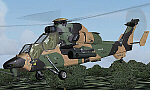
The Tiger HAP/HCP (Helicoptere d'Appui Protection / Helicopter for Close Protection) is a medium-weight air-to-air combat and fire support helicopter built for the French Army. The Tiger HAP is an air-to-air combat and fire support medium-weight (6 tonnes) helicopter fitted with 2 MTR 390 engines. It is daytime and night combat capable and is operable in NBC environments. Three basic parameters were taken into account right from the start of the development phase: low (visual, radar and infrared) detectability, which provides excellent survivability on the battlefield, maximum efficiency of the weapons and the associated fire control systems without heavier workload for the crew, and an optimized logistic concept offering minimum possession costs. The Tiger HAP is fitted with a 30-mm gun turret; 68-mm submunition rockets, and air-to-air Mistral missiles. It also features a firing sight with 3 sensors: infrared, TV camera and direct optical channel. The complete avionics suite includes multi-purpose colour displays and radar/laser warning receivers.
The Tiger UHT (from Unterstuetzungshubschrauber Tiger; Ger. supporting helicopter Tiger) is a medium-weight multi-role fire support helicopter built for the Bundeswehr (German Army).The Tiger UHT is a multi-role fire support helicopter. The Trigat Fire and Forget missiles and/or the Hot missiles it carries offer anti-tank capability, while 68-mm rockets ensure air-to-ground fire support. A 12.7 mm air-to-air gun pod and air-to-air Stinger missiles can also be installed. The helicopter also features a mast-mounted sight with a second-generation IRCCD infrared channel and a TV channel, as well as a nose-mounted IRCCD control FLIR for the pilot. Countermeasures include radar/laser/missiles launch/missile approach warning receivers and decoy launchers.
The Tiger ARH (Armed Reconnaissance Helicopter) is the version ordered by the Australian Army to replace its OH-58 Kiowas and UH-1 Iroquois-based Bushranger gunships. The Tiger ARH is a modified and upgraded version of the Tiger HAP with upgraded MTR390 engines as well as a laser designator incorporated in the Strix sight for the firing of Hellfire II air-to-ground missiles. Instead of SNEB unguided rockets, the ARH will operate 70 mm (2.75 in.) rockets from Belgian developer, Forges de Zeebruges (FZ).
Model, textures by www.afs-design.de - Author: A.Meyer. (Ex-payware package, now released as freeware).
| Filename: | Eurocopter_Tiger_EC_665__HAPHCP_UHT_and_ARH_varian.zip |
| License: | Freeware, limited distribution |
| Added: | 12th January 2013, 19:07:14 |
| Downloads: | 926 |
| Author: | Andreas Meyer |
| Size: | 11.72 MB |
| Category: Miscellaneous Files - Demos from Commercial Vendors | |
| Latin VFR Cuzco Photo and Airport Scenery |
|
File Description:
Cuzco or how is also formally known today as “Cusco” is one of the most important cities of Peru and is the historic capital of the Inca empire, it is also the historical capital of Peru designated by its constitution. The city is located in the Andes mountains and its elevation is above 3310 metres or 10860 feet above sea level. The city is nearby the ancient historical symbol of the Incas, Machu Picchu which is about 80 kilometers from Cusco, which became one of the New seven wonders of the world back in 2007.
This airport (SPZO) or (CUZ) has a visibility restriction and only operates during daylight due to the requirement of a visual approach to land. The aircraft operate mainly in one direction of flight in and out of this airport, they land on runway 28 and depart on runway 10. During weather situations in which no visual approach can be made the airport is closed until the weather gets better. No pilot dares to land with an overcast sky into an airport completely surrounded by mountains and no precision guidance navaid in order to assist for the landing. Therefore all landings conducted are SOLELY visual, and strict VFR rules apply. American Airlines (AA) briefly operated in this airport in the late 90’s and the word out there was that they kept doing miss approaches having difficulties with the approach, so it is widely known to be an airport dominated by veterans of the Cuzco approach, mainly Peruvian pilots or Andean pilots that know how difficult it is to have such restrictions. This is certainly the Madeira or the Innsbruck of all Latin American airports, it would be wise to say that this one is harder due to the lack of a precision approach. And by the way the largest aircraft permitted to operate here is a B757-200, however, anything bigger than a B737-200 needs government approval.
| Filename: | Latin_VFR_Cuzco_Photo_and_Airport_Scenery.zip |
| License: | Commercial demo |
| Added: | 2nd May 2009, 01:50:57 |
| Downloads: | 1,201 |
| Author: | LatinVFR |
| Size: | 34.22 MB |
| Category: Miscellaneous Files - General Utilities | |
| Random Airport Generator |
|
Images related to this file:
File Description:
I can be contacted at [email protected] for any help required or different drive versions needed.
[ABOUT THE PROGRAM]
This program will read a text file from the route of your hard drive depending on the version you run, and select a random line and display that line. The file must be a text file named "Airports.txt". This program was designed with ease of use in mind for selecting a random airport for the Flight Sim community, though can be used for any purpose with any text file called "Airports.txt". The program will display the airport ICAO code then co-ordinates.
[ABOUT ME]
I am a 16 year old aviation enthusiast that loves flying and ATC, but hate having to choose an airport to depart from and arrive at, or to controll. This program has now removed this to make my flight more random with less decisions to make. I also like to explore areas I haven't been before, again this selects a random airport, from thousands of different ones, so exploring is inevitable.
[INSTALLATION]
The only installation required is to copy the Airports.txt file to the route of your hard drive C: or D: (for more drives e-mail me as above), then run the respective program for that drive from any folder you wish.
[ABOUT THE AIRPORTS.TXT FILE]
This file was collected from my FS2004 and contains every airport in it. Currently the program selects a line at random and displays it, whether a large international airport or small grass field. You could edit the file just to contain your favourite airports and it will NOT affect the running of the program as long as the file remains as Airports.txt. I am hoping in future versions to allow you to select a type of airfield, i.e. large, medium or small or select from runway length, though this will take a while to produce, if ever.
For now i hope everyone enjoys the program and happy flying :)
| Filename: | Random_Airport_Generator.zip |
| License: | Freeware |
| Added: | 9th June 2010, 02:41:14 |
| Downloads: | 211 |
| Author: | Alexander Aschacher |
| Size: | 254.45 KB |
| Category: Flight Simulator 2004 - Scenery | |
| PAKN - King Salmon - Alaska, US V1 |
|
Images related to this file:
File Description:
This is the final version, complete in itself and incorporating the two modifications posted separately. King Salmon is a town with a population of just under 400, on the north bank of the Naknek River and 15 miles from the sea. The airport is adjacent to the town and was originally an airforce base; the military hangars on the airport are still usable. The airport, with its long runway (11-29 and 8,500 feet with an ILS, and a second runway 18-36 and 4,000 feet) is a transportation hub for the area in general and in particular for the salmon industry. Along the Naknek River there are numerous canneries and there are also fishing lodges on the river and nearby lakes; to speed up transportation to the lodges there are float bases on the river to the south of the airport. King Salmon has three tiers of scheduled flights: Alaska Air direct from Anchorage in a 737 (passengers and cargo), PenAir (Saab turboprop) as part of their flights up and down the peninsula, and Grant Air serving nearby small towns. There are also PenAir flights, both scheduled and unscheduled, in smaller aircraft (Piper Navajo for instance) to smaller airports for the fishing season, plus cargo flights in larger aircraft by the lowest bidder (Everts and Northern). To complete the mix the AI includes a pair of F15s. The runways cross (see the airport diagram) so read the notes re long taxi routes. There is AI for PAKN, plus revised AI made for Dutch Harbor which includes flights by PenAir to King Salmon, plus revised parking for Dutch Harbor with new replacement bgls to cater for more flights. There is also AI for the float bases on the river; I have made two runways separated into two float bases for river AI, called King Salmon Floats and King Salmon River; more AI for these will be added when other scenery along the river is made. Just land according to the wind and taxi to whatever dock takes your fancy.
| Filename: | PAKN__King_Salmon__Alaska_US_V1.zip |
| License: | Freeware, limited distribution |
| Added: | 11th April 2015, 06:20:40 |
| Downloads: | 506 |
| Author: | Roger Wensley |
| Size: | 23.67 MB |


© 2001-2026 AVSIM Online
All Rights Reserved
Privacy Policy |