
Where Flight Simulation Enthusiasts Gather from Around the World!
AVSIM Library - Search Results

| Category: Prepar3D V1-4 - Utilities | |
| Flightplan Visualizer 1.10 |

|
Images related to this file:
File Description:
Flightplan Visualizer (FV) version 1.10.0. Copyright 2018-2019 by Pelle F. S. Liljendal ([email protected]), all rights reserved.
FV comes with 300 Commercial-, and +380 BizJet AI pre-imported flightplans which the creators of those flightplans have gracefully allowed me to include with the installer, however you are able to import additional (AI) flightplans if you want to. Once imported these (AI) flightplans can be visualized on a map-view, and the user will be able to search accross all these. Hence you can use the program as inspiration as to which routes to fly. E.g. you can search across all imported flightplans to find all flights in an A321 flying into/out from LDDU, or simply to look for all flights in a Boeing 747-8F.
Simply run the included installer to install the software. The program will be installed into "C:\Program Files (x86)\Flightplan Visualizer" and all datafiles will be installed into: "C:\Users\[UserName]\AppData\Roaming\FlightplanVisualizer". The program comes with a full manual explaining everything, and a 3 page quick manual to get you started. The first 3 times you run the program the quick manual will automatically open. The forum is hosted here: https://forum.aerosoft.com/index.php?/forum/919-flightplan-visualizer/
Version 1.10 Contains the following changes: In the flightplan combo-box at the bottom of the main-form, "Active Search" have been renamed into "Last Search". Picking "Last Search" from the flightplan combo-box, will re-execute the last performed search, and populate the map accordingly. A new entry called "None", have been added flightplan combo-box (at the top of the list). Chosing this item will "deselect" the otherwise current search or selected flightplan, and clear the map of routes. A form have been added to assist enabling/disabling flightplans. Gate-letters/numbers are now by default written using a (5x7) Matrix-"font". If you want to revert to the segment-"font", used in previous versions, simply set the value of the "UseMatrixGateChars" tag in the settings-file to false. changed how the Gate-letters/numbers are written in the round gate-markers on the map. Previously all "chars" had the same width. Now the width is dependant on which sub-elements are in use by each "char" (e.g. a "1" is not as wide as an "8"), as a result the gate letter/number are more easy to read. Zulu- and local-time added to the "Selected airport" group-box in the upper/right corner of the main form. If no airport is selected, or no time-zone is registred for the selected airport, only zulu-time will be displayed. Selections of favorite aircraft can now be saved and loaded.⦠This selection of aircraft can be loaded as a selection of aircraft in the "Search leg" form. Video tutorials can now be accessed from the "Help" menu. These are simply "links" to the actual videos on YouTube, hence will launch the default browser. If you hold SHIFT the url will in stead be copied to the clipboard (e.g. in case you want to upen the link in another browser). In the same manner the "Help" menu now contains a link to the forum. The form with decoded METAR/TAF-messages now shows: name, city, and country/state for the selected station in the caption. This text will also be embedded when copying the content to the clipboard. Likewise UTC/Local-time is also embedded when copying the content to the clipboard as it can be used to show the "age" of the report and convert between UTC and Local -times (based on the difference of UTC- and local-time). The info presented when pressing the "Show Scenery Gates" button on the Airport Info form, can now be copied to the clipboard. Various minor "behind the scenes" changes and optimizations. Added support for additional aircraft: Airbus A220-100 (CS100), Airbus A220-300 (CS300), Boeing 777-8 and Boeing 777-9. Listviews containing both (aircraft) IATA and ICAO-codes now all list them in the following order: IATA, ICAO (both individual sortable). Hovering the mouse over gate-markers the hint window will no show the radius both in meters and feet. Editing gate-info you will now see more info for the gate being edited: Type, Size (meters and feet) and if applicable: airlines. Fixed: Minor bug in relation to how the airport size was calculated. Fixed: IATA/ICAO columns were swapped when choosing Favorite Aircraft. Fixed: Typo on the METAR/TAF-decoder form.
| Filename: | Flightplan_Visualizer_110.zip |
| License: | Freeware, limited distribution |
| Added: | 5th June 2019, 21:20:51 |
| Downloads: | 319 |
| Author: | Pelle Liljendal |
| Size: | 24.81 MB |
| Category: Flight Simulator X - Original Aircraft | |
| Airbus A318 FD Special Version V3 - Light Pack |
|
Images related to this file:
File Description:

This is the new version of my Airbus A318 with the Panel in V3 opened on the A321 - here in a light pack version, included is 1 livery only (Frontier Airlines NR807 Painted by Derek Mayer & Steve Mac Bee of PA Team).
This light pack contains only the user manual in english version (and low resolution). If you want the french version of this manual, use the "zipdrive" function with the complete pack of this aircraft (search by name file "pa318fd_v3.zip"). This light version has been made by request for all those with low download speeds and limits.
The original complete pack is available HERE (filename: pa318fd_v3.zip)
I remind you that this aircraft is based on the Project Airbus A318, with an ehanced panel based on the work of stefan Liebe.
This latest development can see the more realistic Airbus available as freeware. With a new version of the panel, the aircraft has a 100% cold & dark Status at the start of a flight, a real fuel system management with all valves, piumps and crossfeed work, the complete Bleed circuit with X-bleed, a real engines manual startup procedure like the real aircraft. I have also ehanced the navigation display with TCAS function in ARC and NAV mode; There is also the engines failure procedure to work (fire, oil leaks....) and many improved function that I cannot describe here. The aircraft comes with user manual in English and in French, and it is essantial to read it before you fly.
All the functions of the V2 have been kept and improved, like the vertical navigation gauge, the terrain radar map on the navigation display, the autolanding function, the SFCC.
This version is only in CFm engines, but with real engine data (CFM56-5B9) and custom HD sounds. Now, the Fly By wire works in 2 modes: "Normal Law" and "Direct Law". I put 300 hours into the development of this panel and I hope that you will like it.
Please, note that this panel is the v3.05 version, witch fixes the bugs of the first version that came with the A321 (there is an update panel for the A321).
So, It seems that this aircraft works with PREPAR3D
Francois Dore
| Filename: | Airbus_A318_FD_Special_Version_V3__Light_Pack.zip |
| License: | Freeware, limited distribution |
| Added: | 14th July 2012, 15:34:06 |
| Downloads: | 6,727 |
| Author: | Francois Dore, Project Airbus |
| Size: | 64.88 MB |
| Category: Flight Simulator X - Original Aircraft | |
| Boeing 787-942 VIP-BBJ |
|
Images related to this file:
File Description:
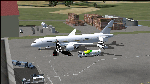
Boeing 787-942 Boeing Business Jet (VIP), AKA "DreamJet", is the Corporate version of this aircraft, modified for individual client specs. The range is extended beyond the normal 787-9 due to additional fuel tanks, a lot less payload weight, and more powerful and efficient engines. The Cabin Pressure is decreased to 6,000 ft, allowing for higher Flight Levels than normal. The tail number on this model can be changed to match the user's preference, since it is not apparent on the exterior (No Airline Call used on Private Aircraft).
This is a huge aircraft and normally seats about 300 passengers, but there are only 48 (including Pilots/Attendants) on this plane. A lot of space remains for luxuries that are well beyond any Business Jet of any kind other than the 747 or A380. Some of these luxuries include automated beds that are hidden in the floorboard and activated by the attendants when requested, and each of these includes a privacy barrier. There is one Large Screen TV with stereo surround sound with theater seating in the fore section, and separate small screen monitors located at every assigned seat (including flight data relay of all positioning and aircraft data viewable). The kitchen is fully equipped with 935 lbs of various food and drinks, with one attendant being a Master Chef. There is a automated Dance Floor that can be activated in the theater area, after the seating chairs are automatically stored below deck. The crew also experiences luxury as the pilots have a twin-bed sleeping area with a private kitchen (2 sleep while 2 fly), as do the attendants (fore and aft upper deck) with twin beds and private kitchens. The aircraft is also more luxurious in that it has 6.000 ft of pressure continuous to 47,000 ft, and has a very low interior noise level. There are also many added safety features that provide for survival in the event of a mishap, making it possible to survive a water crash for several days through the use of 6 inflatable skiff-rafts with engines, radios, and supplies. All attendants are trained and certified Registered Nurses, and they have 25 lbs of medications and supplies stored in the aft. Some of these features add to the empty weight, so the MTOW is the same as a normal aircraft of this design for commercial use (the gear are also modified for these accommodations).
This aircraft is designed for educational use protected under the Fair Use Doctrine:
(http://www.expertlaw.com/library/intellectual_property/fair_use.html)
It cannot be sold or bundled for sale, and such will never be approved by me or the original authors. FREEWARE DISTRIBUTION ONLY!!!
Model design and paint by: Camil Valiquette;
Sound by: Emil Serafino;
Engine/Aerodynamics and Details by: Douglas E. Trapp, ([email protected]) May 2018
| Filename: | Boeing_787942_VIPBBJ.zip |
| License: | Freeware |
| Added: | 20th May 2018, 16:58:42 |
| Downloads: | 877 |
| Author: | Douglas E Trapp |
| Size: | 77.99 MB |
| Category: Flight Simulator X - Scenery | |
| RNAS Henstridge (HMS Dipper) |
|
File Description:
Royal Naval Air Station Henstridge or RNAS Henstridge (HMS Dipper) is a former Fleet Air Arm base located 7 miles (11 km) west of Shaftesbury, Dorset (Now Somerset) and 12.4 miles (20.0 km) east of Yeovil, Somerset in South West England.
The main part of the land (355 acres) was purchased in August 1941, after which building of the airfield and the marsh lane accommodation site commenced, it was commissioned on April 1, 1943 as HMS Dipper, principally as number 2 naval fighter school, on the 11th September 1942, another 18 acres was acquired at the adjoining gibbs marsh area for an aircraft repair and maintenance site. The design and lay-out of the airfield was quite unique, having 5 runways, 2 of these being east west lay-out (07-25) both 1000 yards long, the northern runway incorporated a dummy deck landing strip, complete with under-ground arresting gear with four above ground arrestor wires, which was a duplicate of that installed on HMS Implacable for training of aircraft carrier landings, these mainly being carried out with the Seafire, a naval version of the spitfire with folding wings. The site also had its own cinema and stage hall
March 1952 the airfield became inactive and was placed under care and maintenance, during 1953 Air whaling (now Bristow group) used the facilities for repairs to the whaling fleet of helicopters until moving out in June 1958.June 1957 it was finally closed as a naval establishment, from 1958-1960 the entire site was sold off. 27 June 1980 the BBC purchased the whole site and applied for planning permission to erect at the airfield a shortwave radio station consisting of 21 self-supporting towers holding aerial arrays and ancillary buildings on a 300-acre site. The station would transmit overseas radio services to Eastern Europe, the Soviet Union and perhaps South America the application failed and the BBC sold the land during January 1987 The airfield is also the home of the wessex strut, a general aviation club formed in January 1977, which holds an annual fly in and other events their first fly-in was on 17 April 1977 and attracted 107 aircraft. As of today the only usable runway is the north 07-25 runway, extant with the concrete dummy deck, and the underground machinery chamber, it is also the home to a large number of light aviation enthusiasts aircraft as well as the Yakolevs aerobatic display team and the Dorset and Somerset air ambulance
The current airfield is operated by EGHS and is an unlicensed airfield. The only usable runway is 07/25 tarmac/concrete 750 mts long x 6 mtr wide. Henstridge radio can be contacted on 130.250 MHz, it can be found at the south eastern stub of the Yeovilton MATZ
Source:Wikipedia
| Filename: | RNAS_Henstridge_HMS_Dipper.zip |
| License: | Freeware |
| Added: | 9th February 2017, 22:14:54 |
| Downloads: | 165 |
| Author: | Terry Boissel |
| Size: | 4.53 MB |
| Category: Flight Simulator 2004 - Utilities | |
| Servinfo Update 5(Nov 01, 2010) |
|
File Description:
Thank you for downloading this 5th update of Servinfo 2.02.
This update actualised with logos and data the following Airlines and Air Forces:Air Zimbabwe, Basler Flight Service, Bristow Helicopters, British International Helicopters,RAF Barkston Heath, Braniff International Airways, BQB LÃ�ÂÂneas A�©reas, China Northern Airlines,China Southern Airlines, Canadian Western Airlines, Centurion Air Cargo, Air Comores International,Dominicana de Aviaci�³n, DAS Air Cargo, Ecuatoriana De Aviaci�³n, Georgian National Airlines,Caribbean Star Airlines, Ghana International Airlines, Royal Tongan Airlines, Turkish Air Force,Ju-Air, RAF Leuchars, Albanian Airlines, South African Air Force, 32th Squadron RAF,USAF 100th Air Refuelling Wing, RAF(Support Helicopter Force),RAF Scampton, RAF St Athan,RAF Topcliffe Flying Training Unit, Vladivostok Air and RAF Valley Flying Training Unit.
The following aircrafts are now identified by Servinfo in all his flights:
Antonov An-2,Antonov An-8,Antonov An-12,Antonov An-22,Antonov An-24,Antonov An-26,Antonov An-28,Antonov An-30,Antonov An-32 Sutley/Firekiller,Antonov An-38,Antonov An-70,Antonov An-72,Antonov An-74-100/200, Antonov A124 Ruslan ,Antonov A140,Antonov A148,Antonov A225 Mriya,Antonov An-74-300,Avro Lancaster,Avro Lancastrian,Boeing B-17 Flying Fortress,Boeing B-29 Superfortress,Bristol Blenheim,B�¼cker B�¼ 131 Jungmann,B�¼cker B�¼ 131 Jungmeister,Consolidated B-24 Liberator,Curtiss P-40 Warhawk/Kittyhawk
Curtiss SNC-1 Falcon,De Havilland DH.98 Mosquito,Douglas AD Skyraider,
Douglas A-20 Havoc/Boston/P-70/DB-7,Douglas B-26 Invader,Douglas SBD Dauntless
Fairey Swordfish,Grumman F4F Wildcat,Grumman F6F Hellcat,Grumman F7F Tigercat,
Grumman F8F Bearcat,Grumman TBF Avenger,Grumman F9F Panther,Grumman S-2/S-2F Tracker,Grumman S-2 Turbo Tracker,Hawker Hurricane/Sea Hurricane, Hawker Fury-Sea Fury,Hawker Hunter,Hawker Hind,Heinkel He-111,Ilyushin A-50,Ilyushin IL-103,Ilyushin IL-114,Ilyushin IL-2M3,Ilyushin IL-4,Ilyushin IL-10,Ilyushin IL-12,Ilyushin IL-14,Ilyushin IL-18/IL-20/IL-22"Coot"/IL-22 Zebra/IL-24,Ilyushin IL-28,Ilyushin IL-38,Ilyushin IL-62,Ilyushin IL-76/IL-78/IL-82/IL-76 Gajaraj
Ilyushin IL-86/IL-87,Ilyushin IL-96,Kamov Ka-25 "Hormone",Kamov Ka-27"Helix"
Martin B-26B Marauder,Messerschmitt 109,Messerschmitt 262 Schwalbe,MiG-15,
MiG-17,MiG-19,MiG-21,MiG-25,MiG-27,MiG-29,MiG-31,Mitsubishi A6M Rei-Sen"Zero",
North American F-82 Twin Mustang,Northrop P-61 Black Widow,Vought F4U Corsair,
Short S-25 Sandringham,SIAI Marchetti SF.260,Sukhoi Su-7,Sukhoi Su-15,Sukhoi Su-17/Su-20/Su-22,Sukhoi Su-24,Sukhoi Su-25/Su-28/Su-39,Sukhoi Su-26,Sukhoi Su-29,Sukhoi Su-31,Sukhoi Su-38,Sukhoi Su-47 Berkut,Sukhoi Su-80,Sukhoi Superjet 100-95,Tupolev Tu-2,Tupolev Tu-4,Tupolev Tu-14,Tupolev Tu-16,Tupolev Tu-20/95/142,Tupolev Tu-22,Tupolev Tu-22M,Tupolev Tu-114,Tupolev Tu-124, Tupolev Tu-134,Tupolev Tu-144,Tupolev Tu-154,Tupolev Tu-160,Tupolev Tu-204/214/224/234,Tupolev Tu-334 and Vickers Supermarine Spitfire/SeaFire.
| Filename: | Servinfo_Update_5Nov_01_2010.zip |
| License: | Freeware |
| Added: | 2nd November 2010, 01:43:39 |
| Downloads: | 935 |
| Author: | Daniel Nole |
| Size: | 1.44 MB |
| Category: Prepar3D V1-4 - Utilities | |
| Flightplan Visualizer 1.15 |
|
Images related to this file:
File Description:
Flightplan Visualizer (FV) version 1.15.0. Copyright 2018-2020 by Pelle F. S. Liljendal ([email protected]), all rights reserved.
FV comes with 738 pre-imported Commercial AI flightplans (+380 BizJet flightplans are available as a separate download). However you are able to import additional (AI) flightplans yourself. Once imported these (AI) flightplans can be visualized on a map-view, and the user will be able to search accross all these. Hence you can use the program as inspiration as to which routes to fly. E.g. you can search across all imported flightplans to find all flights in an A321 flying into/out from LDDU, or simply to look for all flights in a Boeing 747-8F.
Simply run the included installer to install the software. The program will be installed into "C:\Program Files (x86)\Flightplan Visualizer" and all datafiles will be installed into: "C:\Users\[UserName]\AppData\Roaming\FlightplanVisualizer". The program comes with a full manual explaining everything, and a 3 page quick manual to get you started. The first 3 times you run the program the quick manual will automatically open. The forum is hosted here: https://forum.aerosoft.com/index.php?/forum/919-flightplan-visualizer/
Version 1.15 Contains the following changes:
- As a first, you can now import flightplans even if one or more aircraft-types cannot be automatically detected during import. These will instead be assigned to a dummy-type during import, however you need to manually assign substitute aircraft-type(s) before being able to save the imported flightplan. If/when the program gets support for the aircraft-type(s) that were missing during import, the substitute aircraft-types can either be re-detected manually or by using the "Re-process aircraft/airport-redirects" menu-item.
- Added a combo-box that can be used to filter the flightplans that are shown in the flightplan combo-box on the main-form (e.g. enter "west" to see only flightplans containing "west" in the name). Hovering the mouse over this new filter combo-box will show examples of the more complex filters (e.g. filter by provider, author, season, year, and so on).
- In version 1.14 user-airlines were added, and these could be accessed via a menu-item on the main-form. However in version 1.15 you can now also add user-airlines from the import-flightplan form, so you don't have to abort a pending import, and go to the main form in case you find you are missing a user-airline.
- Added MRU-lists (Most Recent Used) to the browser-forms used to search for: Airport, Aircraft and Airline. The text-edit in the top of these forms have been replaced by a combo-box holding up to 20 items (in chronological order, with the most recent at the top).
- Added a new chart to the Airport Info form showing: "Daily flights per international/domestic/same state".
- Added Utilization-pct to the fleet report (both total for the entire fleet, and per aircraft). The Utilization-pct is also visible for the displayed schedule (for a single aircraft) in the Leg-Info form. This value tells the pct of time the aircraft spends servicing the schedule (the remaining time the aircraft "sits at the gate", including the time spend loading/unloading passenger and cargo, loading fuel, being serviced by ground-crew and what not).
- On the main-form, renamed menu-item "Re-process airport-redirects" into "Re-process flightplans".
- Distance from selected airport to mouse-position on main-map moved from the bottom of the form to the upper/right-corner of the form (where info of selected airport is listed).
- Using the (right-click) context-menu on the main-form airports can now be toggled (on/off) as being favorites.
- A few minor changes were made to the default leg search criteria. If you have saved your own default, you should go to the leg search form, press-and-hold SHIFT while clicking the "Reset" button (to reset to "factory default"), then set the criteria to your perferences, and finally press the "Save Reset" button to re-save your preferences.
- Added MRU-list (Most Recent Used) to fuel-density combo-box on Unit Conversion form. If empty, the list will be preloaded with the values 0.7850 (old default), 0.8040 (often used as a standard for Jet-A), 0.8200 (often used as a standard for Jet-A1). The user is still able to enter another value.
- The values used in the unit-conversion form are saved with the settings file, so each time you open the form will contain the values entered last time you used the form.
- Tweaked the method for calculated flight-time. In previous version the same parameters were used for calculating flight-time for all flights. Now these parameters are dependant on distance, resulting in calculated flight times that are closer to those used in the flight-plans (based on statistic-data from +700.000 AI flights).
- Some of the aircraft have been marked as "Retro", and in settings you can choose to exclude the "Retro" (they are enabled by default).
- Improved (Boeing) aircraft-type detection when importing flightplans using non-standard naming, such as "B744F" in stead of "747-400F" or "B736" in stead of "737-600".
- Updated all libraries in use to the latest versions, and addressed some minor issues with the map.
- Fixed: Newer versions of MyRwy are outputting airport elevation as a floating point value (e.g. "629.92") whereas older versions were outputting it as an integer value (e.g. "630"). In previous versions of FV the floating point value "629.92" was wrongly read as an elevation of 62992 ft. The program can now both handle floating point and integer values, hence can be used with both old- and new versions of MkRwy.
- Fixed: When adding new user-airlines in version 1.14, callsign was being set to the name of the airline, in stead of the entered callsign. If you added any user-airlines in version 1.14, you should edit these with version 1.15, and set the callsigns again.
- Fixed: If a Leg search was active (combo-box in bottom of main-form showing "[Last Search]") and all flightplans were disabled in "Enable/Disable -flightplans" the program would shut-down with an exception.
- Fixed: The list of the airline-codes (gate-tab on Airline-Info form) started with a comma, however comma should only be used to separate the items when multiple airline-codes were associated with the same gate (3rd party scenery only).
- Fixed: In some cases the cruise-speed was not shown correctly in the Aircraft search form.
- Fixed: Some of the menu-items for launching the (YouTube) tutorial-videos were missing the tool-tip text ("Hold SHIFT to copy url to clipboard").
- Fixed: About-box can now be closed with ESC, like most other forms.
- Fixed: potential issue reading xml-data, perhaps with a the benefit of a slightly better performance.
- Data: Added support for flightplans using "retro" aircraft types such as: Aerospatiale SE-210 Caravelle, British Aerosapce ATP/BAC One Eleven, Concorde, DC-3, DC-4, DC-6, DC-8, De Havilland Comet, Fokker F28, Hawker Siddeley HS 121 Trident, Ilyushin Il-18/20/22/24/86, Lockheed Constellation/L-188 Electra, Shorts SC-5, Tupolev TU-134, Vickers VC10/Viscount, and thanks to user Aucery Lockheed 1011.
- Data: Support for additional aircraft-types added as well: BN-2A Trislander, CASA C-212/C-235, CubCrafters XCub, DHC-2 Beaver/Turbo-Beaver, DHC-3 Otter, DHC-5 Buffalo, Diamond DA-42/62, Extra EA-300, Honda HA-420, ICON A5, NAMC YS-11, Mooney, Mudry CAP 10, Pilatus PC-6/PC-24, Piper Cub/Super Cub, Robin DR-300/400, Shorts SC-7, Tecnam P2012/P2006T
- Data: Some of the aircraft-types, for which multiple ICAO/IATA-codes exists, were split into two (one for Pax and one for Freight), e.g. Convair 580, DC-9-10/30/40, and Il-96. As a result you should execute "Re-process flightplans" (found in the "Flightplan" menu), and "Re-detect all" aircraft.
- Data: A few missing aircraft IATA/ICAO codes were added, and some "behind the screen" data for multiple aircraft were updated as well.
- Data: A few Airlines were added/updated (a big THANK YOU to Bruce Nicholson for the assistance keeping these data up-to-date).
- Flightplans: The good people over at AIG (Alpha India Group) have once again been VERY busy since the last release, hence the installer comes with 298 new/updated pre-imported flightplans, bringing the total of flightplans bundled with the installer to 738.
- Flightplans: A few flightplans were bundled with the program in duplicates (2 slightly different names, or 2 different seasons). These duplicates have been marked as obsolete, and have been removed from the installer. Using the "Select all obsolete flightplans" menu-item in "Enable/disable-flightplans" you can mark these flightplans and move them to the "Disabled" folder, from where they can be deleted.
Pelle
| Filename: | Flightplan_Visualizer_115.zip |
| License: | Freeware, limited distribution |
| Added: | 20th March 2020, 17:08:52 |
| Downloads: | 378 |
| Author: | Pelle Liljendal |
| Size: | 28.9 MB |
| Category: Prepar3D V1-4 - Utilities | |
| Flightplan Visualizer 1.16 |
|
Images related to this file:
File Description:
Flightplan Visualizer (FV) version 1.16.0. Copyright 2018-2020 by Pelle F. S. Liljendal ([email protected]), all rights reserved.
FV comes with 765 pre-imported Commercial AI flightplans (+380 BizJet flightplans are available as a separate download). However you are able to import additional (AI) flightplans yourself. Once imported these (AI) flightplans can be visualized on a map-view, and the user will be able to search accross all these. Hence you can use the program as inspiration as to which routes to fly. E.g. you can search across all imported flightplans to find all flights in an A321 flying into/out from LDDU, or simply to look for all flights in a Boeing 747-8F.
Simply run the included installer to install the software. The program will be installed into "C:\Program Files (x86)\Flightplan Visualizer" and all datafiles will be installed into: "C:\Users\[UserName]\AppData\Roaming\FlightplanVisualizer". The program comes with a full manual explaining everything, and a 3 page quick manual to get you started. The first 3 times you run the program the quick manual will automatically open. The forum is hosted here: https://forum.aerosoft.com/index.php?/forum/919-flightplan-visualizer/
Version 1.16 Contains the following changes:
- First of all a big THANK YOU to AIG (Alpha India Group) for allowing me to add features to both download their flight-plans (actually a feature suggested by Kai Kamjunke who is one of the developers of AIG AIM and other AIG tools) and access their list of defunct/renamed flightplans. While giving thanks, I also want to thank all (AI) aircraft-model creators, repainters and those who create all the flightplans ... our virtual sky would not be the same without your hard and dedicated work.
- Added new form to download or install AIG flightplans (downloaded directly from the AIG-servers). The form will identify all flightplans that are newer than those already installed or flightplans that are not currently installed. You can simply double-click a flightplan and it will be directly installed without the need to first download the file, and then choose to import this file.
- Both the new flightplan download- and the enable/disable flightplan- form contains a button which download- and show a list of defunct/renamed flightplans (obtained directly from the AIG forum).
- If you create a user-Airline while importing a flight-plan, when you return to the import-form you will be asked if you want to use that newly created flightplan (saves you from having to open the airline-browser and search-for/select that user-airline).
- Added Flightplan-, Airline- and Aircraft-filter to the top of the leg-search form to filter the items shown in the listviews.
- The "Select All" and "Select None" buttons now only (de)select visible items (if a filter is active there might be more items not displayed). However holding SHIFT while pressing these buttons, ALL items will be (de)selected no matter if they are shown or not.
- Replaced the two airport entry fields (in the leg-search form) with filter combo-boxes (MRU) so you can now enter a filter-text to filter which airports to include (the default filter is usign ICAO-codes so the old functionallity is preserved).
- Added filters to search for legs with specific flight-numbers and/or served by aircraft with specific registrations.
- When setting up a filter, sub-elements of the same type can now be separated by "/" so you only have to enter the type-name once (e.g. "country=dnk/nor/swe"). The pipe-char ("|") can be uses in stead if you prefer (e.g. "country=dnk|nor|swe").
- Now both "?" and "%" can be used as a single char wildcard in the filters ("?" is a DOS wildcard, whereas "%" is a SQL-wildcard).
- Added "#" as a wildcard for a single numeric value (0-9) in filters.
- Added "@" as a wildcard for a single alpha value (A-Z) in filters.
- Improved detection of invalid filter-text, which changes the text-color into red, to indicatet that the filter is invalid.
- The ISO3 country-code is now visible in the country combo-boxes in the leg-search form (these codes can be used in the airline- and airport- filters).
- Likewise 3-char Region- and Sub-region -codes have been added to their respective combo-boxes (these codes can also be used in the airline- and airport- filters).
- Saving the leg-search criteria will no longer require the input to be validated. E.g. you can now save the criteria where no aircraft have been selected. If you want to make sure that the criteria is valid for a search, please perform a search before you save the criteria.
- Flightplan-filter added to the "Re-process flightplans" form.
- Aircraft-filter added to the "Choose favorite aircraft-types" form. Also a few extra columns were added to the aicraft list-view.
- The Decode-METAR/TAF form now allows the user to manually enter METAR/TAF messages, and the form can now be opened directly from the main-menu (in case you optain METAR/TAF from other sources and need to decode it).
- Added a new button to the Randomizer form which lets you pick a random route (there is already a button to pick a random flight). The difference is the statistical chance of the chosen route.
- Added 2 columns to the runways listview in the Airport-info form showing head/cross-wind based on selected wind-direction/speed (automatically updated from the obtained METAR report).
- When accepting the result of a leg-search the previous used criteria (if different) are now archived. So you are able to load the 5 last used search criteria.
- The Result-viewer form now have a "Top-most" check-box. When checked that form will be shown on top of all other windows. This allows you to have this form shown on top of other forms (e.g. if you need to enter data from a metar-message into the FMC in the simulator).
- Many of the result-viewer forms now opens non-modal, meaning it can be displayed next to the window form where it was opened and you can switch between the two (you might need to use the new "Top-most" check-box for the best result). When closing the form from where the result-viewer was opened, the result-viewer will be closed as well.
- Likewise the Unit Conversion form also got the "Top-most" check-box in case you want to display this window on top of another program (e.g. if you have paper-work with weight based on kg and you need to enter the weights into a FMC/MCDU that only accepts lbs (or vice versa).
- The "Copy to clipboard" buttons on the METAR/TAF-decode form, and the Leg-Info form have been replaced by a "Show Report" button in stead. This new button will in stead show the text in the Result-viewer form (if you need to, it can be clipped to the clipboard from there).
- Below the (left/right) list-views in the "Enable/disable flightplans" form you now find a label showing two numbers. The 1st number shows the number of items (flightplans) shown in the list-view, and the 2nd number (in the parentheses) shows the number of selected items.
- When importing a flightplan where the aircraft-type can not be detected, the "lines" assigned to the "DUMMY AIRCRAFT" are now all automatically selected. So it is easy to just hit the "Change Aircraft type" button in case there is just a single, or multiple that should have the same type assigned.
- Hoovering the mouse over the gate-markers in the Airport-info form, the tool-tip now contains the GPS-position of the gate. Likewise editing the gate the caption of the edit window contains the GPS-position.
- Added airport size to "FS Comment" column in the "Nearby Airports" form.
- Added line-breaks to the METAR/TAF tool-tips displayed in the Leg-info form (line-breaks also included in the report).
- Fixed: There was a nasty bug in the "Legs" tab-page of the Airport-Info form where the same time-zone was used for both departure- and destination-airport when showing the departure-/destination-times as local times, even if departure- and destination-airports were in different time-zones.
- Fixed: The value of the "Calculated flighttime" check-box in the leg-search form was not set to the loaded value.
- Fixed: If one of your user-airlines had a blank callsign, it would list all airlines with a blank callsign as alternatives. Now it will only try to match non-blank callsigns.
- Fixed: The METAR/TAF decoder was not able to correctly detect a fraction visibility if following variable wind (e.g. "210V290 3/8SM").
- Fixed: Some of the combo-boxes in the leg-search form were enabled for text-entry, where the user should only be able to pick a value.
- Fixed: If "[None]" was selected and you executed a leg-search the "Edit" button remained disabled when you returned to the main form.
- Data: While testing some of the new filters I saw a few erros in the aircraft data (e.g. a few freight aircraft had a non-zero passenger count and other minor issues like that), which were fixed.
- Data: Thanks to Bruce Nicholson for bringing it to my attention that DC-9-15F was not being detected in version 1.15. Now all the DC-9 sub-variants should be detected correctly (e.g. 9-11/12/13/14...51 both pax and freight). The same better sub-variant detection was added to the DC-8's and DC-10's as well.
- Data: Thanks to Aucery for bringing it to my attension that some of the (BizJet) aircraft were not being detected, or not being detected correctly. The King Air 250/300 should now be detected correctly as are Hawker-700/1000, Mitsubishi MU-300, IAI Astra Jet 1125, Cessna T210/T303, and Dornier 328JET/PROP.
- Flightplans: All new/updated flightplans have been added to the installer, and all obsolete have been removed. A total of 765 active flightplans are bundled with the installer.
Pelle
| Filename: | Flightplan_Visualizer_116.zip |
| License: | Freeware, limited distribution |
| Added: | 2nd May 2020, 23:15:38 |
| Downloads: | 318 |
| Author: | Pelle Liljendal |
| Size: | 29.27 MB |
| Category: Prepar3D V1-4 - Utilities | |
| Flightplan Visualizer 1.11 |
|
Images related to this file:
File Description:
Flightplan Visualizer (FV) version 1.11.0. Copyright 2018-2019 by Pelle F. S. Liljendal ([email protected]), all rights reserved.
FV comes with 540 pre-imported Commercial AI flightplans (+380 BizJet flightplans are available as a separate download). However you are able to import additional (AI) flightplans yourself. Once imported these (AI) flightplans can be visualized on a map-view, and the user will be able to search accross all these. Hence you can use the program as inspiration as to which routes to fly. E.g. you can search across all imported flightplans to find all flights in an A321 flying into/out from LDDU, or simply to look for all flights in a Boeing 747-8F.
Simply run the included installer to install the software. The program will be installed into "C:\Program Files (x86)\Flightplan Visualizer" and all datafiles will be installed into: "C:\Users\[UserName]\AppData\Roaming\FlightplanVisualizer". The program comes with a full manual explaining everything, and a 3 page quick manual to get you started. The first 3 times you run the program the quick manual will automatically open. The forum is hosted here: https://forum.aerosoft.com/index.php?/forum/919-flightplan-visualizer/
Version 1.11 Contains the following changes: The file-format of the Flightplan-files was changed to accommodate some planed changes. The program remains backward compatible, so "old" flightplans can still be loaded. I wanted to implement these changes BEFORE I began importing new flightplans, to ensure these new/updated flightplans are all utilizing the new format. On startup the old flightplans will automatically be converted to the new format. The new installer now comes bundled with 540 commercial flightplans (schedules:22291, legs:699158) whereas the old one "only" contained 300 commercial flighplans (schedules:16786, legs:536198). All BizJet flightplans were removed from the installer and are now available as a separate download. A new settings-form have been added to eliminate the need to manually edit the settings-file using a text-editor. A new menu-item have been added which opens an explore window browsing the content of the UserData folder. Individual (disabled) flightplan-files can now be permanently deleted via the "Enable/disable flightplans" form. Flightplan sub-folders (with exception of "Disabled") can now be marked as "enabled" (using a check-box). Meaning that the flightplans in these will be also loaded on startup (along with the files in the root-folder). Using the "Enable/disable flightplans" form you can now both move and copy flightplans (based on the value of the radio-buttons). A creator-field have been added to flightplans, which can be entered when you import/edit a flightplan. The name of the creator is displayed as a tool tip when hoovering the mouse over the combo-box in the bottom of the main-form. When importing new Flightplans the program will try to grab creator and provider from the files bundled with the flightplan. Likewise a button is added to the import-form which list the content of the text-files (e.g. "ReadMe.txt"), in case you need to manually grab the creators name from this file. Both when importing- and editing flightplans a new column have been added to the airport list-view containing comments regarding airports that have been redirected (from one ICAO to another), or airports classified as pseudo-airports (in case the airport does not exists in the flightsim). The elevation-column from previous versions was removed to make more room for the comment-column. Added a new form to edit airport-redirections (redirect from one ICAO to another on import). In the airport-info form you can now switch between showing flights for the selected flightplan/last search and all flights to/from the airport being displayed. Added a new "Nearby Airports" tab-sheet to the Airport-info form, which shows a distance-sorted list of nearby airports. In the previous versions all new aircraft were automatically added to the selection of favorite aircraft. From version 1.11 you must manually choose which are your favorites (upgrading from a previous version, your current selection of favorites will NOT be changed). First letter of decoded-metar is now changed to uppercase, and a checkbox lets you decide if you want to perserve line-breaks in the decoded text copied to the clipboard. Switched position of "Save" and "Cancel" buttons in airport-info form, to match layout of other forms. Like elsewhere in the program, the airport search-browser now lists the icao-codes with an asterisk (*) for each airport that is a pseudo airport. Greatly improved the responsiveness/performance of the browser-forms, when searching for : Airports, Airlines and Aircraft. Managed to shave off a few 10th of a second loading/processing data at startup. Added support for additional Aircraft. Many of the Airports in the supplied data-files were updated likewise some new Airlines were added as well. Made the importer stronger to import flightplans where aircraft names are not in quotes, and multiweek days are written as "1/3" in stead of "10". Fixed: When manually redirecting an airport during import, the flightplan was not visualized corretly until re-loading the flightplan (e.g. restarting the program). Fixed: Closing the Enable/Disable-flightplan using other means than the close-button would not make the program re-load active flightplans afterwards. Fixed: Several of the combo-boxes on the airport-info form allowed text being entered into them. Fixed: Corrected an issue with map-caching.
Pelle
| Filename: | Flightplan_Visualizer_111.zip |
| License: | Freeware, limited distribution |
| Added: | 7th July 2019, 18:15:30 |
| Downloads: | 227 |
| Author: | Pelle Liljendal |
| Size: | 29.95 MB |
| Category: Prepar3D V1-4 - Utilities | |
| Flightplan Visualizer 1.13 |
|
Images related to this file:
File Description:
Flightplan Visualizer (FV) version 1.13.0. Copyright 2018-2019 by Pelle F. S. Liljendal ([email protected]), all rights reserved.
FV comes with 586 pre-imported Commercial AI flightplans (+380 BizJet flightplans are available as a separate download). However you are able to import additional (AI) flightplans yourself. Once imported these (AI) flightplans can be visualized on a map-view, and the user will be able to search accross all these. Hence you can use the program as inspiration as to which routes to fly. E.g. you can search across all imported flightplans to find all flights in an A321 flying into/out from LDDU, or simply to look for all flights in a Boeing 747-8F.
Simply run the included installer to install the software. The program will be installed into "C:\Program Files (x86)\Flightplan Visualizer" and all datafiles will be installed into: "C:\Users\[UserName]\AppData\Roaming\FlightplanVisualizer". The program comes with a full manual explaining everything, and a 3 page quick manual to get you started. The first 3 times you run the program the quick manual will automatically open. The forum is hosted here: https://forum.aerosoft.com/index.php?/forum/919-flightplan-visualizer/
Version 1.13 Contains the following changes: Flightplans can now be exported in AIFP/TrafficTool-format (the same format that FV is able to import). It means if you have made any changes to a flightplan (e.g. redirected some airports) the flightplan can be exported from FV, and imported into AIFP (AI Flight Planner, by Don Grovestine) where it can be compiled into an AI-traffic bgl-file (traffic "scenery"). A new setting called "Adjust flight-time on airport-redirect" have been added. This setting defaults to "false" (un-checked), however if changed to "true" (checked) the flight-time will be changed if/when departure/destination-airports are changed due to airport-redirections (both automatic and manually). The flight-time is the result of the difference between departure-/destination-time, hence if the flight-time is changed either- or both departure-/destination-time will change as well. The original flight-time is scaled based on the original- and the redirected distance between the departure/destination-airports. When importing/editing flightplans you can now select one or multiple aircraft and delete them. When deleting an aircraft all schedules attached to that aircraft will be deleted as well. One use of this feature could be to remove aircraft you don't have a AI aircraft, prior to exporting the flightplan in AIFP/TT-format, and loading it into AIFP. When importing/editing flightplans a "Similar" button will appear next to the flightplan name if a similar named flightplan exists (e.g. "same name", but different season), or other flighplans exists for the same airline (ICAO). Hoovering the mouse over this button will show the names of these flightplans as a tool-tip, and if you click the button the list will be shown in a window (with some additional information), from where it can be copied to the clipboard if you need to. On the Edit/Import-flightplan form, the Aircraft- and Airport tab-sheets have been swapped, and a new tab-sheet was added to list all routes of the flightplan. For each route the distance is listed along will all aircraft types of the flightplan servicing that route. The "Aircraft" tabsheet of the form to import/edit flightplans now contains a button called: "Fleet report". Pressing this button will generate a report showing the fleet of an airline (based on the flightplan), that is sorted by Aircraft type and registration. For each aircraft it will show a list of all the airports served by that particular aircraft. A "Word-wrap" check-box have been added to the Result-viewer to toggle word-wrap on/off (word-wrap defaults to "on"). In previous versions any changes made in the settings form resulted in all flightplans having to reload (while showing the splash-screen). Changing the path for MakeRunway-files still results in an automatic "reboot" of the program. The combo-box for choosing default direction (outbound/inbound/both) for the leg-search (on reset) have been removed from settings, and it now defaults to "Outbound or Inbound". However in the search legs form you can now save your own preferred "Reset" criteria. When you press the reset-button, it will load this Reset-file (with your preferred reset criteria). If you hold SHIFT while pressing the reset-button (or you have not saved a personal reset-file), it will reset to the default factory-criteria. In the traffic tabsheet of the airport info form there is a combo-box letting you switch between "Selected flightplan" or last-search on main-form" and "All flights to/from this airport". In previous versions it did not perform the search of flights to-/from- the viewed airport until you selected the 2nd item from the combo-box. Now this search is performed in the background as soon as the form is opened, hence choosing the 2nd item in the combo-box is now instantaneous. The "Nearby Airports" tab-sheet in the "Airport Info" form, now have a column listing direction (from the airport to the nearby airports). When listing number of runways and gates (e.g. in the form showing nearby airports, or in the redirection-report), the radius of the largest gate is now included, as there is no need to redirect any 747 traffic to an airport where the largest gate is 23m (a 747 requires a gate with a radius of at least 36m). The frequency-count was removed from the before mentioned listing of runways and gates, to make more room for listing the aircraft serving each airport. The search for airport browse now have a new optional column listing comments (e.g. length of longest rwy and largest gate). The "show" combo-box lets you choose to show comments in stead of "Size/Rank/Traffic" or "Hint-text". Opening the search airport browser from the import/edit flightplan form, will automatically choose to show the comments column, as information regarding rwy length/gate radius can be relevant when redirecting airports. Form "Nearby Airports" now show the GPS-position in the caption of the form. Added runway/gate summary to caption-bar of airport info form, so you no longer need to look at both the runway- and gate- tab-sheet in order to see: number of runways, longest runway, number of gates and largest rate (radius). New check-box added to settings allowing you to include the before mentioned runway/gate info in the airport marker tool-tip on the main map. Region/sub-region added to "Airport Info" form (top/left corner). A new setting (default to disabled) lets you add region/sub-region to the airport marker-hint on the map as well. Added a button to the "airport info" to show the airport at flightradar24 (opens the default browser), and the button on the leg info form to show route the route at flightaware (also using the browser) have been replicated on the route info form. The METAR-/TAF-buttons on the leg info form now shows the raw METAR/TAF-message - as a tool tip - when you hoover the mouse over the buttons. As before, when you press these buttons it will open a window showing the decoded messages. Various minor changes to the leg info form: added info regarding longest runway and largest gate for each airport, and re-positioned some of the fields. Likewise the info copied to the clipboard when you click the appropriate button have been re-ordered as well. Changed flightplan format to accommodate additional information, but the format remains backward compatible. Button added to about-box allowing the user to copy version-info to the clipboard. Managed to "shave off" approx ½ a second during start-up (on my pc). Not a lot but still an improvement :-) Fixed: In the form for importing/editing flightplans the leg-page showed the original distance even if the airports were redirected. Fixed: On leg info form "Dest.Country" and "Dest.Apt" column-order were swapped. Fixed: Tweaked aircraft type detecting to better detect 740-400 and 767-200/300 freighters. In previous versions a few aircrafts were wrongly detected as pax, when they should have been detected as freighter. Data: Airbus 330-800/900 Neo, Boeing 747-400LCF (Dreamlifter), and Embraer 175/190/195-E2 have been added as supported aircraft, and a few additional airlines and airports were added as well. Flightplans: Installer comes with +70 new pre-imported (Summer 2019) flightplans of which some are replacements of obsolete flightplans (from previous installers), and 2 of the "old" flightplans have been marked as defunct, as "Adria Airways" and "Aigle Azur" have filed for bankruptcy and ceased their operations. Flightplans: Among the added flightplans you will find the first flightplan I have made myself, a flightplan for Airbus Transport International covering their 5 Beluga's an 2 Beluga XL's (the latter 2 are stil performing test-flights and have yet to be implemented into their "normal schedule").
| Filename: | Flightplan_Visualizer_113.zip |
| License: | Freeware, limited distribution |
| Added: | 13th October 2019, 17:50:53 |
| Downloads: | 355 |
| Author: | Pelle Liljendal |
| Size: | 30.45 MB |
| Category: Microsoft Flight Simulator (2020) - Utilities | |
| Flightplan Visualizer 1.22 |
|
Images related to this file:
File Description:
Flightplan Visualizer (FV) version 1.22. Copyright 2018-2022 by Pelle F. S. Liljendal ([email protected]), all rights reserved.
FV comes with 1599 pre-imported AI flightplans (of which +726 are BizJet flightplans, the rest are commercial, government and military). However you are able to import additional (AI) flightplans yourself. Once imported these (AI) flightplans can be visualized on a map-view, and the user will be able to search accross all these. Hence you can use the program as inspiration as to which routes to fly. E.g. you can search across all imported flightplans to find all flights in an A321 flying into/out from LDDU, or simply to look for all flights in a Boeing 747-8F.
Simply run the included installer to install the software. The program will be installed into "C:\Program Files (x86)\Flightplan Visualizer" and all datafiles will be installed into: "C:\Users\[UserName]\AppData\Roaming\FlightplanVisualizer". The program comes with a full manual explaining everything, and a 3 page quick manual to get you started. The first 3 times you run the program the quick manual will automatically open. The forum is hosted here: https://forum.aerosoft.com/index.php?/forum/919-flightplan-visualizer/
Version 1.22 Contains the following changes:
- I had initially added a feature to download AIG airline-logos, however a later change in AIG's server setup rendered this feature useless. In stead you can now specify the local folder holding AIG's airline logo's (if/when you are using AIG AIM on your computer for AI-traffic). If specified, airline-logo's will be obtained from this folder.
- On the same note, I had to remove the menu-item to download AIG flightplans, as this program no longer have directly access to the AIG servers. For the same reason the menu-item to access the index with flightplans (up to summer 2021) was re-enabled.
- In the past when opening the Airport-Info form it defaulted to show in-/out-going traffic for the selected flightplan or active leg-search only. Now there is a new setting where you can set it up to in stead default to showing all traffic in/out of the airport (the Airport-info form still contains a combobox where you maually can choose what to see).
- "Owned aircraft" was renamed into "Simulator-aircraft", as these are the (flyable) aircraft you have available within your simulator of choise.
- When choosing to use calculated flight-times in a leg-search, you can now specify a percentage-difference (between leg-time and calculated-time). Only when the difference between leg-time and calculated-time exceeds this specified value will the calculated time be used during leg-search (e.g. "only use calc-times if diff. exceeds 50%, otherwise use leg-times").
- Began using (aircraft) short-names many places where the program in the past used IATA/ICAO-code (e.g. when hovering the mouse over a route, or list of aircraft servicing specific airports when editing flightplans). Also added short-name columns to aircraft browser and when choosing favorites (these stil contains columns for IATA/ICAO-codes).
- Pressing the "Usage" button when editing/viewing an aircraft-type or right-clicking an aircraft-type in the browser and choosing "View usage-report..." from the context menu, you will be shown a report that inform you how that aircraft-type is used: which simulator-aircraft are based on that type, which owned aircraft that have been marked as substitute for that type, which airlines are using that type (as carrier/operator), and finally in which (active) flightplans that type is used.
- Items in airline-browser are now by default sorted by (airline) name, and the usage-column shows the size of the airline if its in use. If available a logo for the selected airline is displayed in the upper/right corner.
- Improved performance when searching for ICAO-codes in the airport-browser. Also improved priority of the default selected item, in cases when an airport had a 3 letter ICAO-code, and another was using the same 3 leters for its IATA code.
- When searching for ICAO/IATA-codes in the airline-browser, it will now prioritize non-defunct airlines, if multiple airlines share the same ICAO/IATA-code.
- When enabling/disabling flightplans, you can now select all BizJet flightplans (those prefixed with "Bz_"), all Military (prefixed with "Ml_") or all Goverment (prefixed with "Gv_").
- Individual FP sub-folders can now be setup to leave (not move) defunct- and/or obsolete FP, even if the settings to automatic move these to the disabled folder is set.
- Performing "Search legs" you can now filter on aircrafts you are allowed to fly via type-ratings ("Must be type-rated").
- Performing a substitute of a user-airline, that airline will remain selected (previously the list scrolled to the top, and selected the 1st item).
- Added new check-box to "Search legs" that can exclude round-trips (legs taking-off and landing at same airport).
- Airline/Aircraft-repaint -filter can now filter on size of airline (e.g. "size=major"). Size is determined from usage as carrier/operator in active flightplans. Airlines not in use by active flightplans are listed with a size of "unknown").
- Added GPS-conversion (deg deg,min,sec) to the conversion-form, as requested by a colleague. You can either manually enter lat/lon or look-up an airport to get it. There is both a primary lat/lon and a secondary, and the form will show the (GC)distance between these and the initial/final course.
- Added new "Max airport-distance" for airport-redirections. At the same time added new feature when importing/editing airports to permanent change an airport. If used, it is not saved/handled as a redirection (can't be restored) but rather as a perpament change.
- Reordered- and renamed some of the tab-pages in the Airport-info form.
- Reordered the length/distance-fields in the unit-conversion form.
- The Wind-calculator have been removed from the main-menu, in stead wind-calcuations can now be performed using the unit-conversion form. Also now the speed of the wind is always displayed as a positive value, and in stead the label will either say "Head-wind" or "Tail-wind".
- Added new "Country list" menu-item in the misc-menu. Will list all countries twice (sorted by names, and sorted by ISO3-codes).
- Showing airport-marker tool-tips on the main-map is now prioritized over showing route tool-tips.
- Added "Min take-off fuel ("MTFL") field to user-aircraft weight-fields. As of now its not set for any aircraft in the database, however it can be estimated as 60 minutes of flight at cruise.
- Moved several group-boxes of the settings-form to the 2nd tab-page, and added new fields for defalt simulator/logging-environment based on the File-prefix used when starting the program.
- Also now the header-names that was previous fixed to "Rank" and "Traffic-density" can be changed, so the selectable 6 values can be used for something entirely different, if anyone have the need for this. If/when changed, these new names are shown when editing an airport, or when performing a leg-search (as the leg-search can filter on these fields).
- MakeRunways (MkRwy) by Pete Dowson is challenged handling unicode in the scenery it scans/writes to XML. E.g. the Icelandic airport (BIFL) "Flúðir Airport" is exported by MkRwy as "Flúðir Airport". In this version FV will try to identify when this happens, and then it will fall back using the airport/city-names from the databases bundled with FV. This is not a perfect solution, but at least it improves the result.
- Various minor changes and tweaks to multiple forms (e.g. Unit conversion form can now be closed with ESC, renamed log-archives and so on).
- Fixed: If the main-form had an active flightplan filter when using the search-legs feature the flightplan combo-box still only contained the filtered context. Pressing the Clear button did not resolve the issue.
- Fixed: Since adding support for the AIGFP file-format, there could be flights departing from- and arriving at the same airport (e.g. helicopter flights). In previous versions the calculated flights-time would only consist of taxi-out/in times. In this version the flightplan leg-time will now also be uses for the calculated time, when the same airport is used both for departure and destination.
- Fixed: In some cases re-processing flightplans (resetting and performing redirection) could corrupt the flightplans and remove airport-data from the flightplans. This version will also try to add any missing airport-data to flightplans when re-processing them.
- Fixed: Selecting "only show favorites" in the Search aircraft-type form would filter out all aircraft (including those marked as favories).
- Fixed: In the leg-info form the fields to show times (Out, Off, On, In) were too narrow for multi-week flights, when showing the week-number (e.g. "TH7/14:37").
- Fixed: Issues when estimating cruise/taxi fuel-burn for user-aircraft, where in some cases some fields were not saved, and wrong calcuation if setup to show weight in Kg.
- Fixed: In some cases wrong TimeZone was used when calculating local time for OUT, OFF, ON, IN-times.
- Data: The airport redirection file ("UserAirportRedirect.xml") in the UserData folder have been updated to match the latest MSFS world update. However this new file is only installed by the installer if it does not already exists (in case you made your own changes), hence you need to delete this file manually prior to running the version 1.22 installer.
- Data: Quite a few airports in the airport-database were updated (had wrong names due to issues with unicode-letters). Also some additional airports were added.
- Data: The installer comes bundled with +300 airline-logos (optional install), and a separat package of +1400 airline-logos are avilable for download from AVSIM (in both cases these are encoded into a propriotary format using the ".CAL" extension).
- Data: Added the P2F (Passenger-to-Freighter) versions of the Airbus A320, A321 and A330. Also added the package freighter versions of CRJ100 and CRJ200.
- Data: Improved detection of Boeing 737-700/800 BCF/BDSF when importing flightplans utilizing these (passenger aircraft converted into freighters). Also improved a few other freighter detections.
- Data: Changed a few (aircraft) short-names to either shorten them a bit, or make them "more readable".
- Flightplans: All new/updated flightplans have been added to the installer, and all obsolete/defunct have been marked/removed. A total of 1599 active flightplans are bundled with the installer.
| Filename: | Flightplan_Visualizer_122.zip |
| License: | Freeware, limited distribution |
| Added: | 18th October 2022, 23:31:28 |
| Downloads: | 395 |
| Author: | Pelle Liljendal |
| Size: | 45.57 MB |


© 2001-2026 AVSIM Online
All Rights Reserved
Privacy Policy |