
Where Flight Simulation Enthusiasts Gather from Around the World!
AVSIM Library - Search Results

| Category: Flight Simulator X - Scenery | |
| TNCB - Flamingo Airport (Bonaire) |

|
File Description:
Welcome to one of the 3 ABC's beautifull dutch island, Bonaire.
Flamingo Intl. is an international airport located at Kralendijk, Bonaire, Netherlands Antilles. Flamingo Airport serves as a connecting
point for flights of KLM to some destinations in South America. It once served as a hub for BonaireExel, BonaireExpress,CuraçaoExel,
CuraçaoExpress and now serves Dutch Antilles Express as it's secondary hub & also "EZAir" serves Bonaire as its main airline, although
the airline itself is based at Curaçao.
It is the 3rd largest airport in the Netherlands Antilles behind St.Maarten's Princess Juliana International Airport & Curaçao's Hato
International Airport and is the 4th largest between the islands of the Dutch Kingdom behind the already mention St. Maarten,
Curaçao & Aruba's Queen Beatrix International Airport. Arkefly, Continental, Delta & KLM are currently the largest airline operators
that operate flights to Bonaire.
The airport is large enough to accommodate most international widebody airliners such as the Boeing 747, the Boeing 777 and the
Airbus A340, although the largest widebody type to operate to Bonaire today is the MD11. It can also accommodate medium sized
aircraft such as the Boeing 737 and Airbus A310 as well as small aircraft such as the de Havilland Dash 8, ATR 42 and other such
turboprop aircraft.
| Filename: | TNCB__Flamingo_Airport__Bonaire.zip |
| License: | Freeware |
| Added: | 13th April 2009, 08:00:18 |
| Downloads: | 2,343 |
| Author: | Daniel Louvet |
| Size: | 1.01 MB |
| Category: Flight Simulator 2004 - Scenery | |
| Trail CAD4 in British Columbia, Canada |
|
Images related to this file:
File Description:
Trail is in the valley carved out by the Columbia River, around 7 miles north of the Canada-US border and on both banks of the river. The town has a population of just under 8,000 and the main industry is mining. The airport is around 3 miles south-east of the town and on the east bank, with the runway parallel to the river and aligned 16-34, 75 feet wide and asphalt. There are currently no runway or taxiway lights, though there is an overall improvement programme in place to cope with increasing passenger demand. A new terminal building was recently completed, along with alterations to road access and parking; as I have no information regarding these road changes I have left the original "terminal" building in place and in use by Pacific Coastal, the only airline to fly to Trail. There is a Youtube video which gives a very good idea of the basic facilities, and of the surrounding hilly terrain which is similar to that at Bella Cooola at the far side of Pacific Coastal's coverage area. The original position of the airport in FS9 before I corrected it was best described as "in a hole". The hole remains nearby as there is no easy way to deal with it.
| Filename: | Trail_CAD4_in_British_Columbia_Canada.zip |
| License: | Freeware, limited distribution |
| Added: | 23rd December 2018, 17:27:38 |
| Downloads: | 140 |
| Author: | Roger Wensley |
| Size: | 12.3 MB |
| Category: Flight Simulator X - Aircraft Repaints, Textures and Modifications | |
| FS2004/FSX/P3D TDS Jeju Air HL8088 Boeing 737-8AS(WL) "Flight 2216" |
|
Images related to this file:
File Description:
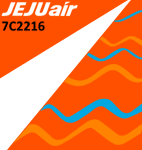
(TEXTURES ONLY)
(ONLY TESTED IN FSX: STEAM EDITION)
Painted as a tribute to the victims, their families and preserve the memory of this accident. It is in no means to mock the crash, the victims, or both.
I have made the "readme" file before, but unfortunately I couldn't find it and must have been accidentally deleted, so this is a remake version of it.
This will sadly be the last file I will upload in the Flightsim(.com) site, as in 3 days (January 1st, 2026), the new owners will close the website down temporarily. From now on, if you still want to download my liveries, you can download them in AVSIM Library, and Dropbox (Accessible from my website, as well as the Facebook Groups I am in!), my website is just in the last page of this readme file.
Thank you so much to GabrielCorazza for letting me borrow his Jeju Air "제주항공" Text Decal, which made this livery possible! I recommend you checking his page out in Flightsim.to if you use MSFS2020 / MSFS2024. His liveries are equally as good, if not better!
Instructions and more information are included in the readme file.
| Filename: | FS2004FSXP3D_TDS_Jeju_Air_HL8088_Boeing_7378ASWL_F.zip |
| License: | Freeware |
| Added: | 30th December 2025, 00:30:29 |
| Downloads: | 69 |
| Author: | Ryubunao |
| Size: | 43.76 MB |
| Category: Flight Simulator 2004 - AI Aircraft | |
| The 2006 Maine Military AI Aircraft and Airbases |
|
File Description:
The NorthEastern USA Military AI Aircraft and Airbase Collection Part 1: 2006 Maine Military AI Aircraft and Airbases package is the first in a series of complete Military AI packages that will cover all the currently active military aviation units in the New England states of Maine, New Hampshire, Vermont, Massachusetts, Connecticut and Rhode Island along with New York, New Jersey and Pennsylvania. This first package includes represenative AI fixed and rotary wing aircraft for all the military aviation units currently operating in the state of Maine, AFCADs for Bangor International Airport (KBGR) and Naval Air Station Brunswick (KNHZ) and novel and unique demonstration flightplans utilizing all of the above. Complete AI versions or conversions of such aircraft as the USN P-3C, USNR C-130T, USN SH-60B, USN HH-1N, ME ANG KC-135E, ME ARNG UH-60A, ME ARNG/CD RAID OH-58R, OSACOM C-12D and VT ANG F-16C (refueling flight conversion) are included. My thanks to John Young for the use of a modification of his excellent KBGR scenery version 3 and to Henry Tomkiewicz, Mike Stone, Jordan Moore, Owen Hewitt and Rok Dolonec for the use of their excellent aircraft models. This Military AI package created by Mike MacIntyre.
| Filename: | The_2006_Maine_Military_AI_Aircraft_and_Airbases.zip |
| License: | Freeware, limited distribution |
| Added: | 26th June 2006, 19:19:13 |
| Downloads: | 4,859 |
| Author: | Mike MacIntyre |
| Size: | 17.56 MB |
| Category: Prepar3D V1-4 - Aircraft Repaints, Textures and Modifications | |
| Feelthere E175/E195 V3 SP1+ V3 Resized VC Textures |
|
Images related to this file:
File Description:

These are resized shared and shared lighting virtual cockpit textures for Version 3 (with SP1) of the Feelthere E175/E195 for Prepar3D Verion 4.5 and above. After Service Pack 1, released to date only for the Feelthere E175/E195, performance issues were experienced by some owners of the E175/E195 V3. Specifically, when switching views from the virtual cockpit (VC) to an exterior view and then back to the VC, some users experienced long load times and sustained low frame rates, in some cases as low as 5 fps or lower while in the VC view. The problem was experienced more often in the dusk to twilight times or at dawn. The textures related to these symptoms seem to be the shared textures and the shared lighting textures used by the virtual cockpit. This package is a set of those textures, resized to 2048x2048 (2K) from 4096x4096 (4K). Any textures smaller than 2K were not resized. These textures are only resized; no changes were made to any other attributes of characteristics of the DDS format files. NOTE: Feelthere has kindly given me permission to publish these textures and I thank them for that. To use these textures you must own a copy of the Feelthere Embraer E-JETS E175 AND E195 V3.
| Filename: | Feelthere_E175E195_V3_SP1_V3_Resized_VC_Textures.zip |
| License: | Freeware, limited distribution |
| Added: | 3rd June 2020, 21:28:54 |
| Downloads: | 2,016 |
| Author: | Feelthere, Jeffrey S. Bryner |
| Size: | 452.42 MB |
| Category: Flight Simulator X - Scenery | |
| KDEN - Denver, Colorado International Airport |
|
Images related to this file:
File Description:
Denver Colorado International Airport For FSX. Several improvements have been made to the default airport, those being:
1. A United Airlines commuter terminal has been added to Concourse B along with custom made jetways complete with the United Airlines logo (these jetways are NOT animated).
2. All jetways and scenery objects will display as long as scenery complexity in FSX is set at normal or higher.
3. The vehicle paths have been redesigned so as not to allow airport vehicles to enter taxiways
4. Optionally, all runways may be opened for AI traffic.
5. The land class has been changed in places so as to prevent autogen objects from displaying on the airport grounds.
6. The tower view has been changed to display from the roof of the control tower.
7. Extra fuel trucks have been added throughout the airport.
8. All gates are accurately portrayed.
9. All taxiways are included and are accurately named, and taxiway signs are accurately placed.
Also, there is an option to place several static United Airlines and Southwest Airlines aircraft in designated spots.
This is an improved version of the airport which I first did in 2007.
Please refer to the README FIRST.txt file for important information
| Filename: | KDEN__Denver_Colorado_International_Airport.zip |
| License: | Freeware, limited distribution |
| Added: | 5th January 2014, 23:51:59 |
| Downloads: | 3,482 |
| Author: | Patrick Finch |
| Size: | 2.57 MB |
| Category: Prepar3D V1-4 - Scenery | |
| KILE, Killeen Texas airport |
|
Images related to this file:
File Description: Instructions: There are 3 folders in this package; effects, scenery and texture.
Create a subfolder under the C:\Program Files (x86)\Lockheed Martin\Prepar3D v3\Scenery folder and call this new folder KILE.
Place the scenery and texture folders (with their associated contents) under this newly created KILE subfolder.
Place only the contents (not the folder) of the effects folder in the P3D effects folder often located at C:\Program Files (x86)\Lockheed Martin\Prepar3D v3\Effects.
Now start up P3D.
On the menu at the top of the P3D screen click on World > Scenery Library > Add Area. This will bring up the Add Scenery Area dialog box. Click the Browse button and browse to find the newly created KILE folder. It should be located at C:\Program Files (x86)\Lockheed Martin\Prepar3D v3\Scenery. Once you select the KILE folder, click the OK button. This will place that folder in the P3D scenery library. You will notice that the library is organized by priority starting at 1. I have my KILE scenery set as #4 priority but I am not sure if it needs to be that high. I did notice during design that sometimes my ground texture at the airport would act strange and I found that by setting KILE to a higher priority, it fixed that. As a last step make sure the checkbox to enable the scenery is checked and click OK.
You should now have the new KILE scenery available to use.
This package covers KILE, Killeen Texas airport. It is a city owned public use airport located 3 miles east of Killeen Texas. It has one runway that is 5,495 x 100 feet.
Almost 100 custom objects are included in this package. They include:
All hangers and buildings on the airport grounds made from on site photos.
Several buildings surrounding the airport grounds.
All taxiway and runway signs.
All taxiway, runway and approach lighting.
ILS antenna, localizer, etc.
Fuel tanks and parking T's.
Night lighting where appropriate.
Currently I am using the default land class instead of photo real because I couldn't find any photo real that suited my needs.
I welcome your feedback good or bad. Currently this airport is only for P3D. I may create an FSX version if I have enough requests. I started learning to make 3d objects and airports last year and I am learning something new every day. I hope you enjoy!
I plan on improving the night lighting for the runway lights, runway end lights, taxiway lights, etc. to make them more visible from a distance at night. I also want to replace the stock P3D vehicles with my own design and a few other things to come in an updated version down the road.
| Filename: | KILE_Killeen_Texas_airport.zip |
| License: | Freeware |
| Added: | 11th May 2017, 19:54:19 |
| Downloads: | 491 |
| Author: | Shannan Landreth |
| Size: | 23.83 MB |
| Category: X-Plane - Scenery | |
| TMA Fortaleza XP11 Package SBFZ SJCM SJDS SNFF v1.0.0 |
|
Images related to this file:
File Description:
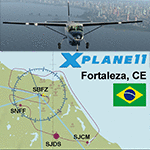
This is an X-Plane 11 scenery package for Fortaleza, Ceara, Brazil. It includes four airfields located in the metropolitan area of Fortaleza: (1) SBFZ FOR - Pinto Martins International Airport, (2) SJCM - Catuleve Aeronautical and Sports Airfield, (3) SJDS - Fabrica Fortaleza Private Airport, (4) SNFF - Feijo Flight School and Private Airfield. SBFZ/FOR scenery was tested and is operational (as of January 27, 2017) in "X-Plane 11 Public Beta #8 64 bit", Windows 10 Home. It was also tested but is NOT operational (as of January 27, 2017) in "X-Plane 10.51 64 bit", Windows 10 Home. This happens for two reasons: (a) preparation of a near future update release of this airport with ground traffic/services enabled for SBFZ/FOR ground, a feature compatible only with XP11, and (b) the use of some internal Laminar Research made libraries for XP11 only, not present in XP10 libraries. The new SBFZ version with XP11 ground traffic/services will be released after X-Plane's WED v1.6 is stable, outside of beta version for XP11. If you want a great SBFZ airport scenery compatible with XP10, please download it from here: "SBFZ - Pinto Martins International Airport - Fortaleza Ceará (Brazil) 1.6", By Rafasax, found at: http://forums.x-plane.org/index.php?/files/file/21401-sbfz-pinto-martins-international-airport-fortaleza-cear%C3%A1-brazil/
| Filename: | TMA_Fortaleza_XP11_Package_SBFZ_SJCM_SJDS_SNFF_v10.zip |
| License: | Freeware |
| Added: | 28th January 2017, 07:20:20 |
| Downloads: | 171 |
| Author: | Rui Mesquita |
| Size: | 16.99 MB |
| Category: Prepar3D V1-4 - AI Flight Plans | |
| Nigeria Airways 1998 AI Flightplans |
|
File Description:
Unfortunately, between the early 1990s and 1998, Nigeria Airways had drastically reduced it's European network, ending service to places like London and Amsterdam and disposing of most of the A310s and DC-10s. Flights to Dubai were now on a charter basis, with the DC-10 only doing a LOS-KAN-JED route once per week. The DC-10 also did maintenance in MIA, so I included a ferry flight there but it usually sits in Lagos unused. A single PW-powered A310-200 and a DC-10-30 were doing the longhaul flights while the A310s and several 737-200s were flying around Africa. There were 3 A310s stored; 2 in Lagos and one impounded in BRU(to become a cafe in 12/99) with none in flying conditions. I have them sitting idle in LOS as in real life, but since they were not in flying condition, they only do a touch and go landing once per week in the middle of the night. I will give them proper parking spots when I do the LOS ADEX eventually, but delete them if you wish. Flightplans by Chasen Richardson. Repaints are in the Avsim library, filenames included. Part of the 1998 Flight Simulator Project. Follow us on Facebook at facebook.com/flightsim98 and on instagram as @bayviationsim. For more Retro AI, check out the forums at: http://retroai.proboards.com/
| Filename: | Nigeria_Airways_1998_AI_Flightplans.zip |
| License: | Freeware, limited distribution |
| Added: | 20th December 2019, 02:48:48 |
| Downloads: | 54 |
| Author: | Chasen Richardson\Bayviation |
| Size: | 672.64 KB |
| Category: Microsoft Flight Simulator (2020) - Aircraft Repaints, Textures and Modifications | |
| MF_P-38_Hollywood Hepcat |
|
Images related to this file:
File Description:
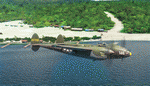
This folder contains a repaint for the Lockheed P-38L Lightning by Flying Iron. It shows Hollywood Hepcat' P-38J, numéro de série 42-31383, piloté par 2nd.
Le lieutenant Dwight M. Kelly, du 339th Fighter Squadron, 347th Fighter Group, 13th Air Force, en 1944, de Sterling Field dans les îles Salomon.
I was inspired by Ron Cole's magnificent painting: https://roncole.net/products/p-38-lightning-hollywood-hepcat-by-ron-cole?_pos=1&_sid=2b9efd2ac&_ss=r
where you can find superb painting on his site. https://roncole.net/
Repaint by Martial FÉRON, based on the textures by Flying Iron.
INSTALLATION
1. Unzip to a temporary location.
2. Copy the "MF_P-38_Holliwood Epcat" folder in this download to your "Community" folder in MSFS2020.
3. Have fun flying!
ACKNOWLEDGEMENTS
The model and textures used for this repaint were made by Fying Iron.
LEGAL STUFF
This repaint is released as FREEWARE. You may use and modify it in any way you wish, but
you may NOT use it in any kind of money-making endeavor, and you may NOT publicly
distribute any copies of it, whether modified or not, without my permission.
Martial FÉRON
CONTACT
Questions and/or comments about this repaint are always welcome via e-mail at [email protected].
April 2022
| Filename: | MF_P38_Hollywood_Hepcat.zip |
| License: | Freeware |
| Added: | 15th April 2022, 15:02:15 |
| Downloads: | 29 |
| Author: | Martial FÉRON |
| Size: | 56.72 MB |


© 2001-2026 AVSIM Online
All Rights Reserved
Privacy Policy |