
Where Flight Simulation Enthusiasts Gather from Around the World!
AVSIM Library - Search Results

| Category: Combat Flight Simulator 1 and 2 - Aircraft | |
| Mitsubishi G4M |

|
Images related to this file:
File Description:
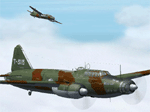
The Mitsubishi G4M (long designation: Mitsubishi Navy Type 1 attack bomber: 一å¼é™¸ä¸Šæ”»æ’ƒæ©Ÿ, 一å¼é™¸æ”» Isshiki rikujÅ kÅgeki ki, IsshikirikkÅ) was the main twin-engine, land-based bomber used by the Imperial Japanese Navy Air Service in World War II. The Allies gave the G4M the reporting name Betty. Japanese Navy pilots called it Hamaki (葉巻, "cigar", lit. "leaf roll") due to its cylindrical shape.
The G4M had very good performance, especially range, which was achieved by its structural lightness and an almost total lack of protection for its crew, with no armor plating or self-sealing fuel tanks. These omissions proved to be its weakness when confronted with American fighter aircraft during the Pacific War.
| Filename: | Mitsubishi_G4M.zip |
| License: | Freeware |
| Added: | 12th August 2017, 15:21:52 |
| Downloads: | 37 |
| Author: | Peter Mercy |
| Size: | 21.27 MB |
| Category: Prepar3D V5 - Aircraft Repaints, Textures and Modifications | |
| G-KURK A2A Piper Cub P3Dv5 |
|
Images related to this file:
File Description:
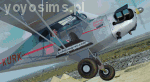
This is repaint of L-4 "Grasshopper" version of Piper "Cub" - G-KURK A2A Piper Cub - version for P3Dv5 only. Real repaint was inspiration for this skin outside and inside - it was adapted for A2A Piper Cub for P3Dv4.4+. The plane "Liberty Girl II" is used by Maurice Kirk. He traveled on this G-KURK on many places on the World and took up the challenge in 2016 - Vintage Air Rally over Africa (didn't finish it). Textures only, you need A2A mode for P3Dv5. The set has outside textures and completly rebuilded inside textures (cockpit). Enjoy and maybe help him to finish this race virtally! If You need more info about this pilot, his Cub and this skin check topic about G-KURK on A2A Forum. For P3Dv4.5 check different version and downlaod link.
| Filename: | GKURK_A2A_Piper_Cub_P3Dv5.zip |
| License: | Freeware |
| Added: | 27th November 2020, 18:29:52 |
| Downloads: | 61 |
| Author: | Rafal Stankiewicz / yoyosims |
| Size: | 77.31 MB |
| Category: Flight Simulator X - AI Aircraft | |
| AI Mexicana de Aviacion Airbus A318-111 New and Old Liveries Pack |
|
Images related to this file:
File Description:
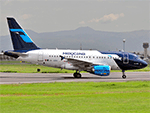
This is the Third Oldest Airline in the world, the Second Oldest Airline in Latin America, and the First Oldest Airline in Mexico, Mexicana Airlines (Mexicana de Aviacion), this is the Airbus A318-111 for now the pack have the Last New Livery (2010) and the Old Livery (2005), more later will upload the Older Liveries, the Old Livery but with the Thin Logo and No Wingtips Logos, and the mos popular and old Mexicana´s livery, (1997-2005). For the 100th Anniversary I´ll upload all the fleet, since 1940´s with the DC-2 to the last fleet that had when it flies, the Mark and Airline still exists, BUT It doesn´t fly since 2011. The model is FSX AI Bureau (FAIB) Airbus A318-100 Basepack. I hope enjoy it!.
| Filename: | AI_Mexicana_de_Aviacion_Airbus_A318111_New_and_Old.zip |
| License: | Freeware |
| Added: | 20th July 2021, 01:07:16 |
| Downloads: | 142 |
| Author: | Jesús Gibran Soriano Solleiro |
| Size: | 106.34 MB |
| Category: Flight Simulator 2004 - AI Aircraft | |
| AI Mexicana de Aviacion Airbus A318-111 New and Old Liveries Pack |
|
Images related to this file:
File Description:
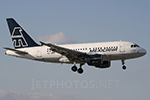
This is the Third Oldest Airline in the world, the Second Oldest Airline in Latin America, and the First Oldest Airline in Mexico, Mexicana Airlines (Mexicana de Aviacion), this is the Airbus A318-111 for now the pack have the Last New Livery (2010) and the Old Livery (2005), more later will upload the Older Liveries, the Old Livery but with the Thin Logo and No Wingtips Logos, and the most popular and old Mexicana´s livery, (1997-2005). For the 100th Anniversary I´ll upload all the fleet, since 1940´s with the DC-2 to the last fleet that had when it flies, the Mark and Airline still exists, BUT It doesn´t fly since 2011. The model is FSX AI Bureau (FAIB) Airbus A318-100 Basepack. I hope enjoy it!.
| Filename: | AI_Mexicana_de_Aviacion_Airbus_A318111_New_and_Old.zip |
| License: | Freeware |
| Added: | 20th July 2021, 01:07:29 |
| Downloads: | 75 |
| Author: | Jesús Gibran Soriano Solleiro |
| Size: | 106.34 MB |
| Category: Flight Simulator 2004 - Scenery | |
| Cordova Smith PACV & Municipal CKU in Alaska US |
|
Images related to this file:
File Description:
Cordova is on the south coast of Alaska, around 150 miles east of Anchorage and 45 miles south of Valdez. The town is mainly built on a small but relatively flat area between the east side of Prince William Sound and Eyak Lake, and has a population of around 2,350 in 2010, the approximate date of this scenery.
The Municipal Airfield CKU is on the north side of Eyak Lake to the east of Cordova, with the runway that is 1,800 feet of unlit gravel squeezed between the lake and the road that runs around the lake. The hangars and parking aprons are reached by taxiing across, and to some extent along, the road. Float planes are also taken from the lake to an apron to the west of the runway.
Cordova Airport PACV (named in the real world "Merle K. (Mudhole) Smith", and I will leave you to research this) is known as Cordova Smith in FS9 and is 10 miles to the east of the town on relatively flat ground between mountains to the north and the sea to the south. The runway is 8,080 feet of lit asphalt aligned 09-27 with ILS on runway 27 and VASI on both ends. The aprons are to the north side of the runway and are reached by back-taxiing; there are no taxiways parallel to the runway. The main apron serves Alaska Air via the western of two taxiways. The GA parking and hangars are mainly reached by using the eastern taxiway, though there is in fact a connecting taxiway between the two (for GA, but definitely not for airliner use). The taxiway further to the west serves the separated Alaska Coastguard apron and hangar, which is mainly for helicopter use. There is a nominally grass runway 1,900 feet long and aligned 16-34 to the south of the main runway; in fact it appears to be more gravel than grass. I have left this inactive as otherwise AI Alaska Air planes would be attempting to use this when the wind made it seem like a good idea.
The AI includes Alaska Air (twice a day) and also Coastguard helicopters, along with GA.
| Filename: | Cordova_Smith_PACV__Municipal_CKU_in_Alaska_US.zip |
| License: | Freeware, limited distribution |
| Added: | 22nd January 2022, 21:53:03 |
| Downloads: | 148 |
| Author: | Roger Wensley |
| Size: | 16.93 MB |
| Category: Prepar3D V1-4 - Scenery | |
| EDJA Allgäu Memmingen (DE) - V1 |
|
Images related to this file:
File Description:
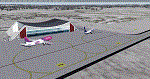
Airport: Allgäu (DE) EDJA V1
Release: January 2018
Simulation: P3D v4.1
This scenery is an update of the stock Airport (ICAO code: EDJA).
"Memmingen Airport (IATA: FMM, ICAO: EDJA), also known as Allgäu-Airport Memmingen, is an international airport in the town of Memmingerberg near Memmingen, in the Swabia region of Germany. It is the smallest of the three commercial airports in Bavaria after Munich Airport and Nuremberg Airport and has the highest altitude of any commercial airport in Germany. It is operated by Allgäu Airport GmbH & Co. KG, a limited partnership of 71 mostly local, medium-sized companies with only minor public shares.
Located about 3.8 km (2.4 mi) from the centre of Memmingen and 110 km (68 mi) from the city centre of Munich, it serves Memmingen and the Allgäu area and also provides a low-cost alternative to Munich Airport and therefore is sometimes referred to as Memmingen/Munich-West Airport or similar by some low-cost airlines, despite the fact that it is 110 kilometres from the centre of Munich. It mostly features flights to European leisure and some metropolitan destinations and handled nearly 1,18 million passengers in 2017."
Source: Wikipedia, the free encyclopedia
Link: https://en.wikipedia.org/wiki/Memmingen_Airport
What to expect?
The entire airport has been updated with correct RWY, Taxiways, APRON's, COMM's (ATIS, GND, TWR), markings and some objects. RWY 24 got it's ILS and go arround information acc. to the charts. The main Terminal is a custom building with custom day and night textures. Also all ground textures are custom made. Other objects INCLUDING the tower are from stock ADE!
In time I will add more custom buildings to further releases of this airport. Currently I have already started to work on the Tower building.
Ground textures will not receive shadows unless you turn "Buildings" receieve shadows to ON!
General:
I'm not a proffessional scenery builder or texture artist but I did try to do my best to update the stock Airport and offer it as freeware to the simming community. I have tested the scenery and did not find any issues with it. GSX services work, AI traffic with Ultimate Traffic Live works, COMM's work, APPR on ILS24 does work, and so on.
Entire work and object placing has been done using a photo overlay image from Google Earth, yet don't expect a photoreal scenery. The used background image has been removed due to Google's copyright policy.
Big thanks to the guys from FS Developer (Don, Arno) who I have kept busy during the birth of the scenery and those who offered the tools to build it (ADE, MCX, Sketchup, Gimp,...).
| Filename: | EDJA_Allgu_Memmingen_DE__V1.zip |
| License: | Freeware |
| Added: | 21st January 2018, 17:07:14 |
| Downloads: | 1,623 |
| Author: | Gerald Krutsch |
| Size: | 19.08 MB |
| Category: X-Plane - Utilities | |
| X-Camera 2.2.1 |
|
Images related to this file:
File Description:
The X-Camera 2.1.1 plugin for X-Plane 9 and 10 is a replacement camera system that lets you define multiple view categories and multiple views within those categories that are associated with specific aircraft. X-Camera is similar to EzDok for FSX only for X-Plane. Watch this short X-Camera demo on YouTube: https://www.youtube.com/watch?v=PgOxG8ejq9A
Each view can have options:
- TrackIR:
Each view can enable or disable the TrackIR input. If the view is out the cockpit window having TrackIR enabled is desirable. However, if the view is a close-up of an instrument panel then having TrackIR disabled is probably the better choice since the view will be stable making it easy to click on cockpit controls with the mouse. We also support LinuxTrack on Linux and Mac systems.
- HeadShake:
If the HeadShake plugin from SimCoders is installed then the view can accept input from HeadShake. Similar to the TrackIR feature you will likely want this enabled for certain views but disabled for views on instrument panel close-ups where a stable camera makes it easier to use a mouse to control cockpit knobs and switches. The HeadShake plugin must be at version 1.3 or higher for the integration to work.
- Scenic Flyer:
If the Scenic Flyer plugin from Digital Avionics is installed then the view can choose to display either the Scenic Flyer Glass panel or GA panel.
- Smooth Transition:
When this option is enabled the camera with smoothly transition from one view to another over approximately half a second. When the option is off the view will transition immediately.
- Views can be controlled in a number of ways:
> Each view can be positioned by using keyboard keys or a control panel
> The camera'™s X, Y, Z, Heading, and Pitch can all be adjusted for each view
> Views can be assigned to a HotKey or JoyStick button for easy selection
> HotKey or JoyStick button can be used to navigate to next or previous views
> The views for a specific aircraft can be saved to a CSV file for easy editing
- Walk Mode:
Any view'™s camera can be placed in Walk Mode. While in this mode the camera can be walked or floated around using keyboard input. If you ever played the video game asteroid that is what walk mode is like. The mode is particularly useful for pre-flight inspections of your aircraft. You can create a external view and after selecting that view you can "Walk" the camera around checking out your landing gear, props, etc.
- Linear Transitions and Auto Advance:
Linear transitions allows you to define a transition between two adjacent cameras in category. This capability, in conjunction with the auto advance feature, allows you define fairly sophisticated animations that can be used for automated Pre-flight inspections, scenery viewing, and cool transitions affects that can be used when creating flight videos. All the transitions in our YouTube video were done with X-Camera.
- Bezier Curve Transitions:
Bezier curve transitions allows you to define a transition between three or more adjacent cameras in a category. This capability, in conjunction with the auto advance feature, allows you define fairly sophisticated animations that have an ultra smooth movement between the curve control points.
- Many Unique Camera Attributes:
Tracking Cameras - Camera Leveling - Smooth Camera Joining - Auto Advance to the Next Camera - Individual Zoom and Field of View Setting - External Cameras - Free Cameras - Target Following Cameras - Cineflex Cameras - Automatically Generate Unique Orbit and Fly-By Animations
X-Camera can create unique orbit and fly-by camera sequences by providing a few key parameters
- Airport Cameras:
You can define a set of free cameras associated with an airport. You can create up to 2,000 cameras per airport. X-Camera can also automatically populate airport cameras by reading the airport scenery files and creating cameras at runways, starting locations, taxiway signs, and airport viewpoints. You can map a joystick button to quickly switch between your aircraft camera set and the nearest camera at the nearest airport.
- Target Following Cameras:
Targets are locations defined by a latitude, longitude, and elevation in meters. Target following cameras are a special type of external camera that is attached to your plane and it has the ability to track a selected target. You can also view the target reciprocal which as a view from the target back to you plane.
X-Camera Tutorial Videos: There is also a four part series of tutorial videos that will help you get started with X-Camera. You can access them from the X-Camera Tutorial Page: https://www.stickandrudderstudios.com/x-camera-tutorial-videos/
The full manual is included in the zip file you can also view it here: https://www.stickandrudderstudios.com/downloads/User_Guide.pdf
| Filename: | XCamera_221.zip |
| License: | Shareware, limited functionality |
| Added: | 27th January 2017, 15:14:21 |
| Downloads: | 478 |
| Author: | Mark Ellis |
| Size: | 4.61 MB |
| Category: Flight Simulator X - Scenery | |
| 75 AI Ships and AI Ship Traffic - Mediterranean Sea and Asia |
|
Images related to this file:
File Description:
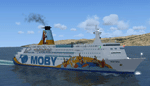
This package contains 75 different AI Ships with FPS friendly textures and models based on real ships including the world largest container ship Maersk Mckinney Moller and a collection of other ships including cruise ships, ferries, oil tankers, bulk carriers, gas tankers, sail ships, research vessels all with numerous repaints. This package also includes a full set of AI shipping routes for the Mediterranean Sea from Gibraltar to Istanbul and Port Said and for Asia from Tokyo to Kuala Lumpur. Ships will visit among other harbors: Hong Kong, Singapore, Kobe, Busan, Dalian, Shanghai, Manila, Xiamen, Macau, Marseille, Valencia, Barcelona, Livorno, Athens, Malta, Nice, and many more. This package is an expansion of my package 63 AI Ships and AI Ship Traffic for South America and Europe and to benefit fully from this you should install first 63 AI Ships and AI Ship Traffic for South America and Europe and the patch Patch for 63 AI ships and AI Ship Traffic. With everything installed you will have 138 ships sailing the FSX Oceans. This package has been developed with contributions from among others Jean-Pierre Fillion, Didier Lagaffe Puentes and Robystar. I would like to thank these three as well as everybody who have encouraged and supported the project or participated in the beta testing.
More routes for these ships can be expected soon: First look out for AI Ship Traffic for North West Europe.
| Filename: | 75_AI_Ships_and_AI_Ship_Traffic__Mediterranean_Sea.zip |
| License: | Freeware |
| Added: | 16th August 2013, 22:36:00 |
| Downloads: | 13,540 |
| Author: | Henrik Nielsen |
| Size: | 32.51 MB |
| Category: Flight Simulator 2004 - AI Aircraft | |
| Re-upload of five repaints of Rysiek Winawer's A-10 in the colors of the 511th TFS and one in of the Wing's CO, all during 1988/1989, textures only |
|
Images related to this file:
File Description:
Re-upload of five repaints of Rysiek Winawer's A-10 in the colors of the 511th TFS and one in of the Wing's CO, all during 1988/1989, textures only
| Filename: | Reupload_of_five_repaints_of_Rysiek_Winawers_A10_i.zip |
| License: | Freeware |
| Added: | 16th May 2010, 23:34:59 |
| Downloads: | 336 |
| Author: | Bert Dekker |
| Size: | 1.08 MB |
| Category: Flight Simulator 2002 - AFCAD Files | |
| Hong Kong International Airport VHHH Single-Layer AFCAD |
|
File Description:
This single-layer AFCAD file, named VHHHBB.txt, is an FS2002 facility file for the Hong Kong International Airport in Hong Kong, Special Administrative Region of the People's Republic of China. It adds as many gates as possible to the airport. The gates are logically labeled, but may not reflect their real-world equivalent. My goal was to add 'life' to the airport, not recreate an exact replica of the real thing. All runways
are available for FS2K2 to select the active. The file ID is VECC and has the following gate distribution: Heavy-17, Medium-8, Small-20, Express-0, GA-7. I have included Lee Swordy's AF Installer along with this file. It automatically installs it into FS2002. To use the installer, simply click on the file VHHHBB.txt and drag it onto the AF Installer icon.
| Filename: | Hong_Kong_International_Airport_VHHH_SingleLayer_AFCAD.zip |
| License: | Freeware |
| Added: | 30th December 2002, 15:51:55 |
| Downloads: | 1,115 |
| Author: | Boyd Barker |
| Size: | 54.63 KB |


© 2001-2026 AVSIM Online
All Rights Reserved
Privacy Policy |