
Where Flight Simulation Enthusiasts Gather from Around the World!
AVSIM Library - Search Results

| Category: Flight Simulator X - AI Aircraft | |
| AI Lineas Aereas Azteca Faib Boeing 737-300 Fleet Pack |

|
Images related to this file:
File Description:
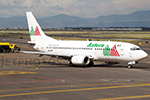
Those are the aircrafts of the extinct mexican airline "Lineas Aereas Azteca", the Boeing 737-300 fleet pack contain the next aircrafts with the registrations: XA-AAU (With New Colors, Old Colors, Small Livery and Website included), XA-AAV (With New Colors, Old Colors, Small Livery and Website included),
XA-CAS (With No Website and Website included), XA-TWG (With GE Logo Engines and Website included), XA-UCL (With Website and White Colors included), XA-UCP (With Website and White Colors included). LÃneas Aéreas Azteca was an airline based in Mexico City, Mexico. It operated domestic scheduled services and international services to the USA. Its main base was Mexico City International Airport, with a hub at General Abelardo L. RodrÃguez International Airport, Tijuana.
The airline was established on 9 May 2000 and started operations on 1 June 2000, operating domestic services with Boeing 737 aircraft. It started up after TAESA closed down and some of the staff and assets were taken over.
The airline's operations were suspended by the government in March 2007 due to safety problems, and in October 2007 the Mexican government permanently revoked its air operator's certificate because the company hadn't solved those problems.
On 10 October 2007, the General Civil Aeronautics Directorship (DGAC) of Mexico's Communications and Transport Secretariat permanently revoked LÃneas Aéreas Azteca's air operator's certificate, because the airline did not have a sound financial statement after the previous suspension.
The fleet consisted in 6 Boeing 737-300 (XA-AAU, XA-AAV, XA-CAS, XA-TWG, XA-UCL, XA-UCP), 3 Boeing 737-700 (XA-AEP, XA-AEQ, XA-TWF), and 1 Bombardier Learjet 31 (XA-OLE).
The models of this traffic are FSX AI BUREAU (FAIB) Boeing 737-300. This is my website: https://el-mundo-de-los-aviones-ai-traffic.jimdosite.com I hope you enjoy it!
| Filename: | AI_Lineas_Aereas_Azteca_Faib_Boeing_737300_Fleet_P.zip |
| License: | Freeware |
| Added: | 18th May 2023, 06:43:41 |
| Downloads: | 63 |
| Author: | Jesus Gibran Soriano Solleiro |
| Size: | 102.96 MB |
| Category: Flight Simulator X - Scenery | |
| Burke Lakefront Airport (KBKL), Clevland, Ohio |
|
Images related to this file:
File Description:

File Description:
This airport was made using Google sketch up 8, Airport Facilitator X and Instant Scenery 2. Burke Lakefront Airport is a general aviation airport located next to Lake Erie in Cleveland, Ohio. I have made custom 3D buildings using Google sketchup for the airport. This update makes it so that all the buildings will show because some people were having problems with the buildings. All the buildings have photo textures to make it closer to real life. The update also makes it so that the airport ICAO is not included in the airport name and an installer program is included. I put static aircraft on the ramp, airport vehicles and more fuel trucks. I added more parking and fuel spots. I also made a parking lot full of cars. If you choose to start off at a DOCK gate, you will start off inside one of the custom hangars. Starting off or taxiing inside of a hangar will cause a crash (unless you have crashes turned off). I added a helipad located near the FBO. I have also included the aviation high school, that is located at the northeast, and boats that are right next to it in the water. There will be more objects at the airport if your scenery complexity is set to normal (such as vehicles, aircraft, and fuel trucks). Tower view is from the roof of the control tower. This was all made based on Google Earth satellite imagery and Bing Maps. There are no night textures for the custom buildings. These will be added in a future version. Please read the readme for instructions on how to install. You do not need the original file for this update to work. This is for flight simulator X only. By Tyler Lawrence.
| Filename: | Burke_Lakefront_Airport_KBKL_Clevland_Ohio.zip |
| License: | Freeware |
| Added: | 7th April 2012, 11:42:42 |
| Downloads: | 1,347 |
| Author: | Tyler Lawrence |
| Size: | 6.82 MB |
| Category: Flight Simulator X - Scenery | |
| FSX-LIEO-Olbia-Sardinien |
|
File Description:
Now, after a long construction period and many hours of free time,
the new FSX airport LIEO-Olbia-Sardinia is finally finished, of
course as always with lots of details and a few extras.........
So off we go, off to Sardinia to the Costa Smeralda, preferably
with an A 321 or a Boeing 737, where you switch to a helicopter or
a smaller aircraft and explore the landscape in detail, including
the port, which has a heli pad for them VIP guests or you can take
a fire-fighting plane and help put out the fire. Of course, in the
direction of the hot air balloons, please first fill up with water
in the sea.............
Installation:
Unpack the zip folder: then copy the FSX-LIEO-Olbia folder into
the FSX addon folder, start the FSX, go to settings, scenery
library, add area, press OK, then you can start.
Extras:
! If you already have one of these files activated in your scenery
library, you do not need to install it again.
For all extras, the respective file must be copied individually
into the Addon Scenery folder and activated individually in FSX as
described during installation.
File: 3DPeople_Lib............ (to see people)
File: ObjLib-Large-Car-Parking-FSX.............(parking spaces and
vehicles)
File: PKP...........(to see trains and wagons)
File: Cobus.........(to see buses)
File: FSX_LTS......(lights and light poles)
File: EZ object Library.......(! Most important file for numerous
accessories + buildings)
! Note whoever installed the old EZ Object Library from me before
October 25th, 2023 should install this new one here and delete the
old one in FSX because I have completely revised it!
Candy:
As a treat, I'll give you the Canadair CL215 firefighting plane
that is stationed in Olbia 1x as AI traffic + 1x for flying
yourself..............
You can find more information on my YouTube channel
https://www.youtube.com/channel/UC7vHXQMa3hhU2iGtODXlkHw/videos
| Filename: | FSXLIEOOlbiaSardinien.zip |
| License: | Freeware |
| Added: | 29th October 2023, 12:01:15 |
| Downloads: | 598 |
| Author: | Ewald Wagner alias Jamaika |
| Size: | 251 MB |
| Category: Flight Simulator X - Sounds | |
| Boeing 737NG CFM56-7B Ultra Effects Edition |
|
File Description:
SkyHigh Audio Simulations is proud to present what is quite possibly the most realistic sounding Boeing 737NG sound pack available! This sound pack is designed specifically for the PMDG 737NGX, and will not work properly in any other 737NG aircraft add-ons in MS FSX, or Prepar3D. Seperate 737NG versions for the freeware TDS, Vistaliners/Kittyhawk, default 737-800, and other 737NG add-ons will follow shortly.
We have gone through great lengths to make this sound as realistic as possible through all stages of flight and through all dimensions of the exterior view, as well as the interior points of view. These sounds will raise the bar for all future jet sounds for Flight Simulator X!
One new and amazing feature in this sound is the interior 3D Sound Cone environment specifically for the PMDG 737NGX version. The sound environment will change inside as you 'scroll' back towards the engines and wings in the 3D interior view (virtual cockpit view).
Perhaps the best part of these sounds is the exterior fly-by! Using 3D Sound Cone technology, there are two exterior buzzsaw sounds, one distant and one up close. Two jet whine sounds, one for front and rear, and one for side-on to the plane. There are three powerful sounding rumble/exhaust sounds, one 'whooshing' sound effect for side one, one powerful blast sound for behind the engine, and one low rumble for when the plane is flying overhead at a distance. All in all, this will create one of the most realistic sounding in-game jet fly-by sound experiences for Flight Simulator X, especially for the CFM56-7B 737NG in FSX.
We hope you enjoy these new ultra-realistic 737NGX sounds for FSX. Actually we know you will enjoy them!
| Filename: | Boeing_737NG_CFM567B_Ultra_Effects_Edition.zip |
| License: | Freeware |
| Added: | 8th December 2014, 12:03:20 |
| Downloads: | 15,493 |
| Author: | Adam Murphy and Jesse Casserly - Skyhigh Audio Simulations |
| Size: | 79.16 MB |
| Category: Prepar3D V1-4 - Aircraft Repaints, Textures and Modifications | |
| North American P-51D 52nd FG (WD-M) 'Pendaja / Miss Ruth' |
|
Images related to this file:
File Description:

This folder contains a repaint for the A2A WoP3 P-51D Mustang (with AccuSim), in the colors of P-51D-5-NA 44-13287 WD-M, which was the aircraft assigned to Lt William Parent of the 4th FS/ 52nd FG, based in Italy. On the 1st of September 1944 however, it was being flown by Major Wyatt P. Exum during an escort mission to Hungary. It was Maj. Exum's first operational mission nin the ETO. On the way back from the mission, the squadron strafed an airfield, before spotting a moving train. Lts Strout and Wilson attacked the train, and as a result of Lt Wilson's attack, the engine blew up while he was overflying it, damaging his cooling system and setting the engine on fire. The fire quickly blew out, and Lt Wilson decided to make an belly landing in a recently plowed field. Over the radio, he heard Maj Wyatt Exum transmit "I'll be down to get you, Charlie!" and indeed he landed close to Lt Wilson's aircraft. Lt Wilson managed to turn Maj Exum's aircraft, as his tail wheel had become stuck in a rut in the field, and both men tried to squeeze into the cockpit. Meanwhile, men on horseback were approaching, shooting several holes in the aircraft. While Lt Wilson shot back with his .45, Major Exum gunned the engine, and they managed to take off with Lt Wilson half outside the cockpit with his .45. They flew the 400 miles back to Madna in Italy on their last fuel, and landed with other Mustangs landing from the other side. Major Exum received the Silver Star for this action, as well as from the undying gratitude and admiration from Lt Wilson Repaint by Jan Kees Blom, based on the A2A paintkit.
| Filename: | North_American_P51D_52nd_FG_WDM_Pendaja__Miss_Ruth.zip |
| License: | Freeware |
| Added: | 4th November 2018, 17:24:47 |
| Downloads: | 66 |
| Author: | Jan Kees Blom |
| Size: | 11.83 MB |
| Category: Prepar3D V1-4 - Utilities | |
| Flightplan Visualizer 1.14 |
|
Images related to this file:
File Description:
Flightplan Visualizer (FV) version 1.14.0. Copyright 2018-2019 by Pelle F. S. Liljendal ([email protected]), all rights reserved.
FV comes with 629 pre-imported Commercial AI flightplans (+380 BizJet flightplans are available as a separate download). However you are able to import additional (AI) flightplans yourself. Once imported these (AI) flightplans can be visualized on a map-view, and the user will be able to search accross all these. Hence you can use the program as inspiration as to which routes to fly. E.g. you can search across all imported flightplans to find all flights in an A321 flying into/out from LDDU, or simply to look for all flights in a Boeing 747-8F.
Simply run the included installer to install the software. The program will be installed into "C:\Program Files (x86)\Flightplan Visualizer" and all datafiles will be installed into: "C:\Users\[UserName]\AppData\Roaming\FlightplanVisualizer". The program comes with a full manual explaining everything, and a 3 page quick manual to get you started. The first 3 times you run the program the quick manual will automatically open. The forum is hosted here: https://forum.aerosoft.com/index.php?/forum/919-flightplan-visualizer/
Version 1.14 Contains the following changes:
- Flightplan file-format was changed, to accommodate changes to the airline-data. In previous versions the airline ICAO-code had to be unique, hence not allowing old defunct airlines still remaining in the data-file when a new airline would be issued the same ICAO-code (now they can both exists, and many of the defunct have been marked as defunct).
- On start-up old flightplans in enabled folders will automatically be updated to the new format. If you have sub-folders containing additional flightplans, you should make sure these are enabled, in order to have these updated as well. Once they have been updated you can go ahead and disable these sub-folders again as you please.
- Its now possible to add user defined airlines, in case you want to add you own fictitious airlines (e.g. VA's) or you want to add airlines missing in the official data-files that I supply with the program (if this is the case, please notify me, so I can add these in the next release of the program).
- "Favorite aircraft" have been renamed into "Favorite aircraft-types", as it is the "types" of aircraft you mark. You don't mark a particular aircraft/cofiguration (like the PMDG B737-800 NGXu) as your favorite, but rather the "type" (B737-800). The file containing the (active) favorite aircraft-type selection was renamed as well (you don't have to do anything, the file is automatically renamed on start-up).
- Added a new Unit-Conversion form, letting the user convert units of: Speed, Lenght/Distance, Weight/Volume, Pressure and Temperature. The Weight/Volumne conversions is a bit special as it lets the user convert between weight (kg/lbs) and volume (liter/gal), thanks to a Fuel Density that defaults to 0.785, but can be changed by the user.
- All search-forms (seaching for airport, aircraft and airline) was changed to ignore whitespeaces (e.g. "airBaltic" vs. "air Baltic"), and ignore diacritics (e.g. "AerolÃnea" vs. "Aerolinea"), making it more easy to find what you are searching for in one go.
- The airline search-form will by default exclude airlines that have been marked as defunct. However a new "Include defunct" check-box have been added to the form, allowing you to include these (who am I to say you can not still use "Air Berlin", "Monarch" or "Thomas Cook" flightplans if you want to).
- Added 3 new columns to the airline search form showing commence/cease-date, and wheter or not the airline is "in use" (as carrier/operator by any of the active fligthplans).
- State is now by default excluded when using the airport search form, which make it a lot more convenient to find airports in the city of "New York". State can still be included in the search by choosing a different search-type using the combo-box in the upper/right corner.
- When Flightplan Visualizer needs for perform potentially lengthy operations it will spread the workload over the available cores of the CPU. However if you want to limit which cores it uses you can now set the affinity-mask in the settings form.
- The splash-screen shown when the program starts, and when reloading active flightplans was prevoiusly always shown on top (top-most), but if you find this anoying it can now be disabled in settings.
- Fixed: Warnings/errors regarding loading flightplans were only displayed at start-up. Now they are shown whenever all active flightplans are loaded (e.g. after having enabled a sub-folder).
- Data: The airline-data got a major update, and a bunch of new airlines were added, and the data for MANY others were updated. It is a manual process to update these, almost as funny to do as to watch paint dry ;-)
- Data: A few countries had a wrong- or no sub-region code, so these were fixed/updated. As usual, if any of you spot any erros, or missing data, please use the forum to notify me.
- Data: Additional info added to the aircraft-data (in preparation for some future plans).
- Flightplans: All flightplans bundled with the installer have been updated to the new file-format.
- Flightplans: Thanks to Ryan Carson (RCAI) for allowing me to bundle the installer with a few of his flightplans, so the installer comes with the very first winter 2019-2020 flightplan.
- Flightplans: The good people over at AIG (Alpha India Group) have been VERY busy since the last release, hence the installer comes with +130 new pre-imported flightplans, bringing the total to 629. This update concludes Summer 2019, and AIG already have the first Winter 2019/2020 flight-plans in beta-test.
Pelle
| Filename: | Flightplan_Visualizer_114.zip |
| License: | Freeware, limited distribution |
| Added: | 10th December 2019, 06:59:46 |
| Downloads: | 370 |
| Author: | Pelle Liljendal |
| Size: | 31.01 MB |
| Category: Flight Simulator X - Scenery | |
| hythevillage_pier.zip |
|
File Description:
Hythe Village and Pier
Hythe Village [Town] nestles between the edge of Southampton Water and the New Forest, some 500 yards west of the ‘American Base – RAF Hythe’; the surrounding area is known as ‘The Waterside’. Hythe, with its waterfront, boasts incredible views across Southampton Water, while the village [town] centre, with its Georgian High Street, offers a range of shops, services, traffic-free precincts and parking facilities. Nearby is ‘Hythe Marina’, to be found on Southampton Water's southern shore; it’s a unique development of a 206 berth marina, together with waterside homes, shops, restaurants, bars and a boutique hotel.There is also a passenger ferry which sails back-and-forth from Hythe Pier to the City of Southampton every 30 minutes. Before Hythe Pier was built, ferry and other boats arriving at Hythe had to use a gravel hard ramp which ran from the land out to the low tide point in Southampton Water. Walking along the hard gravel was not easy and travellers often got very wet. Various ideas to improve the situation were suggested at the time and construction of Hythe Pier was eventually started in October 1879 and officially opened on the 1st January 1881. Many World War II heroes departed from this pier on D-Day in June 1944.The pier itself stretches some 640 meters into Southampton Water and is one of the ten longest piers in the British Isles. In 1922, a narrow gauge electric railway opened in order to take passengers the full length of the Pier. This railway, with its original engine and rolling stock, is the oldest operating electric pier train in the world and is still operational to this day – playing an important part in the local transportation system between Hythe and Southampton.
Scenery Features
* Bus Shelter
* Ferry Ticket Collectors (On pier landing platform)
* Ferry Ticket Office
* High Street Shops
* Hotspur House
* Hythe Library & Car Park
* Hythe Pier
* Hythe Pier Landing Platform
* Hythe Promenade
* Library Road & Shops
* Lidl Superstore & Car Park
* People (Static & animated)
* Pier Railway & Safety Railings
* Pier Train (Parked at village end of pier)
* Lord Nelson Public House
* Prospect Place Park
* Public Toilets
* Seashells Lounge Bar & Restaurant
* St. John's Church & Cemetery
* Street Lighting
* Streets & Roadways
* ‘The Marsh’ & New Road
* Vegetation (Trees, bushes)
* Vehicles (Buses & cars)
* Waitrose Supermarket & Car Park
* WWII Remembrance Plaque (Prospect Place)
Special Effects
* Animated Birds (seagulls-close to village & pier)
* Chimney Smoke
* Night, Dusk & Dawn Lighting Effects
* Seagull Cry Sounds
| Filename: | hythevillage_pierzip.zip |
| License: | Freeware |
| Added: | 21st November 2025, 12:42:28 |
| Downloads: | 68 |
| Author: | Barrie Semmens |
| Size: | 16.37 MB |
| Category: Flight Simulator X - Aircraft Repaints, Textures and Modifications | |
| RAF Supermarine Spitfire Mk IX, French 340 & 345 Squadron |
|
Images related to this file:
File Description:
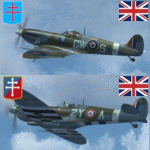
This packet includes two repaints of the Supermarine Spitfire IX, of Royal Air
Force, which were flown by French airman in the following 2 squadrons:
No. 340 Squadron was formed on 7 November 1941 at Turnhouse as a Free French fighter
squadron equipped with Spitfires. In April 1944 it joined No.145 Wing, Second
Tactical Air Force, a wing made up of French fighter squadrons. The squadron
served with the occupation forces in Germany, before on 25 November 1945 being
transferred to the Armee de l'Air.
The aircraft: serial BS392, code GW-S, was flown by S/Ldr Bernard Duperier,
Duperier flew this Spitfire only rarely in the period from October 25 to November
7 1942.
No.345 (French) Squadron (GC II/2 'Berry') was formed on 12 February 1944 at Ayr,
from French personnel transferred from North Africa. It served with 2nd Tactical
Air Force, taking part in the liberation of Europe in 1944-45. After the war the
squadron remained on the continent, and on 21 November 1945 it was transferred
to the Armee de l'Air. Even in RAF service, French roundels were used.
The aircraft: serial PT766, code, 2Y-A, was flown by Jean-Marie Accart, known under
Nom-de-Guerre 'Bernard', became famous during the campaign in France in 1940.
He commanded GC 1/5 and is credited with 12 German aircraft destroyed.
To be used with the payware Spitfire 2008 from RealAir Simulation. Buy it here
http://realairsimulations.com/spitfire/buynow.php?page=spitfire_buynow
The Realair repaintkit was used for making this repaint. The following items
were done extra:
- Redone all stencils and added lots more, so far i could find information and pictures on the internet;
- Pilot is repainted completely;
- Redone some bump-maps for some more detail (with RealAir approval);
- Several textures are now HD, 2048x2048 pixel for more detail;
- Improvement of the some details.
| Filename: | RAF_Supermarine_Spitfire_Mk_IX_French_340__345_Squ.zip |
| License: | Freeware, limited distribution |
| Added: | 14th May 2015, 17:39:49 |
| Downloads: | 225 |
| Author: | Marcel Ritzema |
| Size: | 17.43 MB |
| Category: Flight Simulator X - Scenery | |
| RAF Tholthorpe |
|
File Description:
RAF Tholthorpe opened in the late 1930s as a grass airfield, and operated as a sub-station of RAF Linton-on-Ouse.
From August 1940 to December 1940, Tholthorpe was a landing field for Whitley bombers of No. 58 Squadron RAF and No. 51 Squadron RAF based at Linton. From January 1941 to June 1943, Tholthorpe underwent maintenance to upgrade to Class A standards, with three intersecting concrete runways.
RAF Tholthorpe was assigned to No. 6 Group RCAF in June 1943. RCAF squadrons stationed here included No. 434 Squadron "Bluenose", 431 Squadron "Iroquois", 420 Squadron "Snowy Owl", and 425 Squadron "Alouette".
No. 434 Squadron, flying Halifax bombers, was formed and headquartered at Tholthorpe airfield from June 1943 until the squadron was moved to Croft. In July 1943, 431 Squadron moved to Tholthorpe airfield from Burn. It was later moved to Croft airfield as well. Not only were the operational squadrons quartered here, also their service echelons, - respectively Nos. 9431 and 9434 Service Echelon - which were formed from the ground crew of nos. 431 and 434 Squadron on 3 November 1943 and who moved with their squadrons on to Croft in December 1943.
In December 1943 No. 420 and No. 425 Squadrons (together with their service echelons, nos. 9420 and 9425 Service Echelon were moved to Tholthorpe airfield from Dalton and Dishforth respectively. These squadrons had returned from service with Wellingtons in North Africa, and it took them several weeks to work up on the newly acquired Halifax bombers. They were therefore unable to fly their first raids from Tholthorpe until mid-February 1944.
No. 420 Squadron flew 160 operations from Tholthorpe airfield and lost 25 Halifax’s. No. 425 squadron flew 162 operations from Tholthorpe airfield and lost 28 Halifax’s. In all, 119 Halifax bombers were lost from Tholthorpe. In April and May 1945 nos. 420 and 425 Squadron converted to Avro Lancaster’s, which they took with them when they left for RCAF Debert, Nova Scotia, Canada in June 1945.
The station closed in June 1945.
| Filename: | RAF_Tholthorpe.zip |
| License: | Freeware |
| Added: | 9th May 2017, 20:41:48 |
| Downloads: | 138 |
| Author: | Terry Boissel |
| Size: | 4.63 MB |
| Category: Flight Simulator X - Utilities | |
| FSDbBuild V1.0.2 for FStarToFS2K (Fully functional Release with Installer) |
|
File Description:
FSDbBuild is a Supplement for FStarToFS2K, it provides the possibility to build or update the Airport/Runway Database as used in FStarToFS2K. This Database is required because the from Jeppesen FliteStar/FliteMap exported Flight plans lack some important information as provided by FliteStar/FliteMap. The exported Flight plans don't provide the Information for the Departure Runway, which is a Requirement in Microsoft Flight Simulator 2000/2002/2004/FSX and Lockheed Martin Prepar3D.
In this current Version of the Utility, only the old plain Text-type Airport/Runway Data file - a Relict from Erni Alston's FSBuild 1.3.9 around the Year 2000 or even older - will be created, accompanied by a simple Indexing Mechanism Index file to speed-up the Search. A future Release will create a SQLite Database, which will be implemented also in FStarToFS2K V1.2.0 which will be released within the coming Weeks or Month. In Fact, this Airport/Runway Data file could also be used by Erni Alston's FSBuild, if there are any Users still around of this Flight Planning Software from 2000.
This program evolved from the necessity, that the with FStarToFS2K Program Package supplied Airport/Runway Data file was totally outdated, dating back to 2000 or even older! This shortcoming will now be eliminated, the User has now the possibility to build the Information according to the Data contained in his installed Microsoft Flight Simulator 2000/2002/2004/FSX or Lockheed Martin Prepar3D according the Scenery Configuration. For Installation and other Information consult the FSDbBuild Readme.txt file in the Zip-file.
Several Issues have been discovered and (hopefully) fixed. The detection of any Flight Simulator (MS FS 2002/2004/FSX or LM P3D V1.x) works now also correctly, also on 64bit machines. If you have the previous Versions of FSDbBuild (V1.0.0 & V1.0.1) installed, you should install now V1.0.2. Please note, this Utility is not only for Microsoft Flight Simulator X, it also supports Lockheed Martins Prepar3D V1.x!
| Filename: | FSDbBuild_V102_for_FStarToFS2K_Fully_functional_Re.zip |
| License: | Freeware |
| Added: | 25th July 2014, 00:00:24 |
| Downloads: | 396 |
| Author: | Conrad F. Staeheli |
| Size: | 4.43 MB |


© 2001-2026 AVSIM Online
All Rights Reserved
Privacy Policy |