
Where Flight Simulation Enthusiasts Gather from Around the World!
AVSIM Library - Search Results

| Category: Prepar3D V1-4 - Aircraft Repaints, Textures and Modifications | |
| De Havilland DH-82 Tiger Moth (ZK-AQA & ZK-AYE) Nelson Aero Club |

|
Images related to this file:
File Description:

This folder contains two repaints for Ant's DH-82 Tiger Moth Pro for P3DV4+. It shows two Tiger Moths of the Nelson Aero Club in New Zealand, ZK-AQA and ZK-AYE.
ZK-AQA, which was built in Hatfield and assembled in New Zealand in 1940 as NZ863. It was sold to a Mr. J. Reid in 1947. In 1950 it went to the Nelson Aero Club, and is shown in their service in this repaint. After several owners it wound up with the Auckland Gliding Club in 1961. In 1965, it crashed on take-off while towing a glider and it was damaged. Its remains were stored, but I'm not sure if they are still around.
ZK-AYE came from RAF stocks and was previously R4978.
It was built at Hatfield and assembled in NZ. It was shipped to New Zealand on "SS Rangitata" and BOC Unit 18 Rongotai 03 June 1940 and flew with No.3 EFTS, Harewood 1943-1944. After the war, it was issued free to Nelson Aero Club from Taieri on 15 September 1949 and entered the New Zealand Civil Aircraft Register as ZK-AYE on 02 February 1951. It was sold to A. Blechynden on 28 October 1957. The transfer was not notified to the CAA who cancelled it from the register on 28 November 1957. It rejoined the register with the new allocated registration of ZK-BVK in January 1958 and went to W. Scottof Karangahua in 1958. Unfortunately, it broke up in flight 10 miles north of Otorohanga on 07 May 1958 killing pilot and passenger. Repaint by Jan Kees Blom, based on the paintkit by Anthony Lynch
| Filename: | De_Havilland_DH82_Tiger_Moth_ZKAQA__ZKAYE_Nelson_Aero_Club.zip |
| License: | Freeware |
| Added: | 27th December 2019, 18:51:54 |
| Downloads: | 96 |
| Author: | Jan Kees Blom |
| Size: | 30.36 MB |
| Category: X-Plane - Utilities | |
| X-Camera 2.2.1 |
|
Images related to this file:
File Description:
The X-Camera 2.1.1 plugin for X-Plane 9 and 10 is a replacement camera system that lets you define multiple view categories and multiple views within those categories that are associated with specific aircraft. X-Camera is similar to EzDok for FSX only for X-Plane. Watch this short X-Camera demo on YouTube: https://www.youtube.com/watch?v=PgOxG8ejq9A
Each view can have options:
- TrackIR:
Each view can enable or disable the TrackIR input. If the view is out the cockpit window having TrackIR enabled is desirable. However, if the view is a close-up of an instrument panel then having TrackIR disabled is probably the better choice since the view will be stable making it easy to click on cockpit controls with the mouse. We also support LinuxTrack on Linux and Mac systems.
- HeadShake:
If the HeadShake plugin from SimCoders is installed then the view can accept input from HeadShake. Similar to the TrackIR feature you will likely want this enabled for certain views but disabled for views on instrument panel close-ups where a stable camera makes it easier to use a mouse to control cockpit knobs and switches. The HeadShake plugin must be at version 1.3 or higher for the integration to work.
- Scenic Flyer:
If the Scenic Flyer plugin from Digital Avionics is installed then the view can choose to display either the Scenic Flyer Glass panel or GA panel.
- Smooth Transition:
When this option is enabled the camera with smoothly transition from one view to another over approximately half a second. When the option is off the view will transition immediately.
- Views can be controlled in a number of ways:
> Each view can be positioned by using keyboard keys or a control panel
> The camera'™s X, Y, Z, Heading, and Pitch can all be adjusted for each view
> Views can be assigned to a HotKey or JoyStick button for easy selection
> HotKey or JoyStick button can be used to navigate to next or previous views
> The views for a specific aircraft can be saved to a CSV file for easy editing
- Walk Mode:
Any view'™s camera can be placed in Walk Mode. While in this mode the camera can be walked or floated around using keyboard input. If you ever played the video game asteroid that is what walk mode is like. The mode is particularly useful for pre-flight inspections of your aircraft. You can create a external view and after selecting that view you can "Walk" the camera around checking out your landing gear, props, etc.
- Linear Transitions and Auto Advance:
Linear transitions allows you to define a transition between two adjacent cameras in category. This capability, in conjunction with the auto advance feature, allows you define fairly sophisticated animations that can be used for automated Pre-flight inspections, scenery viewing, and cool transitions affects that can be used when creating flight videos. All the transitions in our YouTube video were done with X-Camera.
- Bezier Curve Transitions:
Bezier curve transitions allows you to define a transition between three or more adjacent cameras in a category. This capability, in conjunction with the auto advance feature, allows you define fairly sophisticated animations that have an ultra smooth movement between the curve control points.
- Many Unique Camera Attributes:
Tracking Cameras - Camera Leveling - Smooth Camera Joining - Auto Advance to the Next Camera - Individual Zoom and Field of View Setting - External Cameras - Free Cameras - Target Following Cameras - Cineflex Cameras - Automatically Generate Unique Orbit and Fly-By Animations
X-Camera can create unique orbit and fly-by camera sequences by providing a few key parameters
- Airport Cameras:
You can define a set of free cameras associated with an airport. You can create up to 2,000 cameras per airport. X-Camera can also automatically populate airport cameras by reading the airport scenery files and creating cameras at runways, starting locations, taxiway signs, and airport viewpoints. You can map a joystick button to quickly switch between your aircraft camera set and the nearest camera at the nearest airport.
- Target Following Cameras:
Targets are locations defined by a latitude, longitude, and elevation in meters. Target following cameras are a special type of external camera that is attached to your plane and it has the ability to track a selected target. You can also view the target reciprocal which as a view from the target back to you plane.
X-Camera Tutorial Videos: There is also a four part series of tutorial videos that will help you get started with X-Camera. You can access them from the X-Camera Tutorial Page: https://www.stickandrudderstudios.com/x-camera-tutorial-videos/
The full manual is included in the zip file you can also view it here: https://www.stickandrudderstudios.com/downloads/User_Guide.pdf
| Filename: | XCamera_221.zip |
| License: | Shareware, limited functionality |
| Added: | 27th January 2017, 15:14:21 |
| Downloads: | 478 |
| Author: | Mark Ellis |
| Size: | 4.61 MB |
| Category: Flight Simulator X - Gauges | |
| Beechcraft Baron 58 FULL Engine Gauges for Saitek FIP's |
|
Images related to this file:
File Description:
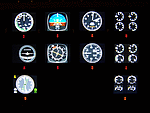
10 Left/Right analog Engine Gauges plus Fuel Level for the Beechcraft Baron 58 across 3 Saitek FIP's. I recommend these if you have 9 or more Saitek FIP's. However you can always scroll through the 3 gauges if you have less.
These compliment Philippe Verhaege's fantastic Beechcraft Baron 58 main gauges "essential_gauges.zip" nicely.
I grouped the Left/Right Manifold Pressure and RPM onto the first Saitek FIP. The Fuel Flow and Cylinder Head/Exhaust Gas Temperature onto the second. The Oil Temp/Pressure onto the third. Since there was room and they are directly below the engine gauges, I also incorporated the Fuel Level gauges.
The beautiful Freeware gauge artwork is by Laurent Ferrari (FlyFrog) of the www.thegaugesfactory.org (Website now dead). They even have the "Beechcraft" logo. Laurent's gauges were originally designed for high end custom cockpit gauges that I resized and configured to fit the Saitek FIP's. I customized XML's to position and calibrate to Flight Simulator X.
Thanks to Horacio for providing the original artwork via a zip file.
Installation requires simple copy and paste. These were only tested on a Windows 7 computer with a X99 i7-5960X processor. You may have to adjust the needle reaction speeds for your machine.
| Filename: | Beechcraft_Baron_58_FULL_Engine_Gauges_for_Saitek_.zip |
| License: | Freeware |
| Added: | 19th March 2015, 09:44:28 |
| Downloads: | 322 |
| Author: | Jack Pickett, Laurent Ferrari |
| Size: | 677.35 KB |
| Category: Flight Simulator 2004 - Utilities | |
| AIRound v1.0 |
|
File Description:
FS2004 AIRound v1.0. This utility displays AI aircraft around user plane in AI map or AI list forms, enables AI aircraft forward, fly by or spot plane views and has its own built-in traffic alert system. In forward view eyepoint is tied to AI aircraft in front of virtual cockpit with ability to change look direction. Fly by view has adjustable parameters and random options. Departure and arrival airports and time, total about 40 ATC, state, control surfaces, radio, etc. AI aircraft parameters are available. AI map has set of scales and can be placed everywhere within 160nm AI aircraft zone around user plane. You can customize AI aircraft appearance on the map by changing mark colors, shapes, sizes and data tag types. Utility has mini panel with small scalable AI map for quick in-flight AI aircraft related analysis. Traffic alert panel helps to avoid collision with AI aircraft. Also it may be used as a navigation gauge in escort missions assisting to find, get closer and follow accompanied AI aircraft. Utility works both in FS windowed and full screen modes and doesn't require any other add-on modules or programs. You have 10 FS sessions for free.
| Filename: | AIRound_v10.zip |
| License: | Shareware, time limited |
| Added: | 12th February 2006, 22:02:49 |
| Downloads: | 5,266 |
| Author: | Valery Stenin |
| Size: | 612.81 KB |
| Category: Prepar3D V5 - Aircraft Repaints, Textures and Modifications | |
| G-KURK A2A Piper Cub P3Dv5 |
|
Images related to this file:
File Description:
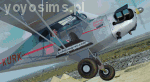
This is repaint of L-4 "Grasshopper" version of Piper "Cub" - G-KURK A2A Piper Cub - version for P3Dv5 only. Real repaint was inspiration for this skin outside and inside - it was adapted for A2A Piper Cub for P3Dv4.4+. The plane "Liberty Girl II" is used by Maurice Kirk. He traveled on this G-KURK on many places on the World and took up the challenge in 2016 - Vintage Air Rally over Africa (didn't finish it). Textures only, you need A2A mode for P3Dv5. The set has outside textures and completly rebuilded inside textures (cockpit). Enjoy and maybe help him to finish this race virtally! If You need more info about this pilot, his Cub and this skin check topic about G-KURK on A2A Forum. For P3Dv4.5 check different version and downlaod link.
| Filename: | GKURK_A2A_Piper_Cub_P3Dv5.zip |
| License: | Freeware |
| Added: | 27th November 2020, 18:29:52 |
| Downloads: | 61 |
| Author: | Rafal Stankiewicz / yoyosims |
| Size: | 77.31 MB |
| Category: Flight Simulator X - Aircraft Repaints, Textures and Modifications | |
| "French Livery" Embraer EMB-505 Phenom 300 (F-HMML) |
|
Images related to this file:
File Description:

My first livery for those looking for a Phenom 300 registered in France. F-HMML is a real world Phenom 300 flying around Europe on any given day. The real world edition has some questionable paint on the vertical stabilizer so I cleaned that up only to make it look more like it should. I took a little artistic liberty and add my own version of a gold swish on the tail to extend the larger stripes to the tail. I hope you enjoy this one. You will need to have the Carenado EMB-505 Phenom 300 payware installed in FSX, P3D or FSX:Steam to use this repaint. I did not find any photos showing the registration number under the left wing, so I gave it a best guess.
| Filename: | French_Livery_Embraer_EMB505_Phenom_300_FHMML.zip |
| License: | Freeware |
| Added: | 19th October 2015, 18:55:18 |
| Downloads: | 704 |
| Author: | Ray Marshall |
| Size: | 29.28 MB |
| Category: X-Plane - Scenery | |
| BR GO SWWA - Porangatu Airport v1.0.0 |
|
Images related to this file:
File Description:
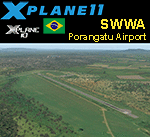
This is an X-Plane 11 and X-Plane 10 scenery package for Porangatu Airport (ICAO: SWWA, no IATA), which is the airport serving the city of Porangatu, Goiás, Brasil. It includes corrected aprons, ramps, gates, taxiways, lighting system, city buildings, ortho-photoscenery for the airfield area, and (XP11 only) airport ground services (like push back). This is a small general aviation airport, in north up state of Goais, in Brazil. This scenery was tested and is operational (as of January 03, 2018) in "X-Plane 11.11 64 bit", Windows 10 Home. It was also tested and is also operational (as of January 03, 2018) in "X-Plane 10.51 64 bit", Windows 10 Home. Only the default X-Plane 11 libraries, by Laminar Research, are needed. No third party libraries are used.
| Filename: | BR_GO_SWWA__Porangatu_Airport_v100.zip |
| License: | Freeware |
| Added: | 3rd January 2018, 18:19:13 |
| Downloads: | 54 |
| Author: | Rui Mesquita |
| Size: | 7.71 MB |
| Category: Flight Simulator 2004 - Aircraft Repaints, Textures and Modifications | |
| iFDG McDonnell Douglas MD11 V1.5 Paintkit |
|
File Description:
Included are 4 GE models and 2 P&W Models, blank Bmps, full fuselage PSD containging both pax and freighter masters, PSD files for other 'major' components such as the tail and engines, alpha bmps and the usual assortment of cfg files. All repaints should follow the rules set out in the Readme files included in this paintkit. MD11 1.5 brings many updates and fixes including new door configurations, new textures, improved aircraft structures, and simplified texture arrangement. Visit our website and forum here for more information.
| Filename: | iFDG_McDonnell_Douglas_MD11_V15_Paintkit.zip |
| License: | Freeware, limited distribution |
| Added: | 26th August 2004, 02:24:38 |
| Downloads: | 15,836 |
| Author: | iFDG, Ben Jones |
| Size: | 17.34 MB |
| Category: Flight Simulator 2004 - Scenery | |
| FS9 SimCopter |
|
Images related to this file:
File Description:

This is a remake of a popular helicopter game called SimCopter by Maxis. It was one of my favorite games to fly. I have made this version of the game with FS9 using the sound files from SimCopter. This sound files is located in the download. This adventure is made up of different mission in one adventure. Complete all missions to successfully complete the adventure. As a pilot for the city you will be dispatched to several types of calls in the city and the surrounding towns. Calls are: Passenger Transportation, Medical Transports, Rescue or Police calls. Hospitals are located as close to their actually location as the scenery allows. A briefing is included to help you fly these missions.
SimCopter Intallation.pdf is included.
Good luck and have fun.
| Filename: | FS9_SimCopter.zip |
| License: | Freeware |
| Added: | 12th April 2019, 03:17:53 |
| Downloads: | 132 |
| Author: | David J Crandall |
| Size: | 149.53 MB |
| Category: Flight Simulator 2004 - Scenery | |
| St Andre-Avellin CAA2 in Quebec Canada |
|
Images related to this file:
File Description:
St Andre-Avellin is a new airfield in Quebec Canada, 35 miles east of Ottawa and 10 miles north of the Ottawa River, and just northwest of the village of the same name. There is a 03/21 grass runway that is 2,870 feet long and slopes up towards the north. To show this slope I have not "placed" a grass runway (which would immediately flatten the slope) and anway there is not so much traffic that the grass would be notably marked. Because of the lack of an FS-recognised runway I have not made parking or a traffic file as AI would not work; anyway this airfield with constant activity would not reflect reality. There are no facilities at the airfield except a hangar for the owner and space to park.
| Filename: | St_AndreAvellin_CAA2_in_Quebec_Canada.zip |
| License: | Freeware, limited distribution |
| Added: | 9th April 2011, 20:49:47 |
| Downloads: | 168 |
| Author: | Roger Wensley |
| Size: | 816.9 KB |


© 2001-2026 AVSIM Online
All Rights Reserved
Privacy Policy |