
Where Flight Simulation Enthusiasts Gather from Around the World!
AVSIM Library - Search Results

| Category: Flight Simulator 2004 - Original Aircraft | |
| Rockwell Aero Commander 500, with VC |

|
File Description:
Pkg incl Gmax A/C with "hand-flyer" flight dynamics, and features two custom era correct panels and easy-to-read virtual cockpits, 3 paint schemes and matching interiors, VC gauge backlighting, rain effects and specular highlites in the VC and Html checklists. This model is greatly enhanced over the previous releases of our Aero Commanders.
| Filename: | Rockwell_Aero_Commander_500_with_VC.zip |
| License: | Freeware, limited distribution |
| Added: | 7th March 2004, 04:38:41 |
| Downloads: | 33,053 |
| Author: | Milton Shupe, Scott Thomas, André Folkers |
| Size: | 11.92 MB |
| Category: Miscellaneous Files - General Utilities | |
| Weather Explorer 2019 |
|
File Description:
Here is a little program to look up weather reports and forecasts.
It was built on Windows 10 1809 and tested on Windows 8.1.
It should also work on Windows 7 SP1 with .Net Framework updated to v4.7.2.
| Filename: | Weather_Explorer_2019.zip |
| License: | Freeware |
| Added: | 29th April 2019, 22:50:24 |
| Downloads: | 132 |
| Author: | Stas Neznamov |
| Size: | 257.19 KB |
| Category: Flight Simulator X - Gauges | |
| V-One Gauge for B707-300 with Call-Outs |
|
Images related to this file:
File Description:
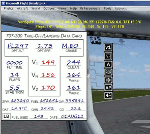
This gauge is written specifically for Captain Sim's B707-300 aircraft (http://www.captainsim.com/products/x707/). It will inform you of appropriate take-off speeds (V-speeds), take-off trim units, Vref landing speeds, elapsed flight time, fuel used, optimum cruise altitude and optimum EPR setting. It will also indicate when the aircraft's max gross weight and TOW has been exceeded by displaying in red text. Take-off speeds are adjusted for altitude and temperature values. Flight time and fuel used can be reset at any time by clicking on their respective displays. Pounds (LB), Kilograms (KG), Celsius (C) and Fahrenheit (F) are toggled by a mouse click. Provisions have been made to allow user adjustments to Optimum Altitude, Optimum EPR and Center of Gravity values. Seven F/O take-off call-outs are included: 80 knots, V1, VR, V2, Gear-up, Flaps-up and Slats Retract.
| Filename: | VOne_Gauge_for_B707300_with_CallOuts.zip |
| License: | Freeware, limited distribution |
| Added: | 3rd August 2012, 18:17:03 |
| Downloads: | 1,228 |
| Author: | Paul Tally |
| Size: | 1.04 MB |
| Category: Flight Simulator X - Gauges | |
| V-One Gauge for Milviz Boeing 737-200 v2.0 |
|
File Description:
The following changes are in this version release:
1) All pilot/co-pilot call-outs replaced
2) V-One XML code and sound file logic updated
3) Altitude Call-Out XML code re-written & optimized
4) Corrected setting of Airspeed Cursor when SP177 is in use during approach phase
5) Added Call-out sound toggle for: 'All', 'Altitude' or 'Off' (box in upper right of Data Card)
6) Added 'Current %N1' display to Data Card
List of features: Approximately 40 sounds integrated into gauge. Take-off V-Speeds calculated for Flaps 1, 2, 5, 10, 15 or 25 including temperature and altitude correction. Take-off speed bugs and command speed bug automatically set for: V1, Vr, V2, V2 + 15 and flaps-up maneuvering speed (clean speed). Optimum altitude and optimum EPR (EPR calc for M.74) continually calculated. Flap mis-configuration is displayed in text. Tooltip indicates overweight value (LB/KG). Take-off trim calculated for current gross weight. Current Altitude, EPR, Speed (knts), Flaps and Trim displays via toggle. Display units can be toggled between LB and KG (default LB). Re-settable flight timer. Re-settable fuel use. Selectable Vref landing configurations, Vref15, Vref30 (default) or Vref40. Approach / landing speed bugs and Command speed bug automatically set for: Vref, Vref + 5, Vref + 15 and flaps-up maneuvering speed (clean speed). ZFW, Fuel, CG, Gross Weight and Barometric Pressure MSL (QNH) displayed.
| Filename: | VOne_Gauge_for_Milviz_Boeing_737200_v20.zip |
| License: | Freeware, limited distribution |
| Added: | 1st November 2015, 18:35:29 |
| Downloads: | 2,434 |
| Author: | Paul Tally |
| Size: | 4.11 MB |
| Category: Flight Simulator X - Gauges | |
| V-One Gauge for Boeing 737-200/Adv Update |
|
Images related to this file:
File Description:

Update includes KG, LB, degrees C and degrees F functionallity. V-speed calculation accuracy improved.
| Filename: | VOne_Gauge_for_Boeing_737200Adv_Update.zip |
| License: | Freeware, limited distribution |
| Added: | 9th August 2012, 20:06:58 |
| Downloads: | 596 |
| Author: | Paul Tally |
| Size: | 14.27 KB |
| Category: Flight Simulator X - Gauges | |
| V-One Gauge for Captain Sim L-1011/F |
|
Images related to this file:
File Description:
List of features: Approximately 40 sounds integrated into gauge.
Take-off V-Speeds calculated for Flaps 10, 18 or 22.
Take-off command speed automatically set for V2 + 15.
Maneuvering speed for each flap selected.
Optimum altitude and optimum EPR (EPR calc for M.84) continually calculated.
Take-off trim calculated for current gross weight.
Current Altitude, EPR, Speed (knts), Flaps and Trim displays via toggle.
Display units can be toggled between LB and KG (default LB).
Re-settable flight timer. Re-settable fuel use.
Selectable Vref landing configurations, Vref33 (default) or Vref42.
ZFW, Fuel, CG, Gross Weight and Barometric Pressure MSL (QNH) displayed.
| Filename: | VOne_Gauge_for_Captain_Sim_L1011F.zip |
| License: | Freeware, limited distribution |
| Added: | 20th July 2014, 21:01:19 |
| Downloads: | 1,192 |
| Author: | Paul Tally, Stefan Liebe, Jimmy Foong |
| Size: | 5.28 MB |
| Category: Flight Simulator 2004 - Panels | |
| FS2004 HUGHES XF-11 Full Panel |
|
File Description:
this aircraft is avalaible here :
http://www.classicwings.net/freeplanes/xf-11/xf-11.html
The original panel had not 2D panel and had not its minipanel. I created them.
About the original VC, The original gauges are not changed, their position are not changed, I just completed it, with : -
position of blades ( in english ? ) --
spoiler gauge; ( with sound, from DCC P-38 L, See after ) --
flaps gauge, --
gear gauge, --
six command icons, --
level engine push, --
sound brake gauge, ( invisible, from CFS2 Giacomazzi bf109e7t, See after ) --
mini autopilot. --
What you see on 2D panel, you see exactly the same on 3D panel.
The minipanel is not exactly the same, but specific for this aircraft.
enjoy !
| Filename: | FS2004_HUGHES_XF11_Full_Panel.zip |
| License: | Freeware |
| Added: | 11th March 2008, 12:06:45 |
| Downloads: | 650 |
| Author: | Frédéric BOURMAUT |
| Size: | 6.69 MB |
| Category: Flight Simulator 2004 - Panels | |
| AeroSim's L-1011 TriStar Photo Real Panel. Version 2 |
|
File Description:
This is Version 2 of my photo real panel for AeroSim's L-1011 TriStar. This panel will replace the original panel. Access to the original panel controls is now through pop up panels.
This is a very easy installation and there is no editing necessary, just copy and paste.
I hope this panel adds more enjoyment to your AeroSim TriStar flying experience.
| Filename: | AeroSims_L1011_TriStar_Photo_Real_Panel__Version_2.zip |
| License: | Freeware |
| Added: | 23rd September 2005, 13:15:41 |
| Downloads: | 6,663 |
| Author: | Edward Grabel |
| Size: | 1.16 MB |
| Category: Flight Simulator 2002 - Panels | |
| Boeing 737-6/7/8/900 Panel |
|
File Description:
My first Boeing 737-6/7/8/900 NG panel was for FS2000. This was a big succes! The panel is downloaded more than 25.000 times! Unfortunately the panel was not compatible with FS2002. But this version is now fully compatible and has even more functions! Like a removable flightyoke, Pop Up GPS, all the B737 NG internal views and GPWS support.
| Filename: | Boeing_737678900_Panel.zip |
| License: | Freeware |
| Added: | 31st December 2002, 16:13:22 |
| Downloads: | 3,642 |
| Author: | Frank Elfert |
| Size: | 6.15 MB |
| Category: Flight Simulator 2004 - Gauges | |
| Airspeed Reduction Monitor (ARM) |
|
File Description:
FS2004 Gauge: Airspeed Reduction Monitor(ARM).
This small, fully animated gauge arms the spoilers and reverse thrusters so both deploy upon landing. The gauge does not extend spoilers or activate reverse thrusters until the nose wheel is safely on the runway. This overcomes the pitch-up tendency in some jets caused when the spoilers deploy as soon as the main gear touches down. As IAS decreases to preset limits, r/thrusters auto-deactivate followed later by spoiler retraction. By Glenn Copeland
| Filename: | Airspeed_Reduction_Monitor_ARM.zip |
| License: | Freeware |
| Added: | 14th March 2006, 16:35:46 |
| Downloads: | 4,607 |
| Author: | Glenn Copeland |
| Size: | 109.7 KB |


© 2001-2026 AVSIM Online
All Rights Reserved
Privacy Policy |