
Where Flight Simulation Enthusiasts Gather from Around the World!
AVSIM Library - Search Results

| Category: Flight Simulator 2004 - Utilities | |
| Weather Maker Enhanced Edition 1.2 (Preview Version) |

|
File Description:
Weather Maker Enhanced Edition 1.2 is the first weather add-on that allows you to create dynamic weather scapes for Flight Simulator 2002 or 2004. You can load these weather scapes over various regions across the world and experience a variety of weather features. Please note this is a preview edition scheduled to expire on 9/30/2004. However, this edition may be extended.
Weather Maker Enhanced Edition requires the .net Framework 1.0 from Microsoft. It also requires the latest edition of FSUIPC. Weather Maker Enhanced Edition if fully accredited for FSUIPC. For more information or downloading the .net Framework redistribution files, you can go to www.weather-maker.com.
| Filename: | Weather_Maker_Enhanced_Edition_12_Preview_Version.zip |
| License: | Freeware, limited distribution |
| Added: | 17th September 2004, 14:30:45 |
| Downloads: | 1,305 |
| Author: | Calibre Software Solutions |
| Size: | 5.43 MB |
| Category: Flight Simulator 2002 - Panels | |
| Cessna 180 STD or PRO |
|
File Description:
This photoreal panel represents an older model Cessna 180. The panel has "Full panel" and "Pilot panel" views both providing excellent forward visiblity. It also has a custom GPS with night lighting, and moving controls. All gauges are represented and function in VC mode. It may be suitable for other Cessna models but the use of the VC in other models is unknown but may work with editing. This is a VFR Panel but has a pop-up mini radio stack with VOR/ILS and ADF.It is designed for use with the Cessna 185 series by Mikko Maliniemi and Ian Grant.
| Filename: | Cessna_180_STD_or_PRO.zip |
| License: | Freeware |
| Added: | 15th April 2003, 15:24:46 |
| Downloads: | 1,127 |
| Author: | Larry Smith |
| Size: | 2.1 MB |
| Category: Flight Simulator X - Gauges | |
| Head Up Display (HUD) |
|
Images related to this file:
File Description:
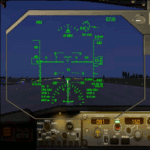
This gauge has been developed for FSX Flight Simulator SP1 or SP2. It
has also been tested with Microsoft Acceleration but compatibility is not guaranteed by the
author. The functionality of this gauge is based on the Rockwell Collins HGS which is
designed for the Bombardier CRJ 700. However, this gauge is not following the Rockwell
Collins design completely. It is created to be used as a generic HUD for all commercial
aircraft. It can be programmed to work on any FSX aircraft as a stand alone pop up
window. The gauge is available in the frame color of gray and beige.
For installation and configuration look at the documentation inside the zip file.
Credit goes out to: Kaj O. Hallstrom for his outstanding support on
documentation, pre beta and beta testing and improvement recommendations
for the gauge and control panel.
Credit also goes to Doug Dawson for his config.gau generating dsd-XML
interface.
| Filename: | Head_Up_Display_HUD.zip |
| License: | Freeware |
| Added: | 14th October 2011, 16:57:19 |
| Downloads: | 5,216 |
| Author: | Dietmar Loleit |
| Size: | 2.68 MB |
| Category: Flight Simulator 2004 - Panels | |
| Douglas DC-3 Package |
|
File Description:
This package includes:
1. The default DC-3 panel with the addition of a co-pilot option which can be toggled inflight. All pop-up windows that are available on the Captain's side are also available from the First Officer position. Other small modifications, including a cleaned up main bitmap by Andy Hatcher.
2. The default panel lowered to give better visibility, also with a switchable co-pilot position.
3. A modified, more contemporary panel with VOR1, RMI and VOR2 gauges. Co-pilot position can be switched inflight. In addition to standard pop-up windows, this panel uses Bendix King radios, has optionally overlaid digital readouts for all key instruments and two flight timers, all of which can be accessed from both seating positions. Replacement gauges flow through to the VC.
All panels are darkened slightly for more realism, have modified night lighting and other additions such as an electrical panel on the FO's side.
| Filename: | Douglas_DC3_Package.zip |
| License: | Freeware |
| Added: | 21st November 2003, 03:31:50 |
| Downloads: | 10,376 |
| Author: | Mark Beaumont |
| Size: | 5.45 MB |
| Category: Flight Simulator 2004 - Gauges | |
| AI Radar, Traffic Collision Avoidance System |
|
File Description:
FS2004 Gauge: AI Radar, Traffic Collision Avoidance System (TCAS). This gauge has five ranges from 1 NM to 30 NM. It displays all moving aircraft in green within the selected range. A switch will allow static aircraft to also be displayed in white when desired. Traffic Advisory (TA) aircraft are displayed in yellow, Resolution Advisory (RA) aircraft are shown in red. AI aircraft have their relative altitudes pinned to each aircraft symbol. Bearing to an aircraft can be obtained using the optional 360-degree sweep cursor. For panel or separate window installation. With Radar Icon gauge. By Glenn Copeland
| Filename: | AI_Radar_Traffic_Collision_Avoidance_System.zip |
| License: | Freeware |
| Added: | 8th July 2006, 01:56:49 |
| Downloads: | 19,506 |
| Author: | Glenn Copeland |
| Size: | 244.57 KB |
| Category: Flight Simulator 2004 - Gauges | |
| 3rd Hand: Auto gear up |
|
File Description:
FS2004 Gauge: 3rd Hand- Auto gear up. This gauge can lend an extra hand during takeoff by automatically raising the landing gear. A "gear up" delay from 1 to 30 seconds is entered into the gauge. After takeoff, the power button begins a flashing sequence that indicates the delay count is in progress. At the end of the count the gear lever is shifted to the up position, the landing gear raises, and the gauge turns itself off. Small size allows convenient mounting on any panel. Give yourself a hand. By Glenn Copeland
| Filename: | 3rd_Hand_Auto_gear_up.zip |
| License: | Freeware |
| Added: | 31st January 2006, 15:26:29 |
| Downloads: | 3,849 |
| Author: | Glenn Copeland |
| Size: | 139.32 KB |
| Category: Flight Simulator 2002 - Panels | |
| CRJ Panel Update v 2a |
|
File Description:
Bombardier CRJ Panel Version 2a (Optimized for POSKY's CRJ-200)
This panel update was created using portions of Chris Alevritis' CRJ bitmap with revisions and new additions to better compliment and maintain compatibility with the POSKY CRJ VC. Included are Eric Marciano's TCAS/radar gauge, Jorge Salas' collection of switches and toggles, a few files and the pushback gauge from the folks at FPDA, the signs2k gauge by Christian Koegler, Bill Morad's ATC panel, and an assembly of HUD gauges from Paul Golding. This panel also uses default gauges and requires Pete Dowson's FSUIPC version 2.83 or later. Significant updates include an expanded overhead panel, a working HUD, revised windshield center post perspective, and 'clicks' added to switches - other refinements accomplished as well.
| Filename: | CRJ_Panel_Update_v_2a.zip |
| License: | Freeware, limited distribution |
| Added: | 23rd November 2002, 17:42:26 |
| Downloads: | 9,941 |
| Author: | Leon Seale |
| Size: | 1.76 MB |
| Category: Flight Simulator 2004 - Miscellaneous Files | |
| Waterspout/Tornadoes05 |
|
File Description:
The weather is heating up and getting a bit nasty..ever wish you could do something about it?
Now you can..Fly a waterspout/tornado in FS9 and make it go where (you) want it to go..watch your weather vortex
blow up water on the sea and then transform blowing up dirt as it hits land..take it downtown in your favorite city
and proove the FS weatherman wrong..a flight scenario is included and weather instructions for best effect in FS9..
By-Ron Jeffers
| Filename: | WaterspoutTornadoes05.zip |
| License: | Freeware |
| Added: | 17th July 2005, 05:45:13 |
| Downloads: | 2,784 |
| Author: | Ron Jeffers |
| Size: | 6.73 MB |
| Category: Flight Simulator 2004 - Utilities | |
| WETTER 2004 - Random Weather Generator |
|
File Description:
Random Weather Generator for FS 2004, creates world weather or weather for smaller areas.
According to new features of FS 2004, different weather areas can be seen from the distance. Weather includes fog, rain, thunderstorms, high and low pressure areas, realistic winds, temperatures, turbulence, dewpoints, visibility and different cloud layers.
You may print weather reports for each airport and look for fog, rain and thunderstorm areas on a map. Free for registered users of WETTER 2002, V. 2.0. Shareware with all features working, but some limitations in the demo-version . Written by Klaus Prichatz ([email protected])
| Filename: | WETTER_2004__Random_Weather_Generator.zip |
| License: | Shareware, limited functionality |
| Added: | 21st September 2003, 18:45:38 |
| Downloads: | 4,073 |
| Author: | Klaus Prichatz |
| Size: | 1.76 MB |
| Category: Flight Simulator 2004 - Gauges | |
| Spoiler Gauge |
|
File Description:
This gauge will display the state of the spoilers, up, armed and extended. It works with any aircraft and can be set up very easily.
| Filename: | Spoiler_Gauge.zip |
| License: | Freeware |
| Added: | 20th August 2008, 22:53:48 |
| Downloads: | 1,380 |
| Author: | Thomas Sautter |
| Size: | 5.01 KB |


© 2001-2026 AVSIM Online
All Rights Reserved
Privacy Policy |