
Where Flight Simulation Enthusiasts Gather from Around the World!
AVSIM Library - Search Results

| Category: Prepar3D V1-4 - Aircraft Repaints, Textures and Modifications | |
| North American P-51D 4th FG (WD-M) 'Suzon' |

|
Images related to this file:
File Description:

This folder contains a repaint for the A2A WoP3 P-51D Mustang (with AccuSim), in the colors of P-51D-20-NA 44-63736 WD-M, which was the aircraft flown by Lt George Green of the 335th FS/ 4th FG on 18 march 1945 during a mission to Berlin. While the 335th was strafing Prenslau Aerodrome, Green's CO, major Pierce McKennon, was hit by flak and had to bail out. Green landed in the field where McKennon had come down with his parachute, threw out his parachute, and the two of them squeezed into the small Mustang cockpit, Green sitting on McKennon's lap. While the rest of the squadron kept the Germans at a distance, Green managed to get 'Suzon' airborne again with centimeters to spare. They flew the 600 miles back to the UK, sharing an oxygen mask. Green was promoted to Captain by a grateful CO. Repaint by Jan Kees Blom, based on the A2A paintkit.
| Filename: | North_American_P51D_4th_FG_WDM_Suzon.zip |
| License: | Freeware |
| Added: | 30th October 2018, 15:26:44 |
| Downloads: | 69 |
| Author: | Jan Kees Blom |
| Size: | 12.63 MB |
| Category: Flight Simulator X - Aircraft Repaints, Textures and Modifications | |
| Republic P-47D-22 365th FG (D5-O) "Sally Flat Foot III" |
|
Images related to this file:
File Description:
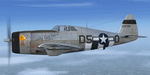
This folder contains a repaint for the A2A Wings of Power III P-47D Thunderbolt, representing P-47D-22-RE 42-26386 D5-O "Sally Flat Foot III", the assigned aircraft of Lt William Ward of the 386th FS/ 365th FG. The first 365th FG pilot to report for duty, Bill Ward also had the distinction of leading the group on its last combat mission, a patrol flight on 8 May 1945. He scored to kills over Me109's, one marked with the German cross below the cockpit, scored on 22 june 1944, and another later in 1944, but that never made it into the 365th history books, hence the question mark. All lt Ward's Thunderbolts were called Sally Flat Foot, a nickname for his wife Sally. The third one also had a picture of a bird on the nose he referred to as 'the worry bird'. Repaint by Jan Kees Blom, based on the paintkit by Martin Catney.
| Filename: | Republic_P47D22_365th_FG_D5O_Sally_Flat_Foot_III.zip |
| License: | Freeware |
| Added: | 1st December 2019, 20:57:04 |
| Downloads: | 36 |
| Author: | Jan Kees Blom |
| Size: | 11.37 MB |
| Category: Prepar3D V1-4 - Utilities | |
| Flightplan Visualizer 1.7 |
|
File Description:
Flightplan Visualizer (FV) version 1.7.1. Copyright 2018 by Pelle F. S. Liljendal ([email protected]), all rights reserved.
FV comes with 300 Commercial-, and +380 BizJet AI pre-imported flightplans which the creators of those flightplans have gracefully allowed me to include with the installer, however you are able to import additional (AI) flightplans if you want to. Once imported these (AI) flightplans can be visualized on a map-view, and the user will be able to search accross all these. Hence you can use the program as inspiration as to which routes to fly. E.g. you can search across all imported flightplans to find all flights in an A321 flying into/out from LDDU, or simply to look for all flights in a Boeing 747-8F.
Simply run the included installer to install the software. The program will be installed into "C:\Program Files (x86)\Flightplan Visualizer" and all datafiles will be installed into: "C:\Users\[UserName]\AppData\Roaming\FlightplanVisualizer". The program comes with a full manual explaining everything, and a 2 page quick manual to get you started. The first 3 times you run the program the quick manual will automatically open. Lacking a “proper forum†I have - for now - setup a Facebook group for support. This group is called “Flightplan Visualizerâ€, and you can seek membership via this link: https://www.facebook.com/groups/FlightplanVisualizer/
If you are installing this version on top of a version prior to 1.7 the program will start slower than ususal and display a lot of warnings. This is because it fileformat of the pre-imported flightplans was changed between version 1.6 and 1.7, so starting version 1.7 it will update all flightplans (and in the progress it will display all those warnings). The next time you start FV you will no longer see this warnings as all flightplans will have become updated.
Pelle
| Filename: | Flightplan_Visualizer_17.zip |
| License: | Freeware, limited distribution |
| Added: | 27th November 2018, 17:23:12 |
| Downloads: | 463 |
| Author: | Pelle Liljendal |
| Size: | 23.28 MB |
| Category: Prepar3D V1-4 - Utilities | |
| Flightplan Visualizer 1.8 |
|
Images related to this file:
File Description:
Flightplan Visualizer (FV) version 1.8.0. Copyright 2018 by Pelle F. S. Liljendal ([email protected]), all rights reserved.
FV comes with 300 Commercial-, and +380 BizJet AI pre-imported flightplans which the creators of those flightplans have gracefully allowed me to include with the installer, however you are able to import additional (AI) flightplans if you want to. Once imported these (AI) flightplans can be visualized on a map-view, and the user will be able to search accross all these. Hence you can use the program as inspiration as to which routes to fly. E.g. you can search across all imported flightplans to find all flights in an A321 flying into/out from LDDU, or simply to look for all flights in a Boeing 747-8F.
Simply run the included installer to install the software. The program will be installed into "C:\Program Files (x86)\Flightplan Visualizer" and all datafiles will be installed into: "C:\Users\[UserName]\AppData\Roaming\FlightplanVisualizer". The program comes with a full manual explaining everything, and a 2 page quick manual to get you started. The first 3 times you run the program the quick manual will automatically open. Lacking a “proper forum†I have - for now - setup a Facebook group for support. This group is called “Flightplan Visualizerâ€, and you can seek membership via this link: https://www.facebook.com/groups/FlightplanVisualizer/
If you are installing this version on top of a version prior to 1.7 the program will start slower than ususal and display a lot of warnings. This is because it fileformat of the pre-imported flightplans was changed between version 1.6 and 1.7, so starting version 1.8 it will update all flightplans (and in the progress it will display all those warnings). The next time you start FV you will no longer see this warnings as all flightplans will have become updated.
Pelle
| Filename: | Flightplan_Visualizer_18.zip |
| License: | Freeware, limited distribution |
| Added: | 16th December 2018, 01:30:27 |
| Downloads: | 330 |
| Author: | Pelle Liljendal |
| Size: | 24.48 MB |
| Category: Flight Simulator X - Aircraft Repaints, Textures and Modifications | |
| Global 7000 for "iris_easter_eggs_2013_fsx" |
|
File Description:
Repaint for "iris_easter_eggs_2013_fsx" by "IRIS Flight Simulation Software" "Bombardier's Global 7000 and the Global 8000 were launched together at NBAA in October 2010 as derivatives of the Global 6000 program. The aircraft completed its first flight Nov. 4, 2016, marking the start of a rigorous flight-testing program. Entry-into-service of the large jet was scheduled in the second half of 2018. The Global 7000 has a four-zone cabin and will carry up to 12 passengers. It features 14 windows on each side of the fuselage - One more than the legacy Global Express and one less than the 6000. The Global 7000 also features the high swept supercritical wing with winglets and a high swept T-tail. As far as performance, the Global 7000 is powered by GE Aviation Passport engines and has a range of 7,400 nm and a top speed of 530 knots. The two GE Passport engines are side mounted at the rear of the aircraft. The Global 7000, which was priced at about $73 million is indeed large. The cabin (not including the baggage compartment) is 54 feet, seven inches long; six feet, three inches tall; and eight feet, two inches wide. Aft of the galley, the passenger area is divided into four distinct living areas. Depending on the layout, they can include a seating area, a dining or meeting area, a cinema room, and a bedroom. In April 2018, the Global 7000 and its cabin won a Red Dot in the Ships, Trains and Planes category of this year’s Red Dot Design Award, ainternational competition conducted annually since 1955 by Design Zentrum Nordrhein Westfalen in Essen, Germany. As judging criteria, the 39-member jury looked at each product’s levels of innovation, functionality, formal quality, ergonomics, and durability."
| Filename: | Global_7000__for_iris_easter_eggs_2013_fsx.zip |
| License: | Freeware |
| Added: | 16th November 2019, 18:49:23 |
| Downloads: | 377 |
| Author: | David Robles |
| Size: | 25.09 MB |
| Category: Flight Simulator 2004 - Scenery | |
| Fort St James CYJM in British Columbia Canada |
|
Images related to this file:
File Description:
Fort St James is a small town of around 1,600 folks at the southeastern end of Stuart Lake, at the head of the Stuart River, and around 360 miles north of Vancouver and 220 miles inland from the coast. It was a long-established trading post for furs, with a permanent presence there from 1806 onwards. The airfield is 3 miles south of the town and is called "Fort St James (Perison)" in the Nav Canada listings. I presume that this is part of their trend towards calling airfields by their location rather than by their name. Makes sense as it is difficult to find information by searching for an airfield that is listed under a name you don't know. The field has an asphalt runway of 4,000 feet aligned 10-28 and at 2,364 feet ASL. There is no lighting. The main user of the airfield is Interior Helicopters Ltd. who are based there as operators, and at Williams Lake as helicopter dealers. For the AI helicopters, there is a screenshot (01) of the AS350 helicopter installation folder when it has been transformed into an AI helicopter. The process is to download and install the Ecuriel AS 350, along with the additional textures, as normal; this is straightforward. Then you download the software shown in screenshot 02 and add it as instructed and as shown in 01 so that the helicopter now operates as AI, with a different air file and a modified config file. I should have included this with the Pemberton post. I have posted this as Fort St James CYJM, but I suggest that you just add it to your previously created "BC airfields" and avoid the inevitable doubling up of common textures etc. Up to you. If you find a defect, email me.
| Filename: | Fort_St_James_CYJM_in_British_Columbia_Canada.zip |
| License: | Freeware, limited distribution |
| Added: | 23rd November 2020, 20:14:04 |
| Downloads: | 151 |
| Author: | Roger Wensley |
| Size: | 2.62 MB |
| Category: Microsoft Flight Simulator (2020) - Utilities | |
| Random Flight Database 3.5.2 |
|
File Description:
Random Flight Database is a simple and easy to use application.
​
It will allow you to randomly choose one or more VFR, IFR flights according to your criteria (type of plane, flight time, company, distance, departure airport, .....).
​
These flights are chosen at random from a default database, a user base created by yourself or according to the world aviation POIs.
​
A default database is already included, but also the possibility for each user to create his own database.
​
But that's not all, you can also extract the flights of the day for an airport, or extract the flights for a whole week.
Why Use RFD ?
The advantage of RANDOM FLIGHT DATABASE:
Extracted from FlightRadar but also from other databases, it chooses randomly among those where these databases according to your choices.
You can also make many other possible combinations, such as leaving each time from the arrival airport for each flight generated, but also selecting your favorite planes and airports.
Simply choose the departure airport, he chooses the arrival airport for you, choose the arrival airport, he chooses the departure airport for you and all this according to the real data of the airlines.
A tab for generating non-real flights is available, it will allow you to generate random flights from over 58,000 global aviation POIs.
​
Full of possibilities, including the possibility to choose the flight time but also to generate several flights while leaving the arrival airport.
You also have the option of creating your own data for inclusion in this software.
And one of the most important is that once the flight (s) are generated, you can send them to SIMBRIEF or PFPX to schedule this.
| Filename: | Random_Flight_Database_352.zip |
| License: | Freeware |
| Added: | 21st December 2020, 20:47:04 |
| Downloads: | 163 |
| Author: | mikoulprostgrandprix |
| Size: | 181.97 MB |
| Category: Microsoft Flight Simulator (2020) - Utilities | |
| Random Flight Database 3.5.2 |
|
File Description:
Random Flight Database is a simple and easy to use application.
​
It will allow you to randomly choose one or more VFR, IFR flights according to your criteria (type of plane, flight time, company, distance, departure airport, .....).
​
These flights are chosen at random from a default database, a user base created by yourself or according to the world aviation POIs.
​
A default database is already included, but also the possibility for each user to create his own database.
​
But that's not all, you can also extract the flights of the day for an airport, or extract the flights for a whole week.
Why Use RFD ?
The advantage of RANDOM FLIGHT DATABASE:
Extracted from FlightRadar but also from other databases, it chooses randomly among those where these databases according to your choices.
You can also make many other possible combinations, such as leaving each time from the arrival airport for each flight generated, but also selecting your favorite planes and airports.
Simply choose the departure airport, he chooses the arrival airport for you, choose the arrival airport, he chooses the departure airport for you and all this according to the real data of the airlines.
A tab for generating non-real flights is available, it will allow you to generate random flights from over 58,000 global aviation POIs.
​
Full of possibilities, including the possibility to choose the flight time but also to generate several flights while leaving the arrival airport.
You also have the option of creating your own data for inclusion in this software.
And one of the most important is that once the flight (s) are generated, you can send them to SIMBRIEF or PFPX to schedule this.
https://www.youtube.com/channel/UC8y3mSeP-gj-h2MbMT59AOw
| Filename: | Random_Flight_Database_352.zip |
| License: | Freeware |
| Added: | 28th December 2020, 18:47:26 |
| Downloads: | 151 |
| Author: | mikoulprostgrandprix |
| Size: | 181.97 MB |
| Category: Flight Simulator 2004 - Original Aircraft | |
| Piaggio P-166A |
|
File Description:
The second of the coming P-166 aircraft series. I'm going to built the whole family of these graceful twins.
The Piaggio P-166A is a light small twin. An Exotic two-engined prop that sold all over the world including America, UK, and Australia. Its origin is traced Back to the Piaggio P-136, a light anphibian, wich the P-166 keeps the wings, the engines and the tailplanes. The first P-166A flew in November 1957. The aircraft is still in production in a slightly modified turboprop version, the P-166D-P1.
This model is 788 Kbs with c.a. 23000 polygons in c.a.170 assemblies. (see something in common with the previous one? YES: 99%...) Features Clickable Dynamic VC with non-planar throttle quadrant. Detailed internals. Fully compatible with FS 2002 (pro edition)
Not said about the M version!! The flight Dynamics is based on real data, provided by Piaggio Itself: control surfaces, engines, weights, etc...
Paints:
1)FIAT - I-NCAS
2)AGIP Mineraria I-MINT
3)Papuan Airlines VH-PND
4)Northrop corp. - N7651E
| Filename: | Piaggio_P166A.zip |
| License: | Freeware |
| Added: | 1st November 2003, 19:12:21 |
| Downloads: | 4,938 |
| Author: | Mario Noriega |
| Size: | 7.72 MB |
| Category: Flight Simulator 2004 - Scenery | |
| Hricziscse Ranch, Oregon v2 |
|
File Description:
A small mixup resulted in a couple incorrect files for a short time in previous version. Check inside folder "FS9 Default Mesh" for bgl files "hricz.bgl" and "hricz_A16N.bgl". They should be dated 4/28/2004. If you have the earlier dated version then you will want to download this fixed version. Sorry for the inconvenience.--------------------------
A simulation of the real-world 483 acre Hricziscse Ranch located in Langell Valley, southeast Oregon, 21nm east of KLMT. Of course, I don't really have an airstrip, but it would be neat. Landclass also used to more closely depict the agricultural nature of the valley. Some artistic leeway is used in the depiction of the ranch and its surroundings. It's a lot cleaner (sterile) in FS than real-life. Rwy 29/11_1500' x 50' grass_alt 4211.3'_night lighting (airstrip does not exist in real world). This scenery is a bit of a frame-hog. --This scenery is designed for use with FSGenesis Westcoast mesh. Alternate files provided for FS9 default mesh users. See install readme for options--
| Filename: | Hricziscse_Ranch_Oregon_v2.zip |
| License: | Freeware, limited distribution |
| Added: | 1st May 2004, 01:42:15 |
| Downloads: | 1,116 |
| Author: | Brent Hricziscse |
| Size: | 7.24 MB |


© 2001-2026 AVSIM Online
All Rights Reserved
Privacy Policy |