
Where Flight Simulation Enthusiasts Gather from Around the World!
AVSIM Library - Search Results

| Category: Flight Simulator 2004 - Scenery | |
| Carp CYRP in Ontario Canada (updated October 2011) |

|
Images related to this file:
File Description:
This version further updates the post of 2006 and the 2009 update with more bespoke buildings for the west GA apron plus the revised fuelling area, and corrected surroundings with large forested areas and a modified airfield grass shape. This is a stand-alone version and does not require you to have downloaded and installed the previous posts; this REPLACES those versions. Carp airfield is fifteen miles west of Ottawa and two miles south of the town of Carp. There are two runways, 10/28 which is asphalt and almost 4,000 feet long and 100 feet wide, and 04/22 which is gravel and 2,000 feet long. The airfield has a fairly large population of general aviation residents and is slowly expanding under new ownership. This version models the large hangar beside the terminal, the "Touch'n Go" aviation warehouse that has opened more recently, and the ramshackle collection of hangars and sheds that make up Westair, the maintenance facility. The nearby pagoda-roof flight school building has in fact now been demolished, but I like it too much to do that, at least until something else has been built on that space.
| Filename: | Carp_CYRP_in_Ontario_Canada__updated_October_2011.zip |
| License: | Freeware, limited distribution |
| Added: | 25th November 2011, 09:25:34 |
| Downloads: | 588 |
| Author: | Roger Wensley |
| Size: | 7.59 MB |
| Category: Flight Simulator X - AFCAD Files | |
| Greater Moncton International Airport / Canada (CYQM) |
|
Images related to this file:
File Description:
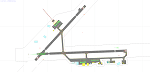
CYQM - Greater Moncton International Airport / Moncton, New Brunswick, Canada
This airport update was made with the latest version of ADE (Airport Design Editor) and made for FSX as a replacement for the stock (default) airport. I found that most stock airports in FSX lack a decent amount of character and realism and this area in particular was dreadful! The stock airport was rather inaccurate. I've made several additions to the airport which are listed below. All these enchancements are as close to the real airport as I can get with stock library objects. I've used satellite images, terminal photos and maps throughout the whole process so building locations are as accurate as possible. Happy landings in the beautiful Canada!
Features:
*Expanded parking apron
*Main terminal building with it's 2 jetways and additional parking for regional jets/turboprops
*Seperate parking aprons for GA traffic near the old terminal
*Hangar and other airport buildings added
*Airport vehicles and objects throughout the airport
*Main road in front of airport added with static vehicles
*Parking lots with static vehicles
*Airport fire station with fire trucks
*Static de-icing vehicles
| Filename: | Greater_Moncton_International_Airport__Canada_CYQM.zip |
| License: | Freeware |
| Added: | 21st July 2012, 02:41:58 |
| Downloads: | 817 |
| Author: | Jaison Diaz |
| Size: | 10.6 KB |
| Category: Flight Simulator X - AFCAD Files | |
| MYGF - Grand Bahama International Airport / Freeport, Bahamas |
|
Images related to this file:
File Description:
Features:
*Accurate parking apron
*Main terminal building with parking area for commercial traffic
*Domestic terminal building
*Cargo ramp
*Separate parking area for GA traffic
*Misc airport buildings added
*Airport vehicles and objects throughout the airport
*Parking lot with vehicles
*Properly placed control tower
*Fire station
*Fuel tanks and trucks
*Rental car building with static rental vehicles
*Birds flying near runway (beware)
*Palm trees/vegetation added near terminal
(For more information on Endeavourai please visit our site at endeavourai.com or our forums at http://endeavourai.boards.net/)
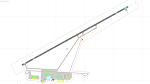
This airport update was made with the latest version of ADE (Airport Design Editor) and made for FSX as a replacement for the stock (default) airport. I've made several changes to the airport which are listed below. All these enhancements are as close to the real airport as I can get with stock library objects. I've used satellite images, terminal photos and maps throughout the whole process so building locations are as accurate as possible. Happy landings in the tropical Bahamas!
| Filename: | MYGF__Grand_Bahama_International_Airport__Freeport.zip |
| License: | Freeware |
| Added: | 12th August 2012, 05:15:17 |
| Downloads: | 954 |
| Author: | Jaison Diaz / Endeavour AI |
| Size: | 107.42 KB |
| Category: Flight Simulator X - AFCAD Files | |
| KLEX - Blue Grass Airport - Lexington, Kentucky |
|
Images related to this file:
File Description:
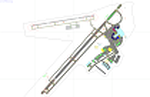
This airport update was made with the latest version of ADE (Airport Design Editor) and made for FSX as a replacement for the stock (default) airport. I've made several changes to the airport which are listed below. All these enchancements are as close to the real airport as I can get with stock library objects. I've used satellite images, terminal photos and maps throughout the whole process so building locations are as accurate as possible. Happy landings in charming Kentucky!
Features:
*Expanded parking apron
*Taxiways properly desginated
*Runway 8/26 renamed to 9/27 and moved to correct location as FSX had it completely wrong, appropriate taxiways have been repositioned and/or removed as well as per latest airport diagram
*Completely redesigned main terminal building with accurate airline assigned gates
*Seperate parking areaa for GA traffic
*Misc airport buildings added
*Airport vehicles and objects throughout the airport
*Fuel tanks and vehicles
*Fire station and vehicles
*De-icing trucks
*Static aircraft
*Autogen removed from a few areas around the airport as several buildings were popping up on airport property and a few trees were too close to runway
| Filename: | KLEX__Blue_Grass_Airport__Lexington_Kentucky.zip |
| License: | Freeware |
| Added: | 22nd December 2012, 00:03:01 |
| Downloads: | 599 |
| Author: | Jaison Diaz / Endeavour ai |
| Size: | 153.05 KB |
| Category: Prepar3D V1-4 - Utilities | |
| Random Flight Database v2.2.5 |
|
File Description:
Random Flight Database is a simple and easy to use application.
It will allow you to randomly choose a flight according to your criteria.
A default database is already included, but also the possibility for each user to create his own database.
But it's not all, you can also extract the flights of the day for an airport, or extract flights on a full week.
Windows Only
2.2.5 :
Replace winter by summer 2019 :
Cyprus Airways
Flyadeal
Flynas
Frontier Airlines
GetJet Airlines
Saudia Cargo
Saudia
SkyUp Airlines
Uzbekistan Airways Cargo
Uzbekistan Airways
Improved code for extracting data from Flightpedia and FlightAware sites
Added in "Extraction of scheduled flights and random choice in the list" :
- Flight Aware Departure (Longest Extraction, 3 Day Extraction, No Codeshare Extract)
- Flight Aware Departure (Longest Extraction, Last Week's Flight Extraction, No Codeshare Preview)
- Flight Aware Arrival (Longest Extraction, 3 Day Extraction, No Codeshare Extract)
- Flight Aware Arrival (Longest Extraction, Last Week's Flight Extraction, No Codeshare Preview)
Install : Execute .exe
Contact [email protected]
https://mikoulprostgrandprix.wixsite.com/randomflightdatabase
Other install : execute the shortcut "Check Update Random Flight Database"
Do not hesitate to send me bugs, or proposals. Thanks
| Filename: | Random_Flight_Database_v225.zip |
| License: | Freeware |
| Added: | 15th September 2019, 20:52:26 |
| Downloads: | 91 |
| Author: | mikoulprostgrandprix |
| Size: | 79.06 MB |
| Category: Prepar3D V1-4 - Aircraft Repaints, Textures and Modifications | |
| PH-PBA, Douglas C-47 (DC-3), September 1944 historical repaint, 75 years Market Garden |
|
Images related to this file:
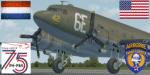
File Description: The PH-PBA, once USAAF '42-100971' as she looked during Operation Market Garden.
She was named 'The Squirrel'. This historical repaint is inspired by 75th commemoration
of the Allied drops into Holland, September 1944. The chalk number '24' depicts her
Waco-glider tow mission of Sept.18, 1944 into LZ 'O' at Overasselt.
The PH-PBA still flies today with the DDA Classic Airlines, 75 years onwards.
For more info on DDA Classic Airlines visit there site: https://www.dutchdakota.nl/en/home/
These are repaint only, you need to install the beautiful freeware plane first.
It's available here: https://library.avsim.net/download.php?DLID=198659
Update/fix: https://library.avsim.net/download.php?DLID=199046
Big thanks to Manfred Jahn and his team for creating this beautiful model and
Jan Visser and his team for all the work done to improve this model even further.
Ted "TuFun" Wolfgang for the improved engine textures. For this repaint the
excellent paintkit by Gordon "Gman5250" Madison was used.
Works both in FSX and Prepar3D.
| Filename: | PHPBA_Douglas_C47_DC3__September_1944_historical_r.zip |
| License: | Freeware |
| Added: | 23rd September 2019, 16:51:40 |
| Downloads: | 334 |
| Author: | Marcel Ritzema |
| Size: | 41.48 MB |
| Category: Prepar3D V1-4 - Utilities | |
| Random Flight Database 2.4.0 |
|
File Description:
Random Flight Database is a simple and easy to use application.
It will allow you to randomly choose a flight according to your criteria.
A default database is already included, but also the possibility for each user to create his own database.
But it's not all, you can also extract the flights of the day for an airport, or extract flights on a full week.
Windows Only
2.4.0 :
Optimization of the code performed. Precious seconds of winning.
In the "Random Flight Database" window :
All lists interact with each other.
Passing green color of the lists to validate the choice
New combinations available
Replace winter by summer 2019:
Air Marshall Islands
Air North
Air Tahiti Nui
Arkia Israeli Airlines
Blue Air
Corendon Airlines Europe
Corendon Airlines
Corendon Dutch Airlines
El Al Israel Airlines
Ernest
Gulf Air
Israir Airlines
Laudamotion
Ryanair Operations
Ryanair Sun
Ryanair
Satena
Install : Execute .exe
Contact [email protected]
https://mikoulprostgrandprix.wixsite.com/randomflightdatabase
All my downloads for RFD :
https://forums.x-plane.org/index.php?/profile/170054-mikoulprostgrandprix/
Other install : execute the shortcut "Check Update Random Flight Database"
Do not hesitate to send me bugs, or proposals. Thanks
| Filename: | Random_Flight_Database_240.zip |
| License: | Freeware |
| Added: | 30th October 2019, 23:18:03 |
| Downloads: | 88 |
| Author: | mikoulprostgrandprix |
| Size: | 72.48 MB |
| Category: Microsoft Flight Simulator (2020) - Utilities | |
| FBWA320_LINDA_Module_ByJujunet_v0.2 |
|
File Description:
This module allow to control hidden controls of the FBW A320, using LINDA software and FSUIPC
Require : FSUIPC ver 7 full licence, Microsoft Flight Simulator
Installation :
Uncompress archive in any place.
Move A32nx.evt file to your FSUIPC root folder.
Move A320.hvar on \Community\fsuipc-lvar-module\modules
On LINDA software :
Click on "Maintenance", on top, select "--aircrafts--".
Click on "Select Source Folder", below "Import Aircraft Module", browse to the folder FBWA320, click on "Import", or "Overwrite" if updating
This module for Linda freeware allows to bind :
-Landing and Nose light independently
-Seat-belt
-No Smoking
-Mode and zoom on ND
-Display function ARPT, VOR, WPT, NDB... on ND
-Terrain on ND
-Eicam pages, with an encoder
-ILS
-Barometer increment and decrement with automatic detection of position (HPA or inHg)
-Toggle between HPA and inHg
-Toggle between QNH setting and STD
-Autobrake Cycle
-Full compatibility for Managed/Selected on SPD, HDG, ALT and Selected mode on VS
To create your own module, or customize this one, go to my Youtube Tutorial :
My channel : https://www.youtube.com/channel/UCVgdlnaAk2Q4EOSCICW_0iA
Changelog :
Version 0.1 : Initial Release
Version 0.2 : Update to working with FBWA320 v0.8.0
| Filename: | FBWA320_LINDA_Module_ByJujunet_v02.zip |
| License: | Freeware |
| Added: | 12th July 2022, 18:21:02 |
| Downloads: | 47 |
| Author: | Julien GICQUIAUD |
| Size: | 17.55 KB |
| Category: Flight Simulator 2002 - Aircraft Repaints, Textures and Modifications | |
| Frontier Airlines Convair 580 v2 |
|
File Description:
This is an update of the great plane by Greg Pepper. Props now display the pitch visually - you can feather the props by pressing and holding Crtl-F2 and watch them rotate. Flaps deploy as proper Fowler flaps (i.e. slide back), and the flap/nacelle joint has been corrected to 45 degree angle. Air stair handrails now deploy realistically. Props have smooth curved edge, corrected right wing misalignment, pointed the rear fuselage, smoothed rear fuselage, and added view blocks in air intakes, prop spinners, main gear wells, and under stairs. Scissors links are added to the gear, the gear retraction cycle has been altered to match video footage, the nose has been
slightly reshaped, antennas have been added, glass has been added to the cockpit, and the airstairs plate reads correctly from the back as well as the front. Nosewheel
now steers with the rudder. Added reflective textures, and it is lit at night, albeit subtly, and the virtual cockpit gauges are lit. Altered Greg's original textures to match photos I had. Corrected blue textures showing on bottom fuselage. Greg has added a smoothed wing root too! Original model, animation, panel & textures by Greg Pepper.
Modifications by Tom Gibson.
| Filename: | Frontier_Airlines__Convair_580_v2.zip |
| License: | Freeware, limited distribution |
| Added: | 23rd September 2002, 19:22:30 |
| Downloads: | 8,696 |
| Author: | Tom Gibson and Greg Pepper |
| Size: | 1.63 MB |
| Category: Microsoft Flight Simulator (2020) - Utilities | |
| WorkingTitleCJ4_LINDA_Module_ByJujunet_v0.2 |
|
File Description:
This module allows to use hidden controls of the default MSFS CJ4, using FSUIPC and LINDA software. Require : FSUIPC ver 7 full licence, Microsoft Flight Simulator and LINDA software. Installation : Uncompress archive in any place. Move CJ4.hvar on \Community\fsuipc-lvar-module\modules On LINDA software : Click on "Maintenance", on top, select "--aircrafts--". Click on "Select Source Folder", below "Import Aircraft Module", browse to the folder CJ4, click on "Import", or "Overwrite" if updating. This module for Linda freeware allows to bind : - Menu choice, menu inc/dec and puch : bind a key to browse to all screen menus, and scroll with an encoder to move up and down inside the menus. Push a key to validate. - Map zoom in/out - Terrain/WX - PFD functions (FRMT/TFC/NAV) - Seatbelt light - Safety light - Baro inc/dec - Baro std - AP modes : FLC, HDG, ALT, VS, APPR and Toga button. To create your own module, or customize this one, go to my Youtube Tutorial : My channel : https://www.youtube.com/channel/UCVgdlnaAk2Q4EOSCICW_0iA Changelog : Version 0.2 : Correction to working with the default CJ4 since AAU1 update, the Working title mod no longer exist.
| Filename: | WorkingTitleCJ4_LINDA_Module_ByJujunet_v02.zip |
| License: | Freeware |
| Added: | 16th January 2024, 14:29:33 |
| Downloads: | 37 |
| Author: | Julien GICQUIAUD |
| Size: | 6.35 KB |


© 2001-2026 AVSIM Online
All Rights Reserved
Privacy Policy |