
Where Flight Simulation Enthusiasts Gather from Around the World!
AVSIM Library - Search Results

| Category: Flight Simulator X - Scenery | |
| LFMQ - Le Castellet |

|
File Description:
Welcome to Le Castellet Airfield -
This airfield is situated few Nm east of Marseille Provence - LFML, in the south of France. On the 1,000 hectares of plateau he acquired between Marseille and Toulon, Paul Ricard, forever motivated by innovation and development, constructed in 1962 the largest
private airfield in the Provence-Alpes-Côte d’Azur region.
The landing strip at Le Castellet covered a distance of 1,000 metres and allowed for VFR (Visual Flight Rules) operation. Situated on a plateau at the time free of all economic development, it was above all a private airfield. In 1970, the construction
of the Paul Ricard Circuit nearby created an economic dynamic for the first time on Le Castellet plateau. In 1972, Paul Ricard invested in improvements to the runway, lengthening it from 1,000 to 1,750 metres, thus rendering it capable of
receiving business and private airplanes of up to 38 tonnes.
Over twenty years, Le Castellet Airport saw intense periods of activity due to business and private aviation, notably with the arrival of the first F1 French Grand Prix on the Paul Ricard Circuit in 1971, and more recently, with the creation of the Entreprise Zone at Signes, situated only a few kilometres from the airfield. Stop by for an amazing visit at the medieval village as well, situatued on top of a hill.
Nevertheless, from 1972 to 1999, no investment was made at the airfield. In May 1999, the company Excelis S.A. purchased the site (airfield and circuit) and refurbished and modernised the installations.
A truly amazing place to fly to - I have enhanced the entire apron as it is today, all marking correctly set, acces to runway and the Heli area for the "Eggbeater" fan :)
includes the hangar, building and other things around. Hope you'll enjoy your stay at "Le castellet"!
| Filename: | LFMQ__Le_Castellet.zip |
| License: | Freeware |
| Added: | 24th April 2009, 16:28:59 |
| Downloads: | 2,350 |
| Author: | Daniel Louvet |
| Size: | 986.65 KB |
| Category: Flight Simulator 2004 - Scenery | |
| Toronto Downtown Airport CYTZ Ontario, Canada |
|
Images related to this file:
File Description:
CYTZ is on an island in Lake Ontario and immediately adjacent to downtown Toronto. This updates the version made by Flight Ontario as there have been major changes since Porter Airlines purchased the airport. The obvious and main new item is the terminal, made with photo textures and with ten gates sized to accomodate the Dash 8-400 they currently use. The terminal has a passenger entrance and a vehicle setdown point as part of the link to the ferry terminal that wraps around the west side of the original and preserved terminal building. The ferry terminal is included here, along with a ferry. Also new are the car parking, road routing, gate and taxi markings, taxiways, taxiway signage, taxiway lighting, runway lighting, aprons, apron lighting (from Sid Schwartz and you will need to install his "lights_ss_v2"), fences, fuel tanks, tanker trucks, access roads to navigation equipment, ai parking, static parked planes, parked cars, apron equipment, and the useable floatplane ramp. The AI includes Porter, Jazz, several GA aircraft, and a helicopter. Only 3 of these require downloads. The Lake Ontario AI includes three large ships, typical of the traffic to be seen on all the Great Lakes. CYTZ has three runways and there is an airport diagram included. 08-26 has ILS and is the only runway actually long enough to be used by Porter; FS9 atc will ignore this. There is fuel available and it is dispensed from a truck. The longer projection from the front of the terminal building is a covered ramp that leads up from the terminal basement level, used by towed luggage trolleys. The gates are not powered in any way except for the weather cover that protects passengers as they cross the small area of asphalt between plane and gate. I did not try to reproduce this in FS9.
| Filename: | Toronto_Downtown_Airport_CYTZ_Ontario_Canada.zip |
| License: | Freeware, limited distribution |
| Added: | 23rd October 2012, 12:52:14 |
| Downloads: | 1,806 |
| Author: | Roger Wensley + Flight Ontario |
| Size: | 12.43 MB |
| Category: Flight Simulator 2004 - Scenery | |
| Ballina, New South Wales, Australia (YBNA) |
|
File Description:
A very attractive small airport approximately 120 nautical miles from Coffs Harbour and a slightly shorter distance to Grafton and Lismore. This makes a good stopover for hopping down the east coast of Australia. The airport handles around 11 flight a day from Sydney and is also a busy GA aiport. Airlines REX and Qantas link fly into Ballina. The size of the airport has allowed me to put in that extra detail which makes to terminal and surrounds very much "as in real life". Photographic textures are used throughout for the buildings and even the trees and shrubs are hand made macros from photographs at the airport. Thanks to the cooperation of Northern Airline Services - Mr Bruce Beesley the MD and Graeme from Ballina Council the relative position of all of the buildings are exactly to scale as shown on scale drawings of the airport. AFCAD and Traffic Tools files are included to add extra AI traffic. For that reason and because of limited apron space no static planes have been used. In addition a landclass is included to make the airport ground texture resemble the real thing and also to widen the river behind runway 24. The scenery concentrates on adding a realistic terminal to the airport and hangars which are as close as possible to the real thing. Many other details have been added all authentically Ballina. The default runway detail remain unchanged with the exception of VASI placement. Other than that the airport merges into the default scenery without the usual "green oasis" effect. Full night lighting is included plus a rather dubious attempt to model the inside of the terminal (strictly not to be taken too seriously)
| Filename: | Ballina_New_South_Wales_Australia_YBNA.zip |
| License: | Freeware |
| Added: | 25th January 2004, 19:16:25 |
| Downloads: | 5,909 |
| Author: | John Ross |
| Size: | 6.8 MB |
| Category: Flight Simulator X - Aircraft Repaints, Textures and Modifications | |
| Global 7000 for "iris_easter_eggs_2013_fsx" |
|
File Description:
Repaint for "iris_easter_eggs_2013_fsx" by "IRIS Flight Simulation Software" "Bombardier's Global 7000 and the Global 8000 were launched together at NBAA in October 2010 as derivatives of the Global 6000 program. The aircraft completed its first flight Nov. 4, 2016, marking the start of a rigorous flight-testing program. Entry-into-service of the large jet was scheduled in the second half of 2018. The Global 7000 has a four-zone cabin and will carry up to 12 passengers. It features 14 windows on each side of the fuselage - One more than the legacy Global Express and one less than the 6000. The Global 7000 also features the high swept supercritical wing with winglets and a high swept T-tail. As far as performance, the Global 7000 is powered by GE Aviation Passport engines and has a range of 7,400 nm and a top speed of 530 knots. The two GE Passport engines are side mounted at the rear of the aircraft. The Global 7000, which was priced at about $73 million is indeed large. The cabin (not including the baggage compartment) is 54 feet, seven inches long; six feet, three inches tall; and eight feet, two inches wide. Aft of the galley, the passenger area is divided into four distinct living areas. Depending on the layout, they can include a seating area, a dining or meeting area, a cinema room, and a bedroom. In April 2018, the Global 7000 and its cabin won a Red Dot in the Ships, Trains and Planes category of this year’s Red Dot Design Award, ainternational competition conducted annually since 1955 by Design Zentrum Nordrhein Westfalen in Essen, Germany. As judging criteria, the 39-member jury looked at each product’s levels of innovation, functionality, formal quality, ergonomics, and durability."
| Filename: | Global_7000__for_iris_easter_eggs_2013_fsx.zip |
| License: | Freeware |
| Added: | 16th November 2019, 18:49:23 |
| Downloads: | 377 |
| Author: | David Robles |
| Size: | 25.09 MB |
| Category: Flight Simulator 2004 - Scenery | |
| Silver City CFQ5 in Yukon Territory Canada |
|
Images related to this file:
File Description:
Silver City is a ghost town in the Yukon Territory, Canada, amid the Rocky Mountains and around 35 miles northwest of Haines Junction. It is on the southern end of Kluane Lake and in the Kluane National Park and this probably explains it's (minimal) survival after what appears to have been the shutdown of mining for silver. There is little information readily available. The date of this scenery is, as usual, around 2010. There was no recent regular service by Yukon Air North or any other airline, and the primary user of the airfield adjacent to the lake is a company called Icefield Discovery Tours. Their activity is probably very similar to the company at Haines Junction and involves trips to the National Park amid mountains and glaciers. There is also another organisation at the airfield, the Kluane Lake Research Station of the Arctic Institute. They have four buildings there but it is unclear how much aerial activity they generate, or if in fact they fly at all for their work. The runway is 3,000 feet of unlit gravel, aligned north-south. This post will be followed by Burwash, which is at the far northwestern end of the lake. There is no video of the Silver City airfield on Youtube, and it is not the most exciting airfield in the world, but the location is enough in real life for a visit to be made. On YouTube there is a series of posts by Angle of Attack showing the preparation and then the flight of an old Cessna 172 from Homer to Oshkosh for the installation of modern instruments. Interesting for me as they visit or fly over airfields I have made: Homer, Merrill, Tok Junction, Burwash, Silver City, Haines Junction, Watson Lake, Fort Nelson, and Grande Prairie. But they fly in the winter so it all looks very different.
| Filename: | Silver_City_CFQ5_in_Yukon_Territory_Canada.zip |
| License: | Freeware, limited distribution |
| Added: | 22nd January 2022, 21:57:41 |
| Downloads: | 97 |
| Author: | Roger Wensley |
| Size: | 9.86 MB |
| Category: Flight Simulator X - Original Aircraft | |
| Airbus A318 FD Special Version V3 - Light Pack |
|
Images related to this file:
File Description:

This is the new version of my Airbus A318 with the Panel in V3 opened on the A321 - here in a light pack version, included is 1 livery only (Frontier Airlines NR807 Painted by Derek Mayer & Steve Mac Bee of PA Team).
This light pack contains only the user manual in english version (and low resolution). If you want the french version of this manual, use the "zipdrive" function with the complete pack of this aircraft (search by name file "pa318fd_v3.zip"). This light version has been made by request for all those with low download speeds and limits.
The original complete pack is available HERE (filename: pa318fd_v3.zip)
I remind you that this aircraft is based on the Project Airbus A318, with an ehanced panel based on the work of stefan Liebe.
This latest development can see the more realistic Airbus available as freeware. With a new version of the panel, the aircraft has a 100% cold & dark Status at the start of a flight, a real fuel system management with all valves, piumps and crossfeed work, the complete Bleed circuit with X-bleed, a real engines manual startup procedure like the real aircraft. I have also ehanced the navigation display with TCAS function in ARC and NAV mode; There is also the engines failure procedure to work (fire, oil leaks....) and many improved function that I cannot describe here. The aircraft comes with user manual in English and in French, and it is essantial to read it before you fly.
All the functions of the V2 have been kept and improved, like the vertical navigation gauge, the terrain radar map on the navigation display, the autolanding function, the SFCC.
This version is only in CFm engines, but with real engine data (CFM56-5B9) and custom HD sounds. Now, the Fly By wire works in 2 modes: "Normal Law" and "Direct Law". I put 300 hours into the development of this panel and I hope that you will like it.
Please, note that this panel is the v3.05 version, witch fixes the bugs of the first version that came with the A321 (there is an update panel for the A321).
So, It seems that this aircraft works with PREPAR3D
Francois Dore
| Filename: | Airbus_A318_FD_Special_Version_V3__Light_Pack.zip |
| License: | Freeware, limited distribution |
| Added: | 14th July 2012, 15:34:06 |
| Downloads: | 6,726 |
| Author: | Francois Dore, Project Airbus |
| Size: | 64.88 MB |
| Category: Flight Simulator X - Aircraft Repaints, Textures and Modifications | |
| Boeing B-17G Flying Fortress #43-97976 "A Bit o' Lace" |
|
Images related to this file:
File Description:

This folder contains a repaint for the accu-sim version of the A2A B-17G Flying Fortress. It represents #42-97976 "A Bit o' Lace", which was assigned to the 709th BS /447th BG. The nose art consisted of a cartoon by Milton Caniff. The co-pilot was Lt. John Bauman, a fraternity brother of Milton Caniff. He sent Caniff a detailed idea of the proposed artwork and the sketch was returned with Caniff's annotation: "A Bit-O-Lace for Lt. John H. Bauman, and the rest of the gang, with my best wishes - Milton Caniff NY, Oct. 1944". Nicholas Fingelly, an artist attached to the 709th BS, carried out the work and completed the painting in about six hours and gave Milton Caniff full credit for his his character. Her first crew flew 35 missions over Europe with no injuries, although returning with a good many holes, at times. The closest call was when a piece of shrapnel came up through Navigator's table and "Ike" Eisenhart's arms, but missed him. A surprise souvenir for Ike, which he still has. She flew more missions with different crews, until the april 4, 1945 flight. From the navigator, John Kirkwood: "Right over Kiel, and seconds before the bomb release, I heard the co-pilot say that "This airplane feels funny." Seconds later the tail gunner, who had regained his power of speech, blurted out something to the effect that part of "The tail was gone." A flak shell had gone right through the left horizontal tail, leaving only a partial surface, and completely removing the left elevator.
We dropped out of the formation, and tried to drop the bombs, but the electrical system failed. We flew north a minute or so, the plane now in the hands of the pilot. The pilot did not want to drop over Denmark, so we turned out over sea, and dropped via screwdriver. Actually, we were over Schleswig-Holstein, according to my position, but it was close, and Tom did not want to chance killing danes.
We flew on, at a reduced speed, far out to sea on a west-south-west course with occasional ETA's to the pilot. Several fighters joined us, and finally we got back to the base, and the runway was cleared for us. A decision had to be made by the pilot: To jump or ride her in.. Tom decided that he could land the plane, so we all congregated to the radio room, and that was that.
I might add that none of us had any desire to jump. Most of the photos of 976 were taken after repairs, hence the dark colored rudder and left elevator. As you know, the color prior to the damage was silver. 976 flew one or two missions after that, but I never saw her again, other than in a color photo of the moth-balled fleet in Arizona."
Repaint by Jan Kees Blom, based on the repaint kit by A2A.
| Filename: | Boeing_B17G_Flying_Fortress_4397976_A_Bit_o_Lace.zip |
| License: | Freeware |
| Added: | 20th August 2010, 22:14:46 |
| Downloads: | 721 |
| Author: | Jan Kees Blom |
| Size: | 19.95 MB |
| Category: Prepar3D V1-4 - Utilities | |
| Flightplan Visualizer 1.11 |
|
Images related to this file:
File Description:
Flightplan Visualizer (FV) version 1.11.0. Copyright 2018-2019 by Pelle F. S. Liljendal ([email protected]), all rights reserved.
FV comes with 540 pre-imported Commercial AI flightplans (+380 BizJet flightplans are available as a separate download). However you are able to import additional (AI) flightplans yourself. Once imported these (AI) flightplans can be visualized on a map-view, and the user will be able to search accross all these. Hence you can use the program as inspiration as to which routes to fly. E.g. you can search across all imported flightplans to find all flights in an A321 flying into/out from LDDU, or simply to look for all flights in a Boeing 747-8F.
Simply run the included installer to install the software. The program will be installed into "C:\Program Files (x86)\Flightplan Visualizer" and all datafiles will be installed into: "C:\Users\[UserName]\AppData\Roaming\FlightplanVisualizer". The program comes with a full manual explaining everything, and a 3 page quick manual to get you started. The first 3 times you run the program the quick manual will automatically open. The forum is hosted here: https://forum.aerosoft.com/index.php?/forum/919-flightplan-visualizer/
Version 1.11 Contains the following changes: The file-format of the Flightplan-files was changed to accommodate some planed changes. The program remains backward compatible, so "old" flightplans can still be loaded. I wanted to implement these changes BEFORE I began importing new flightplans, to ensure these new/updated flightplans are all utilizing the new format. On startup the old flightplans will automatically be converted to the new format. The new installer now comes bundled with 540 commercial flightplans (schedules:22291, legs:699158) whereas the old one "only" contained 300 commercial flighplans (schedules:16786, legs:536198). All BizJet flightplans were removed from the installer and are now available as a separate download. A new settings-form have been added to eliminate the need to manually edit the settings-file using a text-editor. A new menu-item have been added which opens an explore window browsing the content of the UserData folder. Individual (disabled) flightplan-files can now be permanently deleted via the "Enable/disable flightplans" form. Flightplan sub-folders (with exception of "Disabled") can now be marked as "enabled" (using a check-box). Meaning that the flightplans in these will be also loaded on startup (along with the files in the root-folder). Using the "Enable/disable flightplans" form you can now both move and copy flightplans (based on the value of the radio-buttons). A creator-field have been added to flightplans, which can be entered when you import/edit a flightplan. The name of the creator is displayed as a tool tip when hoovering the mouse over the combo-box in the bottom of the main-form. When importing new Flightplans the program will try to grab creator and provider from the files bundled with the flightplan. Likewise a button is added to the import-form which list the content of the text-files (e.g. "ReadMe.txt"), in case you need to manually grab the creators name from this file. Both when importing- and editing flightplans a new column have been added to the airport list-view containing comments regarding airports that have been redirected (from one ICAO to another), or airports classified as pseudo-airports (in case the airport does not exists in the flightsim). The elevation-column from previous versions was removed to make more room for the comment-column. Added a new form to edit airport-redirections (redirect from one ICAO to another on import). In the airport-info form you can now switch between showing flights for the selected flightplan/last search and all flights to/from the airport being displayed. Added a new "Nearby Airports" tab-sheet to the Airport-info form, which shows a distance-sorted list of nearby airports. In the previous versions all new aircraft were automatically added to the selection of favorite aircraft. From version 1.11 you must manually choose which are your favorites (upgrading from a previous version, your current selection of favorites will NOT be changed). First letter of decoded-metar is now changed to uppercase, and a checkbox lets you decide if you want to perserve line-breaks in the decoded text copied to the clipboard. Switched position of "Save" and "Cancel" buttons in airport-info form, to match layout of other forms. Like elsewhere in the program, the airport search-browser now lists the icao-codes with an asterisk (*) for each airport that is a pseudo airport. Greatly improved the responsiveness/performance of the browser-forms, when searching for : Airports, Airlines and Aircraft. Managed to shave off a few 10th of a second loading/processing data at startup. Added support for additional Aircraft. Many of the Airports in the supplied data-files were updated likewise some new Airlines were added as well. Made the importer stronger to import flightplans where aircraft names are not in quotes, and multiweek days are written as "1/3" in stead of "10". Fixed: When manually redirecting an airport during import, the flightplan was not visualized corretly until re-loading the flightplan (e.g. restarting the program). Fixed: Closing the Enable/Disable-flightplan using other means than the close-button would not make the program re-load active flightplans afterwards. Fixed: Several of the combo-boxes on the airport-info form allowed text being entered into them. Fixed: Corrected an issue with map-caching.
Pelle
| Filename: | Flightplan_Visualizer_111.zip |
| License: | Freeware, limited distribution |
| Added: | 7th July 2019, 18:15:30 |
| Downloads: | 227 |
| Author: | Pelle Liljendal |
| Size: | 29.95 MB |
| Category: Flight Simulator X - Panels | |
| Eurofighter Typhoon Panel |
|
Images related to this file:
File Description:
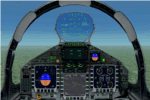
The panel has been developed for FSX Flight Simulator SP1 or SP2. It has also been tested with Microsoft Acceleration, but compatibility is not guaranteed by the author.
This panel has been designed according to a large number of technical documents, descriptions, and pictures out of the Internet. The design goal was to develop a panel and gauges as close as possible to the original aircraft. It was, however by far not possible to programming all the functions and displays, because of the complexity of the real Eurofighter panel, and also because of limitations in FSX.
However, I believe, that the panel with the MFD screen displays gives a good impression on how the real Eurofighter cockpit looks inside.The aircraft model, development by ALPHA/VIRTAVIA, has been used as the base for this panel development. The aim was to go with one model version only , the two seater air to air model. A number of parameter of the aircraft.cfg have been modified to achieve a best possible result of the flight dynamics for the model. It is up to the user to use any other model as this one, and use this panel for it.
For this package, panel and model, I decided to call it the X -Version which shall be seen as an experimental military test version, or if you like, a " Proof of Concept " version. So, you will see a neutral paint with just the Typhoon letters on the aircraft tail. This approach allows to go with deviations and differences to the current technical implementations for the cockpit displays and functions for the Eurofighter.
The panel includes gauges for the afterburner effects, sonic sound effect, callout sounds, weapon explosions effects, and a full functioning TCAS gauge (A future requirement for the Eurofighter), A2A fuel functions, target radar tracking functions and more. The panel has been developed for widescreen monitors only. No VC panel is part of this package.
This is not a load and fly package. Please take your time to read the included panel documentation carefully. Do not skip chapters because you may think, they are not important for you.
For copyrights and credits please look at the documentation for this panel.
| Filename: | Eurofighter_Typhoon_Panel.zip |
| License: | Freeware, limited distribution |
| Added: | 13th April 2016, 20:37:48 |
| Downloads: | 394 |
| Author: | Dietmar Loleit |
| Size: | 24.77 MB |
| Category: Flight Simulator 2004 - Scenery | |
| Gjoa Haven CYHK, on King William Island, Nunavut, Canada, |
|
Images related to this file:
File Description:
Gjoa Haven is a village of 1,200 or so inhabitants at N 68 38 W 95 51 on the southeast corner of King William Island, around 155 miles north of the Arctic Circle. It's Inuit name is Uqsuqtuuq; the Gjoa Haven name was given by the Norwegian explorer Roald Amundsen when he spent two years there from 1903 to 1905 during his exploration of the northwest passage from east to west. His boat was called Gjoa and the cove was named Gjoa Harbour, in Norwegian. The village has been added in this scenery with approximately the right shape; though the coastline with Ultimate Terrain does have the small cove that serves as a harbor the coast shape is wrong. The airfield runway is 4,400 feet of gravel 100 feet wide at 154 feet above sea level. There is no LL100 available, only JetA1, delivered once a year by ship along with all the other requirements of the town. There is also a nearby CAM-B remotely operated defence radar station with its three protective domes. The old terminal building is still there, albeit repainted and spruced up, along with the far larger and newer one alongside it.
One of the screen shots shows Gjoa Haven as it appears for at least 8 months of the year, with snow on the ground and sea ice all around. If you want the ice then download my recent post of All Canada frozen lakes, rivers, and the northern seas, reversible with an untick in the FS scenery library.
| Filename: | Gjoa_Haven_CYHK_on_King_William_Island_Nunavut_Can.zip |
| License: | Freeware, limited distribution |
| Added: | 19th February 2011, 15:42:51 |
| Downloads: | 550 |
| Author: | Roger Wensley |
| Size: | 2.68 MB |


© 2001-2026 AVSIM Online
All Rights Reserved
Privacy Policy |