
Where Flight Simulation Enthusiasts Gather from Around the World!
AVSIM Library - Search Results

| Category: Flight Simulator X - Gauges | |
| V-One Gauge for Boeing 707-300 Complete |

|
Images related to this file:
File Description:
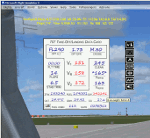
This gauge is specifically written for Captain Sim B707-300 and variants.
List of features: [New Items/Features]
Twenty-Two call-outs sounds integrated into gauge [15 new call-outs].
Take-off V-Speeds calculated for Flaps 14 with temperature and altitude adjustments.
[Take-off speed bugs automatically set for: V1, VR, V2].
[Flaps-up maneuvering speed (clean speed) bug set after flaps-up].
Optimum altitude and optimum EPR (EPR calc for M.80) are continually calculated.
Gross Weight overage will display in 'red' text. Tooltip indicates overweight value (LB/KG).
Take-off trim calculated for current gross weight.
Display units can be toggled between LB and KG (default LB).
Outside Air Temperature can be toggle between Fahrenheit and Celsius.
Resettable fuel use.
Resettable flight timer.
[Selectable Vref landing configurations, Vref40 (default) or Vref50].
[Approach / landing speed bugs automatically set for: Vref, Vref + 5, Vref + 10].
ZFW, Fuel, CG, Gross Weight and Barometric Pressure MSL (QNH) displayed.
['Barometer Set' call-out occurs when pressing keyboard letter 'B' (V-One gauge must be open)].
[Decision Height adjustment now on Data Card in hidden click-spot located on upper right corner].
[Now installation to a single location will work for all variants].
| Filename: | VOne_Gauge_for_Boeing_707300_Complete.zip |
| License: | Freeware, limited distribution |
| Added: | 3rd February 2013, 00:11:24 |
| Downloads: | 2,451 |
| Author: | Paul Tally |
| Size: | 3.14 MB |
| Category: Flight Simulator X - Scenery | |
| NEW YORK CITY X DEMO |
|
Images related to this file:
File Description:

NEW YORK CITY X DEMO features a detailed scenery of New York city in the United States of America, fully compatible with FSX, FSX STEAM, P3D v1/v2/v3/v4 and FSW by Dovetail.
A demo version of New York City X is provided. This is a fully functional freeware scenery, perfectly aligned with the full payware version. This ensures no problems with online (VATSIM, IVAO and multiplayer) flying in case some users have the payware scenery and some don't. The demo gives you the most important (largest) downtown buildings with a low quality photoreal ground for Manhattan area, as well as low quality heliports.
This scenery add-on features 2500 sq km of terrain with autogen and over 6100 photoreal New York buildings in the city, which is the most populous in the United States and the center of the New York Metropolitan Area, one of the most populous urban agglomerations in the world.
The product is equipped with an automatic installer, which means that the scenery will be automatically added to the Flight Simulator Scenery Library.
Please uninstall all previous versions of similar sceneries you may have installed before. Please make also sure that no duplicated AFCAD files are installed.
Enjoy your virtual flying with Drzewiecki Design!
| Filename: | NEW_YORK_CITY_X_DEMO.zip |
| License: | Freeware, limited distribution |
| Added: | 10th August 2017, 18:05:30 |
| Downloads: | 2,799 |
| Author: | Drzewiecki Design |
| Size: | 25.8 MB |
| Category: Prepar3D V1-4 - Scenery | |
| POLISH AIRPORTS VOL. 3 X DEMO |
|
Images related to this file:
File Description:

POLISH AIRPORTS VOL. 3 X DEMO is a package of detailed sceneries of EPPO Poznan, EPWR Wroclaw, EPBY Bydgoszcz and EPSY Olsztyn-Mazury airports in Poland, fully compatible with FSX, FSX:SE and P3D (v1,v2,v3,v4).
This product is a fully functional DEMO version of the commercial payware product that features simplified airports with main buildings but with low resolution textures, non-animated jetways and generally much less details. Using this free demo ensures no problems with online (VATSIM, IVAO, multiplayer etc.) flying in case some users use the payware scenery and some don't.
Poznan-Lawica Henryk Wieniawski Airport (POZ/EPPO), built in 1913, is one of the oldest airports in Poland. Bydgoszcz Ignacy Jan Paderewski Airport (BZG/EPBY) is a Polish regional airport in the city of Bydgoszcz. Wroclaw Copernicus Airport (WRO/EPWR) is an international commercial airport in Wroclaw in southwestern Poland, the 4th largest airport in Poland. Olsztyn-Mazury Airport (SZY/EPSY) is an international passenger airport in the North-East of Poland, branded as the gateway to the Masurian Lake District.
The product is equipped with an automatic installer, which means that the scenery will be automatically added to the Flight Simulator Scenery Library. Please uninstall all previous versions of this airport you may have installed before. Please make also sure that no duplicated AFCAD files are installed.
Enjoy your virtual flying with Drzewiecki Design!
| Filename: | POLISH_AIRPORTS_VOL_3_X_DEMO.zip |
| License: | Freeware, limited distribution |
| Added: | 27th July 2018, 00:06:20 |
| Downloads: | 341 |
| Author: | Drzewiecki Design |
| Size: | 20.81 MB |
| Category: Flight Simulator 2004 - Aircraft Repaints, Textures and Modifications | |
| Imperial Iranian Air Force One (IIAF1) Boeing 747-400 |
|
File Description:
This is a repaint of the FSPainter fabulous Boeing 747-400 V2 (model not included) in the Imperial Iranian Air Force 1 colour. Yes, Iran was due to receive her first American modeled Air Force 1 B747SP registered as EP-HIM (His Imperial Highness) during the reign of the late Shah of Iran Mohammad Reza Shah Pahlavi but the so called revolution of the 1979 put an end to all the good relations with the United States of America and resulted in cancellation of all the orders for American jet planes(including this fabulous aircraft) and fighters. Well, I had read about this certain aircraft sometime but had no idea how it would look like since I saw a small photo,a painting of it on the internet (what a wonderful plane it was due to become) and decided to make a repaint job of it on a 747-400(instead of 747SP) and FSPainter model.v2 was great for it. So I do hope that you enjoy this imperial repainting of the Queen of the Skies whose registeration is the same EP-HIM and the Persian writings on the sides of the fuslage (Keshvar-e Shahanshahi-e Iran) can be translated as the Imperial Land of Iran or the Imperial Country of Iran.744 Base textures by FSPainter, IIAF1 textures by Pantee Farhangi.
| Filename: | Imperial_Iranian_Air_Force_One_IIAF1_Boeing_747400.zip |
| License: | Freeware |
| Added: | 4th December 2003, 23:02:53 |
| Downloads: | 712 |
| Author: | Pantee Farhangi / FSPainter |
| Size: | 328.64 KB |
| Category: Flight Simulator 2004 - Aircraft Repaints, Textures and Modifications | |
| Monarch Airlines Airbus A320-214 (G-MRJK) |
|
Images related to this file:
File Description:

Monarch Airlines, also known as and trading as Monarch, is a British airline based at Luton Airport, operating scheduled flights to destinations in the Mediterranean, Canary Islands, Cyprus, Egypt, Greece and Turkey, with additional charter services to Europe, the United States, the Caribbean, India and Africa. Owned by Globus Travel Group, the airline's headquarters are at Luton with other bases at Birmingham, East Midlands, Leeds/Bradford, Gatwick and Manchester. Monarch is the oldest UK airline to have not changed its original name. It has around 3000 employees.
Monarch Airlines's livery painted on Project Airbus's Airbus A320-214 V2 model. The textures are saved in 32bit format for quality graphics. Textures are also characterized by HD (High Definition). Its features are idle-reverser animation, animated pack vents and pressurisation outflow valve, detailed textures, accurate paint, dynamic shine & effects, dynamic flexing wings that respond to turbulence, fully independent suspension, trim animation, gear steering, accurate flight dynamics, spoiler animation, reflective cockpit windows, improved wingflex code with input from several new parameters including ground spoilers, fuel load, and angle of attack, transparent navigation light lenses and many more.
Visit our Facebook page "Sky Level Textures" for news, updates and previews on my future repaint projects. Thanks for downloading & Happy flying. TEXTURES ARE ALSO COMPATIBLE WITH FSX.
| Filename: | Monarch_Airlines_Airbus_A320214_GMRJK.zip |
| License: | Freeware |
| Added: | 19th February 2014, 23:09:23 |
| Downloads: | 904 |
| Author: | Giacomo Tomasini | Sky Level Textures |
| Size: | 12.91 MB |
| Category: Flight Simulator X - Scenery | |
| POLISH AIRPORTS VOL. 3 X DEMO |
|
Images related to this file:
File Description:

POLISH AIRPORTS VOL. 3 X DEMO is a package of detailed sceneries of EPPO Poznan, EPWR Wroclaw, EPBY Bydgoszcz and EPSY Olsztyn-Mazury airports in Poland, fully compatible with FSX, FSX:SE and P3D (v1,v2,v3,v4).
This product is a fully functional DEMO version of the commercial payware product that features simplified airports with main buildings but with low resolution textures, non-animated jetways and generally much less details. Using this free demo ensures no problems with online (VATSIM, IVAO, multiplayer etc.) flying in case some users use the payware scenery and some don't.
Poznan-Lawica Henryk Wieniawski Airport (POZ/EPPO), built in 1913, is one of the oldest airports in Poland. Bydgoszcz Ignacy Jan Paderewski Airport (BZG/EPBY) is a Polish regional airport in the city of Bydgoszcz. Wroclaw Copernicus Airport (WRO/EPWR) is an international commercial airport in Wroclaw in southwestern Poland, the 4th largest airport in Poland. Olsztyn-Mazury Airport (SZY/EPSY) is an international passenger airport in the North-East of Poland, branded as the gateway to the Masurian Lake District.
The product is equipped with an automatic installer, which means that the scenery will be automatically added to the Flight Simulator Scenery Library. Please uninstall all previous versions of this airport you may have installed before. Please make also sure that no duplicated AFCAD files are installed.
Enjoy your virtual flying with Drzewiecki Design!
| Filename: | POLISH_AIRPORTS_VOL_3_X_DEMO.zip |
| License: | Freeware, limited distribution |
| Added: | 27th July 2018, 00:08:14 |
| Downloads: | 2,449 |
| Author: | Drzewiecki Design |
| Size: | 20.81 MB |
| Category: Flight Simulator 2004 - Panels | |
| Sperry 177 FCU Autopilot Panel Modification v2.1 for the Tinmouse II Boeing 737-200 |
|
Images related to this file:
File Description:
This package includes the files and installation procedures for a modification of the terrific Tinmouse II Boeing 737-200 panel available on AVSIM to add a Sperry 177 FCU autopilot to the panel. While the Tinmouse II panel is simply one of the best freeware 2D panels ever created, a number of pilots have expressed a desire for a replacement of the Sperry 77 (CWS) autopilot with the Sperry 177 (dials and digits) autopilot. The previous Sperry 177 modification I released had many of the elements of a Sperry 177, but did not entirely look or function like a Sperry 177 FCU. This version (2.1) corrects many of these issues, and should bring an entirely new level of realism to your Tinmouse II panel over the v1.0 modification. Here's the list of corrections and improvements implemented in the v2.1 package over v1 and v2: Actual Sperry 177 layout and functionality, Course knob now fully functional and works in synergy with gyro course knob, Panel refresh rate now accurate and smooth (no "click delay"), VOR LOC button drives the FS NAV1 Lock button, LNAV turns on the GPS Drives NAV1 signal, and an optional Sperry 177 full MCP layout or condensed w/ FD layout. This package requires the latest Tinmouse II aircraft and panel, which at the time of this release was v1.26.
| Filename: | Sperry_177_FCU_Autopilot_Panel_Modification_v21_fo.zip |
| License: | Freeware |
| Added: | 5th December 2010, 08:44:27 |
| Downloads: | 2,296 |
| Author: | Mark McCoy |
| Size: | 2.66 MB |
| Category: Flight Simulator 2004 - Aircraft Repaints, Textures and Modifications | |
| US Airways OC Airbus A320-214 (N124US) with Lighting Effects and Updated FDE |
|
File Description:
I am proud to present this highly detailed repaint of US Airways A320-214, registration N124US, in their old livery. US Airways was founded in my home state of Pennsylvania by the DuPont family in 1939 as a mail courier service, and became a passenger carrier in 1949. US Airways has changed its name 4 times until taking the current name. This airframe was delivered to US Airways from Airbus in November of 2000 and is the last CFM equipped 214 model purchased by US Airways. Subsequent to this, US Airways has been purchasing the IAE equipped 231 and 232 models. US Airways operates 66 A320's, using them to provide domestic service throughout the US and international service to the Caribbean, Canada and Mexico. I paid attention to detail and realism as much as possible. I added some dirt and grime to the airframe in parts where it showed in photos of this aircraft. I also distressed the Vstab lines as this part of these aircraft from US Airways always look the worst. I think these details have added a realistic touch without being overdone. This full installation package includes the Project Airbus A320 CFM V2 model and air files, a modified FDE (with permission from Peter Binamira of Project Airbus), A320 lighting enhancements and 32-bit textures. Uses default 737-400 panel and sounds. Please see Install.txt for installation details.
| Filename: | US_Airways_OC_Airbus_A320214_N124US_with_Lighting_.zip |
| License: | Freeware, limited distribution |
| Added: | 21st August 2007, 21:44:34 |
| Downloads: | 2,247 |
| Author: | Project Airbus, Jeffrey S. Bryner, Grayson Ottaway |
| Size: | 6.68 MB |
| Category: Flight Simulator 2004 - Sounds | |
| General Electric CF6-80 - 767v3 - "Matched FDE" |
|
File Description:
General Electric CF6-80 v2 soundpack simulating the engine type fitted on the Boeing 767.
This is a quite major rebuild of the first Boeing 767 GE soundpack I made in February 2005. I've spent a lot of time tweaking and listening to how the the engines spool-up and I think the results are quite pleasing. Soundset is matched with the flight dynamics engine to make flying a lot more enjoyble. Instead of taking off with 100% thrust to really hear the turbofan and letting the speed rocket up to 240 in seconds and then have to decrease the thrust to 30% to not pass 250knots, you now can take-off with 85-90% of thrust, make a very smooth take-off roll and controlled climb. A recommended N1 setting (thrust) is 85-90% for take-off! New features in this set: Matched to use with the Project OpenSky Boeing 767v4 family flight dynamics engine exclusively (this pack might not work correctly with other 767 planes), New spool and turbofan sound for the interior as well as the exterior, New cockpit environment, Cockpit environment can now be turned off when pushing the "Battery on/off" button (for those panels fitted with these), New interior and exterior APU (These sound kicks in when engines are turned off). Please take a look in the readme for possible important info. Created in FS Sound Studio. Enjoy!
| Filename: | General_Electric_CF680___767v3__Matched_FDE.zip |
| License: | Freeware |
| Added: | 13th April 2006, 00:31:46 |
| Downloads: | 9,295 |
| Author: | Steven Persson |
| Size: | 29.93 MB |
| Category: Flight Simulator X - Utilities | |
| Flight Simulator First Officer V2.2 |
|
Images related to this file:
File Description:
Flight Simulator First Officer is a generic virtual copilot for FSX and FS9. The primary function of FSFO is to assist the Pilot In Command (PIC) to fly the aircraft safely while adhering to Standard Operating Procedures (SOPs). This is accomplished via virtual checklist and sharing of cockpit duties/responsibilities. Specifically, the First Officer reads the following configurable checklist: Before Start, After Start, Before Takeoff, In-Range, After Landing and Shutdown. After reading the checklist items, the Copilot will wait to ensure you (i.e. the pilot) have configured the aircraft correctly before proceeding to the next item. Also, the Virtual copilot is capable of performing the following actions: Call Vspeeds based on your input, Raise the Landing Gear on Takeoff, Retract the Flaps, Manage the taxi/landing lights, Land the Aircraft, Tune the ILS frequencies, Call Climb Power based on your input, Reset Vertical Speed when the Aircraft is within 1000 ft of the programmed altitude, IAS warning (e.g. Aircraft is above 250 IAS while below 10000 ft), GS Warnings (e.g. Aircraft is above 25 knots while taxing), Resets the altimeter to standards when passing TA, Engage Heading Hold on Takeoff, Engage Altitude Hold on Takeoff, Reset Speed on Takeoff, Engage Speed Hold on Takeoff, Engages Rev Thrust on Landing, Ground Proximity Warning System (GPWS) and much more...
View the change log to view what's new with V2.2: http://flightsimaddons.proboards.com/thread/32/change-log-updated-july-2014
This is a complete installer; you DO NOT need FSFO V2.*. If upgrading from 2.*, please read the attached readme.txt file for instructions
| Filename: | Flight_Simulator_First_Officer_V22.zip |
| License: | Freeware, limited distribution |
| Added: | 12th July 2014, 08:19:29 |
| Downloads: | 2,359 |
| Author: | Matthew King |
| Size: | 67.17 MB |


© 2001-2026 AVSIM Online
All Rights Reserved
Privacy Policy |