
Where Flight Simulation Enthusiasts Gather from Around the World!
AVSIM Library - Search Results

| Category: Flight Simulator X - Gauges | |
| TCAS and Traffic Display Gauge V2.0 |

|
Images related to this file:
File Description:
This TCAS and Traffic Display Gauge Version 2.0 includes significant improvements from V1.0. It has been developed for the FSX Flight Simulator SP1/2 also. It should also work with Acceleration.The functionality for the TCAS part is based on general specs for commercial aircrafts. It does not provide in detail the function for a specific aircraft model. It is a generic gauge, and can be simple added to any aircraft as a standalone popup window.
In addition the gauge provides a AI traffic display in the ranges of 10,20, and 40 miles.Within this display mode, no TCAS rules are valid, which means all AI aircraft are displayed independent of any altitude or distance.
Improvements in V2.0 are: 1: Full TCAS and traffic display capability is provided even though your aircraft is on the ground. Only the trigger of the alarm/warn sound and the blinking lamp display willbe blocked. 2: An AI HDG pointer will be displayed. It shows in which direction the AI is moving. 3: A bearing pointer has been introduced. It allows the pilot to point to a specific AI.4: The AI additional text info display follows the structure of an ATC text.5:The AI additional text can be selected individually per AI with a mouse click.
6: Each AI display contains a ID index number (0 � 20).7: The design of the TCAS and Traffic Display Box has been updated.8: Increased the number of AIs displayed on the screen in display mode.
For installation and functional description look at the doc inside the ZIp.
CREDIT goes to :
Stefan Schneider for his support on special XML issues and TCAS functionality.
Bob Familton for his review of the documentation and testing for SP1 FSX.
Doug Dawson for his dsd-XML-sound interface in order to generate the sounds.
| Filename: | TCAS_and_Traffic_Display_Gauge_V20.zip |
| License: | Freeware |
| Added: | 25th October 2010, 13:37:36 |
| Downloads: | 3,750 |
| Author: | Dietmar Loleit |
| Size: | 981.32 KB |
| Category: Flight Simulator X - Gauges | |
| TCAS and Traffic Display Gauge V1.0 |
|
Images related to this file:
File Description:
This TCAS and Traffic Display Gauge Version 1.0 has been developed for the FSX Flight Simulator SP1/2. It should also work with Acceleration. The functionality for the TCAS part is based on general specs for commercial aircrafts. It does not provide in detail the function for a specific aircraft model. It is a generic gauge, and can be simply added to any aircraft as a standalone pop-up window.
In addition the gauge provides a AI traffic display in the ranges of 10,20, and 40 miles.
Within this display mode, no TCAS rules are valid, which means all AI aircraft are displayed independent of any altitude or distance.
For installation and functional description look at the doc inside the Zip.
CREDIT goes to:
Stefan Schneider for his support on special XML issues and TCAS functionality.
Bob Familton for his review of the documentation and testing for SP1 FSX.
Doug Dawson for his dsd-XML-sound interface in order to generate the sounds.
| Filename: | TCAS_and_Traffic_Display_Gauge_V10.zip |
| License: | Freeware |
| Added: | 13th September 2010, 12:58:33 |
| Downloads: | 1,726 |
| Author: | Dietmar Loleit |
| Size: | 979.49 KB |
| Category: Flight Simulator 2004 - Panels | |
| F-16 Panel |
|
File Description:
F-16 panel for FS2004 - Includes the new GDI+ Radar Gauge v2.0 designed for fighter jets: multi-mode radar that shows AI aircrafts and other player aircrafts during multi-player session (incl. IBNet support) + HUD gauge with adjustable brightness and radar-selected information display. No need of additional module. Based on Peeter Johan F-16 panel graphics. By Eric Marciano - http://emarciano.free.fr
| Filename: | F16_Panel.zip |
| License: | Freeware, limited distribution |
| Added: | 5th June 2007, 15:38:42 |
| Downloads: | 6,007 |
| Author: | Eric Marciano |
| Size: | 1.8 MB |
| Category: Flight Simulator 2002 - Gauges | |
| FSMeteo Toggle Switch |
|
File Description:
FSMeteo Weather Display Toggle Switch. A simple XML toggle to display and hide Marc Philibert's FSMeteo Weather Display Gauge. A registered version of FSMeteo and Weather Display are required.
| Filename: | FSMeteo_Toggle_Switch.zip |
| License: | Freeware, limited distribution |
| Added: | 8th December 2002, 02:52:38 |
| Downloads: | 657 |
| Author: | Andy Hatcher |
| Size: | 3.84 KB |
| Category: Flight Simulator X - Gauges | |
| Flypad Gauge V2.0 |
|
Images related to this file:
File Description:
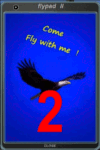
FSX, Flypad Gauge Version 2.0
This gauge has been developed on Win7 for FSX Flight Simulator SP2 or SP1.It should also work with Acceleration, but this is not guaranteed by the author. The gauge is a little extra addon based on the design of a smart phone and provides 9 different displays which are different from all of the standard gauge displays on a regular aircraft panel. It is mainly helpful for the user flying small propeller aircraft, and old timer aircraft.
However, the displays are as well attractive for sim pilots flying modern jet aircraft. Use it as if you just grabbed to your smart phone during a flight and check on the status of your aircraft, or how the terrain awareness situation looks like, how the AI traffic on the radar is, while you proceed with your flight plan. Enjoy the new design of a simple aircraft attitude display during an ILS approach. A new screen for LAT/LON coordination control and distance/bearing calculation has been added to this version in addition with a number of improvements.For credits look at the pdf documentation inside the zip file. By Dietmar Loleit
| Filename: | Flypad_Gauge_V20.zip |
| License: | Freeware |
| Added: | 2nd August 2014, 17:50:45 |
| Downloads: | 778 |
| Author: | Dietmar Loleit |
| Size: | 4 MB |
| Category: Flight Simulator X - Gauges | |
| Checklist display gauge with Lockheed C-130 checklists and reference |
|
Images related to this file:
File Description:
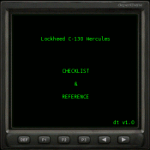
Checklist display gauge with checklists and reference for Captain Sim C-130 X-perience (Payware). By editing checklist images (.bmp) this gauge can be used with any aircraft. Total of 29 pages available (each 285x255px), including three (3) quick select pages for reference and essential display information.
| Filename: | Checklist_display_gauge_with_Lockheed_C130_checkli.zip |
| License: | Freeware |
| Added: | 19th June 2012, 18:00:56 |
| Downloads: | 1,125 |
| Author: | Esko Halli |
| Size: | 447.92 KB |
| Category: Flight Simulator 2004 - Gauges | |
| Runway Roll Gauge v2.0 |
|
File Description:
Collects and displays a number of takeoff and landing roll parameters, including ground roll, obstacle length, nominal runway length and touchdown vertical speed, all in metric or US measure. Easy to use one button ARM operation, just like in v1.0. The gauge disarms automatically on take off, and when you slow to taxi speed on landing. This is a bitmap gauge which can be installed in FS2004 (FS9) or FS2002 aircraft. (1000+ downloads of v1.0)
| Filename: | Runway_Roll_Gauge_v20.zip |
| License: | Freeware, limited distribution |
| Added: | 17th June 2005, 23:23:51 |
| Downloads: | 3,604 |
| Author: | Orest Skrypuch |
| Size: | 99.63 KB |
| Category: Flight Simulator X - Gauges | |
| Airbus A321 ECAMS gauge fix |
|
Images related to this file:
File Description:
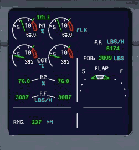
Stock FSX Airbus A321 ECAMS gauge fix.
Fuel flow gauge (the F.F. LBS/H) fixed to display pounds per hour.
Fuel on board gauge (the FOB: LBS) fixed to display total fuel on board, in pounds.
Also included is separate ECAMS gauge upgrade: Display instantaneous
projected maximum range, or distance to empty, in nautical miles.
Very useful when low on fuel or at long range cruise, you will
immediately know how far you can fly or if you burn fuel too fast.
| Filename: | Airbus_A321_ECAMS_gauge_fix.zip |
| License: | Freeware |
| Added: | 16th November 2009, 01:15:24 |
| Downloads: | 1,569 |
| Author: | Branislav Jansik |
| Size: | 5.28 MB |
| Category: Flight Simulator 2004 - Miscellaneous Files | |
| Guide to Installing Lee Hetherington's TCAS II 7.0 to Any Aircraft Panel |
|
File Description:
This is a guide on how to install Lee Hetherington's great TCAS II 7.0 gauge to any aircraft panel of your choosing. It requires editing the panel.cfg file of the aircraft you wish to install it to. I tried to make the guide as easy to follow as I could for people that have never edited a panel.cfg file before. According to Lee's documentation the TCAS II 7.0 gauge mimics the real world counterpart in a full-fledged implementation as is possible. Making this gauge 'As Real As It Gets' beyond the shadow of a doubt. I hope that this guide will enable as many people that are interested in using the best TCAS available for MS Flight Simulator to be able to enjoy Lee's excellent work.
| Filename: | Guide_to_Installing_Lee_Hetheringtons_TCAS_II_70_t.zip |
| License: | Freeware |
| Added: | 19th June 2004, 07:27:41 |
| Downloads: | 6,848 |
| Author: | Jimmy Richards, Lee Hetherington |
| Size: | 3.68 KB |
| Category: Flight Simulator 2002 - Panels | |
| Airbus A330 panel - version 2.2 |
|
File Description:
This is the 4th version of my A330 panel, fully based on custom gauges especially developed for this panel. It includes many new highly realistic and fully working features:
Advanced Primary Flight Display, Airbus Navigation Display including TCAS and navaid display, MCDU including FMGC for flight management, Autoland, Persistence Management, Keyboard shortcuts, Improved Flight Control Unit (autopilot), and much more.
For more information: http://emarciano.free.fr
| Filename: | Airbus_A330_panel__version_22.zip |
| License: | Freeware, limited distribution |
| Added: | 20th May 2003, 21:14:01 |
| Downloads: | 20,164 |
| Author: | Eric Marciano |
| Size: | 3.57 MB |


© 2001-2026 AVSIM Online
All Rights Reserved
Privacy Policy |