
Where Flight Simulation Enthusiasts Gather from Around the World!
AVSIM Library - Search Results

| Category: Flight Simulator 2004 - Miscellaneous Files | |
| Creating Icons & Popup Windows - an Illustrated Tutorial - Corrected Version. |

|
Images related to this file:
File Description:

Creating Icons & Popup Windows - an Illustrated Tutorial. Have you ever wanted to add an icon to a panel which will "call" a pop-up window displaying a picture or chart or a gauge which is not already available? This step by step illustrated tutorial will show you how to accomplish that task. No programming knowledge is required - just a little patience. All necessary files are included. If I can can do it, anyone can. Just unzip to a folder of you choice and enjoy. This procedure has been tested in FS2004 only. Compiled in DOC and PDF formats for your flying enjoymen by David "Opa" Marshall.
| Filename: | Creating_Icons__Popup_Windows__an_Illustrated_Tuto.zip |
| License: | Freeware |
| Added: | 1st January 2009, 19:49:18 |
| Downloads: | 1,562 |
| Author: | David "Opa" Marshall |
| Size: | 779.88 KB |
| Category: Fly! II - Navigation | |
| US Terminal Area Charts for Fly! II (ECW Files) |
|
File Description:
Terminal Area Charts for the continental United States and Puerto Rico in ECW (ERMapper Compressed Wavelet) format for Fly! II. This download contains just the ECW images; in order to be usable in the Fly! II chart viewer, you must also download and install the associated MAP files.
These charts are simply conversions of JPG images uploaded to AVSIM by Matt Fox. Thanks to Matt for making these charts available in the first place! Conversion from JPG to ECW was done with the ECW plugin for PaintShop Pro v6 with desired compression ratio of 25:1.
THESE CHARTS ARE NOT TO BE USED FOR REAL-WORLD NAVIGATION!
| Filename: | US_Terminal_Area_Charts_for_Fly_II_ECW_Files.zip |
| License: | Freeware |
| Added: | 9th March 2005, 13:38:27 |
| Downloads: | 207 |
| Author: | Chris Wallace |
| Size: | 58.08 MB |
| Category: Fly! II - Navigation | |
| Alaska Terminal Area Charts for Fly! II (ECW Files) |
|
File Description:
Terminal Area Charts for Anchorage and Fairbanks, Alaska, in ECW (ERMapper Compressed Wavelet) format for Fly! II. This download contains just the ECW images; in order to be usable in the Fly! II chart viewer, you must also download and install the associated MAP files.
These charts are simply conversions of JPG images uploaded to AVSIM by Matt Fox. Thanks to Matt for making these charts available in the first place! Conversion from JPG to ECW was done with the ECW plugin for PaintShop Pro v6 with desired compression ratio of 25:1.
THESE CHARTS ARE NOT TO BE USED FOR REAL-WORLD NAVIGATION!
| Filename: | Alaska_Terminal_Area_Charts_for_Fly_II_ECW_Files.zip |
| License: | Freeware |
| Added: | 10th March 2005, 05:38:34 |
| Downloads: | 289 |
| Author: | Chris Wallace |
| Size: | 8.24 MB |
| Category: Flight Simulator X - Missions | |
| Lost in the Snow FIXED |
|
File Description:
This is my third resuce mission. Two inexperience hikers decide to do some winter backpacking on a trail in the White Mountains of New Hampshire and get lost in a snowstorm. You have been called to help search for them
This mission is rated EXPERT. There are no pointers in the mission, you must be able to understand a areonotic sectional chart and know how to navigate using VOR(s) to locate both the hiker and the hospital. You MUST be experienced in flying a helicopter and be able to hover over an area. Read the MISSION BREIFING document, it has all the information required for this mission.
| Filename: | Lost_in_the_Snow_FIXED.zip |
| License: | Freeware |
| Added: | 24th April 2007, 00:36:56 |
| Downloads: | 2,768 |
| Author: | David J Crandall |
| Size: | 22.51 MB |
| Category: Flight Simulator 2004 - Scenery | |
| Oberpfaffenhofen v2.2 |
|
Images related to this file:
File Description:
This factory airport is located in the west of Munich (lovely Bavaria, South-Germany).The simulated version of the airport I dedicated to Claude Dornier, one of the
very famous aviation pioneers in the last century. Civil and military aircraft are manufactured and/or serviced on this airport. Over the years the ownership has changed in 1996 from Dornier to Fairchild/Dornier and in December 2002 to RUAG (Swiss Company). The airport also is hosting the "DLR" (German Aerospace Center) at the south western part of the field.
Version 2.2 replaces version 1 and 2.1 completely. Several airport buildings have
been modified and all the scenery textures have been converted to the DXT1/DXT3 format.
All EZ-Scenery BGL's and Textures are on board, therefore no further library downloads
are required. Gentlemen, it's time to get the weather briefing.
Re-upload.
| Filename: | Oberpfaffenhofen_v22.zip |
| License: | Freeware |
| Added: | 8th April 2011, 11:44:36 |
| Downloads: | 2,556 |
| Author: | Klaus Jone |
| Size: | 32.76 MB |
| Category: Flight Simulator 2004 - Utilities | |
| Omni Notes - Displays Text and Graphics on the Kneeboard on Any aircraft - Any time |
|
File Description:
Omni Notes - A new Kneeboard enhancement which allows you to display whatever information you wish to see at any time in any aircraft without pausing your flight! You can display text and graphic formats such as jpg, bmp and even animated gifs. Omni Notes is designed to work with the default Kneeboard but a setup for anyone who uses Rana Hossain's Moving Map program is also provided. This package includes a complete setup with samples of various displayable items. You can easily configure Omni Notes to suit your particular requirements. Comprehensive, illustrated documentation in pdf format is included. Original concept by Loyd Livaudais. Project compilation by David "Opa" Marshall. Please unzip (using folders option) to a temporary folder and read the documentation carefully.
| Filename: | Omni_Notes__Displays_Text_and_Graphics_on_the_Knee.zip |
| License: | Freeware |
| Added: | 7th January 2006, 20:57:46 |
| Downloads: | 2,288 |
| Author: | Loyd Livaudais and David "Opa" Marshall |
| Size: | 951.14 KB |
| Category: Flight Simulator X - Miscellaneous Files | |
| iFly Flow/Checklist For The 600, 700, 800, 900, BBJ, BBJ2, BBJ3 Series Aircraft |
|
Images related to this file:
File Description:

iFly Boeing 737-NG Series (600,700,800,900,BBJ,BBJ2,BBJ3) Flow/Checklist. The enclosed file contains two Boeing 737-NG Normal Flow/Checklist. These Flows/checklists are designed to work with the 600,700,800,900,BBJ,BBJ2,BBJ3 series aircraft. They will take you from Pre-Flight to Shutdown. These Flows/checklists contain Additional hints/information right below the checklist item. I designed these checklists with the new iFly Boeing 737-NG pilot in mind.
| Filename: | iFly_FlowChecklist_For_The_600_700_800_900_BBJ_BBJ.zip |
| License: | Freeware |
| Added: | 20th May 2011, 21:50:50 |
| Downloads: | 2,687 |
| Author: | Michael Swannick |
| Size: | 400.85 KB |
| Category: Flight Simulator X - Aircraft Repaints, Textures and Modifications | |
| Thomas Ruth A330-200 MRTT Ejercito del Aire (Spanish Air Force) liveries (no aircraft) |
|
Images related to this file:
File Description:
2 liveries for Thomas Ruth's A330-200. The airplanes models are not included. Tested in Prepar3D v3, should work also in FSX.
There are two liveries included and both are of the same aircraft:
-The folder texture.mmfEdAMR(T)T is for the GE civilian model. It's the current state (in 2022) of this airplane (the Spanish Air Force has bought 3 A330-200 from Iberia, and will be gradually converted to MRTT standard).
-The folder texture.mmfEdA is for the MRTT model, and depicts the intended complete conversion to the MRTT standard.
| Filename: | Thomas_Ruth_A330200_MRTT_Ejercito_del_Aire_Spanish.zip |
| License: | Freeware |
| Added: | 14th May 2022, 15:28:42 |
| Downloads: | 119 |
| Author: | Antonio Diaz Cayuela |
| Size: | 8.08 MB |
| Category: Flight Simulator 2004 - Scenery Design | |
| Airport active refueling facility for medium and small aircraft 30x30 m or 98x98 ft |
|
File Description:
FS 2004/2002 High detail Airport active refueling facility for medium and small aircraft sized at 30 x 30 m (98 x 98 ft)active area. Night texture included and with night lights on.
| Filename: | Airport_active_refueling_facility_for_medium_and_s.zip |
| License: | Freeware |
| Added: | 3rd July 2004, 16:43:59 |
| Downloads: | 1,469 |
| Author: | Andrej Urosevic |
| Size: | 197.89 KB |
| Category: Flight Simulator X - Gauges | |
| 737 EICAS and 777 EICAS, PFD, and Nav Glass Instruments for FSX Default Aircraft |
|
Images related to this file:
File Description:
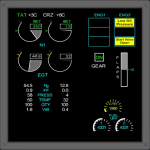
CrgSim is a networked system of 737 and 777 glass instruments for default FSX turbine aircraft. It has drivers for the GoFlight EFIS and MCP Pro and for the OpenCockpits EFIS through their IOCP server. A sample SIOC file for CrgSim EFIS values is included. CrgSim is generally compatible with any software that access and/or modify standard flight variables on the default FSX aircraft. AA flight plan manager is included that can import flight plans in standard FSX format. VNAV and LNAV buttons are active to turn on activate the flight plans and allow unattended flying.
The Nav Display will display active AI aircraft with the range of the nav display (up to 80 NM).
| Filename: | 737_EICAS_and_777_EICAS_PFD_and_Nav_Glass_Instrume.zip |
| License: | Check within download |
| Added: | 24th February 2014, 00:12:15 |
| Downloads: | 1,974 |
| Author: | Kapock Cavanaugh |
| Size: | 103.32 MB |


© 2001-2026 AVSIM Online
All Rights Reserved
Privacy Policy |