
Where Flight Simulation Enthusiasts Gather from Around the World!
AVSIM Library - Search Results

| Category: Flight Simulator X - Scenery | |
| 130 AI Ships and AI Ship Traffic |

|
Images related to this file:
File Description:

This package contains 130 new AI ships and AI ship traffic routes for the North Sea, the Norwegian coast and the sea around the Arabian Peninsula and a few routes for the Mediterranean Sea.
The new ship models include 40 ferries, 4 cruise ships, different types of fishing vessels, Platform Supply Vessels (PSV), Offshore Subsea Construction Vessels (OSCV), and shuttle tankers from off shore oil industry, a pirate mother ship, pirate attack boats, a Greenpeace ship, a heavy lift ship, a couple of frigates, a coast guard ship, container ships, bulk carriers, a number of small coasters, and much more. Around 40 ships have landable helicopter platforms - all marked with an H. Most ships will have simple animations and custom wake, smoke and light effects.
Ships visits among other places Le Havre, Plymouth, Jersey, Hull, Aberdeen, Oslo, Kristiansand, Stavanger, Bergen, Trondheim, Bodo, Narvik, Tromso, Hammerfest, Murmansk, Mallorca, Rome, Neaples, Heraklion, Port Said, Suez, Jeddah, Djibouti, Salalah, Muscat, Dubai, Abu Dhabi, Doha, Ras Tanura, Kuwait, Basra, Bandar Imam, Mogadishu, Karachi, and Mumbai.
In order to get full benefit of this package you must first download and install 63 AI Ships and AI Ship Traffic for Europe and South America, 75 AI Ships and AI Ship Traffic, and the corresponding patch. With that installed you will have a total of 268 ships on shipping routes across the globe.
Full credits to the many people who have contributed in this project can be found in the PDF manual.
| Filename: | 130_AI_Ships_and_AI_Ship_Traffic.zip |
| License: | Freeware |
| Added: | 2nd March 2014, 12:37:04 |
| Downloads: | 11,534 |
| Author: | Henrik Nielsen |
| Size: | 56.11 MB |
| Category: Flight Simulator X - Scenery | |
| ZGGG Guangzhou Baiyun Int'l Airport 2017 |
|
File Description:
Guangzhou Baiyun International Airport (ZGGG) is the major airport of Guangzhou, China. Located in Guangzhou's Baiyun District, it opened on August 5, 2004, but has gone through major changes since FSX was created. The default version only has one terminal and two runways and is slightly out of place from the actual location. I placed the airport in its real location based upon the charted latitude and longitude of the airport reference point. Guangzhou Baiyun Int'l Airport now has three runways. The third runway opened in February 2015. The centerpiece is the new Terminal 2, faithfully rendered here as much as possible. The terminal footprint and gates are accurate. The 3D terminal itself is a simple Sketchup project with generic textures (including night textures). The scenery converted and placed using MCX's amazing Convert and Place Wizard. I added the FBO ramp and the FEDEX Cargo Ramp Aprons and added some hangars to both locations, all default FSX buildings, so no additional library downloads are required. The new runway (now called 02R/20L) was added with Airport Design Editor. The old runway 02R/20L was renamed to the current runway 02L/20R and the old runway 02L/20R was renamed to the current runway 01/19. All taxiways are accurately drawn and designated with taxisigns using the latest AIRAC 1712 Jeppesen chart for ZGGG. All six ILS approaches are rendered as well as ADE would let me.
| Filename: | ZGGG_Guangzhou_Baiyun_Intl_Airport_2017.zip |
| License: | Freeware |
| Added: | 26th November 2017, 22:43:37 |
| Downloads: | 1,083 |
| Author: | Randy Tyndall |
| Size: | 490.4 KB |
| Category: Flight Simulator X - Miscellaneous Files | |
| Boeing 737NGX Checklist |
|
Images related to this file:
File Description:
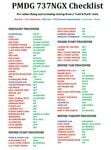
There are already some great checklists for the PMDG NGX done by others but what I've found with these checklists is that I find them to include many steps that I normally don't perform on every single flight, things like testing all fire bells and whistles etc.
So for this reason I decided to first setup the cockpit in a cold & dark state which corresponds to how the flightdeck should look like for every single switch in the cockpit according to the Boeing doc that came with the NGX after running both the shutdown and secure flows and then from this state make a checklist including all the phases of the flight from preflight at the origin to securing the a/c at the destination.
Since I'm doing all my flying online I have also included items such as filing your flightplan, asking ATC for push and engine startup clearence etc. Not fully realistic to include those kind of items in a checklist but the main purpose of this checklist will be to serve as a memory note how to perform a correct flight online in the NGX. Being used to the company of a FS2Crew FO this checklist will be there to help not forgetting about any steps during all the phases of the flight.
If you just like me have been looking for a simple checklist that will help you remember all the normal steps performed on a normal flight I hope you'll enjoy this checklist!
| Filename: | Boeing_737NGX_Checklist.zip |
| License: | Freeware |
| Added: | 18th September 2011, 17:40:11 |
| Downloads: | 8,490 |
| Author: | Richard Asberg |
| Size: | 37.91 KB |
| Category: Flight Simulator X - Miscellaneous Files | |
| 737NG Normal Procedures |
|
Images related to this file:
File Description:
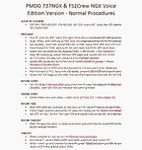
Sorry folks but yet another update since I found some additional small issues I wanted to correct. I hope with this version I caught them all so this will be the FINAL version...at least for today ;-) If you have problem fitting the list on 2 A4 pages when printing it from WordPad make sure you have unchecked the option in WordPad to print page numbers.
A flow/checklist for flying PMDG's 737NGX with FS2Crew Voice Edition. Did this mainly for my own use meaning the flow/checklist is adjusted for how I do my flying and with the addons I use like Aerosoft AES for example. Please also be aware this is not the kind of flow/checklist that includes all things you need to perform during a normal flight but instead you are expected to already have a general knowledge of both the NGX and FS2Crew. However I thought others might be helped by this too both newbies to get you going with the "flow" using FS2Crew but also for the more experienced users as a simple to print out and use memory note. It's also easy for you to change whatever you like to suit your own needs better since I created it in common rtf format using the standard Wordpad Windows application. I deliberately made it as compressed as possible leaving out stuff like all the answers to the checklists etc so it would fit on a single A4 sheet being easy to print and maybe also laminate if you like. Hope you'll enjoy it!
| Filename: | 737NG_Normal_Procedures.zip |
| License: | Freeware |
| Added: | 18th June 2012, 19:58:29 |
| Downloads: | 4,154 |
| Author: | Richard Asberg |
| Size: | 6.17 KB |
| Category: Flight Simulator X - Original Aircraft | |
| Piaggio P-166 Collection |
|
Images related to this file:
File Description:
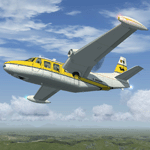
This package contains a FS-X native conversion of all my original Piaggio P-166 models developed for FS-2002/2004. All versions are included: P-166A, P-166BL-2, P-166CL-2, P-166M, P-166S, P-166DL-3 and P-166DP-1. The 3D models are virtually the same, so these are fairly simple models. Yet they come with a VC (no 2D panel this time!). With respect to the FS-2002/2004 releases, they come with very much improved panels, in two flavors: Piston and Turboprop. Gauges developed by Milton Shupe & Scott Thomas for the Aero Commander / Turbo Commander Aircraft series, and Edgar Guinart López of Aeroproyecto for the Embraer 110. Other Gauges from my own Piaggio P-180 & PD-808. Also Included is a brand-new flight model redeveloped from scratch. The 3D models are mildly improved, with a proper pilot figure, main panel backlighting and bump-mapping. Please refer to the Reference and Checklist pages provided via the FS Kneeboard for flying and operating instructions. Models converted with Arno Gerretsen’s Model Converter X.
The Piaggio P-166 is a light small twin. An Exotic twin-engine prop that sold all over the world including America, UK, and Australia. Its origin is traced Back to the Piaggio P-136, a light amphibian, which the P-166 keeps the wings, the engines and the tail planes. The first P-166A flew in November 1957. The aircraft was still in production in the early 21st century in an improved turboprop version, the P-166DP-1.
| Filename: | Piaggio_P166_Collection.zip |
| License: | Freeware |
| Added: | 2nd April 2020, 17:49:58 |
| Downloads: | 697 |
| Author: | Mario Noriega |
| Size: | 56.4 MB |
| Category: Flight Simulator 2004 - Scenery | |
| KLBB - Lubbock Preston Smith Intl - Texas V3.0.1 |
|
Images related to this file:
File Description:

Lubbock is another one of those little known, neglected airports that populate the
FS world. Avery simple airport, LBB somewhat feels like a little DFW. There is a very DFW-ish main terminal with fewer than
10 gates and plenty of space to grow. The only mainline service is courtesy Southwest, but several RJ's freqent Lubbock
several times per day along with the big freighters. This airport was built from the ground up with excellent detail,
and because of the sparse traffic, frame rates are excellent as well.
V2.0 Update:
Recently, Lubbock has moved their east-west runway 8/26 roughly 1000 feet to the East so as to eliminate runway incursions
by separation from the north-south runway 17R-35L. Version 2.0 reflects this modificaton. Several taxiways have been removed
or modified, and airport fencing has been altered to reflect the change.
V3.0 Update:
This update fixes some major errors mainly on the West side of the airport. The cargo ramp and some of the GA parking had been
found to be located in the wrong positions. They have been relocated and rebuilt to match GoogleEarth images. Also, the afcad
has been updated to line up with these changes along with airline parking updates at the main terminal. All the jetways have
been replaced with more accurate representations, and they have also been adjusted to match their current real world positioning.
v3.0.1 update:
There was a missing scenery library that has been added to the download, so now the jetways will appear if they had not before.
| Filename: | KLBB__Lubbock_Preston_Smith_Intl__Texas__V301.zip |
| License: | Freeware |
| Added: | 18th May 2013, 07:39:35 |
| Downloads: | 1,550 |
| Author: | FRFStudio.net / William Morgan |
| Size: | 8.17 MB |
| Category: Prepar3D V1-4 - Scenery | |
| EPBK - Bialystok-Krywlany 2020 |
|
File Description:
EPBK - Białystok-Krywlany 2020 - P3D V4.5 Scenery
PL:
Prosta sceneria lotniska Białystok-Krywlany i landclass miasta oraz okolic.
EPBK:
- zaktualizowane wymiary pasa trawiastego 9L/27R i odpowiednie położenie
- dodany nowy asfaltowy pas 9R/27L - uzyska certyfikat z dniem 23 maja 2020 - do tej daty wyłączony z użytku
- dodana płyta postojowa przed hangarem
- dodane 2 helipady
- dodane obiekty i ogrodzenie lotniska z domyślnej biblioteki obiektów
MIASTO I OKOLICE:
- dodany domyślny obiekt stadionu w miejscu Stadionu Miejskiego
- dodane najważniejsze ulice i drogi w okolicy lotniska - min. Ciołkowskiego, Mickiewicza, nowa obwodnica miasta - Trasa Niepodległości
- zaktualizowany landclass terenów wokół lotniska
- zaktualizowany kształt lasów na terenie całego miasta oraz w jego okolicach - min. Las Turczyński, Las Solnicki, Las Bacieczkowski
Najlepsze wrażenia wizualne z ORBX Global + Vector i openLC Europe.
ENG:
Simple scenery of the Bialystok-Krywlany airport and the landclass of the city and the surrounding area.
EPBK:
- updated grass runway 9L / 27R
- new asphalt 9R / 27L runway added - will be certified on May 23, 2020 - out of service until this date
- parking apron added
- 2 helipads added
- added objects and airport fence from the default object library
CITY AND VICINITY:
- default stadium object added in place of the City Stadium
- the most important streets and roads around the airport have been added - min. Ciołkowskiego, Mickiewicza, the new city beltway - Independence Route
- updated landclass of areas around the airport
- updated shape of forests throughout the city and in its vicinity - Turczyński Forest, Solnicki Forest, Bacieczkowski Forest and others
| Filename: | EPBK__BialystokKrywlany_2020.zip |
| License: | Freeware |
| Added: | 26th April 2020, 19:05:34 |
| Downloads: | 177 |
| Author: | Åukasz Tyszkiewicz |
| Size: | 8.34 KB |
| Category: Miscellaneous Files - Miscellaneous Files | |
| CPS-NG RC 5 |
|
File Description:
CPS-NG (Concorde Performance System New Generation) is the successor to CPS-X, the essential flight preparation utility created in 2011
and discontinued in 2018.
Since the end of its development, still present on AVSIM despite a large number of unavailable functions, it has been downloaded more
than 3000 times.
This new CPS opus will satisfy the most demanding Concorde simulation enthusiasts.
CPS-NG now makes it possible to plan Concorde flights with the following simulators:
FsLabs Concorde X for FSX, and P3D up to version 3.
Colimata Concorde FXP for X-Plane and Gaston Reif's beautiful mod, Heritage Concorde Avionics Package.
With these simulators, CPS-NG can export waypoints to INS, payload and fuel to aircraft.
Like its illustrious predecessors, CPS-NG uses authentic Air France data and charts.
It offers a map of the flight including the navigation points, the points to protect from the supersonic bang, on departure and on
arrival
The flight preparation stages are done in a user-friendly way.
the subsonic levels are configurable, the anti-noise procedures are calculated as in reality. The loading of the plane is modifiable by
the user in order to obtain the ideal centering.
The fuel is calculated as in reality and its distribution in the 11 tanks of Concorde complies with the filling law of Air France and
British Airways.
CPS-NG like its previous version also offers the user a flight report in the form of a PDF document which contains all the elements
necessary for the preparation of the aircraft.
it also offers Concorde-specific settings such as initial climb angle, time until anti noise procedure, throttle levers angle during
anti noise procedure, fuel flow, maximum pressure in P7,
trim adjustment and everything a pilot and flight engineer could want for a perfect flight.
CPS-NG also offers in the flight report, Take-off and landing forms in accordance with the real documents and the user has the choice
between the Air France form and the British Airways one.
Finally, CPS-NG allows the use of real-time weather from NOAA, personalized weather or the one generated by Active Sky 2016,
Active Sky for P3D and Active Sky for X-Plane 11 or 12.
In summary, here you have the ultimate tool for Concorde simulation.
You dreamed it, we did it!
Break the sound barrier.
| Filename: | CPSNG_RC_5.zip |
| License: | Freeware |
| Added: | 10th August 2023, 15:48:00 |
| Downloads: | 72 |
| Author: | Pierre Chassang |
| Size: | 19.49 MB |
| Category: Miscellaneous Files - General Utilities | |
| CONCORDE PERFORMANCE SYSTEM NEW GENERATION |
|
File Description:
CONCORDE PERFORMANCE SYSTEM
NEW GENERATION
CPS-NG (Concorde Performance System New Generation) is the successor to CPS-X, the essential flight preparation utility created in 2011
and discontinued in 2018.
Since the end of its development, still present on AVSIM despite a large number of unavailable functions, it has been downloaded more
than 3000 times.
This new CPS opus will satisfy the most demanding Concorde simulation enthusiasts.
CPS-NG now makes it possible to plan Concorde flights with the following simulators:
- FsLabs Concorde X for FSX, and P3D up to version 3.
- Colimata Concorde FXP for X-Plane and Gaston Reif's beautiful mod, Heritage Concorde Avionics Package.
With these simulators, CPS-NG can export waypoints to INS, payload and fuel to aircraft.
Like its illustrious predecessors, CPS-NG uses authentic Air France data and charts.
It offers a map of the flight including the navigation points, the points to protect from the supersonic bang, on departure and on
arriva.
The flight preparation stages are done in a user-friendly way.
the subsonic steps are configurable, the anti-noise procedures are calculated as in reality. The aircraft loading is modifiable by
the user in order to obtain the ideal centering.
The fuel is calculated as in reality and its distribution in the 11 tanks of Concorde complies with the filling law of Air France and
British Airways.
CPS-NG like its previous version also offers the user a flight report in the form of a PDF document which contains all the elements
necessary for the preparation of the aircraft.
it also offers Concorde-specific settings such as
- Initial climb angle.
- Time to anti noise procedure.
- Throttle levers angle during anti noise procedure.
- Fuel flow.
- Maximum pressure in P7 compressor.
- Trim adjustment and everything a pilot and flight engineer could want for a perfect flight.
CPS-NG also offers in the flight report, Take-off and landing forms in accordance with the real documents and the user has the choice
between the Air France form and the British Airways one.
Finally, CPS-NG allows the use of real-time weather from NOAA, personalized weather or the one generated by Active Sky 2016,
Active Sky for P3D and Active Sky for X-Plane 11 or 12.
In summary, here you have the ultimate tool for Concorde simulation.
NOTE: The manual curently in writing, thanks for your patience.
You dreamed it, we did it!
Break the sound barrier.
| Filename: | CONCORDE_PERFORMANCE_SYSTEM_NEW_GENERATION.zip |
| License: | Freeware, limited distribution |
| Added: | 20th July 2023, 05:20:23 |
| Downloads: | 130 |
| Author: | Pierre Chassang |
| Size: | 19.49 MB |
| Category: Microsoft Flight Simulator (2020) - Utilities | |
| Random Flight Database 3.5.2 |
|
File Description:
Random Flight Database is a simple and easy to use application.
​
It will allow you to randomly choose one or more VFR, IFR flights according to your criteria (type of plane, flight time, company, distance, departure airport, .....).
​
These flights are chosen at random from a default database, a user base created by yourself or according to the world aviation POIs.
​
A default database is already included, but also the possibility for each user to create his own database.
​
But that's not all, you can also extract the flights of the day for an airport, or extract the flights for a whole week.
Why Use RFD ?
The advantage of RANDOM FLIGHT DATABASE:
Extracted from FlightRadar but also from other databases, it chooses randomly among those where these databases according to your choices.
You can also make many other possible combinations, such as leaving each time from the arrival airport for each flight generated, but also selecting your favorite planes and airports.
Simply choose the departure airport, he chooses the arrival airport for you, choose the arrival airport, he chooses the departure airport for you and all this according to the real data of the airlines.
A tab for generating non-real flights is available, it will allow you to generate random flights from over 58,000 global aviation POIs.
​
Full of possibilities, including the possibility to choose the flight time but also to generate several flights while leaving the arrival airport.
You also have the option of creating your own data for inclusion in this software.
And one of the most important is that once the flight (s) are generated, you can send them to SIMBRIEF or PFPX to schedule this.
https://www.youtube.com/channel/UC8y3mSeP-gj-h2MbMT59AOw
| Filename: | Random_Flight_Database_352.zip |
| License: | Freeware |
| Added: | 28th December 2020, 18:47:26 |
| Downloads: | 148 |
| Author: | mikoulprostgrandprix |
| Size: | 181.97 MB |


© 2001-2026 AVSIM Online
All Rights Reserved
Privacy Policy |