
Where Flight Simulation Enthusiasts Gather from Around the World!
AVSIM Library - Search Results

| Category: Flight Simulator X - Scenery | |
| RAF Broadwell - Oxfordshire, England |

|
File Description:
RAF Broadwell (ICAO X2BW) is a former Royal Air Force station located 2 miles north of Broadwell and 3 miles southeast of Burford, Oxfordshire, within 2 miles of RAF Brize Norton.
It opened on 15 November 1943 and closed on 31 March 1947, operating under RAF Transport Command. It consisted of 3 concrete runways in triangular configuration.
Broadwell took part in the D-Day assaults with nearby RAF Down Ampney and RAF Blakehill Farm. Broadwell had two such squadrons, No. 512 Squadron RAF and No. 575 Squadron RAF were based here, flying the Douglas Dakota.
In February 1944, No. 512 Squadron was transferred to No. 46 Group at RAF Broadwell, it was a tactical Dakota squadron and started training glider towing and parachute dropping. Its first operation in the new role was a leaflet drop on 5 June 1944 over France, this followed intensive flying in and out of France including dropping parachutists at Arnhem.
On the eve of D-Day No. 575 Squadron dropped 5 Para into the invasion drop zone. On 6 June, it towed 21 Horsa gliders into France. In the next few weeks it started a casualty evacuation service from France back to England. In September 1944, it was involved in operation market garden to Arnhem where it suffered severe casualties.
The airfield continued to be a terminus for long-range transport operations to Europe, the Middle East and India. Source: Wikipedia
| Filename: | RAF_Broadwell__Oxfordshire_England.zip |
| License: | Freeware |
| Added: | 17th April 2016, 19:06:12 |
| Downloads: | 144 |
| Author: | Terry Boissel |
| Size: | 948.66 KB |
| Category: Flight Simulator 2004 - Scenery | |
| CYVP - Kuujjuaq - Quebec, Canada |
|
Images related to this file:
File Description:
Kuujjuaq is in northern Quebec at the southern end of Ungava Bay, and 30 miles up the Koksoak River. Kuujjuaq has a population of around 2,400; it was previously called Fort Chimo and in 1830 there was a Hudson Bay trading post established close by, but on the other bank of the river. A nursing station and a school were established in 1948 and the Hudson Bay post moved across the river to the current location. The airport is to the south of the town and, unusally for northern airfields, has two runways. The asphalt runway is 6,000 feet long and aligned 07/25, and the gravel runway is 5,000 feet long and aligned 13/31; 07 has ILS. There is fuel available, both 100LL and JetA, but the 100LL will be in drums and you are required to have your own pump. There are numerous flights that stop at Kuujjuaq; the AI included here has Air Creebec, First Air, Wasaya Airways, and Air Inuit (Kuujjuaq is a maintenance centre for Air Inuit) plus private flights by various aircraft. There is also a flight by my poor representation of a Helicopter Transport Services chopper. There is a float base on the nearby Stewart Lake during the summer months. The base is within the Kuujjuaq control zone, and normally you would talk to the tower and inform them of your intentions, but in FS9 this cannot be replicated.
| Filename: | CYVP__Kuujjuaq__Quebec_Canada.zip |
| License: | Freeware, limited distribution |
| Added: | 11th February 2013, 06:22:50 |
| Downloads: | 810 |
| Author: | Roger Wensley |
| Size: | 5.92 MB |
| Category: Flight Simulator 2004 - Scenery | |
| Sachs Harbour CYSY in Northwest Territories, Canada |
|
Images related to this file:
File Description:
Sachs Harbour is on the southwest coast of Banks Island on the north side of Amundsen Gulf, around 240 miles northeast of Tuktoyaktuk and 180 miles northwest of Ulukhaktok. The village is the only permanent settlement on the island, and is located where it is to benefit from the harbour shelter provided by offshore land. The population is only 130 or so folks, who live on hunting and fishing with some tourism. One claim to fame is that the island is home to threequarters of the world's population of muskoxen and the second is the largest goose colony in North America. The airfield is on the plateau just above the village at 282 feet ASL. The gravel runway 084T/264T (true bearings in Northern Domestic Airspace) is 4,000' long and 100' wide and lit. The apron is on the south side at the centre of the runway and there is a new terminal building; there is JetA fuel available and perhaps 100LL in drums. To the west of the airfield are the deserted buildings of what was once a Department Of Transport weather station. Aklak Airlines flights (operated by Kenn Borek) fly to Sachs Harbour from Inuvik three times a week in summer and twice a week at other times; the AI will be included in the post of a revised Aklavik, and Inuvik revised and Tuktoyaktuk should be fully installed BEFORE Sachs Harbour.
| Filename: | Sachs_Harbour_CYSY_in_Northwest_Territories_Canada.zip |
| License: | Freeware, limited distribution |
| Added: | 14th May 2012, 17:20:09 |
| Downloads: | 393 |
| Author: | Roger Wensley |
| Size: | 6.16 MB |
| Category: Microsoft Flight Simulator (2020) - Utilities | |
| FSTramp v8.84 for MSFS, FSX(-SE), Prepart3D, X-Plane (Win) |
|
Images related to this file:
File Description:

This add-on is an EXE application for Microsoft Flight Simulator and a DLL module for all other simulators. The DLL variant is activated via hotkeys or the simulator menu add-ons or plugins. Window size and layout are configurable for one or more screens. To avoid dazzling, the brightness of the entire application is customizable. Primarily it is a flight management system (FMS) with automatic control from start to landing. This also includes the observance of SID, STAR and Approaches in unmatched quality. The flight plan required for the FMS can be created manually or automatically, interactive changes and additions during the flight are possible. The basis of the flight planner is the 3D world map and the search function for airfields and navigation aids. The FMS by FSTramp relies on the autopilot of the aircraft. In case of incompatibility, the autopilot integrated in FSTramp will be used. This allows FSTramp to control almost all aircraft from airport to airport. The altitude profile of the flight plan, SID, STAR and approach is taken into account. This means that FSTramp extends the often incomplete airport procedures to and from the runway so that they can be flown completely automatically. During the fully automatic flight, the autopilot values ​​for HDG, ALT, VSPEED, SPD and MACH can be manually overridden. This is e.g. useful for being able to react to the instructions of the tower in the final approach without completely stopping the automatic flight. The rotating or north pointing 3D world map with numeric display of the terrain elevation under the mouse arrow is another special feature. It does not need an internet but is synthesized from included height profiles of the globe. The Data of continents, mountains and rivers are included in the setup. Airspaces, Airways, Waypoints and SID, STAR and Approaches are also included in the setup, but can be updated by installing additional AIRAC cycles. Airfields and navigation stations are taken from the simulator. NVIDIA: If the frame rate of the simulator drops sharply about 20 seconds after FSTramp's visibility, the power management of the GPU slows down prematurely. In the NVIDIA Control Panel, change the 'Manage 3D settings - Power management mode' option to 'Adaptive'.
| Filename: | FSTramp_v884_for_MSFS_FSXSE_Prepart3D_XPlane_Win.zip |
| License: | Shareware, time limited |
| Added: | 7th July 2023, 04:35:12 |
| Downloads: | 110 |
| Author: | Helge Schroeder |
| Size: | 358.21 MB |
| Category: Flight Simulator X - Utilities | |
| FSTramp v8.84 for MSFS, FSX(-SE), Prepart3D, X-Plane (Win) |
|
Images related to this file:
File Description:
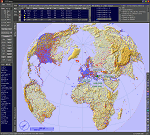
This add-on is an EXE application for Microsoft Flight Simulator and a DLL module for all other simulators. The DLL variant is activated via hotkeys or the simulator menu add-ons or plugins. Window size and layout are configurable for one or more screens. To avoid dazzling, the brightness of the entire application is customizable. Primarily it is a flight management system (FMS) with automatic control from start to landing. This also includes the observance of SID, STAR and Approaches in unmatched quality. The flight plan required for the FMS can be created manually or automatically, interactive changes and additions during the flight are possible. The basis of the flight planner is the 3D world map and the search function for airfields and navigation aids. The FMS by FSTramp relies on the autopilot of the aircraft. In case of incompatibility, the autopilot integrated in FSTramp will be used. This allows FSTramp to control almost all aircraft from airport to airport. The altitude profile of the flight plan, SID, STAR and approach is taken into account. This means that FSTramp extends the often incomplete airport procedures to and from the runway so that they can be flown completely automatically. During the fully automatic flight, the autopilot values ​​for HDG, ALT, VSPEED, SPD and MACH can be manually overridden. This is e.g. useful for being able to react to the instructions of the tower in the final approach without completely stopping the automatic flight. The rotating or north pointing 3D world map with numeric display of the terrain elevation under the mouse arrow is another special feature. It does not need an internet but is synthesized from included height profiles of the globe. The Data of continents, mountains and rivers are included in the setup. Airspaces, Airways, Waypoints and SID, STAR and Approaches are also included in the setup, but can be updated by installing additional AIRAC cycles. Airfields and navigation stations are taken from the simulator. NVIDIA: If the frame rate of the simulator drops sharply about 20 seconds after FSTramp's visibility, the power management of the GPU slows down prematurely. In the NVIDIA Control Panel, change the 'Manage 3D settings - Power management mode' option to 'Adaptive'.
| Filename: | FSTramp_v884_for_MSFS_FSXSE_Prepart3D_XPlane_Win.zip |
| License: | Shareware, time limited |
| Added: | 7th July 2023, 04:35:43 |
| Downloads: | 130 |
| Author: | Helge Schroeder |
| Size: | 358.21 MB |
| Category: Prepar3D V5 - Utilities | |
| FSTramp v8.84 for Prepart3D 2-6, MSFS, FSX(-SE), X-Plane (Win) |
|
Images related to this file:
File Description:
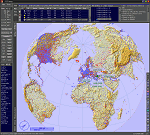
This add-on is an EXE application for Microsoft Flight Simulator and a DLL module for all other simulators. The DLL variant is activated via hotkeys or the simulator menu add-ons or plugins. Window size and layout are configurable for one or more screens. To avoid dazzling, the brightness of the entire application is customizable. Primarily it is a flight management system (FMS) with automatic control from start to landing. This also includes the observance of SID, STAR and Approaches in unmatched quality. The flight plan required for the FMS can be created manually or automatically, interactive changes and additions during the flight are possible. The basis of the flight planner is the 3D world map and the search function for airfields and navigation aids. The FMS by FSTramp relies on the autopilot of the aircraft. In case of incompatibility, the autopilot integrated in FSTramp will be used. This allows FSTramp to control almost all aircraft from airport to airport. The altitude profile of the flight plan, SID, STAR and approach is taken into account. This means that FSTramp extends the often incomplete airport procedures to and from the runway so that they can be flown completely automatically. During the fully automatic flight, the autopilot values ​​for HDG, ALT, VSPEED, SPD and MACH can be manually overridden. This is e.g. useful for being able to react to the instructions of the tower in the final approach without completely stopping the automatic flight. The rotating or north pointing 3D world map with numeric display of the terrain elevation under the mouse arrow is another special feature. It does not need an internet but is synthesized from included height profiles of the globe. The Data of continents, mountains and rivers are included in the setup. Airspaces, Airways, Waypoints and SID, STAR and Approaches are also included in the setup, but can be updated by installing additional AIRAC cycles. Airfields and navigation stations are taken from the simulator. NVIDIA: If the frame rate of the simulator drops sharply about 20 seconds after FSTramp's visibility, the power management of the GPU slows down prematurely. In the NVIDIA Control Panel, change the 'Manage 3D settings - Power management mode' option to 'Adaptive'.
| Filename: | FSTramp_v884_for_Prepart3D_26_MSFS_FSXSE_XPlane_Wi.zip |
| License: | Shareware, time limited |
| Added: | 7th July 2023, 04:35:26 |
| Downloads: | 42 |
| Author: | Helge Schroeder |
| Size: | 358.21 MB |
| Category: Flight Simulator X - Scenery | |
| RAF Honeybourne 1945 - Worcestershire, England |
|
File Description:
RAF Honeybourne was a Royal Air Force station located 0.6 miles (0.97 km) south of Honeybourne, Worcestershire, England and 4.6 miles (7.4 km) east of Evesham, Worcestershire, England.
The airfield was home to No. 24 Operational Training Unit RAF (OTU) which used Vickers Wellingtons and Armstrong Whitworth Whitleys from 15 March 1942 until July 1945 flying many operational bombing and leaflet dropping operations.
A number of units from Ferry Command were based here including a ferry training unit using Lockheed Hudsons and Bristol Beauforts.
The airfield was also temporarily home to No. 21 OTU flying Wellingtons from RAF Enstone from August 1945 for two months because the runways at their home base were being repaired. From October 1945 until 1946 107 Sub Storage Unit from No. 8 Maintenance Unit used the airfield for storing Wellingtons and General Aircraft Hamilcar gliders.
The role of the airfield after the war changed with the reduction of flying movements and with a slight change in what the units did on the airfield when No. 107 Sub Storage Unit from 1947 began to collect no longer needed Wellingtons which were then scrapped and taken to Weston Subedge goods yard (which was near to the south-western corner) where the railway would take them to the necessary destination.
In July 1948 the site was closed and much has reverted to farmland with runways being removed in 1968. Since then, the airside area has evolved into the Honeybourne Airfield Trading Estate with the five hangars being used for different purposes.
| Filename: | RAF_Honeybourne_1945__Worcestershire_England.zip |
| License: | Freeware |
| Added: | 3rd June 2016, 11:00:06 |
| Downloads: | 131 |
| Author: | Terry Boissel |
| Size: | 2.29 MB |
| Category: Flight Simulator X - Scenery | |
| RAF Bircham Newton - Norfolk, England |
|
File Description:
RAF Bircham Newton is a former Royal Air Force station located 2.1 miles (3.4 km) south east of Docking, Norfolk
and 13.4 miles (21.6 km) north east of King's Lynn, Norfolk, England.
The site was first used during the First World War and received the largest British bomber of the time, the Handley Page V/1500. They would have carried out bombing missions against Berlin but the Armistice was arranged before any missions were actually flown.
The airfield was equipped with one aircraft repair shed and three double bay general service sheds, although these had been demolished by 1937. It had two Belfast hangars, three C Type hangars, three Bellman hangars and ten Blister hangars. It operated through the Second World War as part of No. 16 Group RAF as part of Coastal Command.
No. 206 Squadron RAF was one of the squadrons being based there, on maritime patrol duties. Two satellite airfields, RAF Docking and RAF Langham were opened to accommodate units. In 1965 the airfield was used for evaluation trials of the Hawker Siddeley Kestrel V/STOL aircraft.
After closure as an operational airfield in 1966, the airfield became the home of the Construction Industry Training Board. The runways have gone, but the majority of buildings on the site, including some hangars and the control tower, remain in use by the CITB.The control tower was demolished in 2010 due to its poor condition. Constructionarium is also based within the estate, providing a week's practical learning opportunity for undergraduates
| Filename: | RAF_Bircham_Newton__Norfolk_England.zip |
| License: | Freeware |
| Added: | 25th December 2015, 18:15:50 |
| Downloads: | 360 |
| Author: | Terry Boissel |
| Size: | 1.6 MB |
| Category: Flight Simulator 2004 - Scenery | |
| Gjoa Haven CYHK, on King William Island, Nunavut, Canada, |
|
Images related to this file:
File Description:
Gjoa Haven is a village of 1,200 or so inhabitants at N 68 38 W 95 51 on the southeast corner of King William Island, around 155 miles north of the Arctic Circle. It's Inuit name is Uqsuqtuuq; the Gjoa Haven name was given by the Norwegian explorer Roald Amundsen when he spent two years there from 1903 to 1905 during his exploration of the northwest passage from east to west. His boat was called Gjoa and the cove was named Gjoa Harbour, in Norwegian. The village has been added in this scenery with approximately the right shape; though the coastline with Ultimate Terrain does have the small cove that serves as a harbor the coast shape is wrong. The airfield runway is 4,400 feet of gravel 100 feet wide at 154 feet above sea level. There is no LL100 available, only JetA1, delivered once a year by ship along with all the other requirements of the town. There is also a nearby CAM-B remotely operated defence radar station with its three protective domes. The old terminal building is still there, albeit repainted and spruced up, along with the far larger and newer one alongside it.
One of the screen shots shows Gjoa Haven as it appears for at least 8 months of the year, with snow on the ground and sea ice all around. If you want the ice then download my recent post of All Canada frozen lakes, rivers, and the northern seas, reversible with an untick in the FS scenery library.
| Filename: | Gjoa_Haven_CYHK_on_King_William_Island_Nunavut_Can.zip |
| License: | Freeware, limited distribution |
| Added: | 19th February 2011, 15:42:51 |
| Downloads: | 550 |
| Author: | Roger Wensley |
| Size: | 2.68 MB |
| Category: Flight Simulator X - Scenery | |
| RNAS Anthorn (HMS Nuthatch) - Cumbria, UK |
|
File Description:
This scenery is a representation of RNAS Anthorn (HMS Nuthatch) prior to runway and taxiway upgrades completed in 1948. It is not 100% accurate and no claim is being made that it is.
The scenery was made using ADE and is intended for use in FSX along with Horizon GenX VFR scenery but should work ok in Basic FSX.
Some History: Anthorn air field (also known as RAF Anthorn, RNAS Anthorn and HMS Nuthatch) was an airfield approximately 430 KM north-northwest of London
The airfield was built in february 1918 as a Fleet Air Arm (FAA) airfield. It was abandoned after World War I ended, however. The RAF reinstated the airfield at the beginning of World War II as an emergency landing ground for nearby RAF Silloth.
The site was taken over by the Royal Navy in December 1942, and renamed the site RNAS Anthorn. It was commissioned in September 1944 as 'HMS Nuthatch'.
The airfield served as No. ARDU (Aircraft Receipt and Dispatch Unit), a unit that accepts aircraft from their manufacturers and prepares them for operational use.
The last official flight took off from the airfield in November 1957. It was then put on Care and Maintenance, before it closed down in March 1958.
In 1961 the site was chosen to become a NATO VLF transmitting site for communicating with submarines. Construction of the site, by Continental Electronics of Dallas, U.S.A., began in 1962.
The station was accepted on behalf of the MoD in November 1964.
| Filename: | RNAS_Anthorn_HMS_Nuthatch__Cumbria_UK.zip |
| License: | Freeware |
| Added: | 1st March 2015, 23:11:58 |
| Downloads: | 435 |
| Author: | Mark Byers |
| Size: | 21.34 MB |


© 2001-2026 AVSIM Online
All Rights Reserved
Privacy Policy |