
Where Flight Simulation Enthusiasts Gather from Around the World!
AVSIM Library - Search Results

| Category: Flight Simulator 2004 - Miscellaneous Files | |
| Active ILS - KLAS (McCarran Intl - Las Vegas, Nevada) |

|
File Description:
As most know initiating the ILS at certain airports for AI Aircraft or User Planes is not a function at this time when using AFCAD2 if visibilty falls below 3 miles. This is do to the somewhat complex XML code that has to be written for NAVAIDS and then the compiling into a bgl file. If you add a new ILS runway to an airport such as KLAS (rwy 01L) only the user aircraft can use this runway when visibility falls below 3 miles. ATC will no longer use 01L ILS runway for AI Traffic or User Aircraft (by default) because FS9 sees it as a visual runway and will now vector your Planes back to rwy 7/25LR ILS which is also being used as a Terminal Departure Runway. The KLAS_ILS_jv.bgl file adds all NAVAIDS for making 01L a Precision Instrument Runway by adding all the radar fixes for both the ILS/DME approach portion and the proper missed approach procedures as per current published plates for runway 01L. See the readme for what's new at the KLAS airport. **** AFCAD2 included for FS9 default scenery. ****
| Filename: | Active_ILS____KLAS__McCarran_Intl____Las_Vegas_Nev.zip |
| License: | Freeware, limited distribution |
| Added: | 28th February 2005, 15:44:40 |
| Downloads: | 3,027 |
| Author: | Jim Vile |
| Size: | 33.84 KB |
| Category: Flight Simulator 2004 - Scenery | |
| KCLT Charlotte Douglas International Airport |
|
Images related to this file:
File Description:
In 2008 runway 18R/36L at KCLT was renamed 18C/36C in anticipation of a third parallel under construction. The new runway was to be designated 18R/36L and was finally activated on January 6, 2010. This scenery adds that new runway to the default Charlotte Douglas International Airport (KCLT). This is a complete rebuild of my previous upload, KCLT2010 (not required) that inadvertently removed approximately 30 airports in the Charlotte area, including Fayetteville and Spartanburg. It also includes Terminal E, which was added in 2002, but never made it into the default FS2004 scenery.
I used Airport Design Editor (ADE9x) to modify the default FS2004 KCLT file, renaming the default 18R/36L to 18C/36C, create the new taxiways, taxi signs, NavAids, 18R-36L runway, and Terminal E. I used Abacus EZ-Scenery to add jetways, gate markings, and ramp lights. All files, libraries, and textures are either default or included. No additional downloads are required. AI Aircraft were acting normally on my system. I sat at Taxiway W2 for the new Runway 18R/36L and watched AI Aircraft land and take off from it after creating this scenery.
| Filename: | KCLT_Charlotte_Douglas_International_Airport.zip |
| License: | Freeware, limited distribution |
| Added: | 12th January 2011, 22:34:51 |
| Downloads: | 3,561 |
| Author: | Randy Tyndall |
| Size: | 1022.34 KB |
| Category: Flight Simulator 2004 - Scenery | |
| Galena PAGA Runway and Taxiway Lighting in Alaska |
|
Images related to this file:
File Description:
Galena is in Alaska, and this posting adds proper runway lighting to the gravel runway that is used in the winter by light planes on skis, and because of that is not cleared of snow; unfortunately a gravel surface that gets snow covered in winter cannot be replicated in FS9. There are also taxiway lights visible during the day and at night there will be lit taxiway lights. I did not attempt to replicate the complicated main runway lighting which is well covered anyway by FS9. First of all, download and install the Library Objects once and for all from either the Allakaket Lights or Anaktuvuk Lights postings earlier this week. Then put these new bgl's into the existing scenery folder of your previous Galena PAGA installation and say yes to replace the existing bgl's that have the same names. Add the texture folder contents to the existing texture folder as they are required for the red warning lights at the ends of the gravel runway. There will be further retro upgrades to other recent scenery that was posted with temporary lighting. Say thank you to Greg Putz for making the lighting.
| Filename: | Galena_PAGA_Runway_and_Taxiway_Lighting_in_Alaska.zip |
| License: | Freeware, limited distribution |
| Added: | 27th November 2019, 19:14:31 |
| Downloads: | 153 |
| Author: | Roger Wensley |
| Size: | 1011.22 KB |
| Category: Prepar3D V1-4 - Utilities | |
| Flightplan Visualizer 1.13 |
|
Images related to this file:
File Description:
Flightplan Visualizer (FV) version 1.13.0. Copyright 2018-2019 by Pelle F. S. Liljendal ([email protected]), all rights reserved.
FV comes with 586 pre-imported Commercial AI flightplans (+380 BizJet flightplans are available as a separate download). However you are able to import additional (AI) flightplans yourself. Once imported these (AI) flightplans can be visualized on a map-view, and the user will be able to search accross all these. Hence you can use the program as inspiration as to which routes to fly. E.g. you can search across all imported flightplans to find all flights in an A321 flying into/out from LDDU, or simply to look for all flights in a Boeing 747-8F.
Simply run the included installer to install the software. The program will be installed into "C:\Program Files (x86)\Flightplan Visualizer" and all datafiles will be installed into: "C:\Users\[UserName]\AppData\Roaming\FlightplanVisualizer". The program comes with a full manual explaining everything, and a 3 page quick manual to get you started. The first 3 times you run the program the quick manual will automatically open. The forum is hosted here: https://forum.aerosoft.com/index.php?/forum/919-flightplan-visualizer/
Version 1.13 Contains the following changes: Flightplans can now be exported in AIFP/TrafficTool-format (the same format that FV is able to import). It means if you have made any changes to a flightplan (e.g. redirected some airports) the flightplan can be exported from FV, and imported into AIFP (AI Flight Planner, by Don Grovestine) where it can be compiled into an AI-traffic bgl-file (traffic "scenery"). A new setting called "Adjust flight-time on airport-redirect" have been added. This setting defaults to "false" (un-checked), however if changed to "true" (checked) the flight-time will be changed if/when departure/destination-airports are changed due to airport-redirections (both automatic and manually). The flight-time is the result of the difference between departure-/destination-time, hence if the flight-time is changed either- or both departure-/destination-time will change as well. The original flight-time is scaled based on the original- and the redirected distance between the departure/destination-airports. When importing/editing flightplans you can now select one or multiple aircraft and delete them. When deleting an aircraft all schedules attached to that aircraft will be deleted as well. One use of this feature could be to remove aircraft you don't have a AI aircraft, prior to exporting the flightplan in AIFP/TT-format, and loading it into AIFP. When importing/editing flightplans a "Similar" button will appear next to the flightplan name if a similar named flightplan exists (e.g. "same name", but different season), or other flighplans exists for the same airline (ICAO). Hoovering the mouse over this button will show the names of these flightplans as a tool-tip, and if you click the button the list will be shown in a window (with some additional information), from where it can be copied to the clipboard if you need to. On the Edit/Import-flightplan form, the Aircraft- and Airport tab-sheets have been swapped, and a new tab-sheet was added to list all routes of the flightplan. For each route the distance is listed along will all aircraft types of the flightplan servicing that route. The "Aircraft" tabsheet of the form to import/edit flightplans now contains a button called: "Fleet report". Pressing this button will generate a report showing the fleet of an airline (based on the flightplan), that is sorted by Aircraft type and registration. For each aircraft it will show a list of all the airports served by that particular aircraft. A "Word-wrap" check-box have been added to the Result-viewer to toggle word-wrap on/off (word-wrap defaults to "on"). In previous versions any changes made in the settings form resulted in all flightplans having to reload (while showing the splash-screen). Changing the path for MakeRunway-files still results in an automatic "reboot" of the program. The combo-box for choosing default direction (outbound/inbound/both) for the leg-search (on reset) have been removed from settings, and it now defaults to "Outbound or Inbound". However in the search legs form you can now save your own preferred "Reset" criteria. When you press the reset-button, it will load this Reset-file (with your preferred reset criteria). If you hold SHIFT while pressing the reset-button (or you have not saved a personal reset-file), it will reset to the default factory-criteria. In the traffic tabsheet of the airport info form there is a combo-box letting you switch between "Selected flightplan" or last-search on main-form" and "All flights to/from this airport". In previous versions it did not perform the search of flights to-/from- the viewed airport until you selected the 2nd item from the combo-box. Now this search is performed in the background as soon as the form is opened, hence choosing the 2nd item in the combo-box is now instantaneous. The "Nearby Airports" tab-sheet in the "Airport Info" form, now have a column listing direction (from the airport to the nearby airports). When listing number of runways and gates (e.g. in the form showing nearby airports, or in the redirection-report), the radius of the largest gate is now included, as there is no need to redirect any 747 traffic to an airport where the largest gate is 23m (a 747 requires a gate with a radius of at least 36m). The frequency-count was removed from the before mentioned listing of runways and gates, to make more room for listing the aircraft serving each airport. The search for airport browse now have a new optional column listing comments (e.g. length of longest rwy and largest gate). The "show" combo-box lets you choose to show comments in stead of "Size/Rank/Traffic" or "Hint-text". Opening the search airport browser from the import/edit flightplan form, will automatically choose to show the comments column, as information regarding rwy length/gate radius can be relevant when redirecting airports. Form "Nearby Airports" now show the GPS-position in the caption of the form. Added runway/gate summary to caption-bar of airport info form, so you no longer need to look at both the runway- and gate- tab-sheet in order to see: number of runways, longest runway, number of gates and largest rate (radius). New check-box added to settings allowing you to include the before mentioned runway/gate info in the airport marker tool-tip on the main map. Region/sub-region added to "Airport Info" form (top/left corner). A new setting (default to disabled) lets you add region/sub-region to the airport marker-hint on the map as well. Added a button to the "airport info" to show the airport at flightradar24 (opens the default browser), and the button on the leg info form to show route the route at flightaware (also using the browser) have been replicated on the route info form. The METAR-/TAF-buttons on the leg info form now shows the raw METAR/TAF-message - as a tool tip - when you hoover the mouse over the buttons. As before, when you press these buttons it will open a window showing the decoded messages. Various minor changes to the leg info form: added info regarding longest runway and largest gate for each airport, and re-positioned some of the fields. Likewise the info copied to the clipboard when you click the appropriate button have been re-ordered as well. Changed flightplan format to accommodate additional information, but the format remains backward compatible. Button added to about-box allowing the user to copy version-info to the clipboard. Managed to "shave off" approx ½ a second during start-up (on my pc). Not a lot but still an improvement :-) Fixed: In the form for importing/editing flightplans the leg-page showed the original distance even if the airports were redirected. Fixed: On leg info form "Dest.Country" and "Dest.Apt" column-order were swapped. Fixed: Tweaked aircraft type detecting to better detect 740-400 and 767-200/300 freighters. In previous versions a few aircrafts were wrongly detected as pax, when they should have been detected as freighter. Data: Airbus 330-800/900 Neo, Boeing 747-400LCF (Dreamlifter), and Embraer 175/190/195-E2 have been added as supported aircraft, and a few additional airlines and airports were added as well. Flightplans: Installer comes with +70 new pre-imported (Summer 2019) flightplans of which some are replacements of obsolete flightplans (from previous installers), and 2 of the "old" flightplans have been marked as defunct, as "Adria Airways" and "Aigle Azur" have filed for bankruptcy and ceased their operations. Flightplans: Among the added flightplans you will find the first flightplan I have made myself, a flightplan for Airbus Transport International covering their 5 Beluga's an 2 Beluga XL's (the latter 2 are stil performing test-flights and have yet to be implemented into their "normal schedule").
| Filename: | Flightplan_Visualizer_113.zip |
| License: | Freeware, limited distribution |
| Added: | 13th October 2019, 17:50:53 |
| Downloads: | 355 |
| Author: | Pelle Liljendal |
| Size: | 30.45 MB |
| Category: Microsoft Flight Simulator (2020) - Utilities | |
| Flightplan Visualizer 1.18 |
|
Images related to this file:
File Description:
Flightplan Visualizer (FV) version 1.18.0. Copyright 2018-2020 by Pelle F. S. Liljendal ([email protected]), all rights reserved.
FV comes with 787 pre-imported Commercial AI flightplans (+380 BizJet flightplans are available as a separate download). However you are able to import additional (AI) flightplans yourself. Once imported these (AI) flightplans can be visualized on a map-view, and the user will be able to search accross all these. Hence you can use the program as inspiration as to which routes to fly. E.g. you can search across all imported flightplans to find all flights in an A321 flying into/out from LDDU, or simply to look for all flights in a Boeing 747-8F.
Simply run the included installer to install the software. The program will be installed into "C:\Program Files (x86)\Flightplan Visualizer" and all datafiles will be installed into: "C:\Users\[UserName]\AppData\Roaming\FlightplanVisualizer". The program comes with a full manual explaining everything, and a 3 page quick manual to get you started. The first 3 times you run the program the quick manual will automatically open. The forum is hosted here: https://forum.aerosoft.com/index.php?/forum/919-flightplan-visualizer/
Version 1.18 Contains the following changes:
- GREATLY improved the search-legs feature (by a factor of +50).
- In the past the application was forced to 32 bit. This is no longer the case, hence if needed its able to allocate more memory than before. I have never heard of anyone getting an "out of memory" exception, buy anyway.
- In the settings form, the field for entering the path to where to look for the Make Runways -files, have been replaced with a (MRU) combo-box, remembering the last 5 paths entered. So now you don't need to remember these paths each time you want to change it (e.g. if you switch between a set of files generated for P3D and another generated for MSFS). Remark that when this path is changed, FV will automatically restart when saving the settings, as the MkRwy-data are only loaded at startup.
- Added new command-line argument /MkRwy="G:\FS\MakeRunways". If this argument is set, FV will try to locate the files generated by Pete Dowson's MakeRunway in the specified folder, no matter the value of the MkRwy-path set in the settings-form.
- Added new command-line argument /FilePrefix=XXX. If this prefix is set (in the short-cut starting FV) it will look for files in the UserData-folder using this prefix and an underscore (e.g. open "XXX_UserAirportInfo.xml" in stead of "UserAirportInfo.xml"). If FV is started with this argument it will be displayed in the caption of the main-form to notify the user "which prefix is in use".
- Added new command-line argument /ForceReprocessFlightplans which forces all flightplans to be reprocessed on startup (e.g. process all airport redirections according to loaded redirection file).
- Added new command-line argument /? or /help. Using either of these, or having specified a wrong command-line argument will show a small example of the correct way to use these arguments.
- Added a new "Auto-activation prefixes" entry field to the "Edit owned aircraft" form where you can now enter a comma separated list of prefixes for which each aircraft should set to active. If entered, the aircraft will automatically be set active when FV have been started with the /FilePrefix argument set to the entered value (e.g. P3D). If one or more prefixes have been entered into this field, and FV have been started with another prefix, those aircraft will be set to not-active.
- Added new setting to reprocess all loaded flightplans on startup if FV was started with another /FilePrefix argument than used the previous time FV was started (e.g. if you switch between two different simulators).
- Improved how pseudo-airports tries to look-up airport data from the bundled airport-database. So there is now a higher chance that: name, country/state, and time-zone will be populated with useful data for the pseudo airports.
- In previous versions when opening the airport-info form, the checkbox "Exclude small/grass/dirt" (runways) was always checked, meaning you had to uncheck this checkbox before being able to see any runway-information for small airports. In this version a new setting have been added where you can chose if this checkbox should default to being: Checked, Unchecked or (default) Automatic. if choosing "Automatic", this checkbox will default to un-checked for airports only having few/small runways.
- Redesigned the settings-form so things are less "cluttered", and it will be more easy for me to add additional items in the future.
- The Search Airport form now contains fields that lets you specify min/max criteria for rwy-length and airport elevation, and min/max distance to a specified airport (e.g. find all airports within 20-50 Nm of XXXX). Also you can specify required rwy-type (e.g. "All Hard", "Have Soft" ...).
- Added an "Edit" menu-item to the context menu in the Search Airport form, which opens the Airport Info form, and returns back to the Search Airport form (e.g. see details for a few found airports before chooing one of them).
- If Transition Altitude (TA) is not known for a particular airport, the program will now try to estimate TA based on nearby airports in the same country, where those nearby are weighted more than those further away (its not perfect, but "better" than 0). An estimated TA will be postfixed by a asterisk to mark that it is estimated.
- Minor (internal) changes to the automatic version-check.
- Fixed: Issue importing some AigFP flightplans where airports were being redirected (e.g. "AIG_AviaTrafficCompany_Winter_2019-2020v2").
- Fixed: Using the context menu in the list-view showing all owned aircraft, the changes were sometimes not saved.
- Fixed: In the conversion-form when converting weight/volume into US-Gal, the calcuation was wrong (converting from US-Gal was not an issue).
- Fixed: In the leg-info report the value of Transition Altitude was in some cases used in stead of the length of the longest runway.
- Fixed: Leg-info report only contained taxi-out time for all airports. Now it only contains the taxi-out time for the departure airport, but both departure- and destination airports contains a taxi-in time.
- Fixed: In some cases an airport that was currently being edited, could be edited in another window at the same time (opening multiple Airport Info forms).
- Data: The bundled airport-database had a MAJOR face-lift. Various data were corrected, and it have more than doubled in number of airports/helipads contained within the database.
- Data: Improved detection of aircraft-type "IAI 1126 Galaxy" (as "Gulfstream G200"). Thanks to Bruce Nicholson for notifying me of the issue when importing a particular AIG flight-plan.
- Flightplans: All new/updated flightplans have been added to the installer, and all obsolete/defunct have been marked/removed. A total of 787 active flightplans are bundled with the installer.
Pelle
| Filename: | Flightplan_Visualizer_118.zip |
| License: | Freeware, limited distribution |
| Added: | 9th November 2020, 20:09:24 |
| Downloads: | 479 |
| Author: | Pelle Liljendal |
| Size: | 34.48 MB |
| Category: Flight Simulator X - Aircraft Repaints, Textures and Modifications | |
| Centurion Cargo "Petete" McDonnell-Douglas MD-11F (N701GC) |
|
Images related to this file:
File Description:
Centurion Cargo is a privately owned company founded in 2001. Based at
Miami International Airport, it currently operates a fleet of ten MD-11F,
and has an impressive 550,000 square foot warehouse, divided into two
different sections, a 159,000 square foot cooler and 391,000 square foot
Dry Cargo Area. The Centurion Cargo Center is by far the largest privately
owned all cargo airline facility in North America.
Centurion is one of the leading cargo airlines operating to and from
Latin America and is No. 1 in the handling of live animals and perishable
goods. Centurion has recently expanded its network to include 4 weekly flights
from Amsterdam, The Netherlands. We also offer worldwide charter, handling, and
security services among others.
FSX McDonnell-Douglas MD-11F repaint textures for the real world
Centurion Cargo N701GC, named "Petete", but with the freeware version's Pratt
and Whitney engines. For the freeware SMS Overland MD-11 with P&W 4460 engines,
which you must have previously installed in FSX. I installed the freeware
(SMS-MD-11_Dutch_Package.zip) with VC which works well with this repaint.
Also includes engine exhaust smoke coordinates which you can add to
your "aircraft.cfg" if you wish. Screenshots enclosed. Easy installation.
Repaint by Tom Tiedman.
| Filename: | Centurion_Cargo_Petete_McDonnellDouglas_MD11F_N701.zip |
| License: | Freeware |
| Added: | 20th July 2013, 07:14:54 |
| Downloads: | 160 |
| Author: | Tom Tiedman / SMS Overland |
| Size: | 7.86 MB |
| Category: Flight Simulator X - Aircraft Repaints, Textures and Modifications | |
| "Fantasy of Flight" AT-6 Texan (N3931Y) |
|
Images related to this file:
File Description:
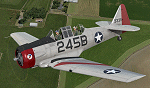
This is a repaint for the payware A2A Simulations AT-6 Texan. This repaint depicts AT-6D/AT-6G 49-3311, registered as N3931Y, which is owned/operated by Kermit Weeks at "Fantasy of Flight" in Polk City, FL. This aircraft was originally manufactured as an AT-6D in WWII for the USAAF, but was rebuilt to AT-6G standard in 1949 for the USAF. The aircraft served in the Spanish AF as a "Caza 6", C.6-167, from around 1962 all the way until 1982, serving as both a trainer and a frontline ground support aircraft, with machine guns mounted in the wings and rocket launchers under the wings. Imported into the US in the 80's, and flying on the civil register, the aircraft is painted as a tribute to the Women Airforce Service Pilots (WASP), with the markings of Avenger Field in Sweetwater, Texas, where they trained. The WASP insignia "Fifinella" is applied to the cowling, which was designed by Disney during the war. This aircraft is one of those which have been covered by Kermit Weeks in his popular "Kermie Cam" flight video series on Youtube. The repaint was created using the A2A product paintkit.
| Filename: | Fantasy_of_Flight_AT6_Texan_N3931Y.zip |
| License: | Freeware |
| Added: | 2nd April 2016, 11:43:15 |
| Downloads: | 265 |
| Author: | John Terrell |
| Size: | 33.24 MB |
| Category: Flight Simulator X - Aircraft Repaints, Textures and Modifications | |
| NIGAT & KNILM Douglas C-54A **UPDATED VERSION** |
|
Images related to this file:
File Description:
This package contains three repaints for Jens B. Kristensen's FSX Douglas DC-4 & C-54 V3.0. In 1946 four ex-USAAF C-54A's were delivered by the USA to the Netherlands Indies Government Air Transport service (NIGAT) and based at Kemayoran near Batavia (now Indonesia's capital Jakarta). Initially they wore military serials, but soon civil registrations were allotted (PK-DSA, PK-DSB, PK-DSC and PK-DSD). Very soon they were chartered by the "reborn" KNILM Royal Netherlands Indies Airways for the weekly service between Batavia and Los Angeles. However, this service lasted only a very few months. By August 1947, when KNILM ceased to exist and was integrated into KLM, the C-54A's were taken over by KLM as PH-TSA through PH-TSD. Their career with KLM was shortlived, as they were sold to airlines elsewhere. Featured are the C-54A's PK-DSB with KNILM titles, PK-DSC with Netherlands Government Air Transport titles, and PK-DSD with NIGAT titles. These are textures only. They replace the textures released in 2013 which have turned out to be in the wrong colour, a problem if one only had a very few, bad quality b/w pictures as a source. You will need the FSX Douglas DC-4 & C-54 (DC4_V30X.ZIP). Repaints by Maarten Brouwer.
| Filename: | NIGAT__KNILM_Douglas_C54A_UPDATED_VERSION.zip |
| License: | Freeware, limited distribution |
| Added: | 13th July 2015, 15:30:11 |
| Downloads: | 165 |
| Author: | Maarten Brouwer |
| Size: | 3.48 MB |
| Category: Flight Simulator X - Aircraft Repaints, Textures and Modifications | |
| Fairchild 24 (2/96) Swedish Air Force |
|
Images related to this file:
File Description:

This folder contains a repaint for the Lionheart Fairchild 24, in the colors of 2/96, a civilian Fairchild 24 that was impressed into the Swedish Air Force. At the outbreak of war, many civilian aircraft were mobilized. Most of them was larger aircraft, but lighter aircraft for liaison work were also used. The Naval Aviation Wing of F 2 at Hägernäs needed smaller aircraft for transport of personnel and liaison in their co-operation with the Navy.
For this reason, one Fairchild 24-C8CS-De Luxe was mobilized between May of 1940 and February of 1943. Its earlier civil registration was SE-AIR (in the USA ex NC15926). It was powered with a Warner Super Scarab S50 air-cooled radial engine delivering 145 hk. The aircraft was designated Tp 6 and got the Air Force number 912. At the delivery of the Tp 6 in May of 1940 to the Air Force, it crashed. But it was repaired and in service again in October the same year. After its time in the Air Force, the Fairchild went back to the civil register, where it was written off in 1951 after another crash.
Repaint by Jan Kees Blom, based on the paintkit by Lionheart Creations.
| Filename: | Fairchild_24_296_Swedish_Air_Force.zip |
| License: | Freeware |
| Added: | 21st July 2018, 14:10:02 |
| Downloads: | 55 |
| Author: | Jan Kees Blom |
| Size: | 17.6 MB |
| Category: Prepar3D V5 - AI Aircraft | |
| McDonnell Douglas DC-8 for AI Traffic (DWAI Models) |
|
Images related to this file:
File Description:

McDonnell Douglas DC-8 for AI Traffic (DWAI Models). This is the P3Dv4.5/5.2 conversion of Dee Waldron's entire DC-8 family of models for AI traffic, with permission kindly given by Dee Waldron. These models are intended as a stop-gap measure until a new DC-8 family specifically modeled for the 64-bit sims comes along, and I may have something to do with that this fall. This package has all seven of Dee's original models, and includes DC-8-12, DC-8-52, DC-8-61, DC-8-62 (two different model versions), and DC-8-63. I have also added in a small collection of the paints I have done over the years. Five main aircraft variants with a total of six models and 61 repaints are included here. This is only meant to get the AI DC-8 into the 64-bit sims, and I pretty much did straight conversions without too many upgrades. However, these aircraft, with special instructions included, are compatible with all prior paints available in the usual places. Original aircraft by Dee Waldron et. al, MCX and RADiator utilites by Arno Gerretsen, P3Dv4/5 conversion and all release repaints by Michael Pearson.
| Filename: | McDonnell_Douglas_DC8_for_AI_Traffic_DWAI_Models.zip |
| License: | Freeware, limited distribution |
| Added: | 5th September 2021, 16:55:35 |
| Downloads: | 253 |
| Author: | Michael Pearson |
| Size: | 20.64 MB |


© 2001-2026 AVSIM Online
All Rights Reserved
Privacy Policy |