
Where Flight Simulation Enthusiasts Gather from Around the World!
AVSIM Library - Search Results

| Category: Flight Simulator X - AFCAD Files | |
| Vliet Airport (6NJ1), NJ |

|
File Description:
Located 02 miles SE of Washington, New Jersey, Vliet Airport is a private turf field. Trees border the runway on three sides, and a dirt mound and semi-truck are also obstacles to watch out for at the end of Runway 06 if you land long. At 1300' feet, it is a very short runway so make sure you check the capabilities of your aircraft before attempting to either land or take off here! Don't forget that in order to clear trees, usable runway space is closer to only 1000'. This airport has no lighting so daytime VFR operations only are recommended. Take note that there is also no wind sock, so be sure you are aware of the weather conditions prior to arriving/departing. There is also no hard-surfaced runway and you will be landing on terrain so it's suggested you have your mesh resolution slider as high as possible.
Scenery constructed with use of satellite images/streetview/aerial photos - the author has not been there in person.
This scenery is meant to be used in conjunction with MegaScenery Earth New York 007. It is not required, but apron use is minimized to allow satellite scenery to show through as much as possible, and objects are placed based on the MSE textures - lack of it may make scenery look out of place.
| Filename: | Vliet_Airport_6NJ1_NJ.zip |
| License: | Freeware |
| Added: | 8th February 2011, 23:20:47 |
| Downloads: | 182 |
| Author: | Drew Sikora |
| Size: | 375.28 KB |
| Category: Flight Simulator X - AFCAD Files | |
| Wide Sky Airpark Airport (JY31), NJ |
|
File Description:
Located 03 miles NW of Bridgeton, New Jersey on 23 acres of land, Wide Sky Airpark Airport is a private turf field 2550' in length. There is no fuel available, but there is tiedown space by the main hangar in the middle of the field to the west. You can start in the parking spot there if you have a plane with 40' or less wingspan (collision with static aircraft is disabled so you can put a bigger plane there if you wish with no trouble). The windsock is not lit at night and is located atop the south end of then main hangar's roof. The field is hedged in to the east with bushes but they do not cause aircraft collisions. The runway is lit for night VFR operations. There is no hard surfaced runway so set your terrain mesh settings as high as possible to enjoy rolling around on bare bumpy terrain.
Scenery constructed with use of satellite images/streetview/aerial photos - the author has not been there in person.
This scenery is meant to be used in conjunction with MegaScenery Earth New Jersey/Delaware 004. It is not required, but apron use is minimized to allow satellite scenery to show through as much as possible, and objects are placed based on the MSE textures - lack of it may make scenery look out of place.
| Filename: | Wide_Sky_Airpark_Airport_JY31_NJ.zip |
| License: | Freeware |
| Added: | 10th May 2011, 13:40:36 |
| Downloads: | 157 |
| Author: | Drew Sikora |
| Size: | 1.27 MB |
| Category: Flight Simulator 2004 - Aircraft Repaints, Textures and Modifications | |
| FSP Airbus Paint Kits |
|
File Description:
This paint kit package contains all of the FSP Airbus paint kits in one easy-to-access pack. These are full kits - models, textures, aircraft.cfg, and *.air files. These kits are CLEAN; that is there is no dirt or shading. In addition to the normal DXT3 files, there are one or more PSP detail files in each aircraft folder. The detail files eliminate most of the requirement to use layered techniques when painting aircraft. Please see the instruction files for specific painting steps. You can now use full color washes on your work and you can stop worring about replacing windows and doors when you paint. I developed these CLEAN kits for two reasons - one, I like to add shading and details that reflect the way I paint aircraft as opposed to someone else who might add things like dirt where I might not want it - and two because with most aircraft designed with dynamic shine, you really don't need shading because it is built in. NOTE: The night textures in these kits have been heavily modified. I found two discrepancies in many of the kits on the Net today - incorrect window placement (especially on doors) and the use of an incorrect BLACK color on night textures which prevented the display of textures during night operations. Paint kits are by Frank Bass and night textures by Peter Leadbeater.
| Filename: | FSP_Airbus_Paint_Kits.zip |
| License: | Freeware |
| Added: | 4th June 2005, 16:04:31 |
| Downloads: | 1,455 |
| Author: | Frank Bass |
| Size: | 11.09 MB |
| Category: Flight Simulator X - Aircraft Repaints, Textures and Modifications | |
| FSX/P3D Ethiopian Airlines 707-379C 1968 |
|
Images related to this file:
File Description:
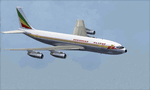
This is a repaint of the 707-379C in Ethiopian Airlines colors. The payware 707-300C by Captain Sim is needed for this repaint. Ethiopian Airlines was established in 1946 by the Emperor Haile Sellassie, and TWA which provided technical and managerial support. Regular operations commenced on April 8 1946 with a fleet of 6 ex USAAF DC-3s. Later in 1950, 2 Convair CV-240s entered the fleet. Then in 1958, the first DC-6B arrived on the scene. On January 1 1959 Ethiopian officially became a member of IATA. The first jet services started in 1963 after the delivery of the carrier's first Boeing 720s. The 720s replaced the DC-6Bs on the European routes. In 1964, Ethiopian started a new pilot training school, installed a large IBM computer system, and also established the largest jet overhaul facility in Africa. 707s, 727s, and 737s, joined the fleet in the ensuing years. Today Ethiopian ranks as Africa's supreme air carrier with a safe and reliable service, notwithstanding the 737 Max 8 tragedy, and has a vast route network. The cherry on top was when in 2014, Ethiopian dethroned South African Airways as the "Best African Airline". Textures are 32 bit dds and DXT5 textures are included as well. This repaint was tested FSX-SE. It should work on FSX & P3Dv1-3.
| Filename: | FSXP3D_Ethiopian_Airlines_707379C_1968.zip |
| License: | Freeware |
| Added: | 20th September 2019, 16:33:20 |
| Downloads: | 131 |
| Author: | Ted Giana |
| Size: | 20.14 MB |
| Category: Prepar3D V1-4 - AI Aircraft | |
| AI Pan American World Airlines AIG Boeing 757-23N Winglets RR TF-FIC |
|
Images related to this file:
File Description:

This is one of the oldest US Airlines that ceased operations but reburned 3rd times, this is the 4th time that this airline reborn as a charter airline called "Pan American World Airlines" known as "PanAm", the fleet only consists in 1 Boeing 757-23N Winglets with the registrations TF-FIC, operated by the Iceland airline "Icelandair". Pan American World Airways was an airline that was the principal and largest international air carrier and unofficial overseas flag carrier of the United States of America for much of the 20th century. The first airline to fly worldwide, it pioneered innovations such as jumbo jets and computerized reservation systems and introduced the first American Airline in 1958. Until its dissolution on December 4, 1991, Pan Am "epitomized the luxury and glamour of intercontinental travel", and it remains a cultural icon of the 20th century, identified by its blue globe logo ("The Blue Meatball"), the use of the word "Clipper" in its aircraft names and call signs, and the white uniform caps of its pilots.The model is Alpha India Group (AIG) Boeing 757-200 RR Basepack. This is my website: https://el-mundo-de-los-aviones-ai-traffic.jimdosite.com. I you hope you enjoy it!
| Filename: | AI_Pan_American_World_Airlines_AIG_Boeing_75723N_W.zip |
| License: | Freeware |
| Added: | 19th June 2025, 11:43:22 |
| Downloads: | 63 |
| Author: | Jesus Gibran Soriano Solleiro |
| Size: | 7.28 MB |
| Category: Flight Simulator X - AFCAD Files | |
| KOPF - Opa Locka - Miami, Florida 2013 |
|
File Description:
Opa-locka Airport (IATA: OPF, ICAO: KOPF, FAA LID: OPF), also known as Opa-locka Executive Airport, is a general aviation airport and joint civil-military airfield 10 miles (16 km) north of Downtown Miami, primarily in metropolitan
Miami, Florida, United States, with a portion within the city proper of Opa-locka.
The airport's control tower is manned from 7:00 AM to 9:00 PM. The airport has four fixed base operators. It is owned by Miami-Dade County and operated by the Miami-Dade Aviation Department.
The tenant military activity is Coast Guard Air Station Miami, operating HU-25 Guardian jet aircraft, the HC-144 Ocean Sentry[4] turboprop aircraft and HH-65 Dolphin helicopters for coastal patrol and air-sea rescue operations.
Much of CGAS Miami's facilities were originally built during World War II as part of the former Naval Air Station Miami.
DayJet previously provided an on-demand jet air taxi service from this airport to 44 airports in 5 states. The company filed for Chapter 7 bankruptcy liquidation in 2008.
The airport is currently served by several cargo and charter airlines who use the U.S. customs facility. Maintenance and modification of airliners up to Boeing 747 size are carried out by several aviation firms
This file has the right coordenates, apron and characteristics of the airport, airport vehicles and buildings, Airport charts included.
| Filename: | KOPF__Opa_Locka__Miami_Florida_2013.zip |
| License: | Freeware |
| Added: | 6th January 2013, 11:39:28 |
| Downloads: | 770 |
| Author: | anwar gonzalez |
| Size: | 3.96 MB |
| Category: Flight Simulator 2004 - Scenery | |
| SKMD Medellin/Enrique Olaya Herrera, Colombia |
|
File Description:
Googly scenery for Medellin/Enrique Olaya Herrera (ICAO: SKMD, IATA: EOH). This
centrally located airport, named after the 1930 president of Colombia, was once
the only airport for the city of Medellin but most international flights are now
concentrated on the new international airport inconveniently situated 24 miles
away. Nevertheless the airport is very busy with domestic, charter and private
traffic and is regularly served by scheduled services of Aerolínea de Antioquia,
AIRES, Easyfly and SATENA. There are many charter operators based or serving
serving this airport, including Aexpa, Heliandes, Sarpa, Helicol and TAC; these
are mostly smaller aircraft or helicopter operations.
Remarkably for such an important airport, Microsoft have only provided a runway
at this airport in Flight Simulator 2004 and this scenery seeks to redress the
situation so that you and your "AI" traffic can use the airport realistically.
The scenery does not purport to be ultra-accurate. Based on high quality
satellite imagery from Google Earth, the layout is proportionally correct but the
added airport features, such as buildings, are built from default Microsoft objects
and add-on libraries so will not look exactly like the real thing.
You are not obliged to download and install any additional scenery libraries,
but to enjoy this scenery in its entirety, you may wish to. It will work fine,
with or without.
| Filename: | SKMD_MedellinEnrique_Olaya_Herrera_Colombia.zip |
| License: | Freeware |
| Added: | 6th December 2008, 10:22:40 |
| Downloads: | 2,564 |
| Author: | John Hinson |
| Size: | 388 KB |
| Category: Flight Simulator 2004 - Aircraft Repaints, Textures and Modifications | |
| Aerial Transit DC-6A / C-118A |
|
Images related to this file:
File Description:
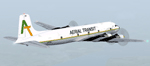
Textures for Tom Gibson's Douglas DC-6A - repainted by Manfred Meyer.
You need to download and install the latest Douglas DC-6A CB-16 base pack with model(use the model with Propspinners), sound and panel from the website calclassic.com.
These textures depict N96BL (c/n 43574) of Aerial Transit. Harold Bellomy and Charles Lawson founded 1963 the Bellomy & Lawson Company in Miami FL, buying DC-6 aircrafts an convert them to pure freighters. They run Challenge Air Transport and sold this airline 1982. Then they started 1983 a part 121 operation under the trading name "Aerial Transit" and ceased operations in 1991. The DC-6 aircrafts of aerial Transit, flying throughout the Caribbean and Central America and were often leased out to other operators of the region. N96BL was built 1952 as C-118A and delivered to the USAF as 51-3827. In 1976 bought by Bellomy & Lawson and registered as N3492F the aircraft served with Challenge AT and re-registered as N96BL from october 1983 until 1991 with Aerial Transit. Aerial Transits DC-6 always looking a little bit shabby and when flying this aircraft, keep in mind it has no pressurisation and no superchargers. So if you are forced to go above 10 000 ft take some oxygen bottles with you!
| Filename: | Aerial_Transit_DC6A__C118A.zip |
| License: | Freeware |
| Added: | 11th October 2014, 20:28:43 |
| Downloads: | 266 |
| Author: | Manfred Meyer |
| Size: | 4.23 MB |
| Category: Prepar3D V1-4 - Utilities | |
| Flightplan Visualizer 1.10 |
|
Images related to this file:
File Description:
Flightplan Visualizer (FV) version 1.10.0. Copyright 2018-2019 by Pelle F. S. Liljendal ([email protected]), all rights reserved.
FV comes with 300 Commercial-, and +380 BizJet AI pre-imported flightplans which the creators of those flightplans have gracefully allowed me to include with the installer, however you are able to import additional (AI) flightplans if you want to. Once imported these (AI) flightplans can be visualized on a map-view, and the user will be able to search accross all these. Hence you can use the program as inspiration as to which routes to fly. E.g. you can search across all imported flightplans to find all flights in an A321 flying into/out from LDDU, or simply to look for all flights in a Boeing 747-8F.
Simply run the included installer to install the software. The program will be installed into "C:\Program Files (x86)\Flightplan Visualizer" and all datafiles will be installed into: "C:\Users\[UserName]\AppData\Roaming\FlightplanVisualizer". The program comes with a full manual explaining everything, and a 3 page quick manual to get you started. The first 3 times you run the program the quick manual will automatically open. The forum is hosted here: https://forum.aerosoft.com/index.php?/forum/919-flightplan-visualizer/
Version 1.10 Contains the following changes: In the flightplan combo-box at the bottom of the main-form, "Active Search" have been renamed into "Last Search". Picking "Last Search" from the flightplan combo-box, will re-execute the last performed search, and populate the map accordingly. A new entry called "None", have been added flightplan combo-box (at the top of the list). Chosing this item will "deselect" the otherwise current search or selected flightplan, and clear the map of routes. A form have been added to assist enabling/disabling flightplans. Gate-letters/numbers are now by default written using a (5x7) Matrix-"font". If you want to revert to the segment-"font", used in previous versions, simply set the value of the "UseMatrixGateChars" tag in the settings-file to false. changed how the Gate-letters/numbers are written in the round gate-markers on the map. Previously all "chars" had the same width. Now the width is dependant on which sub-elements are in use by each "char" (e.g. a "1" is not as wide as an "8"), as a result the gate letter/number are more easy to read. Zulu- and local-time added to the "Selected airport" group-box in the upper/right corner of the main form. If no airport is selected, or no time-zone is registred for the selected airport, only zulu-time will be displayed. Selections of favorite aircraft can now be saved and loaded.⦠This selection of aircraft can be loaded as a selection of aircraft in the "Search leg" form. Video tutorials can now be accessed from the "Help" menu. These are simply "links" to the actual videos on YouTube, hence will launch the default browser. If you hold SHIFT the url will in stead be copied to the clipboard (e.g. in case you want to upen the link in another browser). In the same manner the "Help" menu now contains a link to the forum. The form with decoded METAR/TAF-messages now shows: name, city, and country/state for the selected station in the caption. This text will also be embedded when copying the content to the clipboard. Likewise UTC/Local-time is also embedded when copying the content to the clipboard as it can be used to show the "age" of the report and convert between UTC and Local -times (based on the difference of UTC- and local-time). The info presented when pressing the "Show Scenery Gates" button on the Airport Info form, can now be copied to the clipboard. Various minor "behind the scenes" changes and optimizations. Added support for additional aircraft: Airbus A220-100 (CS100), Airbus A220-300 (CS300), Boeing 777-8 and Boeing 777-9. Listviews containing both (aircraft) IATA and ICAO-codes now all list them in the following order: IATA, ICAO (both individual sortable). Hovering the mouse over gate-markers the hint window will no show the radius both in meters and feet. Editing gate-info you will now see more info for the gate being edited: Type, Size (meters and feet) and if applicable: airlines. Fixed: Minor bug in relation to how the airport size was calculated. Fixed: IATA/ICAO columns were swapped when choosing Favorite Aircraft. Fixed: Typo on the METAR/TAF-decoder form.
| Filename: | Flightplan_Visualizer_110.zip |
| License: | Freeware, limited distribution |
| Added: | 5th June 2019, 21:20:51 |
| Downloads: | 319 |
| Author: | Pelle Liljendal |
| Size: | 24.81 MB |
| Category: Flight Simulator X - Scenery | |
| Freeware Project Kobe X (RJBE) Japan |
|
Images related to this file:
File Description:
Freeware project KOBE X (RJBE) Japan. Contains fully detailed airport with custom ground polygons. Accurate 3d model and texture of all the building of the airport including the terminal, control tower, hangars, bridge and many more. Please note that this project was my initial experience in many fields of scenery design so take it as it is and enjoy flying in Japan. The design is never done but I think it was ready to be released. Still have some work to do with the animated jetways and night lighting for my next "payware" project (KSAN, San Diego Intl). It's going to be far better than this freeware.
You can download the world of ai installer and install the All Nippon Airways package and maybe the JAL too. The jetways are not animated but you can park a 747 in gate 1, a 767 in gate 5 and a 737 in gate 6 and be perfectly aligned with the jetway door.
Also I've not try this scenery in a less powerful computer than mine. I run a Windows 7, I7-950 @ 3.8 GHz and a GTX 570. So don't get mad if you're having bad performances :). With all sliders in the "display settings" set to max I've around 20 fps in the virtual cockpit of the level-d 767. You'll get a nicer airport with also the global texture resolution set to max, water effects set to High 2.x and traffic to ultra-high. Do not turn on Ground scenery shadows as it will make a shadow for the entire airport (ground poly).
I've some tutorial on my YouTube channel (n170toga) on how to make fsx sceneries if you are interested. Don't forget to subscribe there and have updates for the upcoming scenery. Please review this airport if you like as I will learn a lot for my next
project and it's only going to be better.
This scenery is a freeware and should be considered as a freeware. Arigato, Sagga Toure (Devinci), Devinci Design and Development (3De)
| Filename: | Freeware_Project_Kobe_X_RJBE_Japan.zip |
| License: | Freeware |
| Added: | 12th June 2011, 08:28:51 |
| Downloads: | 6,653 |
| Author: | Sagga Toure |
| Size: | 66.48 MB |


© 2001-2026 AVSIM Online
All Rights Reserved
Privacy Policy |