
Where Flight Simulation Enthusiasts Gather from Around the World!
AVSIM Library - Search Results

| Category: Flight Simulator 2004 - Utilities | |
| RPP_FPGen Flightplans Generator v1.0 |

|
File Description:
RPP_FPGen is MS Excel based FS utility that ... will generate those nasty AI flightplans for you!
This is THE generator, where you can design both military and GA traffic plans but all tedious job is done by the software itself. You just choose a home base, set a destination list and AI aircraft list ... and run macro. You get three txt files, which you manually compile using Lee Swordy’s Traffic Tools (for FS9). Then you get a traffic BGL file, just where you need this.
RPP_FPGen runs on a random probability, taking into account Probability Profiles, defining flight probability for each hour of a day in a week. Almost every decision made is random but your concepts are respected.
RPP_FPGen can generate flightplans for FS2004, as well as for FSX.
Special thanks to Barry Taylor for thorough testing, ideas and a quick guide.
See User's Manual for details.
| Filename: | RPP_FPGen_Flightplans_Generator_v10.zip |
| License: | Freeware, limited distribution |
| Added: | 18th April 2008, 21:39:13 |
| Downloads: | 6,773 |
| Author: | Rysiek Winawer |
| Size: | 1.45 MB |
| Category: Flight Simulator 2004 - Original Aircraft | |
| EUROFIGHTER - Germany JG 73 |
|
Images related to this file:
File Description:
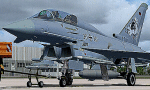
The Eurofighter is a single-seat, twin-engine, agile combat aircraft which will be used in the air-to-air, air-to-ground and tactical reconnaissance roles. Developed by Europe�¢����s leading aerospace companies, Eurofighter Typhoon is now in service with the Air Forces of Germany, Spain, Italy and the United Kingdom and will fulfil Air Force requirements well into the 21st Century. Aircraft production is ongoing and with 638 aircraft under contract to the four Partner Nations and Austria, as the first export customer. The design of Eurofighter Typhoon is optimised for air dominance performance with high instantaneous and sustained turn rates, and specific excess power. Special emphasis has been placed on low wing loading, high thrust to weight ratio, excellent all round vision and carefree handling. - Models, panel, sound, textures, gauges and animations by www.afs-design.de - Author: A.Meyer.
| Filename: | EUROFIGHTER__Germany_JG_73.zip |
| License: | Commercial demo |
| Added: | 5th December 2009, 04:15:45 |
| Downloads: | 2,988 |
| Author: | Andreas Meyer |
| Size: | 6.3 MB |
| Category: Flight Simulator 2004 - AI Aircraft | |
| Rolladen-Schneider LS-4 |
|
File Description:
This upload is one of the results of my efforts to get AI-glider traffic into FS2004.
Included are an AI-version with two textures of the Rolladen-Schneider LS-4 for flights from airfield A to airfield B, and another AI-version of the Rolladen-Schneider LS-4, tweaked in a way that it will take off from airfield A, climb while circling and then keeps endlessly circling to a max altitude of around 3000ft ASL in the surrounding of the airfield.
Credits go to Wolfgang Piper for his excellent gliders which inspired me to start experimenting with AI-gliders and for giving me permission to rebuild his gliders to AI-versions.
For other examples of his excellent gliders, visit his site http://www.fsglider.de.
Also credits go to Alan Kaiser for the stemme.air, which I used to make the AI-versions for the LS-4.
| Filename: | RolladenSchneider_LS4.zip |
| License: | Freeware, limited distribution |
| Added: | 22nd July 2005, 03:29:29 |
| Downloads: | 480 |
| Author: | Bert de Bruin |
| Size: | 812.22 KB |
| Category: Flight Simulator 2004 - Scenery | |
| BFU Brooks |
|
File Description:
With BFU Brooks, BFU enters the faraway bush country of northern Alaska. Located at Coldfoot in the southern foothills of the Brooks mountains, this base will cater to the needs of visitors to the area, and of sportsmen who indulge in hunting and fishing. This scenery package consists of three sceneries: our new northern base BFU Brooks, Moose Camp and Moose Lodge. The camp sits in the mountains on a small lake, whereas the lodge is situated on the shore of a large lake. Visitors are flown into Coldfoot from Fairbanks, then on to the camp or lodge as desired. Moose Camp and Moose Lodge will not show on the GPS, and of course do not have an NDB or similar to guide you. You'd better start in the camp/lodge, and fly toward Coldfoot to get to know the area. The sceneries have only been tested with the default mesh.
| Filename: | BFU_Brooks.zip |
| License: | Freeware |
| Added: | 30th September 2003, 15:17:31 |
| Downloads: | 5,315 |
| Author: | Naji Chehabeddine |
| Size: | 2.96 MB |
| Category: Flight Simulator X - Scenery | |
| Scenery Object Library |
|
File Description:
This is my first sojourn into scenery objects and was prompted by the need of an object which was not available. In the end that led to me in to that one and doing other objects for fun and so here is my first library for my fellow simmers to use and I hope to enjoy. Feedback is always welcome.
However, I would not be publishing anything at all if wasn't for the help and advice I received from the walking encyclopaedia that is Mr Peter Broom so thank you Peter for testing all my models.
In addition; it would be remis of me not to mention the author’s and their books that I referenced to ensure I got my models reasonably accurate, British Military Airfield Architecture by Paul Francis and Graham Buchan Innes and his British Airfield Buildings Vols 1 & 2.
| Filename: | Scenery_Object_Library.zip |
| License: | Freeware |
| Added: | 8th September 2017, 17:52:14 |
| Downloads: | 415 |
| Author: | Terence Boissel |
| Size: | 14.28 MB |
| Category: Flight Simulator X - Missions | |
| On To Tibet..Landing at Paro -The Mission-Episode I |
|
File Description:
" Dog weather!!!!, why did I get into this!!!!! I should have stayed with my dog in Bali!!!!! a Tzunami is better than this!!!!"....words spoken by your pilot as she gets nervous and hands the plane to you!!!!!!!!!!!!!!!!.....--"What?? you cry out...now you give me the darn plane!!!!! what´s the matter with you Sonia?? you said you were going to land, woman!!!!!!!.......
Yes...this is how the Mission starts as the Beechcraft begins its approach to Paro, Bhutan...............weather?, yup.....lousy as the sky of hell!!! and low down in that gully called Paro is your destination....
If you get through Episode I (not a great chance) you then fly out to the forbidden land of Tibet..........be good and Budda´s finger will be your guide....
"Hang-shi-lu-mai Tsung Tsung", like the old masters used to say ( before they had coke!!).
| Filename: | On_To_TibetLanding_at_Paro_The_MissionEpisode_I.zip |
| License: | Freeware, limited distribution |
| Added: | 14th April 2009, 20:56:09 |
| Downloads: | 1,804 |
| Author: | Gera Godoy Canova |
| Size: | 7.99 MB |
| Category: Flight Simulator 2004 - AI Aircraft | |
| Marineflieger Lockheed F-104G Starfighter |
|
Images related to this file:
File Description:

Marineflieger Lockheed F-104G Starfighter, aka the Zipper, Coffin Nail, Widowmaker, Flying Coffin, or Missile with a Man in It; in untrained hands it resembles a lawn dart, as nicknamed by the Canadians. I present a comprehensive AI traffic model package for this hotrod of military jet history. Going into production in 1955, this aircraft was manufactured, directly or by license, by 6 countries, and served the air forces of 17 countries. Late examples served until 2004, nearly fifty years after its introduction.
An original 7-LOD model brings this historic aircraft to the flightsim world. This package represents the F-104G, RF-104G, and TF-104G in the service of the Marineflieger (German Navy); with a total of 11 models and 30 repaints. I am also including some optional variants with separate manual install instructions. Original aircraft model and textures by Michael Pearson, flight dynamics by Michael MacIntyre.
| Filename: | Marineflieger_Lockheed_F104G_Starfighter.zip |
| License: | Freeware |
| Added: | 12th March 2013, 19:16:47 |
| Downloads: | 525 |
| Author: | Michael Pearson |
| Size: | 13.45 MB |
| Category: Prepar3D V1-4 - Utilities | |
| Flightplan Visualizer 1.13 |
|
Images related to this file:
File Description:
Flightplan Visualizer (FV) version 1.13.0. Copyright 2018-2019 by Pelle F. S. Liljendal ([email protected]), all rights reserved.
FV comes with 586 pre-imported Commercial AI flightplans (+380 BizJet flightplans are available as a separate download). However you are able to import additional (AI) flightplans yourself. Once imported these (AI) flightplans can be visualized on a map-view, and the user will be able to search accross all these. Hence you can use the program as inspiration as to which routes to fly. E.g. you can search across all imported flightplans to find all flights in an A321 flying into/out from LDDU, or simply to look for all flights in a Boeing 747-8F.
Simply run the included installer to install the software. The program will be installed into "C:\Program Files (x86)\Flightplan Visualizer" and all datafiles will be installed into: "C:\Users\[UserName]\AppData\Roaming\FlightplanVisualizer". The program comes with a full manual explaining everything, and a 3 page quick manual to get you started. The first 3 times you run the program the quick manual will automatically open. The forum is hosted here: https://forum.aerosoft.com/index.php?/forum/919-flightplan-visualizer/
Version 1.13 Contains the following changes: Flightplans can now be exported in AIFP/TrafficTool-format (the same format that FV is able to import). It means if you have made any changes to a flightplan (e.g. redirected some airports) the flightplan can be exported from FV, and imported into AIFP (AI Flight Planner, by Don Grovestine) where it can be compiled into an AI-traffic bgl-file (traffic "scenery"). A new setting called "Adjust flight-time on airport-redirect" have been added. This setting defaults to "false" (un-checked), however if changed to "true" (checked) the flight-time will be changed if/when departure/destination-airports are changed due to airport-redirections (both automatic and manually). The flight-time is the result of the difference between departure-/destination-time, hence if the flight-time is changed either- or both departure-/destination-time will change as well. The original flight-time is scaled based on the original- and the redirected distance between the departure/destination-airports. When importing/editing flightplans you can now select one or multiple aircraft and delete them. When deleting an aircraft all schedules attached to that aircraft will be deleted as well. One use of this feature could be to remove aircraft you don't have a AI aircraft, prior to exporting the flightplan in AIFP/TT-format, and loading it into AIFP. When importing/editing flightplans a "Similar" button will appear next to the flightplan name if a similar named flightplan exists (e.g. "same name", but different season), or other flighplans exists for the same airline (ICAO). Hoovering the mouse over this button will show the names of these flightplans as a tool-tip, and if you click the button the list will be shown in a window (with some additional information), from where it can be copied to the clipboard if you need to. On the Edit/Import-flightplan form, the Aircraft- and Airport tab-sheets have been swapped, and a new tab-sheet was added to list all routes of the flightplan. For each route the distance is listed along will all aircraft types of the flightplan servicing that route. The "Aircraft" tabsheet of the form to import/edit flightplans now contains a button called: "Fleet report". Pressing this button will generate a report showing the fleet of an airline (based on the flightplan), that is sorted by Aircraft type and registration. For each aircraft it will show a list of all the airports served by that particular aircraft. A "Word-wrap" check-box have been added to the Result-viewer to toggle word-wrap on/off (word-wrap defaults to "on"). In previous versions any changes made in the settings form resulted in all flightplans having to reload (while showing the splash-screen). Changing the path for MakeRunway-files still results in an automatic "reboot" of the program. The combo-box for choosing default direction (outbound/inbound/both) for the leg-search (on reset) have been removed from settings, and it now defaults to "Outbound or Inbound". However in the search legs form you can now save your own preferred "Reset" criteria. When you press the reset-button, it will load this Reset-file (with your preferred reset criteria). If you hold SHIFT while pressing the reset-button (or you have not saved a personal reset-file), it will reset to the default factory-criteria. In the traffic tabsheet of the airport info form there is a combo-box letting you switch between "Selected flightplan" or last-search on main-form" and "All flights to/from this airport". In previous versions it did not perform the search of flights to-/from- the viewed airport until you selected the 2nd item from the combo-box. Now this search is performed in the background as soon as the form is opened, hence choosing the 2nd item in the combo-box is now instantaneous. The "Nearby Airports" tab-sheet in the "Airport Info" form, now have a column listing direction (from the airport to the nearby airports). When listing number of runways and gates (e.g. in the form showing nearby airports, or in the redirection-report), the radius of the largest gate is now included, as there is no need to redirect any 747 traffic to an airport where the largest gate is 23m (a 747 requires a gate with a radius of at least 36m). The frequency-count was removed from the before mentioned listing of runways and gates, to make more room for listing the aircraft serving each airport. The search for airport browse now have a new optional column listing comments (e.g. length of longest rwy and largest gate). The "show" combo-box lets you choose to show comments in stead of "Size/Rank/Traffic" or "Hint-text". Opening the search airport browser from the import/edit flightplan form, will automatically choose to show the comments column, as information regarding rwy length/gate radius can be relevant when redirecting airports. Form "Nearby Airports" now show the GPS-position in the caption of the form. Added runway/gate summary to caption-bar of airport info form, so you no longer need to look at both the runway- and gate- tab-sheet in order to see: number of runways, longest runway, number of gates and largest rate (radius). New check-box added to settings allowing you to include the before mentioned runway/gate info in the airport marker tool-tip on the main map. Region/sub-region added to "Airport Info" form (top/left corner). A new setting (default to disabled) lets you add region/sub-region to the airport marker-hint on the map as well. Added a button to the "airport info" to show the airport at flightradar24 (opens the default browser), and the button on the leg info form to show route the route at flightaware (also using the browser) have been replicated on the route info form. The METAR-/TAF-buttons on the leg info form now shows the raw METAR/TAF-message - as a tool tip - when you hoover the mouse over the buttons. As before, when you press these buttons it will open a window showing the decoded messages. Various minor changes to the leg info form: added info regarding longest runway and largest gate for each airport, and re-positioned some of the fields. Likewise the info copied to the clipboard when you click the appropriate button have been re-ordered as well. Changed flightplan format to accommodate additional information, but the format remains backward compatible. Button added to about-box allowing the user to copy version-info to the clipboard. Managed to "shave off" approx ½ a second during start-up (on my pc). Not a lot but still an improvement :-) Fixed: In the form for importing/editing flightplans the leg-page showed the original distance even if the airports were redirected. Fixed: On leg info form "Dest.Country" and "Dest.Apt" column-order were swapped. Fixed: Tweaked aircraft type detecting to better detect 740-400 and 767-200/300 freighters. In previous versions a few aircrafts were wrongly detected as pax, when they should have been detected as freighter. Data: Airbus 330-800/900 Neo, Boeing 747-400LCF (Dreamlifter), and Embraer 175/190/195-E2 have been added as supported aircraft, and a few additional airlines and airports were added as well. Flightplans: Installer comes with +70 new pre-imported (Summer 2019) flightplans of which some are replacements of obsolete flightplans (from previous installers), and 2 of the "old" flightplans have been marked as defunct, as "Adria Airways" and "Aigle Azur" have filed for bankruptcy and ceased their operations. Flightplans: Among the added flightplans you will find the first flightplan I have made myself, a flightplan for Airbus Transport International covering their 5 Beluga's an 2 Beluga XL's (the latter 2 are stil performing test-flights and have yet to be implemented into their "normal schedule").
| Filename: | Flightplan_Visualizer_113.zip |
| License: | Freeware, limited distribution |
| Added: | 13th October 2019, 17:50:53 |
| Downloads: | 355 |
| Author: | Pelle Liljendal |
| Size: | 30.45 MB |
| Category: X-Plane - Scenery | |
| XP11 German Scenery EDHK 2018+ Kiel-Holtenau |
|
File Description:
The small Zip-file will include a link for scenery download, because the scenery file size is above 500 Mbyte. Just follow the link and download EDHK 2018. This is an "install and fly" version, everything you need is already included (*see info below) and I will continously update the scenery. The story, in November 2012 the German MFG5 (Marineflieger-Geschwader) was relocated to Nordholz (ETMN). This was the end of the main military use in the southern and eastern part of the airport. Because the German harbor city Kiel needs living space for their citizens, opponents of the airport tried to convince citizens and politics to close the airport and to create there living space instead. In 2018 the citizen of Kiel voted with a citizen’s decision with the result that the majority voted for the preservation of the traditional airport. Personally, I am very happy with this decision. On the area of the airport some companies are settled, their employees should be able to sleep a little better now. In addition, there will certainly be future investments in the airport due to the election results. Since the airport has been financially in the red for years, the operator of the airport, the Port of Kiel Flughafen GmbH & Co. KG has converted large areas of the airport as parking area. These parked vehicles are part of the constantly increasing cruise ship operations within Kiel, making it possible for passengers to safely park their vehicles for extended periods of time. The taxiways “A†and “D†of EDHK are no longer in operation. This was of course taken into account in my scenery. The access to this taxiway was marked as in the original by yellow "X". The taxiway lighting was also turned off there. The on-site Luftsportverein (LSV) uses above the runway 08/26 an individually marked grass runway (not official), I called it 08S/26S and it is for the winch launch of their gliders only. The size of this provisional winch runway is about 820x20m. A glider takeoff by towing aircraft is usually handled by the Runway 08/26.(*) There is no copyright infringement, since I have received all the needed permissions to use the listed objects/libraries full or in parts within my scenery, the same for the single objects or non-Library bound objects/elements. I got all these permissions in writing from each individual author/rights holder. Take the time and read the full, included descritpion, please. If you have question, ask me first!
| Filename: | XP11_German_Scenery_EDHK_2018_KielHoltenau.zip |
| License: | Freeware |
| Added: | 28th November 2018, 22:46:11 |
| Downloads: | 69 |
| Author: | Marco Moschet |
| Size: | 1.3 KB |
| Category: X-Plane - Scenery | |
| XP11 German Scenery EDHK 2018+ Kiel-Holtenau |
|
Images related to this file:
File Description:
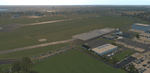
The small Zip-file will include a link for scenery download, because the scenery file size is above 500 Mbyte. Just follow the link and download EDHK 2018. This is an "install and fly" version, everything you need is already included (*see info below) and I will continously update the scenery. The story, in November 2012 the German MFG5 (Marineflieger-Geschwader) was relocated to Nordholz (ETMN). This was the end of the main military use in the southern and eastern part of the airport. Because the German harbor city Kiel needs living space for their citizens, opponents of the airport tried to convince citizens and politics to close the airport and to create there living space instead. In 2018 the citizen of Kiel voted with a citizen’s decision with the result that the majority voted for the preservation of the traditional airport. Personally, I am very happy with this decision. On the area of the airport some companies are settled, their employees should be able to sleep a little better now. In addition, there will certainly be future investments in the airport due to the election results. Since the airport has been financially in the red for years, the operator of the airport, the Port of Kiel Flughafen GmbH & Co. KG has converted large areas of the airport as parking area. These parked vehicles are part of the constantly increasing cruise ship operations within Kiel, making it possible for passengers to safely park their vehicles for extended periods of time. The taxiways “A†and “D†of EDHK are no longer in operation. This was of course taken into account in my scenery. The access to this taxiway was marked as in the original by yellow "X". The taxiway lighting was also turned off there. The on-site Luftsportverein (LSV) uses above the runway 08/26 an individually marked grass runway (not official), I called it 08S/26S and it is for the winch launch of their gliders only. The size of this provisional winch runway is about 820x20m. A glider takeoff by towing aircraft is usually handled by the Runway 08/26.(*) There is no copyright infringement, since I have received all the needed permissions to use the listed objects/libraries full or in parts within my scenery, the same for the single objects or non-Library bound objects/elements. I got all these permissions in writing from each individual author/rights holder. Take the time and read the full, included descritpion, please. If you have question, ask me first!
| Filename: | XP11_German_Scenery_EDHK_2018_KielHoltenau.zip |
| License: | Freeware |
| Added: | 29th November 2018, 19:24:38 |
| Downloads: | 65 |
| Author: | Marco Moschet |
| Size: | 1.3 KB |


© 2001-2026 AVSIM Online
All Rights Reserved
Privacy Policy |