
Where Flight Simulation Enthusiasts Gather from Around the World!
AVSIM Library - Search Results

| Category: Flight Simulator X - Scenery | |
| EICM Galway Airport, Ireland |

|
File Description:
Ireland EICM Galway Airport. Galway airport is a small regional airport situated on the West coast of Ireland. The runway is 1289m(4230ft) in length and is therefore only suitable for GA and small jets. This scenery also includes EICA Connemara and the three airstrips of the Aran Islands, EIIM Inishmore, EIMN Inishmaan, and EIIR Inisheer. EICA Connemara plays host to the shortest scheduled airline service in the world, operated by Aer Arann, and appropriately using BN2 Islanders. In June of 1919, Alcock and Brown crashlanded their converted Vickers Vimy in a Connemara bog, having successfully completed the first non-stop transatlantic flight.
All the terminals and buildings are custom made and static aircraft add a sense of realism. The BGL files have been subdivided so the user can switch various elements of the scenery on or off according to preference. For added realism I have also added some sound effects, animations, people, grass, and rocks. Each airport has a complete set of night textures with wash lighting in the carparks and terminal areas.
The scenery has been primarily designed for VFR photographic scenery using 10m mesh, but will also work with the default terrain, although there are some variations with the default 38m mesh at Inishmore. All the five airports use objects from my Ireland Static object library, 3d aircrew and VFR trees. Full installation instructions are given in the Readme file. I hope you enjoy the scenery as much as I enjoyed making it.
| Filename: | EICM_Galway_Airport_Ireland.zip |
| License: | Freeware |
| Added: | 5th November 2011, 22:04:59 |
| Downloads: | 3,155 |
| Author: | George Keogh |
| Size: | 77.27 MB |
| Category: Flight Simulator X - Original Aircraft | |
| UFO - A51 |
|
Images related to this file:
File Description:
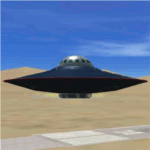
You can fly this UFO model in all directions e.g. vertical up/down lateral right/left, forward/backward, and can stay in a static position on any altitude level. The UFO provides a maximum speed of Mach 4.3 on all altitude levels and the altitude level is unlimited.
The overall radius of the model is 170 feet. The overall height is 100 feet. Be aware of this size if you are landing on standard airports. The model includes a animated gear system which is a big gray ring. The red disk on the outside of the model is the rotating UFO engine. In addition the model contains 3 guns which are moving out of the body if they are armed by activating a switch on the weapon control control panel. Important to say, the UFO is not a traditional aircraft. It reacts different and you need to handle it differently too! For more information and how to fly the model, read the documentation carefully and read the documentation first, before you go to fly it !!!!
The model and the gauges have been developed for FSX Flight Simulator SP2 or SP1. It has also been tested with Microsoft Acceleration but compatibility is not guaranteed by the author. The format for the panel and gauges is developed for a 4/3 monitor. Use the Wide Screen Panel.cfg if you have a 16/9 Monitor. For installation instructions see the documentation inside the zip file.
Credit goes out to: Bob Familton and Geoffrey Bogeaus for improvement, recommendations, testing and review, and to Doug Dawson for his XML IPC interface.
Enjoy a new way to fly.
Dietmar Loleit
| Filename: | UFO__A51.zip |
| License: | Freeware, limited distribution |
| Added: | 21st January 2014, 15:43:13 |
| Downloads: | 724 |
| Author: | Dietmar Loleit |
| Size: | 19.67 MB |
| Category: Flight Simulator X - Gauges | |
| FIP - 5 Gauge Display - 2 Engine |
|
Images related to this file:
File Description:

This set of gauges is for use in the Saitek FIP and has been developed specifically for the Baron 58 and variants but should work with other twin prop aircraft. There are 3 options-
option 1. a pair of gauges for displaying on 2 FIPs (layout is similar to the fsx BB58 layout)
option 2. One gauge for displaying only on 1 FIP (left and right eng needle on each of the 5 main instruments )
option 3. a pair of gauges for displaying on 2 FIPs with larger diameter gauges and more user interaction than in 1. above.
1,2, & 3 all have the 5 main engine instrumentation ( RPM, Manifild Pressure, Fuel Flow rate, Oil Temp and Pressure, CHT/EGT Temp.) Additional features are added .e.g Marker Beacon indicators plus indicator of left / right fuel tank selected for each engine, NAV 1 & NAV 2 with DME data.
Option 1 & 3 also has fuel pump switches, alternator switches, starter buttons, cowl flaps and Amps (total load) gauge, and Battery volts gauge.
Option 3 also has additional avionics data and avionics and battery switch buttons. All this enables the aircraft to be started from cold and shut down to cold. The avionics data is useful if you only have one Saitek radio panel. i.e. dont have to keep clicking / rotating switches all the time. This option also gives user ability to alter NAV 1 standby frequency and swap to active.
With the 2 gauges in option 3 above plus my earlier FIP gauge containing a working Auto pilot and fuel levels / flaps and landing gear indicators (refer "FIP-AP Multi Fuel Gauges") there is everything required (not the primary flight display instruments) for flying a single or twin prop aircraft displayed across either 2 or 3 FIPs.
| Filename: | FIP__5_Gauge_Display__2_Engine.zip |
| License: | Freeware |
| Added: | 30th October 2014, 06:24:58 |
| Downloads: | 250 |
| Author: | Robert Budd |
| Size: | 2.4 MB |
| Category: Flight Simulator X - Aircraft Repaints, Textures and Modifications | |
| Consolidated PBY-5 RNZAF 6 Sqn XX-W |
|
Images related to this file:
File Description:

A repaint for the Aerosoft PBY-5 Catalina in the colors of NZ4020 XX-W of the RNZAF. Bu08435, it flew with 6 Flying Boat Squadron. Following Japan's entry into the war in December 1941, the RNZAF had to switch from primarily training pilots to Europe into a combat force. No. 6 Squadron RNZAF was formed as an army co-operation unit at Milson in February 1942 flying Vickers Vildebeest and Hawker Hind aircraft. At the same time, No. 5 Squadron RNZAF moved to Fiji with Short Singapores and Vickers Vildebeest and Vincent biplanes. Modern maritime patrol flying boats (and more Hudson light bombers) were requested under Lend Lease and when the first Consolidated Catalinas arrived a detachment of men from No. 5 Squadron was assigned to convert to these types as No. 6 Squadron. Before the squadron was officially formed these men successfully completed their first air-sea rescue of a downed US aircrew. From May 1943 No. 6 squadron undertook action against the Japanese. The Squadron also conducted search and rescue missions for allied aircrew and seamen, and undertook many open sea rescues. XX-W arrived in Fiji on 21 October 1943. On February 18, 1944 it took off on a dumbo rescue mission to north Buka Island and landed to rescue two crew members and pick up a dead body from the crash of B-25, and successfully returned them to Halavo. On 26 May 1945, it stalled on landing at Hobsonville and was towed to its mooring by a crash boat. The induced damage resulted in the aircraft being written off charge on 18 June 1945.
Repaint by Jan Kees Blom, based on the paintkit by Aerosoft
| Filename: | Consolidated_PBY5_RNZAF_6_Sqn_XXW.zip |
| License: | Freeware |
| Added: | 13th July 2018, 20:40:22 |
| Downloads: | 137 |
| Author: | Jan Kees Blom |
| Size: | 8.74 MB |
| Category: Flight Simulator 2004 - Scenery | |
| Glacier Bay - Alaska/Canada, Version 2, Part 1 of 2 |
|
Images related to this file:
File Description:
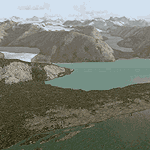
Glacier Bay v2 is a complete replacement of the default FS2004 landscape and scenery of more than 90,000 square kilometers (36,000 sq miles) of Southeast Alaska and adjacent areas of Yukon and British Columbia. File 1 of 2 (also requires glbayv2b.zip)
Landscape enhancements include high-resolution terrain mesh, detailed shorelines, rivers, lakes, and glaciers, and accurate land cover data with custom seasonal ground textures. Inland water bodies can be made to "freeze over" via an on/off switch. Other landmarks include the settlements of Juneau, Haines, Skagway, Yakutat, Atlin, and Carcross as well as road and railroad networks, cabins, lodges, and lighthouses. We modeled or enhanced 16 main airfields (plus one fictitious airstrip), 20 unlisted airstrips, 16 seaplane bases, and seven heliports. We've also included AI ship traffic in various locations as well as optional flightplans for GA and floatplane AI traffic.
Glacier Bay v2 is fully compatible with other third-party add-ons, including terrain mesh (FSGlobal, FS Genesis, etc.), ground textures (Ground Environment, BEV, FScene, etc.), and landscape enhancements (Ultimate Terrain Canada/Alaska, Misty Fjords, Tongass Fjords, Freight Dogs). A configurator panel (requires .Net Framework!) allows users to set compatibility options and to choose levels of scenery detail. We provide an autoinstaller and detailed documentation with a sectional map of the coverage area and a list of weblinks to real-world information.
For feedback and questions, please visit the Glacier Bay v2 support forum at http://forums.fsaddon.eu/viewforum.php?f=10. This project is a collaboration of nine FS developers from Germany, Austria, USA, and Canada, logging more than 1000 hours of work over the past 14 months. We acknowledge the kind support of FSAddon.com. However, this project is independent of any commercial company or product. Enjoy!
| Filename: | Glacier_Bay__AlaskaCanada_Version_2_Part_1_of_2.zip |
| License: | Freeware, limited distribution |
| Added: | 28th May 2010, 19:34:54 |
| Downloads: | 41,280 |
| Author: | Holger Sandmann, Rainer Duda, Michael Eder, Scot Fraser, Manfred Herz, Jay Langham, Jon Patch, Larry Silsbee, and Jim Vile |
| Size: | 56.46 MB |
| Category: Flight Simulator X - Scenery | |
| FSX-LIEO-Olbia-Sardinien |
|
File Description:
Now, after a long construction period and many hours of free time,
the new FSX airport LIEO-Olbia-Sardinia is finally finished, of
course as always with lots of details and a few extras.........
So off we go, off to Sardinia to the Costa Smeralda, preferably
with an A 321 or a Boeing 737, where you switch to a helicopter or
a smaller aircraft and explore the landscape in detail, including
the port, which has a heli pad for them VIP guests or you can take
a fire-fighting plane and help put out the fire. Of course, in the
direction of the hot air balloons, please first fill up with water
in the sea.............
Installation:
Unpack the zip folder: then copy the FSX-LIEO-Olbia folder into
the FSX addon folder, start the FSX, go to settings, scenery
library, add area, press OK, then you can start.
Extras:
! If you already have one of these files activated in your scenery
library, you do not need to install it again.
For all extras, the respective file must be copied individually
into the Addon Scenery folder and activated individually in FSX as
described during installation.
File: 3DPeople_Lib............ (to see people)
File: ObjLib-Large-Car-Parking-FSX.............(parking spaces and
vehicles)
File: PKP...........(to see trains and wagons)
File: Cobus.........(to see buses)
File: FSX_LTS......(lights and light poles)
File: EZ object Library.......(! Most important file for numerous
accessories + buildings)
! Note whoever installed the old EZ Object Library from me before
October 25th, 2023 should install this new one here and delete the
old one in FSX because I have completely revised it!
Candy:
As a treat, I'll give you the Canadair CL215 firefighting plane
that is stationed in Olbia 1x as AI traffic + 1x for flying
yourself..............
You can find more information on my YouTube channel
https://www.youtube.com/channel/UC7vHXQMa3hhU2iGtODXlkHw/videos
| Filename: | FSXLIEOOlbiaSardinien.zip |
| License: | Freeware |
| Added: | 29th October 2023, 12:01:15 |
| Downloads: | 586 |
| Author: | Ewald Wagner alias Jamaika |
| Size: | 251 MB |
| Category: Flight Simulator 2004 - Scenery | |
| Glacier Bay - Alaska/Canada, Version 2, Part 2 of 2 |
|
Images related to this file:
File Description:

Glacier Bay v2 is a complete replacement of the default FS2004 landscape and scenery of more than 90,000 square kilometers (36,000 sq miles) of Southeast Alaska and adjacent areas of Yukon and British Columbia. File 2 of 2 (also requires glbayv2a.zip)
Landscape enhancements include high-resolution terrain mesh, detailed shorelines, rivers, lakes, and glaciers, and accurate land cover data with custom seasonal ground textures. Inland water bodies can be made to "freeze over" via an on/off switch. Other landmarks include the settlements of Juneau, Haines, Skagway, Yakutat, Atlin, and Carcross as well as road and railroad networks, cabins, lodges, and lighthouses. We modeled or enhanced 16 main airfields (plus one fictitious airstrip), 20 unlisted airstrips, 16 seaplane bases, and seven heliports. We've also included AI ship traffic in various locations as well as optional flightplans for GA and floatplane AI traffic.
Glacier Bay v2 is fully compatible with other third-party add-ons, including terrain mesh (FSGlobal, FS Genesis, etc.), ground textures (Ground Environment, BEV, FScene, etc.), and landscape enhancements (Ultimate Terrain Canada/Alaska, Misty Fjords, Tongass Fjords, Freight Dogs). A configurator panel (requires .Net Framework!) allows users to set compatibility options and to choose levels of scenery detail. We provide an autoinstaller and detailed documentation with a sectional map of the coverage area and a list of weblinks to real-world information.
For feedback and questions, please visit the Glacier Bay v2 support forum at http://forums.fsaddon.eu/viewforum.php?f=10. This project is a collaboration of nine FS developers from Germany, Austria, USA, and Canada, logging more than 1000 hours of work over the past 14 months. We acknowledge the kind support of FSAddon.com. However, this project is independent of any commercial company or product. Enjoy!
| Filename: | Glacier_Bay__AlaskaCanada_Version_2_Part_2_of_2.zip |
| License: | Freeware, limited distribution |
| Added: | 28th May 2010, 19:36:31 |
| Downloads: | 40,552 |
| Author: | Holger Sandmann, Rainer Duda, Michael Eder, Scot Fraser, Manfred Herz, Jay Langham, Jon Patch, Larry Silsbee, and Jim Vile |
| Size: | 85.99 MB |
| Category: Prepar3D V1-4 - Aircraft Repaints, Textures and Modifications | |
| KLM 1998 AI Package |
|
File Description:
By 1998, the KLM/Northwest alliance was in full swing, and KLM was serving MSP, DTW, and even MEM daily with it's own metal while Northwest took over from KLM from BOS, IAD, and some other cities. KLM had a vast route network spanning the globe, serving much of Africa and the Middle East with many "tag on" routes onward from Amsterdam. By 1998, KLM was flying the MD-11, 747-200SUD(stretched upper deck), 747-200SUD Combi, 747-300 Combi, 747-400, 747-400 Combi, 767-300ER, 737-300, 737-400, and 6 mainline Fokker 100s which were short lived before going to KLM UK in late 1998 then on to CityHopper. Unfortunately, in the OAG, KLM only specified if a 747 was a combi or not(as in 747=744/742 while 74M can be a combi version of the 742,743, or 744) and did not differentiate between 737-300s and 737-400s. I did my best using what data I had to make the routes realistic, but the aircraft numbers at least are correct except for some extra 767s and 737s that you may remove if you wish. I also had issues making sure the TPE flights were all operated by "KLM Asia" 747s, so I ended up assigning 1 extra 747(I have 5, in real life there were 4) the Asia livery to ensure that you do not see a standard KLM 747 at TPE as they did not visit in real life. You may switch this to a normal 747 if you choose. Repaints by Raphael Rodrigues for the AIA Fokker 100 and FAIB 737-300, 737-400, 767-300, 747-200SUD, 747-300, and 747-400 along with flightplans by Chasen Richardson are included. Note that the 747-200SUD uses the 747-300 model. As a Bonus, the KLM Cargo 747-200SUD is also included.Part of the 1998 Flight Simulator Project. Follow us on Facebook at facebook.com/flightsim98 and on instagram as @bayviationsim. For more Retro AI, check out the forums at: http://retroai.proboards.com/
| Filename: | KLM_1998_AI_Package.zip |
| License: | Freeware, limited distribution |
| Added: | 6th December 2019, 17:14:32 |
| Downloads: | 303 |
| Author: | Raphael Rodrigues, Chasen Richardson/Bayviation |
| Size: | 27.94 MB |
| Category: Flight Simulator 2004 - Scenery | |
| Monument Valley UT25 and Oljato 05UT in Utah USA |
|
Images related to this file:
File Description:
Monument Valley is an impressive sight in south Utah but not, unfortunately, in FS9. Unless you invest in a detailed terrain mesh there are no stacks of rocks reaching for the sky and the lasting overall impression is just of a desert. But I had already downloaded the land textures so I ended up making the Monument Valley UT25 airfield and the nearby Oljato 05UT, which has no buildings of any sort. Maybe I was bored. There is a lodge close to the field with dozens of cabins, but I had insufficient information so this is for the airfield only. The 4,000 feet of new tarmac is aligned 16-34 and is single ended with a large chunk of rock at the southern end; 16 is only used for landing and 34 is only for take off. The runway is not lit. Do not be surprised when you ask to select a runway for take off and FS9 only gives you 16 as a choice, even though you know this is the wrong one. When you accept it FS9 will quickly switch it to 34; apart from a possible sense of humour I have no idea why it does this. Nothing much to say about Oljato. What do you need? You actually don't need Ultimate Terrain as there are other land textures used here, so you will definitely need to have downloaded and installed the land textures "cny_south3west_2010 lr" and "cny_south3west2_2010 lr" by Gottfried Razek, as these land textures showed the runways in the correct positions. Look in the scenery library here or at the other place. A note here about my scenery making. There will not be many more to follow this (unless you count 4 as many) as I am almost at the end of the photos I either took or found for scenery purposes, plus I expect to move on from FS9 at some point during next year.
| Filename: | Monument_Valley_UT25_and_Oljato_05UT_in_Utah_USA.zip |
| License: | Freeware, limited distribution |
| Added: | 22nd January 2020, 20:13:54 |
| Downloads: | 217 |
| Author: | Roger Wensley |
| Size: | 2.91 MB |
| Category: Flight Simulator X - Original Aircraft | |
| JELAIR - Maersk Air, Boeing 737-2L9 (OY-MBZ) - version 3 |
|
Images related to this file:
File Description:

This aircraft (for FSX, with update-patch #2) is a simulated replica of Maersk Air's 'Pocket Rocket' OY-MBZ (a Boeing 737-2L9 a.k.a. 737-200/Advanced) anno 1989. It is designed for a screen-resolution of 1280x1024. Other resolutions have not been tested. It will NOT work correctly in FS2004 (FS9). It has been tested on Windows XP (32bit) and Windows 7 (64bit) only. It is designed to be as realistic as possible, and flight-experience from the real aircraft, as well as large amounts of documentation, have been used to get it as accurate as possible. It has a fairly advanced panel with many systems simulated, such as a passenger oxygen system, a cabin pressure system, anti-skid brakes, EPR control of each engine (with the possibility of asymmetric thrust), IVSI with TCAS, Sperry SP177 autopilot with working CWS and level-change button, active yaw-damper, Quality-of-flight index (so you can see how well you operate the aircraft), windshield wiper, custom flight-computer, automatic Vspeeds for takeoff and landing, takeoff trim calculator, master caution system, PAX simulator (if you make a mistake they may die), a JT8D-17 engine with slow spin-up time (do not idle it on approach). It features a relatively realistic random-failures/error simulation which will trigger, or de-trigger, any of a variety of possible failures/errors (from small gauge-errors to large engine-failures or cabin de-compression). The chance of a failure/error is very low (you may never even get one, but they can happen, so stay alert), maybe less than 1 percent chance per 24 hours of flight-time. It features engine-management simulation, so overheating an engine will cause it to fail (now you actually need to pay attention to the EGT during engine-startup, and have your finger ready at the fuel-cutoff switch just in case you need to save the engine from heat-damage). It features sounds recorded from the actual aircraft (OY-MBZ).
This is the third release of this JELAIR addon. A very big thank you to all the following very talented people that participated directly or in-directly in the production of this add-on: Original Model by Erick Cantu, Original Panel by Pablo Contouris, Original Panel BMP by Bob Scott, Original Panel Gauges by Ken Mitchell, Doug Dawson, Pierre Fasseaux, SPanel, www.FS2X.com, Original Sound by Christoffer Petersen, Original Textures by Henry William, FDE, various modifications and adjustments for aircraft type, as well as additional gauges and sounds by JELAIR
| Filename: | JELAIR__Maersk_Air_Boeing_7372L9_OYMBZ__version_3.zip |
| License: | Freeware |
| Added: | 16th April 2011, 13:52:24 |
| Downloads: | 7,029 |
| Author: | Erick Cantu, Pablo Contouris, Bob Scott, Ken Mitchell, Doug Dawson, Pierre Fasseaux, Christoffer Petersen, Henry William, Jacob Larsen |
| Size: | 80.51 MB |


© 2001-2026 AVSIM Online
All Rights Reserved
Privacy Policy |