
Where Flight Simulation Enthusiasts Gather from Around the World!
AVSIM Library - Search Results

| Category: Flight Simulator 2004 - Panels | |
| C172 Panel using AVG, a NEW Gauge Technology - DEMO |

|
Images related to this file:
File Description:
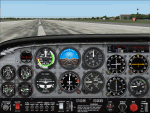
TAKE ADVANTAGE OF SUB-PIXEL RESOLUTION, ANTI-ALIASING AND SMOOTH ANIMATION FOR ALL YOUR ANALOG INSTRUMENTS. The AVG technology is designed for Flight Simulator analog gauges and provides smooth animation, especially for rotating parts (no more degree-per-degree rotation), no impact on performance and full compatibility with FS2004 and FSX, 2D or 3D panel. The panel provided here is a technology demonstrator. It is a C172 modified panel with AVG-based gauges that use the same graphics as the standard C172 gauges to let you compare the gauge animation and rendering. For more information, see this website: http://emarciano.free.fr/AVGHome
The usage of the panel is limited to 30 minutes after FS has started!
| Filename: | C172_Panel_using_AVG_a_NEW_Gauge_Technology__DEMO.zip |
| License: | Freeware, limited distribution |
| Added: | 12th December 2010, 14:11:16 |
| Downloads: | 314 |
| Author: | Eric Marciano |
| Size: | 1.07 MB |
| Category: Flight Simulator X - Panels | |
| C172 Panel using AVG, a NEW Gauge Technology - DEMO |
|
Images related to this file:
File Description:
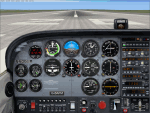
TAKE ADVANTAGE OF SUB-PIXEL RESOLUTION, ANTI-ALIASING AND SMOOTH ANIMATION FOR ALL YOUR ANALOG INSTRUMENTS. The AVG technology is designed for Flight Simulator analog gauges and provides smooth animation, especially for rotating parts (no more degree-per-degree rotation), no impact on performance and full compatibility with FS2004 and FSX, 2D or 3D panel. The panel provided here is a technology demonstrator. It is a C172 modified panel with AVG-based gauges that use the same graphics as the standard C172 gauges to let you compare the gauge animation and rendering. For more information, see this website: http://emarciano.free.fr/AVGHome
The usage of the panel is limited to 30 minutes after FS has started!
| Filename: | C172_Panel_using_AVG_a_NEW_Gauge_Technology__DEMO.zip |
| License: | Freeware, limited distribution |
| Added: | 12th December 2010, 14:26:01 |
| Downloads: | 576 |
| Author: | Eric Marciano |
| Size: | 1.81 MB |
| Category: Flight Simulator 2004 - Gauges | |
| UPDATE for Magnetic Compass gauge with selectable DIGITAL display. |
|
Images related to this file:
File Description:
UPDATE for Magnetic Compass gauge with selectable DIGITAL display. I just discovered that I failed to include instructions in the original documentation which will allow the user to choose two other display options. This update (a short text file) will explain how to easily change the display to one of three slightly different versions. I apologize for the oversight. The installation of the original package - Digital_Compass.zip - is required.
| Filename: | UPDATE_for_Magnetic_Compass_gauge_with_selectable_.zip |
| License: | Freeware |
| Added: | 7th December 2010, 03:26:06 |
| Downloads: | 578 |
| Author: | David "Opa" Marshall |
| Size: | 12.92 KB |
| Category: Flight Simulator X - Gauges | |
| V-One Gauge for Boeing 737-200/Adv Update |
|
Images related to this file:
File Description:

Update includes KG, LB, degrees C and degrees F functionallity. V-speed calculation accuracy improved.
| Filename: | VOne_Gauge_for_Boeing_737200Adv_Update.zip |
| License: | Freeware, limited distribution |
| Added: | 9th August 2012, 20:06:58 |
| Downloads: | 596 |
| Author: | Paul Tally |
| Size: | 14.27 KB |
| Category: Flight Simulator X - Panels | |
| RDP AutoPilot Gauge and Mods for Just Flight HS748 |
|
Images related to this file:
File Description:

This project was born out of necessity to improve a very fun and an amazing aircraft, the Just Flight HS748. The objectives were to depict out of sight, hard to reach or sensitive information in an easier to read alternative. The lower panel is not based on any real panel or gauge, it was simply designed as so by me for easier reading of pertinent flight data. Whilst the top panel, is designed to replicate as close as possible, including how it functions, the 3D panel available on Just Flight HS748.
These include:
+ Autopilot and its various dependencies.
+ Elevator, Aileron and Rudder Trim, and their information.
+ NAV1 and NAV 2, with a DME (Only available for NAV1).
+ Flight Director Trim.
+ Outside and Total Air Temperature in Celsius and Fahrenheit.
+ Aircraft Heading and Vertical Speed ft/min.
+ Autopilot Vertical Speed numbers from the Autpilot VS wheel in Degrees and ft/min.
+ Pilot Input Heading and Course (Only for NAV1).
+ KOHLSMAN Setting, or Barometer in Millibars or inHg.
+ Left and Right Pitot switches.
+ GPS Icon for easier access.
+ Radios Icon.
+ Nav and GPS switch.
+ Indicated Aircraft Airspeed.
+ Indicated Altitude(Feets).
| Filename: | RDP_AutoPilot_Gauge_and_Mods_for_Just_Flight_HS748.zip |
| License: | Freeware |
| Added: | 26th February 2017, 08:07:59 |
| Downloads: | 405 |
| Author: | Ricardo de Paula |
| Size: | 1.31 MB |
| Category: Flight Simulator X - Gauges | |
| V-One Gauge for Captain Sim L-1011/F |
|
Images related to this file:
File Description:
List of features: Approximately 40 sounds integrated into gauge.
Take-off V-Speeds calculated for Flaps 10, 18 or 22.
Take-off command speed automatically set for V2 + 15.
Maneuvering speed for each flap selected.
Optimum altitude and optimum EPR (EPR calc for M.84) continually calculated.
Take-off trim calculated for current gross weight.
Current Altitude, EPR, Speed (knts), Flaps and Trim displays via toggle.
Display units can be toggled between LB and KG (default LB).
Re-settable flight timer. Re-settable fuel use.
Selectable Vref landing configurations, Vref33 (default) or Vref42.
ZFW, Fuel, CG, Gross Weight and Barometric Pressure MSL (QNH) displayed.
| Filename: | VOne_Gauge_for_Captain_Sim_L1011F.zip |
| License: | Freeware, limited distribution |
| Added: | 20th July 2014, 21:01:19 |
| Downloads: | 1,192 |
| Author: | Paul Tally, Stefan Liebe, Jimmy Foong |
| Size: | 5.28 MB |
| Category: Flight Simulator X - Gauges | |
| V-One Gauge for Milviz Boeing 737-200 v2.0 |
|
File Description:
The following changes are in this version release:
1) All pilot/co-pilot call-outs replaced
2) V-One XML code and sound file logic updated
3) Altitude Call-Out XML code re-written & optimized
4) Corrected setting of Airspeed Cursor when SP177 is in use during approach phase
5) Added Call-out sound toggle for: 'All', 'Altitude' or 'Off' (box in upper right of Data Card)
6) Added 'Current %N1' display to Data Card
List of features: Approximately 40 sounds integrated into gauge. Take-off V-Speeds calculated for Flaps 1, 2, 5, 10, 15 or 25 including temperature and altitude correction. Take-off speed bugs and command speed bug automatically set for: V1, Vr, V2, V2 + 15 and flaps-up maneuvering speed (clean speed). Optimum altitude and optimum EPR (EPR calc for M.74) continually calculated. Flap mis-configuration is displayed in text. Tooltip indicates overweight value (LB/KG). Take-off trim calculated for current gross weight. Current Altitude, EPR, Speed (knts), Flaps and Trim displays via toggle. Display units can be toggled between LB and KG (default LB). Re-settable flight timer. Re-settable fuel use. Selectable Vref landing configurations, Vref15, Vref30 (default) or Vref40. Approach / landing speed bugs and Command speed bug automatically set for: Vref, Vref + 5, Vref + 15 and flaps-up maneuvering speed (clean speed). ZFW, Fuel, CG, Gross Weight and Barometric Pressure MSL (QNH) displayed.
| Filename: | VOne_Gauge_for_Milviz_Boeing_737200_v20.zip |
| License: | Freeware, limited distribution |
| Added: | 1st November 2015, 18:35:29 |
| Downloads: | 2,435 |
| Author: | Paul Tally |
| Size: | 4.11 MB |
| Category: Flight Simulator 2004 - Panels | |
| Lear 45 version 1 |
|
File Description:
I created this panel to more closely resemble the actual Lear 45 panel. It includes the upper edge of the windscreen and a lower panel. I was unable to find a suitable photo of the real lower panel in order to make it more real, however, I find that it is pretty realistic and functional. (with the exception of the FUSELAGE de-ice switch. Not working at this time) This is my first-ever upload and I hope you enjoy it.
| Filename: | Lear_45_version_1.zip |
| License: | Freeware, limited distribution |
| Added: | 22nd February 2004, 03:03:52 |
| Downloads: | 3,416 |
| Author: | Bruce Leehan |
| Size: | 684.78 KB |
| Category: Flight Simulator X - Utilities | |
| McDonnell Douglas MD-11 GE flex data charts |
|
File Description:
Flex data (assumed temperature) charts for use with PMDG MD-11 GE version (FS2004 and FSX). These charts allow you to accurately determine assumed temperatures according to TOGW (all weights), runway length (7000-12000 feet), take-off flap setting (10-28) and density altitude (SL-12000 feet). Also contains conversion tables to correct for actual airport altitude, pressure, wind and use of anti-ice. Detailed description and tutorial included within file. MS Excel or Excel-viewer required. No further installation necessary.
| Filename: | McDonnell_Douglas_MD11_GE_flex_data_charts.zip |
| License: | Freeware, limited distribution |
| Added: | 9th April 2009, 10:41:36 |
| Downloads: | 2,904 |
| Author: | Bryan Schleipen |
| Size: | 240.81 KB |
| Category: Flight Simulator X - Gauges | |
| AP_MultiFuel_Gauges for FIP |
|
Images related to this file:
File Description:
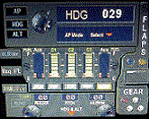
This set of 3 gauges is for use in the Saitek FIP and is an extension to my FIP gauge. That set of 3 gauges was designed to complement the Saitek AP/Multi panel and primarily showed the selected AP Altitude and Vert Spd whilst the Saitek AP/multi panel was displaying HDG. The second main part of those gauges were the Fuel Level displays, each gauge displaying a different combination of fuel tanks to suit the aircraft being flown and thus offered functionality for all types of aircraft.
This set of 3 gauges is designed for the same purpose but now encompasses a working AP that allows you to select HDG, ALT and VS values and activate the HDG and ALT mode (and AP master switch) to enable auto-pilot flight (for those who have a FIP but not an AP/multi panel).
For those who have an AP/multi panel, it gives a backup AP in your build/rig (although it all works off the same FS telemetry, I have found that when the AP/multi-panel freezes, especially the 'Alt' button, then this FIP gauge can de-activate it. The combinations displayed are those that suit my choice of aircraft, however it is easy to re-configure gauge Elements (fuel tank names) and artwork (fuel gauge titles) to suit the combination you prefer.
These gauges also retain the gear, flaps and light indicators, auto rudder on/off button plus rudder and aileron trim capability that were in the previous gauges. An additional feature is the battery switch will now turn off the AP display and fuel levels.
The artwork in these gauges has also been upgraded a bit and a template artwork is included to assist in customising.
| Filename: | AP_MultiFuel_Gauges_for_FIP.zip |
| License: | Freeware |
| Added: | 20th October 2014, 16:00:33 |
| Downloads: | 265 |
| Author: | Robert Budd |
| Size: | 764.26 KB |


© 2001-2026 AVSIM Online
All Rights Reserved
Privacy Policy |