
Where Flight Simulation Enthusiasts Gather from Around the World!
AVSIM Library - Search Results

| Category: Flight Simulator X - Gauges | |
| Digital Elevator Trim and Heading Indicator Gauge |

|
Images related to this file:
File Description:
Display or set current elevator trim position -or- current heading bug indicator.
This gauge will reset the gyro drift error to 0 (zero) approximately every 30 seconds and is active
by default.
| Filename: | Digital_Elevator_Trim_and_Heading_Indicator_Gauge.zip |
| License: | Freeware, limited distribution |
| Added: | 4th September 2016, 00:34:02 |
| Downloads: | 687 |
| Author: | Paul Tally |
| Size: | 23.15 KB |
| Category: Flight Simulator 2004 - Miscellaneous Files | |
| Nick's AI Jet Exhaust With Control Gauge |
|
File Description:
Hanging around the airport watching the A-I traffic and chasing A-I jet aircraft just got a little more interesting. Enjoy watching your entire A-I jet fleet as they display engine heat shimmer effects -after- push-back from the terminal and during taxi to the active runway. All the A-I traffic take off displaying a lite, expanding, frame-rate friendly and nicely scaled high throttle heat/exhaust trail FX which remain with the A-I aircraft during its entire flight. To top off the show, the A-I aircraft that are throttled down and landing display no exhaust from the engines! This package also comes with a gauge that allows pilot throttle control of the taxi heat shimmer/full-throttle exhaust FX for the jet aircraft being flown in the sim by the user. This package does NOT interfere with the logo, taxi or wing lights of any aircraft and comes with 5 all new exhaust effects files which can be applied to just about any size private, commercial or military jet. It requires editing/adding lines in the aircraft.cfg and panel.cfg files. The README files include very complete and comprehensive instructions including a quick and easy copy/paste file for all the Microsoft jet aircraft and tutorial on making custom gauges from the one provided. This package completely replaces my original *Nick's Jet Smoke* package and any/all updates for it.
By Nick Needham
| Filename: | Nicks_AI_Jet_Exhaust_With_Control_Gauge.zip |
| License: | Freeware, limited distribution |
| Added: | 22nd December 2003, 21:16:01 |
| Downloads: | 29,957 |
| Author: | Nick Needham |
| Size: | 894.61 KB |
| Category: Flight Simulator 2004 - Miscellaneous Files | |
| DHC-2 Beaver Smoke With Control Gauge |
|
File Description:
This xml gauge and effect package automatically controls the light smoke effect in the DHC-2 Beaver by simply accelerating the throttle. The DHC-2 Beaver will automatically emit a very light smoke effect at a Manifold Pressure reading of 32(+) or greater, depicting a hard running engine. Reducing the throttle level for cruising (MP30-32) or less for descents deactivates the smoke effect.
Even though this xml gauge and effect file works perfectly well by itself, when used in conjunction with my dhc2_fx.zip, all the bases are covered. Smoke automatically engages for cold air temps and with this xml gauge, smoke engages as a result of high manifold pressure (eg. when taking off or climbing). The two work together very nicely without any conflict.
Designed for the FS2004 DHC-2 wheeled Beaver by Steven Grant, Fred Choate, and Aaron Swindle. In the AVSIM library-- dhc2_04w.zip --
Also works with the DHC-2 De Havilland Beaver Amphibian v2 that was made for FS2002, but works equally well in FS2004. In the AVSIM library-- dhc2ampv2.zip --
The README file includes complete instructions.
| Filename: | DHC2_Beaver_Smoke_With_Control_Gauge.zip |
| License: | Freeware |
| Added: | 7th October 2003, 16:34:19 |
| Downloads: | 1,767 |
| Author: | Brent Hricziscse |
| Size: | 5.31 KB |
| Category: Flight Simulator X - Gauges | |
| Update-A for FW190 Cannon Effect gauge |
|
File Description:
Solves a problem in rcbfw-20.zip, where tracer ammo might not be visible because of a wrong bitmap reference.
Requires prior installation of file rcbfw-20.zip.
By Rob Barendregt
| Filename: | UpdateA_for_FW190_Cannon_Effect_gauge.zip |
| License: | Freeware, limited distribution |
| Added: | 16th March 2009, 11:11:03 |
| Downloads: | 673 |
| Author: | Rob Barendregt |
| Size: | 15.1 KB |
| Category: Flight Simulator X - Gauges | |
| X-Gauge 2-D Panel Toggle Icon |
|
File Description:
2-D panel toggle icon for XGauge. Read the install.txt !!
Placement is for the default Boeing 737-800 panel but can be changed and used in any panel.
This can also be used in FS9.
| Filename: | XGauge_2D_Panel_Toggle_Icon.zip |
| License: | Freeware |
| Added: | 23rd July 2012, 16:15:21 |
| Downloads: | 464 |
| Author: | Dave Opper |
| Size: | 2.56 KB |
| Category: Flight Simulator 2004 - Panels | |
| Boeing 777 2D/VC Gauge Merge! FIX! |
|
File Description:
This is a fix for the 2D/VC Gauge Merge (2d_and_vc_gauges_merge.zip). FS9 Crashed while loading the aircraft. This fix will show up an oportunity how to fly the Posky 777 with the gauges by Wilco.
| Filename: | Boeing_777_2DVC_Gauge_Merge__FIX.zip |
| License: | Freeware |
| Added: | 1st November 2008, 11:06:16 |
| Downloads: | 4,379 |
| Author: | Ensar Budak/ Posky (Project Opensky)/Wilco |
| Size: | 1.44 MB |
| Category: Flight Simulator X - Gauges | |
| Bombardier CRJ-200 V Speeds Card Gauge |
|
Images related to this file:
File Description:
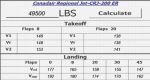
FSX gauge simulating the V Speeds card used by CRJ200 crews. A simple "Calculate" button is used to run the equations (no FPS hit) and store the data. Simply hit "Calculate" again to clear. This is the fully functional BETA version, please see read-me for more information. More features forthcoming in final release. Thank you for your support.
| Filename: | Bombardier_CRJ200_V_Speeds_Card_Gauge.zip |
| License: | Freeware |
| Added: | 10th November 2013, 23:56:58 |
| Downloads: | 296 |
| Author: | Aaron Cook |
| Size: | 623.94 KB |
| Category: Flight Simulator X - Gauges | |
| Bombardier CRJ-700 Gauge Fixes and Improvements |
|
File Description:
This package fixes numerous bugs in the gauges of the default Bombardier CRJ-700 and adds some new features.
Highlights:
New min/max speed bar in ASI, added wind vector to PFD, added track line in MFD,
added VORs and Airports in MFD map mode, new mouse click spots in PFD and MFD.
| Filename: | Bombardier_CRJ700_Gauge_Fixes_and_Improvements.zip |
| License: | Check within download |
| Added: | 31st March 2007, 13:35:52 |
| Downloads: | 7,900 |
| Author: | Alexander Barthel |
| Size: | 2.75 MB |
| Category: Flight Simulator X - Panels | |
| Cessna 172 Wide Screen 2D V1.2 |
|
Images related to this file:
File Description:
A wide screen 2D panel for the default FSX Cessna 172. These are updated bitmaps and panel.cfg files for 1920x1280 wide screen monitors. Version 1.2 fixes the incorrect compass gauge.
| Filename: | Cessna_172_Wide_Screen_2D_V12.zip |
| License: | Freeware |
| Added: | 27th August 2011, 04:50:32 |
| Downloads: | 966 |
| Author: | Jeff Cork |
| Size: | 628.1 KB |
| Category: Flight Simulator 2002 - Gauges | |
| Vertical Speed Calculator Version 2 |
|
File Description:
A simpel tool-gauge to calculate the neccesary vertical speed to climb or
sink to a target altitude within a certain distance
Version 2 working now with NAV1 and NAV2
| Filename: | Vertical_Speed_Calculator_Version_2.zip |
| License: | Freeware |
| Added: | 5th November 2003, 16:33:47 |
| Downloads: | 711 |
| Author: | Herbert Pralle |
| Size: | 39.45 KB |


© 2001-2026 AVSIM Online
All Rights Reserved
Privacy Policy |