
Where Flight Simulation Enthusiasts Gather from Around the World!
AVSIM Library - Search Results

| Category: Flight Simulator 2004 - Panels | |
| Grumman Albatross version 2.1 Panel |

|
Images related to this file:
File Description:
FS2004 Grumman Albatross HU-16 version 2.1
Greg Pepper Michael Verlin
Panel Package
Along with the modifications I've made to Greg Pepper's wonderful Albatross, I felt that a upgrade for the panel was overdue.
The changes consist of a revised set of primary flight instruments in keeping with the chronological period.
The airspeed gauge is part of Greg's gauge set that he provided with the aircraft.
The attitude gauge and turn indicator come from Jens Christensen's DC-6 gauge package.
The altimeter, gyro and vertical speed were designed by Scott Thomas from his Aero Commander 500 gauge package.
The Bendix King radios were designed by Pierre Fasseaux.
The KLN90 gps was designed by Ike Slack.
I've also included Rob Barendregt's Ground Handling package and the RKG Fuelstat gauge.
A few notes on using this panel:
Please read Pierre's instructions for proper operation of the autopilot before you fly.
The GPS will load the flight plan you specify from FS9.
There is a hot spot in the upper left corner of the radio stack that will close it when it isn't needed.
Michael Verlin
[email protected]
May 27, 2012
| Filename: | Grumman_Albatross_version_21_Panel.zip |
| License: | Freeware |
| Added: | 27th May 2012, 23:13:55 |
| Downloads: | 700 |
| Author: | Greg Pepper Michael Verlin |
| Size: | 9.61 MB |
| Category: Flight Simulator X - Gauges | |
| Head Up Display (HUD) |
|
Images related to this file:
File Description:
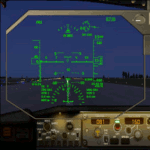
This gauge has been developed for FSX Flight Simulator SP1 or SP2. It
has also been tested with Microsoft Acceleration but compatibility is not guaranteed by the
author. The functionality of this gauge is based on the Rockwell Collins HGS which is
designed for the Bombardier CRJ 700. However, this gauge is not following the Rockwell
Collins design completely. It is created to be used as a generic HUD for all commercial
aircraft. It can be programmed to work on any FSX aircraft as a stand alone pop up
window. The gauge is available in the frame color of gray and beige.
For installation and configuration look at the documentation inside the zip file.
Credit goes out to: Kaj O. Hallstrom for his outstanding support on
documentation, pre beta and beta testing and improvement recommendations
for the gauge and control panel.
Credit also goes to Doug Dawson for his config.gau generating dsd-XML
interface.
| Filename: | Head_Up_Display_HUD.zip |
| License: | Freeware |
| Added: | 14th October 2011, 16:57:19 |
| Downloads: | 5,224 |
| Author: | Dietmar Loleit |
| Size: | 2.68 MB |
| Category: Flight Simulator 2004 - Gauges | |
| RwyInfo 2 Data Update |
|
File Description:
The purpose of this download is to allow you to update the data used by Ernie Alston's Runway Info gauge (RwyInfo version 2.0, available from http://www.fsbuild.com/rwyinfo/). This is an excellent little gauge that allows you to retrieve, through a gauge on your panel, information for all the runways at an airport (selected by ICAO code), and optionally automatically load frequency and course for an ILS into your NAV1 radio and MCP. However the usefulness of the gauge is somewhat restricted by the fact that it comes with a text database of 'info' to be displayed, and does not include any method for updating this info, other than by going into the text file and typing changes yourself (carefully, character by character). This is not really a practical method of getting the data to match your current FS configuration. What I have done is created a little utility that will create a new text database for the RwyInfo 2 gauge, based on your current scenery configuration.
| Filename: | RwyInfo_2_Data_Update.zip |
| License: | Freeware |
| Added: | 30th October 2011, 21:24:00 |
| Downloads: | 471 |
| Author: | Ken Leedham |
| Size: | 4.39 KB |
| Category: Flight Simulator 2004 - Panels | |
| TU-154 B2 Ice Blue Day and Night Lights |
|
File Description:
This is the final version of the day and night panel for the wonderful Tupolev TU 154 B2 from Project Tupolev. You can download the bird here:http://tu154.avsim.ru/files.html. Requires the update 9.3.1 from this page.
| Filename: | TU154_B2_Ice_Blue_Day_and_Night_Lights.zip |
| License: | Freeware |
| Added: | 28th August 2004, 18:04:51 |
| Downloads: | 2,185 |
| Author: | Michael Zukowski |
| Size: | 2.41 MB |
| Category: Flight Simulator 2004 - Panels | |
| TU-154 B2 Ice Blue fix to v. 1.5.1 |
|
File Description:
This panel.cfg file, fixes the problems with the autopilot under the nightpanel view. Works only with my panel version 1.5, which you can download here at avsim.com.
A small & fast download with big effect !
| Filename: | TU154_B2_Ice_Blue_fix_to_v_151.zip |
| License: | Freeware |
| Added: | 4th September 2004, 18:54:45 |
| Downloads: | 899 |
| Author: | Michael Zukowski |
| Size: | 6.53 KB |
| Category: Flight Simulator 2004 - Aircraft Repaints, Textures and Modifications | |
| FS2004/P3D Air Canada A350-1000 (Ice Blue Livery) |
|
Images related to this file:
File Description:

FS2004/P3D Air Canada A350-1000. Fictional Registration C-GCWB. This is a fictional repaint on the TDS A350-1000. The repaint has some custom textures including custom passenger entry, custom fan blades, custom engine cowlings, custom Michelin Air-X tires. - Texture only - includes standard 1024x1024 32bit and PBR dds. You will need to add to your existing TDS A350-1000 G2 model. Repaint by Phillip Hughes. For support with aircraft please visit Tenkuu Developers Studio's Facebook page: https://www.facebook.com/groups/tds350. Works in FS9 and P3D.
| Filename: | FS2004P3D_Air_Canada_A3501000_Ice_Blue_Livery.zip |
| License: | Freeware |
| Added: | 11th April 2024, 18:49:03 |
| Downloads: | 166 |
| Author: | TDS A350 | Phillip Hughes |
| Size: | 18.12 MB |
| Category: Flight Simulator 2004 - Gauges | |
| Parking Brake Toggle Switch Gauge |
|
File Description:
FS2004 Parking Brake Toggle Switch. Lock and release the parking brake by using this gauge. Switch is designed to stay synchronized with both the keyboard and joystick when those are used to set the parking brake. Red diode light gives visual feedback on status of brake. Gauge is available in two colors, grey and tan. Small bitmaps will allow installation in most all panels. By Glenn Copeland
| Filename: | Parking_Brake_Toggle_Switch_Gauge.zip |
| License: | Freeware |
| Added: | 17th December 2005, 14:44:10 |
| Downloads: | 2,788 |
| Author: | Glenn Copeland |
| Size: | 121.99 KB |
| Category: Flight Simulator 2004 - Gauges | |
| Mirage GDIPlus Gauge: Attitude Indicator |
|
File Description:
Attitude Indicator using GDI+.
Version 0.01Alpha test.
| Filename: | Mirage_GDIPlus_Gauge_Attitude_Indicator.zip |
| License: | Freeware |
| Added: | 15th January 2006, 08:26:29 |
| Downloads: | 821 |
| Author: | Yasutoshi Mori |
| Size: | 413.78 KB |
| Category: Flight Simulator 2004 - Gauges | |
| E4 Autopilot System Gauge Set |
|
File Description:
E4 Autopilot System Gauge Version 1.0
This E4 Autopilot Gauge Set is comprised of four different gauges. Two gauges, the “Turn Coordinator” and the “Servo Engage Panel” work together and are both required for proper operation of the E4 Autopilot System. Although not an actual part of an E4 Autopilot System, the “Monitor Panel” and “Set Panel” are provided to monitor switch positions and allow the changing of a few flight parameters.
Author: Paul Michael (Chief439)
| Filename: | E4_Autopilot_System_Gauge_Set.zip |
| License: | Freeware |
| Added: | 12th January 2007, 19:59:20 |
| Downloads: | 1,007 |
| Author: | Paul Michael |
| Size: | 731.6 KB |
| Category: Flight Simulator X - Gauges | |
| FFS Saab 340 Gauge Updates |
|
File Description:
Version 1.0
Left and Right Fuel Gauge replacements for the great FFS Saab 340 aircraft. Also includes a How-To guide for moving this aircraft from your FS9 installation to FSX. Steps include maintaining the functionality of the external Load Config Utility.
Version 2.0 will be out within the next week or so and will update the Low Fuel lights
NOTE: Due to the design of the original gauges, the aircraft Master Alarm will still sound as the system thinks there is no fuel in the plane. Note that the aircraft will operate correctly regardless.
| Filename: | FFS_Saab_340_Gauge_Updates.zip |
| License: | Freeware |
| Added: | 26th March 2008, 06:56:20 |
| Downloads: | 2,199 |
| Author: | Jason Lohrenz |
| Size: | 54.55 KB |


© 2001-2026 AVSIM Online
All Rights Reserved
Privacy Policy |