
Where Flight Simulation Enthusiasts Gather from Around the World!
AVSIM Library - Search Results

| Category: Flight Simulator X - Aircraft Repaints, Textures and Modifications | |
| TAAG Angola Airlines (D2-TEE) B777-200ER (GE) (D2-TEE) ** UPDATE ** |

|
Images related to this file:
File Description:

REPAINT UPDATED FOR - new Captain Sim v1.0 folders, improved wear pattern on wings, correction to engine paint issues.
This is a repaint of a Boeing 777-200ER, registration code D2-TEE, operated by TAAG Angola Airlines, the flag carrier airline of of Angola, based in Luanda with its hub at Quatro de Fevereiro Airport. It operates within Angola as well as in Africa, Brazil, Cuba and Portugal. TAAG is an acronym for Transportes Aereos Angolanos. The airline's logo uses the image of the very rare Sable Antelope, found only in the province of Malanje. TAAG currently operates 4 Boeing 777-200ERs.
This repaint has plenty of clear markings so if you enjoy exterior detail, then you will love this repaint. You can see (and read): Door opening instructions; Static port directions; Air vent warnings; Engine hazard area; No Step warnings; RAT caution; APU intake warning; Stabilizer compartment access; Ground power supply; Forward and aft access door instructions; Pitot, ADA probe, Ice detector and TAT probe markings; Visible rivets; Enhanced window frames; Authentic Taag Angola logo; Bold, colorful Taag Angola livery and authentic flags; Lovely Taag Angola flight attendant; No frame rate hit.
To use this repaint, the Captain Sim B777-200 v1.0 is required. Repainted by Garrett Rowley, [email protected]
| Filename: | TAAG_Angola_Airlines_D2TEE_B777200ER_GE_D2TEE___UP.zip |
| License: | Freeware |
| Added: | 27th February 2013, 14:55:39 |
| Downloads: | 1,006 |
| Author: | Garrett Rowley, Captain Sim |
| Size: | 28.05 MB |
| Category: Flight Simulator X - Aircraft Repaints, Textures and Modifications | |
| Omni Air International B777-200ER (PW) (N918AX) ** UPDATE ** |
|
Images related to this file:
File Description:

REPAINT UPDATED FOR - new Captain Sim v1.0 folders, improved wear pattern on wings, correction to engine paint issues, converted to Pratt & Whitney engines.
This is a repaint of a Boeing 777-200ER, registration code N918AX, operated by Omni Air International, operated by Omni Air International. Omni Air is a United States charter airline with headquarters in Hangar 19 on the grounds of Tulsa International Airport in Tulsa, Oklahoma. It operates international and domestic passenger charters, as well as wet leasing. Omni Air began operating Boeing 777-200ER aircraft in April 2011 and now has two of these aircraft in their fleet.
This repaint has plenty of clear markings so if you enjoy exterior detail, then you will love this repaint. You can see (and read): Door opening instructions; Static port directions; Air vent warnings; Engine hazard area; No Step warnings; RAT caution; APU intake warning; Stabilizer compartment access; Ground power supply; Forward and aft access door instructions; Pitot, ADA probe, Ice detector and TAT probe markings; Visible rivets; Enhanced window frames; Authentic Omni Air International logo; Bold, colorful Omni Air International livery and authentic flags; Lovely Omni Air International flight attendant; No frame rate hit.
To use this repaint, the Captain Sim B777-200 v1.0 is required. Repainted by Garrett Rowley, [email protected]
| Filename: | Omni_Air_International__B777200ER_PW_N918AX___UPDA.zip |
| License: | Freeware |
| Added: | 27th February 2013, 14:39:37 |
| Downloads: | 825 |
| Author: | Garrett Rowley, Captain Sim |
| Size: | 27.72 MB |
| Category: Flight Simulator X - Gauges | |
| Advanced Radar System 2 (ARS2) |
|
Images related to this file:
File Description:
This Advanced Radar System (ARS2) is a enhanced version of the ARS system Version 1.0.
I includes all the displays function from the ARS version 1.0.
New features for ARS2:
ARS2 includes an enhanced tracking function which allows to track an
AI aircraft now regarding heading, speed and altitude. It includes two
simple XML elements which allows the user to change the tracking parameter
for the auto speed control and to set parameter for the re-fuel function as required.
The airfuel panel includes now two pointers in order to watch the distance and the altitude
relative to the AI.
For more information and installation see the documentation in the zip file.
COPYRIGHTS:
This gauge is freeware. All rights are reserved and no part of the package may
be duplicated or distributed without the expressed, written permission of the
author.
| Filename: | Advanced_Radar_System_2_ARS2.zip |
| License: | Freeware |
| Added: | 24th March 2011, 19:47:51 |
| Downloads: | 1,885 |
| Author: | Dietmar Loleit |
| Size: | 1.61 MB |
| Category: Flight Simulator X - Aircraft Repaints, Textures and Modifications | |
| Arado Ar-196 |
|
File Description:
The purpose of this package is to make the Alphasim Arado Ar-196, now freeware, usable in FSX. What needs to be done? First, we need to replace the gauges; the old ones don't work. I have done this for the virtual cockpit, but the 2D cockpit needs some work (which I am leaving to someone else). Second, we need to use some different sounds; the old ones don't exist in FSX. Third, we need a thumbnail image for the Aircraft selection menu. These three items are provided here: new panel.cfg, new sound.cfg, and a thumbnail. In addition, you'll also need the original package for FS2004 (ar196_fs9.zip) and a freeware gauge set by Hauke Keitel (kedigau_ud2.zip). Instructions for putting it all together are provided here in readme.txt.Also requires:
1. ar196_fs9.zip
2. kedigau_ud2.zip
| Filename: | Arado_Ar196.zip |
| License: | Freeware |
| Added: | 13th July 2008, 03:48:21 |
| Downloads: | 1,735 |
| Author: | David Wilson-Okamura |
| Size: | 17.62 KB |
| Category: Flight Simulator X - Original Aircraft | |
| Bristol F2B Mk.1 Part 1 |
|
File Description:
Flight Simulator X version of the Bristol Fighter Mk.1 or 'Biff' as it was called by its crews in WW1. This file is part 1 of a 4 part download and contains visual models and textures depicting 3 aircraft with the earlier short form exhausts. No other downloads are required to make this functional. The other 3 downloads are optional variants. This aircraft was modeled using 3DS Max 8.0 and compiled using FSX SDK tools and will only work in FSX or higher. It is NOT compatible with FS2004. The aircraft makes full use of FSX materials and also features skinned animated crew members in the external model. It also features a detailed virtual cockpit. All instruments, levers and selectors are modeled in the 3D model. It does not use the FSX gauge system and there is NO 2D cockpit.
| Filename: | Bristol_F2B_Mk1__Part_1.zip |
| License: | Freeware, limited distribution |
| Added: | 2nd February 2007, 03:22:25 |
| Downloads: | 7,365 |
| Author: | Robert Bruce |
| Size: | 22.04 MB |
| Category: Flight Simulator X - Original Aircraft | |
| Convair B-36 Peacemaker |
|
Images related to this file:
File Description:
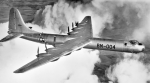
FSX native B-36 Peacemaker. Built by consolidated vultee (Convair) in the late forties, The Convair B-36 Peacemaker was the largest American bomber every produced. Development of the huge plane began in 1941. The Army Air Force wanted a bomber that could fly from the United States to Europe, drop bombs, then return. The prototype first flew on August 8, 1946. The first operational models were delivered to the Strategic Air Command 1948. Included in this file are versions, A, B, D, H, and J models. The A and B versions are textured in FS9 style polished metal textures. Includes a virtual cockpit based on the b-36b cockpit, with a few updated and modern instruments, and a full gauge panel on the engineer station. custom sounds taken from scenes in the movie "strategic air command."
| Filename: | Convair_B36_Peacemaker.zip |
| License: | Freeware, limited distribution |
| Added: | 11th February 2017, 16:02:59 |
| Downloads: | 1,269 |
| Author: | Gary Shetter |
| Size: | 135.57 MB |
| Category: Flight Simulator X - Aircraft Repaints, Textures and Modifications | |
| Virgin Galactic Boeing 747-8i |
|
Images related to this file:
File Description:
FSX Boeing 747-8i Virgin Galactic with advanced VC by Alejandro Rojas Lucena and VC Textures Upgrade by Enrique Cornejo, founder of the Flightsim Workshop Project. This gives the b747 a payware Virtual Cockpit look and now with green leather tapestry on the sides of the seats. It even has a pilot jacket hanged in the rear of the cockpit (besides the right jumpseat). The panel.cfg and the aircraft.cfg have been assembled and edited by the Flightsim Workshop Team. Now you can pop up "My icons" window in the Virtual Cockpit to easily reach the following windows: GPS, avionics, map, ATC, Climb/Radio Altimeter/Spoiler switch, auto-break switch, throttle quadrant, clock, descent meter, kneeboard and overhead panel. A new feature in My Icons Window I added is a new Pitot Heat switch with ON and Off features, (XML gauge by Enrique Cornejo). cold weather, the Pitot Heat switch works just like in real life, so if its turned off the air speed indicator will stop working, so make sure you turn the Pitot Heat switch on before taking off!
The autopilot ON switches have green lights which make them look more realistic. Center ATC identification in this aircraft is "Boeing 747". We have also fixed the position of the strobe lights so when the aircraft is flying they are in the right place, so turn on the strobe lights switch after take off. The cockpit view from the pilots seat is now more comfortable because the distance between the cockpit and the seat is longer.
The aircraft has new engine views (from both wings) and new Virtual Cockpit interior views from the left, right and central jump seats. The brakes has a differential brake system to make smoother turns in ground. The Virgin Galactic Spaceship texture is wonderful and it has a unique paint scheme by Enrique Cornejo which also includes details such as some stains caused by humidity in the fuselage and the wing flaps and other details just like a real aircraft. Real smoke in the four engines, just select key, more cabin views, realistic cockpit and engines sound & more realistic night VC lights and fuselage night textures, in the VC just select key and reset the overhead Instrument panel light dim switch in the overhead panel. The aileron parameters have also improved, so now the right and left turns are smoother. This aircraft uses the Project Opensky FSX Boeing B747-800 Model OSX748V4_GENX(MDL), and includes the gauge window Posky Utility to view the main stairs, ground cargo servicing, etc. The engine sounds are edited like the real ones with cockpit ambient, so you can enjoy a pleasant flight. The Flight Management Computer (FMC) is fixed and looks like a payware instrument. The VC includes FMC, Primary Flight Display (PFD) and Multi-Function Display (MDF) displayed in the correct size. The virtual cockpit also has an Engine-Indicating and Crew-Alerting System also known as EICAS, Ground Proximity Warning System (GPWS), working wipers, cabin lights, fire suppression, avionics switch, fuel cross feed, and you can identify those instruments in the overhead panel because they are bordered with color lines. You can also find landing lights switches, taxi light switch, engine generators, APU generator, battery switch, starter switches, de-ice switch, general lights switches which are a great work of Alejandro. So now the whole cockpit and texture upgrade with all these improvements looks better than a payware version. The clock numbers are now in orange which makes them look better and easily recognizable. Assembled and edited for FSX by Flightsim Workshop Founder Enrique Cornejo. 78 MB
| Filename: | Virgin_Galactic_Boeing_7478i.zip |
| License: | Freeware |
| Added: | 21st February 2013, 18:56:28 |
| Downloads: | 1,940 |
| Author: | Enrique Cornejo |
| Size: | 77.73 MB |
| Category: Flight Simulator 2004 - Panels | |
| Flight1 ATR72 PANEL Enhancement -FAPE- |
|
File Description:
What FAPE does for you??
1) FAPE adds about 50 new clickspots to make easier the opening/closing of every panel window, following GUI ergonomical rules. You won't move your mouse anymore to open popup panels.
2) FAPE adds a clickspot to display the RealityXP500 Weather Radar (if you own it, of course).
3) FAPE integrates Rob Barendregt's nice Pushback gauge within the center panel.
4) FAPE displays the FMS in a smaller size and in the right bottom corner of the screen.
5) FAPE allows using the Panel Controller Window (panel icons) from the VFR window configuration, so you will be able to open every other panel from the VFR panel.
WARNING: THIS FILE IS ONLY FOR FLIGHT1 ATR72 OWNERS (GO AND BUY IT, IT'S A FANTASTIC AIRCRAFT!!) USING THE BROWN CONDENSED PANEL. UPON SIMMERS DEMAND I WILL DO THE SAME FOR THE BLUE CONFIG.
Enjoy!
| Filename: | Flight1_ATR72_PANEL_Enhancement_FAPE.zip |
| License: | Freeware |
| Added: | 10th November 2004, 14:02:26 |
| Downloads: | 2,500 |
| Author: | David Roch |
| Size: | 911.88 KB |
| Category: Flight Simulator X - Miscellaneous Files | |
| FSX A321 Workaround for Shockwave 3d – Redux lights |
|
File Description:
FSX A321 landing or taxi lights only in shockwave Redux.
Workaround for Shockwave 3d – Redux lights in the default A320. (an easter egg!)
When you install the Shockwave 3d lights (both the plain version and the Redux version) you will end up with a plane that can not land with it’s lights on without having it’s gear down.
Luckily, there is a taxi light switch on the overhead panel that works.
Therefore by removing the “lights out when gear up command” by the shockwave gauge, lights won’t go out when gear is up any more.
Now you’ll have to switch the gear lights (not the landing lights!) off by clicking the taxi lights switch on the overhead, and the taxi (gear) lights actually go out, while the landing lights stay on (and vice versa, and you also can have both on or off at the same time)
| Filename: | FSX_A321_Workaround_for_Shockwave_3d__Redux_lights.zip |
| License: | Freeware |
| Added: | 23rd March 2008, 00:32:29 |
| Downloads: | 1,164 |
| Author: | Joost Visser |
| Size: | 911.71 KB |
| Category: Flight Simulator 2004 - Gauges | |
| Digital Clock and Stopwatch |
|
File Description:
This is a Digital Clock & Stopwatch for FS2004 which reads in
Hours:Minutes:Seconds
There are two versions:
LCD (Black figures on Grey-Green background))
LED (Orange figures on Black background)
This gauge replaces my earlier stopwatch which reset
when travelling across time zones!
This stopwatch is not affected by time zones.
Thanks to Guenther "GKCherry1" for testing and evaluating.
It has a Start/Stop function and a Reset function.
When not functioning as a Stopwatch it will display the Local Time
The output is linked to the Simulator clock variable:
If you pause the simulation the timer pauses.
If you change the simulation rate the timer rate changes accordingly.
If you stop the clock then the display remains visible at the stop time.
If you re-start it continues counting from where you stopped.
(There is no 'lap' function)
Pressing RESET zeros the timer and shows the clock.
| Filename: | Digital_Clock_and_Stopwatch.zip |
| License: | Freeware |
| Added: | 7th May 2006, 08:00:23 |
| Downloads: | 3,143 |
| Author: | Jim Cooper |
| Size: | 530.57 KB |


© 2001-2026 AVSIM Online
All Rights Reserved
Privacy Policy |