
Where Flight Simulation Enthusiasts Gather from Around the World!
AVSIM Library - Search Results

| Category: Flight Simulator X - Gauges | |
| AP_MultiFuel_Gauges for FIP |

|
Images related to this file:
File Description:
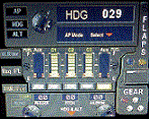
This set of 3 gauges is for use in the Saitek FIP and is an extension to my FIP gauge. That set of 3 gauges was designed to complement the Saitek AP/Multi panel and primarily showed the selected AP Altitude and Vert Spd whilst the Saitek AP/multi panel was displaying HDG. The second main part of those gauges were the Fuel Level displays, each gauge displaying a different combination of fuel tanks to suit the aircraft being flown and thus offered functionality for all types of aircraft.
This set of 3 gauges is designed for the same purpose but now encompasses a working AP that allows you to select HDG, ALT and VS values and activate the HDG and ALT mode (and AP master switch) to enable auto-pilot flight (for those who have a FIP but not an AP/multi panel).
For those who have an AP/multi panel, it gives a backup AP in your build/rig (although it all works off the same FS telemetry, I have found that when the AP/multi-panel freezes, especially the 'Alt' button, then this FIP gauge can de-activate it. The combinations displayed are those that suit my choice of aircraft, however it is easy to re-configure gauge Elements (fuel tank names) and artwork (fuel gauge titles) to suit the combination you prefer.
These gauges also retain the gear, flaps and light indicators, auto rudder on/off button plus rudder and aileron trim capability that were in the previous gauges. An additional feature is the battery switch will now turn off the AP display and fuel levels.
The artwork in these gauges has also been upgraded a bit and a template artwork is included to assist in customising.
| Filename: | AP_MultiFuel_Gauges_for_FIP.zip |
| License: | Freeware |
| Added: | 20th October 2014, 16:00:33 |
| Downloads: | 266 |
| Author: | Robert Budd |
| Size: | 764.26 KB |
| Category: Flight Simulator 2004 - Miscellaneous Files | |
| A Simple Analysis of Alpha in FS9 Gauge Images |
|
File Description:
This is a pdf formatted guide to using alpha in images for FS9's panels and gauges. It is intended to help developers be able to utilize alpha channels in their work without driving the poor developers insane.
| Filename: | A_Simple_Analysis_of_Alpha_in_FS9_Gauge_Images.zip |
| License: | Freeware |
| Added: | 13th May 2006, 20:44:18 |
| Downloads: | 637 |
| Author: | Scott Stoll (aka: Vorlin) |
| Size: | 193.15 KB |
| Category: Flight Simulator 2004 - Panels | |
| Posky (Project Opensky)/Wilco B777 2D/VC Gauge Merge! |
|
File Description:
A Wilco/Posky B777 Gauge Merge. You need the PAYWARE Boeing 777 by Wilcopub, and you need the Project Opensky Boeing 777 in order to make this work.
Here are some features of this Panel:
-> fully functionable 2D Panel!
-> including the VC!
-> WX-Radar (should work, Im unfamiliar with the B777 Cockpit,
so I don´t know how to turn on the WX-Radar, that means I was not able to test it.)
-> fully functionable FMC (In the 2D Panel, but everything is visible in the 3D Panel!)
-> working TCAS!
-> and all other features of the Wilco Boeing!
| Filename: | Posky_Project_OpenskyWilco_B777_2DVC_Gauge_Merge.zip |
| License: | Freeware |
| Added: | 8th August 2008, 22:39:48 |
| Downloads: | 5,930 |
| Author: | Ensar Budak |
| Size: | 476.21 KB |
| Category: Flight Simulator X - Gauges | |
| Air to Air refueling gauge - Tanker Side version 1.4 |
|
File Description:
This gauge will help you to simulate a realistic air to air refueling transfer by removing fuel gradually from your tanks based on the type of transfer that you choose Boom or DROGUE. Fuel will be removed at fixed rate each seconds and the weight and fuel of your airplane reduced accordingly. Enjoy the feeling of your tanker being lighter.
| Filename: | Air_to_Air_refueling_gauge__Tanker_Side_version_14.zip |
| License: | Freeware |
| Added: | 29th September 2010, 00:23:50 |
| Downloads: | 869 |
| Author: | Chris DUB |
| Size: | 22.69 KB |
| Category: Flight Simulator 2004 - Gauges | |
| UPDATE for Magnetic Compass gauge with selectable DIGITAL display. |
|
Images related to this file:
File Description:
UPDATE for Magnetic Compass gauge with selectable DIGITAL display. I just discovered that I failed to include instructions in the original documentation which will allow the user to choose two other display options. This update (a short text file) will explain how to easily change the display to one of three slightly different versions. I apologize for the oversight. The installation of the original package - Digital_Compass.zip - is required.
| Filename: | UPDATE_for_Magnetic_Compass_gauge_with_selectable_.zip |
| License: | Freeware |
| Added: | 7th December 2010, 03:26:06 |
| Downloads: | 579 |
| Author: | David "Opa" Marshall |
| Size: | 12.92 KB |
| Category: Flight Simulator X - Panels | |
| C172 Panel using AVG, a NEW Gauge Technology - DEMO |
|
Images related to this file:
File Description:
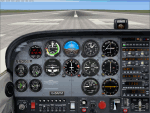
TAKE ADVANTAGE OF SUB-PIXEL RESOLUTION, ANTI-ALIASING AND SMOOTH ANIMATION FOR ALL YOUR ANALOG INSTRUMENTS. The AVG technology is designed for Flight Simulator analog gauges and provides smooth animation, especially for rotating parts (no more degree-per-degree rotation), no impact on performance and full compatibility with FS2004 and FSX, 2D or 3D panel. The panel provided here is a technology demonstrator. It is a C172 modified panel with AVG-based gauges that use the same graphics as the standard C172 gauges to let you compare the gauge animation and rendering. For more information, see this website: http://emarciano.free.fr/AVGHome
The usage of the panel is limited to 30 minutes after FS has started!
| Filename: | C172_Panel_using_AVG_a_NEW_Gauge_Technology__DEMO.zip |
| License: | Freeware, limited distribution |
| Added: | 12th December 2010, 14:26:01 |
| Downloads: | 576 |
| Author: | Eric Marciano |
| Size: | 1.81 MB |
| Category: Flight Simulator X - Gauges | |
| Update for HSI gauge for FIP - speed stripe added |
|
Images related to this file:
File Description:
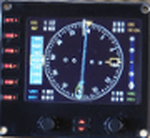
This is an update of hsi_glass.zip which provides a speed stripe on the left side and ADF bearing window is moved just below the course window (left up side).
This update has to be used with HSI_glass.zip file.
Two xml files are available for speed stripe. First with main steps of 5 KTS and up to 600 KTS. The xml file is named HSI_glass_IAS05_2011.xml and is convenient for light aircraft and heavy liner. Second with main steps of 10 KTS and up to 1200 KTS. The xml file is named HSI_glass_IAS10_2011.xml and is convenient for fighter.
| Filename: | Update_for_HSI_gauge_for_FIP__speed_stripe_added.zip |
| License: | Freeware |
| Added: | 9th April 2011, 20:36:25 |
| Downloads: | 734 |
| Author: | Philippe Verhaege |
| Size: | 106.63 KB |
| Category: Flight Simulator X - Gauges | |
| V-One Gauge for B707-300 with Call-Outs |
|
Images related to this file:
File Description:
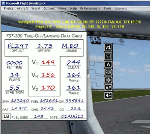
This gauge is written specifically for Captain Sim's B707-300 aircraft (http://www.captainsim.com/products/x707/). It will inform you of appropriate take-off speeds (V-speeds), take-off trim units, Vref landing speeds, elapsed flight time, fuel used, optimum cruise altitude and optimum EPR setting. It will also indicate when the aircraft's max gross weight and TOW has been exceeded by displaying in red text. Take-off speeds are adjusted for altitude and temperature values. Flight time and fuel used can be reset at any time by clicking on their respective displays. Pounds (LB), Kilograms (KG), Celsius (C) and Fahrenheit (F) are toggled by a mouse click. Provisions have been made to allow user adjustments to Optimum Altitude, Optimum EPR and Center of Gravity values. Seven F/O take-off call-outs are included: 80 knots, V1, VR, V2, Gear-up, Flaps-up and Slats Retract.
| Filename: | VOne_Gauge_for_B707300_with_CallOuts.zip |
| License: | Freeware, limited distribution |
| Added: | 3rd August 2012, 18:17:03 |
| Downloads: | 1,236 |
| Author: | Paul Tally |
| Size: | 1.04 MB |
| Category: Flight Simulator X - Gauges | |
| V-One Gauge for Boeing 737-200/Adv Update |
|
Images related to this file:
File Description:
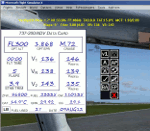
Update includes KG, LB, degrees C and degrees F functionallity. V-speed calculation accuracy improved.
| Filename: | VOne_Gauge_for_Boeing_737200Adv_Update.zip |
| License: | Freeware, limited distribution |
| Added: | 9th August 2012, 20:06:58 |
| Downloads: | 597 |
| Author: | Paul Tally |
| Size: | 14.27 KB |
| Category: Flight Simulator X - Gauges | |
| V-One Gauge for Captain Sim L-1011/F |
|
Images related to this file:
File Description:
List of features: Approximately 40 sounds integrated into gauge.
Take-off V-Speeds calculated for Flaps 10, 18 or 22.
Take-off command speed automatically set for V2 + 15.
Maneuvering speed for each flap selected.
Optimum altitude and optimum EPR (EPR calc for M.84) continually calculated.
Take-off trim calculated for current gross weight.
Current Altitude, EPR, Speed (knts), Flaps and Trim displays via toggle.
Display units can be toggled between LB and KG (default LB).
Re-settable flight timer. Re-settable fuel use.
Selectable Vref landing configurations, Vref33 (default) or Vref42.
ZFW, Fuel, CG, Gross Weight and Barometric Pressure MSL (QNH) displayed.
| Filename: | VOne_Gauge_for_Captain_Sim_L1011F.zip |
| License: | Freeware, limited distribution |
| Added: | 20th July 2014, 21:01:19 |
| Downloads: | 1,194 |
| Author: | Paul Tally, Stefan Liebe, Jimmy Foong |
| Size: | 5.28 MB |


© 2001-2026 AVSIM Online
All Rights Reserved
Privacy Policy |