
Where Flight Simulation Enthusiasts Gather from Around the World!
AVSIM Library - Search Results

| Category: Flight Simulator 2004 - Gauges | |
| AM Broadcast Radio - The 1930's Nav-Aid and In-Flight Entertainment Appliance |

|
File Description:
This system of scenery, sound, panel, and gauge additions seeks to simulate the use of Commercial AM Broadcast stations for aviation Navigation, Weather, Information, and Music in the 1930’s, before the installation of the Radio Range, and NDB systems. It is intended to predate those systems, and to work with them as appropriate. A set of ten 1-minute WAV files - samples of period music and radio broadcasts - forms the core of this facility. Full instructions are included, together with information on the development of this add-on. January 2007.
| Filename: | AM_Broadcast_Radio__The_1930s_NavAid_and_InFlight_.zip |
| License: | Freeware |
| Added: | 6th January 2007, 07:26:10 |
| Downloads: | 1,086 |
| Author: | Dave Bitzer, Bruce Kennewell |
| Size: | 12.18 MB |
| Category: Flight Simulator 2004 - Sounds | |
| Real Airbus A330/A340 Overspeed Warning |
|
File Description:
This ist the first available A330/A340 overspeed warning sound.
In reality you hear the master warning sound and retard callout at the same time, when you exeed the VMO (Velocity maximum operation).
This folder consists only a wave file.
There is no gauge file inside.
This wave file is an opportunity for you to replace unrealistic Airbus overspeed sounds.
Overspeed sound for the A320 family will follow soon.
If you want to replace your old sound with this one, you can use the windows audio recorder for example.
Have fun!
| Filename: | Real_Airbus_A330A340_Overspeed_Warning.zip |
| License: | Freeware, limited distribution |
| Added: | 27th November 2007, 05:14:05 |
| Downloads: | 2,272 |
| Author: | Ahmed Karoua AVIATION SOUND DESIGN |
| Size: | 668.04 KB |
| Category: Flight Simulator 2004 - Sounds | |
| Complete Boeing 777 altitude callouts |
|
File Description:
Since I uploaded the 777 callouts (777_callouts.zip), I've received emails asking if I could include callouts for the other altitudes, so here thery are.
In this complete package, you'll find all the sounds in the earlier pack, as well as callouts for 2500ft, 1000ft, 500ft, approaching minimums, and minimums-the whole deal :-)
This is an optional package. You do not need this if you've already downloaded the earlier one. I included the extra callouts just to make the set complete in case anyone wants to design a callout gauge.
| Filename: | Complete_Boeing_777_altitude_callouts.zip |
| License: | Freeware |
| Added: | 25th December 2006, 10:37:25 |
| Downloads: | 7,773 |
| Author: | Jimmy Foong |
| Size: | 1.97 MB |
| Category: Flight Simulator X - Panels | |
| Defaultimate737 |
|
Images related to this file:
File Description:
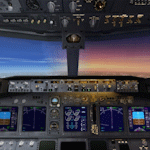
The ultimate virtual cockpit enhancement for Microsoft Flight Simulator X 737-800.
This enhancement includes improved cabin lighting, switchable display units with adjustable brightness, engine starter switches now include FLT & CONT settings, taxi and landing light ground splash effects are decoupled, independent left and right wiper animations, max autopilot bank angle bezel, strobe and navigation lights controlled independently, functional autobrake knob, functional fuel pump switch and cross feed knob, vast majority of switches and knobs animated (although largely non-functional) and various gauge and poly fixes.
| Filename: | Defaultimate737.zip |
| License: | Freeware |
| Added: | 12th September 2026, 20:20:04 |
| Downloads: | 174 |
| Author: | Trent Bennett |
| Size: | 9.63 MB |
| Category: Flight Simulator X - Flight Plans | |
| iFly 737NG flight plan for route: Baltimore, Maryland and St. David's Island, Bremuda FSX and FSX steam |
|
File Description:
This file contains information for the route for a flight between Baltimore, Maryland and St. David's Island, Bremuda
for the iFly 737NG using the following airports:
Departure:Baltimore/Washington International Thurgood Marshall Airport
IATA:BWI
ICAO:KBWI
FAA LID:BWI
WMO:72406
Destination:L.F. Wadwe International Airport
IATA:BDA
ICAO:TXKF
| Filename: | iFly_737NG_flight_plan_for_route_Baltimore_Marylan.zip |
| License: | Freeware |
| Added: | 25th March 2025, 18:12:16 |
| Downloads: | 8 |
| Author: | David M Long |
| Size: | 2.06 KB |
| Category: Flight Simulator X - Original Aircraft | |
| MCR-01 Sportster Ultralight, private - United Kingdom (Commercial Demo) |
|
Images related to this file:
File Description:
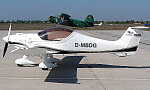
The MCR Ultralight is a side by side two-seater airplane with incredible performance and capability. Fast and agile, the VLA was specially designed to reach top speed while providing the most enjoyable experience to pilots.
The MCR Sportster is a very high performance aircraft, that can cruise as fast as 300 km/h with only a 100 hp engine, at very low cost.
Thanks to the highest level of technology available, and very light material, the Sportster has a very efficient direct control system that guarantees the same satisfaction as flying a fighter jet.
The MCR Sportster can be equipped with a choice of different power plants, but may also be fitted with other options such as: Ballistic Recovery System parachute; Extended range wing tanks; Toe operated Hydraulic brakes.
The MCR Sportster is available in kit form in respect with the CNSK regulation (specific kit airworthiness certificate) or in the "experimental" category depending on the registration country.
(Preview version) This file is a COMMERCIAL DEMO, with banners.
Panel, GAUGES, model, sound and textures by www.afs-design.de - Author: A.Meyer.
| Filename: | MCR01_Sportster_Ultralight_private__United_Kingdom.zip |
| License: | Commercial demo |
| Added: | 21st February 2010, 22:30:22 |
| Downloads: | 1,147 |
| Author: | Andreas Meyer |
| Size: | 13.47 MB |
| Category: Flight Simulator 2004 - Utilities | |
| GaugeGlow v2.0 |
|
File Description:
GaugeGlow is an easy to use tool that allows you to quickly set or adjust an aircraft's 2D panel lighting and the luminous glow of your MS Flight Simulator aircraft's lumious instruments. The virtual cockpit (VC) lighting is controlled by gauge designer and aircraft modeller, and cannot be modified by GaugeGlow.
GaugeGlow gives you a WYSIWYG (what you see is what you get) view of a sample aircraft panel & instrument with easy to use but sophisticated tools to discover the RGB lighting values to create the right lighting effect for your panel. Before GaugeGlow, a panel designer would have to "estimate" desired RGB values for lighting settings, modify configuration files, and then run Flight Simulator to see if they got it right. With GaugeGlow, you can select colors easily with slider controls, and imediately see the effects on panel and gauge lighting just as it will appear in FS under any lighting conditions.
The licensed registered user will be able to easily open any aircraft's panel, to load existing settings, make changes, then save them. Unregistered you'll have to take the data you see and using your knowledge of the SDK, edit the aircraft's config files to make the actual change in that aircraft's night lighting.
| Filename: | GaugeGlow_v20.zip |
| License: | Shareware, limited functionality |
| Added: | 24th August 2006, 14:24:13 |
| Downloads: | 1,758 |
| Author: | Patrick Waugh (Benchmark Avionics) |
| Size: | 692.17 KB |
| Category: Flight Simulator 2004 - Panels | |
| DC3 Photo-real Modern, Re-built Panel |
|
File Description:
This panel is made from a photograph of a modern day DC3. It features a unique 1950's-1960's style radio array mounted on top of the panel. The default King Air Radio gauge has been modified to work with it. The full version includes all working gauges, including VOR, ILS, the compact King Air autopilot, a repostioned GPS, and the default DC3 pop up windows for electrical, engine, and other controls. This shareware version, for evaluation purposes, is limited in gauge functions, color blending, and visibilty. It also includes the Right and Forward-Right cockpit views for evaluation of the full set of 7 inside views. The full set includes cargo and passenger options, from two different DC3 aircraft in use today (see screen shots). Also included as freeware, is the modified DC3 MDL file by Clive Ryan (dc3_mdl.zip), with permission. This will switch off the default virtual cockpit, so it does not conflict with the internal views. Or, if you know how to hex-edit, you can modify your own default MDL file, by following Clive's tutorial, which is included (only recommended for advanced users). You can also install only the panel, without using the modified mdl file. Includes choice of 1024x768 or 800x600 image resolution sets. By Will Fisher
| Filename: | DC3_Photoreal_Modern_Rebuilt_Panel.zip |
| License: | Shareware, limited functionality |
| Added: | 3rd December 2004, 22:21:38 |
| Downloads: | 2,524 |
| Author: | Will Fisher |
| Size: | 3.36 MB |
| Category: Flight Simulator X - Gauges | |
| Labelled Cockpit Switches |
|
Images related to this file:
File Description:
Wow! This ***MEGA*** cockpit gauge pack from Touch-Up Designs brings you a
fantasmodical download, now being made exclusively available to AVSIM users
totally free of charge. You will be unable to resist slobbering
over the virtual unreality that this download brings to your
aircraft. Did you fall for all that hype? Oh good. There really
isn't a lot interesting to say about a
boring set of cockpit switch gauges which
are just a simple modification of one of the splendid CPT Toggles/Switches gauges by Jorge Salas with added
individual labelling for each switch (on a transparent background) - absolutely ideal for the lazy panel
designer. Should work with FS2002, FS2004 and FSX, although I have no plans to test it with the latter. Incidentally, every
download automatically grants you free membership of the LPDS - you can
see how many there are in that society by looking at the total number of
downloads below. Broadband users are requested not to blink during the download. Guaranteed 0.00001% realistic.
| Filename: | Labelled_Cockpit_Switches.zip |
| License: | Freeware |
| Added: | 8th February 2007, 01:26:17 |
| Downloads: | 2,724 |
| Author: | John Hinson |
| Size: | 257.33 KB |
| Category: Flight Simulator X - Utilities | |
| AirTrack Plug-in v1.4 |
|
Images related to this file:
File Description:

This is an update of the Microsoft Flight Simulator X plug-in for the AirTrack iPhone, iPad and iPod Touch app. In order to install it run the executable that will deploy a gauge in the proper folder and automatically activate it.
AirTrack is an App that allows tracking of FS9 flights on your iPhone or iPad in real time using a local wireless network with built-in parameter reporting, an EFIS MFD, an FMC and Airport information. You can also command the plane from the application.
The current update fixes some bugs, improves the communication between the plug-in and the applicaiton and allows the flight plan created at the Flight Simulators to be displaid in the AirTrack. It also adds support for speeds limits, flight director bars in the PDF and VAS selector.
To learn more about the app and its availability please visit the product' site: air.ipobjects.com. If you have any question regarding the FSX plug-in you can contact us at [email protected]
| Filename: | AirTrack_Plugin_v14.zip |
| License: | Freeware |
| Added: | 10th May 2011, 13:54:57 |
| Downloads: | 399 |
| Author: | Jofre Palau |
| Size: | 312.46 KB |


© 2001-2026 AVSIM Online
All Rights Reserved
Privacy Policy |