
Where Flight Simulation Enthusiasts Gather from Around the World!
AVSIM Library - Search Results

| Category: Flight Simulator X - Aircraft Repaints, Textures and Modifications | |
| Fokker 70/100 2D Fixed Cockpit Views System |

|
Images related to this file:
File Description:
The fixed views are fully functional by:
- clickable icons gauge on main and fixed views panels
- keyboard numpad keys, when normally assigned to the correspondent views
- joystick hat, when mapped to the assigned keyboard keys
Note: Doug Dawson's Window Status Gauge reports the visibility status of panel windows and is needed for the fixed views to work. This original feature was lost since previous versions of MS Flight Simulator.
Doug Dawson's window_status gauge is available at http://www.douglassdawson.ca/
This add-on brings back the 2D Fixed Cockpit Views System, of the Digital Aviation Fokker 70/100, to FSX for the Default and First Officer views.
| Filename: | Fokker_70100_2D_Fixed_Cockpit_Views_System.zip |
| License: | Freeware |
| Added: | 23rd June 2012, 03:38:29 |
| Downloads: | 1,447 |
| Author: | Joao Muas, Digital Aviation |
| Size: | 9.42 MB |
| Category: Flight Simulator 2004 - Panels | |
| Airbus A320 Detailed Overhead Panel |
|
Images related to this file:
File Description:
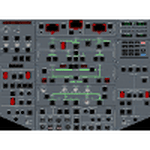
This is a set of gauges for twin-enigne jets, especially Airbus, containing:
- overhead panel with realistic procedures and almost all switches working
- lower EICAS with 10 working screens (F/CTL, FUEL, HYD, DOOR, APU, BLEED, COND, ELEC, WHEEL, EN-GINE, STATUS)
- EICAS switch
- Multiradio gauge (all radio functions in one place)
- optional Multiswitch gauge (flaps, spoilers, gear, autobrake indicators and switches)
It should work with any free or default twin-engine jet aircraft, however it was tested with Airbus models from iFDG and Project OpenSky. It should work on FS2004 and FSX.
Requirements: VasFMC 2.09 or newer in GAUGE version - it provides PFD, ND, upper EICAS, FMC, MCDU.
| Filename: | Airbus_A320_Detailed_Overhead_Panel.zip |
| License: | Freeware |
| Added: | 26th July 2013, 07:13:30 |
| Downloads: | 3,160 |
| Author: | Slawomir Wawak |
| Size: | 12.3 MB |
| Category: Flight Simulator 2004 - Panels | |
| Boeing 717 Panel FIX |
|
File Description:
Sorry Folks:
Attached find the missing ALT selector (hidden) gauge for the B717 panel.
Unzip the Gauge zip and put the ALT gauge in your gauges folder. it's already in the CFG file.
P.S. I noticed that the panel.cfg file is outside of the PANEL folder. Be sure to put that into your panel folder.
Let's go flying.
Capt. Rad
| Filename: | Boeing_717_Panel_FIX.zip |
| License: | Freeware |
| Added: | 3rd January 2006, 14:19:06 |
| Downloads: | 6,444 |
| Author: | Capt. Rad James Yarjan |
| Size: | 55.16 KB |
| Category: Flight Simulator X - Gauges | |
| FLTInfo - Bug Fix |
|
File Description:
This zip file contain a corrected version of the cab file for the FLTInfo_V1.0 gauge (FLTInfo_V1.0.zip). The bug solves a inaccurate
calculation of the runway direction on page three of the gauge.
Please replace your current cab file from the FLTInfo_V1.0 gauge by the cab file in this zip file. Sorry for this inconvenience.
| Filename: | FLTInfo__Bug_Fix.zip |
| License: | Freeware |
| Added: | 12th July 2012, 17:12:19 |
| Downloads: | 767 |
| Author: | Dietmar Loleit |
| Size: | 90.99 KB |
| Category: Fly! II - Navigation | |
| Glass Cockpit Navigation Display Demo V1.3 |
|
File Description:
This 'demo' navigation display gauge, installed in the a IFR Malibu panel, is intended to introduce a freeware gauge that can be easily installed in any glass cockpit type aircraft or in any additional window.
The files included are an exaple how to install this gauge in more sophisticated panels ... Fell free to install it in any plane you wish.
| Filename: | Glass_Cockpit_Navigation_Display_Demo_V13.zip |
| License: | Freeware |
| Added: | 4th September 2004, 05:20:41 |
| Downloads: | 257 |
| Author: | laurent and TJ (rotw) |
| Size: | 2.04 MB |
| Category: Flight Simulator 2004 - Gauges | |
| Pushback/Tow/Taxi Version 1.3.6 |
|
File Description:
This is version 1.3.6 of my groundhandling/utility gauge. This version adds a new ambient wind gauge, several new circuits to the electric gauge (exit, tailhook, water rudder, etc), support for custom backgrounds for any aircraft for better cockpit integration, new backlit display for dusk/night/dawn effect and a highly optimized code for better frame rates. 27 page manual included.
| Filename: | PushbackTowTaxi__Version_136.zip |
| License: | Freeware, limited distribution |
| Added: | 8th November 2004, 18:45:46 |
| Downloads: | 16,769 |
| Author: | Etienne Martin |
| Size: | 992.52 KB |
| Category: Flight Simulator 2004 - Gauges | |
| VTOL/Hover for Alphasim's V22-Osprey V1.1 |
|
File Description:
This freeware gauge adds new VTOL & Hover features to Alphasim's V22-Osprey.
Besides true vertical takeoff&landing, it allows you to fly forward, backward,
sideways and turn, while in a hover.
This solution is based on overriding the normal FS flightdynamics while in a
hover; in short, it's a VTOL&Hover FDE coded in a gauge.
Special thanks to Doug Dawson, who created a gauge that provides for overriding
FS2004 variables from an XML gauge.
Requires FSUIPC (registered or unregistered, NOT included).
The README includes extensive installation and flying instructions.
New in release 1.2:
- the gauge can now be added to both 2D Cockpit and VC.
- solves the problem of Generators-Off after engine restart.
By Rob Barendregt.
| Filename: | VTOLHover_for_Alphasims_V22Osprey_V11.zip |
| License: | Freeware, limited distribution |
| Added: | 21st July 2006, 14:38:21 |
| Downloads: | 1,429 |
| Author: | Rob Barendregt |
| Size: | 75.04 KB |
| Category: Flight Simulator X - Gauges | |
| B737 Head-Up Guidance System (HGS) Model 2350 |
|
File Description:
This gauge has been developed for FSX Flight Simulator Acceleration. It should also work with FSX SP1/SP2 . The functionality of this gauge is based on the Rockwell Collins HGS which is designed for the B737NG . It works correct for FSX B737-800 models only !!
The gauge has been developed as close as possible according to the HGS Pilot Guide from Rockwell Collins for normal operations. The HGS can be used during all phases of flight from takeoff to landing. This can include Ground Roll Guidance, all enroute operations and either non-precision or precision approaches.
This gauge is very realistic. It supports the pilot particular during approach operations to meet always
precise the runway touch down zone by keeping a 3° glide slope angle. Even for a visual approach maneuver
the HGS supports the pilot to establish and maintain the aircraft on the proper glide path to the runway without reference to a ground based landing system like ILS.
Technical descriptions and installations guide are included in the zip file for further information. You may also look at a video under this link: https://youtu.be/mw4Q_eOWYtk
| Filename: | B737_HeadUp_Guidance_System_HGS__Model_2350.zip |
| License: | Freeware |
| Added: | 8th November 2019, 18:09:22 |
| Downloads: | 269 |
| Author: | Dietmar Loleit |
| Size: | 7.59 MB |
| Category: Flight Simulator X - Aircraft Repaints, Textures and Modifications | |
| NASA "991 repaint" Grumman F-14A Tomcat |
|
Images related to this file:
File Description:

A test bed Tomcat of Dryden, NASA's "991" was designated the F-14 (1X) and operated between 1979 and 1985 in extensive high-angle-of-attack and spin-control-and-recovery tests. This repaint was designed for use with the payware IRIS Pro Series F-14 Tomcat. I hope you like this nod to some of NASA's test history!
| Filename: | NASA_991_repaint_Grumman_F14A_Tomcat.zip |
| License: | Freeware, limited distribution |
| Added: | 7th February 2017, 18:11:06 |
| Downloads: | 125 |
| Author: | Anthony Richards |
| Size: | 5.57 MB |
| Category: Dovetail Games Flight Sim World - Gauges | |
| Bell 206b update Fixed startup and gauge errors |
|
File Description:
Aircraft.cfg, panel.cfg & gauge files to avoid the startup error message.
| Filename: | Bell_206b_update_Fixed_startup_and_gauge_errors.zip |
| License: | Freeware |
| Added: | 27th November 2017, 18:53:20 |
| Downloads: | 46 |
| Author: | Paul Kemp |
| Size: | 400.99 KB |


© 2001-2026 AVSIM Online
All Rights Reserved
Privacy Policy |