
Where Flight Simulation Enthusiasts Gather from Around the World!
AVSIM Library - Search Results

| Category: Flight Simulator 2004 - Scenery | |
| Europe SRTM mesh part 10: Lower Danube |

|
File Description:
Europe SRTM LOD9 mesh part 10 of 13: Covers a wide area centered over the Danube valley from Novi Sad to the Black Sea (42°N-46°N, 19°E-30°E). Includes Balkans & Transylvanian moutain ranges, and parts of the following countries: Romania, Bulgaria, Serbia and Albania.
This Europe SRTM project was optimized for the lowest HDD space use: Each part macthing exactly the boundaries of its neighbors, you'll have a complete corevage of Europe without gap or overlapping scenery. Based on SRTM Data v1 and v2 (3 arcsec, 90m) and sampled to LOD9 resolution (76m). Each SRTM tile was carefully checked and repaired with Blackart v4.02: water areas are now flattened (lighter mesh), and SRTM voids were treated taking advantage of Blackart's sophisticated interpolation algorithm. When required, biggest voids were patched with oversampled SRTM 30 arcsec data and/or manual input.
| Filename: | Europe_SRTM_mesh_part_10_Lower_Danube.zip |
| License: | Freeware, limited distribution |
| Added: | 19th October 2005, 17:55:10 |
| Downloads: | 11,734 |
| Author: | Yohann Baptiste |
| Size: | 39.14 MB |
| Category: X-Plane - Aircraft Repaints, Textures and Modifications | |
| Mitsubishi MU-2 (N316PR) |
|
Images related to this file:
File Description:
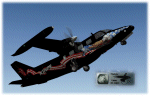
This is a repaint, made for the X-Scenery Mitsubishi MU-2 (payware aircraft add-on).
It depicts the N316PR wich crashed tragically on the 25th of June 2006.
I added normal-files (with specular-layers) wich contain custom-made effects (specular regulated gloss).
These custom normals are part of the livery allthough they can be used for other liveries as well.
Please read the enclosed N316PR_Readme PDF carefully. Use a text editor e.g. Wordpad for editing the OBJ files.
Make sure to install the new normal files from MU-2_normals.zip if you already downloaded this livery (they replace the normals in MU-2_N316PR.zip) and all windows will have gloss again. ( sorry for the inconvenience)
The version V2 includes this new normals.
Questions, or need help, please mail me. Enjoy, Leen de Jager www.flybike-paints.nl
| Filename: | Mitsubishi_MU2_N316PR.zip |
| License: | Freeware, limited distribution |
| Added: | 21st June 2013, 21:05:30 |
| Downloads: | 43 |
| Author: | Leen "Flybike" de Jager |
| Size: | 10.64 MB |
| Category: Flight Simulator 2004 - Scenery | |
| Europe SRTM mesh part 01: LOD7 buffer mesh |
|
File Description:
Europe SRTM LOD9 mesh part 1 of 13: This is a LOD7 mesh covering the whole Europe from 35°N to 60°N and 12°W to 30°E, to be used as a buffer mesh in conjection with the LOD9 mesh. This Europe SRTM project was optimized for the lowest HDD space use: Each part macthing exactly the boundaries of its neighbors, you'll have a complete corevage of Europe without gap or overlapping scenery. Based on SRTM Data v1 and v2 (3 arcsec, 90m) and sampled to LOD7 resolution (300m). Each SRTM tile was carefully checked and repaired with Blackart v4.02: water areas are now flattened (lighter mesh), and SRTM voids were treated taking advantage of Blackart's sophisticated interpolation algorithm. When required, biggest voids were patched with oversampled SRTM 30 arcsec data and/or manual input.
| Filename: | Europe_SRTM_mesh_part_01_LOD7_buffer_mesh.zip |
| License: | Freeware, limited distribution |
| Added: | 19th October 2005, 16:11:05 |
| Downloads: | 19,061 |
| Author: | Yohann Baptiste |
| Size: | 50.28 MB |
| Category: Flight Simulator X - Gauges | |
| V-One Gauge for B737-200/Adv with Call-outs |
|
File Description:
This gauge is written specifically for Captain Sim's B737-200 and B737-200Adv aircraft (http://www.captainsim.com/products/x737/). It will inform you of appropriate take-off speeds (V-speeds), take-off trim units, Vref landing speeds, elapsed flight time, fuel used, optimum cruise altitude, optimum ERP setting and Maximum Climb Thrust (MCT). It will also indicate when the aircraft's gross weight has been exceeded and if an incorrect flap has been set. Take-off speeds are adjusted for altitude and temperature values. Flight time and fuel used can be reset at any time by clicking on their respective displays. Provisions have been made to allow user adjustments to Optimum Altitude, Optimum EPR and Center of Gravity values.
Seven F/O take-off call-outs are included: 80 knots, V1, VR, V2, Gear-up, Flaps-up and Slats Retract.
| Filename: | VOne_Gauge_for_B737200Adv_with_Callouts.zip |
| License: | Freeware, limited distribution |
| Added: | 22nd May 2012, 03:36:23 |
| Downloads: | 2,081 |
| Author: | Paul Tally |
| Size: | 1.04 MB |
| Category: Miscellaneous Files - General Utilities | |
| Wx2pfpx v2.6.4 |
|
Images related to this file:
File Description:
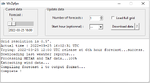
A simple weather data provider for the discontinued Professional Flight Plan X software. The script fetches raw weather data, METAR and TAF data from the NOAA, US national weather service, which is then compiled to a single file that can be imported in PFPX. More than 15000 reference stations (airports) from PFPX are used and wind/temperature data is provided for each of them. When available, METAR and TAF data is also provided for more than 5000 airports. The original data source is updated 4 times a day, and can provide forecasts for every 3 following hours up to 16 days. *** A new script can trigger antivirus analysis as it's unknown, you can ignore it.*** V2: Great precision improvement, possibility of importing the whole NOAA dataset grid, a bit of documentation. V2.6: Repaired due to API change.
| Filename: | Wx2pfpx_v264.zip |
| License: | Freeware, limited distribution |
| Added: | 27th September 2025, 15:55:08 |
| Downloads: | 85 |
| Author: | John Smith |
| Size: | 21.97 MB |
| Category: Flight Simulator X - Scenery | |
| Concord NC X - Textures 1 ONLY |
|
File Description:
Requirements: -Microsoft Flight Simulator X (not tested with FS2004)
Optional Requirements: -Ultimate Terrain X (tested with the latest version out as of June 2015)
-Orbx Global FTX
Install: Simply place the "Concord NC X" folder inside your FSX Addon Scenery folder, go inside FSX, activate the scenery and enjoy!
FOR TEXTURES!!!: Create A Textures Folder Inside The ConcordNCX Folder , restart FSX and enjoy!
Concord NC X includes:
- Up to date KJQF (Concord Regional Airport) (June 2015)
- Photoreal scenery in and around the Concord Regional Airport
- Custom night lighting!!
- Charlotte Motor Speedway (with Autogen)
- New parking at KJQF
- Longer runway to current 7000+ ft length at KJQF
- Autogen on photoscenery (not just textures but also autogen!)
Kaleem Beats Sceneries is a local Charlotte, NC scenery maker.
This is our first project and a V2 will be in the making soon.
Questions, Comments, Concerns: [email protected]
| Filename: | Concord_NC_X__Textures_1_ONLY.zip |
| License: | Freeware |
| Added: | 25th June 2015, 08:02:39 |
| Downloads: | 405 |
| Author: | William Campbell |
| Size: | 66.54 MB |
| Category: Flight Simulator X - Scenery | |
| Concord NC X - Textures 2 ONLY |
|
File Description:
Requirements: -Microsoft Flight Simulator X (not tested with FS2004) Optional Requirements: -Ultimate Terrain X (tested with the latest version out as of June 2015) -Orbx Global FTX Install: Simply place the "Concord NC X" folder inside your FSX Addon Scenery folder, go inside FSX, activate the scenery and enjoy! FOR TEXTURES!!!: Create A Textures Folder Inside The Concord NC X Folder , restart FSX and enjoy! Concord NC X includes: - Up to date KJQF (Concord Regional Airport) (June 2015) - Photoreal scenery in and around the Concord Regional Airport - Custom night lighting!! - Charlotte Motor Speedway (with Autogen) - New parking at KJQF - Longer runway to current 7000+ ft length at KJQF - Autogen on photoscenery (not just textures but also autogen!) Kaleem Beats Sceneries is a local Charlotte, NC scenery maker. This is our first project and a V2 will be in the making soon. Questions, Comments, Concerns: [email protected]
| Filename: | Concord_NC_X__Textures_2_ONLY.zip |
| License: | Freeware |
| Added: | 25th June 2015, 08:02:50 |
| Downloads: | 314 |
| Author: | William Campbell |
| Size: | 74.97 MB |
| Category: Flight Simulator X - Scenery | |
| Concord NC X - Textures 3 ONLY |
|
File Description:
Requirements: -Microsoft Flight Simulator X (not tested with FS2004) Optional Requirements: -Ultimate Terrain X (tested with the latest version out as of June 2015) -Orbx Global FTX Install: Simply place the "Concord NC X" folder inside your FSX Addon Scenery folder, go inside FSX, activate the scenery and enjoy! FOR TEXTURES!!!: Create A Textures Folder Inside The ConcordNCX Folder , restart FSX and enjoy! Concord NC X includes: - Up to date KJQF (Concord Regional Airport) (June 2015) - Photoreal scenery in and around the Concord Regional Airport - Custom night lighting!! - Charlotte Motor Speedway (with Autogen) - New parking at KJQF - Longer runway to current 7000+ ft length at KJQF - Autogen on photoscenery (not just textures but also autogen!) Kaleem Beats Sceneries is a local Charlotte, NC scenery maker. This is our first project and a V2 will be in the making soon. Questions, Comments, Concerns: [email protected]
| Filename: | Concord_NC_X__Textures_3_ONLY.zip |
| License: | Freeware |
| Added: | 25th June 2015, 08:03:00 |
| Downloads: | 324 |
| Author: | William Campbell |
| Size: | 96.14 MB |
| Category: Flight Simulator X - Scenery | |
| Concord NC X - Textures 4 ONLY |
|
File Description:
Requirements: -Microsoft Flight Simulator X (not tested with FS2004) Optional Requirements: -Ultimate Terrain X (tested with the latest version out as of June 2015) -Orbx Global FTX Install: Simply place the "Concord NC X" folder inside your FSX Addon Scenery folder, go inside FSX, activate the scenery and enjoy! FOR TEXTURES!!!: Create A Textures Folder Inside The ConcordNCX Folder , restart FSX and enjoy! Concord NC X includes: - Up to date KJQF (Concord Regional Airport) (June 2015) - Photoreal scenery in and around the Concord Regional Airport - Custom night lighting!! - Charlotte Motor Speedway (with Autogen) - New parking at KJQF - Longer runway to current 7000+ ft length at KJQF - Autogen on photoscenery (not just textures but also autogen!) Kaleem Beats Sceneries is a local Charlotte, NC scenery maker. This is our first project and a V2 will be in the making soon. Questions, Comments, Concerns: [email protected]
| Filename: | Concord_NC_X__Textures_4_ONLY.zip |
| License: | Freeware |
| Added: | 25th June 2015, 08:03:08 |
| Downloads: | 310 |
| Author: | William Campbell |
| Size: | 81.28 MB |
| Category: Flight Simulator 2004 - Aircraft Repaints, Textures and Modifications | |
| Air Philippines NC Boeing 737-2B7 (RP-C8003) |
|
Images related to this file:
File Description:

Air Philippines took delivery of their first 737-200 on December 9, 1995. It then began operations on February 2, 1996 with revenue flights to Subic, Iloilo and Zamboanga. It currently operates 16 737-200's in its fleet. This particular aircraft, registration RP-C8003, was delivered to Air Philippines on September 25, 2003 and originally flew as US Air registration N318AU, delivered to USAir from Boeing on June 14, 1983. The tail on this aircraft is color matched to Kelly Freeman's AIA Air Philippines NC B732 (DLID 82673). I also recommend Matthew Lue's Tinmouse II lighting effects (DLID 89742).
This is a textures only package; you must have the Tinmouse 737-200adv v2 base package available here at AVSIM (tinmouse_ii_v1_25.zip). The textures in this repaint are detailed 32-bit with no mips.
NOTE: This is a re-upload due to the AVSIM site compromise.
| Filename: | Air_Philippines_NC_Boeing_7372B7_RPC8003.zip |
| License: | Freeware, limited distribution |
| Added: | 5th June 2010, 19:40:00 |
| Downloads: | 1,491 |
| Author: | Jeffrey S. Bryner, Tinmouse II Project |
| Size: | 4.71 MB |


© 2001-2026 AVSIM Online
All Rights Reserved
Privacy Policy |