
Where Flight Simulation Enthusiasts Gather from Around the World!
AVSIM Library - Search Results

| Category: Microsoft Flight Simulator (2020) - Utilities | |
| Flightplan Visualizer 1.18 |

|
Images related to this file:
File Description:
Flightplan Visualizer (FV) version 1.18.0. Copyright 2018-2020 by Pelle F. S. Liljendal ([email protected]), all rights reserved.
FV comes with 787 pre-imported Commercial AI flightplans (+380 BizJet flightplans are available as a separate download). However you are able to import additional (AI) flightplans yourself. Once imported these (AI) flightplans can be visualized on a map-view, and the user will be able to search accross all these. Hence you can use the program as inspiration as to which routes to fly. E.g. you can search across all imported flightplans to find all flights in an A321 flying into/out from LDDU, or simply to look for all flights in a Boeing 747-8F.
Simply run the included installer to install the software. The program will be installed into "C:\Program Files (x86)\Flightplan Visualizer" and all datafiles will be installed into: "C:\Users\[UserName]\AppData\Roaming\FlightplanVisualizer". The program comes with a full manual explaining everything, and a 3 page quick manual to get you started. The first 3 times you run the program the quick manual will automatically open. The forum is hosted here: https://forum.aerosoft.com/index.php?/forum/919-flightplan-visualizer/
Version 1.18 Contains the following changes:
- GREATLY improved the search-legs feature (by a factor of +50).
- In the past the application was forced to 32 bit. This is no longer the case, hence if needed its able to allocate more memory than before. I have never heard of anyone getting an "out of memory" exception, buy anyway.
- In the settings form, the field for entering the path to where to look for the Make Runways -files, have been replaced with a (MRU) combo-box, remembering the last 5 paths entered. So now you don't need to remember these paths each time you want to change it (e.g. if you switch between a set of files generated for P3D and another generated for MSFS). Remark that when this path is changed, FV will automatically restart when saving the settings, as the MkRwy-data are only loaded at startup.
- Added new command-line argument /MkRwy="G:\FS\MakeRunways". If this argument is set, FV will try to locate the files generated by Pete Dowson's MakeRunway in the specified folder, no matter the value of the MkRwy-path set in the settings-form.
- Added new command-line argument /FilePrefix=XXX. If this prefix is set (in the short-cut starting FV) it will look for files in the UserData-folder using this prefix and an underscore (e.g. open "XXX_UserAirportInfo.xml" in stead of "UserAirportInfo.xml"). If FV is started with this argument it will be displayed in the caption of the main-form to notify the user "which prefix is in use".
- Added new command-line argument /ForceReprocessFlightplans which forces all flightplans to be reprocessed on startup (e.g. process all airport redirections according to loaded redirection file).
- Added new command-line argument /? or /help. Using either of these, or having specified a wrong command-line argument will show a small example of the correct way to use these arguments.
- Added a new "Auto-activation prefixes" entry field to the "Edit owned aircraft" form where you can now enter a comma separated list of prefixes for which each aircraft should set to active. If entered, the aircraft will automatically be set active when FV have been started with the /FilePrefix argument set to the entered value (e.g. P3D). If one or more prefixes have been entered into this field, and FV have been started with another prefix, those aircraft will be set to not-active.
- Added new setting to reprocess all loaded flightplans on startup if FV was started with another /FilePrefix argument than used the previous time FV was started (e.g. if you switch between two different simulators).
- Improved how pseudo-airports tries to look-up airport data from the bundled airport-database. So there is now a higher chance that: name, country/state, and time-zone will be populated with useful data for the pseudo airports.
- In previous versions when opening the airport-info form, the checkbox "Exclude small/grass/dirt" (runways) was always checked, meaning you had to uncheck this checkbox before being able to see any runway-information for small airports. In this version a new setting have been added where you can chose if this checkbox should default to being: Checked, Unchecked or (default) Automatic. if choosing "Automatic", this checkbox will default to un-checked for airports only having few/small runways.
- Redesigned the settings-form so things are less "cluttered", and it will be more easy for me to add additional items in the future.
- The Search Airport form now contains fields that lets you specify min/max criteria for rwy-length and airport elevation, and min/max distance to a specified airport (e.g. find all airports within 20-50 Nm of XXXX). Also you can specify required rwy-type (e.g. "All Hard", "Have Soft" ...).
- Added an "Edit" menu-item to the context menu in the Search Airport form, which opens the Airport Info form, and returns back to the Search Airport form (e.g. see details for a few found airports before chooing one of them).
- If Transition Altitude (TA) is not known for a particular airport, the program will now try to estimate TA based on nearby airports in the same country, where those nearby are weighted more than those further away (its not perfect, but "better" than 0). An estimated TA will be postfixed by a asterisk to mark that it is estimated.
- Minor (internal) changes to the automatic version-check.
- Fixed: Issue importing some AigFP flightplans where airports were being redirected (e.g. "AIG_AviaTrafficCompany_Winter_2019-2020v2").
- Fixed: Using the context menu in the list-view showing all owned aircraft, the changes were sometimes not saved.
- Fixed: In the conversion-form when converting weight/volume into US-Gal, the calcuation was wrong (converting from US-Gal was not an issue).
- Fixed: In the leg-info report the value of Transition Altitude was in some cases used in stead of the length of the longest runway.
- Fixed: Leg-info report only contained taxi-out time for all airports. Now it only contains the taxi-out time for the departure airport, but both departure- and destination airports contains a taxi-in time.
- Fixed: In some cases an airport that was currently being edited, could be edited in another window at the same time (opening multiple Airport Info forms).
- Data: The bundled airport-database had a MAJOR face-lift. Various data were corrected, and it have more than doubled in number of airports/helipads contained within the database.
- Data: Improved detection of aircraft-type "IAI 1126 Galaxy" (as "Gulfstream G200"). Thanks to Bruce Nicholson for notifying me of the issue when importing a particular AIG flight-plan.
- Flightplans: All new/updated flightplans have been added to the installer, and all obsolete/defunct have been marked/removed. A total of 787 active flightplans are bundled with the installer.
Pelle
| Filename: | Flightplan_Visualizer_118.zip |
| License: | Freeware, limited distribution |
| Added: | 9th November 2020, 20:09:24 |
| Downloads: | 479 |
| Author: | Pelle Liljendal |
| Size: | 34.48 MB |
| Category: Flight Simulator X - Aircraft Repaints, Textures and Modifications | |
| Mooney 20J PH-SIN |
|
File Description:
Depicted is PH-SIN .
Repaint is for the Carenado Mooney and can de used in FS 9 and FS X , a thumbnail and full instructions for installing are included ( with a Dutch readme file also ) .
| Filename: | Mooney_20J_PHSIN.zip |
| License: | Freeware, limited distribution |
| Added: | 11th August 2008, 02:49:04 |
| Downloads: | 407 |
| Author: | John Glanville / Carenado |
| Size: | 2.03 MB |
| Category: Flight Simulator 2002 - Panels | |
| Boeing 737-200 panel |
|
File Description:
New 737-200 panel for FS2002, with night lightning: as real as possible!
Panel painting and instruments lay-out based on a real 737-200 cockpit
Tested in 1024 x 768 and 1600 x 1200 resolution
| Filename: | Boeing_737200_panel.zip |
| License: | Freeware |
| Added: | 31st August 2002, 13:07:27 |
| Downloads: | 2,338 |
| Author: | Fabrizio Berretta |
| Size: | 4.26 MB |
| Category: Prepar3D V1-4 - Aircraft Repaints, Textures and Modifications | |
| Carenado King Air 350i N352D |
|
Images related to this file:
File Description:
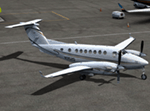
Repaint for the Carenado King Air 350. It's a real scheme with a fictional N-Number.
| Filename: | Carenado_King_Air_350i_N352D.zip |
| License: | Freeware, limited distribution |
| Added: | 6th May 2019, 17:53:05 |
| Downloads: | 103 |
| Author: | David Chapman |
| Size: | 24.52 MB |
| Category: Flight Simulator 2004 - AFCAD Files | |
| FWKI - Lilongwe Malawi, Kamuzu International Airport |
|
File Description:
AFCAD file for default scenery, with changed taxiways and parking spots according to real layout. Enjoy!
| Filename: | FWKI__Lilongwe_Malawi_Kamuzu_International_Airport.zip |
| License: | Freeware |
| Added: | 5th September 2007, 13:13:50 |
| Downloads: | 808 |
| Author: | Florian Kreuzer |
| Size: | 2.23 KB |
| Category: Flight Simulator X - Scenery | |
| Mossgas Refinery at Mossel Bay South Africa |
|
File Description:
Mossgas Refinery at Mossel Bay,not the real thing,goes well with the Mossel Bay harbor.
| Filename: | Mossgas_Refinery_at_Mossel_Bay__South_Africa.zip |
| License: | Freeware |
| Added: | 5th May 2008, 19:43:24 |
| Downloads: | 812 |
| Author: | Frits Beyer |
| Size: | 5.46 KB |
| Category: Flight Simulator X - Aircraft Repaints, Textures and Modifications | |
| Gabon Express Sud Aviation Caravelle |
|
Images related to this file:
File Description:

Real repaint for freeware Caravelle (model with no VC) in Gabon Express colors. File Readme included.
| Filename: | Gabon_Express_Sud_Aviation_Caravelle.zip |
| License: | Freeware |
| Added: | 8th August 2015, 22:44:47 |
| Downloads: | 142 |
| Author: | Luca Paoloni |
| Size: | 4.87 MB |
| Category: Flight Simulator 2004 - Scenery | |
| SBCH - Chapeco - Brasil |
|
File Description:
Airport Enoss Serafin Bertaso - Chapecó (SBCH) - Santa Catarina - Brazil. Scenario partially in accordance with the real.
| Filename: | SBCH__Chapeco__Brasil.zip |
| License: | Freeware |
| Added: | 16th January 2009, 01:50:55 |
| Downloads: | 2,096 |
| Author: | Camilo Miranda |
| Size: | 2.15 MB |
| Category: Flight Simulator 2004 - Miscellaneous Files | |
| Black Widow Sailing Yacht |
|
File Description:
FS2004 Black Widow Sailing Yacht. The model was made in GMAX.
This is very close copy of the Wally 55 real sailing yacht.
The model has switch to set full sail and to lower sail.
The boat has balanced to sailing with 16-18 knots of power wind.
Moving parts: windows, back flap, rudders, ropes, sails, flag. Model has
Real teak wood deck with bumping map. Virtual cockpit with full functional
switches and real gauges, like wind indicator - Windman 2000 and marine compass.
| Filename: | Black_Widow_Sailing_Yacht.zip |
| License: | Freeware |
| Added: | 22nd August 2006, 15:31:46 |
| Downloads: | 2,191 |
| Author: | Robert Waszkiewicz - Deltasim Studio |
| Size: | 7.37 MB |
| Category: Flight Simulator 2004 - AI Aircraft | |
| World of AI Air Brasil Complete AI Package |
|
File Description:
World of AI welcomes you to this Air Brasil Complete AI Package for FS2004 and FSX. Models by AI Aardvark; Repaints by Germano Cavalcanti; Summer 2008 flightplans by Alexandre Alves. Re-uploaded with corrected texture. IMPORTANT! You need the World of AI Installer to make this package work! (WOAINS24.zip).
| Filename: | World_of_AI_Air_Brasil_Complete_AI_Package.zip |
| License: | Freeware, limited distribution |
| Added: | 21st July 2008, 07:26:30 |
| Downloads: | 3,726 |
| Author: | Mike Theisen, Peter van der Veen, Marten Weber / World of AI |
| Size: | 464.51 KB |


© 2001-2026 AVSIM Online
All Rights Reserved
Privacy Policy |