
Where Flight Simulation Enthusiasts Gather from Around the World!
AVSIM Library - Search Results

| Category: Flight Simulator 2004 - AI Flight Plans | |
| Army Air Corps WAH-64 Apache Complete AI Package |

|
Images related to this file:
File Description:

Military AI Works is proud to bring you the Army Air Corps WAH-64 Apache Complete AI Package for FS2004. Military AI Works is pleased to finally revisit Army Aviation units, this time the United Kingdom's Army Air Corps and depicts the units currently flying the WAH-64 Apache gunship. Credits: Models by Nick Black, Repaints by Andy Nott, FDE/Effects by Mike MacIntyre , Custom Enhancements by Ted Andrews, Paul Mitchell and John Burtenshaw, AFCADs by Gary Barker, Greg Loones, Nick Black, UKMil and Desmond Burrell, Flightplans by Gary Barker, VCPs by Nick Black, Gary Barker and Stewart Pearson
| Filename: | Army_Air_Corps_WAH64_Apache_Complete_AI_Package.zip |
| License: | Freeware, limited distribution |
| Added: | 3rd January 2010, 21:01:36 |
| Downloads: | 1,327 |
| Author: | Gary Barker, Military AI Works (MAIW) |
| Size: | 27.89 MB |
| Category: Flight Simulator 2004 - Utilities | |
| Scenery File Align |
|
File Description:
Re-numbers and re-layers scenery.cfg entries in the order they are listed in the scenery.cfg file. If you install scenery by editing scenery.cfg manually, SceneryAlign allows you to control priority by ordering and grouping of entries in the file. Adding mesh at a high priority when you have many addons can be intimidating because you have to either use the MSFS interface to adjust the priority one click at a time, or manually add the .cfg entry and then renumber all lower-priority entries. SceneryAlign does the renumbering for you, making manual editing a breeze. Works for both FS9 and FS2002.
| Filename: | Scenery_File_Align.zip |
| License: | Freeware |
| Added: | 3rd May 2004, 12:51:49 |
| Downloads: | 2,892 |
| Author: | Richard Bixler |
| Size: | 249.02 KB |
| Category: Flight Simulator X - Aircraft Repaints, Textures and Modifications | |
| Lauda "Romy Schneider" Boeing 737-600 (OE-LNL) |
|
Images related to this file:
File Description:

This is a Repaint for the PMDG Boeing 737-600 model in the historical livery of OE-LNL (30137/526). OE-LNL was delivered to Lauda air in May 2000. This Boeing 737-6Z9 was leased from the US Navy for flight training purposes from December 2003 until October 2009 (it flew in Lauda colors; registration during this time: N743NV). It returned to Austria and then was repainted into Austrian Airlines color scheme. The aircraft has been scrapped in St. Athan Airport in 2012. To use these textures you will need the PMDG 737-600/700 NGX available here: http://www.precisionmanuals.com/
| Filename: | Lauda_Romy_Schneider_Boeing_737600_OELNL.zip |
| License: | Freeware |
| Added: | 6th May 2012, 00:14:34 |
| Downloads: | 735 |
| Author: | Roman Reiner |
| Size: | 15.66 MB |
| Category: Flight Simulator X - Aircraft Repaints, Textures and Modifications | |
| SIAI Marchetti SF260 (N941TA) - LEFT & RIGHT SEATS |
|
Images related to this file:
File Description:

N941TA was flown by the late Chuck Lischer before he was killed in June 27 2006. The small military jet he was piloting during a radar test crashed into a wooded area near Ocean City Municipal Airport in Maryland. He was 61.
| Filename: | SIAI_Marchetti_SF260_N941TA__LEFT__RIGHT_SEATS.zip |
| License: | Freeware |
| Added: | 11th October 2014, 20:24:39 |
| Downloads: | 142 |
| Author: | Ron Attwood |
| Size: | 1.62 MB |
| Category: Flight Simulator 2004 - AI Flight Plans | |
| Portuguese Air Force Complete AI Package |
|
File Description:
Military AI Works is proud to present the Portuguese Air Force Complete AI Package for FS2004. This package depicts various units of the Portuguese Air Force that fly the highly versatile F-16 and lumbersome C-130. Included for the first time in an MAIW package, this package also includes Jake Burrus' NEW P-3 Orion AI model featuring a very realistic FDE designed by Mike MacIntyre. Credits: Models by Henry Tomkiewicz and Jake Burrus, FDE Design by Mike MacIntyre, Repaints by Graham King, Flightplans by Danny Martinez, AFCADs by Jose Maia and Mike Guenthner and Callsigns by Stewart Pearson
| Filename: | Portuguese_Air_Force_Complete_AI_Package.zip |
| License: | Freeware, limited distribution |
| Added: | 25th December 2007, 05:14:57 |
| Downloads: | 5,626 |
| Author: | Danny Martinez, Military AI Works (MAIW) |
| Size: | 6.05 MB |
| Category: Flight Simulator X - Aircraft Repaints, Textures and Modifications | |
| Aeromexico McDonnell Douglas MD-82 N/C |
|
File Description:
Highly detailed and hand painted repaint (dirty) of CoolSky's Super 80 in Aeromexico's newest, most recent livery (2006). Aeromexico operates different types of the Super 80 family ; the 82, 83 and 87, but at present time none of them are painted in the new 'Euro White' color scheme...yet. I used the fleet page of Aeromexico to align and position all layers to their authentic position. These textures are intended for use on the Flight1/CoolSky Super 80 and can be either processed using Flight1's Repaint Manager for FSX or installed manually. Fly safe, land safe!
| Filename: | Aeromexico_McDonnell_Douglas_MD82_NC.zip |
| License: | Freeware, limited distribution |
| Added: | 29th July 2007, 20:02:22 |
| Downloads: | 1,915 |
| Author: | Zacherius Acht / McPhat Studios |
| Size: | 4.01 MB |
| Category: Flight Simulator 2004 - AI Aircraft | |
| JAT Yugoslav Airlines ATR-42 (1989) for Retro AI Traffic |
|
Images related to this file:
File Description:
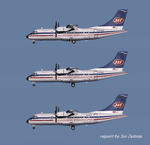
JAT Yugoslav Airlines ATR 42-300 for retro AI traffic, textures for the OSP ATR 42-300 model set. ATR-42 has been short time in JAT's fleet around 1989 and it was used for lines inside Yugoslavia but also for flights to some European cities like Prague, Frankfurt am Main, Vienna, Lyon, Venice, Budapest, Tirana, Bucharest, Sofia, etc. This is only textures for all three ATR's that were in fleet (YU-ALK, YU-ALL, YU-ALM). You will need base file pack for OSP ATR 42-300 (osp_atr_42_300_base.zip). Repaint by Vladimir Frenc ([email protected]). Thank you for flying JAT!
| Filename: | JAT_Yugoslav_Airlines_ATR42_1989_for_Retro_AI_Traf.zip |
| License: | Freeware |
| Added: | 4th January 2021, 18:37:09 |
| Downloads: | 103 |
| Author: | Vladimir Frenc |
| Size: | 2.66 MB |
| Category: Flight Simulator 2004 - Aircraft Repaints, Textures and Modifications | |
| Transportes Aereo Boliviano (TAB) Lockheed C-130 - UPDATE |
|
Images related to this file:
File Description:
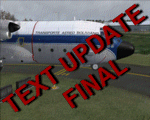
This "ONLY CONTAINS THE NEW UPDATED FILES" you must have my original upload, "Transportes Aereo Boliviano (TAB) Lockheed C-130" (captainsim_c130_tab.zip) found here:
http://library.avsim.net/download.php?DLID=155620 ...
I've had some problems getting the text on the side of the fuselage to look right... the space between the propline and the cockpit side windows seem to be out of scale in relationship to the height of the cockpit windows... I have re-made the text "TRANSPORTE AEREO BOLIVIANO", but this time I hand cut each letter, then scaled and adjusted the positions accordingly... I think this text update looks the best.
| Filename: | Transportes_Aereo_Boliviano_TAB_Lockheed_C130__UPD.zip |
| License: | Freeware |
| Added: | 7th January 2011, 20:48:47 |
| Downloads: | 305 |
| Author: | Greg Spellmen, Captain Sim |
| Size: | 4.21 MB |
| Category: Microsoft Flight Simulator (2020) - Utilities | |
| Flightplan Visualizer 1.18 |
|
Images related to this file:
File Description:
Flightplan Visualizer (FV) version 1.18.0. Copyright 2018-2020 by Pelle F. S. Liljendal ([email protected]), all rights reserved.
FV comes with 787 pre-imported Commercial AI flightplans (+380 BizJet flightplans are available as a separate download). However you are able to import additional (AI) flightplans yourself. Once imported these (AI) flightplans can be visualized on a map-view, and the user will be able to search accross all these. Hence you can use the program as inspiration as to which routes to fly. E.g. you can search across all imported flightplans to find all flights in an A321 flying into/out from LDDU, or simply to look for all flights in a Boeing 747-8F.
Simply run the included installer to install the software. The program will be installed into "C:\Program Files (x86)\Flightplan Visualizer" and all datafiles will be installed into: "C:\Users\[UserName]\AppData\Roaming\FlightplanVisualizer". The program comes with a full manual explaining everything, and a 3 page quick manual to get you started. The first 3 times you run the program the quick manual will automatically open. The forum is hosted here: https://forum.aerosoft.com/index.php?/forum/919-flightplan-visualizer/
Version 1.18 Contains the following changes:
- GREATLY improved the search-legs feature (by a factor of +50).
- In the past the application was forced to 32 bit. This is no longer the case, hence if needed its able to allocate more memory than before. I have never heard of anyone getting an "out of memory" exception, buy anyway.
- In the settings form, the field for entering the path to where to look for the Make Runways -files, have been replaced with a (MRU) combo-box, remembering the last 5 paths entered. So now you don't need to remember these paths each time you want to change it (e.g. if you switch between a set of files generated for P3D and another generated for MSFS). Remark that when this path is changed, FV will automatically restart when saving the settings, as the MkRwy-data are only loaded at startup.
- Added new command-line argument /MkRwy="G:\FS\MakeRunways". If this argument is set, FV will try to locate the files generated by Pete Dowson's MakeRunway in the specified folder, no matter the value of the MkRwy-path set in the settings-form.
- Added new command-line argument /FilePrefix=XXX. If this prefix is set (in the short-cut starting FV) it will look for files in the UserData-folder using this prefix and an underscore (e.g. open "XXX_UserAirportInfo.xml" in stead of "UserAirportInfo.xml"). If FV is started with this argument it will be displayed in the caption of the main-form to notify the user "which prefix is in use".
- Added new command-line argument /ForceReprocessFlightplans which forces all flightplans to be reprocessed on startup (e.g. process all airport redirections according to loaded redirection file).
- Added new command-line argument /? or /help. Using either of these, or having specified a wrong command-line argument will show a small example of the correct way to use these arguments.
- Added a new "Auto-activation prefixes" entry field to the "Edit owned aircraft" form where you can now enter a comma separated list of prefixes for which each aircraft should set to active. If entered, the aircraft will automatically be set active when FV have been started with the /FilePrefix argument set to the entered value (e.g. P3D). If one or more prefixes have been entered into this field, and FV have been started with another prefix, those aircraft will be set to not-active.
- Added new setting to reprocess all loaded flightplans on startup if FV was started with another /FilePrefix argument than used the previous time FV was started (e.g. if you switch between two different simulators).
- Improved how pseudo-airports tries to look-up airport data from the bundled airport-database. So there is now a higher chance that: name, country/state, and time-zone will be populated with useful data for the pseudo airports.
- In previous versions when opening the airport-info form, the checkbox "Exclude small/grass/dirt" (runways) was always checked, meaning you had to uncheck this checkbox before being able to see any runway-information for small airports. In this version a new setting have been added where you can chose if this checkbox should default to being: Checked, Unchecked or (default) Automatic. if choosing "Automatic", this checkbox will default to un-checked for airports only having few/small runways.
- Redesigned the settings-form so things are less "cluttered", and it will be more easy for me to add additional items in the future.
- The Search Airport form now contains fields that lets you specify min/max criteria for rwy-length and airport elevation, and min/max distance to a specified airport (e.g. find all airports within 20-50 Nm of XXXX). Also you can specify required rwy-type (e.g. "All Hard", "Have Soft" ...).
- Added an "Edit" menu-item to the context menu in the Search Airport form, which opens the Airport Info form, and returns back to the Search Airport form (e.g. see details for a few found airports before chooing one of them).
- If Transition Altitude (TA) is not known for a particular airport, the program will now try to estimate TA based on nearby airports in the same country, where those nearby are weighted more than those further away (its not perfect, but "better" than 0). An estimated TA will be postfixed by a asterisk to mark that it is estimated.
- Minor (internal) changes to the automatic version-check.
- Fixed: Issue importing some AigFP flightplans where airports were being redirected (e.g. "AIG_AviaTrafficCompany_Winter_2019-2020v2").
- Fixed: Using the context menu in the list-view showing all owned aircraft, the changes were sometimes not saved.
- Fixed: In the conversion-form when converting weight/volume into US-Gal, the calcuation was wrong (converting from US-Gal was not an issue).
- Fixed: In the leg-info report the value of Transition Altitude was in some cases used in stead of the length of the longest runway.
- Fixed: Leg-info report only contained taxi-out time for all airports. Now it only contains the taxi-out time for the departure airport, but both departure- and destination airports contains a taxi-in time.
- Fixed: In some cases an airport that was currently being edited, could be edited in another window at the same time (opening multiple Airport Info forms).
- Data: The bundled airport-database had a MAJOR face-lift. Various data were corrected, and it have more than doubled in number of airports/helipads contained within the database.
- Data: Improved detection of aircraft-type "IAI 1126 Galaxy" (as "Gulfstream G200"). Thanks to Bruce Nicholson for notifying me of the issue when importing a particular AIG flight-plan.
- Flightplans: All new/updated flightplans have been added to the installer, and all obsolete/defunct have been marked/removed. A total of 787 active flightplans are bundled with the installer.
Pelle
| Filename: | Flightplan_Visualizer_118.zip |
| License: | Freeware, limited distribution |
| Added: | 9th November 2020, 20:09:24 |
| Downloads: | 479 |
| Author: | Pelle Liljendal |
| Size: | 34.48 MB |
| Category: Flight Simulator X - Aircraft Repaints, Textures and Modifications | |
| Mooney 20J PH-SIN |
|
File Description:
Depicted is PH-SIN .
Repaint is for the Carenado Mooney and can de used in FS 9 and FS X , a thumbnail and full instructions for installing are included ( with a Dutch readme file also ) .
| Filename: | Mooney_20J_PHSIN.zip |
| License: | Freeware, limited distribution |
| Added: | 11th August 2008, 02:49:04 |
| Downloads: | 407 |
| Author: | John Glanville / Carenado |
| Size: | 2.03 MB |


© 2001-2026 AVSIM Online
All Rights Reserved
Privacy Policy |