
Where Flight Simulation Enthusiasts Gather from Around the World!
AVSIM Library - Search Results

| Category: Flight Simulator 2004 - Scenery | |
| OSM World: Western Europe |

|
Images related to this file:
File Description:
Read Installation instructions carefully, this is a complex scenery package!
This package includes a "Dev Kit" should you wish to expand it to other areas! Please contact me if you wish to do so! This is community effort! If we all contribute, we will hopefully have the entire world covered one day!
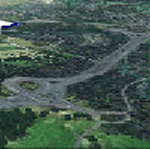
Welcome to OSM World: Western Europe! This is a vector data scenery package covering the western European area. Coastlines, Rivers, lakes, roads, railways, and power lines with detail never before seen! All in an autogen-compatible density! You can see roundabouts, train terminals, harbor areas in a resolution of a point every 10 meters. At this same resolution a vectorial city class places residential (in small and big building variations, depending on surface area) and industrial areas exactly where they are supposed to be. This gives the city areas a resolution far superior to the capacity of FS-2004 default landclass bitmaps, limited to approximately 1 Km x 1 Km squares. OSM World: Western Europe will even give you small roads leading to small towns (even a few houses across)! From big highway intersections, including ramps, to the tiniest rural pathways covering the entire western area! Wherever in Western Europe you fly, there is something to see!
| Filename: | OSM_World_Western_Europe.zip |
| License: | Freeware |
| Added: | 13th October 2014, 00:18:39 |
| Downloads: | 4,140 |
| Author: | Mario Noriega |
| Size: | 274.75 MB |
| Category: Flight Simulator 2002 - Miscellaneous Files | |
| Active Camera 2002 version 1.1 |
|
File Description:
Active Camera 2002. With this module you can enable additional views in Microsoft Flight Simulator 2002. Several new camera views are selectable from the FS2002 - Options menu. When activated this module replaces the original tower and virtual cockpit views of FS2002. Features: fly by, approach and spotter view, mouse driven spot plane view, allows mouse panning and zooming in the VC, walking in the cabin, walking outside of the aircraft (ambient sounds like steps, wind and aircraft stress sounds), head latency function, pre-stall buffeting effect, ground turbulence effect, ability to save and call up to 10 presets of views in the VC per aircraft for an unlimited number of aircraft. This version replaces Active Camera 2002 (AC2002.zip) uploaded to the AVSIM library on 20 June 2003. Some users encountered troubles to "handle" the spot plane view parameters, got a trembling image in Spot plane view and could not pan. To make things more simple we added : " Use mouse in spot view", a new option in the AC2002 menu that enables the Active Camera Spot Plane view. If "Use mouse in spot view" is unchecked, THE FS DEFAULT SPOT PLANE VIEW is active. Bug corrected : sometimes recycling views from 2D to 3D jumped over the virtual cockpit. Updated shortcut table.
| Filename: | Active_Camera_2002_version_11.zip |
| License: | Freeware, limited distribution |
| Added: | 24th June 2003, 00:35:57 |
| Downloads: | 34,402 |
| Author: | Guillaume Darier and Serge Baye |
| Size: | 1.77 MB |
| Category: Flight Simulator 2004 - Sounds | |
| A300/A310 General Electric CF6-80C2A Series V3.1 Update |
|
File Description:
This is a vital update to the soundset I released a little over a month ago. I replaced all the exterior sounds respectively and updated the inteior howl heard during the early stages of the spool up and the volume of the files that followed. All though I stated that my previous version was the final one I felt that this was completely necessary, expect more and more updates to follow much like Pedro Oliveira's A320 Flight Dynamics which happen to be superb. I personally recommend that you use Corey Ford's latest repaint of which happens to be an excellent American A300 which compliments this update well. I am not an Official HNAC member (Although I wish) nor is this the official HNAC Sound Package this is just the best availible one every created for FS on this plane period. This requires V3 so if you don't have it please download it first before you download this update also do not use this with 767s. If you want a 767 soundset download Devyn Silverstein's latest CF6...B1F package. Lastly I've asked avsim to remove verison 1 and 2 because people were still downloading them (V3 is on another planet 1 & 2 was much too old.) Enjoy this, on to the GE 767!
| Filename: | A300A310_General_Electric_CF680C2A_Series_V31_Upda.zip |
| License: | Freeware |
| Added: | 14th February 2005, 06:17:26 |
| Downloads: | 28,538 |
| Author: | Emil Serafino Jr. - A300/A310 GE Sound Project |
| Size: | 22.97 MB |
| Category: Flight Simulator 2004 - Scenery | |
| New York City Default Bridges and Objects v2.0 |
|
File Description:
I originally planned on "fixing" the George Washington Bridge, which was inadvertantly "sunk" by FSG's 38m mesh, and ended up repositioning and scaling a whole bunch of other default bridges and objects within about 50 miles of NYC. This addon was designed and tested for use with FS 9.1, FSG 38m mesh (available here at AVSIM), and Freeflow NE, UT/USA and USA Roads. It should also work with other road and water packages. I did not create any new scenery, I only repositioned default objects to their correct locations.
This should be the final version for a while. This version was tested with and adds compatibility for Megascenery NY and Aerosoft's Manhattan scenery. I also removed a few more objects that were placed in the water, and moved back to land a bunch of cranes around KEWR that were in the water.
Fixed stuff: All inappropriately placed NYC and Newark bridges (major, not autogen) up to Bear Mountain in the north and south to about the Verrazanno; Belmont Racing track; Shea Stadium; Meadowlands Stadium; World's Fair Tower; US Open Stadium. Added Meadowlands Race track and a few bridges around Newark, moved cranes around KEWR back to land, removed several objects in the water.
| Filename: | New_York_City_Default_Bridges_and_Objects_v20.zip |
| License: | Freeware |
| Added: | 10th November 2005, 16:48:46 |
| Downloads: | 6,557 |
| Author: | Thomas Perry |
| Size: | 558.69 KB |
| Category: Flight Simulator X - Scenery Design | |
| Airport Design Editor 1.50 |
|
File Description:
This is the first significant upgrade of ADE since version 1.47 almost two years ago and contains a number of new and improved features and fixes for old problems.
New and updated features include
- ProKey features include Custom Hiding objects, ADE responds to key presses in FS, Load last saved project and improvements to the Move Airport Feature
- List third party libraries used. This is currently a basic feature to list the libraries for objects used in your project
- Beacons and Effects can now be placed
- New List for helper shapes and many lists now support multiple selection and delete
- Improved multiple selection in the main display including 'rubber band'
- Most objects can now be copied and pasted
- Undo/Redo extended to support actions with vertices
- Select and drag a taxi link rather than dragging its end nodes
Fixes include
- Improvements to the handling of background images that should help the performance issues found in the past
- Stopping the display drift that can be exhibited when ADE is connected to FSX and the display Locked to the user aircraft
- Problem of dialog buttons being lost where users used dpi settings greated than 96.
| Filename: | Airport_Design_Editor_150.zip |
| License: | Freeware, limited distribution |
| Added: | 17th August 2011, 16:15:08 |
| Downloads: | 4,599 |
| Author: | Jon Masterson, ScruffyDuck Software |
| Size: | 26.33 MB |
| Category: Miscellaneous Files - Miscellaneous Files | |
| FSMMoving Map v1.1.0 |
|
File Description:
FSMMovingMap 1.1.0 - Compatible with both FS2002 and FS2004
FSM Moving Map is a Freeware software with some neat features. With proper road maps, you will be able to find your road (or lack of) in FS environment, or fly at ease using Sectional or terminal charts. The concept is very simple: you, the user define all the maps... once you are flying, FSMMM will try to locate the best map available, and display it on screen. This can be very useful during VFR Flights.
One of our beta user has described it as "flying like the rich people with fancy GPS units sporting colour map displays" - 'nuff said.
On local PC, this map can be used with FS2004 Kneeboard, or with "MovingMap Launcher". This software can also integrate with FlightSim Manager (v2.8 and above), and work over the network using FSM Lanview (so you can fly on one machine while the map runs on a different PC).
You can find the latest version from: http://www.ranainside.com/
Programmer
Rana Hossain
[email protected]
24 February 2005
| Filename: | FSMMoving_Map_v110.zip |
| License: | Freeware, limited distribution |
| Added: | 24th February 2005, 05:00:56 |
| Downloads: | 12,058 |
| Author: | Rana Hossain |
| Size: | 798.33 KB |
| Category: Prepar3D V1-4 - Flight Plans | |
| CargoJet Flight Plans |
|
File Description:
Attached is an Excel Flight Planner including recent (Jan/Feb 2019) scheduled flight plans for CargoJet for use with the CaptainSim 757-III Freighter expansion.
A couple of weeks ago, I made two CargoJet liveries for the CS 757-III Freighter, available at Avsim:
https://library.avsim.net/esearch.php?DLID=&Name=&FileName=&Author=meier&CatID=p3dacrp
To use these files, copy the attached .rt files to your Captain Sim route directory:
*\Lockheed Martin\Prepar3D v4\Captain_Sim\757-III\Routes\
These accompanying route files (60+) DO NOT include any SID or STAR data, nor do they include any performance information (cargo/fuel weights)...I've intentionally tried to keep these files customizable with any ATC program you may be using.
The Excel spreadsheet use should be pretty straight forward (it was designed using MS Excel 2019...you'll need MS Excel 2013 or newer for the macros to work correctly).
The spreadsheet will open to a worksheet containing CargoJet's current, scheduled route network. From this worksheet, simply select a departure location from the buttons on the world map.
Once a departure location is selected, a second "Flight Planning" worksheet will open with a UserForm Box directing you to select an airport destination based upon your selected departure location.
The UserForm box is pre-populated only with current destinations from that departure airport (based upon current CargoJet Jan/Feb 2019 schedules obtained from online flight tracking data).
I've included a weather snapshot download from each of the departure and destination airports into the flight planning worksheet.
I have not yet included enroute weather information...that may come in a "V2" of this flight planner.
As I have not yet included enroute weather information, flight fuel calculations/fuel burn are only approximate for now. Down the road, I may also include calculations for derate temperatures...that will take considerable more work.
I think this Flight Planner is a pretty good version 1 for sharing. In the absence of a website dedicated to a "CargoJet Virtual Airline", I thought this Excel spreadsheet and accompanying flight plans may be of benefit to anyone who might enjoy flying the CS757-III Freighter expansion with CargoJet livery.
Personally, I was fortunate to already have the full compliment of SimAddon airports (Canada wide) which makes for enhanced enjoyment of the CaptainSim 757-III add-on and this flight planning spreadsheet. (That statement wasn't intended as a promotion for people to go out and buy the SimAddons software!!!)
I haven't had a chance to test all the flight plans yet...I'm hoping I haven't made any errors!
Anyhow, I hope this spreadsheet and flight plans can be of benefit to others.
Feedback always appreciated!
Rob
February 15, 2019
| Filename: | CargoJet_Flight_Plans.zip |
| License: | Freeware |
| Added: | 16th February 2019, 22:00:12 |
| Downloads: | 169 |
| Author: | Rob Meier |
| Size: | 1.93 MB |
| Category: Flight Simulator X - Aircraft Repaints, Textures and Modifications | |
| Republic P-47D-20 365th FG (B4-W) "Mortician's Delight" |
|
Images related to this file:
File Description:
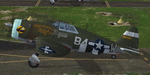
This folder contains a repaint for the A2A Wings of Power III P-47D Thunderbolt, representing P-47D-5-RE 42-8438 B4-W "Morticians Delight", one of the P-47's flown by Lt Neal Worley of the 387th FS/ 365th FG. Lt. Worley's first two P-47's were called 'Kansas Jack', referring to his Emporia, Kansas upbringing, but he did not feel like naming his third aircraft. His crew came up with 'Morticians Delight', and Worley himself painted the picture on the engine cowling. In 127 missions, he crashed 5 Thunderbolts. His coolness under pressure was immortilized on July 26th, 1944. A 20 mm shell hit his right wheel well during an attack on Sauveur Lendelin, jamming the wheel. He discovered that only the left wheel would lower, but would not retract, so bellying in was no longer an option. He circled for over an hour, burning fuel, and then landed on only the left gear, easing the fighter down. When the right wing dipped just enough, he hit the left brake, and the P-47 spun to a stop. His landing was captured on film, and used in the movie "Fighter Squadron". The aircraft was repaired, and flew missions the very next day, as a testament to the ruggedness of the Thunderbolt. Repaint by Jan Kees Blom, based on the paintkit by Martin Catney.
| Filename: | Republic_P47D20_365th_FG_B4W_Morticians_Delight.zip |
| License: | Freeware |
| Added: | 30th November 2019, 18:26:25 |
| Downloads: | 48 |
| Author: | Jan Kees Blom |
| Size: | 9.9 MB |
| Category: Flight Simulator 2004 - Scenery | |
| Mountain View CPZ3 in Ontario, Canada |
|
Images related to this file:
File Description:
This is Mountain View, a small RCAF airfield at the eastern end of Lake Ontario on Prince Edward Island, some 40 miles west of Kingston. Mountain View is used for training during the summer months, and part of this training is for C-130 crews, who practice landing on rough or unprepared landing strips. The crews are based at Trenton, which is a large base 10 miles to the northwest on the mainland. There are (or were, I haven't seen it recently) numerous parked and ancient fighter planes such T-33's and Canadair Tutors; these could also have possibly been used for summer training or perhaps were just stored. Last summer there were only two hangars left standing; in 2002 there were five. In real life you would be on the lookout not only for C-130's but also (at certain times during the summer) for parachutists and also gliders. This airfield is one that you will fly over and not land on; I confess that I have cheated with the length of the 06L-24R gravel "practice" runway, so that it became possible for the FS version of a touch-n-go with a C-130 to be completed without using the grass. The aerial photograph shows the new "practice" gravel runway under construction.
| Filename: | Mountain_View_CPZ3_in_Ontario_Canada.zip |
| License: | Freeware, limited distribution |
| Added: | 9th March 2012, 15:05:57 |
| Downloads: | 350 |
| Author: | Roger Wensley |
| Size: | 7.26 MB |
| Category: Flight Simulator 2004 - Utilities | |
| FsPassengers (ver 05 september) |
|
File Description:
FsPassengers 2004 is an add-on for Flight Simulator 2004 that will completely revolutionize the way you fly in Fs2004. Here
are just some of the features of FsPassengers 2004: Add passengers to your flights! Finally, you're not alone in the sky.
Passengers react to how you fly your plane. Hear them scream if you make drastic mistakes, and get their opinion of your
flight in real time. Provide in-flight passenger services such as movies, music, and drinks. Make money for successful
flights; be fined if you do something wrong. Manage an airline (make money, manage aircraft fleets, etc). Maintain your
aircraft in good condition, otherwise you may experience unique and suprising failures. Create and maintain pilot careers.
Keep detailed logs and statistics for every flight you make (great for virtual airlines). Fly through dangerous parts of the
world, and risk the safety of your plane, crew, or passengers! Export your flight to your Virtual Airline. This add-on
includes more than 200 in-flight sounds to immerse you in the ambiance of flight. Hear feedback from your co-pilot, flight
attendants, passengers; listen to ATC chatter, music, GPWS, and more. All screens and reports work in full screen. No need to
quit FS. - This demo is fully functional apart that you can only start a flight from San-Francisco area (but you can land
anywhere)
| Filename: | FsPassengers_ver_05_september.zip |
| License: | Shareware, limited functionality |
| Added: | 5th September 2005, 17:01:18 |
| Downloads: | 9,751 |
| Author: | Daniel Polli |
| Size: | 26.19 MB |


© 2001-2026 AVSIM Online
All Rights Reserved
Privacy Policy |