
Where Flight Simulation Enthusiasts Gather from Around the World!
AVSIM Library - Search Results

| Category: Flight Simulator 2004 - Scenery | |
| Chennai airport for fs9/Fs2004 |

|
File Description:
Hi everyone
This is my first project, and it took 6 months to complete. This is a freeware airport, but I have tried to put in as much detail as I possibly can. I made this airport because FS9 did not have very many good-quality payware or freeware airports, so I decided to make an airport for my home country. Some general info for the airport is below:
Chennai International Airport (MAA), located in Meenambakkam, is the primary airport serving Chennai, Tamil Nadu, and the southern part of India. It has two terminals: Terminal 1 for domestic flights and Terminal 2 for international flights. The airport is known for its modern infrastructure and facilities, including shopping areas, lounges, dining options, and passenger services. It is an important hub for domestic and international travel, especially for travelers heading to South Asia, Southeast Asia, and the Middle East. The airport also has strong connectivity via road and metro.
Features of the scenery:
1)Has the latest terminal and airport layout since I used the latest data
2)added buildings to the surroundings (Custom 3d model made from scratch even the terminals)
3)has partial photoreal scenery(will talk about issues in bugs area)
4)has good jetbridges
5)3d volumetric grass in certain parts(will talk about issues in bugs area)
6)taxiways designed as in real life
7)Includes parked cars, lights, nearby buildings
8)Added lots of ground equipment
9)Trees around the airport
10)airport perimeter walls
11)Used Lh simulations library for some buildings and volumetric grass
Known bugs:
1)photoreal scenery has some issues since I can't get my photoreal scenery maker to work properly
2)Papi lights are kinda bugged
3)3d volumetric grass is limited to some parts due to fps loss
How to install:
1)Download file
2)Extract from rar using WinRaR or other program
3)paste vomm in the addon scenery of your flight sim installation directory and add scenery in settings once you open fs9
4)Includes better default textures for aprons and taxiways (optional!!!!!)
5)enjoy!!
Reminder: This airport does not have custom taxiways or aprons the default textures modified by me are the ones used in the picture. If you decide to replace your default files with mine all your airports globally(default) will have these textures for taxiways and aprons.
Tested to run on low-end devices with minimal lag
will run well on better devices
Hope you enjoy this completely freeware scenery and always read the above instructions to avoid unnecessary scenery limitation discussions.
Thank all you fs9 folks.
Download link: https://sharemods.com/imxa719wg065/Chennai_airport_fs9.rar.html
| Filename: | Chennai_airport_for_fs9Fs2004.zip |
| License: | Freeware |
| Added: | 18th January 2025, 01:22:51 |
| Downloads: | 244 |
| Author: | Jeremy(lol890) |
| Size: | 92.14 MB |
| Category: Flight Simulator X - Scenery | |
| EGXJ - RAF Cottesmore - Rutland, England |
|
File Description:
RAF Cottesmore (ICAO EGXJ) is a former Royal Air Force station in Rutland, England, situated between Cottesmore and Market Overton.
The Stationed opened on 11 March 1938 and was used mainly for training, and the first squadrons were equipped with Vickers Wellesley aircraft, but soon converted to Fairey Battles. Later RAF Bomber Command took over the airfield, again as a training station, flying Handley Page Hampdens. These units remained in residence until a few days before the outbreak of war in 1939 when they were sent to RAF Cranfield to serve as a pool providing replacements for combat losses. Their place at Cottesmore was taken by Nos. 106 and 185 Squadrons, moving in from RAF Thornaby with Hampdens. However, with the outbreak of war, the aircraft and crews were sent to locations in the north and west, as enemy air attacks were expected over the southern half of England. As these never materialised, the Hampdens returned in the spring of 1940 and No. 185 Squadron became the Hampden operational training unit, No. 14 Operational Training Unit RAF.
RAF Cottesmore's Hampdens' first trespass into hostile airspace was a leaflet dropping operation over northern France. In October 1940, 106 Squadron moved to RAF Finningley while No. 14 OTU remained training crews for Bomber Command, its Hampdens and HP.53 Herefords being replaced by Vickers Wellingtons in 1942. Training continued for three years and three months until August 1943 when No. 14 OTU moved to RAF Market Harborough.
In early December 2009, it was announced the station would close due to funding cut-backs, in part to help pay for additional helicopters for British operations in Afghanistan.
In 2010, No. 4 Squadron RAF disbanded, with No. 20 Squadron RAF re-badging as No 4 (Reserve) Squadron.
The station became a satellite to RAF Wittering on 31 March 2011 with a civic parade and flypast to mark the disbandment of No 1 Sqn RAF, 800 NAS, 801 NAS and JFH.
In July 2011 Defence Secretary Liam Fox announced plans for it to be the airfield for one of five of the Army's Multi-Role Brigades. In April 2012 it was renamed Kendrew Barracks after Major General Sir Douglas Kendrew.
Source: Wikipedia
| Filename: | EGXJ__RAF_Cottesmore__Rutland_England.zip |
| License: | Freeware |
| Added: | 19th March 2016, 12:15:07 |
| Downloads: | 344 |
| Author: | Terry Boissel |
| Size: | 1.66 MB |
| Category: Flight Simulator X - Scenery | |
| RNAS Henstridge (HMS Dipper) |
|
File Description:
Royal Naval Air Station Henstridge or RNAS Henstridge (HMS Dipper) is a former Fleet Air Arm base located 7 miles (11 km) west of Shaftesbury, Dorset (Now Somerset) and 12.4 miles (20.0 km) east of Yeovil, Somerset in South West England.
The main part of the land (355 acres) was purchased in August 1941, after which building of the airfield and the marsh lane accommodation site commenced, it was commissioned on April 1, 1943 as HMS Dipper, principally as number 2 naval fighter school, on the 11th September 1942, another 18 acres was acquired at the adjoining gibbs marsh area for an aircraft repair and maintenance site. The design and lay-out of the airfield was quite unique, having 5 runways, 2 of these being east west lay-out (07-25) both 1000 yards long, the northern runway incorporated a dummy deck landing strip, complete with under-ground arresting gear with four above ground arrestor wires, which was a duplicate of that installed on HMS Implacable for training of aircraft carrier landings, these mainly being carried out with the Seafire, a naval version of the spitfire with folding wings. The site also had its own cinema and stage hall
March 1952 the airfield became inactive and was placed under care and maintenance, during 1953 Air whaling (now Bristow group) used the facilities for repairs to the whaling fleet of helicopters until moving out in June 1958.June 1957 it was finally closed as a naval establishment, from 1958-1960 the entire site was sold off. 27 June 1980 the BBC purchased the whole site and applied for planning permission to erect at the airfield a shortwave radio station consisting of 21 self-supporting towers holding aerial arrays and ancillary buildings on a 300-acre site. The station would transmit overseas radio services to Eastern Europe, the Soviet Union and perhaps South America the application failed and the BBC sold the land during January 1987 The airfield is also the home of the wessex strut, a general aviation club formed in January 1977, which holds an annual fly in and other events their first fly-in was on 17 April 1977 and attracted 107 aircraft. As of today the only usable runway is the north 07-25 runway, extant with the concrete dummy deck, and the underground machinery chamber, it is also the home to a large number of light aviation enthusiasts aircraft as well as the Yakolevs aerobatic display team and the Dorset and Somerset air ambulance
The current airfield is operated by EGHS and is an unlicensed airfield. The only usable runway is 07/25 tarmac/concrete 750 mts long x 6 mtr wide. Henstridge radio can be contacted on 130.250 MHz, it can be found at the south eastern stub of the Yeovilton MATZ
Source:Wikipedia
| Filename: | RNAS_Henstridge_HMS_Dipper.zip |
| License: | Freeware |
| Added: | 9th February 2017, 22:14:54 |
| Downloads: | 165 |
| Author: | Terry Boissel |
| Size: | 4.53 MB |
| Category: Prepar3D V1-4 - AI Aircraft | |
| AI Click Mexicana Ai Aardvark Fokker 100 Fleet Pack |
|
Images related to this file:
File Description:
This is the Third Oldest Airline in the world, the Second Oldest Airline in Latin America, and the First Oldest Airline in Mexico, Mexicana Airlines (Mexicana de Aviacion), this is the Airbus A318-111 for now the pack have the Last New Livery (2010) and the Old Livery (2005), more later will upload the Older Liveries, the Old Livery but with the Thin Logo and No Wingtips Logos, and the most popular and old Mexicana´s livery, (1997-2005). For the 100th Anniversary I´ll upload all the fleet, since 1940´s with the DC-2 to the last fleet that had when it flies, the Mark and Airline still exists, BUT It doesn´t fly since 2011. In this case this is the Mexicana Click the low cost airline by Mexicana Airlines, founded in 1972 as Aerovias Caribe S.A. de C.V. (Aerocaribe), in 2005 Aerocaribe changed as Click Mexicana/Mexicana Click, the fleet consisted in 2010 in Fokker 100 and Boeing 717-2BL. The textures are Mexicana Click Fokker 100, the registrations of this aircraft are: N109MN, N305MX, N347MX, N388DF, XA-JXT (With Old Colors, White Colors included), XA-JXW (With New Colors, Old Colors, White Colors, Grupo Mexicana sticker included), XA-KXJ (With Old Colors, Grupo Mexicana sticker, No paint included), XA-KXR, XA-LXG (With New Colors, Old Colors, No Tail Logo included), XA-MQC (With New Colors, No Tail Logo included), XA-MQJ (With New Colors, Old Colors, No Tail Logo, White Colors included), XA-MQK, XA-MRA (With New Colors, No Tail Logo, White Colors, included), XA-MRB, XA-MRE (With New Colors No Tail Logo included), XA-MRG (With New Colors, No Tail Logo included), XA-MRH (With Old Colors, New Colors, White Colors included), XA-SGE (With Old Colors, No Paint, Grupo Mexicana sticker included), XA-SGF (With Old Colors, Grupo Mexicana sticker included), XA-SHI (With Old Colors, New Colors, No Tail Paint, Grupo Mexicana sticker included), XA-SHJ (With Old Colors, New Colors, White Colors included), XA-SHK, XA-SHL (With Old Colors, White Colors included), XA-TCG (With Old Colors, Grupo Mexicana sticker included), XA-TCH (With Old Colors, Grupo Mexicana sticker included), XA-TCM, XA-TCP (With New Colors Old Colors, No Tail Logo), XA-TKP (With Old Colors, Grupo Mexicana sticker, No Paint included), XA-TKR (With New Colors, Old Colors, No Paint Logo, White Colors, Grupo Mexicana sticker included). The model is AI Aardvark (AIA) Fokker 100 Basepack. I hope you enjoy it!.
| Filename: | AI_Click_Mexicana_Ai_Aardvark_Fokker_100_Fleet_Pac.zip |
| License: | Freeware |
| Added: | 22nd May 2025, 22:57:41 |
| Downloads: | 27 |
| Author: | Jesus Gibran Soriano Solleiro |
| Size: | 264.28 MB |
| Category: Prepar3D V1-4 - Utilities | |
| Flightplan Visualizer 1.16 |
|
Images related to this file:
File Description:
Flightplan Visualizer (FV) version 1.16.0. Copyright 2018-2020 by Pelle F. S. Liljendal ([email protected]), all rights reserved.
FV comes with 765 pre-imported Commercial AI flightplans (+380 BizJet flightplans are available as a separate download). However you are able to import additional (AI) flightplans yourself. Once imported these (AI) flightplans can be visualized on a map-view, and the user will be able to search accross all these. Hence you can use the program as inspiration as to which routes to fly. E.g. you can search across all imported flightplans to find all flights in an A321 flying into/out from LDDU, or simply to look for all flights in a Boeing 747-8F.
Simply run the included installer to install the software. The program will be installed into "C:\Program Files (x86)\Flightplan Visualizer" and all datafiles will be installed into: "C:\Users\[UserName]\AppData\Roaming\FlightplanVisualizer". The program comes with a full manual explaining everything, and a 3 page quick manual to get you started. The first 3 times you run the program the quick manual will automatically open. The forum is hosted here: https://forum.aerosoft.com/index.php?/forum/919-flightplan-visualizer/
Version 1.16 Contains the following changes:
- First of all a big THANK YOU to AIG (Alpha India Group) for allowing me to add features to both download their flight-plans (actually a feature suggested by Kai Kamjunke who is one of the developers of AIG AIM and other AIG tools) and access their list of defunct/renamed flightplans. While giving thanks, I also want to thank all (AI) aircraft-model creators, repainters and those who create all the flightplans ... our virtual sky would not be the same without your hard and dedicated work.
- Added new form to download or install AIG flightplans (downloaded directly from the AIG-servers). The form will identify all flightplans that are newer than those already installed or flightplans that are not currently installed. You can simply double-click a flightplan and it will be directly installed without the need to first download the file, and then choose to import this file.
- Both the new flightplan download- and the enable/disable flightplan- form contains a button which download- and show a list of defunct/renamed flightplans (obtained directly from the AIG forum).
- If you create a user-Airline while importing a flight-plan, when you return to the import-form you will be asked if you want to use that newly created flightplan (saves you from having to open the airline-browser and search-for/select that user-airline).
- Added Flightplan-, Airline- and Aircraft-filter to the top of the leg-search form to filter the items shown in the listviews.
- The "Select All" and "Select None" buttons now only (de)select visible items (if a filter is active there might be more items not displayed). However holding SHIFT while pressing these buttons, ALL items will be (de)selected no matter if they are shown or not.
- Replaced the two airport entry fields (in the leg-search form) with filter combo-boxes (MRU) so you can now enter a filter-text to filter which airports to include (the default filter is usign ICAO-codes so the old functionallity is preserved).
- Added filters to search for legs with specific flight-numbers and/or served by aircraft with specific registrations.
- When setting up a filter, sub-elements of the same type can now be separated by "/" so you only have to enter the type-name once (e.g. "country=dnk/nor/swe"). The pipe-char ("|") can be uses in stead if you prefer (e.g. "country=dnk|nor|swe").
- Now both "?" and "%" can be used as a single char wildcard in the filters ("?" is a DOS wildcard, whereas "%" is a SQL-wildcard).
- Added "#" as a wildcard for a single numeric value (0-9) in filters.
- Added "@" as a wildcard for a single alpha value (A-Z) in filters.
- Improved detection of invalid filter-text, which changes the text-color into red, to indicatet that the filter is invalid.
- The ISO3 country-code is now visible in the country combo-boxes in the leg-search form (these codes can be used in the airline- and airport- filters).
- Likewise 3-char Region- and Sub-region -codes have been added to their respective combo-boxes (these codes can also be used in the airline- and airport- filters).
- Saving the leg-search criteria will no longer require the input to be validated. E.g. you can now save the criteria where no aircraft have been selected. If you want to make sure that the criteria is valid for a search, please perform a search before you save the criteria.
- Flightplan-filter added to the "Re-process flightplans" form.
- Aircraft-filter added to the "Choose favorite aircraft-types" form. Also a few extra columns were added to the aicraft list-view.
- The Decode-METAR/TAF form now allows the user to manually enter METAR/TAF messages, and the form can now be opened directly from the main-menu (in case you optain METAR/TAF from other sources and need to decode it).
- Added a new button to the Randomizer form which lets you pick a random route (there is already a button to pick a random flight). The difference is the statistical chance of the chosen route.
- Added 2 columns to the runways listview in the Airport-info form showing head/cross-wind based on selected wind-direction/speed (automatically updated from the obtained METAR report).
- When accepting the result of a leg-search the previous used criteria (if different) are now archived. So you are able to load the 5 last used search criteria.
- The Result-viewer form now have a "Top-most" check-box. When checked that form will be shown on top of all other windows. This allows you to have this form shown on top of other forms (e.g. if you need to enter data from a metar-message into the FMC in the simulator).
- Many of the result-viewer forms now opens non-modal, meaning it can be displayed next to the window form where it was opened and you can switch between the two (you might need to use the new "Top-most" check-box for the best result). When closing the form from where the result-viewer was opened, the result-viewer will be closed as well.
- Likewise the Unit Conversion form also got the "Top-most" check-box in case you want to display this window on top of another program (e.g. if you have paper-work with weight based on kg and you need to enter the weights into a FMC/MCDU that only accepts lbs (or vice versa).
- The "Copy to clipboard" buttons on the METAR/TAF-decode form, and the Leg-Info form have been replaced by a "Show Report" button in stead. This new button will in stead show the text in the Result-viewer form (if you need to, it can be clipped to the clipboard from there).
- Below the (left/right) list-views in the "Enable/disable flightplans" form you now find a label showing two numbers. The 1st number shows the number of items (flightplans) shown in the list-view, and the 2nd number (in the parentheses) shows the number of selected items.
- When importing a flightplan where the aircraft-type can not be detected, the "lines" assigned to the "DUMMY AIRCRAFT" are now all automatically selected. So it is easy to just hit the "Change Aircraft type" button in case there is just a single, or multiple that should have the same type assigned.
- Hoovering the mouse over the gate-markers in the Airport-info form, the tool-tip now contains the GPS-position of the gate. Likewise editing the gate the caption of the edit window contains the GPS-position.
- Added airport size to "FS Comment" column in the "Nearby Airports" form.
- Added line-breaks to the METAR/TAF tool-tips displayed in the Leg-info form (line-breaks also included in the report).
- Fixed: There was a nasty bug in the "Legs" tab-page of the Airport-Info form where the same time-zone was used for both departure- and destination-airport when showing the departure-/destination-times as local times, even if departure- and destination-airports were in different time-zones.
- Fixed: The value of the "Calculated flighttime" check-box in the leg-search form was not set to the loaded value.
- Fixed: If one of your user-airlines had a blank callsign, it would list all airlines with a blank callsign as alternatives. Now it will only try to match non-blank callsigns.
- Fixed: The METAR/TAF decoder was not able to correctly detect a fraction visibility if following variable wind (e.g. "210V290 3/8SM").
- Fixed: Some of the combo-boxes in the leg-search form were enabled for text-entry, where the user should only be able to pick a value.
- Fixed: If "[None]" was selected and you executed a leg-search the "Edit" button remained disabled when you returned to the main form.
- Data: While testing some of the new filters I saw a few erros in the aircraft data (e.g. a few freight aircraft had a non-zero passenger count and other minor issues like that), which were fixed.
- Data: Thanks to Bruce Nicholson for bringing it to my attention that DC-9-15F was not being detected in version 1.15. Now all the DC-9 sub-variants should be detected correctly (e.g. 9-11/12/13/14...51 both pax and freight). The same better sub-variant detection was added to the DC-8's and DC-10's as well.
- Data: Thanks to Aucery for bringing it to my attension that some of the (BizJet) aircraft were not being detected, or not being detected correctly. The King Air 250/300 should now be detected correctly as are Hawker-700/1000, Mitsubishi MU-300, IAI Astra Jet 1125, Cessna T210/T303, and Dornier 328JET/PROP.
- Flightplans: All new/updated flightplans have been added to the installer, and all obsolete have been removed. A total of 765 active flightplans are bundled with the installer.
Pelle
| Filename: | Flightplan_Visualizer_116.zip |
| License: | Freeware, limited distribution |
| Added: | 2nd May 2020, 23:15:38 |
| Downloads: | 318 |
| Author: | Pelle Liljendal |
| Size: | 29.27 MB |
| Category: Flight Simulator 2004 - Miscellaneous Files | |
| The Steamer PATRIA, pearl on VFR of Lario - Como Lake, Italy |
|
Images related to this file:
File Description:
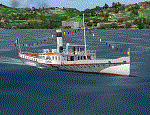
Steamship sailing, GMax model with photo real textures and panel with exterior views.
The History: Born with the name of "Savoia" this steamer was placed in the yard June 7, 1926 by the Odero's workers at the construction site of Dervio, and in a very short time, triumphantly launched July 31, 1926 first in the waters of Dervio , to start shipping in the Como Lake.
Soon after this launch, the site was put on the twin " October 28 ", which later became the "Concordia". In December 1926, the " Savoia " incorporates a major change : the distribution system of the machine new one "Caprotti" type that has excellent results and is , up to date, the only example in the world (reduction of rolling steam). In May 1927, the " Savoia " has the honor to welcome on board the King of Italy Vittorio Emanuele III , escorted by the steamers " October 28" and " Plinio". During World War II , following the fall of the fascist regime , July 25, 1943 , is required to change the name of the steamer. Even public opinion is mobilized and decide to rename the steamer by the name of "PATRIA". At the same time the twin " October 28 " is renamed "Concordia". Back after a break in service , January 10, 1945 is attacked and strafed while browsing the center of the lake . At the end of was counted 5 victims and 17 injured of which one will die as a result. At the height of the bridge spread of a fire, for piercing and incendiary bullets used by the Anglo-Americans, but soon subdued by the crew. In June 1951, the PATRIA is back in service with some modifications. The smokestack is shortened to about 3 mts and boilers and burners are converted from coal to oil. In August 1952, the boat service on the lake shift from "Lariana " to Government Management, which taken the steamer. In 1973 the interior of the " Patria" is restored according to the original scheme: the magnificent ship back into service June 10, 1973.
Great new features are the stained glass windows in the inner surface that allow you to see the paddle wheels in motion. In the 80s the PATRIA is used mainly for special cruises and rentals, limiting the use of the line. The summer of 1990 is the last one that sees the "PATRIA" in service. In the fall it is stopped at the construction site of Tavernola, later transferred to Dervio where it remains moored for years waiting to know his fate ... between demolition or renovation (this strongly desired by the Lariana population). Finally in 2003, the Province of Como takes the field by engaging in the recovery of the steamer, with PATRIA's historic "friends" of "Famiglia Comasca"; February 27, 2004 the remains of the steamer is formally sold to the Province of Como in the symbolic figure of " 1 Euro". After a series of bureaucratic delays, in August 2008 is finally contracted the first batch of works and the renovation starts. On 8 May 2013, PATRIA comes to Dervio for a short cruise, and for testing stability on the lake, and received a "Certificate of Class" that officially renames it as a ship. After 23 years it is the first time that the PATRIA sails again, since 1990, the year of its disarmament. The inauguration takes place July 19, 2013, at Villa Olmo in Como present authorities, proponents of the huge recovery and many other enthusiasts ... as me. Enjoy.
Check video available here: http://youtu.be/KALgHsGiPu8
| Filename: | The_Steamer_PATRIA_pearl_on_VFR_of_Lario__Como_Lak.zip |
| License: | Freeware |
| Added: | 22nd February 2014, 01:25:28 |
| Downloads: | 590 |
| Author: | Aldo Della vedova, Daniele Lanfranchi, Gian Mario Verga |
| Size: | 10.5 MB |
| Category: Flight Simulator X - Scenery | |
| GB-0112 - RAF Bassingbourn - Cambridgeshire, England |
|
File Description:
RAF Bassingbourn is a former Royal Air Force station located in Cambridgeshire approximately 3 mi (5 km) north of Royston, Hertfordshire and 11 mi (18 km) south west of Cambridge, Cambridgeshire, England.
RAF Bassingbourn was constructed by John Laing & Son between 1937 and 1939 in the parishes of Wendy and Bassingbourn immediately to the west of the A14 (now the A1198) road. The site selected was low ground between several tributaries of the River Cam. The area had been long cleared of forest and tended to be swampy and unstable, and because the boggy ground produced a persistent mist over the large meadow the site was considered ideal for airfield camouflage.
During the Second World War it served first as an RAF station and then as a bomber airfield of the Eighth Air Force, of the United States Army Air Forces (USAAF). It remains the home of the Tower Museum Bassingbourn. From 19 August 1942 to 25 June 1945, Bassingbourn served as headquarters for the 1st Combat Bombardment Wing of the 1st Bomb Division. It was assigned USAAF designation Station 121.
The RAF resumed occupation of Bassingbourn on 26 June 1945, the airfield was officially returned on 10 July 1945. The station became one of the main airfields for long-range transport aircraft. In 1948 and 1949 Avro York, Avro Lancaster and Douglas Dakota aircraft from the base took part in the Berlin Airlift, a massive operation transporting essential commodities to the beleaguered city.
In February 1952, RAF Bassingbourn received its first allocation of English Electric Canberra bombers and became the first jet bomber operational conversion unit (OCU) in the world. Canberras operated from Bassingbourn for 17 years and one of the aircraft is on static display in the Barracks. From 1963 to 1969 the Joint School of Photographic Interpretation was also located there.
On 29 August 1969, the last RAF Commanding Officer, Sqn Ldr A.M. McGregor MBE, turned over the station to the British Army as Bassingbourn Barracks.
The barracks were established, on the site of the former RAF Bassingbourn airfield, in January 1970, as the new Depot for the Queen's Division. The depot was responsible for training recruits undergoing their 19-week basic training before joining a regular battalion; in 1993 the Barracks were re-designated the home of the "Army Training Regiment, Bassingbourn" and remained as such for nearly 20 years. Bassingbourn Barracks closed as an army training location in August 2012.
The site was reopened for training Libyan soldiers in 2014 but closed down the same year.
Since approximately 1970 the site has retained its RAF links by being the home of 2484 (Bassingbourn) Squadron Air Training Corps.
| Filename: | GB0112__RAF_Bassingbourn__Cambridgeshire_England.zip |
| License: | Freeware |
| Added: | 30th May 2016, 11:01:25 |
| Downloads: | 321 |
| Author: | Terry Boissel |
| Size: | 1.58 MB |
| Category: Flight Simulator X - Aircraft Repaints, Textures and Modifications | |
| air algerie livery of wilco a340-300 |
|
File Description:
air algerie leased an a340-300 from hifly
The Airbus A340 is a long-range, wide-body passenger airliner that was developed and produced by Airbus. In the mid-1970s, Airbus conceived several derivatives of the A300, its first airliner, and developed the A340 quadjet in parallel with the A330 twinjet. In June 1987, Airbus launched both designs with their first orders and the A340-300 took its maiden flight on 25 October 1991. It was certified along with the A340-200 on 22 December 1992 and both versions entered service in March 1993 with launch customers Lufthansa and Air France. The larger A340-500/600 were launched on 8 December 1997; the A340-600 flew for the first time on 23 April 2001 and entered service on 1 August 2002.
Keeping the eight-abreast economy cross-section of the A300, the early A340-200/300 has a similar airframe to the A330. Differences include four 151 kN (34,000 lbf) CFM56s instead of two high-thrust turbofans to bypass ETOPS restrictions on trans-oceanic routes, and a three-leg main landing gear instead of two for a heavier 276 t (608,000 lb) MTOW. Both airliners have fly-by-wire controls, which was first introduced on the A320, as well as a similar glass cockpit. The later A340-500/600 have a larger wing and are powered by 275 kN (62,000 lbf) Rolls-Royce Trent 500 for a heavier 380 t (840,000 lb) MTOW.
The shortest A340-200 measured 59.4 m (195 ft), and could cover 12,400 km / 6,700 nmi with 210–250 seats in 3-class. The most common A340-300 reached 63.7 m (209 ft) to accommodate 250–290 passengers and had a 13,500 km / 7,300 nmi range. The A340-500 was 67.9 m (223 ft) long to seat 270–310 over 16,670 km / 9,000 nmi, the longest-range airliner at the time. The longest A340-600 was stretched to 75.4 m (247 ft), then the longest airliner, to accommodate 320–370 passengers over 14,450 km / 7,800 nmi.
As improving engine reliability allowed ETOPS operations for almost all routes, more economical twinjets have replaced quadjets on many routes. On 10 November 2011, Airbus announced that the production reached its end, after 380 orders had been placed and 377 delivered from Toulouse, France. By the end of 2021, the global A340 fleet had completed more than 2.5 million flights over 20 million block hours and carried over 600 million passengers with no fatalities. The A350 is its successor; the McDonnell Douglas MD-11 and the Boeing 777 were its main competitors. Lufthansa is the largest operator and the largest customer with 34 A340 aircraft in its fleet.
| Filename: | air_algerie_livery_of_wilco_a340300.zip |
| License: | Freeware |
| Added: | 29th May 2022, 17:02:17 |
| Downloads: | 165 |
| Author: | moussa cherif baya |
| Size: | 10.55 MB |
| Category: Orbiter - Orbital Stations | |
| New Skylab 2, 3 And 4 Mission |
|
File Description:
Skylab 2
25 May 1973 13:00 GMT. Duration: 28.03 days. Call Sign: Skylab. Backup
Crew: McCandless, Musgrave, Schweickart. Nation: USA. Agency: NASA.
Launch Site: Cape Canaveral . Launch Complex: LC39B. Launch Vehicle:
Saturn IB . LV Configuration: Saturn IB s/n SA-206. Program: Skylab.
Class: Manned. Type: Lunar spacecraft. Spacecraft: Apollo CSM. Payload
: Apollo CSM 116. Mass: 19,979 kg. Location of Spacecraft: Naval
Aviation Museum, Pensacola, FL. Perigee: 427 km. Apogee: 439 km.
Inclination: 50.0 deg. Period: 93.2 min.
Epic repair mission which brought Skylab into working order. Included
such great moments as Conrad being flung through space by the whiplash
after heaving on the solar wing just as the debris constraining it
gave way; deployment of a lightweight solar shield, developed in
Houston in one week, which brought the temperatures down to tolerable
levels. With this flight US again took manned spaceflight duration
record.
When the meteoroid shield ripped loose, it disturbed the mounting of
workshop solar array "wing" two and caused it to partially deploy.
The exhaust plume of the second stage retro-rockets impacted the
partially deployed solar array and literally blew it into space.
Also, a strap of debris from the meteoroid shield overlapped solar
array "wing" number one such that when the programmed deployment
signal occurred, wing number one was held in a slightly opened
position where it was able to generate virtually no power.
In the meantime, the space station had achieved a near-circular orbit
at the desired altitude of 435 kilometers (270 miles). All other
major functions including payload shroud jettison, deployment of the
Apollo Telescope Mount (Skylab's solar observatory) and its solar
arrays, and pressurization of the space station occurred as planned.
Scientists, engineers, astronauts, and management personnel at the
NASA Marshall Space Flight Center and elsewhere worked throughout
the first ten-day period of Skylab's flight to devise the means for
its rescue. Simultaneously, Skylab--seriously overheating--was
maneuvered through varying nose-up attitudes that would best maintain
an acceptable "holding" condition. Because of the loss of the
meteoroid shield, however, this positioning caused workshop
temperatures to rise to 52 degrees Celsius (126 degrees F). During
that ten-day period and for some time thereafter, the space station
operated on less than half of its designed electrical system, in the
partially nose-up attitudes, was generating power at reduced
efficiency. The optimum condition that maintained the most favorable
balance between Skylab temperatures and its power generation
capability occurred at approximately 50 degrees nose-up.
The crew rendezvoused with Skylab on the fifth orbit. After making
substantial repairs, including deployment of a parasol sunshade which
cooled the inside temperatures to 23.8 degrees C (75 degrees F), by
June 4 the workshop was in full operation. In orbit the crew conducted
solar astronomy and Earth resources experiments, medical studies, and
five student experiments; 404 orbits and 392 experiment hours were
completed; three EVAs totalled six hours, 20 minutes.
Skylab 3
28 July 1973 11:10 GMT. Duration: 59.46 days. Call Sign: Skylab.
Backup Crew: Brand, Lenoir, Lind. Nation: USA. Agency: NASA. Launch
Site: Cape Canaveral . Launch Complex: LC39B. Launch Vehicle: Saturn
IB . LV Configuration: Saturn IB s/n SA-207. Program: Skylab. Class:
Manned. Type: Lunar spacecraft. Spacecraft: Apollo CSM. Payload:
Apollo CSM 117. Mass: 20,121 kg. Location of Spacecraft: NASA Lewis
Research Center, Cleveland, OH. Perigee: 422 km. Apogee: 442 km.
Inclination: 50.0 deg. Period: 93.2 min.
Continued maintenance of the Skylab space station and extensive
scientific and medical experiments. Installed twinpole solar shield
on EVA; performed major inflight maintenance; doubled record for
length of time in space. Completed 858 Earth orbits and 1,081 hours
of solar and Earth experiments; three EVAs totalled 13 hours, 43
minutes.
Skylab4
16 November 1973 14:01 GMT. Duration: 84.05 days. Call Sign: Skylab.
Backup Crew: Brand, Lenoir, Lind. Nation: USA. Agency: NASA. Launch
Site: Cape Canaveral . Launch Complex: LC39B. Launch Vehicle: Saturn
IB . LV Configuration: Saturn IB s/n SA-208. Program: Skylab. Class:
Manned. Type: Lunar spacecraft. Spacecraft: Apollo CSM. Payload:
Apollo CSM 118. Mass: 20,847 kg. Location of Spacecraft: National Air
and Space Museum (Smithsonian Institution), Washington, DC. Perigee:
422 km. Apogee: 437 km. Inclination: 50.0 deg. Period: 93.1 min.
Included observation and photography of Comet Kohoutek among numerous
experiments. Completed 1,214 Earth orbits and four EVAs totalling 22
hours, 13 minutes. Increased manned space flight time record by 50%.
Rebellion by crew against NASA Ground Control overtasking led to none
of the crew ever flying again.
| Filename: | New_Skylab_2_3_And_4_Mission.zip |
| License: | Freeware |
| Added: | 11th January 2003, 16:39:14 |
| Downloads: | 1,934 |
| Author: | Ronald Dandurand |
| Size: | 6.06 KB |


© 2001-2026 AVSIM Online
All Rights Reserved
Privacy Policy |