
Where Flight Simulation Enthusiasts Gather from Around the World!
AVSIM Library - Search Results

| Category: Flight Simulator 2004 - AI Aircraft | |
| AI Lineas Aereas Azteca Faib Boeing 737-700 Fleet Pack |

|
Images related to this file:
File Description:
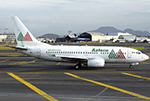
Those are the aircrafts of the extinct mexican airline "Lineas Aereas Azteca", the Boeing 737-700 fleet pack contain the next aircrafts with the registrations: N160CK, N815PG, N966PG, XA-AEP (With Website included), XA-AEQ (With Website included), XA-TWF (With Website included). LÃneas Aéreas Azteca was an airline based in Mexico City, Mexico. It operated domestic scheduled services and international services to the USA. Its main base was Mexico City International Airport, with a hub at General Abelardo L. RodrÃguez International Airport, Tijuana. The airline was established on 9 May 2000 and started operations on 1 June 2000, operating domestic services with Boeing 737 aircraft. It started up after TAESA closed down and some of the staff and assets were taken over. The airline's operations were suspended by the government in March 2007 due to safety problems, and in October 2007 the Mexican government permanently revoked its air operator's certificate because the company hadn't solved those problems. On 10 October 2007, the General Civil Aeronautics Directorship (DGAC) of Mexico's Communications and Transport Secretariat permanently revoked LÃneas Aéreas Azteca's air operator's certificate, because the airline did not have a sound financial statement after the previous suspension. The fleet consisted in 6 Boeing 737-300 (XA-AAU, XA-AAV, XA-CAS, XA-TWG, XA-UCL, XA-UCP), 3 Boeing 737-700 (XA-AEP, XA-AEQ, XA-TWF), and 1 Bombardier Learjet 31 (XA-OLE). The models of this traffic are FSX AI BUREAU (FAIB) Boeing 737-700. This is my website: https://el-mundo-de-los-aviones-ai-traffic.jimdosite.com I hope you enjoy it!
| Filename: | AI_Lineas_Aereas_Azteca_Faib_Boeing_737700_Fleet_P.zip |
| License: | Freeware |
| Added: | 22nd May 2023, 17:11:39 |
| Downloads: | 40 |
| Author: | Jesus Gibran Soriano Solleiro |
| Size: | 45.58 MB |
| Category: Flight Simulator X - AI Aircraft | |
| AI Lineas Aereas Azteca Faib Boeing 737-700 Fleet Pack |
|
Images related to this file:
File Description:
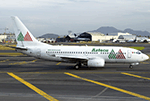
Those are the aircrafts of the extinct mexican airline "Lineas Aereas Azteca", the Boeing 737-700 fleet pack contain the next aircrafts with the registrations: N160CK, N815PG, N966PG, XA-AEP (With Website included), XA-AEQ (With Website included), XA-TWF (With Website included). LÃneas Aéreas Azteca was an airline based in Mexico City, Mexico. It operated domestic scheduled services and international services to the USA. Its main base was Mexico City International Airport, with a hub at General Abelardo L. RodrÃguez International Airport, Tijuana. The airline was established on 9 May 2000 and started operations on 1 June 2000, operating domestic services with Boeing 737 aircraft. It started up after TAESA closed down and some of the staff and assets were taken over. The airline's operations were suspended by the government in March 2007 due to safety problems, and in October 2007 the Mexican government permanently revoked its air operator's certificate because the company hadn't solved those problems. On 10 October 2007, the General Civil Aeronautics Directorship (DGAC) of Mexico's Communications and Transport Secretariat permanently revoked LÃneas Aéreas Azteca's air operator's certificate, because the airline did not have a sound financial statement after the previous suspension. The fleet consisted in 6 Boeing 737-300 (XA-AAU, XA-AAV, XA-CAS, XA-TWG, XA-UCL, XA-UCP), 3 Boeing 737-700 (XA-AEP, XA-AEQ, XA-TWF), and 1 Bombardier Learjet 31 (XA-OLE). The models of this traffic are FSX AI BUREAU (FAIB) Boeing 737-700. This is my website: https://el-mundo-de-los-aviones-ai-traffic.jimdosite.com I hope you enjoy it!
| Filename: | AI_Lineas_Aereas_Azteca_Faib_Boeing_737700_Fleet_P.zip |
| License: | Freeware |
| Added: | 22nd May 2023, 17:11:11 |
| Downloads: | 52 |
| Author: | Jesus Gibran Soriano Solleiro |
| Size: | 45.58 MB |
| Category: Flight Simulator 2004 - AI Flight Plans | |
| TUI Airlines Belgium - Summer 05 (corrected 2nd version) |
|
File Description:
::: Corrected version ::: Representative and accurate charter flight plans for the summer 2005 period, which have been compiled according to the company information for the week of 4th July, 2005.
TUI Airlines Belgium (TUB) is the most important charter airline based in Belgium, flying with its own fleet which includes: 1 Fokker 100 (OO-TUF), 3 Boeing 737-400 (OO-TUA, OO-TUB, OO-TUI), 2 Boeing 737-800W (OO-VAC, OO-VAS), and 1 Boeing 767-300ER (OO-TUC).
In addition for the summer, TUB is wet leasing two 737's from Futura International Airways, also operating under the "Beauty" callsign.
As for all charter company, flights differs from one week to one another but this file comprises its main destinations regularly visited throughout the summer period.
They are currently flying from its main base Brussels-National (as well as from the belgian regional airports of Liège and Oostende) to many various medium- and long-haul destinations:
Agadir, Alicante, Almeria, Araxos, Athens, Burgas, Cagliari, Cairo, Cancun, Catania, Chania, Chios, Djerba, Dubrovnik, Faro, Fuerteventura, Funchal, Girona, Gran Canaria, Hurghada, Ibiza, Iraklion, Jerez, Kerkira, Kos, Lanzarote, La Palma, Luxor, Mahon, Malagà, Malta, Marrakech, Marsa Alam, Mitilini, Monastir, Montego Bay, Murcia, Mykonos, Napoli, Pafos, Palermo, Palma de Mallorca, Puerto Plata, Punta Cana, Rhodos, Samos, Santorini, Sharm-el-Sheikh, Tabarka, Tanger, Tarbes, Tenerife-Sur, Toulon, Tunis, Varadero, Varna, and Zakinthos.
Other destinations such as Corsica, Tunisia and Turkey are jointly operated with partner airlines such as SN Brussels Airlines, MNG, Thomas Cook, Karthago and Tunis Air, but not included here.
Schedule files fully compatible with Traffic Tools by Lee Swordy (available on this site). Enjoy...
| Filename: | TUI_Airlines_Belgium__Summer_05_corrected_2nd_vers.zip |
| License: | Freeware |
| Added: | 3rd June 2005, 17:58:36 |
| Downloads: | 2,249 |
| Author: | Jean-Philippe DELWICHE |
| Size: | 10.03 KB |
| Category: Flight Simulator 2004 - Scenery | |
| Chatrapatti Shivaji international Airport, Mumbai/ VABB |
|
Images related to this file:
File Description:
Mumbai is having frequent commissioning and decommissioning of various features especially aprons and stands and twy changing nomenclature. However the inf. and resources used while developing the scenery are as on Tue, 22 Jun 2010 13:14:00 UTC. Middle marker for rwy 27 has been permanently withdrawn so the missed approach point of the GP inop. procedure had been amended as 1D ILS/DME in place of middle marker(mm). Navaid BMB freq 396khz withdrawn from service.
New contents include - Commissioning of TWY L4 De-commissioning of portion of Taxi lane L beyond parking stand A1 Aircraft from parking stand A1 to A3 to push back facing west on the taxi lane L, to taxi out via TWY L4 on to TWY N.* Portion of taxi lane L beyond parking stand A1 shall be decommissioned w.e.f. 0430 UTC on 1st July 2010.1. Renaming portion of TWY P from RWY 14 to its junction with TWY E as E4 & TWY Y
as TWY S7
2. Commissioning of TWYs E7, E8, E9 & E10
3. Commissioning of one additional code C Parking Stand on Apron A named A1
4. Decommissioning of Parking Stands T4 & T5
5. Commissioning of Parking Stand G7and Decommissioning of Parking Stand G10 & G14
6. Renaming of Apron K(as apron J ) alongwith it's Parking Stands & Commissioning of
one additional code E Parking stand(J4).
7. Renaming of Apron M ( as apron K).layout chart included.
Scenery features includes - 3 different models of twy edge lights, holding point 3d lights at major intersection.check out pics. if you want extremely frame rate rate friendly update, look for file in library named as - Default mumbai.
| Filename: | Chatrapatti_Shivaji_international_Airport_Mumbai_V.zip |
| License: | Freeware |
| Added: | 22nd June 2010, 22:19:54 |
| Downloads: | 7,264 |
| Author: | Ashish Singh |
| Size: | 63.93 MB |
| Category: Flight Simulator X - Scenery | |
| KSLC - Salt Lake City Intl Airport 2020, Utah, USA |
|
Images related to this file:
File Description:
I have been asked many times could i do an update for SLC, knowing there were going to be major changes there I held off until now when someone sent me a plan for the new terminal layout and its taxiways, so here is my interpretation of what it may look like in 2020.
This is a version of Salt Lake City Intl Airport with two optional files and made only for FSX, do not use in P3D: There is one version with the Crosswind runway 14/32 operating where all 4 runways will be used for takeoff/landing and one version as the default airport runway operation, The new south terminal A and north concourse B have been designed similar to the plan i have, i also had to take a guess at which airlines will park where so may not be accurate on opening day, as a Delta hub they are only assigned to terminal A, most other airlines are assigned to the north concourse B, transient parking is retained in the same place, the north cargo ramp and buildings updated, runway 17/35 is now parallel with 16L/34R which is also part of the upgrade plan, and the approaches for it aligned with the new position, all other approaches and frequencies updated to the latest charts where needed, extra fuel trucks, Helipads/start locations now in their correct positions, De-icing pads added, support vehicle roads rebuilt and many other scenery improvements and objects added, airport views are from the roof of the control tower (when in tower view) please view the readme before installation,
| Filename: | KSLC__Salt_Lake_City_Intl_Airport_2020_Utah_USA.zip |
| License: | Freeware, limited distribution |
| Added: | 6th March 2018, 04:23:35 |
| Downloads: | 44,425 |
| Author: | Ray Smith |
| Size: | 4.91 MB |
| Category: Flight Simulator 2004 - Scenery | |
| Ketchikan PAKT in southern Alaska plus float planes 5KE and the town |
|
Images related to this file:
File Description:
This is Ketchikan PAKT in southern Alaska, 45 miles north of the Canadian border and 220 miles south of Juneau. It is the closest major Alaskan airport to the lower 48 and most flights from or to Seattle pass through Ketchikan en route. The airport is on the southern side of the stretch of water known as The Narrows and the town is on the northern side, with ferries connecting the two. The town side was somewhat modified as part of one of the three Misty Fjords sceneries, so there were already some marinas and docked cruise liners etc before I started this. In addition, Ketchikan Airport had been partly made way back in 2006, and further modified in 2007; I say "partly" as there is in fact no way to accurately make PAKT within the limitations of FS9 as there is a 50 or 60 feet difference in elevation between runway and apron, and the taxiways are actually ramps up from the apron to the ends of the runway. This has a knock-on effect on the float plane and ferry docks on the water below the airport. I can see why the Misty Fjord sceneries avoided it. This scenery retains the original buildings from the Alan Wright scenery. It also includes the modification made by John Hinson, who created the second taxiway to the western end of the runway; FS9 had not included this as the original airport started operations with only one taxiway in place. There are new vehicles on the apron (fuel etc), new apron markings and some parking modifications to enable AI with Boing 737, DC6, Beechcraft 1900, and GA, plus runway and taxiway signage, windsocks, some car parking, freight items, etc. There is a road and covered bridges down to the docks and ferry, and the town side of the water has been modelled to include other float plane docks along with waterfront buildings, including the ship repair facility with it's dry dock (actually a floating dock that lifts ships out of the water) and the Alaskan Ferry Terminal wharf etc. The ferry forms a part of the AI, generously permitted by FSAddon and originally a part of the payware Tongass Fjords package, as are the AI aircraft also included here. There are new waterside buildings that stretch from the ship repair yard, past the shopping plaza and onward to the stationary cruise liners (that were part of the Tongass payware scenery) including float docks for the float plane companies that are based in Ketchikan, plus a new AI liner. The AI is a further adaptation of the already posted CF36 AI and PAKN AI, as listed in the AI folder. Due to the surrounding hills there may be some interference with AI float aircraft, depending on the wind direction, though I have watched succesful Beaver landings with the wind from the east. The combined AI for float planes creates a float plane take off or landing at, on average, 20 minute intervals; this is still well short of the actual busy summertime period.
| Filename: | Ketchikan_PAKT_in_southern_Alaska_plus_float_plane.zip |
| License: | Freeware, limited distribution |
| Added: | 12th February 2017, 23:27:59 |
| Downloads: | 1,232 |
| Author: | Roger Wensley |
| Size: | 47.11 MB |
| Category: Flight Simulator X - Gauges | |
| AP_MultiFuel_Gauges for FIP |
|
Images related to this file:
File Description:
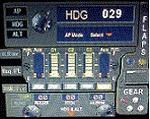
This set of 3 gauges is for use in the Saitek FIP and is an extension to my FIP gauge. That set of 3 gauges was designed to complement the Saitek AP/Multi panel and primarily showed the selected AP Altitude and Vert Spd whilst the Saitek AP/multi panel was displaying HDG. The second main part of those gauges were the Fuel Level displays, each gauge displaying a different combination of fuel tanks to suit the aircraft being flown and thus offered functionality for all types of aircraft.
This set of 3 gauges is designed for the same purpose but now encompasses a working AP that allows you to select HDG, ALT and VS values and activate the HDG and ALT mode (and AP master switch) to enable auto-pilot flight (for those who have a FIP but not an AP/multi panel).
For those who have an AP/multi panel, it gives a backup AP in your build/rig (although it all works off the same FS telemetry, I have found that when the AP/multi-panel freezes, especially the 'Alt' button, then this FIP gauge can de-activate it. The combinations displayed are those that suit my choice of aircraft, however it is easy to re-configure gauge Elements (fuel tank names) and artwork (fuel gauge titles) to suit the combination you prefer.
These gauges also retain the gear, flaps and light indicators, auto rudder on/off button plus rudder and aileron trim capability that were in the previous gauges. An additional feature is the battery switch will now turn off the AP display and fuel levels.
The artwork in these gauges has also been upgraded a bit and a template artwork is included to assist in customising.
| Filename: | AP_MultiFuel_Gauges_for_FIP.zip |
| License: | Freeware |
| Added: | 20th October 2014, 16:00:33 |
| Downloads: | 265 |
| Author: | Robert Budd |
| Size: | 764.26 KB |
| Category: Flight Simulator X - Utilities | |
| FS Remote version 1.0 |
|
File Description:
Email: [email protected]
Name: Hans Elzer
Current version 1.0
Version 1.0 contains various little bug fixes plus Fuel management in the Engines dialog
FS-Remote a utility for remotely controlling FSX
The Zip file contains:
* Readme text file
* .NET 2.0 FS-Remote executable
* Configuration file for FS-Remote
* Document file in MSWord format
What you need to run FS-Remote:
* .NET 2.0 or 3.0 installed on the computer where you want to run FS-Remote
* FSUIPC4 (registered) on the computer where you run FSX
* WideClient (FSUIPC4 FSWide remote) if you want to run FS-Remote on a remote computer
It does what the title says FS-Remote controls FSX remotely through FSUIPC.
Just take a look at the (word) document that is contained in the zip file and look at some screen shots.
It can view and control the following items in FSX through FSUIPC:
* Aircraft - Control aircraft switches like Lights, Doors, Pushback, De-Ice and Jetway plus call fuel truck
* Auto Pilot - Control auto pilot switches plus reset altimeter and heading indicator instruments
* Radio - Control radio stack switches and push buttons plus view navigation status information
* Attitude - View attitude information and warnings plus convert and view various items in feet, meter, knots, mph and km/p
* Engines - Control engines auto start and stop plus fuel management
* Weather - not implemented jet (next version)
* Environment - View the local date, time and position environment information
* Date Time - Control and view the flight simulator date and time
* Message - View and send messages to flight simulator message bar
* FPS - View real-time flight simulator frames per second FPS rate
* About - View version information about FS-Remote, FSUIPC4 and FSX
Hope that you like it.
| Filename: | FS_Remote_version_10.zip |
| License: | Freeware |
| Added: | 9th September 2007, 15:26:14 |
| Downloads: | 1,439 |
| Author: | Hans Elzer |
| Size: | 353.2 KB |
| Category: Flight Simulator X - Utilities | |
| FSRemote 2.0 |
|
File Description:
Current version 2.0
Version 2.0 contains a new more graphical interface
Version 1.0 contains various little bug fixes plus Fuel management in the Engines dialog
FS-Remote a utility for remotely controlling FSX
The Zip file contains:
* Readme text file
* .NET 2.0 FS-Remote executable
* Configuration file for FS-Remote
* Document file in MSWord format
What you need to run FS-Remote:
* .NET 2.0 or 3.0 installed on the computer where you want to run FS-Remote
* FSUIPC4 (registered) on the computer where you run FSX
* WideClient (FSUIPC4 FSWide remote) if you want to run FS-Remote on a remote computer
It does what the title says FS-Remote controls FSX remotely through FSUIPC.
Just take a look at the (word) document that is contained in the zip file and look at some screen shots.
It can view and control the following items in FSX through FSUIPC:
* Aircraft - Control aircraft switches like Lights, Doors, Pushback, De-Ice and Jetway plus call fuel truck
* Auto Pilot - Control auto pilot switches plus reset altimeter and heading indicator instruments
* Radio - Control radio stack switches and push buttons plus view navigation status information
* Attitude - View attitude information and warnings plus convert and view various items in feet, meter, knots, mph and km/p
* Engines - Control engines auto start and stop plus fuel management
* Weather - not implemented jet (next version)
* Environment - View the local date, time and position environment information
* Date Time - Control and view the flight simulator date and time
* Message - View and send messages to flight simulator message bar
* FPS - View real-time flight simulator frames per second FPS rate
* About - View version information about FS-Remote, FSUIPC4 and FSX
Hope that you like it.
| Filename: | FSRemote_20.zip |
| License: | Freeware |
| Added: | 9th November 2007, 22:24:52 |
| Downloads: | 1,674 |
| Author: | Hans Elzer |
| Size: | 620.8 KB |
| Category: Flight Simulator 2004 - Scenery | |
| MNPC Puerto Cabezas, Nicaragua |
|
Images related to this file:
File Description:
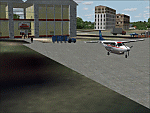
Googly scenery for MNPC Puerto Cabezas - a small international
airport in Nicaragua for which no facilities are provided in Microsoft Flight
Simulator 2004. These scenery files create the airport and add taxiways, aprons,
buildings and other airport features, so that you and your "AI" traffic can land,
taxi, park and take off in a realistic manner.
The airport, with its new Rigoberto Cabezas terminal opened in 2000, serves the
city of Puerto Cabezas and is surrounded by beautiful beaches and lush scenery.
Unfortunately, the country of Nicaragua has been embroiled in civil unrest almost
continuously since it became an independent republic in 1838, most of which is funded and fuelled by other countries seeking to interfere with Nicaragua's politics. For this reason, the country has no national airline or international flights of its own - the major powers refuse to accept its currency - and commercial traffic is confined to local flights operated by small craft from adjoining countries like those of Atlantic Airlines de Honduras and TACA Regional.
Fortunately, in Flight Simulator you do not need to worry about world politics
and you will be assured of a "virtual" welcome when you call in here. Please
say a small prayer for world peace when you do.
The scenery does not purport to be ultra-accurate. Based on high-detail satellite
imagery from Google Earth, the layout is proportionally correct but the added
airport features, such as buildings, are built from default Microsoft objects
and add-on libraries so will not look exactly like the real thing.
You are not obliged to download and install any additional scenery libraries,
but to enjoy this scenery in its entirety, you may wish to. It will work fine,
with or without. [File re-uploaded at request of AVSIM]
| Filename: | MNPC_Puerto_Cabezas_Nicaragua.zip |
| License: | Freeware |
| Added: | 28th May 2010, 20:36:10 |
| Downloads: | 1,149 |
| Author: | John Hinson |
| Size: | 67.63 KB |


© 2001-2026 AVSIM Online
All Rights Reserved
Privacy Policy |