
Where Flight Simulation Enthusiasts Gather from Around the World!
AVSIM Library - Search Results

| Category: Flight Simulator X - Aircraft Repaints, Textures and Modifications | |
| Boeing B-17G 91st BG (LL-E) "Shoo shoo shoo baby" |

|
Images related to this file:
File Description:
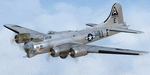
This folder contains a repaint for the A2A WoP2 B-17G in the colors B-17G-35-BO 42-32076, which rolled off Boeing's production line in Seattle in march 1944. This was around the transition from camouflaged to bare metal aircraft, which led to the odd situation that the datablock was stencilled onto a OD panel, while the rest of the aircraft was left bare metal. This was because the datablock was sprayed on right at the beginning of production. The aircraft was assigned to the 401st BS of the 91st BG, and was collected at the depot in Burtonwood by Paul McDuffee, who was so impressed with its smooth handling that he asked to be assigned to it. The aircraft was named by its crew chief, Hank Cordes, and was named after a popular song by the Andrews Sisters. Originally, the name was 'Shoo shoo baby', applied in gothic letters, which was later replaced by a Vargas girl and an additional 'shoo', painted by Cpl. Tony Starcer. McDuffee flew 13 missions with 076, before completing his tour of duty. On completion of his last flight, he buzzed the airfield and flew so low that fencing wire became entangled in the tail wheel. On the plane's 23rd mission, on 29 may 1944, Lt. Robert Guenther was flying 076 on a raid to Poznan when he suffered engine failure on one engine, and a while later, flak knocked out a second engine. 'Shoo shoo shoo baby' started to fall behind, and when a third engine started to falter, Lt Guenther decided to turn to neutral Sweden, with the crew jettisoning all loose equipment. A group of FW190's closed in, but did not open fire, peeling away. By the time 076 reached Bulltofta airfield near Malmö, it had only one engine left, but it did manage to perform a safe landing. The crew were interned, and the aircraft was impounded. The crew returned to the UK in October 1944, and 'Shoo shoo shoo baby' would later tour the world...
Repaint by Jan Kees Blom, based on the paintkit by A2A.
| Filename: | Boeing_B17G_91st_BG_LLE_Shoo_shoo_shoo_baby.zip |
| License: | Freeware |
| Added: | 7th October 2019, 18:22:46 |
| Downloads: | 106 |
| Author: | Jan Kees Blom |
| Size: | 18.03 MB |
| Category: Microsoft Flight Simulator (2020) - Utilities | |
| FSTramp v8.84 for MSFS, FSX(-SE), Prepart3D, X-Plane (Win) |
|
Images related to this file:
File Description:

This add-on is an EXE application for Microsoft Flight Simulator and a DLL module for all other simulators. The DLL variant is activated via hotkeys or the simulator menu add-ons or plugins. Window size and layout are configurable for one or more screens. To avoid dazzling, the brightness of the entire application is customizable. Primarily it is a flight management system (FMS) with automatic control from start to landing. This also includes the observance of SID, STAR and Approaches in unmatched quality. The flight plan required for the FMS can be created manually or automatically, interactive changes and additions during the flight are possible. The basis of the flight planner is the 3D world map and the search function for airfields and navigation aids. The FMS by FSTramp relies on the autopilot of the aircraft. In case of incompatibility, the autopilot integrated in FSTramp will be used. This allows FSTramp to control almost all aircraft from airport to airport. The altitude profile of the flight plan, SID, STAR and approach is taken into account. This means that FSTramp extends the often incomplete airport procedures to and from the runway so that they can be flown completely automatically. During the fully automatic flight, the autopilot values ​​for HDG, ALT, VSPEED, SPD and MACH can be manually overridden. This is e.g. useful for being able to react to the instructions of the tower in the final approach without completely stopping the automatic flight. The rotating or north pointing 3D world map with numeric display of the terrain elevation under the mouse arrow is another special feature. It does not need an internet but is synthesized from included height profiles of the globe. The Data of continents, mountains and rivers are included in the setup. Airspaces, Airways, Waypoints and SID, STAR and Approaches are also included in the setup, but can be updated by installing additional AIRAC cycles. Airfields and navigation stations are taken from the simulator. NVIDIA: If the frame rate of the simulator drops sharply about 20 seconds after FSTramp's visibility, the power management of the GPU slows down prematurely. In the NVIDIA Control Panel, change the 'Manage 3D settings - Power management mode' option to 'Adaptive'.
| Filename: | FSTramp_v884_for_MSFS_FSXSE_Prepart3D_XPlane_Win.zip |
| License: | Shareware, time limited |
| Added: | 7th July 2023, 04:35:12 |
| Downloads: | 111 |
| Author: | Helge Schroeder |
| Size: | 358.21 MB |
| Category: Prepar3D V5 - Utilities | |
| FSTramp v8.84 for Prepart3D 2-6, MSFS, FSX(-SE), X-Plane (Win) |
|
Images related to this file:
File Description:
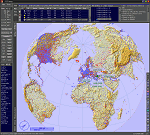
This add-on is an EXE application for Microsoft Flight Simulator and a DLL module for all other simulators. The DLL variant is activated via hotkeys or the simulator menu add-ons or plugins. Window size and layout are configurable for one or more screens. To avoid dazzling, the brightness of the entire application is customizable. Primarily it is a flight management system (FMS) with automatic control from start to landing. This also includes the observance of SID, STAR and Approaches in unmatched quality. The flight plan required for the FMS can be created manually or automatically, interactive changes and additions during the flight are possible. The basis of the flight planner is the 3D world map and the search function for airfields and navigation aids. The FMS by FSTramp relies on the autopilot of the aircraft. In case of incompatibility, the autopilot integrated in FSTramp will be used. This allows FSTramp to control almost all aircraft from airport to airport. The altitude profile of the flight plan, SID, STAR and approach is taken into account. This means that FSTramp extends the often incomplete airport procedures to and from the runway so that they can be flown completely automatically. During the fully automatic flight, the autopilot values ​​for HDG, ALT, VSPEED, SPD and MACH can be manually overridden. This is e.g. useful for being able to react to the instructions of the tower in the final approach without completely stopping the automatic flight. The rotating or north pointing 3D world map with numeric display of the terrain elevation under the mouse arrow is another special feature. It does not need an internet but is synthesized from included height profiles of the globe. The Data of continents, mountains and rivers are included in the setup. Airspaces, Airways, Waypoints and SID, STAR and Approaches are also included in the setup, but can be updated by installing additional AIRAC cycles. Airfields and navigation stations are taken from the simulator. NVIDIA: If the frame rate of the simulator drops sharply about 20 seconds after FSTramp's visibility, the power management of the GPU slows down prematurely. In the NVIDIA Control Panel, change the 'Manage 3D settings - Power management mode' option to 'Adaptive'.
| Filename: | FSTramp_v884_for_Prepart3D_26_MSFS_FSXSE_XPlane_Wi.zip |
| License: | Shareware, time limited |
| Added: | 7th July 2023, 04:35:26 |
| Downloads: | 43 |
| Author: | Helge Schroeder |
| Size: | 358.21 MB |
| Category: Flight Simulator X - Utilities | |
| FSTramp v8.84 for MSFS, FSX(-SE), Prepart3D, X-Plane (Win) |
|
Images related to this file:
File Description:
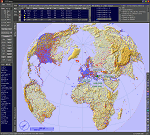
This add-on is an EXE application for Microsoft Flight Simulator and a DLL module for all other simulators. The DLL variant is activated via hotkeys or the simulator menu add-ons or plugins. Window size and layout are configurable for one or more screens. To avoid dazzling, the brightness of the entire application is customizable. Primarily it is a flight management system (FMS) with automatic control from start to landing. This also includes the observance of SID, STAR and Approaches in unmatched quality. The flight plan required for the FMS can be created manually or automatically, interactive changes and additions during the flight are possible. The basis of the flight planner is the 3D world map and the search function for airfields and navigation aids. The FMS by FSTramp relies on the autopilot of the aircraft. In case of incompatibility, the autopilot integrated in FSTramp will be used. This allows FSTramp to control almost all aircraft from airport to airport. The altitude profile of the flight plan, SID, STAR and approach is taken into account. This means that FSTramp extends the often incomplete airport procedures to and from the runway so that they can be flown completely automatically. During the fully automatic flight, the autopilot values ​​for HDG, ALT, VSPEED, SPD and MACH can be manually overridden. This is e.g. useful for being able to react to the instructions of the tower in the final approach without completely stopping the automatic flight. The rotating or north pointing 3D world map with numeric display of the terrain elevation under the mouse arrow is another special feature. It does not need an internet but is synthesized from included height profiles of the globe. The Data of continents, mountains and rivers are included in the setup. Airspaces, Airways, Waypoints and SID, STAR and Approaches are also included in the setup, but can be updated by installing additional AIRAC cycles. Airfields and navigation stations are taken from the simulator. NVIDIA: If the frame rate of the simulator drops sharply about 20 seconds after FSTramp's visibility, the power management of the GPU slows down prematurely. In the NVIDIA Control Panel, change the 'Manage 3D settings - Power management mode' option to 'Adaptive'.
| Filename: | FSTramp_v884_for_MSFS_FSXSE_Prepart3D_XPlane_Win.zip |
| License: | Shareware, time limited |
| Added: | 7th July 2023, 04:35:43 |
| Downloads: | 130 |
| Author: | Helge Schroeder |
| Size: | 358.21 MB |
| Category: Flight Simulator X - Original Aircraft | |
| Boeing 787-8XLR Qantas |
|
Images related to this file:
File Description:
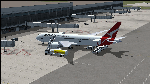
Qantas is requesting proposals (Dec 2018) for design of an aircraft model or variation that is capable of non-stop flights over 10,000 nm for YSSY to EGLL and/or YPPH to KDFW and return service routes. This model is the best choice for Boeing based on real world data. The Boeing 787-8XLR "Dreamcruiser" will have a maximum range of 13,600 nm at FL450E (Mach .83) which will give her more than the desired capabilities, and will be the very efficient. This model (B788XLR) is based on the current 787-8 using weight modifications to increase the range without adding additional fuel tanks, and designed for luxury/comfort with only 161 paid passengers on board. Everything in this model is realistic to the best of my abilities. If Boeing creates this model, it will likely be very similar to this. The name is my own invention, as are all of the weight characteristics. Based on all of my extensive testing, there is no other aircraft capable of these requirements, to date. The 787-800 is certainly the right choice for Qantas if Boeing decides they will modify the original model to fit these requirements. In reality, there is no such aircraft as a 787-8XLR Dreamcruiser. Not yet, anyway. My data shows the aircraft is capable of long-range non-stop flights over 13,000 nm east or west at Mach .82 and above FL435. However, this can only be done by lowering the empty weight and using the full fuel capabilities designed within the original model. This simple modification cuts the total souls on board down to 176, with 161 paid passengers, 11 flight attendants, and 4 pilots in two shifts. Full fuel can now be used in all long-range flights which is actually not common for most 787-800s in service today (Fuel Managed). Ramp and MTOW remain the same, but because she flies higher than normal, and has less weight, she can cruise much further than any other 787. In reality, this is what the 787 was originally designed to do.
| Filename: | Boeing_7878XLR_Qantas.zip |
| License: | Freeware |
| Added: | 12th January 2019, 20:18:29 |
| Downloads: | 482 |
| Author: | Douglas E Trapp |
| Size: | 35.3 MB |
| Category: Prepar3D V1-4 - Utilities | |
| Flightplan Visualizer 1.13 |
|
Images related to this file:
File Description:
Flightplan Visualizer (FV) version 1.13.0. Copyright 2018-2019 by Pelle F. S. Liljendal ([email protected]), all rights reserved.
FV comes with 586 pre-imported Commercial AI flightplans (+380 BizJet flightplans are available as a separate download). However you are able to import additional (AI) flightplans yourself. Once imported these (AI) flightplans can be visualized on a map-view, and the user will be able to search accross all these. Hence you can use the program as inspiration as to which routes to fly. E.g. you can search across all imported flightplans to find all flights in an A321 flying into/out from LDDU, or simply to look for all flights in a Boeing 747-8F.
Simply run the included installer to install the software. The program will be installed into "C:\Program Files (x86)\Flightplan Visualizer" and all datafiles will be installed into: "C:\Users\[UserName]\AppData\Roaming\FlightplanVisualizer". The program comes with a full manual explaining everything, and a 3 page quick manual to get you started. The first 3 times you run the program the quick manual will automatically open. The forum is hosted here: https://forum.aerosoft.com/index.php?/forum/919-flightplan-visualizer/
Version 1.13 Contains the following changes: Flightplans can now be exported in AIFP/TrafficTool-format (the same format that FV is able to import). It means if you have made any changes to a flightplan (e.g. redirected some airports) the flightplan can be exported from FV, and imported into AIFP (AI Flight Planner, by Don Grovestine) where it can be compiled into an AI-traffic bgl-file (traffic "scenery"). A new setting called "Adjust flight-time on airport-redirect" have been added. This setting defaults to "false" (un-checked), however if changed to "true" (checked) the flight-time will be changed if/when departure/destination-airports are changed due to airport-redirections (both automatic and manually). The flight-time is the result of the difference between departure-/destination-time, hence if the flight-time is changed either- or both departure-/destination-time will change as well. The original flight-time is scaled based on the original- and the redirected distance between the departure/destination-airports. When importing/editing flightplans you can now select one or multiple aircraft and delete them. When deleting an aircraft all schedules attached to that aircraft will be deleted as well. One use of this feature could be to remove aircraft you don't have a AI aircraft, prior to exporting the flightplan in AIFP/TT-format, and loading it into AIFP. When importing/editing flightplans a "Similar" button will appear next to the flightplan name if a similar named flightplan exists (e.g. "same name", but different season), or other flighplans exists for the same airline (ICAO). Hoovering the mouse over this button will show the names of these flightplans as a tool-tip, and if you click the button the list will be shown in a window (with some additional information), from where it can be copied to the clipboard if you need to. On the Edit/Import-flightplan form, the Aircraft- and Airport tab-sheets have been swapped, and a new tab-sheet was added to list all routes of the flightplan. For each route the distance is listed along will all aircraft types of the flightplan servicing that route. The "Aircraft" tabsheet of the form to import/edit flightplans now contains a button called: "Fleet report". Pressing this button will generate a report showing the fleet of an airline (based on the flightplan), that is sorted by Aircraft type and registration. For each aircraft it will show a list of all the airports served by that particular aircraft. A "Word-wrap" check-box have been added to the Result-viewer to toggle word-wrap on/off (word-wrap defaults to "on"). In previous versions any changes made in the settings form resulted in all flightplans having to reload (while showing the splash-screen). Changing the path for MakeRunway-files still results in an automatic "reboot" of the program. The combo-box for choosing default direction (outbound/inbound/both) for the leg-search (on reset) have been removed from settings, and it now defaults to "Outbound or Inbound". However in the search legs form you can now save your own preferred "Reset" criteria. When you press the reset-button, it will load this Reset-file (with your preferred reset criteria). If you hold SHIFT while pressing the reset-button (or you have not saved a personal reset-file), it will reset to the default factory-criteria. In the traffic tabsheet of the airport info form there is a combo-box letting you switch between "Selected flightplan" or last-search on main-form" and "All flights to/from this airport". In previous versions it did not perform the search of flights to-/from- the viewed airport until you selected the 2nd item from the combo-box. Now this search is performed in the background as soon as the form is opened, hence choosing the 2nd item in the combo-box is now instantaneous. The "Nearby Airports" tab-sheet in the "Airport Info" form, now have a column listing direction (from the airport to the nearby airports). When listing number of runways and gates (e.g. in the form showing nearby airports, or in the redirection-report), the radius of the largest gate is now included, as there is no need to redirect any 747 traffic to an airport where the largest gate is 23m (a 747 requires a gate with a radius of at least 36m). The frequency-count was removed from the before mentioned listing of runways and gates, to make more room for listing the aircraft serving each airport. The search for airport browse now have a new optional column listing comments (e.g. length of longest rwy and largest gate). The "show" combo-box lets you choose to show comments in stead of "Size/Rank/Traffic" or "Hint-text". Opening the search airport browser from the import/edit flightplan form, will automatically choose to show the comments column, as information regarding rwy length/gate radius can be relevant when redirecting airports. Form "Nearby Airports" now show the GPS-position in the caption of the form. Added runway/gate summary to caption-bar of airport info form, so you no longer need to look at both the runway- and gate- tab-sheet in order to see: number of runways, longest runway, number of gates and largest rate (radius). New check-box added to settings allowing you to include the before mentioned runway/gate info in the airport marker tool-tip on the main map. Region/sub-region added to "Airport Info" form (top/left corner). A new setting (default to disabled) lets you add region/sub-region to the airport marker-hint on the map as well. Added a button to the "airport info" to show the airport at flightradar24 (opens the default browser), and the button on the leg info form to show route the route at flightaware (also using the browser) have been replicated on the route info form. The METAR-/TAF-buttons on the leg info form now shows the raw METAR/TAF-message - as a tool tip - when you hoover the mouse over the buttons. As before, when you press these buttons it will open a window showing the decoded messages. Various minor changes to the leg info form: added info regarding longest runway and largest gate for each airport, and re-positioned some of the fields. Likewise the info copied to the clipboard when you click the appropriate button have been re-ordered as well. Changed flightplan format to accommodate additional information, but the format remains backward compatible. Button added to about-box allowing the user to copy version-info to the clipboard. Managed to "shave off" approx ½ a second during start-up (on my pc). Not a lot but still an improvement :-) Fixed: In the form for importing/editing flightplans the leg-page showed the original distance even if the airports were redirected. Fixed: On leg info form "Dest.Country" and "Dest.Apt" column-order were swapped. Fixed: Tweaked aircraft type detecting to better detect 740-400 and 767-200/300 freighters. In previous versions a few aircrafts were wrongly detected as pax, when they should have been detected as freighter. Data: Airbus 330-800/900 Neo, Boeing 747-400LCF (Dreamlifter), and Embraer 175/190/195-E2 have been added as supported aircraft, and a few additional airlines and airports were added as well. Flightplans: Installer comes with +70 new pre-imported (Summer 2019) flightplans of which some are replacements of obsolete flightplans (from previous installers), and 2 of the "old" flightplans have been marked as defunct, as "Adria Airways" and "Aigle Azur" have filed for bankruptcy and ceased their operations. Flightplans: Among the added flightplans you will find the first flightplan I have made myself, a flightplan for Airbus Transport International covering their 5 Beluga's an 2 Beluga XL's (the latter 2 are stil performing test-flights and have yet to be implemented into their "normal schedule").
| Filename: | Flightplan_Visualizer_113.zip |
| License: | Freeware, limited distribution |
| Added: | 13th October 2019, 17:50:53 |
| Downloads: | 355 |
| Author: | Pelle Liljendal |
| Size: | 30.45 MB |
| Category: Prepar3D V1-4 - Utilities | |
| Flightplan Visualizer 1.10 |
|
Images related to this file:
File Description:
Flightplan Visualizer (FV) version 1.10.0. Copyright 2018-2019 by Pelle F. S. Liljendal ([email protected]), all rights reserved.
FV comes with 300 Commercial-, and +380 BizJet AI pre-imported flightplans which the creators of those flightplans have gracefully allowed me to include with the installer, however you are able to import additional (AI) flightplans if you want to. Once imported these (AI) flightplans can be visualized on a map-view, and the user will be able to search accross all these. Hence you can use the program as inspiration as to which routes to fly. E.g. you can search across all imported flightplans to find all flights in an A321 flying into/out from LDDU, or simply to look for all flights in a Boeing 747-8F.
Simply run the included installer to install the software. The program will be installed into "C:\Program Files (x86)\Flightplan Visualizer" and all datafiles will be installed into: "C:\Users\[UserName]\AppData\Roaming\FlightplanVisualizer". The program comes with a full manual explaining everything, and a 3 page quick manual to get you started. The first 3 times you run the program the quick manual will automatically open. The forum is hosted here: https://forum.aerosoft.com/index.php?/forum/919-flightplan-visualizer/
Version 1.10 Contains the following changes: In the flightplan combo-box at the bottom of the main-form, "Active Search" have been renamed into "Last Search". Picking "Last Search" from the flightplan combo-box, will re-execute the last performed search, and populate the map accordingly. A new entry called "None", have been added flightplan combo-box (at the top of the list). Chosing this item will "deselect" the otherwise current search or selected flightplan, and clear the map of routes. A form have been added to assist enabling/disabling flightplans. Gate-letters/numbers are now by default written using a (5x7) Matrix-"font". If you want to revert to the segment-"font", used in previous versions, simply set the value of the "UseMatrixGateChars" tag in the settings-file to false. changed how the Gate-letters/numbers are written in the round gate-markers on the map. Previously all "chars" had the same width. Now the width is dependant on which sub-elements are in use by each "char" (e.g. a "1" is not as wide as an "8"), as a result the gate letter/number are more easy to read. Zulu- and local-time added to the "Selected airport" group-box in the upper/right corner of the main form. If no airport is selected, or no time-zone is registred for the selected airport, only zulu-time will be displayed. Selections of favorite aircraft can now be saved and loaded.⦠This selection of aircraft can be loaded as a selection of aircraft in the "Search leg" form. Video tutorials can now be accessed from the "Help" menu. These are simply "links" to the actual videos on YouTube, hence will launch the default browser. If you hold SHIFT the url will in stead be copied to the clipboard (e.g. in case you want to upen the link in another browser). In the same manner the "Help" menu now contains a link to the forum. The form with decoded METAR/TAF-messages now shows: name, city, and country/state for the selected station in the caption. This text will also be embedded when copying the content to the clipboard. Likewise UTC/Local-time is also embedded when copying the content to the clipboard as it can be used to show the "age" of the report and convert between UTC and Local -times (based on the difference of UTC- and local-time). The info presented when pressing the "Show Scenery Gates" button on the Airport Info form, can now be copied to the clipboard. Various minor "behind the scenes" changes and optimizations. Added support for additional aircraft: Airbus A220-100 (CS100), Airbus A220-300 (CS300), Boeing 777-8 and Boeing 777-9. Listviews containing both (aircraft) IATA and ICAO-codes now all list them in the following order: IATA, ICAO (both individual sortable). Hovering the mouse over gate-markers the hint window will no show the radius both in meters and feet. Editing gate-info you will now see more info for the gate being edited: Type, Size (meters and feet) and if applicable: airlines. Fixed: Minor bug in relation to how the airport size was calculated. Fixed: IATA/ICAO columns were swapped when choosing Favorite Aircraft. Fixed: Typo on the METAR/TAF-decoder form.
| Filename: | Flightplan_Visualizer_110.zip |
| License: | Freeware, limited distribution |
| Added: | 5th June 2019, 21:20:51 |
| Downloads: | 319 |
| Author: | Pelle Liljendal |
| Size: | 24.81 MB |
| Category: Miscellaneous Files - Demos from Commercial Vendors | |
| QuickPlan for Windows |
|
Images related to this file:
File Description:

QuickPlan for Windows is a visual point and click flight planner that makes it easy to generate flight plans in native FSX, FS2004 or X-Plane formats.
The entire route is generated visually, by tapping the map to add the departure airport, intermediate waypoints and arrival airport in the same order that you intend flying the plan.
During plan creation and after adding the final arrival waypoint you also have the opportunity to remove any of the intermediate waypoints before saving the plan in your preferred format.
QuickPlan utilises a new mapping engine and includes 12 world-wide map styles and has support for FSWidgets Cloud Based Aero Charts (free Cuba/Puerto Rico WAC Cloud Based Chart included) and FSWidgets Cloud Based World Nav Data (Free KSFO - San Francisco Bay area Nav Data included).
QuickPlan can be used in Freeform Mode, Advanced Mode, or a combination of both.
FREEFORM MODE: Simply click anywhere on the map and QuickPlan will allow you to add it as a generic waypoint. VFR pilots often use towns, lakes and other unique geographic features and with QuickPlan you can add any geographical location shown on the base map. Plans created this way label the waypoints automatically with generic names (e.g. DEP, WP1, WP2, ARR).
If desired, the entire route from departure to arrival can be created without reference to any navigational aids or official airports. This is handy for bush pilots who often use unlicensed airfields and small landing strips (or seaplane landing areas). Helicopter pilots can also quickly create plans that depart from off-airport locations like building rooftops or land on a road.
ADVANCED MODE: If you own the FSWidgets Cloud Based World Nav Data product you can create more advanced flight plans by clicking on any of the icons displayed on the map to add them as waypoints - airports, VOR's, NDB's and intersections (data for the KSFO area is included free). Plans created this way label the waypoints automatically with airport and navigational aid identifiers taken from the Nav Data (e.g. KSFO, OSI, LV, FABLA). FEATURE LIST:
- Generates native FSX (.pln), FS2004 (.pln) and X-Plane (.fms) format flight plans
- Saves flight plans to any folder (preferred folder set in Preferences)
- Search for airport by ICAO identifier
- Map powered by CloudMade Leaflet API (using OpenStreetMap data)
- Includes 12 world-wide maps styles
- Supports FSWidgets Cloud Based AERO CHARTS
- Free Cuba/Puerto Rico WAC Cloud Based Chart included
- Supports FSWidgets Cloud Based WORLD NAV DATA
- Free KSFO (San Francisco Bay) area Nav Data included
- World-wide Metar and TAF Data icons
- US Nexrad (Next-Gen Radar) Data
| Filename: | QuickPlan_for_Windows.zip |
| License: | Commercial demo |
| Added: | 27th October 2012, 09:22:33 |
| Downloads: | 523 |
| Author: | Fermin Fernandez - FSWidgets |
| Size: | 1.95 MB |
| Category: X-Plane - Scenery | |
| London 2004 |
|
File Description:
Continuing my new free releases for this year, here is my London 2004 scenery package that I designed for my personal
use but now I want to share it with the community. I have had numerous requests to do more cities and airports so this is my third scenery for 2004. Being the lazy
person I am, no research was done and no claim to real life cities and airports is intended or implied.
I have added many objects to the airports and cities including terminals, hangers, buildings, castles, city scapes and
other fun and interesting things. All of which were culled from all the wonderful designers in the X-Plane Community
such as B. Brooks & Christian Franz, Ted Davis, Tom Curtis, Ralph Glass, Tim Chandler, Didier Chauveau and all the
other hard working and exceptionally talented designers who have inspired me. Many thanks to each of you for your
contributions to the X-Plane community.
Like all my scenery packages, the additions to the citys and airports are purely fictional. The airports themselves are
unaltered. I have enhanced London Heathrow (EGLL), London Gatwick (EGKK), London City (EGLC) airports and of
course the city of London . A special thanks to Robert Bunce for his NYEXPRO packages and Ken Spiker for his
KWIKCITIES package. If I inadvertently left out other objects and scenery designers, it was purely unintentional and I
offer my apologies.
All airports and cities come with Night Textures. Flying at dusk and dawn will add additional enjoyment to your
experience. You may want to experiment with your Autogen settings for best results. I turn mine way down in the
rendering settings so that autogen buildings don't sit on top of custom objects and roads. It will improve framerates as
well.
Installation: Place the extracted "London 2004" folder into your "Custom Scenery" folder. I have included apt.dat files
for v6.70 and v7.30. Keep the apt.dat file for your particular XP version. Apt.dat files are different formats for v6 and v7.
Please send any comments or suggestions to [email protected]. If you choose to rate my Scenery Packs and
give less than a "9" rating, I would appreciate knowing what I can do to improve them. I can only do that with your
feedback.
My Other Free Scenery Packages are:
Charlotte-Rock Hill,
Houston-Galveston,
Iraq,
Nice, France,
San Diego 2004,
San Francisco 2004.
All are available at X-Plane.org and Avsim.com.
Have fun and FLY SAFE!.
| Filename: | London_2004.zip |
| License: | Freeware |
| Added: | 18th January 2004, 22:54:38 |
| Downloads: | 6,517 |
| Author: | Bill Moore |
| Size: | 9.28 MB |
| Category: Flight Simulator X - Scenery | |
| EGXJ - RAF Cottesmore - Rutland, England |
|
File Description:
RAF Cottesmore (ICAO EGXJ) is a former Royal Air Force station in Rutland, England, situated between Cottesmore and Market Overton.
The Stationed opened on 11 March 1938 and was used mainly for training, and the first squadrons were equipped with Vickers Wellesley aircraft, but soon converted to Fairey Battles. Later RAF Bomber Command took over the airfield, again as a training station, flying Handley Page Hampdens. These units remained in residence until a few days before the outbreak of war in 1939 when they were sent to RAF Cranfield to serve as a pool providing replacements for combat losses. Their place at Cottesmore was taken by Nos. 106 and 185 Squadrons, moving in from RAF Thornaby with Hampdens. However, with the outbreak of war, the aircraft and crews were sent to locations in the north and west, as enemy air attacks were expected over the southern half of England. As these never materialised, the Hampdens returned in the spring of 1940 and No. 185 Squadron became the Hampden operational training unit, No. 14 Operational Training Unit RAF.
RAF Cottesmore's Hampdens' first trespass into hostile airspace was a leaflet dropping operation over northern France. In October 1940, 106 Squadron moved to RAF Finningley while No. 14 OTU remained training crews for Bomber Command, its Hampdens and HP.53 Herefords being replaced by Vickers Wellingtons in 1942. Training continued for three years and three months until August 1943 when No. 14 OTU moved to RAF Market Harborough.
In early December 2009, it was announced the station would close due to funding cut-backs, in part to help pay for additional helicopters for British operations in Afghanistan.
In 2010, No. 4 Squadron RAF disbanded, with No. 20 Squadron RAF re-badging as No 4 (Reserve) Squadron.
The station became a satellite to RAF Wittering on 31 March 2011 with a civic parade and flypast to mark the disbandment of No 1 Sqn RAF, 800 NAS, 801 NAS and JFH.
In July 2011 Defence Secretary Liam Fox announced plans for it to be the airfield for one of five of the Army's Multi-Role Brigades. In April 2012 it was renamed Kendrew Barracks after Major General Sir Douglas Kendrew.
Source: Wikipedia
| Filename: | EGXJ__RAF_Cottesmore__Rutland_England.zip |
| License: | Freeware |
| Added: | 19th March 2016, 12:15:07 |
| Downloads: | 344 |
| Author: | Terry Boissel |
| Size: | 1.66 MB |


© 2001-2026 AVSIM Online
All Rights Reserved
Privacy Policy |