
Where Flight Simulation Enthusiasts Gather from Around the World!
AVSIM Library - Search Results

| Category: Flight Simulator X - Gauges | |
| Twin jet engine EICAS for Instrument Panel Version 2. |

|
Images related to this file:
File Description:
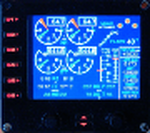
For Saitek Pro Flight Instrument Panel. This is the second version, you can delete previous one.
This folder contains 17 types of EICAS (Engine Indicating and Crew Alerting System) for Lear45, CRJ700, B737-800, B767-300, MD83, A300B1, A300B2, A350, CRJ100, CRJ300, B777-200, A320, A321, A310-100, A300B4, A350-800, B777-200ER, B787, A310 standard, A310-300, A330-200 and B777-200LR.
They replace older tje xml files, they have been improved and provide following utilities:N1, ITT, N2, fuel flow, Vibration, Oil pressure, Oil temperature, Landing gear position, Flaps positions, Pitch trim, Spoilers positions, Total, main tanks and auxiliaries tanks fuel.
The left knob activate spoilers, the right knob adjusts the N1 bug for autopilot.
Added two extra xml, if you do not find your favorite aircraft you can use the tje_full_range.xml which has total fuel of 6 digits, 5 digits for all tanks and full 8 flaps steps, this should fit with any twin jet engine aircraft. If this is not sufficient then use tje_extra_range.xml with 6 digits for all fuel and 8 steps for flaps. If you need more, that means you are flying a military tanker !
| Filename: | Twin_jet_engine_EICAS_for_Instrument_Panel_Version.zip |
| License: | Freeware |
| Added: | 7th September 2011, 22:24:35 |
| Downloads: | 1,120 |
| Author: | Philippe Verhaege |
| Size: | 567.42 KB |
| Category: Flight Simulator X - Scenery | |
| Active ILS, VHHX (Hong Kong Kai Tak Airport) |
|
File Description:
This FSX Airport is more then just an enhanced style Airport. As most know the Approach and Final (VMC) for AI Traffic in FSX is a straight in type landing and does not always consider real world approaches. This is due to the way that the coding is written in FSX and it puts limits on IFR arriving aircraft. At certain airports the AI Traffic will fly directly through a mountain once it is established on Final for a runway. What you will see with my files is a different type approach used for both the way I control AI and User Airplane Traffic in FSX. My AI Aircraft Approach coding system for FSX uses a visual offset approach so AI Traffic does not fly through the mountains but flys the IGS/LDA 13 approach to the Checkerboard. Try your skill flying a Large Heavy Airplane vectored by ATC onto the approach course of the IGS/LDA 13 approach to Kai Tak. Read the text file for all the enhancements added to the FSX VHHX Airport along with a full understanding of how the new Approaches work *** Full set of Freeware Approach Charts included ***
| Filename: | Active_ILS_VHHX_Hong_Kong_Kai_Tak_Airport.zip |
| License: | Freeware, limited distribution |
| Added: | 19th September 2007, 11:57:46 |
| Downloads: | 27,444 |
| Author: | Jim Vile |
| Size: | 3.61 MB |
| Category: Flight Simulator 2004 - Scenery | |
| KCLT Charlotte Douglas International Airport |
|
Images related to this file:
File Description:
In 2008 runway 18R/36L at KCLT was renamed 18C/36C in anticipation of a third parallel under construction. The new runway was to be designated 18R/36L and was finally activated on January 6, 2010. This scenery adds that new runway to the default Charlotte Douglas International Airport (KCLT). This is a complete rebuild of my previous upload, KCLT2010 (not required) that inadvertently removed approximately 30 airports in the Charlotte area, including Fayetteville and Spartanburg. It also includes Terminal E, which was added in 2002, but never made it into the default FS2004 scenery.
I used Airport Design Editor (ADE9x) to modify the default FS2004 KCLT file, renaming the default 18R/36L to 18C/36C, create the new taxiways, taxi signs, NavAids, 18R-36L runway, and Terminal E. I used Abacus EZ-Scenery to add jetways, gate markings, and ramp lights. All files, libraries, and textures are either default or included. No additional downloads are required. AI Aircraft were acting normally on my system. I sat at Taxiway W2 for the new Runway 18R/36L and watched AI Aircraft land and take off from it after creating this scenery.
| Filename: | KCLT_Charlotte_Douglas_International_Airport.zip |
| License: | Freeware, limited distribution |
| Added: | 12th January 2011, 22:34:51 |
| Downloads: | 3,559 |
| Author: | Randy Tyndall |
| Size: | 1022.34 KB |
| Category: Flight Simulator 2004 - Scenery | |
| Canyonlands National Park South, Monticello (U43), Utah, Photo-Scenery (FSX too) |
|
Images related to this file:
File Description:
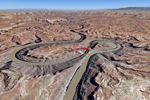
This scenery covers the southern part of Canyonlands National Park (Needles District) in Utah. The colorful layers of sand- and limestone that you can see today built over hundreds of millions years by advancing and retreating oceans as well as rivers that deposited huge amounts of sediment. About 15 million years ago these layers began to rise due to a colliding movement of plates in the earth's crust, forming what is today called the Colorado Plateau. As the land rose higher, erosion accelerated, resulting in countless canyons, mesas and buttes. The uplifting land caused the rivers to carve in even faster, resulting in the deep canyons of the Colorado and Green Rivers. The needles and fins in the Needles District have yet another story: First uplifts and later slides created a system of perpendicular cracks. Then he resulting crosshatched pattern of "joints" widened by erosion until only thin fins and needles of rock remained. The scenery extends my Arches National Park scenery to the south and brings you another 3.500 sq km in 4.7m/pix quality. To explore the scenery depart from Monticello (U43) and head north. YourDonation@Work: Dedicated to Nels, David and Michael. Thanks!
| Filename: | Canyonlands_National_Park_South_Monticello_U43_Uta.zip |
| License: | Freeware, limited distribution |
| Added: | 30th December 2009, 21:44:56 |
| Downloads: | 1,526 |
| Author: | Gottfried Razek - blueskyscenery.com |
| Size: | 95.76 MB |
| Category: Flight Simulator X - Aircraft Repaints, Textures and Modifications | |
| Virgin Galactic Boeing 747-8i |
|
Images related to this file:
File Description:
FSX Boeing 747-8i Virgin Galactic with advanced VC by Alejandro Rojas Lucena and VC Textures Upgrade by Enrique Cornejo, founder of the Flightsim Workshop Project. This gives the b747 a payware Virtual Cockpit look and now with green leather tapestry on the sides of the seats. It even has a pilot jacket hanged in the rear of the cockpit (besides the right jumpseat). The panel.cfg and the aircraft.cfg have been assembled and edited by the Flightsim Workshop Team. Now you can pop up "My icons" window in the Virtual Cockpit to easily reach the following windows: GPS, avionics, map, ATC, Climb/Radio Altimeter/Spoiler switch, auto-break switch, throttle quadrant, clock, descent meter, kneeboard and overhead panel. A new feature in My Icons Window I added is a new Pitot Heat switch with ON and Off features, (XML gauge by Enrique Cornejo). cold weather, the Pitot Heat switch works just like in real life, so if its turned off the air speed indicator will stop working, so make sure you turn the Pitot Heat switch on before taking off!
The autopilot ON switches have green lights which make them look more realistic. Center ATC identification in this aircraft is "Boeing 747". We have also fixed the position of the strobe lights so when the aircraft is flying they are in the right place, so turn on the strobe lights switch after take off. The cockpit view from the pilots seat is now more comfortable because the distance between the cockpit and the seat is longer.
The aircraft has new engine views (from both wings) and new Virtual Cockpit interior views from the left, right and central jump seats. The brakes has a differential brake system to make smoother turns in ground. The Virgin Galactic Spaceship texture is wonderful and it has a unique paint scheme by Enrique Cornejo which also includes details such as some stains caused by humidity in the fuselage and the wing flaps and other details just like a real aircraft. Real smoke in the four engines, just select key, more cabin views, realistic cockpit and engines sound & more realistic night VC lights and fuselage night textures, in the VC just select key and reset the overhead Instrument panel light dim switch in the overhead panel. The aileron parameters have also improved, so now the right and left turns are smoother. This aircraft uses the Project Opensky FSX Boeing B747-800 Model OSX748V4_GENX(MDL), and includes the gauge window Posky Utility to view the main stairs, ground cargo servicing, etc. The engine sounds are edited like the real ones with cockpit ambient, so you can enjoy a pleasant flight. The Flight Management Computer (FMC) is fixed and looks like a payware instrument. The VC includes FMC, Primary Flight Display (PFD) and Multi-Function Display (MDF) displayed in the correct size. The virtual cockpit also has an Engine-Indicating and Crew-Alerting System also known as EICAS, Ground Proximity Warning System (GPWS), working wipers, cabin lights, fire suppression, avionics switch, fuel cross feed, and you can identify those instruments in the overhead panel because they are bordered with color lines. You can also find landing lights switches, taxi light switch, engine generators, APU generator, battery switch, starter switches, de-ice switch, general lights switches which are a great work of Alejandro. So now the whole cockpit and texture upgrade with all these improvements looks better than a payware version. The clock numbers are now in orange which makes them look better and easily recognizable. Assembled and edited for FSX by Flightsim Workshop Founder Enrique Cornejo. 78 MB
| Filename: | Virgin_Galactic_Boeing_7478i.zip |
| License: | Freeware |
| Added: | 21st February 2013, 18:56:28 |
| Downloads: | 1,940 |
| Author: | Enrique Cornejo |
| Size: | 77.73 MB |
| Category: Flight Simulator X - Aircraft Repaints, Textures and Modifications | |
| FSX/P3D Trans-Texas Airways DC-3/C-47 circa 1962 |
|
Images related to this file:
File Description:
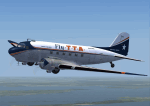
This is a repaint of the DC-3 in Trans-Texas Airways colors. The freeware DC-3/C-47 v3 by Manfred Jahn is needed for this repaint. Trans-Texas Airways (TTA) began operations in 1940, at Houston, as an aircraft sales and service company named Aviation Enterprises. The name was changed to Trans-Texas Airways on June 21 1947, and scheduled Douglas DC-3 services were inaugurated on October 11. Initially, Trans-Texas Airways flew routes only within Texas, but the key year in the history of Trans Texas Airways was 1966. That year its route network was significantly strengthened by the acquisition of new feeder routes from Eastern Airlines. This gave them virtual control of the entire feeder route system of the U.S. Southwest. Following this, TTA became an international airline in August 1967, with flights to Monterrey, Tampico, and Vera Cruz in Mexico. The expansion, however, created financial difficulties for TTA. This led to a takeover of TTA, in late 1968, by Minnesota Enterprises. The stockholders then voted to change the company name and corporate image the following spring. Thus, on March 1 1969, Trans-Texas Airways became Texas International Airlines. Textures are DXT5. This repaint was tested on FSX-SE and should work on FSX & P3D v1-3.
| Filename: | FSXP3D_TransTexas_Airways_DC3C47_circa_1962.zip |
| License: | Freeware |
| Added: | 3rd December 2018, 17:20:01 |
| Downloads: | 173 |
| Author: | Ted Giana |
| Size: | 7.94 MB |
| Category: X-Plane - Scenery | |
| BR RJ SBME - Macae Airport v1.0.0 |
|
Images related to this file:
File Description:
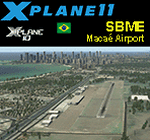
This is an X-Plane 11 and X-Plane 10 scenery package for Benedito Lacerda Airport (IATA: MEA, ICAO: SBME) is the airport serving Macaé, RJ, in Brazil. It includes corrected aprons, ramps, gates, taxiways, lighting system, city buildings, ortho-photoscenery for the airfield area, and (XP11 only) airport ground services (like push back). The airport was established in the 1960s as an airfield for general aviation and a Flying club. In the 1980s the runway was paved and an apron and a terminal with 941 m² were constructed, enabling Macaé Airport to fully support the operations related to the Campos basin (off shore oil platform in the costal area of the state of Rio de Janeiro). In fact, most of its movement (98%) is related to helicopter flights to/from offshore oil platforms of the Campos basin. It features a lot of apron positions for rotorcrafts. This scenery was tested and is operational (as of March 26, 2017) in "X-Plane 11 Public Beta #17 64 bit", Windows 10 Home. It was also tested and is also operational (as of March 26, 2017) in "X-Plane 10.51 64 bit", Windows 10 Home. Only the default X-Plane 11 libraries, by Laminar Research, are needed. No third party libraries are used.
| Filename: | BR_RJ_SBME__Macae_Airport_v100.zip |
| License: | Freeware |
| Added: | 29th March 2017, 03:50:00 |
| Downloads: | 80 |
| Author: | Rui Mesquita |
| Size: | 14.62 MB |
| Category: X-Plane - Scenery | |
| BR ES SBVT - Goiabeiras Vitoria v1.0.0 |
|
Images related to this file:
File Description:
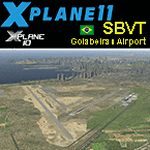
This is an X-Plane 11 and X-Plane 10 scenery package for Eurico de Aguiar Salles Airport (IATA: VIX, ICAO: SBVT), formerly called Goiabeiras Airport after the neighborhood where it is located, which is the airport serving Vitoria metro area, in Brazil. It includes corrected aprons, ramps, gates, taxiways, lighting system, renovation work construction of new runway and new terminal building, the city skyline buildings and (XP11 only) airport ground services (like push back). Located 10 km (6 mi) from downtown Vitória, the airport handles domestic flights only, and has the capacity to receive medium-sized aircraft such as the Boeing 737 and the Airbus 320. It is considered one of the worst among the main airports in Brazil due to lack of renovations. Delayed renovation works have started at the airport, with the construction of a second runway, and a brand new terminal building. This scenery was tested and is operational (as of February 25, 2017) in "X-Plane 11 Public Beta #12 64 bit", Windows 10 Home. It was also tested and is also operational (as of February 25, 2017) in "X-Plane 10.51 64 bit", Windows 10 Home. Only the default X-Plane 11 libraries, by Laminar Research, are needed. No third party libraries are used.
| Filename: | BR_ES_SBVT__Goiabeiras_Vitoria_v100.zip |
| License: | Freeware |
| Added: | 26th February 2017, 08:06:44 |
| Downloads: | 113 |
| Author: | Rui Mesquita |
| Size: | 9.58 MB |
| Category: Flight Simulator 2004 - AI Flight Plans | |
| Vision Airlines (RBY - Ruby) Flightplans - some 52-week and some "normal". |
|
File Description:
These are fictional flightplans for Vision Airlines (ex Vision Air) of North Las Vegas, USA. There are 2 sets of flightplans, each using a different part of the fleet to the other. One set are plans that operate on the 52-week concept - these contain charters that can be varied every week if you use Matthew Ministry's flightplan swapper routine. The other set fly fixed flights each week (in fact 2 planes fly 24-hour plans, canyon sightseeing) and also include Vision's Boeing fleet that fly military charters via Europe. You can use both sets to get the whole fleet, or either to get a flavour of Vision Airlines. If you want to use just 1 week's charters, you can get the whole fleet but the charters will repeat every week. These plans will add some Dorniers (228, 328TP and 328J) to North Las Vegas (KVGT) and points on Vision's scheduled network, plus the Houston-based 328Jets that fly to Alamogordo. If you use the 52-week system the rest of the fleet will fly charters almost nationwide, limited only by the real-world aircraft's range (so no Miami and no Boston, but KLAX, KPDX and KSEA). They will also operate into many smaller regional and municipal airports.
| Filename: | Vision_Airlines_RBY__Ruby_Flightplans__some_52week.zip |
| License: | Freeware |
| Added: | 12th January 2009, 23:12:57 |
| Downloads: | 760 |
| Author: | Morello Ciliegia |
| Size: | 2.44 MB |
| Category: Flight Simulator 2004 - AFCAD Files | |
| ***AFCAD SMOOTH for Major Airports! Vienna Schwechat ( LOWW / VIE )*** |
|
File Description:
AFCAD SMOOTH is a normal AFCAD File for Major Airports such as Frankfurt, London LHR
or Paris CDG but all the taxiways have been totally reworked in order to get the most smoothest
AI Traffic on ground you will ever have. To achive this all the new created taxiways have nothing
in common with the original one for an airport. The new taxiways have been created
in a way to allow the smoothest traffic on ground, without traffic jam, conflict alerts
and also without planes staying almost 5 minutes at one point due to heavy traffic and finnaly
disappear. All this has been resolved.
In addition to this the parking positions have been created in a very very orderly way
with as much positions as possible. The gates are almost the same as in reality only with minor changes.
I also added missing ILS to airports like LIMC (RWY 17R) This File is only recommended for virtual pilots
who can call a huge amount of AI Traffic their own and who prefer smooth traffic instead an accurate taxiway system
compared to the real airports one.
In addition I recommend you AI Seperation (available at avsim), one of the best freeware AI Traffic
Management Tools for traffic on ground and in the air as well.
| Filename: | AFCAD_SMOOTH_for_Major_Airports_Vienna_Schwechat__.zip |
| License: | Freeware |
| Added: | 2nd July 2008, 15:33:25 |
| Downloads: | 2,181 |
| Author: | Dave Sheffield |
| Size: | 11.39 KB |


© 2001-2026 AVSIM Online
All Rights Reserved
Privacy Policy |