
Where Flight Simulation Enthusiasts Gather from Around the World!
AVSIM Library - Search Results

| Category: Flight Simulator X - Aircraft Repaints, Textures and Modifications | |
| Douglas C-47 (N65276) Frontier Airlines |

|
Images related to this file:
File Description:

This folder contains a repaint for version 3.14 of the Douglas C-47 by Manfred Jahn and colleagues in the colors of Frontier Airlines N65276, one of the C-47/DC-3's operated by Frontier Airlines. On April 21, 1957, at 1321 hours, N65276, operating as Frontier Airlines flight 7 departed Prescott, Arizona enroute to Phoenix under visual flight rules (VFR) with 21 passengers and one stewardess. As the flight proceeded southbound toward Phoenix the weather deteriorated to a point where the flight could no longer remain clear of clouds and maintain VFR. Captain Welling requested and received an instrument flight rules (IFR) clearance to proceed to Phoenix via Knob intersection thence to the Phoenix omni range, maintain 7000 feet. The crew never acknowledged receiving the clearance. It is suspected that the reason there was no response is that this was the precise moment that flight 7 struck the west ridge of a mountain at the 4500’ level southeast of Prescott shearing off twelve feet of the left wing and six feet of the left aileron. After declaring an emergency, flight 7 landed safely at Phoenix Sky Harbor airport without further incident. There was no injury to the passengers or crew. The wing was replaced and the aircraft continued flying for Frontier. Sadly, N65276 was lost in a tragic accident in 1967 on a snowy Denver day when a rudder-lock had been placed on an elevator and not removed prior to take-off. Both pilots were killed in the crash. More info, as well as pictures, on these incidents, and an earlier mishap with N65276 can be found here: http://fal-1.tripod.com/FL_Crash.html.Repaint by Jan Kees Blom for Manfred Jahn's C-47 version 3.14, based on the paintkit by Gman5250.
| Filename: | Douglas_C47_N65276_Frontier_Airlines.zip |
| License: | Freeware |
| Added: | 14th August 2018, 21:34:27 |
| Downloads: | 380 |
| Author: | Jan Kees Blom |
| Size: | 13.82 MB |
| Category: Flight Simulator 2004 - Scenery | |
| Replacement Dynamic Water Textures Version 8 |
|
File Description:
Replacement dynamic water texture-sets for FS2004 (VERSION 8). This is the full version 8. The default reflections and water colors leave a lot to be desired in FS2004. As an example; The default milky "white/green" texture is highly unrealistic in overcast conditions. The replacement textures will change this dramactically to a much more convincing and realistic "blue/grey", cast, with improved lighting and refections in respect to the sun. These replacement textures will generally give a much more realistic tone and color to the water effects in FS2004. The change is quite dramactic and transforms the flight sim experience to a much greater level of realism. Fully compatible with my earlier versions of "overcast" texture modifications. Textures included are; Clear weather; High noon, mid-sun, low sun, sun-rise and sun-set with a choice of four "overcast" tones and a choice of two sun sets Version 8 has improved sun-set and sun-rise textures which offer better colours and better transitions from daylight to dawn/dusk hours; and a small change to the reflections on the low-sun texture. As an added bonus with Version 8 you have a choice of sun sets to use. Now you can have the very bright "orange" sun sets or select one of the new "golden yellows" which offer two distinct variations. It is important to stress the default FS9 textures are fully compatible with these new textures and they can be used in any combinations and can be mixed and matched with the new textures. For example it may be that some users want to keep some of the water environment textures as they are by default but change only one or two textures. The choice is yours. As a further added bonus a voice control file has been included for "Shoot" which will control FS2004 by voice. It is brilliant and it's free.
| Filename: | Replacement_Dynamic_Water_Textures_Version_8.zip |
| License: | Freeware |
| Added: | 7th January 2004, 19:51:30 |
| Downloads: | 4,112 |
| Author: | Peter Wilding |
| Size: | 2.71 MB |
| Category: Flight Simulator 2004 - Scenery | |
| Toronto Downtown Airport CYTZ, Ontario Canada, for Toronto2 |
|
Images related to this file:
File Description:
CYTZ is on an island in Lake Ontario and immediately adjacent to downtown Toronto, and this is the version for use with Flight Ontario's Toronto2 scenery for the Greater Toronto Area. There have been major changes after Porter Airlines purchase of the airport. The obvious and main new item is the terminal, made with photo textures, and with ten gates sized to meet the requirements of the Dash 8-400 they currently use. The terminal has a passenger entrance and a vehicle setdown point as part of the link to the ferry terminal that wraps around the west side of the original and preserved terminal building. The ferry terminal is included here, along with a ferry. Also new are the car parking, road routing, gate and taxi markings, taxiways, taxiway signage, taxiway lighting, runway lighting, aprons, apron lighting (from Sid, and you will need to install his "lights_ss_v2"), fences, fuel tanks, tanker trucks, access roads to navigation equipment, ai parking, static parked planes, parked cars, apron equipment, and the useable floatplane ramp. The AI includes Porter, Jazz, several GA aircraft, and a helicopter; only 3 of these require downloads. The Lake Ontario AI includes three large ships, typical of the traffic to be seen on all the Great Lakes. CYTZ has three runways and there is an airport diagram included. 08-26 has ILS and is the only runway long enough for Porter to use; FS9 atc will ignore this. There is fuel available and it is dispensed from a truck. The longer projection from the front of the terminal building is a covered ramp that leads up from the terminal basement level, used by towed luggage trolleys. The gates are not powered in any way except for the weather cover that protects passengers as they cross the small area of asphalt between plane and gate. I did not try to reproduce this in FS9.
| Filename: | Toronto_Downtown_Airport_CYTZ_Ontario_Canada_for_T.zip |
| License: | Freeware, limited distribution |
| Added: | 23rd October 2012, 12:52:29 |
| Downloads: | 1,524 |
| Author: | Roger Wensley + Flight Ontario |
| Size: | 12.71 MB |
| Category: Flight Simulator X - Original Aircraft | |
| VC-25A (Air Force One) |
|
Images related to this file:
File Description:
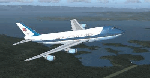
The VC-25A is a modified Boeing 747-200F used as a dignitary transport by the Air Mobility Command's 89th Airlift Wing, Andrews Air Force Base (KADF), Maryland. There are two twin sister aircraft with tail numbers 28000 and 29000. Both are used by the President of the United States (POTUS) and the First Lady of the United States (FLOTUS) and as a dignitary transport for high level personnel for special missions. When carrying the President, the call-sign is “Air Force Oneâ€, but otherwise uses a variety of call-signs when the President is not on-board. Each sister aircraft is nearly identical to the other, with all of the same accommodations. One can fly as a “Mask†when the President is on-board the other.
The aircraft is modified with many secret aspects, and is heavier at Empty Weight than a normal 747-200F because of this. However, she normally only carries 102 souls on board with enough supplies to last for any long range flight, so she operates at a lower weight than the normal 747-200F. Due to the fortifications employed within the design, her MTOW is lower, as well. The engines are a bit more powerful than normal, and have better fuel efficiency. She has specialized equipment on-board for communications, a weather/recon radar dome (not shown in this paint scheme), and missile/aircraft countermeasures if needed. The interior is almost silent due to the high pressure cabin structure and fortified frame, including bullet-proof windows.
With all of the above, she is still the most powerful, efficient, and the fastest 747 ever built.
Original Model Designers (FS2004):
C. Vincent Cho, Yosuke Ube, Nick Peterson, Warren C. Daniel, Simon Ng, Hin Tat, BIll Kovatchev.
Sound: Emil Serafino.
Panel: Philippe Wallaert.
Real World Aero/Engine Dynamics and Modifications by Douglas E. Trapp ([email protected]), June 2018.
| Filename: | VC25A_Air_Force_One.zip |
| License: | Freeware |
| Added: | 24th June 2018, 00:38:28 |
| Downloads: | 985 |
| Author: | Douglas E. Trapp |
| Size: | 118.85 MB |
| Category: Flight Simulator 2004 - Scenery | |
| Tok Junction 6K8 in Alaska, USA |
|
Images related to this file:
File Description:
Tok Junction is a village, or small town, on the Alaska Highway some 180 miles east of Fairbanks and 60 miles west of the Alaska-Canada border. The town is spread over a wide area on the flat terrain and barely registers among the trees, and as such is not shown in FS9 except as a grid of roads as there is no town terrain texture like it used in FS9. The airfield is at the eastern end of the town and adjacent to the Alaska Highway and I have included some surrounding houses, workshops, shops, lodges, etc. The single runway is 3,000 feet of 50 feet wide asphalt aligned 07-25 and lit. There is a small airline based on the airfield called 40-Mile Air. Their hangar is red and the name written large and 100LL fuel is available beside it at all times. Jet A-1 is available by a telephoned pre-arangement. They are, I believe, no longer flying scheduled flights but they do still function as an air taxi and they have a contract to deliver mail to surrounding villages that are not served by all-weather roads. The airfield now has a new icao "PFTO" but in FS9 it remains as the original FAA LID, 6K8. The FS9 roads are not accurately placed, and the grass airfield background is not really appropriate as the reality is more like gravel mixed with earth; it is however difficult to replicate this with the available textures and still prevent bushes or trees appearing. But, in the winter and with snow on the ground it looks as it should. A note here about my scenery making. There will not be many more to follow this as I am almost at the end of the photos I either took or found for scenery purposes, plus I expect to move on from FS9 at some point during next year.
| Filename: | Tok_Junction_6K8_in_Alaska_USA.zip |
| License: | Freeware, limited distribution |
| Added: | 14th January 2020, 17:49:21 |
| Downloads: | 176 |
| Author: | Roger Wensley |
| Size: | 25.47 MB |
| Category: Flight Simulator 2004 - Aircraft Repaints, Textures and Modifications | |
| Louisiana State Police Texture Updates Bell/Textron 430 |
|
File Description:
FS2004 Bell/Textron 430 Helicopter Louisiana State Police Updates
This package contains 2 revised texture sets for: N810SP & N918SP which are based here in Baton Rouge.
These fixes add the gold stripe on the tail and reflect the readjusted bottom
gold cheat stripe and a few more small tweaks that make the textures more accurate.
There is a well known member of the FS Community that is also painting up more LSP Bell430s.I believe that his will feature 430s from LSP Troop I,B and C.
Giving you all more N#'s to fly based on your preference of which Troop you want to fly for.So keep an eye out for more LSP Bell 430s in the near future!!
As always....Enjoy!!
**P.S.***
I am finishing up on a custom scenery to compliment these repaints.
The scenery will feature a large photoreal terrain area of the Independence Park area here in Baton Rouge wich houses on its grounds the following:
Louisiana State Police Headquarters,Louisiana Statepolice Training acadamy,various State Gov't offices such as Dept. of Motor Vehicles,Louisiana State Office of Emergency Managment,State fire Marshals Offices,e.t.c.....
The main Helipad is set up as a runway..rwys 9-27 which feature their own ILS systems with outermarkers,an NDB,Fictioal Airport Designation of 1LSP.Trees,Military Landing Zones,resturants,minmalls,gas stations along the perimeter,the main Fire House/Fire Station for that area.the Main branch of the Public Library and the big school bus transfer area on the west side.Street lights along the roadways,and much more.With minimal impact of FPS.
This will be a great add-on tool for the real LSP and AIr Med pilots who fly into this place everyday.Now you guys/gals can practice approaches in inclement weather conditions without fear of ruining a 5 million dollar chopper,all the while honing your IMC skills.
This scenery will integrate seemlessly with the upcoming release of KBTR v2.
The screenshots in this archive are from KBTRv2 Beta and the 1LSP beta sceneries!!
Keep an eye out at the BSMP forum for updates and preview screenshots... www.bsmp.co.nz
| Filename: | Louisiana_State_Police_Texture_Updates_BellTextron.zip |
| License: | Freeware |
| Added: | 25th May 2008, 19:00:07 |
| Downloads: | 358 |
| Author: | Joe DeGregorio / Alan Devins / Rory Kelly / Keith Devins |
| Size: | 2.96 MB |
| Category: Flight Simulator 2004 - Scenery | |
| Nome PAOM on the northwestern coast of Alaska |
|
Images related to this file:
File Description:
There are four main northwestern Alaska towns which have good airports and are serviced by Alaska Airlines. From these airports local flights connect to nearby villages, "nearby" in Alaska meaning up to 200 miles away. The northernmost is Barrow. Southwest of Barrow is Kotzebue, then Nome, and the furthest south is Bethel. The town of Nome is south of the Bering Strait on the southern coast of the Seward Peninsula, around 185 miles south of Kotzebue, with a population of about 3,800. It is the town that led to the creation of the most famous dogsledge race in the world, the Iditarod, which is based on the delivery to Nome of diphtheria serum during the blizzard conditions of the winter of 1925. The Nome airport (it currently has no other name) was originally built as the last of the refuelling airfields for planes being ferried to Russia during WW2. It has two runways, aligned 09-27 and 02-20 in FS9 (the wandering magnetic north has recently renamed the magnetic headings) and both of them around 6,000 feet with an ILS on 27. There is a modern airport layout diagram included showing taxiway names etc. Alaska Airlines, ERA, and Bering Air (which is headquartered in Nome), along with the shared cargo terminal for Northern Air Cargo and Everts Air, are all on the southern apron. The northern apron is mainly for GA, along with maintenance facilities, a garage building that also houses a weather bureau, and at the far northern end of runway 02-20 an apron and hanger for the Alaska Air National Guard. All AI aircraft in FS9 much prefer to use a runway that has an ILS and so will continue to use 09-27 even if the wind is from the north or south, right up until it reaches 30+ knots, so for AI realism in FS9 a permanent wind from the west would be the most realistic on a daily basis. There is also a small gravel strip just north of the town and this is included (94Z), as are some old line-of-sight radio communication reflectors on the hills above the town. There is a note about making adjustments to Ultimate Terrain Alaska-Canada regarding both realistic road lighting and also auto-generation.
| Filename: | Nome_PAOM_on_the_northwestern_coast_of_Alaska.zip |
| License: | Freeware, limited distribution |
| Added: | 18th October 2016, 02:38:42 |
| Downloads: | 487 |
| Author: | Roger Wensley |
| Size: | 22.65 MB |
| Category: Prepar3D V1-4 - Utilities | |
| FS Flight Builder |
|
Images related to this file:
File Description:

New version: Updated installer and auto-update functionality along with chart downloaded changes to support browser updated security measures.
FS Flight Builder is a utility for general aviation flying that will build flight files for FSX (flt), FSX Steam Edition (flt), and Prepar3D (fxml) based on waypoints and other data either entered manually or imported from SkyVector using the Plain Text Link information. Among other things, you can select your starting position, aircraft, and VFR or IFR flight plan.
One of the most interesting features of the application is that it will include a Briefing file, added to the aircraft's built-in kneedboard, that will include departure and destination airport information (runways, frequencies, weather, and charts) as well as navigation frequencies along the route.
Have you ever started up flight simulator and wondered “where do I want to go today� The new Destination Chooser functionality can help to solve that problem. The screen allows you to enter your departure airport and choose various parameters for your destination (like min and max distance, tower availability, ILS availability, runway length requirements, etc.).
How to install:
***************
Run Setup.exe and simply follow the installation wizard.
When you run the application for the first time (make sure your flight simulator is not running), it will build the database from your flight sim data. Be patient. It could take a few minutes.
It will attempt to locate your flight sim folder and flight plan folders automatically. If it can't find them, however, you'll need to select them from the options menu.
IMPORTANT!
Because FS Flight Builder saves to your Flight Sim directories, it MUST be run in Administrator mode. To do this, right-click on the desktop icon, select the Compatibility tab, and check the Run as administrator checkbox.
IMPORTANT!
The airport and navaid databases for FS Flight Builder are built using Peter Dowson's excellent Make Runway utility and the equally excellent BGL2XML utility from ScruffyDuck Software. The links to these utilities are below. They must be added to the main FSX or Prepar3D folder.
Peter Dowson's website: http://www.schiratti.com/dowson.html
ScruffyDick Software website: http://www.scruffyduck.org/bgl2xml/4584282773
It's also important to note that Version 1.7 of BGL2XML is required for Prepar3D V3 and higher.
Author:
*******
Tom Arduini
The latest installer can always be found at
http://www.arduiniwebdevelopment.com/fsflightbuilder/fsflightbuilder.zip
| Filename: | FS_Flight_Builder.zip |
| License: | Freeware |
| Added: | 24th December 2018, 02:41:36 |
| Downloads: | 408 |
| Author: | Tom Arduini |
| Size: | 69.56 MB |
| Category: Prepar3D V1-4 - Utilities | |
| Flightplan Visualizer 1.12 |
|
Images related to this file:
File Description:
Flightplan Visualizer (FV) version 1.12.0. Copyright 2018-2019 by Pelle F. S. Liljendal ([email protected]), all rights reserved.
FV comes with 540 pre-imported Commercial AI flightplans (+380 BizJet flightplans are available as a separate download). However you are able to import additional (AI) flightplans yourself. Once imported these (AI) flightplans can be visualized on a map-view, and the user will be able to search accross all these. Hence you can use the program as inspiration as to which routes to fly. E.g. you can search across all imported flightplans to find all flights in an A321 flying into/out from LDDU, or simply to look for all flights in a Boeing 747-8F.
Simply run the included installer to install the software. The program will be installed into "C:\Program Files (x86)\Flightplan Visualizer" and all datafiles will be installed into: "C:\Users\[UserName]\AppData\Roaming\FlightplanVisualizer". The program comes with a full manual explaining everything, and a 3 page quick manual to get you started. The first 3 times you run the program the quick manual will automatically open. The forum is hosted here: https://forum.aerosoft.com/index.php?/forum/919-flightplan-visualizer/
Version 1.12 Contains the following changes: ⦠Ability to automatically check for available program-updates. The actual download of the new installer is still a manual process, but the program will at least list the download-URL. However You cannot see this feature in action until the next version will be released ;-) Updated the flightplan file-format to accommodate changes in the latest versions of (AI) flightplans. The program remains backward compatible and can still read older flightplans, however these might “miss†some (at this time) non-essential information. As a result all “Wi18-19†and “Su19†(and a few “Su18) flightplans have been re-imported and have been bundled with the version 1.12 installer, using the new file-format. Added new "Generate redirection report" button to the redirection edit form. Pressing this button will generate- and display a report of all active pseudo airports and redirections per flightplan. Added new menu-item to re-process all flightplans, according to specified airport-redirections. The "UserAirportRedirect.xml" file bundled with the installer have been updated, based on output from the new "Generate redirection report". These updated airport-redirections have been used to re-process/update all flightplans bundled with the installer. Buttons have been added to the "Leg Info" which allows you to transfer data for a particular leg/flight from FV to SimBrief in order to kick-start your "paper work" for a flight to fly. The "Leg Info" form also got buttons to show decoded METAR/TAF, and the raw METAR/TAF is also embedded in the text copied to the clipboard (when pressing the appropriate button). In settings you can now speficy the path of the folder holding the files that MakeRunway generates (if not specified it will use the UserData folder). Once set to the folder where MakeRunway generates its files (e.g. the P3D folder), you only have to run MakeRunway, you no longer have to copy the 3 files to the UserData folder. A few new traffic-charts were added to the "Airport Info" form (traffic per: region, sub-region and country), and a combo-box was added to switch between inbound- and outbound-traffic. The "Nearby Airport" form that can be opened from the "Flightplan Import" form now have an extra comment-column with information about the non-pseudo/pseudo airports. The comment column on the airport tab-sheet of the "Flightplan Import" form now also contains more info about non-pseudo/pseudo airports. The Generic Randomizer form got a new button called "Pick random flight", which will display info for a flight, randomly picked from all flights for the selected flightplan, or last search. In the "Search legs" form, you can now enter multiple ICAO-codes (separated by comma) to search for flights to/from these (e.g. search for all flights to/from EBLG or ELLX, by entering "EBLG,ELLX"). If you press SHIFT while clicking the airport browser button, the selected airport will be added to the comma separated list. If you do not hold SHIFT, the list will only contain the newly selected airport. Added support for using FS Global Real Weather (FSGRW) as a Weather provider for METAR-messages (FSGRW does not support TAF-messages). To use FSGRW you must go to settings and specify a full path (including filename) of the file generated by FSGRW. When editing a flightplan the user will be warned if trying to close the form, if changes were made. The menu-item to generate report with all defuct-/obsolete flightplans have been removed from the main-menu, but can now be generated using a button on the "Enable/disable flightplans" form. Now all applicable authors are shown when hoovering the mouse over the flightplan combo-box when a search is active. In previous versions the "Edit" buttons next the flightplan combo-box (on the main form) was only active when a flightplan was selected. Now its also active when "[Last Search]" is selected. However it will instead launch the "Search Legs" form, where you can then edit the criteria of the search. A few airports and airlines have been added/updated in the data-files bundled with the updated installer to accommodate the additional bundled flightplans. The Beluga XL Freighter was added as well as many of the other aircraft were updated with various changes. Added support for a bunch of military aircraft: A6/AE6, A10, C5, C17, E2, E3, EF2000, F14, F15, F16, F18, F22, F35, F111, F117, JAS39, KC10, KC135, MiG 21/23/25/27/29/31, Mirage III/5/2000, Rafale, SU 17/20/22/24/25/27/30/32/34, V22. New "Exclude military aircraft" setting have been added (defaults to true). When true military aircraft will not be shown (can be changed in the settings form). Added new menu-item to load/display current log-file. FV tend to be somewhat memory-hungry while (re)loading all active flightplans, and you might see a peek in memory consumption. But from this release and forward it will try to free up most of the memory once all flightplans have been loaded. Minor changes to the "Enable/disable flightplans" form, to make it more responsive, and added a progressbar that is visible while flightplans are being moved, copied or deleted. Fixed: issue when trying to import a flightplan zip-file containing multiple "Flightplan_XXX" files. If the same zip contains multiple sets of matching files (Flightplan, Aircraft and Airport) the user will now be presented with a combo-box from where the user can pick which set of files to import (only the flightplan-file will be shown). Fixed: The file "f5.csv" was missing from previous installers. Fixed: issue with pseudo-airports when using the "Nearby airports" tab-sheet in the Airport Info form. Fixed: Saving a flightplan that was edited, it would try to save it in the (flightplan) [ROOT] folder even if it was loaded from a sub-folder. Now it will always try to save it in the same location with the same filename. If you want it saved elsewhere/with another filename use the "Save As" button in stead. Imported flightplans will still be saved to the [ROOT] flightplan folder. Fixed: Pressing ENTER in the Flightplan import/edit-form while the comments-field had focus, would close the form (saving the flightplan). Fixed: Result-viewer will no longer display with all text selected. Fixed: METAR/TAF decoder will no longer display with raw-message selected. Fixed: In some cases the program needed to be restarted if changes were made to the weather-provided data in the settings-form. Installer: Comes with +30 new pre-imported (Summer 2019) flightplans of which some are replacements of obsolete flightplans (from previous installers), and 2 of the "old" flightplans have been marked as defunct.
Pelle
| Filename: | Flightplan_Visualizer_112.zip |
| License: | Freeware, limited distribution |
| Added: | 23rd August 2019, 17:15:13 |
| Downloads: | 195 |
| Author: | Pelle Liljendal |
| Size: | 30 MB |
| Category: Flight Simulator X - Aircraft Repaints, Textures and Modifications | |
| Virgin Galactic Boeing 747-8i |
|
Images related to this file:
File Description:
FSX Boeing 747-8i Virgin Galactic with advanced VC by Alejandro Rojas Lucena and VC Textures Upgrade by Enrique Cornejo, founder of the Flightsim Workshop Project. This gives the b747 a payware Virtual Cockpit look and now with green leather tapestry on the sides of the seats. It even has a pilot jacket hanged in the rear of the cockpit (besides the right jumpseat). The panel.cfg and the aircraft.cfg have been assembled and edited by the Flightsim Workshop Team. Now you can pop up "My icons" window in the Virtual Cockpit to easily reach the following windows: GPS, avionics, map, ATC, Climb/Radio Altimeter/Spoiler switch, auto-break switch, throttle quadrant, clock, descent meter, kneeboard and overhead panel. A new feature in My Icons Window I added is a new Pitot Heat switch with ON and Off features, (XML gauge by Enrique Cornejo). cold weather, the Pitot Heat switch works just like in real life, so if its turned off the air speed indicator will stop working, so make sure you turn the Pitot Heat switch on before taking off!
The autopilot ON switches have green lights which make them look more realistic. Center ATC identification in this aircraft is "Boeing 747". We have also fixed the position of the strobe lights so when the aircraft is flying they are in the right place, so turn on the strobe lights switch after take off. The cockpit view from the pilots seat is now more comfortable because the distance between the cockpit and the seat is longer.
The aircraft has new engine views (from both wings) and new Virtual Cockpit interior views from the left, right and central jump seats. The brakes has a differential brake system to make smoother turns in ground. The Virgin Galactic Spaceship texture is wonderful and it has a unique paint scheme by Enrique Cornejo which also includes details such as some stains caused by humidity in the fuselage and the wing flaps and other details just like a real aircraft. Real smoke in the four engines, just select key, more cabin views, realistic cockpit and engines sound & more realistic night VC lights and fuselage night textures, in the VC just select key and reset the overhead Instrument panel light dim switch in the overhead panel. The aileron parameters have also improved, so now the right and left turns are smoother. This aircraft uses the Project Opensky FSX Boeing B747-800 Model OSX748V4_GENX(MDL), and includes the gauge window Posky Utility to view the main stairs, ground cargo servicing, etc. The engine sounds are edited like the real ones with cockpit ambient, so you can enjoy a pleasant flight. The Flight Management Computer (FMC) is fixed and looks like a payware instrument. The VC includes FMC, Primary Flight Display (PFD) and Multi-Function Display (MDF) displayed in the correct size. The virtual cockpit also has an Engine-Indicating and Crew-Alerting System also known as EICAS, Ground Proximity Warning System (GPWS), working wipers, cabin lights, fire suppression, avionics switch, fuel cross feed, and you can identify those instruments in the overhead panel because they are bordered with color lines. You can also find landing lights switches, taxi light switch, engine generators, APU generator, battery switch, starter switches, de-ice switch, general lights switches which are a great work of Alejandro. So now the whole cockpit and texture upgrade with all these improvements looks better than a payware version. The clock numbers are now in orange which makes them look better and easily recognizable. Assembled and edited for FSX by Flightsim Workshop Founder Enrique Cornejo. 78 MB
| Filename: | Virgin_Galactic_Boeing_7478i.zip |
| License: | Freeware |
| Added: | 21st February 2013, 18:56:28 |
| Downloads: | 1,940 |
| Author: | Enrique Cornejo |
| Size: | 77.73 MB |


© 2001-2026 AVSIM Online
All Rights Reserved
Privacy Policy |