
Where Flight Simulation Enthusiasts Gather from Around the World!
AVSIM Library - Search Results

| Category: Combat Flight Simulators - Digital Combat Simulator | |
| DCS World - Bin 8 |

|
Images related to this file:
File Description:
Bin 8 file for DCS World installer. Part 10 of 13. Installation:
1- Download the exe setup file and all 12 bin files (all files are stored here as .zip files)
2- Place all files in a single folder and unzip them.
3- Run the exe and follow the on-screen directions.
Support:
http://forums.eagle.ru/index.php
http://support.digitalcombatsimulator.com/en/
Digital Combat Simulator World (DCS World) is a free-to-play digital battlefield game, focusing on a military aircraft simulation. It includes a FREE Su-25T attack aircraft and it is extendible through additional DCS modules as well as user-made add-ons and mods.
DCS World includes:
-A vast mission area of the Caucasus region
-Powerful mission and campaign editors
-Multiplayer
-Massive inventory of air, land and sea combat units and weapons
-Advanced AI
-Fast mission generator
-Dynamic weather and seasons
-Training missions
-Mission replay system
-Pilot log book
DCS is a true "sandbox" simulation that can and will cover multiple time periods covering many types of combat and civilian units. Modules that can plug into DCS World can include aircraft, maps, ground units, campaigns, etc. This includes modules developed internally by Eagle Dynamics, and by certified third party developers.
DCS World video overview.
| Filename: | DCS_World__Bin_8.zip |
| License: | Freeware |
| Added: | 9th March 2013, 20:23:01 |
| Downloads: | 240 |
| Author: | Matt Wagner |
| Size: | 499.67 MB |
| Category: Combat Flight Simulators - Digital Combat Simulator | |
| DCS World - Bin 9 |
|
Images related to this file:
File Description:
Bin 9 file for DCS World installer. Part 11 of 13. Installation:
1- Download the exe setup file and all 12 bin files (all files are stored here as .zip files)
2- Place all files in a single folder and unzip them.
3- Run the exe and follow the on-screen directions.
Support:
http://forums.eagle.ru/index.php
http://support.digitalcombatsimulator.com/en/
Digital Combat Simulator World (DCS World) is a free-to-play digital battlefield game, focusing on a military aircraft simulation. It includes a FREE Su-25T attack aircraft and it is extendible through additional DCS modules as well as user-made add-ons and mods.
DCS World includes:
-A vast mission area of the Caucasus region
-Powerful mission and campaign editors
-Multiplayer
-Massive inventory of air, land and sea combat units and weapons
-Advanced AI
-Fast mission generator
-Dynamic weather and seasons
-Training missions
-Mission replay system
-Pilot log book
DCS is a true "sandbox" simulation that can and will cover multiple time periods covering many types of combat and civilian units. Modules that can plug into DCS World can include aircraft, maps, ground units, campaigns, etc. This includes modules developed internally by Eagle Dynamics, and by certified third party developers.
DCS World video overview.
| Filename: | DCS_World__Bin_9.zip |
| License: | Freeware |
| Added: | 9th March 2013, 20:23:04 |
| Downloads: | 196 |
| Author: | Matt Wagner |
| Size: | 499.56 MB |
| Category: Combat Flight Simulators - Digital Combat Simulator | |
| DCS World - Bin 10 |
|
Images related to this file:
File Description:
Bin 10 file for DCS World installer. Part 12 of 13. Installation:
1- Download the exe setup file and all 12 bin files (all files are stored here as .zip files)
2- Place all files in a single folder and unzip them.
3- Run the exe and follow the on-screen directions.
Support:
http://forums.eagle.ru/index.php
http://support.digitalcombatsimulator.com/en/
Digital Combat Simulator World (DCS World) is a free-to-play digital battlefield game, focusing on a military aircraft simulation. It includes a FREE Su-25T attack aircraft and it is extendible through additional DCS modules as well as user-made add-ons and mods.
DCS World includes:
-A vast mission area of the Caucasus region
-Powerful mission and campaign editors
-Multiplayer
-Massive inventory of air, land and sea combat units and weapons
-Advanced AI
-Fast mission generator
-Dynamic weather and seasons
-Training missions
-Mission replay system
-Pilot log book
DCS is a true "sandbox" simulation that can and will cover multiple time periods covering many types of combat and civilian units. Modules that can plug into DCS World can include aircraft, maps, ground units, campaigns, etc. This includes modules developed internally by Eagle Dynamics, and by certified third party developers.
DCS World video overview.
| Filename: | DCS_World__Bin_10.zip |
| License: | Freeware |
| Added: | 9th March 2013, 20:23:08 |
| Downloads: | 200 |
| Author: | Matt Wagner |
| Size: | 499.47 MB |
| Category: Combat Flight Simulators - Digital Combat Simulator | |
| DCS World - Bin 11 |
|
Images related to this file:
File Description:

Bin 11 file for DCS World installer. Part 13 of 13. Installation:
1- Download the exe setup file and all 12 bin files (all files are stored here as .zip files)
2- Place all files in a single folder and unzip them.
3- Run the exe and follow the on-screen directions.
Support:
http://forums.eagle.ru/index.php
http://support.digitalcombatsimulator.com/en/
Digital Combat Simulator World (DCS World) is a free-to-play digital battlefield game, focusing on a military aircraft simulation. It includes a FREE Su-25T attack aircraft and it is extendible through additional DCS modules as well as user-made add-ons and mods.
DCS World includes:
-A vast mission area of the Caucasus region
-Powerful mission and campaign editors
-Multiplayer
-Massive inventory of air, land and sea combat units and weapons
-Advanced AI
-Fast mission generator
-Dynamic weather and seasons
-Training missions
-Mission replay system
-Pilot log book
DCS is a true "sandbox" simulation that can and will cover multiple time periods covering many types of combat and civilian units. Modules that can plug into DCS World can include aircraft, maps, ground units, campaigns, etc. This includes modules developed internally by Eagle Dynamics, and by certified third party developers.
DCS World video overview.
| Filename: | DCS_World__Bin_11.zip |
| License: | Freeware |
| Added: | 9th March 2013, 20:23:13 |
| Downloads: | 221 |
| Author: | Matt Wagner |
| Size: | 346.31 MB |
| Category: Flight Simulator 2004 - Scenery | |
| Sachs Harbour CYSY in Northwest Territories, Canada |
|
Images related to this file:
File Description:
Sachs Harbour is on the southwest coast of Banks Island on the north side of Amundsen Gulf, around 240 miles northeast of Tuktoyaktuk and 180 miles northwest of Ulukhaktok. The village is the only permanent settlement on the island, and is located where it is to benefit from the harbour shelter provided by offshore land. The population is only 130 or so folks, who live on hunting and fishing with some tourism. One claim to fame is that the island is home to threequarters of the world's population of muskoxen and the second is the largest goose colony in North America. The airfield is on the plateau just above the village at 282 feet ASL. The gravel runway 084T/264T (true bearings in Northern Domestic Airspace) is 4,000' long and 100' wide and lit. The apron is on the south side at the centre of the runway and there is a new terminal building; there is JetA fuel available and perhaps 100LL in drums. To the west of the airfield are the deserted buildings of what was once a Department Of Transport weather station. Aklak Airlines flights (operated by Kenn Borek) fly to Sachs Harbour from Inuvik three times a week in summer and twice a week at other times; the AI will be included in the post of a revised Aklavik, and Inuvik revised and Tuktoyaktuk should be fully installed BEFORE Sachs Harbour.
| Filename: | Sachs_Harbour_CYSY_in_Northwest_Territories_Canada.zip |
| License: | Freeware, limited distribution |
| Added: | 14th May 2012, 17:20:09 |
| Downloads: | 394 |
| Author: | Roger Wensley |
| Size: | 6.16 MB |
| Category: Flight Simulator 2004 - Original Aircraft | |
| Heinkel P-1079A Night-Fighter |
|
File Description:
Heinkel P-1079, a new twin-jet fighter project of the Heinkel Aircraft Construction Corp. was designed in five variations, all under the same designation.
The first of these advanced designs, the Heinkel P-1078A was basically developed as a two-seated nightfighter. The pilot and the gunner/navigator were sitting in tandem position. The wings were swept back 35 degrees, mounted to mid-fuselage. The tail had a V-shaped rudder. The armament were three Rheinmetall-Borsig MK 108 30mm cannons in the nose and 24 R4-M 'Orkan' high explosive rockets on two racks mounted under the wings. Another feature of armament was the so-called 'schraege musik' with four upward-firing 20 mm Mauser MG 151/20 autocannons, mounted in the back of the aircraft. Therefore, the nightfighter had to approach and attack bombers from below, guided into position by commands from the navigator.
The aircraft should be equipped with the new FUG 228 radar unit. This sophisticated radar would have empowered the aircraft with an almost all-weather ability.
The engines were located in the wing roots. This version should be fitted with two Junkers Jumo 004D turbojet engines with two-stage fuel injector, each with 8.8 kN of power.
The max. speed was about Mach 0.89 = 950kph
The Range 1079.22nm = 1241.9 sm = 2000 km
The max. Service Ceiling was up to 51,000 ft = 15,545m
| Filename: | Heinkel_P1079A_NightFighter.zip |
| License: | Freeware |
| Added: | 8th May 2012, 13:09:01 |
| Downloads: | 698 |
| Author: | Andreas Becker |
| Size: | 21.43 MB |
| Category: Flight Simulator X - Original Aircraft | |
| Heinkel P-1079A Jet Nightfighter |
|
Images related to this file:
File Description:
Heinkel P-1079, a new twin-jet fighter project of the Heinkel Aircraft Construction Corp. was designed in five variations, all under the same designation.
The first of these advanced designs, the Heinkel P-1078A was basically developed as a two-seated nightfighter. The pilot and the gunner/navigator were sitting in tandem position. The wings were swept back 35 degrees, mounted to mid-fuselage. The tail had a V-shaped rudder. The armament were three Rheinmetall-Borsig MK 108 30mm cannons in the nose and 24 R4-M 'Orkan' high explosive rockets on two racks mounted under the wings. Another feature of armament was the so-called 'schraege musik' with four upward-firing 20 mm Mauser MG 151/20 autocannons, mounted in the back of the aircraft. Therefore, the nightfighter had to approach and attack bombers from below, guided into position by commands from the navigator.
The aircraft should be equipped with the new FUG 228 radar unit. This sophisticated radar would have empowered the aircraft with an almost all-weather ability.
The engines were located in the wing roots. This version should be fitted with two Junkers Jumo 004D turbojet engines with two-stage fuel injector, each with 8.8 kN of power.
The Max. speed was about Mach 0.89 = 950kph, the range about 1079.22nm = 1241.9 sm = 2000 km and the max. Service Ceiling up to 51,000 ft = 15,545m
Flyable in FS2004 and FSX
| Filename: | Heinkel_P1079A_Jet_Nightfighter.zip |
| License: | Freeware |
| Added: | 3rd June 2012, 19:56:05 |
| Downloads: | 997 |
| Author: | Andreas Becker |
| Size: | 21.43 MB |
| Category: Microsoft Flight Simulator (2020) - Scenery Design | |
| MSFS 2020 object library with 200+ models ranging from towers hangars to cones (v10 12 extra models) |
|
Images related to this file:
File Description:
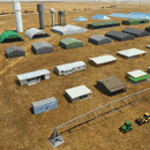
Object libraries for scenery developers (version 10 - improvements on curved surfaces + 10 lights(improved) + 3 windsocks + 3 animals + 5 animated people + 10 fuel_area +stable +fire_tower + 28 new fences + church + sheds). All objects in these libraries will be used in my own sceneries and the result of 100s hrs of effort. All objects from the real world. All objects use LOD (Level Of Detail) to keep frame rates high. Final long distance models have a large triangle added below ground to stop them disappearing in the distance. PBR materials used extensively. Included are 2 PDF files with photos of every object to make selection easy. Republish these files in any freeware scenery if required. READ "read me library instructions" before using.
---------------library1v10-cbj
Cones x4 Gables x3
Church x1
Fences (10 types farm chainlink x4 mesh x2 horse hand-rail paling cattle_grid) x94
Flag pole x1
Fuel_Signs_ x6
Fuel_area_pipes x2
Gas (petrol) station x3
Gliders x4
Glider trailers x4
Grain storage hoppers silos x 4
Power poles x2
Rail platforms station x5
Rail locomotive passenger_carriage grain_hoppers x5
Tower_forest_observation
Towers_radio x6
Weather station small x4
Windsock x3 Windsock-light x1
-------------library2v10-cbj
Animals - Cows x2 Sheep
Grain bunkers - large piles of grain covered with canvas x5
Hangars small airfield x15
Medical transfer station (building) x2
Obstacle-light x10
People x5 Men Women
Pivot irrigator x3
Sheds x10
Shelters x2
Terminals - small airfield x12
Water tanks x3
Towers water x4
Tractors farm x3
Water tanks x3
| Filename: | MSFS_2020_object_library_with_200_models_ranging_f.zip |
| License: | Freeware |
| Added: | 6th March 2022, 19:34:52 |
| Downloads: | 395 |
| Author: | COLIN JEFFERY |
| Size: | 198.25 MB |
| Category: Flight Simulator 2004 - Miscellaneous Files | |
| GoTo any Airport Version 4 |
|
File Description:
Go To Any Airport.- Now 4 Airports Included.
Always wanted to return to your favourite local Airport from anywhere in the world? simply - with no fuss? Look no Further.
Start at your Designated Airport, [in this case London Gatwick,Innsbruck,Dublin or Edinburgh in a 737], then Goto any Airport! - via the FS9 World menu and return to the Original Designated Airport - every time! - By Just turning the GPS/nav switch to GPS and Flight Director and autothrottle on whilst still on the ground.Click on the Autopilot and Nav Hold switch once above 1000ft - thats it !! . Set Weather as required and dont forget Altitude and Speed in autopilot and away you go. Use the FS9 ATC as You Travel, call into designated Airport when close and receive the curent ATIS and Runway approach in use.
HAVE FUN.
(This is different to the great circle direct routes that you can programme into the very good FS9 GPS - each and every time you start from a new airport).
As A bonus you can also use the designated flight files provided to take of and circle your Airport,using autopilot again with GPS/nav switch on gps setting and nav hold switch on. This is a good way to observe the airfield and your aircraft especially from tower view - set tower position using map window and pointing and dragging tower icon also set the tower altitude.Some Example flights worded "AJT Circuit of......." are also enclosed.- these particular flights can make good moving screen savers!
| Filename: | GoTo_any_Airport_Version_4.zip |
| License: | Freeware |
| Added: | 7th March 2004, 18:21:48 |
| Downloads: | 1,001 |
| Author: | Alan Trussell |
| Size: | 54.91 KB |
| Category: Flight Simulator 2004 - Flight Plans | |
| Military Base Tour - Pacific Rim |
|
File Description:
Military Base Tour – Pacific Rim (MFPR) contains 21 Flight Plans (.PLN) for flights to various military air bases along the Pacific Rim, across the Pacific to CONUS and ending at Andrews AFB/NAF where the Military Flights Series began. It is the continuation of Military Flight Plans (MF) (mf_flights.zip) published in Avsim on 29th March 2004, Military Flight Plans – Europe (MFE) (mfe_flights.zip) published in Avsim on 17th June 2004 and Military Base Tour – West Asia (MFWA) (mfwa_flights.zip) published in Avsim on 6th August 2004 and Military Base Tour – South Asia (MFSA) (mfsa_flights.zip) published in Avsim on 20th November 2004. There are a total of 128 flight plans in this Military Flight Series - Round the World Tour of Military Bases. (See Military Flights Master Itinerary– included in this .zip.) The itinerary contains a list of all the plans in the five uploaded files.) There are Briefing documents for each flight in Microsoft Word (.doc) and Text (.txt). The Flight Plans use the autopilot from takeoff to landing. The speed, altitude, weather, radios and various other controls are the pilot’s responsibility. Many landings are IFR and all are under the control of the autopilot. It is suggested that the pilot set up a separate Folder (“MFPR Flights” for example) and unzip this file there to store the .PLN and Briefing files. The .PLN can then be copied to the “Flight Simulator Files” and used to set up the flight and the Briefings printed and available for quick reference during the flight.
| Filename: | Military_Base_Tour__Pacific_Rim.zip |
| License: | Freeware |
| Added: | 9th April 2005, 04:39:05 |
| Downloads: | 1,382 |
| Author: | John Resch |
| Size: | 282.22 KB |


© 2001-2026 AVSIM Online
All Rights Reserved
Privacy Policy |