
Where Flight Simulation Enthusiasts Gather from Around the World!
AVSIM Library - Search Results

| Category: Prepar3D V1-4 - Aircraft Repaints, Textures and Modifications | |
| Douglas C-54 (VH-PAF) Pacific Air Freighters |

|
Images related to this file:
File Description:
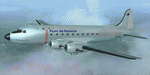
This folder contains a repaint for the Douglas C-54 / DC-4 by Flight Replicas. It shows Douglas DC-4 VH-PAF in the colors of Pacific Air Freighters.
VH-Paf was originally delivered new to the USAAF as 44-9126 on May 14, 1945. It transferred to the USAF in 1947 and was Withdrawn from service and stored at Davis Montahan, Arizona - December 1971. She was sold to Dross Metals in 1975 and entered onto the United States Aircraft Register as N9013V.She then flew for several companies in the US until she was seized by Bahamas authorities for alleged smuggling activities in April 1981. She was sold again, among others flying for Lynch Air Tankers Inc, Billings, Montana between 1984 and 1995 as 'City of Billings'.
She then went to Australia with Pacific Air Freighters Pty Ltd, arriving in Cairns on completion of the ferry flight to Australia in June 1995.
The ferry route was Chino - Hilo - Majuro - Honiara - Cairns, the first leg of this ferry flight took 14 hours. On arrival at Majuro some problems associated with Number 2 engine were worked on before departing for Honiara. During this leg Number 2 engine began to play up so it was shut down in flight. As the problem could not be rectified it was decided to carry on to Cairns as planned on three engines. She was ferried Cairns - Brisbane (Archerfield) on three engines in june 1995 and entered onto the Australian Aircraft Register as VH-PAF on January 31, 1996
She commenced long term contract with Goroka Air Service, Papua New Guinea - October 14, 1996. Returned to Brisbane after 3 months and placed in open storage and sold at auction to Airfreighters International P/L - May 22, 1997. Services were flown under the name of Pacific Air Freighters. Chartered by Ansett Australia Cargo for service Brisbane - Darwin - September 15, 2000. She was then sold to Historical Aviation Restoration Society Inc and ferried to Brisbane - Albion Park Regional Airport, where she was reregistered as VH-EAY - June 23, 2008. At present, she is undergoing complete overhaul for return to airworthy condition.
A repaint by Jan Kees Blom, based on the paintkit by Flight Replicas.
| Filename: | Douglas_C54_VHPAF_Pacific_Air_Freighters.zip |
| License: | Freeware |
| Added: | 28th November 2019, 23:21:36 |
| Downloads: | 103 |
| Author: | Jan Kees Blom |
| Size: | 58.97 MB |
| Category: Flight Simulator 2004 - Scenery | |
| St Lawrence Island AK: Gambell PAGM, Savoonga PASA, and Northeast Cape |
|
Images related to this file:
File Description:
St Lawrence Island is in Alaska, but "in" is slightly misleading as it is in fact in the Barents Sea and 120 miles from the Alaska mainland, and only 40 miles offshore of Russia. The island is around 100 miles long, with two villages and at the eastern end an old air force radar base that was cleared away some 25 years ago. Gambell is one of the two villages and is at the far western end of the island, with a population of around 700 living mainly from the sea. This northern airfield is unusual in that it has an asphalt runway and apron, the lit runway being aligned 16-34 and just over 4,500 feet long. The reason for the asphalt becomes apparent if you try walking in the vicinity, as underfoot there are rounded pebbles down to varying depths, and they are quite small and eventually slippery enough to trip you up. To base a flexible gravel runway on top of this would have been difficult, and when it was originally built it was for an air force base (closed long ago). The village is also fairly unique among northern settlements in that it has wind turbines and also solar panels. The second village is Savoonga and is around 40 miles east of Gambell with a similar population. The runway here is lit gravel aligned 5-23 and 4,900 feet long. This village also has wind turbines and solar panels. There are no vehicles (cars, pickups, trucks etc) on the island, mainly because there is nowhere far to go to and in the case of Gambell because roads as such would be difficult to create. ATV's are the standard way to go, along with small boats for fishing and whaling. At the eastern and of the island the remaining traces of the air force radar base are just the gravel runway and aprons, included with the Savoonga scenery. The AI included here is for daily flights from Nome by ERA and Bering Air, along with some GA. Also included here is the EZ library that includes the wind turbines, to save you looking for it. Installing this will also mean that a wind farm in my Cyprus scenery wii now be visible to the north of Larnaca, and there are other libraries in the series that include useful objects. The Lens_EZ_Animated library could go into your static objects folders, which is where I have it; up to you.
| Filename: | St_Lawrence_Island_AK_Gambell_PAGM_Savoonga_PASA_a.zip |
| License: | Freeware, limited distribution |
| Added: | 29th February 2020, 00:09:36 |
| Downloads: | 225 |
| Author: | Roger Wensley |
| Size: | 11.59 MB |
| Category: Flight Simulator X - Aircraft Repaints, Textures and Modifications | |
| air algerie livery of wilco a340-300 |
|
File Description:
air algerie leased an a340-300 from hifly
The Airbus A340 is a long-range, wide-body passenger airliner that was developed and produced by Airbus. In the mid-1970s, Airbus conceived several derivatives of the A300, its first airliner, and developed the A340 quadjet in parallel with the A330 twinjet. In June 1987, Airbus launched both designs with their first orders and the A340-300 took its maiden flight on 25 October 1991. It was certified along with the A340-200 on 22 December 1992 and both versions entered service in March 1993 with launch customers Lufthansa and Air France. The larger A340-500/600 were launched on 8 December 1997; the A340-600 flew for the first time on 23 April 2001 and entered service on 1 August 2002.
Keeping the eight-abreast economy cross-section of the A300, the early A340-200/300 has a similar airframe to the A330. Differences include four 151 kN (34,000 lbf) CFM56s instead of two high-thrust turbofans to bypass ETOPS restrictions on trans-oceanic routes, and a three-leg main landing gear instead of two for a heavier 276 t (608,000 lb) MTOW. Both airliners have fly-by-wire controls, which was first introduced on the A320, as well as a similar glass cockpit. The later A340-500/600 have a larger wing and are powered by 275 kN (62,000 lbf) Rolls-Royce Trent 500 for a heavier 380 t (840,000 lb) MTOW.
The shortest A340-200 measured 59.4 m (195 ft), and could cover 12,400 km / 6,700 nmi with 210–250 seats in 3-class. The most common A340-300 reached 63.7 m (209 ft) to accommodate 250–290 passengers and had a 13,500 km / 7,300 nmi range. The A340-500 was 67.9 m (223 ft) long to seat 270–310 over 16,670 km / 9,000 nmi, the longest-range airliner at the time. The longest A340-600 was stretched to 75.4 m (247 ft), then the longest airliner, to accommodate 320–370 passengers over 14,450 km / 7,800 nmi.
As improving engine reliability allowed ETOPS operations for almost all routes, more economical twinjets have replaced quadjets on many routes. On 10 November 2011, Airbus announced that the production reached its end, after 380 orders had been placed and 377 delivered from Toulouse, France. By the end of 2021, the global A340 fleet had completed more than 2.5 million flights over 20 million block hours and carried over 600 million passengers with no fatalities. The A350 is its successor; the McDonnell Douglas MD-11 and the Boeing 777 were its main competitors. Lufthansa is the largest operator and the largest customer with 34 A340 aircraft in its fleet.
| Filename: | air_algerie_livery_of_wilco_a340300.zip |
| License: | Freeware |
| Added: | 29th May 2022, 17:02:17 |
| Downloads: | 166 |
| Author: | moussa cherif baya |
| Size: | 10.55 MB |
| Category: Flight Simulator 2004 - Miscellaneous Files | |
| The Steamer PATRIA, pearl on VFR of Lario - Como Lake, Italy |
|
Images related to this file:
File Description:
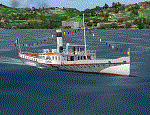
Steamship sailing, GMax model with photo real textures and panel with exterior views.
The History: Born with the name of "Savoia" this steamer was placed in the yard June 7, 1926 by the Odero's workers at the construction site of Dervio, and in a very short time, triumphantly launched July 31, 1926 first in the waters of Dervio , to start shipping in the Como Lake.
Soon after this launch, the site was put on the twin " October 28 ", which later became the "Concordia". In December 1926, the " Savoia " incorporates a major change : the distribution system of the machine new one "Caprotti" type that has excellent results and is , up to date, the only example in the world (reduction of rolling steam). In May 1927, the " Savoia " has the honor to welcome on board the King of Italy Vittorio Emanuele III , escorted by the steamers " October 28" and " Plinio". During World War II , following the fall of the fascist regime , July 25, 1943 , is required to change the name of the steamer. Even public opinion is mobilized and decide to rename the steamer by the name of "PATRIA". At the same time the twin " October 28 " is renamed "Concordia". Back after a break in service , January 10, 1945 is attacked and strafed while browsing the center of the lake . At the end of was counted 5 victims and 17 injured of which one will die as a result. At the height of the bridge spread of a fire, for piercing and incendiary bullets used by the Anglo-Americans, but soon subdued by the crew. In June 1951, the PATRIA is back in service with some modifications. The smokestack is shortened to about 3 mts and boilers and burners are converted from coal to oil. In August 1952, the boat service on the lake shift from "Lariana " to Government Management, which taken the steamer. In 1973 the interior of the " Patria" is restored according to the original scheme: the magnificent ship back into service June 10, 1973.
Great new features are the stained glass windows in the inner surface that allow you to see the paddle wheels in motion. In the 80s the PATRIA is used mainly for special cruises and rentals, limiting the use of the line. The summer of 1990 is the last one that sees the "PATRIA" in service. In the fall it is stopped at the construction site of Tavernola, later transferred to Dervio where it remains moored for years waiting to know his fate ... between demolition or renovation (this strongly desired by the Lariana population). Finally in 2003, the Province of Como takes the field by engaging in the recovery of the steamer, with PATRIA's historic "friends" of "Famiglia Comasca"; February 27, 2004 the remains of the steamer is formally sold to the Province of Como in the symbolic figure of " 1 Euro". After a series of bureaucratic delays, in August 2008 is finally contracted the first batch of works and the renovation starts. On 8 May 2013, PATRIA comes to Dervio for a short cruise, and for testing stability on the lake, and received a "Certificate of Class" that officially renames it as a ship. After 23 years it is the first time that the PATRIA sails again, since 1990, the year of its disarmament. The inauguration takes place July 19, 2013, at Villa Olmo in Como present authorities, proponents of the huge recovery and many other enthusiasts ... as me. Enjoy.
Check video available here: http://youtu.be/KALgHsGiPu8
| Filename: | The_Steamer_PATRIA_pearl_on_VFR_of_Lario__Como_Lak.zip |
| License: | Freeware |
| Added: | 22nd February 2014, 01:25:28 |
| Downloads: | 591 |
| Author: | Aldo Della vedova, Daniele Lanfranchi, Gian Mario Verga |
| Size: | 10.5 MB |
| Category: Prepar3D V1-4 - Utilities | |
| Flightplan Visualizer 1.12 |
|
Images related to this file:
File Description:
Flightplan Visualizer (FV) version 1.12.0. Copyright 2018-2019 by Pelle F. S. Liljendal ([email protected]), all rights reserved.
FV comes with 540 pre-imported Commercial AI flightplans (+380 BizJet flightplans are available as a separate download). However you are able to import additional (AI) flightplans yourself. Once imported these (AI) flightplans can be visualized on a map-view, and the user will be able to search accross all these. Hence you can use the program as inspiration as to which routes to fly. E.g. you can search across all imported flightplans to find all flights in an A321 flying into/out from LDDU, or simply to look for all flights in a Boeing 747-8F.
Simply run the included installer to install the software. The program will be installed into "C:\Program Files (x86)\Flightplan Visualizer" and all datafiles will be installed into: "C:\Users\[UserName]\AppData\Roaming\FlightplanVisualizer". The program comes with a full manual explaining everything, and a 3 page quick manual to get you started. The first 3 times you run the program the quick manual will automatically open. The forum is hosted here: https://forum.aerosoft.com/index.php?/forum/919-flightplan-visualizer/
Version 1.12 Contains the following changes: ⦠Ability to automatically check for available program-updates. The actual download of the new installer is still a manual process, but the program will at least list the download-URL. However You cannot see this feature in action until the next version will be released ;-) Updated the flightplan file-format to accommodate changes in the latest versions of (AI) flightplans. The program remains backward compatible and can still read older flightplans, however these might “miss†some (at this time) non-essential information. As a result all “Wi18-19†and “Su19†(and a few “Su18) flightplans have been re-imported and have been bundled with the version 1.12 installer, using the new file-format. Added new "Generate redirection report" button to the redirection edit form. Pressing this button will generate- and display a report of all active pseudo airports and redirections per flightplan. Added new menu-item to re-process all flightplans, according to specified airport-redirections. The "UserAirportRedirect.xml" file bundled with the installer have been updated, based on output from the new "Generate redirection report". These updated airport-redirections have been used to re-process/update all flightplans bundled with the installer. Buttons have been added to the "Leg Info" which allows you to transfer data for a particular leg/flight from FV to SimBrief in order to kick-start your "paper work" for a flight to fly. The "Leg Info" form also got buttons to show decoded METAR/TAF, and the raw METAR/TAF is also embedded in the text copied to the clipboard (when pressing the appropriate button). In settings you can now speficy the path of the folder holding the files that MakeRunway generates (if not specified it will use the UserData folder). Once set to the folder where MakeRunway generates its files (e.g. the P3D folder), you only have to run MakeRunway, you no longer have to copy the 3 files to the UserData folder. A few new traffic-charts were added to the "Airport Info" form (traffic per: region, sub-region and country), and a combo-box was added to switch between inbound- and outbound-traffic. The "Nearby Airport" form that can be opened from the "Flightplan Import" form now have an extra comment-column with information about the non-pseudo/pseudo airports. The comment column on the airport tab-sheet of the "Flightplan Import" form now also contains more info about non-pseudo/pseudo airports. The Generic Randomizer form got a new button called "Pick random flight", which will display info for a flight, randomly picked from all flights for the selected flightplan, or last search. In the "Search legs" form, you can now enter multiple ICAO-codes (separated by comma) to search for flights to/from these (e.g. search for all flights to/from EBLG or ELLX, by entering "EBLG,ELLX"). If you press SHIFT while clicking the airport browser button, the selected airport will be added to the comma separated list. If you do not hold SHIFT, the list will only contain the newly selected airport. Added support for using FS Global Real Weather (FSGRW) as a Weather provider for METAR-messages (FSGRW does not support TAF-messages). To use FSGRW you must go to settings and specify a full path (including filename) of the file generated by FSGRW. When editing a flightplan the user will be warned if trying to close the form, if changes were made. The menu-item to generate report with all defuct-/obsolete flightplans have been removed from the main-menu, but can now be generated using a button on the "Enable/disable flightplans" form. Now all applicable authors are shown when hoovering the mouse over the flightplan combo-box when a search is active. In previous versions the "Edit" buttons next the flightplan combo-box (on the main form) was only active when a flightplan was selected. Now its also active when "[Last Search]" is selected. However it will instead launch the "Search Legs" form, where you can then edit the criteria of the search. A few airports and airlines have been added/updated in the data-files bundled with the updated installer to accommodate the additional bundled flightplans. The Beluga XL Freighter was added as well as many of the other aircraft were updated with various changes. Added support for a bunch of military aircraft: A6/AE6, A10, C5, C17, E2, E3, EF2000, F14, F15, F16, F18, F22, F35, F111, F117, JAS39, KC10, KC135, MiG 21/23/25/27/29/31, Mirage III/5/2000, Rafale, SU 17/20/22/24/25/27/30/32/34, V22. New "Exclude military aircraft" setting have been added (defaults to true). When true military aircraft will not be shown (can be changed in the settings form). Added new menu-item to load/display current log-file. FV tend to be somewhat memory-hungry while (re)loading all active flightplans, and you might see a peek in memory consumption. But from this release and forward it will try to free up most of the memory once all flightplans have been loaded. Minor changes to the "Enable/disable flightplans" form, to make it more responsive, and added a progressbar that is visible while flightplans are being moved, copied or deleted. Fixed: issue when trying to import a flightplan zip-file containing multiple "Flightplan_XXX" files. If the same zip contains multiple sets of matching files (Flightplan, Aircraft and Airport) the user will now be presented with a combo-box from where the user can pick which set of files to import (only the flightplan-file will be shown). Fixed: The file "f5.csv" was missing from previous installers. Fixed: issue with pseudo-airports when using the "Nearby airports" tab-sheet in the Airport Info form. Fixed: Saving a flightplan that was edited, it would try to save it in the (flightplan) [ROOT] folder even if it was loaded from a sub-folder. Now it will always try to save it in the same location with the same filename. If you want it saved elsewhere/with another filename use the "Save As" button in stead. Imported flightplans will still be saved to the [ROOT] flightplan folder. Fixed: Pressing ENTER in the Flightplan import/edit-form while the comments-field had focus, would close the form (saving the flightplan). Fixed: Result-viewer will no longer display with all text selected. Fixed: METAR/TAF decoder will no longer display with raw-message selected. Fixed: In some cases the program needed to be restarted if changes were made to the weather-provided data in the settings-form. Installer: Comes with +30 new pre-imported (Summer 2019) flightplans of which some are replacements of obsolete flightplans (from previous installers), and 2 of the "old" flightplans have been marked as defunct.
Pelle
| Filename: | Flightplan_Visualizer_112.zip |
| License: | Freeware, limited distribution |
| Added: | 23rd August 2019, 17:15:13 |
| Downloads: | 195 |
| Author: | Pelle Liljendal |
| Size: | 30 MB |


© 2001-2026 AVSIM Online
All Rights Reserved
Privacy Policy |