
Where Flight Simulation Enthusiasts Gather from Around the World!
AVSIM Library - Search Results

| Category: Microsoft Flight Simulator (2020) - Utilities | |
| Flightplan Visualizer 1.19 |

|
Images related to this file:
File Description:
Flightplan Visualizer (FV) version 1.19.0. Copyright 2018-2021 by Pelle F. S. Liljendal ([email protected]), all rights reserved.
FV comes with 1164 pre-imported AI flightplans (of which +380 are BizJet flightplans, the rest are commercial). However you are able to import additional (AI) flightplans yourself. Once imported these (AI) flightplans can be visualized on a map-view, and the user will be able to search accross all these. Hence you can use the program as inspiration as to which routes to fly. E.g. you can search across all imported flightplans to find all flights in an A321 flying into/out from LDDU, or simply to look for all flights in a Boeing 747-8F.
Simply run the included installer to install the software. The program will be installed into "C:\Program Files (x86)\Flightplan Visualizer" and all datafiles will be installed into: "C:\Users\[UserName]\AppData\Roaming\FlightplanVisualizer". The program comes with a full manual explaining everything, and a 3 page quick manual to get you started. The first 3 times you run the program the quick manual will automatically open. The forum is hosted here: https://forum.aerosoft.com/index.php?/forum/919-flightplan-visualizer/
Version 1.19 Contains the following changes:
- The release-version of the application is now aimed at 64-bit (granting access to more memory if needed). Enabling 64-bit adds a memory overhead of approx 50% compared to 32-bit, but its the "price to pay" to have access to more memory (for those of you with many active flightplans loaded into memory at the same time).
- FV can now connect to your simulator using FSUIPC (tested both with P3D and MSFS). By default you will have to manually connect/disconnect (using new menu-items in the File-menu). However in settings you can choose to do it automatic. When automatic-connection is selected the connect/disconnect menu-items becomes inactive.
- When connected to a sim, the location/heading of your aircraft can be displayed on the map, using an orange aircraft-marker, and hoovering the mouse over this marker will display some key data (GPS-location, altitude, heading, speed and so on).
- Added abillity to playback audio-files. In settings you can choose which audio-device to use, and set the volume at which these files are played (defaults to 50%). If volume>0 these files will automatically be played back whenever FV connects to/disconnects from the Sim.
- Added additional icons that are automatically selected to indicate when the program is connected to the simulator. Hence the icon in the main-form will indicate if FV is connected to a simulator or not.
- In the form for editing (user)-airlines and in the form for searching airlines the context menu now have a menu-item called "Show usage". When selected, it will generate a report showing all the (active) flightplans in which the airline is used.
- Added a new "Manual" check-box next to the load-factor when editing user-airlines. This check-box needs to be checked if you want to manually enter a load-factor. When not checked (default) the load-factor will automatically be set to the default value of the selected country.
- When editing user-airlines, the airline just added/edited will be visible and selected in the list-view. Likewise when deleting an airline, the previous item will be be visible/selected (in stead of always scrolling to the top afterwards, as in previous versions).
- The Insert/Delete keyboard-keys can now be used as shortcuts adding/deleting user-airlines and user-aircraft (both owned and types).
- The gate-map context-menu (Airport Info), now allows you to re-center the map (in case your have been panning the map, and can't locate the airport again).
- Added a new menu-item/form to calculate head/cross-wind from manually entered flight/runway-heading and wind-direction/speed. Don't forget the runways tab-page in the Airport-info form already calculates this for each runway (and wind-direction/speed is automatically obtained from METAR).
- Added a new menu-item/form to convert plain-text into morse-code. There is also a button that lets you listen to the generated morse-code, so you can practice your morse-code listening skills (e.g. entering an ILS/VOR-ident, to know which morse-code to listen for in the aircraft, to verify the correct ident is reqeived).
- The "Cruise speed" column have been removed from the aircraft tab-page of the Edit Flightplan form to make more room for the Carrier/Operator-columns. In the past these simply contained the ICAO for the airlines. Now it both contains: ICAO, IATA (if not blank) and Name.
- The criteria in the leg-search window now allows you to filter on departure/arrival week-days (e.g. only include flights departing a particular airport on a Saturday or Sunday).
- When using the flightplan-filter on the main-form, it will favour the current active flightplan (as in previous versions), however if not able to, it will select the first flightplan included in the filtered list (in stead of choosing "[None]").
- Improved import of AIGFP-flightplans where the airport is not contained within the embedded airport.txt file and is using a different ICAO-code in route-files (observed for "AIG_UTair_Summer2018v6" and "AIG_S7Airlines_Winter2019-2020v3").
- Added runway-info (for both Departure/Destination-airports) to the flightplan leg-report. For ILS-eqiupped runways its lists the ID (both as text, as morse-code), frequency and ils-slope.
- Morse-code also added to ILS-ID column on the "Runways" tab-page of the airport-info form. Above the list-view there is also a label showing the morse-code (using a larger font), and next to it there is a button that lets you listen to the morse-code.
- Traffic-pattern direction (for take-off and landing) are now displayed for each runway. These data are extracted from the scenery by MakeRunways, hence the info can't be "better" than the info in the scenery (hence most default airports simly shows 'Left').
- Current/peak- memory usage is now logged at various stages while running, and when closing the program. These values can also be observed opening the about-box, which will also forcefully append these values to the log.
- When using MkRwy with MSFS it can't obtain the country-name, hence these are taken from the airport-database embedded with FV. However the name for USA ("United States of America") is too long to be shown together with state-name, hence code have beed added it to shorten it to "United States" (which was the default country-name used in FSX/P3D).
- Changed font in Comments-box for user-aircraft to a fixed font, in case some users what to enter text "in columns" (e.g. if you make "tables" with speed-restrictions).
- Changed the color of the splitter-bars in the Airport-info and leg-search forms to a draker color, to better indicate where it is.
- The build-part of the version-number can now be ignored when performing the automatic version-check at start-up. This new setting is by default disabled. If enabled it will ignore changes from version 1.x.0 to 1.x.1 (e.g. an update from 1.19.0 to 1.19.1). However major/minor versions-updates (e.g. from 1.19.x to 1.20.x) will not be ignored.
- Fixed: Excessive logging while importing AIGFP flightplans removed (leftover from fixing a bug before the release of version 1.18).
- Fixed: When using kg in the leg-info report, the weight of Luggage incl. pax weight (shown in parentees) was wrong.
- Fixed: Button to open filter-manual on Gate-page of the Airport-info form was not visible/position was not fixed.
- Fixed: The wind-speed obtained from the METAR and used to calc head/tail-wind on the Runway tab-page of the Airport-info form, did not considder the unit (e.g. Khp or meters-per-second).
- Data: A VERY BIG THANK YOU to Bruce Nicholson for assistance updating the Airline-database, both with new/missing entries and marking defunct airlines as such.
- Data: A lot of "fictios airlines" was added as well. These are used for companies without official ICAO/IATA codes. To indicate they are fictios the ICAO-code is set to "---" and the IATA-code is used to indicate the kind of traffic (e.g. the combination "---/BZ" is used for biz-jet flights).
- Data: Also thanks to Bruce for pointing out that a few aircraft were not being detected as they should. So this version should do a better job with Cessna T206H, Cessna Citation SII/S550 and Global 7500.
- Flightplans: The bundled AIG flightplans have been updated to the latests versions/revisions available from AIG (there were a few defunct that was removed, a few new versions that was added, and a lot of new revisions being updated).
- Flightplans: Eric Steinmetz's Bizjet (AI) flightplans that have previously been available as a separate download are once again bundled with the installer (they are only installed if you choose the option during installation). These have all been updated to use the new "---/BZ" airlines (for companies without official ICAO/IATA-codes), and the Author/Provider have been set to "Eric Steinmetz"/"ESAI" (the previous/separate download was created before adding author/provider to the software).
Pelle
| Filename: | Flightplan_Visualizer_119.zip |
| License: | Freeware, limited distribution |
| Added: | 2nd May 2021, 00:02:01 |
| Downloads: | 280 |
| Author: | Pelle Liljendal |
| Size: | 35.71 MB |
| Category: Flight Simulator X - Scenery | |
| RNAS Henstridge (HMS Dipper) |
|
File Description:
Royal Naval Air Station Henstridge or RNAS Henstridge (HMS Dipper) is a former Fleet Air Arm base located 7 miles (11 km) west of Shaftesbury, Dorset (Now Somerset) and 12.4 miles (20.0 km) east of Yeovil, Somerset in South West England.
The main part of the land (355 acres) was purchased in August 1941, after which building of the airfield and the marsh lane accommodation site commenced, it was commissioned on April 1, 1943 as HMS Dipper, principally as number 2 naval fighter school, on the 11th September 1942, another 18 acres was acquired at the adjoining gibbs marsh area for an aircraft repair and maintenance site. The design and lay-out of the airfield was quite unique, having 5 runways, 2 of these being east west lay-out (07-25) both 1000 yards long, the northern runway incorporated a dummy deck landing strip, complete with under-ground arresting gear with four above ground arrestor wires, which was a duplicate of that installed on HMS Implacable for training of aircraft carrier landings, these mainly being carried out with the Seafire, a naval version of the spitfire with folding wings. The site also had its own cinema and stage hall
March 1952 the airfield became inactive and was placed under care and maintenance, during 1953 Air whaling (now Bristow group) used the facilities for repairs to the whaling fleet of helicopters until moving out in June 1958.June 1957 it was finally closed as a naval establishment, from 1958-1960 the entire site was sold off. 27 June 1980 the BBC purchased the whole site and applied for planning permission to erect at the airfield a shortwave radio station consisting of 21 self-supporting towers holding aerial arrays and ancillary buildings on a 300-acre site. The station would transmit overseas radio services to Eastern Europe, the Soviet Union and perhaps South America the application failed and the BBC sold the land during January 1987 The airfield is also the home of the wessex strut, a general aviation club formed in January 1977, which holds an annual fly in and other events their first fly-in was on 17 April 1977 and attracted 107 aircraft. As of today the only usable runway is the north 07-25 runway, extant with the concrete dummy deck, and the underground machinery chamber, it is also the home to a large number of light aviation enthusiasts aircraft as well as the Yakolevs aerobatic display team and the Dorset and Somerset air ambulance
The current airfield is operated by EGHS and is an unlicensed airfield. The only usable runway is 07/25 tarmac/concrete 750 mts long x 6 mtr wide. Henstridge radio can be contacted on 130.250 MHz, it can be found at the south eastern stub of the Yeovilton MATZ
Source:Wikipedia
| Filename: | RNAS_Henstridge_HMS_Dipper.zip |
| License: | Freeware |
| Added: | 9th February 2017, 22:14:54 |
| Downloads: | 165 |
| Author: | Terry Boissel |
| Size: | 4.53 MB |
| Category: X-Plane - Original Aircraft | |
| B17 Flying Fortress |
|
File Description:
The B17 is arguably the best known heavy bomber from WWII. Followed closely by it's direct successor the B29 SuperFortress it symbolizes the best of WWII's heavy Bombers. The B17 was one of the planes that barely made it into the war. In 1934 the then very small Boeing company had a prototype four engined bomber design called the B-299 but it had not been ordered by the US military. It had suffered several serious setbacks in it's design competition including a crash during a fly-off. Boeing continued work the plane and eventually secured a small service test order and the troubled early history of the bomber began.
The B17 and bombers like it were planes created as "strategic bombers". The essential idea was that a strategic bomber should be able to carry a very large payload for long distances. The military had come to the realization that bombing technology was by nature imprecise even with new advances like the American Norden sight, and what was required was a large number of bombs delivered by large number of planes to assure that a target was destroyed. Although the Germans actually had a decent "smart bomb" and the British built specialty bombs, neither was reliable, so it seemed the best idea was just to blanket the target with bombs.
An American extension to this concept was that of a self-defended bomber. Bombers could be built so tough and with so much defensive armament, it was thought, that they could simply fly to the target, drop bombs, and if necessary fight their way through fighters to get home. There would be security in the large number of bombers in formations, and the defensive capability would allow bombers to fly during the day for better accuracy in drops. It was to this design concept the B17 was built.
Early experiences in the war with B17's and B-24's could only be termed as disastrous. Loss rates of up to 25% showed the concept of unescorted bombers in daytime to be entirely wrong. Escort fighters were a necessity for success. It soon became apparent that with fighter cover the B17 really was an unparalleled strategic bomber. Success for the B17 shot up dramatically, and it's initial design specifications of huge amounts of armor and gunner positions served it well when fighters did make it close in. The Fortress had enough strength to stave off attackers until escorts showed up, and it became legendary for the incredible punishment it could take and still make it home.
Boeing B-17F Flying Fortress
Wingspan: 103 ft. 9 in.
Length: 74 ft. 9 in.
Height: 19 ft. 1 in.
Engine: 4 x Wright R-1820-97 Cyclone rated 1,200 hp.
Loaded Weight: 65,500 lb.
Maximum Speed: 287 mph.
Service Ceiling: 37,500 ft.
Combat Radius: 1,000 miles
Armaments: 6,000 lbs. of bombs, 12 x .50 cal. machine guns
| Filename: | B17_Flying_Fortress.zip |
| License: | Freeware |
| Added: | 23rd March 2003, 15:42:16 |
| Downloads: | 3,545 |
| Author: | Robert App |
| Size: | 761.49 KB |
| Category: Flight Simulator 2004 - Scenery | |
| Bethel PABE in southwest Alaska |
|
Images related to this file:
File Description:
There are four main northwestern Alaska towns which have good airports and are serviced by Alaska Airlines. From these airports local flights connect to nearby villages, "nearby" in Alaska meaning up to 200 miles away. The northernmost is Barrow. Southwest of Barrow is Kotzebue, then Nome, and the furthest south is this one, Bethel. The town of Bethel has a population of just over 6,000 and is 50 miles from the sea on the Kuskowim River, that splits and forks into many tributaries. Bethel Airport is close to the town and provides the only contact with the rest of Alaska, as there is no connecting highway system. There are scheduled flights by Alaska Airlines, ERA (now called Ravn) and Grant Aviation, plus others such as Ryan Air. There are cargo flights by Everts, Northern, and Lynden, and redistribution onwards to nearby villages by the smaller locally-based planes; all of these are included in the AI. There are two main runways, one just under 6,400 feet and another just under 3,900 feet, both of them aligned 19-1. The third runway is around 1,800 feet and mainly gravel, aligned 11-29. Parking at PABE is on three aprons, the northern for smaller commercial planes of Grant, ERA, Ryan etc, the central for larger planes of Alaska, Northern, Everts, and Lynden, and the southern for a large collection of GA; each apron has further hangars for maintenance companies and smaller operators. There is also another separate apron for the local military and Coastguard. There is not much photographic information available for PABE, and I have never been there; as a result it was impossible to make detailed photographic textures for some of the buildings. However, for most hangars I have made textures of at least the right colour etc based on the information I assembled and if it is green with white trim and side windows then that is how it now appears here. The exceptions are the Alaska Airlines terminal building which has complicated curved elements, and the two military hangars and workshops where I had to settle for an Alaska terminal building from another airport and the same for the military. There are numerous small villages in the vicinity of Bethel, all of them being beside either a river tributary or the coast. There are two Google Earth screenshots to show the villages that are served by the flights from Bethel and that are (mostly) included in the AI. Some of these airfields were not included in FS9 but AI will still operate in and out of Bethel. The smaller area screenshot shows the villages that are close to Bethel, and of these eight I have so far made six and they are included in this post: Napaskiak PKA, Napakiak WNA, Kwethluk KWT, Atmautluak 4A2, Nunapitchuk 16A, and Kasigluk Z09. I will work my way through the rest of the area.
| Filename: | Bethel_PABE_in_southwest_Alaska.zip |
| License: | Freeware, limited distribution |
| Added: | 8th March 2019, 00:37:58 |
| Downloads: | 310 |
| Author: | Roger Wensley |
| Size: | 32.02 MB |
| Category: Flight Simulator X - Aircraft Repaints, Textures and Modifications | |
| Qantas Consolidated PBY-5 5 paints |
|
Images related to this file:
File Description:

Five repaints for the Aerosoft PBY-5 Catalina in the colors of PBY-5's operated by Qantas on the 'Double Sunrise Service' between Western Australia and Ceylon between 1943 and 1945.
In 1943, Royal Australian Air Force personnel were seconded to operate Catalinas under the banner of Qantas. The plan called for flights between Perth, Western Australia, and RAF Base Koggala in southern Ceylon (now Sri Lanka). The flights were the longest non-stop air route of any airline, over 3,500 nautical miles (6,480 km) across the Indian Ocean. Navigating without the aid of radio, the crews relied solely on rudimentary navigation by compass and stars during the trip.
Only Catalinas had that kind of range, so five PBY-5 flying boats were converted to make them suitable for the trip.
They received camouflage paint, with a RAAF roundel on the fuselage, but also a civilian registration, since they were officialy operated by Qantas, and they were named after the stars they would be using for navigation:
Vega Star (G-AGFL/FP221 - tail code 1)
Altair Star (G-AGFM/FP244 - tail code 2)
Rigel Star (G-AGID/JX575 - tail code 3)
Antares Star (G-AGIE/JX577 - tail code 4)
Spica Star (G-AGKS/JX287 - tail code 5)
Taking between 27 and 33 hours, with departure timed so that the flight crossed Japanese occupied territory during darkness, the crews would observe the sunrise twice, which led to the service being known as "The Double Sunrise". The flight route flown was along the coast from Perth to Exmouth then setting out towards Cocos (Keeling) Island or Christmas Island (though neither was actually sighted during the flight) and onto Kogalla, a journey of approximately 3,580 nautical miles (6,630 km). After the success of the initial flights, it was decided to run a weekly service, with some services flying over Rottnest Island and then taking a direct line to Kogalla. As part of the Australia-England air route there was a surface component from Kogalla to Karachi that added considerable time to the service. This was later replaced by the Double Sunrise service, with Karachi to England flown by BOAC. Air crews would change in Kogalla taking the next plane in either direction minimising the time taken to complete the journey.
Though stripped of all non-essential equipment, including de-icing equipment and insulation, the average takeoff weight was 15,900 to 16,000 kg; this included 9,040 liters of fuel, which gave the Catalina a range of 3,600 nautical miles (6,700 km). The service made 271 crossings, delivered over 4,500 kg of mail and carried 860 passengers, including among them British MP Edith Summerskill and the journalist Keith Murdoch. 'The Secret Order of The Double Sunrise' was an illustrated certificate given to passengers aboard the flying boats of the Australia-England air link, to attest they had been airborne for more than 24 hours.
After the war the five modified Catalinas that had flown The Double Sunrise service were scuttled.
Repaints by Jan Kees Blom, based on the paintkit by Aerosoft
| Filename: | Qantas_Consolidated_PBY5_5_paints.zip |
| License: | Freeware |
| Added: | 13th July 2018, 20:38:43 |
| Downloads: | 179 |
| Author: | Jan Kees Blom |
| Size: | 49.87 MB |
| Category: Prepar3D V1-4 - Aircraft Repaints, Textures and Modifications | |
| Cessna 421 advanced physics |
|
File Description:
C421C advanced physics
Modification for the Alabeo C421 C Golden Eagle
Version: tested for P3DV4; should work also with P3DV5 (and probably FSX)
1. Why I developed the advanced physics version
I was asked via this forum, via PMs and also by e-mails to provide a modified version of the Alabeo C421C which can be used for serious multi-engine training. It should have accurate type specific performance for both AEO (all engine operative) and OEI (one engine inoperative), the latter for either a windmilling prop at various speeds and for a feathered engine. Feathering should work as realistic as possible.
Thus, I developed an advanced physics version of the Alabeo C421C. It shows realistic physics for negative thrust (prop drives engine). This is necessary for OEI training and more realistic idle power simulation.
2. Modified files
Modification includes “c421.air†and “aircraft.cfg†files. Data is based on real world Cessna 421C, N100L, 421C-0313.
Aircraft data, equipment list, checklist and other documents for N100L,
as well as some images of C421C, registration N100L, can be found here, too.
Unfortunately, due to copyrights, I can’t upload the full files and can’t provide the AFM and other copyright protected documents.
3. How to install
To update “c421.airâ€:
- Copy the original Alabeo C421 to another aircraft folder, e.g. “C421C advanced physicsâ€.
- Use AirEd (freeware) and open the original “c421.airâ€.
Open AirEd a second time and open “modifications advanced physics c421.airâ€.
Copy the modified tables 511 and 512 to the original .air file
(right click in modification file -> copy -> right click on original file -> replace from clipboard)
To update “aircraft.cfgâ€:
Just copy the modifications to the corresponding position in the original file.
4. Legend of modifications
Modifications in aircraft.cfg:
- Basic Empty Mass (actual mass for N100L 5,154 lbs inserted; most C421C are more heavy, ours is on diet)
- correct basic data for engines + props
- engine friction included (necessary for all negative thrust scenarios)
- flaps lift + drag scalar adjusted (split flaps)
- 2 vacuum pumps
- VMO = 151 KIAS; VNE= 240 KIAS
- cabin: max. differential pressure: 5.0 psi
Modifications in c421.air:
- implemented negative thrust scenarios in prop thrust and efficiency curves (tables 511 + 512); adjusted thrust curves for high TAS at high ALT
5. Side effects of modifications:
- more realistic engine starting:
starting the engine needs the throttle to be 2 cm above idle (see checklist) for the first 15 seconds
- if you start the engine and don’t retard the prop to medium RPMs immediately, you will overstress engine and prop. So be careful when doing an air start, you might lose the prop and the aircraft. (In the real aircraft, these effects are less severe, but you have to avoid high RPMs until the engine is warmed up and have to avoid rapid change of RPM.)
6. Additional Notes:
- Basic aircraft data as published by the manufacturer, like range and service ceilings, especially OEI, are based on MTOM.
- The use of high payloads close to MTOM and higher ambient temperatures are making for a more challenging OEI training.
- In the sim, climb power is too low compared to full power (about 65 % instead of 75 %). I have to find a way to adjust that.
- I have buttons for engine failure under the mixture (see images)
- Seat Position is, like in many Aircraft, higher than as per Default by the sim. For the C421C and me being 5 ft 7 in, that's about 7 clicks arrow up.
| Filename: | Cessna_421_advanced_physics.zip |
| License: | Freeware |
| Added: | 20th March 2021, 01:09:34 |
| Downloads: | 191 |
| Author: | Andreas Kunzi |
| Size: | 18.06 KB |
| Category: Flight Simulator X - Aircraft Repaints, Textures and Modifications | |
| P-47D 334th FS "Miss Plainfield" |
|
File Description:
This folder contains a repaint for the A2A Wings of Power III P-47D Thunderbolt, representing P-47C 42-7945 flown by Lieutenant Spiros 'the Greek' Pisanos of the 334th FS, 4th FG, Finschhafen, New Guinea, 1944. Born in Athens, Greece, in the suburb of Kolonos, on 10 November 1919, Spiros Nicholas "Steve" Pisanos, the son of a subway motorman, came to America in April 1938, as a crew member on a Greek Merchant ship. Arriving in Baltimore, Maryland and unable to speak English, Steve found his way to New York City, where he worked in bakeries and restaurants. As he earned money he started flying lessons at Floyd Bennett Field. In August 1940, he setled i Plainfield, New Jersey, his adopted home town, and continued flying lessons at Westfield Airport. He earned a private pilot's license and, although still a Greek national, in October 1941 he joined the British Royal Air Force sponsored by the Clayton Knight Committee in New York City.
Steve began his military flight training at Polaris Flight Academy in Glendale, California. Upon graduation, Pilot Officer Pisanos was transferred to England where he completed RAF Officers Training School at Cosford, England and OTU (Operational Training Unit) at Old Sarum Aerodrome in Salisbury. Pilot Officer Pisanos was posted to the 268 Fighter Squadron at Snailwell Aerodrome in Newmarket flying P-51A's. He later transferred to the 71 Eagle Squadron, one of the three Eagle squadrons in the RAF, comprised of American volunteers flyin Spitfires at Debden RAF Aerodrome.
When the USAAF 4th Fighter Group absorbed the American members of the Eagle Squadrons in September and October 1942, Pilot Officer Pisanos was commissioned a lieutenant in the U.S. Army Air Forces. On 3 May 1943, Lt. Pisanos was naturalized as an American citizen in London, England, becoming the first individual in American history to be naturalized outside the Continental United States.
Flying his first mission in his P-47 "Miss Plainfield" out of Debden Aerodrome with the 334th Fighter Squadron, 4th Fighter Group, Lt. Pisanos, "The Flying Greek," scored his first victory on 21 May 1943, when he downed a German FW-190 over Ghent, Belgium. by 1 January 1944 he had become an ace with five confirmed victories. On 5 March 1944, he obtained his 10th victory and while returning from that B-17 escort mission to Limoges and Bordeaux, France, Steve experienced engine failure in his P-51B and crash-landed south of Le Havre. For six months he evaded the Germans and worked with the French Resistance and the American OSS sabotaging the German war machine in occupied France. Lt. Pisanos returned to England on 2 September 1944, following the liberation of Paris.
Upon returning to the United States, Captain Pisanos was assigned to the Flight Test Division at Wright Field, Ohio. He attended the USAF Test Pilot School and subsequently served as a test pilot at Wright Field and Muroc Lake, California, testing the YP-80 jet aircraft. During his career in the USAF, Steve graduated from the University of Maryland, attended the Air Command and Staff College and the Air War College. In December 1973, after a distinguished thirty years of service in the United States Air Force, he retired with the rank of Colonel. Repaint by Jan Kees Blom, based on the paintkit by Martin Catney
| Filename: | P47D_334th_FS_Miss_Plainfield.zip |
| License: | Freeware |
| Added: | 14th March 2009, 10:55:44 |
| Downloads: | 730 |
| Author: | Jan Kees Blom |
| Size: | 7.17 MB |
| Category: Flight Simulator 2004 - Miscellaneous Files | |
| The Steamer PATRIA, pearl on VFR of Lario - Como Lake, Italy |
|
Images related to this file:
File Description:
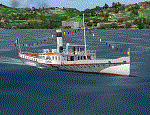
Steamship sailing, GMax model with photo real textures and panel with exterior views.
The History: Born with the name of "Savoia" this steamer was placed in the yard June 7, 1926 by the Odero's workers at the construction site of Dervio, and in a very short time, triumphantly launched July 31, 1926 first in the waters of Dervio , to start shipping in the Como Lake.
Soon after this launch, the site was put on the twin " October 28 ", which later became the "Concordia". In December 1926, the " Savoia " incorporates a major change : the distribution system of the machine new one "Caprotti" type that has excellent results and is , up to date, the only example in the world (reduction of rolling steam). In May 1927, the " Savoia " has the honor to welcome on board the King of Italy Vittorio Emanuele III , escorted by the steamers " October 28" and " Plinio". During World War II , following the fall of the fascist regime , July 25, 1943 , is required to change the name of the steamer. Even public opinion is mobilized and decide to rename the steamer by the name of "PATRIA". At the same time the twin " October 28 " is renamed "Concordia". Back after a break in service , January 10, 1945 is attacked and strafed while browsing the center of the lake . At the end of was counted 5 victims and 17 injured of which one will die as a result. At the height of the bridge spread of a fire, for piercing and incendiary bullets used by the Anglo-Americans, but soon subdued by the crew. In June 1951, the PATRIA is back in service with some modifications. The smokestack is shortened to about 3 mts and boilers and burners are converted from coal to oil. In August 1952, the boat service on the lake shift from "Lariana " to Government Management, which taken the steamer. In 1973 the interior of the " Patria" is restored according to the original scheme: the magnificent ship back into service June 10, 1973.
Great new features are the stained glass windows in the inner surface that allow you to see the paddle wheels in motion. In the 80s the PATRIA is used mainly for special cruises and rentals, limiting the use of the line. The summer of 1990 is the last one that sees the "PATRIA" in service. In the fall it is stopped at the construction site of Tavernola, later transferred to Dervio where it remains moored for years waiting to know his fate ... between demolition or renovation (this strongly desired by the Lariana population). Finally in 2003, the Province of Como takes the field by engaging in the recovery of the steamer, with PATRIA's historic "friends" of "Famiglia Comasca"; February 27, 2004 the remains of the steamer is formally sold to the Province of Como in the symbolic figure of " 1 Euro". After a series of bureaucratic delays, in August 2008 is finally contracted the first batch of works and the renovation starts. On 8 May 2013, PATRIA comes to Dervio for a short cruise, and for testing stability on the lake, and received a "Certificate of Class" that officially renames it as a ship. After 23 years it is the first time that the PATRIA sails again, since 1990, the year of its disarmament. The inauguration takes place July 19, 2013, at Villa Olmo in Como present authorities, proponents of the huge recovery and many other enthusiasts ... as me. Enjoy.
Check video available here: http://youtu.be/KALgHsGiPu8
| Filename: | The_Steamer_PATRIA_pearl_on_VFR_of_Lario__Como_Lak.zip |
| License: | Freeware |
| Added: | 22nd February 2014, 01:25:28 |
| Downloads: | 591 |
| Author: | Aldo Della vedova, Daniele Lanfranchi, Gian Mario Verga |
| Size: | 10.5 MB |
| Category: Flight Simulator 2004 - Utilities | |
| Servinfo Update 5(Nov 01, 2010) |
|
File Description:
Thank you for downloading this 5th update of Servinfo 2.02.
This update actualised with logos and data the following Airlines and Air Forces:Air Zimbabwe, Basler Flight Service, Bristow Helicopters, British International Helicopters,RAF Barkston Heath, Braniff International Airways, BQB LÃ�ÂÂneas A�©reas, China Northern Airlines,China Southern Airlines, Canadian Western Airlines, Centurion Air Cargo, Air Comores International,Dominicana de Aviaci�³n, DAS Air Cargo, Ecuatoriana De Aviaci�³n, Georgian National Airlines,Caribbean Star Airlines, Ghana International Airlines, Royal Tongan Airlines, Turkish Air Force,Ju-Air, RAF Leuchars, Albanian Airlines, South African Air Force, 32th Squadron RAF,USAF 100th Air Refuelling Wing, RAF(Support Helicopter Force),RAF Scampton, RAF St Athan,RAF Topcliffe Flying Training Unit, Vladivostok Air and RAF Valley Flying Training Unit.
The following aircrafts are now identified by Servinfo in all his flights:
Antonov An-2,Antonov An-8,Antonov An-12,Antonov An-22,Antonov An-24,Antonov An-26,Antonov An-28,Antonov An-30,Antonov An-32 Sutley/Firekiller,Antonov An-38,Antonov An-70,Antonov An-72,Antonov An-74-100/200, Antonov A124 Ruslan ,Antonov A140,Antonov A148,Antonov A225 Mriya,Antonov An-74-300,Avro Lancaster,Avro Lancastrian,Boeing B-17 Flying Fortress,Boeing B-29 Superfortress,Bristol Blenheim,B�¼cker B�¼ 131 Jungmann,B�¼cker B�¼ 131 Jungmeister,Consolidated B-24 Liberator,Curtiss P-40 Warhawk/Kittyhawk
Curtiss SNC-1 Falcon,De Havilland DH.98 Mosquito,Douglas AD Skyraider,
Douglas A-20 Havoc/Boston/P-70/DB-7,Douglas B-26 Invader,Douglas SBD Dauntless
Fairey Swordfish,Grumman F4F Wildcat,Grumman F6F Hellcat,Grumman F7F Tigercat,
Grumman F8F Bearcat,Grumman TBF Avenger,Grumman F9F Panther,Grumman S-2/S-2F Tracker,Grumman S-2 Turbo Tracker,Hawker Hurricane/Sea Hurricane, Hawker Fury-Sea Fury,Hawker Hunter,Hawker Hind,Heinkel He-111,Ilyushin A-50,Ilyushin IL-103,Ilyushin IL-114,Ilyushin IL-2M3,Ilyushin IL-4,Ilyushin IL-10,Ilyushin IL-12,Ilyushin IL-14,Ilyushin IL-18/IL-20/IL-22"Coot"/IL-22 Zebra/IL-24,Ilyushin IL-28,Ilyushin IL-38,Ilyushin IL-62,Ilyushin IL-76/IL-78/IL-82/IL-76 Gajaraj
Ilyushin IL-86/IL-87,Ilyushin IL-96,Kamov Ka-25 "Hormone",Kamov Ka-27"Helix"
Martin B-26B Marauder,Messerschmitt 109,Messerschmitt 262 Schwalbe,MiG-15,
MiG-17,MiG-19,MiG-21,MiG-25,MiG-27,MiG-29,MiG-31,Mitsubishi A6M Rei-Sen"Zero",
North American F-82 Twin Mustang,Northrop P-61 Black Widow,Vought F4U Corsair,
Short S-25 Sandringham,SIAI Marchetti SF.260,Sukhoi Su-7,Sukhoi Su-15,Sukhoi Su-17/Su-20/Su-22,Sukhoi Su-24,Sukhoi Su-25/Su-28/Su-39,Sukhoi Su-26,Sukhoi Su-29,Sukhoi Su-31,Sukhoi Su-38,Sukhoi Su-47 Berkut,Sukhoi Su-80,Sukhoi Superjet 100-95,Tupolev Tu-2,Tupolev Tu-4,Tupolev Tu-14,Tupolev Tu-16,Tupolev Tu-20/95/142,Tupolev Tu-22,Tupolev Tu-22M,Tupolev Tu-114,Tupolev Tu-124, Tupolev Tu-134,Tupolev Tu-144,Tupolev Tu-154,Tupolev Tu-160,Tupolev Tu-204/214/224/234,Tupolev Tu-334 and Vickers Supermarine Spitfire/SeaFire.
| Filename: | Servinfo_Update_5Nov_01_2010.zip |
| License: | Freeware |
| Added: | 2nd November 2010, 01:43:39 |
| Downloads: | 936 |
| Author: | Daniel Nole |
| Size: | 1.44 MB |
| Category: Prepar3D V1-4 - Utilities | |
| Flightplan Visualizer 1.10 |
|
Images related to this file:
File Description:
Flightplan Visualizer (FV) version 1.10.0. Copyright 2018-2019 by Pelle F. S. Liljendal ([email protected]), all rights reserved.
FV comes with 300 Commercial-, and +380 BizJet AI pre-imported flightplans which the creators of those flightplans have gracefully allowed me to include with the installer, however you are able to import additional (AI) flightplans if you want to. Once imported these (AI) flightplans can be visualized on a map-view, and the user will be able to search accross all these. Hence you can use the program as inspiration as to which routes to fly. E.g. you can search across all imported flightplans to find all flights in an A321 flying into/out from LDDU, or simply to look for all flights in a Boeing 747-8F.
Simply run the included installer to install the software. The program will be installed into "C:\Program Files (x86)\Flightplan Visualizer" and all datafiles will be installed into: "C:\Users\[UserName]\AppData\Roaming\FlightplanVisualizer". The program comes with a full manual explaining everything, and a 3 page quick manual to get you started. The first 3 times you run the program the quick manual will automatically open. The forum is hosted here: https://forum.aerosoft.com/index.php?/forum/919-flightplan-visualizer/
Version 1.10 Contains the following changes: In the flightplan combo-box at the bottom of the main-form, "Active Search" have been renamed into "Last Search". Picking "Last Search" from the flightplan combo-box, will re-execute the last performed search, and populate the map accordingly. A new entry called "None", have been added flightplan combo-box (at the top of the list). Chosing this item will "deselect" the otherwise current search or selected flightplan, and clear the map of routes. A form have been added to assist enabling/disabling flightplans. Gate-letters/numbers are now by default written using a (5x7) Matrix-"font". If you want to revert to the segment-"font", used in previous versions, simply set the value of the "UseMatrixGateChars" tag in the settings-file to false. changed how the Gate-letters/numbers are written in the round gate-markers on the map. Previously all "chars" had the same width. Now the width is dependant on which sub-elements are in use by each "char" (e.g. a "1" is not as wide as an "8"), as a result the gate letter/number are more easy to read. Zulu- and local-time added to the "Selected airport" group-box in the upper/right corner of the main form. If no airport is selected, or no time-zone is registred for the selected airport, only zulu-time will be displayed. Selections of favorite aircraft can now be saved and loaded.⦠This selection of aircraft can be loaded as a selection of aircraft in the "Search leg" form. Video tutorials can now be accessed from the "Help" menu. These are simply "links" to the actual videos on YouTube, hence will launch the default browser. If you hold SHIFT the url will in stead be copied to the clipboard (e.g. in case you want to upen the link in another browser). In the same manner the "Help" menu now contains a link to the forum. The form with decoded METAR/TAF-messages now shows: name, city, and country/state for the selected station in the caption. This text will also be embedded when copying the content to the clipboard. Likewise UTC/Local-time is also embedded when copying the content to the clipboard as it can be used to show the "age" of the report and convert between UTC and Local -times (based on the difference of UTC- and local-time). The info presented when pressing the "Show Scenery Gates" button on the Airport Info form, can now be copied to the clipboard. Various minor "behind the scenes" changes and optimizations. Added support for additional aircraft: Airbus A220-100 (CS100), Airbus A220-300 (CS300), Boeing 777-8 and Boeing 777-9. Listviews containing both (aircraft) IATA and ICAO-codes now all list them in the following order: IATA, ICAO (both individual sortable). Hovering the mouse over gate-markers the hint window will no show the radius both in meters and feet. Editing gate-info you will now see more info for the gate being edited: Type, Size (meters and feet) and if applicable: airlines. Fixed: Minor bug in relation to how the airport size was calculated. Fixed: IATA/ICAO columns were swapped when choosing Favorite Aircraft. Fixed: Typo on the METAR/TAF-decoder form.
| Filename: | Flightplan_Visualizer_110.zip |
| License: | Freeware, limited distribution |
| Added: | 5th June 2019, 21:20:51 |
| Downloads: | 320 |
| Author: | Pelle Liljendal |
| Size: | 24.81 MB |


© 2001-2026 AVSIM Online
All Rights Reserved
Privacy Policy |