
Where Flight Simulation Enthusiasts Gather from Around the World!
AVSIM Library - Search Results

| Category: Flight Simulator 2004 - Gauges | |
| Altitude Alerter Gauge |

|
File Description:
FS2004 Gauge: Altitude Alerter with Sound- This small gauge will active both a visual and audible alert with message (English) to remind you when the aircraft climbs/descends through any altitude from 100' to 50,000'. Altitudes can be quickly set to desired value. After activating an alert, gauge switches automatically into STBY mode and awaits next altitude setting. By Glenn Copeland
| Filename: | Altitude_Alerter_Gauge.zip |
| License: | Freeware |
| Added: | 22nd August 2007, 01:47:36 |
| Downloads: | 2,215 |
| Author: | Glenn Copelalnd |
| Size: | 188.78 KB |
| Category: Flight Simulator 2004 - Gauges | |
| Check Gear Gauge |
|
File Description:
FS2004 Gauge- Check Gear Lamp. This is a generic gauge for all types of aircraft. It will issue two alerts; the first is a orange Caution to CHECK GEAR. If wheels are not extended and the aircraft continues with the landing approach, the second alert will then activate. It is a red Warning to CHECK GEAR. Lamps have Push-To-Test function. After takeoff, gauge will automatically enter a Standby mode and will signal that the gear position will be monitored during the next approach and landing.
| Filename: | Check_Gear_Gauge.zip |
| License: | Freeware |
| Added: | 19th February 2006, 06:10:42 |
| Downloads: | 2,324 |
| Author: | Glenn Copeland |
| Size: | 123.78 KB |
| Category: Flight Simulator 2004 - Gauges | |
| Autopilot Override Gauge |
|
File Description:
FS2004 Gauge: Autopilot Override. This small gauge allows the pilot to override the autopilot at any time without first turning it off. The gauge activates automatically when the autopilot is turned on and it begins monitoring the rudder, elevators, and ailerons. When a control signal is detected that would alter the aircraft heading and/or altitude, the gauge disconnects the appropriate autopilot system and signals a visual warning. If corrections from the pilot warrant that both altitude and heading systems be disengaged, the gauge disconnects both functions and switches the autopilot off. This causes the audible AP-disconnect warning to sound and the AP OFF light to flash continuously until the autopilot is re-engaged or the override gauge is turned off.
| Filename: | Autopilot_Override_Gauge.zip |
| License: | Freeware |
| Added: | 20th October 2006, 00:55:43 |
| Downloads: | 1,873 |
| Author: | Glenn Copeland |
| Size: | 365.17 KB |
| Category: Flight Simulator 2004 - Scenery | |
| Woodward Field Airport KCDN |
|
Images related to this file:
File Description:
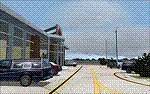
Woodward Field Airport is a county-owned public-use general aviation airport. It is sometimes called Kershaw County Airport, and many people also know it as the Camden Airport. It is located approx. 6.9 miles northeast of the historical city of Camden, South Carolina and currently does not serve scheduled airline flights. It is host to several vintage aircraft events and fly-in's annually. Scenery was designed with ADE9X v1.47 and Google Maps.(for placement references) Requires EZ-Scenery and RWY12 library collections for proper display of scenery objects. ez_1.zip and rwy12_1.zip
| Filename: | Woodward_Field_Airport_KCDN.zip |
| License: | Freeware |
| Added: | 20th November 2011, 00:02:58 |
| Downloads: | 483 |
| Author: | Glenn Mullis |
| Size: | 3.22 MB |
| Category: Flight Simulator 2004 - Gauges | |
| sRadar80 Navigational Radar |
|
File Description:
FS2004 Gauge: sRadar80, navigational radar- This nose-mounted, forward-scanning radar will display simulated echoes from ground-based targets that will assist navigation. Screen blips represent FS objects located within the simulator world. With six ranges available (2nm-80nm), cross-country radar navigation and low visibility approaches are possible (see pictures). Scan sensitivity (GAIN) allows adjustments to minimize screen clutter. On-screen wiper scan, push-to-display nm scale, plus many other features. For panel and window installations with included icon gauge. Also, tutorial illustrating a radar approach using the features of sRadar80. By Glenn Copeland
| Filename: | sRadar80_Navigational_Radar.zip |
| License: | Freeware |
| Added: | 29th April 2006, 04:54:56 |
| Downloads: | 6,269 |
| Author: | Glenn Copeland |
| Size: | 230.11 KB |
| Category: Flight Simulator 2004 - Gauges | |
| AI Radar, Traffic Collision Avoidance System |
|
File Description:
FS2004 Gauge: AI Radar, Traffic Collision Avoidance System (TCAS). This gauge has five ranges from 1 NM to 30 NM. It displays all moving aircraft in green within the selected range. A switch will allow static aircraft to also be displayed in white when desired. Traffic Advisory (TA) aircraft are displayed in yellow, Resolution Advisory (RA) aircraft are shown in red. AI aircraft have their relative altitudes pinned to each aircraft symbol. Bearing to an aircraft can be obtained using the optional 360-degree sweep cursor. For panel or separate window installation. With Radar Icon gauge. By Glenn Copeland
| Filename: | AI_Radar_Traffic_Collision_Avoidance_System.zip |
| License: | Freeware |
| Added: | 8th July 2006, 01:56:49 |
| Downloads: | 19,512 |
| Author: | Glenn Copeland |
| Size: | 244.57 KB |
| Category: Flight Simulator 2004 - Gauges | |
| Pattern Gauge |
|
File Description:
FS2004 Pattern Gauge. This gauge calculates the heading for all five pattern legs around an airport for both left and right turns. After the pilot enters the two-digit runway data, heading information will be displayed for any desired leg by pressing an appropriate button. This gauge was the example used to illustrated a tutorial which shows how to make graphics for gauges. Part 1 of that file TutGG_P1.zip is available as a separate D/L. By Glenn Copeland.
| Filename: | Pattern_Gauge.zip |
| License: | Freeware |
| Added: | 14th September 2005, 14:34:48 |
| Downloads: | 2,877 |
| Author: | Glenn Copeland |
| Size: | 36.7 KB |
| Category: Flight Simulator 2004 - Aircraft Repaints, Textures and Modifications | |
| Altitude VA Airbus A320-200 |
|
File Description:
Altitude's first A320. It will be used on Medium haul routes. We are a new VA based out of London's Heathrow Airport
| Filename: | Altitude_VA_Airbus_A320200.zip |
| License: | Freeware |
| Added: | 21st May 2005, 17:33:38 |
| Downloads: | 85 |
| Author: | Duncan Patterson, Harry Manners |
| Size: | 4.97 MB |
| Category: Flight Simulator 2004 - Scenery | |
| Chistochina, Alaska CZO |
|
File Description:
Chistochina is a small airport off of the Glenn Highway just northeast from Gulkana. This scenery was built using the default strip, so all of your flightplanning goodies will still work. There is a freight office, a repair hangar, a bar and grill / pool hall, a small trading post, a doctor's office and an ammo shop. Truckers also use these facilities, so the little airport is well known. Please enjoy!
| Filename: | Chistochina_Alaska_CZO.zip |
| License: | Freeware, limited distribution |
| Added: | 2nd February 2004, 14:47:08 |
| Downloads: | 3,370 |
| Author: | Don Moser |
| Size: | 2.06 MB |
| Category: Flight Simulator 2004 - AI Flight Plans | |
| Export Hawks Part2: Canadian Hawks Complete AI Package |
|
File Description:
Military AI Works is proud to present the second part in a multi-part series covering current users of the various models of the venerable BAe Hawk, Canadian Hawks. This package depicts the BAe Hawk aircraft that currently fly with the Canadian Air Force. Credits: Model by Nick Black, Repaints by Nick Black, FDE by Mike MacIntyre, Flightplans by Steve Hadlow and Duncan Mackellar, AFCADs by Nick Black and Cornelius Black, Custom Scenery by John Stinstrom and Callsigns by Nick Black
| Filename: | Export_Hawks_Part2_Canadian_Hawks_Complete_AI_Pack.zip |
| License: | Freeware, limited distribution |
| Added: | 2nd June 2008, 03:10:59 |
| Downloads: | 3,466 |
| Author: | Nick Black, Military AI Works (MAIW) |
| Size: | 8.64 MB |


© 2001-2026 AVSIM Online
All Rights Reserved
Privacy Policy |